-
Extreme Closeup: Makeup for Genesis 3 Female(s) (Commercial - it's here!)
sorry for late reply been working on a lot of projects none needed adjusting till now one of my characters that I created a new face for with headshop unlike others was playing up with the makeup tried the uv map but face got messed up then tried as you suggested the lie loaded up g3 makeup first outside daz all good then in daz loaded up g2 extreme which was out of wack opened up lie and dragged it into position worked thank you so much your awsome and as a bonus I've learned more about lie thanks to you, question have you thought of doing a makeup not just face but body like tiger stripes? Also more fantasy makeups like in style of some heavy metal/rock bands like Kiss, Alice Cooper style makeup there's others but probably wouldn't know who talking about
create 3 d model of a head from picture.Too hard to redistribute for others but try headshop, I only have faceshop 6 EZ so I am no help anyway, I use genX on V4 etc heads with that, and the genesis 1 facegen exporter. For my own use OK but cannot share.
HeadShop 9.2 Macintosh Submitted to DAZ, Replaces FaceShop 8 Mac (Commercial)how soon will I be able to purchase the mac version of headshop. I recieved a Daz giftcard for christmas and I wanted to use it for that. Thanks
It was indicated to me that the release is imminent. Maybe between Xmas and New Year?
HeadShop 9.2 Macintosh Submitted to DAZ, Replaces FaceShop 8 Mac (Commercial)how soon will I be able to purchase the mac version of headshop. I recieved a Daz giftcard for christmas and I wanted to use it for that. Thanks
headshop 9 work w/daz studio 8 prosimple question if some one can answer for me ^^ doe s headshop 9 work with daz studio 8 pro? Like another tool pane?HeadShop 9 - Now 40% off at DAZ (Commercial)Complete face+hair solution from a single photo
Anyone here ever use HeadShop 9?I bought it on sale, so at least I didn't pay that much. But I have an author who wants an avatar that looks like him, so I thought, in theory, it would be less hassle than messing with the dials forever and a day. And since the figure will be clothed, not matching the rest really isn't an issue.
But it's probably a mute point now, evidently, since I don't have Daz installed with default settings because my content folder is not under the Daz folder, but in a more convenient spot since I install a lot of content not using the install manager (and my install manager installs content to the easy access folder, too), it doesn't want to work right for me. I guess it's only 'easy to use' if Daz is installed with no changes.
I don't suppose anyone has an actual easy way to put my clients face on a daz figure, do they?
Yes the Headshop plugin was rather fussy about where items were installed and it took me awhile to figure it out and get it working. Still end up doing most of the "matching" work in either a paint program and/or image editor.
I'll hazard a guess that you could probably dial something pretty close for facial features with one of the characters you have [because I know you've been using D/S for quite awhile] and AFAIK Blacksmith3D or whatever they call it now has a free trial over at the other site. Need to use a nice large sized [lots of pixels] image and paint it to a large "paper" on the figure. Then fix it up some to match in with whichever skin being used for the rest of the body.
Anyone here ever use HeadShop 9?You might find it interesting to read through some of the comments in this thread:
Anyone here ever use HeadShop 9?I need to make a 3D representation of one of my authors for his brand/logo, and messing with the dials is taking way too long. Has anyone here ever use HeadShop 9 to create models that resemble photos? Is it difficult to use?
Renders that Look like Photos? Forget it!what I always wanted to do was create pinup and fantasy pinup photography art combining creatures I sculpted with models posed wearing costumes/outfits in fantasy and scifi scenes as well as the normal pinup stuff and did and still do photo manipulations but this with daz is so much easier, quicker and cheaper then hiring paying someone to model for me, buying props, costumes making sculpting creatures not to mention locations and with daz I can pretty much get things set up how I want too saves a lot of headaches plus I can either use from a wide range of premade characters or alter them to create unique looking people/characters using various morphs and products like skin builder even make them look like actual people might know or take it even further and actually add a real person and cgi them via headshop and there's other programs too can do this recreated a few friends and family and modeled them into scenes that just can't do normally via photography or very hard to do which they and others have loved and in a way is bringing fantasies to life in a way having a fantasy/pinup image done of them
A couple of issuesHi there. :)
I have collected some things I had problems with or still have, that I'd like to share:
1. Fitting of Ryan/Rayn clothes/hair to Skyler (pants, shirt, hair)
Fittin the pants to Skyler produces artifacts on the backside (pockets, belt) due to the hidden Skyler body morph that is being applied. The pants is also too loose at the belly.
The bob-cut also does not fit well, due to the hidden skyler body morph.
When you fit the shirt, skyler suddenly has boobs.
You can fix it all by removing the skyler morph on the items and applying the ryan morph. Actually there is no need for a Skyler morph, as, below the shoulders, both meshes seem to be absolutely identical.2. Ryan pants mesh corruption when fitted
In general, the backside of the mesh gets corrupted when fitted to anyone.3. Broken paths in "Clover !Full" Material preset, Product "Clover for Genesis 2 Female(s)"
There are several paths within the file referencing LRCLTorsoBS and LRCLMouthBS, which I consider broken, because of incomplete/wrong paths.
If you don't install the content to the default location, using this material preset will fail partially, because it can't find the textures.
Please note that I have not tested the other materials yet, It is possible that some or all of them have the same error.4. Problem with Teen Josie pupil texture-repeat if eye scaled.
Load any G3 or Josie herself, apply Teen Josie FHM, scale down eye size. A black ring appears on the outside of the pupil.
See sample head render attached (ignore the white iris pls).5. Corrupted DAZ scene file due to Reality 4.0 hickups
I've managed to corrupt quite some scene files I've spent really a lot of time on, because I triggered something that made Reality go crazy.
That'd be no problem, if Reality would not put stuff into the DAZ scene file, corrupting it in these cases. (JSON parse error in log, no usable other details in the log)
Is there any way to recover such scene files?
6. Lyoness Jolie Iray preset loads at Render SubD 5, resulting in huge memory consumption (~22GB)
At some time in the past, Jolie went crazy and crashed my renders due out of memory (had 16 GB back then). I think it started when the package got updated at some time.
I figured out today that it is the default Render SubD of 5 causing this huge memory consumption. Loading only the figure and hitting render, it consumed ~22GB of memory, then it dropped slowly until I aborted it.
7. HeadShop does not work, if content not installed to default location
I have this with the standalone version I've bought before it hit the store here, but I'm pretty sure the store version also has this problem.
When the contents are not installed to the default location, HeadShop can not locate the model data, so you can not use it. I tried a lot, but I could not get a single head back into DAZ.
Best
mork
HeadShop 9.2 Macintosh Submitted to DAZ, Replaces FaceShop 8 Mac (Commercial)HeadSHop 9 Mac replaces FaceShop 8 Macintosh. Upgrades from FaceShop 8 will be available in a few weeks.
HeadShop 9.2 Macintosh Submitted to DAZ, Replaces FaceShop 8 Mac (Commercial)We submitted the Macintosh version of the popular head morphing and texturing software HeadShop 9 to DAZ store.
HeadShop 9.2 Macintosh works as a DAZ Studio plugin, allows users to convert a single photo into a 3D head that will transfer to a DAZ Studio or Poser figure.
You can preview "how-to" videos of the product at:
https://www.youtube.com/watch?v=JC5z64YP1xA
https://www.youtube.com/watch?v=c7YbRsm8m9I
https://www.youtube.com/watch?v=Olc7oeQUmWk
BreastsFor those who are interested http://www.daz3d.com/forums/discussion/63451/glute-and-breast-control-genesis-3-female-commercial#latest
well they don't mention which base female they are using but yeah if it's genesis 3 you'll want zevo's breast control 3 when released it'll be a must buy as is shapeshift 3 and if it's genesis 2 well he has that covered too and you can add some of the others others have done too for more diversity but you'll want zevo's products for sure thanks to zevo/draagonstorm I have created a lot of unique and realistic female characters of various shapes and sizes and skintones + I've gotten hang of headshop (that's by someone else) I still buy a lot of premade stuff because I like it but I can and have the options to make a lot of origional unique ones too variety is the spice of life. There are a few premades that aren't fully endowed yes but you gottta search or adjust them and most are a stanard shape too sadly whereas as in real life there are so many different shapes of breasts as well as sizes and being able to give my ladies different shaped breasts is very important to me
FaceShop is now called HeadShop - Shipping at DAZ (Commercial)I bought Headshop 9 in the full throttle sale, only now realising the output textures are such low resolution :( it's not mentioned anywhere in the documentation. I assumed they'd be the size of the base texture.
Is there any way to increase the output resolution?
I need to make him blink and talkits made from genesis male 2 + headshop + some body and face morpth
here is my scene file in daz https://yadi.sk/d/JaIdm58kjTY4v
and this one is fbx exported from daz
Link removed
I need to make him blink and talkfriends, i really need your help with this (sorry if that guestion seems stupid to you)
i have made a character using headshop plugin
now i need to make it talk and blink (and like ideal move it to iclone to create an avi video with mask)
i have tried to make it in different ways but no luck
when i pass it to iclone (using 3dxchange) its moving with a whole body but not eyes and lips
tried to make lipsync in daz, but it still dont move (moving just head)
log file sais
Mimic warning: 'OpenLips' speech channel not found on 'head:2'
Mimic warning: 'Mouth F' speech channel not found on 'head:2'
Mimic warning: 'Tongue T' speech channel not found on 'head:2'
Mimic warning: 'Mouth O' speech channel not found on 'head:2'
Mimic warning: 'Tongue L' speech channel not found on 'head:2'
Mimic warning: 'Mouth CH' speech channel not found on 'head:2'
Mimic warning: 'Smile' speech channel not found on 'head:2'
Mimic warning: 'Open Smile' speech channel not found on 'head:2'
Mimic warning: 'Mouth M' speech channel not found on 'head:2'
Mimic warning: 'LBrowUp' gesture channel not found on 'head:2'
Mimic warning: 'RBrowUp' gesture channel not found on 'head:2'
Mimic warning: 'Blink Left' gesture channel not found on 'head:2'
Mimic warning: 'Blink Right' gesture channel not found on 'head:2'
Mimic warning: 'yrot' gesture channel not found on 'leftEye:2'
Mimic warning: 'yrot' gesture channel not found on 'rightEye:2'
Mimic warning: 'xrot' gesture channel not found on 'leftEye:2'
Mimic warning: 'xrot' gesture channel not found on 'rightEye:2'
Mimic warning: 'CTRLLipsPart' speech channel not found on 'head:1'
Mimic warning: 'CTRLMouthOpen' speech channel not found on 'head:1'
Mimic warning: 'CTRLBrowUpL' gesture channel not found on 'head:1'
Mimic warning: 'CTRLBrowUpR' gesture channel not found on 'head:1'
Mimic warning: 'CTRLEyesClosedL' gesture channel not found on 'head:1'
Mimic warning: 'CTRLEyesClosedR' gesture channel not found on 'head:1'
but i dont get how to improve it (actually i feel mysef a whole dumb but i dont get it at all)Using just the headHello,
I'm a bit new to daz and have been trying to figure it out for a month or so. I'm working on a project where I need to be able to personalize and 3D print a head. I have headshop hooked up, and know how to us it and put the face onto the daz figure. However I don't need the whole figure, just the head. I've tried exporting it to sculptris or meshlab to cut-off and delete the figure-parts that I don't need with no luck. Sculptris has no cutting tool that I'm aware of, and meshlab makes the edges jagged when I cut it off. If I buy just a plain genesis head morph on daz does it have to be attached to a figure?
Many thanks for any advice!
Who is Mindvision G.D.S.'s Promo girl for "Kicker"?from the looks of it she is basicly MindVision G.D.S.'s main promo girl http://www.daz3d.com/mindvision-g-d-s#index=44 for a lot of their products both v4 up to genesis 2 doesn't look like they've done a G3 version of her yet they may have created her face using something like faceshop/headshop just for their promos as they don't sell characters only clothing, hair, eyes and poses I've admired her and the other versions of her too as well as the blonde in their actual eyes 4 product
Extreme Closeup: Makeup for Genesis 3 Female(s) (Commercial - it's here!)works well on faces created in headshop too
took me a bit but found this tutorial
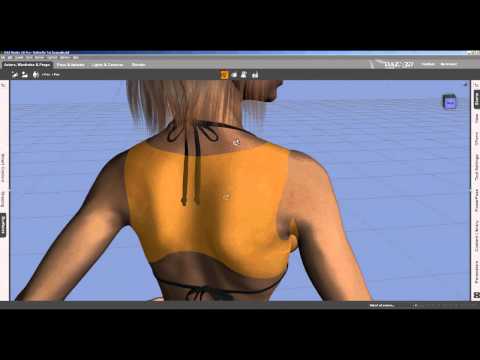 it covers adding a tattoo using lie but princibles the same couldn't find where dim installed your product so just created a folder elsewhere to try this out and it worked just had to select face and base colour to bring up the head and love how easy it is just selecting your texture for lips or whatever and daz puts it in right place thought I'd have to line it up or something so I'm liking these new makeup options
You have to make sure that the UVs are identical in size or they wont just simply line up.
The pack should be installed in 'materials/genesis 3 female' in your product library.
You just click the option you want from the menu and it will apply it to the character.
aaaaah found it it's under the submenu femenine thanks makes it so much easier was looking in iray submenu and its submenu for feminine and other sections
Glad you found it. If you have any other queries, please feel free to PM either of us here on the forum.
thank you
Daz 3D is part of

Connect
DAZ Productions, Inc.
7533 S Center View Ct #4664
West Jordan, UT 84084Licensing Agreement | Terms of Service | Privacy Policy | EULA
© 2026 Daz Productions Inc. All Rights Reserved.