-
Genesis 8: Some Stats and our Thanks
Back on topic. Unfortunately, timing/finances rules out V8 for the present. I have bought the face and body morps (in my worthless opinion, absolutely necessary), along with some poses and expressions. And hair. I do like what I see. I will be getting Victoria eventually. The intro discount will run out soon. It will be more expensive when I do. Regrettable. I coulda had a V8.
It usually pays to wait longer if you're not picking something up straightaway...
Genesis 8: Some Stats and our ThanksBack on topic. Unfortunately, timing/finances rules out V8 for the present. I have bought the face and body morps (in my worthless opinion, absolutely necessary), along with some poses and expressions. And hair. I do like what I see. I will be getting Victoria eventually. The intro discount will run out soon. It will be more expensive when I do. Regrettable. I coulda had a V8.
Genesis 8: Some Stats and our ThanksP3Design would probably appreciate the comment. https://www.daz3d.com/p3d-duffy-hd-for-victoria-8
Quick 2 min render with Duffy for V8....Daz thanks again for this fantastic figure!
Absolutely, I'm a huge fan of P3Design design! Nice job on the Duffy textures.
"Brace yourself, my dear wallet! There's always another Sale - and Glitches!"All the sales look interesting... But, most of the discounts on older items aren't as good as they have been in recent months. And, I have all earlier Incarnations of Victoria and most of the bundle items...only a couple that I still want.
I like the new curly hair...but, it isn't exactly what I was after....
I guess I'll wait and see if anything more exciting comes along.
Sent you a PM...
Didn't get the pm... should it be in my inbox? Nm got it...
Victoria 8 Launch This month?Well, even if I were wrong about David3, my main point is that starting David out as David3 because he belongs in the Third Generation along with Michael 3, is not the same kind of reasoning as naming the next generation of genesis genesis 8 because some of the figures will be named Victoria8 and Michael8. In the first case, the figure (David) has been named to indicate the generation in which he belongs. In the second case, iterations of genesis have been skipped. For what reason: to make the genesis number correspond with the Victoria and Michael numbers? My argument is that this only makes sense if the new iteration of genesis is so much better than its predecessor that calling it genesis 4, or 5, or 6, or 7, just can't be justified. It has to be called genesis8. And I'm stating that the comments, so far, do not reflect this reasoning. I, however, have not yet tried the new genesis8 figures, so I'm not offering an opinion of them.
I did read an argument to the effect that DAZ users would be confused if the new iteration were named genesis4 because there was a generation 4. That seems to argue that DAZ users can't differentiate between the terms generation and genesis. Such a level of vocabulary usage might be expected among fifth or sixth grade students. No, actually, I think DAZ users can make the appropritate distinctions. I'm often impressed by the brillance of the comments DAZ users make.
So, I'm confused as to why the naming of the genesis iterations went from genesis3 to genesis8. I'm still trying to find a comment that offers what I see as a reasonable explanation.
Actually, I think the original David and Hiro were just referred to as David and Hiro, without the number 3 appended. M3, V3, SP3, and A3 all had predecessors (and if you look in the texture folders some textures for AIko 3 were in folders named Aiko 2, as there was only one predecessor). David and Hiro (and the Freak) got the 3's appended when there were later versions.
Genesis 8: Some Stats and our ThanksP3Design would probably appreciate the comment. https://www.daz3d.com/p3d-duffy-hd-for-victoria-8
Quick 2 min render with Duffy for V8....Daz thanks again for this fantastic figure!
I like World Travels Wagon... but it needed a few improvements.Well It is Monday and it is Time for an update. (I had planned on posting this last night)
After last weeks fiddling (born of frustration of not making progress on the undercarriage) I had a Eureka Moment, The answer to my problem was staring me in the face.
The issue: The Mesh Error

You can see the upper mesh error on the upper two beam ends. The lower two are my rework of the mesh. I am not sure why there is a Concave look to the beam end, as all the points are on the same plane, as you can see by the side view in the lower right side.
Repairing this took an hour and a bit, as I fixed one end cap and attached it to both ends of a single beam. (I did capture my repair of the end cap, which I will put in any Tutorial. Well Part of it, you don't want to sit through an hour of my fiddling with this vert and that vert.) Getting the UV Map to behave, took some time. Once I had it for one, copied and Resized it for all the beams. I was also remapping these to the original images and here there was another issue. There is a shadow where the axle mounts and the beams intersect. Getting them to line up was even more adjusting them so they landed in the right spot. So now I have Seven beams, all with UV Maps.

The issue: Combining objects with completed UV's into a Single Object.
The Mesh Error was resolved and I had gotten the UV's to behave; Now all I needed to do was weld them together... and I drop into the Seventh Level of UV H-E -Double Hockey Sticks!. Where there was once beauty, ugliness took control.

If I didn't feel compelled to correct the Mesh Error, I could have finished this already. But since I found it... I couldn't in good faith leave it alone. There were several times, I just though about throwing in the towel on this one, but I wasn't ready to give up. Someone had to have this issue. I knew the answer would come, I just had to bide my time until it bonked me over the head. I am doing this using DAZ Studio and Hexagon.
Note: Has Anyone tried this, does Blender, Lightwave, or the rest have a way to do this? I would like to know how other software handle this, so I want to hear how other Software handles this.
The Solution:
I have Found my solution and I really want an updated Hexagon, but let me add; the Solution is both simple and was staring me in the face.
I was preparing to record the Intro to the Tutorial today. I was going through the Process and I realized I'd already done this! The original door does not have a handle on the inside. I sliced off the handle on the outside and put it on the inside. There was my Eureka moment and I now knew how to take seven beams, one Axle and a few other things to make the New Undercarriage, while maintaining all their UV's. I run them through DAZ Studio and back to Hexagon and Believe it was painless and I laughed at myself for a good fifteen minutes.
So here it is:
Make sure the each item has a valid UV Map. (Once you do this, you can't do any editing to the UV Maps, though you can make minor adjustments.)
Get all the parts you want welded together in Hexagon, then save it, with some sort of tag, that will let you know what it is.
Do a New and Load that File back in. Makes sure there are no extra materials or extra pieces. Clear them out of if their are. OH and make sure that Everything has A Material Assigned to it. Very important.
Once everything is ready, export your parts to an OBJ, with the Settings below:

Note: Hexagon is 10cm/unit. If you export it at 1cm, you will get a very Tiny undercarriage. Like this one, which might be cool for a Child's Toy, but not for a full size Michael and Victoria.


Then you import it into DAZ Studio, using these settings:

This will import the various pieces and make a single Object out of them. If you have pulled them into the "Figure Setup" tab I would have read the OBJ file and separated out the parts as bones. Now you are thinking what if I just import the OBJ into Hexagon? Ah, Hexagon, like Figure Setup, will break out the various parts and pieces. And I am guessing Blender would do the same.

Once it is imported, all fo the parts will be made into one asset, not a group of assets. Then you apply your texture.

We have a welded all the parts together, and proven that they maintained their UV's, by them accepting the old Materials and nothing looks out of place. Now I can send it back through the Hexagon Bridge, so I can add the parts that have to twist and articulate, in a figure.

So Now I'm Ready for my next post.
Victoria 8 Launch This month?Well, even if I were wrong about David3, my main point is that starting David out as David3 because he belongs in the Third Generation along with Michael 3, is not the same kind of reasoning as naming the next generation of genesis genesis 8 because some of the figures will be named Victoria8 and Michael8. In the first case, the figure (David) has been named to indicate the generation in which he belongs. In the second case, iterations of genesis have been skipped. For what reason: to make the genesis number correspond with the Victoria and Michael numbers? My argument is that this only makes sense if the new iteration of genesis is so much better than its predecessor that calling it genesis 4, or 5, or 6, or 7, just can't be justified. It has to be called genesis8. And I'm stating that the comments, so far, do not reflect this reasoning. I, however, have not yet tried the new genesis8 figures, so I'm not offering an opinion of them.
I did read an argument to the effect that DAZ users would be confused if the new iteration were named genesis4 because there was a generation 4. That seems to argue that DAZ users can't differentiate between the terms generation and genesis. Such a level of vocabulary usage might be expected among fifth or sixth grade students. No, actually, I think DAZ users can make the appropritate distinctions. I'm often impressed by the brillance of the comments DAZ users make.
So, I'm confused as to why the naming of the genesis iterations went from genesis3 to genesis8. I'm still trying to find a comment that offers what I see as a reasonable explanation.
"Brace yourself, my dear wallet! There's always another Sale - and Glitches!"All the sales look interesting... But, most of the discounts on older items aren't as good as they have been in recent months. And, I have all earlier Incarnations of Victoria and most of the bundle items...only a couple that I still want.
I like the new curly hair...but, it isn't exactly what I was after....
I guess I'll wait and see if anything more exciting comes along.
Sent you a PM...
Knittingmommy's LaboratoryI've been busy but I did have a chance to play with the new Victoria 8. I really like her. Here is my first render using her with Voss Hair and Lingerie Robe Set. I didn't do any messing around with the settings so this is a straight up render with just a little bit of post in Gimp. I love her hand and feet and how detailed the neck area is. I think whoever modeled her did a stellar job. I played around with the new template for the expressions in Power Pose and I have to say that I like how it works. It did a great job and this is the best expression I've ever managed to get on my own. The rigging on her face is fantastic.
Vicky 8

Nice work,Knittingmommy!
Non-photorealistic Renders (NPR)Victoria 8...

With a paper texture and perhaps a little weathering around the edges, this would look as though it were taken directly from a 1970s illustration in a magazine. What a convincing NPR!!!
Agreed
Non-photorealistic Renders (NPR)Victoria 8...
With a paper texture and perhaps a little weathering around the edges, this would look as though it were taken directly from a 1970s illustration in a magazine. What a convincing NPR!!!
Genesis and Victoria 8 Improvements?http://www.digisprawl.com/blog/review/review-daz-3ds-victoria-8/
https://www.daz3d.com/forums/discussion/177681/digisprawl-s-victoria-8-review#latest
Victoria 8 WOWHello,I'm a long time Daz user,I think I started around V3 and just wanted to give the people at Daz a big thumbs up!!!!!!.The level of realism they have achieved with Victoria 8 just blows my mind-wow-especially in the facial area and skin lumance.Daz genius combined with HD tech has brought this to near 'Virtual Reality'-Love it:)
Genesis and Victoria 8 Improvements?I am currently weighing if the switch from the Gen3 series to the Gen8 is worth it. The models themselves seem to be the same. So I guess my question is what features does Gen8 add that makes it worthwhile?
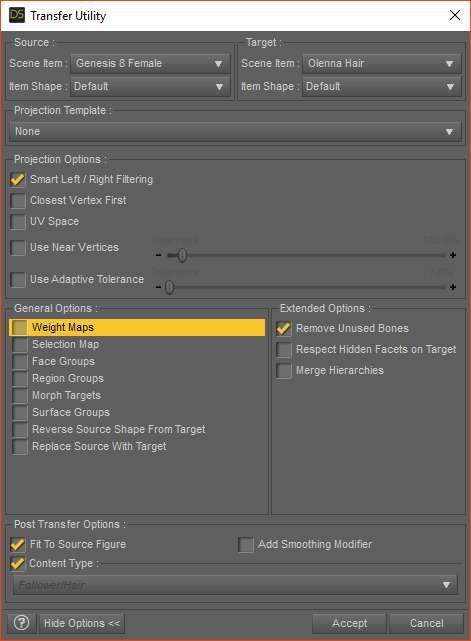
G3 Hair Misfits on G8 whose height is changed.Hi Blantyr, try this...
- Load G8
- Deselect G8
- Load Olenna Hair
- Edit > Figure > Transfer Utility
- do the settings below and click accept. (Basically set G8 as source, hair as target, and uncheck everything!)
Olenna hair should end up fitted to g8 and can turn her head and work with Victoria 8 height :)
Thanks to PA Kayleyss for this tip!
 Victoria 8 problem
I know I sound like an IDIOT, but How can I tell which version of DAZ my machine is running? It boots up as "Daz 4.9 Pro". I seriously thought that I had upgraded to 4.9.4.117...
I have searched the Daz Site up and down and can not seem to find a link to Upgrade Daz Studio to 4.9.4.117. I purchased Victoria 8 and she appears as so many blocks like others in this thread. I have uninstalled and reinstalled Genesis 8 Essentials as suggested above to no avail
 . I now think my problem is that I am still using Daz Studio 4.9. Can someone please provide a link to the updated/upgraded Daz Studio?? Pleasenew Mega Wardrobe set is superb
From what I am seeing, Rebekah and Elizabeth have this issue, Victoria 8 and Honey do not (or it's small enough to not be able to see it). But I am seeing the same thing (possibly worse?) wih the basic wear tank top. I think it may be an issue with auto-fit on these two figure morphs more so than the shirt itself.
*Update, smoothing iterations set to 6 helped quite a bit, though you still get a bit of a shadow where the crease was before. May not help enough for close ups, at some point smoothing seems like diminishing returns.
Morphs from G3 to G8I bought both the Geograft Legacy UVs products and the Smith3D Texture Transformer and personally I feel the better solution is the Texture Transformer. It is much less aggravation and steps once you save the transformed textures and make material presets.
In fact I like it so much I have been waiting for these 2 products to go on massive sales:
Non-photorealistic Renders (NPR)Victoria 8...
Great retro 70's vibe!

Daz 3D is part of

Connect
DAZ Productions, Inc.
7533 S Center View Ct #4664
West Jordan, UT 84084Licensing Agreement | Terms of Service | Privacy Policy | EULA
© 2026 Daz Productions Inc. All Rights Reserved.