-
Getting on the 9 train, or not
Daywalker Designs said:
SolitarySandpiper said:
PerttiA said:
marble said:
SolitarySandpiper said:
Does clothing no longer conform to the shape of a nipple now that they are a HD morph and not part of the base?
Did clothing ever conform to nipples? I almost always make a morph for that.
On G8 it does
it does really well on G8 but i'm wondering about G9... i'm doing some testing and of the 5 items i've bought non will conform to a hd nipple... but the free bra that comes with the starter essentials does.
Check the smoothing parameters on thses clothing items; you should be able to get them to conform.
a lot of the stuff doesn't come with smoothing modifiers and only has base resolution... the couple of items that do have both hd resolution and smoothing modifiers seem to have no idea that there's a nipple to conform to regardless of any settings i try.
Also i've noticed that there are breast morphs that don't conform either such as 'breasts fullness lower'
in fact its easy to see in real time which items are compatable with whichever morph and with all of the purchases i've made so far non are compatable with Hd nipple morphs.
Dartanbeck's Journey - CG Filmmaking Just a friendly reminder,
Dimension3D's Genesis Generation X2 is one amazing friend to have!
I'm still using some of the amazing morphs I've bought for Victoria 4, now on my Genesis 3 figures, and they come across to the target figure so perfectly... I just love it!
I had originally bought it to add Genesis 2 and 3 shapes to Genesis, along with my V4 morphs, and that is crazy-awesome as well! It's such a powerful thing, and it works on the fly - any time we want a new morph dial!
Since Dimension3D has entered the next part of the journey away from this plane, I happened upon Riversoft Art's Character Convertors to and from Genesis 8 and so forth and, while they work quite differently, those things Rock too! So with a bit of patience and forethought, we can run our shapes from Generation 3 (Aiko 3, etc.,) through Genesis 8 (Genesis 9 coming too, I'm sure) and back again - which is really cool!
EDIT: ...and I want to try the Discobob/Zev0's XTransfer character convertors too. I really like having tools that help me to make the most out of my entire product library of character products. I liked them when I bought them, and they look really cool with these more modern figures with their Iray surfaces and so on. Really having a lot of fun here!
The version of Rosie in the two images I posted earlier uses V4, S4. Genesis, G2F and G8F shapes on a Genesis 3 Female version of the amazing Sol for G8F/G3F
Blender Noobie having issues with morphs (shape keys). Please help?Ryuu@AMcCF said:
However, when I went to test it in Object mode @ 1.0 value, the morphs were all well short of their target values. Furthermore, just simply increasing the value of the morphs aren't achieving the desireed result as the target zones are severely distorted when going >1.0.
The only reason I can think of for this kind of behavior is if you have concurrent morphs, but it means you're using multiple morphs together. If you dial-in a single morph there's no way that it can be different from what you edited, apart scaling the object that will maintain the proportions. If you dial-in multiple morphs then it will be the sum of them for the vertices they have in common. Unless you defined vertex groups with different weights.
Anyway it is really hard in my opinion to catch the issue if you can't provide a test scene.
Getting on the 9 train, or notSolitarySandpiper said:
PerttiA said:
marble said:
SolitarySandpiper said:
Does clothing no longer conform to the shape of a nipple now that they are a HD morph and not part of the base?
Did clothing ever conform to nipples? I almost always make a morph for that.
On G8 it does
it does really well on G8 but i'm wondering about G9... i'm doing some testing and of the 5 items i've bought non will conform to a hd nipple... but the free bra that comes with the starter essentials does.
Check the smoothing parameters on thses clothing items; you should be able to get them to conform.
Getting on the 9 train, or notmarble said:
PerttiA said:
marble said:
SolitarySandpiper said:
Does clothing no longer conform to the shape of a nipple now that they are a HD morph and not part of the base?
Did clothing ever conform to nipples? I almost always make a morph for that.
On G8 it does
Yeah, I had to remind myself that I use the Meipe Headlights product for realism so that's probably why I need to make the morph in the clothing.
'Joys' of having to use geografts...
Getting on the 9 train, or notPerttiA said:
marble said:
SolitarySandpiper said:
Does clothing no longer conform to the shape of a nipple now that they are a HD morph and not part of the base?
Did clothing ever conform to nipples? I almost always make a morph for that.
On G8 it does
it does really well on G8 but i'm wondering about G9... i'm doing some testing and of the 5 items i've bought non will conform to a hd nipple... but the free bra that comes with the starter essentials does.
Getting on the 9 train, or notPerttiA said:
marble said:
SolitarySandpiper said:
Does clothing no longer conform to the shape of a nipple now that they are a HD morph and not part of the base?
Did clothing ever conform to nipples? I almost always make a morph for that.
On G8 it does
Yeah, I had to remind myself that I use the Meipe Headlights product for realism so that's probably why I need to make the morph in the clothing.
Getting on the 9 train, or notmarble said:
SolitarySandpiper said:
Does clothing no longer conform to the shape of a nipple now that they are a HD morph and not part of the base?
Did clothing ever conform to nipples? I almost always make a morph for that.
On G8 it does
Getting on the 9 train, or notOso3D said:
Also depends on the ethnic mix where you are.
Now that it's finally out, I wanted to show my corgi mouth... no HD. The entire corgi? No HD. (Toward the 'you have to have HD to do anything')
Here's a basic morph for the mouth:
People mistake the fine details you can get from HD for things you absolutely need to have. That's why I'm annoyed by the mandatory inclusion of the character-specific HD in the downloads for the DAZ Originals.
Getting on the 9 train, or notSolitarySandpiper said:
Does clothing no longer conform to the shape of a nipple now that they are a HD morph and not part of the base?
Did clothing ever conform to nipples? I almost always make a morph for that.
Getting on the 9 train, or notDoes clothing no longer conform to the shape of a nipple now that they are a HD morph and not part of the base?
New Release: Bringing Daz figures To Life in UE5It does seem like rigid followers are a bit of a problem for some of the other programs. Would it be preferable if the nodes were part of the conformer instead?
A quick workaround could be to export all the geometry attached to nodes as a single obj (base resolution) so that its all in one obj. Then use the transfer utility with for example the shirt as the donor so that it conforms to the shirt and follow all the morphs in the shirt and save that as an item. Downside is you'll have some morphs distorting the buttons again with that method.
New Release: Bringing Daz figures To Life in UE5@Ellessarr - As I say, geoshells are not currently supported by DTL. The Maya script optionally deletes them or leaves them in place as 'static' meshes (i.e. they follow the bone they are attached to, but are not affected by any morphs). I've had a look at merging them into the single mesh when imported into Maya but have not had any success yet. Merging geoshells (and embedded meshes) looks like it will require quite a lot of vertex-level manipulation of the skinclusters that would delay the release of DTL.
So I'm putting merging of geoshells onto the feature list for a version 2 of DTL, along with G9 support, embedded mesh merging and morph-driven bone length changes.
The first release of DTL is in a working form at the moment but needs improvements to the UX. I'm currently creating options dialogs and generally making the system as easy to use as possible. I'm planning to get it released before the end of the year.
Getting on the 9 train, or notI got on the train but only bought the Genesis 9 morph package. I still haven't bought Victoria 9.
Getting on the 9 train, or notdaveso said:
MelissaGT said:
Masterstroke said:
MelissaGT said:
Thank you, guys! I will be sure to post him when I finish the final tweaks and put some clothes on him. He's a little young for my tastes, but we don't really have much way of making our "weathered warriors" yet, haha. Vicky 9's skin is really the only base skin that is decent for a pale guy right now. I tried the one from Michael 8.1 but good lord whoever though it was a good idea to have a painted scalp/hairline on that texture needs to be banished to the corner...
Might be just an Illusion, but he looks familiar.
I started out using the randomizer with the G9 morph pack and then tweaked manually. Haven't transferred over any morphs from older generations.
there's a randomizer with G9?
This works just fine on G9 morphs - https://www.daz3d.com/simtenero-randomizer2
There is a newer one out there by Zev0 (I think?) that only work swith G8. I bought that one in the past and could never get the hang of it. The SimTenero one though, I had that up and running fast and it did exactly what I wanted it to do.
Getting on the 9 train, or notMelissaGT said:
Masterstroke said:
MelissaGT said:
Thank you, guys! I will be sure to post him when I finish the final tweaks and put some clothes on him. He's a little young for my tastes, but we don't really have much way of making our "weathered warriors" yet, haha. Vicky 9's skin is really the only base skin that is decent for a pale guy right now. I tried the one from Michael 8.1 but good lord whoever though it was a good idea to have a painted scalp/hairline on that texture needs to be banished to the corner...
Might be just an Illusion, but he looks familiar.
I started out using the randomizer with the G9 morph pack and then tweaked manually. Haven't transferred over any morphs from older generations.
there's a randomizer with G9?
Blender Noobie having issues with morphs (shape keys). Please help?DaremoK3 said:
@Ryuu@AMcCF :
First, versioning is everything with 3D software -- What version of Blender are you using?
Sure. Version is 3.1.0. It's fairly new, but I think it's been around enough for most bugs to have been worked out. I've been working with it ever since it was released, and although I've not done anything with the morphs/shapekey before, it does seem to work identically to 3.0.0 and 2.90.
It could be something as simple as a new introduced bug in a newer version of Blender, or you might, as you suspect, be doing something incorrectly based on your understanding of how to use the software for this type of work.
I tried to follow the advice that I saw from a tutorial--
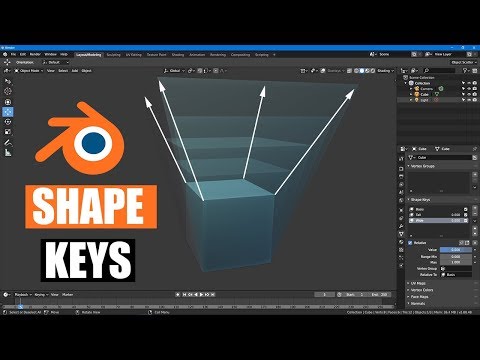 from MrTriPie on Youtube. I made sure that when I created the first set of morphs that the "Basis" was made, ensured the "Relative" was checked for the individual morphs--and all the slots have their appropriate "Vertex Group" filled in as well as "Relative To" is filled in with "Basis" .
So, my goal is to give the spinal ridges and belly scales each to have their own individual morph targets. With three rows for each body segment along the dragon's spine, there are slots for 204 total spinal ridges and 111 belly scales. So far, however, only morphs for the first row of 3 spinal ridges and 2 belly ridges have been made so far (all for Neck8). When I was working on each one, I was ensuring to move only the verticies related to the morph I was working on. At this moment, none of the other slots have any changes from "Basis" to create those morphs yet.
All my pictures in my post above are focused on the Neck8-Left Spinal Ridge. I also made sure to not move the viewport's position when switching between the Edit and Object modes, since the Object modes don't show the position of the verticies, so I had to take screen shots of several different angles to illustrate what is going on. The problem is definitely appearing with every morph, even the belly scales where the verticies on the dragon's throat on the edges of the lateral scales are only moving a small amount on the Z-axis.
Second, by comparing your images, I surmise that you might possibly have previous morphs mingling with newer morphs you are creating if you are not setting only one shape key active per morph creation, or you have vertex group data issues.
So, while in Edit Mode, you see a fresh canvas to create your new morph, but in reality, Object Mode shows the true state of the mesh-to-object, and you have unseen morph data being included/excluded in your current shape key data.
So, after reading this paragraph, I played around to see if any of the other morphs that I have created were affecting the one I was focused on, but I'm not seeing anything. If there is another morph(s) that is causing this, they're not something I created.
The tenets of working on shape key morphs is only one key active and set to 1.000 (which you seem to have done) working against a default (usually 'Basis' -- Also, being done). Secondary, would be working with specific vertex group data (again, which you seem to have done -- But, are you sure all vertices you are morphing in Edit Mode are truly included in the shape key data?).
Now, for a visual aid help solution to help you as you are creating your morphs -- Add one more 'click' to your work-flow; You see the line of parameters (mostly icons) above the 'Value' setting starting with the checkmark toggle 'Relative' -- Check the second box to the right (the square with four verts/lines with one vertex lit up). This is the 1-to-1 visual pairing for Edit/Object mode which will allow you to see correctly the true state of the object-to-mesh data presented to you in Edit Mode -- Without it, your mesh in E.M. appears as 'Basis' (default object shape) which can lead you to believe your new morph creations are without impurities. Also, double-check that your desired vertex displacement is encompassing all vertices in your active vertex group.
Okay, so I clicked on that icon while in Object mode, and there is no change between them. But when I switched over to Edit mode and clicked on it, it IS toggling between the full value of the morph I created and the value that it seems to stop at in Object mode.
Give that a shot, and let us know if you are successful.
Personal Note: I never use vertex groups for base morphing -- I only employ them when needed for specific morph work such as inclusions/exclusions of mesh areas within already established morph targets for advanced morph work such as shape key joins/separations, symmetric to asymmetric work, and morph blending.
Hope this helps...
So, I just want to confirm my understanding, does this mean I should ensure that "Shape Key Edit Mode" icon is lit up when making my morphs? If so, that will be extremely helpful, indeed! Fortuntately, I actually recored the XYZ info for each of those morph verticies in Excel :D
* EDIT: Since you are new to Blender -- Blender works differently then most 3D software when it comes to object/mesh data which usually trips newbies up (I know, been there/done that). Both Object/Edit Modes (and by extension, all modes) are independent of each other, but all supply the main mode (Object) which show the true state of the objects.
Why is this important? Because, for morph target work, anything you do to the raw mesh data state (Edit Mode) will be propagated to the default object data (shape) including, but not limited to scale, translation, displacement, and rotations (within the confines of morph target rules).
However, anything done in Object Mode does not propagate to morph target data.
So, in other words, you can do anything you want to the object in Object Mode such as rotation, translations, and scale. These will not affect the morph target transfer data to other software -- they are not recorded in the raw vertex delta data.
If, you are transferring morph data to 3D software such as Daz Studio, make sure you select 'Selection Only' (if multiple objects in scene), and 'Use Modifiers' (or some wording to that effect) which the Shape Keys use (but, make sure any modifiers in the modifier stack are inactive, or they will be included in the data as well), and of course, 'Keep Vertex Order' in your OBJ export settings. All other settings are superfluous, and not needed.
It is one of my goals to build this guy and export and rig for DAZ, but I've been running into issues with that attempt, so that effort is currently on hiatus until I can figure out the fixes to rig him in Blender first (Weightmapping is the problem I'm having with DAZ).
Blender is giving me a very steep learning curve, but I DO recognize how supremely versitile and powerful Blender truly is, so I'm very eager to challenge to learn it!

Please let me know if setting that icon should fix this. And thank you very much for your advice!!
Getting on the 9 train, or notMasterstroke said:
MelissaGT said:
Thank you, guys! I will be sure to post him when I finish the final tweaks and put some clothes on him. He's a little young for my tastes, but we don't really have much way of making our "weathered warriors" yet, haha. Vicky 9's skin is really the only base skin that is decent for a pale guy right now. I tried the one from Michael 8.1 but good lord whoever though it was a good idea to have a painted scalp/hairline on that texture needs to be banished to the corner...
Might be just an Illusion, but he looks familiar.
I started out using the randomizer with the G9 morph pack and then tweaked manually. Haven't transferred over any morphs from older generations.
Genesis 9 Males?Thank you plasma_ring for the morph! I had auto-converted G8 clothes that were mostly a good fit, but even after running a dforce simulation had the crease in the chest. I still have to play around with getting it exactly right (I just put it in at 100% here) but this already looks much better with minimal effort on my part.
what are the main fundamentals you need for G8.1 to work?MimicMolly said:
PerttiA said:
MimicMolly said:
If you have a bunch of G8 stuff already, you just need to be running DAZ Studio 4.15, and it can use everything but certain facial expressions. (If a character morph gets saved on G8.1, it cannot be used on G8. Same can be said about clothing.)
All the G8 expressions can be made to work on G8.1
Isn't that, that technique that involves dummy folders? As is, the non-morph expressions won't work like that "out of the box," unless you move files around yourself.No moving necessary, just delete the dummy expressions that have been installed to G8.1 morph folders for the sole purpose of disabling the G8 expressions on G8.1.
Daz 3D is part of

Connect
DAZ Productions, Inc.
7533 S Center View Ct #4664
West Jordan, UT 84084Licensing Agreement | Terms of Service | Privacy Policy | EULA
© 2026 Daz Productions Inc. All Rights Reserved.