-
Smooth Out Imperfections in Clothing When Posed?
Oh, you just didn't draw / smooth the top enough... Suggest you turn on symmetry on X axis as well as Wireframe to checking the mesh change while sculpting.
You can try with the morph of initial shape I made but since you shaped your figure with different body morph, my morph may not really work well on it ~~
(extract the data folder in the attached ZIP to the root directory of your Daz Library. Reload the top and dial the morph: Initial Shape)
[Released] Blender to Daz Studio Plugin released!!! Official support thread [Commercial]reitaku said:
Hello! I was able to import hair into Daz using polylines, but how do I add morphs? It doesn't seem to be possible to edit in GoZ. Any advice would be greatly appreciated!
ZBrush is not able to import polylines no matter with GoZ or OBJ.
You can further sculpt the hair curves your created in Blender, export curves to DS as polylines again with this BTD add-on. Then create the morph by using the sculpted polyline object in DS, i.e. export it to OBJ, import OBJ as a morph with Morph Loader Pro. More steps but it should be a quicker way.
Problems with geograft morph mergingI'll try to explain this as clear as i can. its basically about combining/merging multiple morphs into a single slider, everything works fine, i do the export at base resolution, i hide the unnecessary stuff, then importing with morph loader pro and so on all of that works fine. but now i have a specific problem when using both g8f and geograft morphs.
So basically there are 17 morphs that im combining, all which are morphs from the GEOGRAFT, but then there are another 4 morphs which are from the GENESIS 8 FEAMLE FIGURE itself, in the morphs section of that figure. Making it a total of 21 morphs having to be turned into a single morph for the geograft. However, when I'm exporting, only the 17 morphs from the geograft are merged into one, those 4 ones from the figure are completely skipped. I'm trying to find a way to merge all the 21 morphs, so the 17 morphs are already merged no issue but i need to also merge them with the other 4 ones from the G8F morphs (which are not directly geograft morphs).
I believe it could be because when i did the obj export I only selected the geograft, but if I select both the geograft and the figure I believe it wouldn't work
So, is there any fix for this or any alternative? I do use blender in case I can do something with it, I just can't figure out what to do. Or maybe could I possibly convert the G8F morphs into geograft morphs somehow?
Smooth Out Imperfections in Clothing When Posed?crosswind said:
n.aspros123 said:
crosswind said:
Okay, but they're different in terms of design ~ It's tight under figure's breasts on the one you're using while that Rendo's one is obviously with a looser design. If the figure has larger breasts, you won't get the expected result with that Shrug Style Top... no matter you simulate in whatever way.
I suggest another way around since I ever mentioned that the initial shape of the cloting is important before simulation. You can make a morph with Blender to give the top a "looser style". (screenshot 1)
Then you'll get the expected result afer simulation and you won't have to tweak it each time after simulation. (screenshot 2)
Which tools did you use in Blender to make the morph?
As usual, Draw brush and Smooth brush in Sculpt mode.
I don't know what's going on with Blender. When scuplting the top using the draw and smooth brushes, it looks okay. See Top Blender 1 and Top Blender 2. When I change back to Object mode the top doesn't look as smooth while in sculpt mode. Top Blender 3. I've tried more smoothing and drawing sculpting. Best I can without someone having a look for me.
Did I have the Draw and Smooth brushes Radius and Strength set correctly?
When I dForce the top with the Blender Morph, it doesn't look smooth under the breasts. See Top After Blender 1 and Top Blender 4 p. I also have the use Mesh Grabber to pull the bottom of the top out as it clips with the skirt.
I can share any files if needed to be troubleshooted.
Can I try your top morph.obj ? @crosswind . I think the mesh in yours might be better than mine possibly. When the silk shader is applied, the imperfections standout more possibly?
Freebie Challenge July 2025 - "Design a Book Cover" - Entries ThreadGrimm’s Fairy Tales
A classic among the classics! So many of our familiar children’s stories (though sometimes not so safe for kids) came from this collection. It, however, is not even the original source. Most of the stories told here were learned and collected from oral tales that have been told across Europe for centuries!
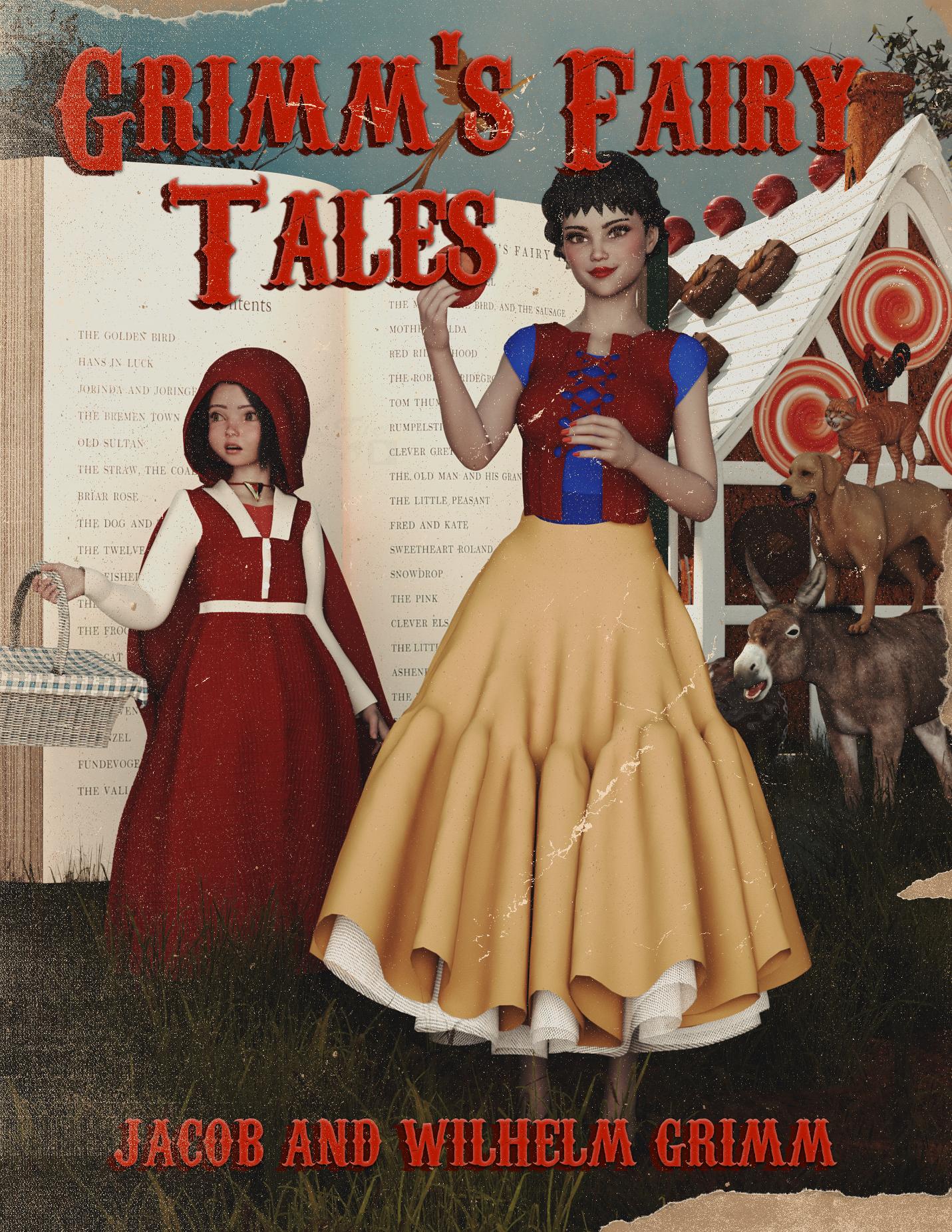
Freebies:
Real Book - https://www.renderosity.com/freestuff/items/73987/real-book
Pd-Soft Leather Daz Studio Shaders for Iray (book, RRH) - https://www.renderosity.com/freestuff/items/75152/pd-soft-leather-daz-studio-shaders-for-iray
Chameleon ROse 2 for Genesis 8 Female (Snow White, nails and lashes) - https://www.renderosity.com/mod/freestuff/chameleon-rose2-for-genesis-8-female/85859
Genesis 8 Female Christmas Dress 2 - (Snow White) - https://www.most-digital-creations.com/g8f_christmas_dress_2.php
KT Child G9 (RRH 100%) - https://www.renderosity.com/freestuff/items/98181/kt-child-g9
Cute Kay Toddler Morph for G9 (RRH, 10%) - https://www.renderhub.com/undeadcrabb/cute-kay-toddle-morph-for-g9
Eyes by Sir Maverick (no way to know which pack it was, link to freebies profile, RRH) - https://www.renderosity.com/users/SirMaverick/freestuff
Dress A for G9 (RRH) - https://www.renderosity.com/freestuff/items/98972/dress-a-for-g9
Sailor3HSa for G9 (Shoes RRH) - https://www.renderosity.com/freestuff/items/98454/sailor3hsa-for-g9
Basket - https://www.renderosity.com/freestuff/items/88982/basket
Hair Starter Pack (Update 1.1) (RRH) - https://www.renderosity.com/freestuff/items/98247/hair-starter-pack-update-11
Capes and Cloaks dForce G8F (RRH) - https://www.renderosity.com/freestuff/items/98539/capes-and-cloaks-dforce-g8f
SY 200 Free Morphs Genesis 8 (Snow White, RRH) - https://www.deviantart.com/sickleyield/art/SY-200-Free-Morphs-Genesis-8-756465264
Rooster - https://www.renderosity.com/freestuff/items/91408/rooster
Mossy Forest HDRI - https://polyhaven.com/a/mossy_forest
Fantasy House 1 - https://www.renderosity.com/freestuff/items/66847/fantasy-house-1
Fairy Tree 3D Model - https://www.renderhub.com/shredder/fairy-tree
CRP Standing Cute Poses 13-20 - https://www.renderosity.com/freestuff/items/97778/crp-standing-cute-poses-13-20
Toon Food Apple - trumarcar.francemi.net/foodprops_tc.htm
Yellow Bird - https://www.cgtrader.com/free-3d-models/animal/bird/low-poly-yellow-bird
Freebie Zeus Morphs (Chonk) - https://www.deviantart.com/christine13black/art/Freebie-Zeus-Morphs-1148068111
Multiple Photoshop Brushes (used in postwork, just thought I’d share since it’s a really cool resource) - https://resourceboy.com/
No Count:
Genesis 9 Essential Shapes Bundle - https://www.daz3d.com/genesis-9-essential-shapes-bundle (not really sure I even used these, but just in case)
Universal Hair Baseline 001 (Snow White) - ??? (Freebie, I think I got it from ShareCG)
Ruffle Tutu (Scaled) (Snow White) - ??? (Freebie, I think I got it from ShareCG)
Leather Outfit for Genesis 8 Female (Snow White) - ??? (Freebie, Made by RhondaR, got it from ShareCG)
SY Super Hoodie Genesis (RRH) - ??? (Freebie, Made by Sickleyield, got it from ShareCG)
Shimmery Sheer II Shaders (RRH) - ??? (Freebie, Made by AllenArt, got it from ShareCG)
Realistic Dog - ??? (Freebie, got it from CGTrader, can't find it now)
Paid:
Mesh Grabber (Mac) - https://www.daz3d.com/mesh-grabber-mac
3D Donkey - https://www.daz3d.com/3d-donkey
SY Invisilights Iray - https://www.daz3d.com/sy-invisilights-iray
Cat Zeus - https://renderhub.com/vyusur/cat-zeus
3DL Destiny For Genesis 8 Females - www.renderosity.com/marketplace/products/165290/3dl-destiny-for-genesis-8-females
I did some major reworking of the materials, the poses and even the geometry. I recently learned how to use Geometry Editor, and I also used Mesh Grabber to make some adjustments. Set up and rendered within Daz Studio Iray. Postwork in Pixelmator. No AI used.
I’ve attached the before post render (the one that says Raw Render) and the finished image file.
Space Crimes - Cover ideas(RAW Render with 1 Edit) Madeline 4.0

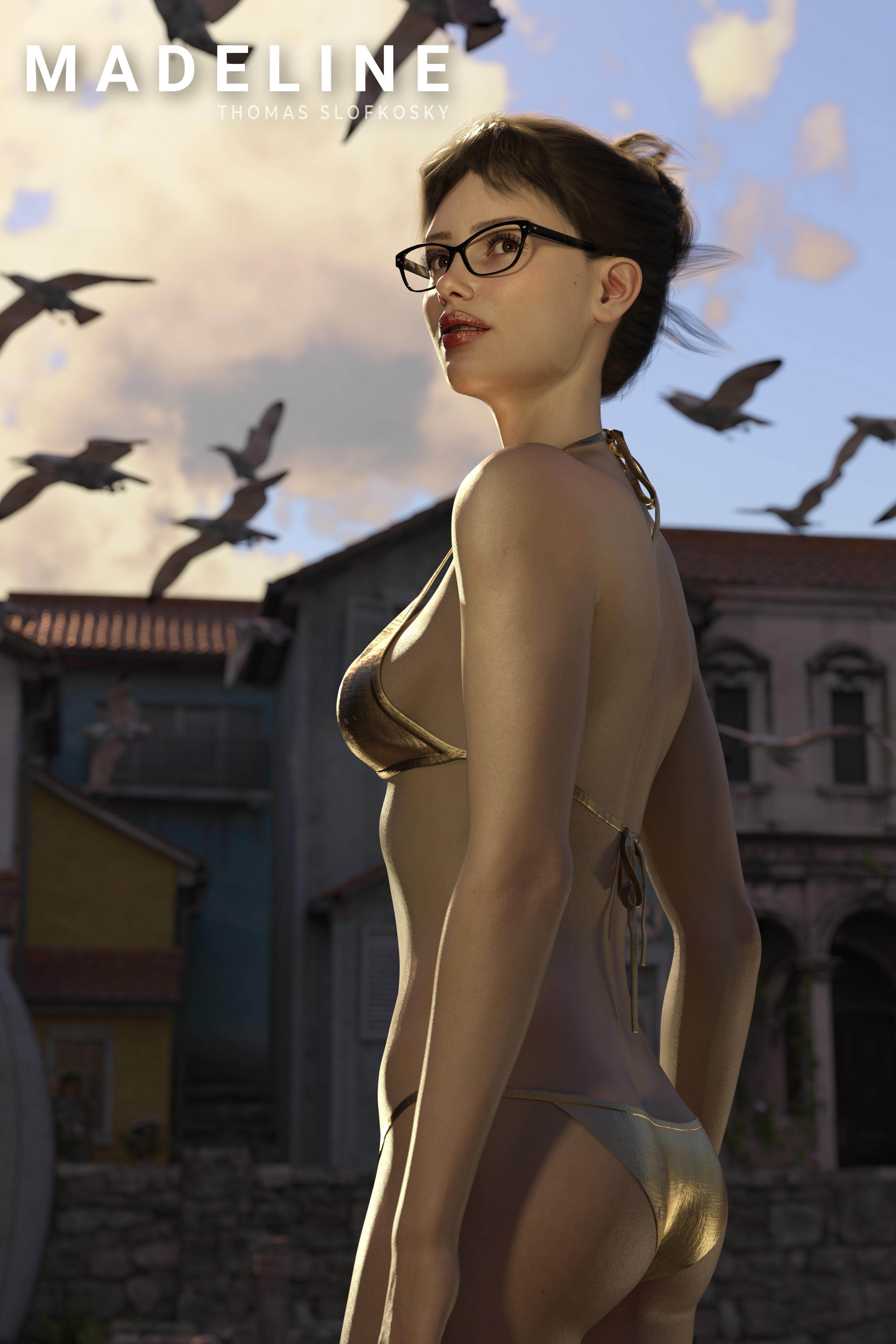
The last couple of renders of Space Crimes included edits to Madeline. I've just been so unhappy with how AI images of the duo, or any output for that matter, look so realistic and my output from Daz Studio has been sorely lacking. Then factor in my frustration of taking Madeline from G8 to G8.1 to G9 utilizing graphs and legacy MAT's has been frustrating to say the least. Try applying lipstick and it ends up on her nose. FRUSTRATING!!!
Fast forward to the last couple of weeks. I created Mads from a default G9, tried using Face Transfer, edited the skin materials and just threw that all out. Utilizing 8K Mat skin from the Snow Queen HD character.
I'm torn, is this an improvement? Is this too different a look for Madeline? I'll try some "regular" renders with this version as a test run before I work on the re-work of John.
Any thoughts?Handbag or tote bag that opensVery rare in this store... there used to be one from EJ: http://docs.daz3d.com/doku.php/public/read_me/index/57555/start ; But they moved to their Gumroad store, you can find and get it in there.
There're some on Rendo that I could find in my lib:
https://www.renderosity.com/marketplace/products/151399
https://www.renderosity.com/marketplace/products/104544Edit: Non G8F one can be easily set as a Smart Prop. Besides, you also can rig any bag to have Open morph only that'll take some time.
Will DAZ ever improve animating?learn how to get their content out of DS. It's easier and easier all the time.
Diffeo/Auto rig pro with quick rig extension is all you need.
once you transfer your FACS & phonemes to blender shape keys ,via diffeo ,you have a Daz figure with a professional HIK control rig but can still accept facial animation from the many Daz sources such as Anilip3 or 32 bit mimic etc.
I do animation completely in DAZ Studio everyday. Of course the IK (especially on later bases, like G8 and G9) are a nightmare (that's why I'm still using G1 which got way better IKs) but once you grasp how it woks, it's not that hard make animations. All in a single software without the need of jumping here and there to make things like lipsynch, walk cycles or just a char getting up from a chair.How are you creating lipsynch for the G1 figures?
The only 64 bit option
for lipsynch (such as Anilip3 or face mojo etc) are all third party
& made for G8-9 and will need updating for DS6 (2025) ,along with Animate 2If you are using the default mimic in DS you are restricted to using not only an older version of DS but a 32 bit version that has limited RAM addressing
I understand all of that may be fine for you but to be fair many DS users would likely prefer to use G8-9 in a 64bit version of DS.I have both 64 and 32 bit versions installed, when I need to make a lipsynch, I simply start another session with the 32bit version, load G1 (or any other figure I need), select the audio file and input the text for a more precise result.
it seems We cross posted
So you are having to jump “here and there" for your lipsinc?
again which is fine for you ,but I imagine Alot of DS users have moved beyond G1 and 32 bit software many years agoDAZ Studio already got all it needs to compete with any other 3D software.
I have Autodesk Maya indie, Maxon C4DR25 perpetual, Blender and and older Reallusion Iclone7&CC3.
Even with my older Iclone 7& CC3
I am not having to use figure rigs from13 years ago (as you are with G1)what is your actual experience with other non Daz software that forms your comparative opinion?
Handbag or tote bag that opensI'm looking for a large handbag or a tote bag with an "open" morph. I've found a lot of bags in the store, but none that you can take anything out of!
It's going to a G8F, but any generation will do.
Mixamo created rig problems in DAZI almost know nothing about Poser... but AutoFit in DS is designed for Genesis figures rather than any other types of figures, that's why you find no options in AutoFit dialogue and the unexpected result without using any Clone.
A proper way is to rig the clothing on you Mixamo La Femme by using Transfer Utility... (if your Mixamo La Femme was imported from an FBX...) In this way, you need to follow the standard procedure of using Transfer Utility ~~
- If La Femme clothing is a CR2, export both figure and clothing to, let's say, Blender, make the clothing a perfect it on the figure.
- Export the clothing to OBJ and import OBJ into DS.
- Rig OBJ object onto Mixamo La Femme with Transfer Utility.[Released] Blender to Daz Studio Plugin released!!! Official support thread [Commercial]The more optimal way is to bake and transfer displacement map rather than the SubD mesh. The former is the typical way of handling displacement in DS.
Blender to Daz bridge- Blender to Daz Studio plugin just released!!!!!!!!!The more optimal way is to bake and transfer displacement map rather than the SubD mesh. The former is the typical way of handling displacement in DS.
[Released] Blender to Daz Studio Plugin released!!! Official support thread [Commercial]A major issue is the limit on poly count. Objects requiring a high polycount for displacement will not transfer, nor will grouped items with high poly counts such as ivy. The bridge needs either a setting to increase the poly count limit or just hardcode the increase. Slicing and dicing my objects just to bring them into DAZ is not a solution, it's a headache. For many sceens, I have to move objects in batches. That's fine if I can't use the "All" button, But for it not to work at all due to poly count, thats just broken.
Blender to Daz bridge- Blender to Daz Studio plugin just released!!!!!!!!!A major issue is the limit on poly count. Objects requiring a high polycount for displacement will not transfer, nor will grouped items with high poly counts such as ivy. The bridge needs either a setting to increase the poly count limit or just hardcode the increase. Slicing and dicing my objects jut to bring them into DAZ is not a solution, it's a headache.
Smooth Out Imperfections in Clothing When Posed?n.aspros123 said:
crosswind said:
Okay, but they're different in terms of design ~ It's tight under figure's breasts on the one you're using while that Rendo's one is obviously with a looser design. If the figure has larger breasts, you won't get the expected result with that Shrug Style Top... no matter you simulate in whatever way.
I suggest another way around since I ever mentioned that the initial shape of the cloting is important before simulation. You can make a morph with Blender to give the top a "looser style". (screenshot 1)
Then you'll get the expected result afer simulation and you won't have to tweak it each time after simulation. (screenshot 2)
Which tools did you use in Blender to make the morph?
As usual, Draw brush and Smooth brush in Sculpt mode.
Smooth Out Imperfections in Clothing When Posed?crosswind said:
Okay, but they're different in terms of design ~ It's tight under figure's breasts on the one you're using while that Rendo's one is obviously with a looser design. If the figure has larger breasts, you won't get the expected result with that Shrug Style Top... no matter you simulate in whatever way.
I suggest another way around since I ever mentioned that the initial shape of the cloting is important before simulation. You can make a morph with Blender to give the top a "looser style". (screenshot 1)
Then you'll get the expected result afer simulation and you won't have to tweak it each time after simulation. (screenshot 2)
Which tools did you use in Blender to make the morph?
Smooth Out Imperfections in Clothing When Posed?Okay, but they're different in terms of design ~ It's tight under figure's breasts on the one you're using while that Rendo's one is obviously with a looser design. If the figure has larger breasts, you won't get the expected result with that Shrug Style Top... no matter you simulate in whatever way.
I suggest another way around since I ever mentioned that the initial shape of the cloting is important before simulation. You can make a morph with Blender to give the top a "looser style". (screenshot 1)
Then you'll get the expected result afer simulation and you won't have to tweak it each time after simulation. (screenshot 2)
Freebie Challenge July 2025 - "Design a Book Cover" - Main ThreadFae3D said:
Grimm’s Fairy Tales
A classic among the classics! So many of our familiar children’s stories (though sometimes not so safe for kids) came from this collection. It, however, is not even the original source. Most of the stories told here were learned and collected from oral tales that have been told across Europe for centuries!
Freebies:
Real Book - https://www.renderosity.com/freestuff/items/73987/real-book
Pd-Soft Leather Daz Studio Shaders for Iray (book, RRH) - https://www.renderosity.com/freestuff/items/75152/pd-soft-leather-daz-studio-shaders-for-iray
Chameleon ROse 2 for Genesis 8 Female (Snow White, nails and lashes) - https://www.renderosity.com/mod/freestuff/chameleon-rose2-for-genesis-8-female/85859
Genesis 8 Female Christmas Dress 2 - (Snow White) - https://www.most-digital-creations.com/g8f_christmas_dress_2.php
KT Child G9 (RRH 100%) - https://www.renderosity.com/freestuff/items/98181/kt-child-g9
Cute Kay Toddler Morph for G9 (RRH, 10%) - https://www.renderhub.com/undeadcrabb/cute-kay-toddle-morph-for-g9
Eyes by Sir Maverick (no way to know which pack it was, link to freebies profile, RRH) - https://www.renderosity.com/users/SirMaverick/freestuff
Dress A for G9 (RRH) - https://www.renderosity.com/freestuff/items/98972/dress-a-for-g9
Sailor3HSa for G9 (Shoes RRH) - https://www.renderosity.com/freestuff/items/98454/sailor3hsa-for-g9
Basket - https://www.renderosity.com/freestuff/items/88982/basket
Hair Starter Pack (Update 1.1) (RRH) - https://www.renderosity.com/freestuff/items/98247/hair-starter-pack-update-11
Capes and Cloaks dForce G8F (RRH) - https://www.renderosity.com/freestuff/items/98539/capes-and-cloaks-dforce-g8f
SY 200 Free Morphs Genesis 8 (Snow White, RRH) - https://www.deviantart.com/sickleyield/art/SY-200-Free-Morphs-Genesis-8-756465264
Realistic Dog - https://www.cgtrader.com/free-3d-models/animals/mammal/dog-realistic
Rooster - https://www.renderosity.com/freestuff/items/91408/rooster
Mossy Forest HDRI - https://polyhaven.com/a/mossy_forest
Fantasy House 1 - https://www.renderosity.com/freestuff/items/66847/fantasy-house-1
Fairy Tree 3D Model - https://www.renderhub.com/shredder/fairy-tree
CRP Standing Cute Poses 13-20 - https://www.renderosity.com/freestuff/items/97778/crp-standing-cute-poses-13-20
Toon Food Apple - trumarcar.francemi.net/foodprops_tc.htm
Yellow Bird - https://www.cgtrader.com/free-3d-models/animal/bird/low-poly-yellow-bird
Freebie Zeus Morphs (Chonk) - https://www.deviantart.com/christine13black/art/Freebie-Zeus-Morphs-1148068111
Multiple Photoshop Brushes (used in postwork, just thought I’d share since it’s a really cool resource) - https://resourceboy.com/
No Count:
Genesis 9 Essential Shapes Bundle - https://www.daz3d.com/genesis-9-essential-shapes-bundle (not really sure I even used these, but just in case)
Universal Hair Baseline 001 (Snow White) - ??? (Freebie, I think I got it from ShareCG)
Ruffle Tutu (Scaled) (Snow White) - ??? (Freebie, I think I got it from ShareCG)
Leather Outfit for Genesis 8 Female (Snow White) - ??? (Freebie, Made by RhondaR, got it from ShareCG)
SY Super Hoodie Genesis (RRH) - ??? (Freebie, Made by Sickleyield, got it from ShareCG)
Shimmery Sheer II Shaders (RRH) - ??? (Freebie, Made by AllenArt, got it from ShareCG)
Paid:
Mesh Grabber (Mac) - https://www.daz3d.com/mesh-grabber-mac
3D Donkey - https://www.daz3d.com/3d-donkey
SY Invisilights Iray - https://www.daz3d.com/sy-invisilights-iray
Cat Zeus - https://renderhub.com/vyusur/cat-zeus
3DL Destiny For Genesis 8 Females - www.renderosity.com/marketplace/products/165290/3dl-destiny-for-genesis-8-females
I did some major reworking of the materials, the poses and even the geometry. I recently learned how to use Geometry Editor, and I also used Mesh Grabber to make some adjustments. Set up and rendered within Daz Studio Iray. Postwork in Pixelmator. No AI used.
I’ve attached the before post render (the one that says Raw Render) and the finished image file.
(Edited to add images)
Can't find the dog model... but I choose to believe that it is (or used to be) a freebie. therefore
Entry is approved! Please move to Entries Thread
Freebie Challenge July 2025 - "Design a Book Cover" - Main ThreadGrimm’s Fairy Tales
A classic among the classics! So many of our familiar children’s stories (though sometimes not so safe for kids) came from this collection. It, however, is not even the original source. Most of the stories told here were learned and collected from oral tales that have been told across Europe for centuries!
Freebies:
Real Book - https://www.renderosity.com/freestuff/items/73987/real-book
Pd-Soft Leather Daz Studio Shaders for Iray (book, RRH) - https://www.renderosity.com/freestuff/items/75152/pd-soft-leather-daz-studio-shaders-for-iray
Chameleon ROse 2 for Genesis 8 Female (Snow White, nails and lashes) - https://www.renderosity.com/mod/freestuff/chameleon-rose2-for-genesis-8-female/85859
Genesis 8 Female Christmas Dress 2 - (Snow White) - https://www.most-digital-creations.com/g8f_christmas_dress_2.php
KT Child G9 (RRH 100%) - https://www.renderosity.com/freestuff/items/98181/kt-child-g9
Cute Kay Toddler Morph for G9 (RRH, 10%) - https://www.renderhub.com/undeadcrabb/cute-kay-toddle-morph-for-g9
Eyes by Sir Maverick (no way to know which pack it was, link to freebies profile, RRH) - https://www.renderosity.com/users/SirMaverick/freestuff
Dress A for G9 (RRH) - https://www.renderosity.com/freestuff/items/98972/dress-a-for-g9
Sailor3HSa for G9 (Shoes RRH) - https://www.renderosity.com/freestuff/items/98454/sailor3hsa-for-g9
Basket - https://www.renderosity.com/freestuff/items/88982/basket
Hair Starter Pack (Update 1.1) (RRH) - https://www.renderosity.com/freestuff/items/98247/hair-starter-pack-update-11
Capes and Cloaks dForce G8F (RRH) - https://www.renderosity.com/freestuff/items/98539/capes-and-cloaks-dforce-g8f
SY 200 Free Morphs Genesis 8 (Snow White, RRH) - https://www.deviantart.com/sickleyield/art/SY-200-Free-Morphs-Genesis-8-756465264
Realistic Dog - https://www.cgtrader.com/free-3d-models/animals/mammal/dog-realistic
Rooster - https://www.renderosity.com/freestuff/items/91408/rooster
Mossy Forest HDRI - https://polyhaven.com/a/mossy_forest
Fantasy House 1 - https://www.renderosity.com/freestuff/items/66847/fantasy-house-1
Fairy Tree 3D Model - https://www.renderhub.com/shredder/fairy-tree
CRP Standing Cute Poses 13-20 - https://www.renderosity.com/freestuff/items/97778/crp-standing-cute-poses-13-20
Toon Food Apple - trumarcar.francemi.net/foodprops_tc.htm
Yellow Bird - https://www.cgtrader.com/free-3d-models/animal/bird/low-poly-yellow-bird
Freebie Zeus Morphs (Chonk) - https://www.deviantart.com/christine13black/art/Freebie-Zeus-Morphs-1148068111
Multiple Photoshop Brushes (used in postwork, just thought I’d share since it’s a really cool resource) - https://resourceboy.com/
No Count:
Genesis 9 Essential Shapes Bundle - https://www.daz3d.com/genesis-9-essential-shapes-bundle (not really sure I even used these, but just in case)
Universal Hair Baseline 001 (Snow White) - ??? (Freebie, I think I got it from ShareCG)
Ruffle Tutu (Scaled) (Snow White) - ??? (Freebie, I think I got it from ShareCG)
Leather Outfit for Genesis 8 Female (Snow White) - ??? (Freebie, Made by RhondaR, got it from ShareCG)
SY Super Hoodie Genesis (RRH) - ??? (Freebie, Made by Sickleyield, got it from ShareCG)
Shimmery Sheer II Shaders (RRH) - ??? (Freebie, Made by AllenArt, got it from ShareCG)
Paid:
Mesh Grabber (Mac) - https://www.daz3d.com/mesh-grabber-mac
3D Donkey - https://www.daz3d.com/3d-donkey
SY Invisilights Iray - https://www.daz3d.com/sy-invisilights-iray
Cat Zeus - https://renderhub.com/vyusur/cat-zeus
3DL Destiny For Genesis 8 Females - www.renderosity.com/marketplace/products/165290/3dl-destiny-for-genesis-8-females
I did some major reworking of the materials, the poses and even the geometry. I recently learned how to use Geometry Editor, and I also used Mesh Grabber to make some adjustments. Set up and rendered within Daz Studio Iray. Postwork in Pixelmator. No AI used.
I’ve attached the before post render (the one that says Raw Render) and the finished image file.
(Edited to add images)
The new "blender to Daz plugin"mummystoat said:
Ainm said:
mummystoat said:
I have it installed with 4.3, not super impressed.
It exports the OBJ wonderfully well. I haven't had one success with materials yet and with almost no documentation to help, it's basically a dead end.It relies on a PrincipledBSDF shader setup in Blender. PrincipledBSDF, from what I understand, is an open physically based rendering format (PBR). Iray is a PBR engine with equivalent material slots in its shaders. If a Blender mesh doesn't have PrincipledBSDF shaders nodes applied, this product can't bake/convert them to Iray shaders. Instead, you'll only get the mesh.
I don't buy a lot of Blender products, but most of those I own don't have that shader setup and don't transfer materials. Some of them I can sort of convert to PrincipledBSDF manually and they sort of work. The Blender products I own that do have PrincipledBSDF shaders are transferred to Daz/Iray perfectly.
I don't use Blender much and struggled to figure out the product. I thought it wasn't working, but it was a combination of not the best documentation and my severe lack of Blender shading systems. Having learned a little about those, the documentation seems more adequate (at least on the marketplace I bought it from).
Yes, the product does specify it needs a principledBSDF shader to work. I'm not relying on purchased products in Blender and my materials are set up with a Principled BSDF shader. Only the very simplest of setups has come through with any material export at all; anything with colour ramps, mix nodes, alpha channels (this one is really a mystery as it looks like it should be working correctly) etc. is a mess.
On product description it says
5) Bakes materials to create simplified texture maps that can be used in Daz Studio.
so guess that was potentially being over-sold?
SimpleBake for Blender can probably make baking down shaders to simply PBR easier before export. It's still tedious to do this even though SimpleBake makes it slightly easier.
Daz 3D is part of

Connect
DAZ Productions, Inc.
7533 S Center View Ct #4664
West Jordan, UT 84084Licensing Agreement | Terms of Service | Privacy Policy | EULA
© 2026 Daz Productions Inc. All Rights Reserved.