-
Alternative PowerPose Templates (Genesis 1, 2, 3, 8, 8.1, 9)
Hi guys, thanks for the help on this!!
Can i ask a question? I'm doing a game in Unreal Engine using Genesis 9 and when i animate using power pose, the facial animations don't import on Unreal, i found out it's because PowerPose is animating Genesis 9's morphs and not it's bones. There's a way that i can change the morphs for the facial bones or someone already did that?
Thanks in advance :)
[Released] Content Wizard [Commercial]To start on a new product click the 'New product'. That will clear all that is currently in the window.
If you haven't previously installed it, you want to click Install, and if you also want metadata (Smart Content) you want to click Install metadata.
So for a new product you would normally want to do both.
Duplicate GUIDI've been getting a "Metadata update failed..." message for quite some time and finally decided to dig into it. log.txt shows why the update is failing:
2025-06-21 19:47:52.444 [WARNING] :: \src\sdksource\cloud\dzcloudtasknotifier.cpp(203): Query (UPDATE "product" SET name = 'Click N'' Render - POP Edition - IBL Set Lite', default_name = 'Click N'' Render - POP Edition - IBL Set Lite', store_id = 1, token = '91235', artists = 'Cake One,Daz Originals', description = '', guid = '882c9f9e-4f37-49c2-a2d7-06d690a71c9f', meta_hash = '7ec474c9bedeaffad08fcc3ea34142c4', file_hash = '6d9d8b134f70a990e47a1b4e9d361ab1', thumbnail_path = '', thumbnail_hash = '', last_update = '2023-08-03 12:33:58', date_purchased = '2024-10-21 13:41:36', date_installed = '2025-06-21 23:47:52', release_date = '1970-01-01 00:00:00', group_num = 0, hide = 'f', is_vendor = 't', has_cloud_meta_data = 't', is_installed = 'f', is_cloud_owned = 't', needs_update = 'f', normalized_name = 'click n render pop edition ibl set lite', normalized_name_first_letter = 'C' WHERE id = 14509) failed with exception: ERROR: duplicate key value violates unique constraint "product_guid_key"
DETAIL: Key (guid)=(882c9f9e-4f37-49c2-a2d7-06d690a71c9f) already exists.2025-06-21 19:47:52.444 [WARNING] :: \src\sdksource\cloud\dzcloudtasknotifier.cpp(203): ERROR: duplicate key value violates unique constraint "product_guid_key"
DETAIL: Key (guid)=(882c9f9e-4f37-49c2-a2d7-06d690a71c9f) already exists.With a slight modification to DB_List_Products.dsa I found the product already using this guid:
Click N Render - POP Edition - IBL Set (DAZ 3D, 73937, 882c9f9e-4f37-49c2-a2d7-06d690a71c9f, 882c9f9e-4f37-49c2-a2d7-06d690a71c9f)To make a long story short, Click N Render - POP Edition - IBL Set and Click N'' Render - POP Edition - IBL Set Lite have different SKUs, but the same GUID. I'm pretty sure this is an oversight, since uniqueness is part of the definition of GUID. I don't know if DAZ can go back and update the GUID for one of these products after the fact nor whether there's some process gap that made this duplication possible in the first place.
Help, Local User ProblemDiid you Export User data on the old system and Reimport metadata on this version?
[Released] Content Wizard [Commercial]Update Regarding question #2: While I as waiting for some answers, I went ahead and checked everything in the Options window. I then had it reanalyze etc. and low and behold, it created a product with all of the parts and did add some metadata in DAZ's Content DB Editor (Type: Prop; Categories: Default/ Transportation/land). Well I think it did the Transportation category - Previously I manually added that category. But in this last try, I believe I deleted that metadata from the Content DB Editor first and then proceeded.
I don't know which item that I checked in the otions window cause it to work as I wanted. But I guesss there's no hurt in checking everything.
So I think question 2 is answered.
Conversions From Victoria 4/Genesis 2 to Genesis 9joe.cotter238561212 said:
Ainm said:
...
... Genesis was the first that came up with a unified mesh for both ...
Technically correct, but there's a bit of nuance behind that if you want/need to take advantage of it.
Generation 3 (V3 and M3) were actually morphs of the same 'Unimesh' figure but sold a separate male & female base figures. As a result, if you go through the process of of creating your own weight mapped figure (TriAx or Weight Mapped) you can base it on (say) V3 and import an M3 .obj file as a full body morph, as shown in the slightly disturbing images below where the M3 morph goes from 0% left to 100% right while changing nothing else:
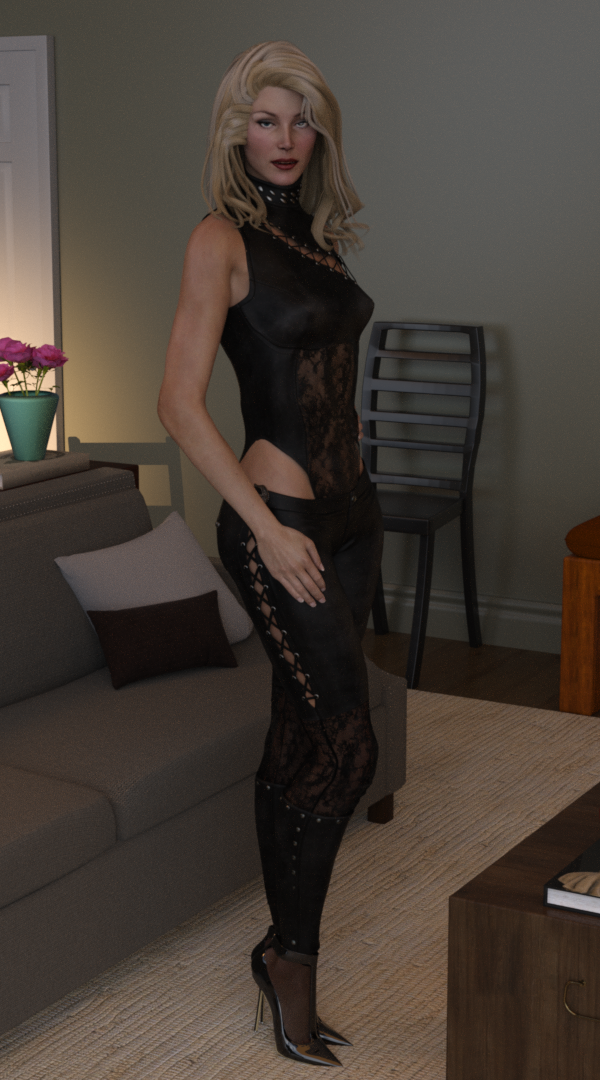
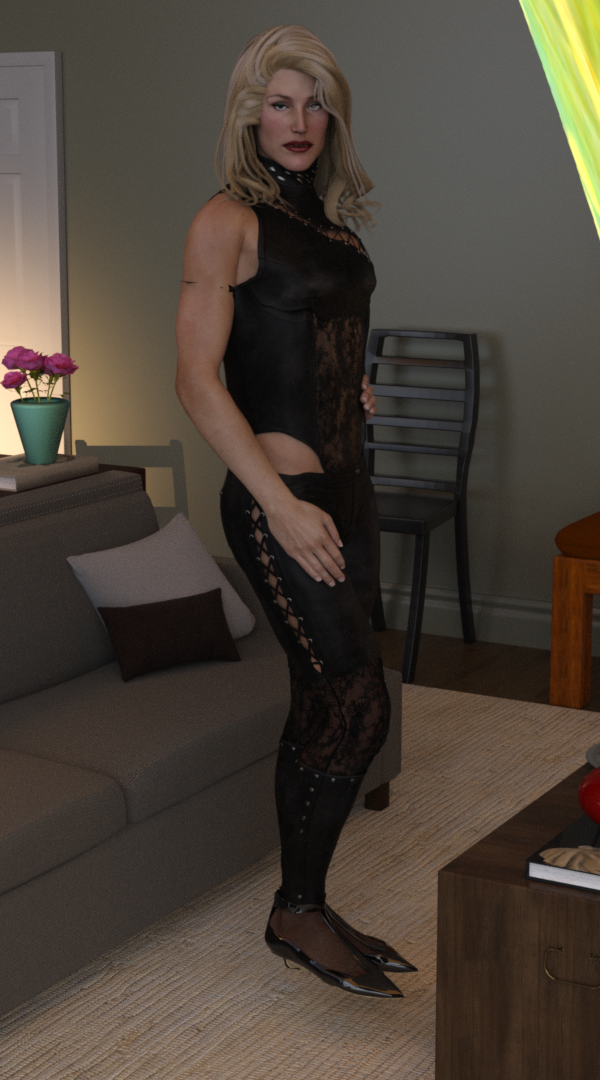
A V3 morph on the left, M3 morph created simply by importing an M3 mesh as a FBM on the right and applied at 100%. In fact you can add in every Gen3 base character - A3, H3, F3, SheFreak 3, GND2, GV3 and Iv etc. as they are all based on the same unimesh origin mesh. The same can be done with Generation 4, V4/M4/A4/H4/F4
In effect with Genesis and G9, DAZ released the sex-undifferentiated base model and the sex differentaited base figures are morphs. While for Generation 3 & 4, Genesis 2, 3 & 8, DAZ didn't release the base unimesh as a figure, instead only released the sex differentiated morphs as base figures.
Where you can take advantage of this is in creating TriAx/weight mapped versions of V3 & V4, and then you can have effort-free autofit clones for male clothing and you can apply male characters as fbm's too. OK, a limited & niche area, but it does mean that you can create autofit clones for your modernised V3/V4 by morphing M3/M4 to match the G3/G8/G9 shapes for the male clothing as well as doing the same with V3/V4 on the female side. (full details in the rather long tutorial pdf here [if you have loads of time and a burning desire to use V3/V4 in their original state but modernised to take advantage of autofit and autofollow for many generations of clothing] https://www.daz3d.com/forums/discussion/655676/tutorial-making-triax-figures-from-old-parametric-characters/p1)
Regards,
Richard
How to flip half of a prop?Drogo Nazhur said:
Catherine3678ab said:
Drogo Nazhur said:
Catherine3678ab said:
A few possibilities: cut it into sections and flip that half : turn it into a clothing figure, add deforce and use wind or gravity to adjust its location, etc.
More information might be a good idea for better suggestions.
It's a police uniform but the gun holster is on the left side and I would like it on the right side
Okay, that should be easy enough to do.
If you use Hexagon, send the figures over the bridge to it. Then create a symmetry figure of the gun holster, place it where desired. Select only that new gun holster and send it back over the bridge to D/S. Polish it as desired and save it as a prop figure.
Another method [less reliable IMHO] can be to select the gun holster and use the resize options on the parameter tab. Using one of the 3 options to effectively flip it to the reverse. i.e. if x=10 try x=-10 And again once you have it positioned as desired, export it out and then import it back in [so it's landing right where it left from] and save it as a prop file.
I can't select the gun and the holster because the entire thing is one piece of clothing -- the shirt, the pants, the holster, the gun, etc., is all included as "outfit" ... these is no way to select individual items
Actually yes there is, in Hexagon. With the clothing set in Hexagon, select the polygons for the gun holster and "copy/delete/paste." This will give you a separate item.
There's Always Another Sale Thread -- Discussions Only Pt 4miladyderyni_173d399f47 said:
[ snip ]
It does in fact lack the back octive hole, the holes aren't spaced right (especially that huge gap between the last two!) and the bottom part doesn't twist at all... the lowest hole is right in line with the other ones. One of these days I might kitbash the thing with geometry editor and make it usable, but as it stands, it's only good for shots where you can't actually see most of it.
(EDIT: I just uploaded the render I did with the recorder in it to my gallery... I spent an absurd amount of time trying to get a pose to work and gave up and had her just holding it instead. Maybe she only plays on the bridge/intro/outro on that song? -- Link in sig)I'm soprano & sopranino mostly; I have small hands, and the alto can be a bit much for me for extended periods. I havent tried a tenor, though I do love the sound when I've heard others play them.
And a +1 to the bagpipes, even though I can't hear them. (We're not going to talk about how many CDs of bagpipe music I own... *whistles innocently*)
@SilverGirl Oh we have more in common! Good luck inproving that soprano model. I MUST get over my reluctance to meddle with meshes. The tenor (25.5" long) is sometimes a stretch for me but the keys help. :D (I attached a picture in case anyone is curious.)
Regarding the bagpipes in One Man Band, I think they'd be best for more historical settings, it's not a modern set. Maybe tartan textures/shaders for cloth and polished wood and ivory for the drones & chanter would help?
BUT! You think that recorder pose was awful? The bagpipe pose is the WORST! The fingering is SO wrong! Unlike most woodwinds, you don't finger with the pads at the tips; you use the middle pads, except for some of the grace note fingerings (bagpipe music is mostly grace notes). My middle & high school bands included pipe & drum corps, so I learned the basics, although piping turned out not to be for me - but I am fond of the music.
I tired to find your bagpipe render but it wasn't there. I did enjoy the other images. Are those adorable pink things drinking from the glasses or just being decorative?
Oh, I don't have a bagpipe render, just the recorder render. And it's a little easy to miss with the angle I have her holding it (necessary to cover for the inaccuracy of the model). It's the one with the blue guy playing guitar. :)
Glad you liked the others, though. The adorable pink things were the April Fool's gift last year... the idea was that they started green, but they changed color once they had some of the drink. I have no idea if that came across visually, but the idea entertained me.
I get the reluctance in playing with meshes... it's definitely intimidating. That and reassigning material zones have been complete lifesavers, though, because so often I only want a part of something (I've been known to delete entire pieces of furniture because all I wanted was a drawer handle).
For the recorder, what I think I'll do is pull it into an empty scene, delete the bottom (turnable) part, and save it as a subscene. Then exit out, pull in a new one, and delete everything except the bottom and make another subscene. Exit out, open both subscenes as a merge, and parent them. Maybe it's easier or more elegant with an import/export into other programs, but I haven't had the mental bandwidth to tackle anything outside Daz yet, and this would make it funcitonal enough for my purposes.
Doesn't fix the spacing issue with those bottom two holes, unfortunately. Might have to shave a bit more of the mesh there, which would make the whole thing just slightly too short, but... well, better than what's going on right now, anyway.
How to flip half of a prop?Catherine3678ab said:
Drogo Nazhur said:
Catherine3678ab said:
A few possibilities: cut it into sections and flip that half : turn it into a clothing figure, add deforce and use wind or gravity to adjust its location, etc.
More information might be a good idea for better suggestions.
It's a police uniform but the gun holster is on the left side and I would like it on the right side
Okay, that should be easy enough to do.
If you use Hexagon, send the figures over the bridge to it. Then create a symmetry figure of the gun holster, place it where desired. Select only that new gun holster and send it back over the bridge to D/S. Polish it as desired and save it as a prop figure.
Another method [less reliable IMHO] can be to select the gun holster and use the resize options on the parameter tab. Using one of the 3 options to effectively flip it to the reverse. i.e. if x=10 try x=-10 And again once you have it positioned as desired, export it out and then import it back in [so it's landing right where it left from] and save it as a prop file.
I can't select the gun and the holster because the entire thing is one piece of clothing -- the shirt, the pants, the holster, the gun, etc., is all included as "outfit" ... these is no way to select individual items
How to flip half of a prop?Drogo Nazhur said:
Catherine3678ab said:
A few possibilities: cut it into sections and flip that half : turn it into a clothing figure, add deforce and use wind or gravity to adjust its location, etc.
More information might be a good idea for better suggestions.
It's a police uniform but the gun holster is on the left side and I would like it on the right side
Okay, that should be easy enough to do.
If you use Hexagon, send the figures over the bridge to it. Then create a symmetry figure of the gun holster, place it where desired. Select only that new gun holster and send it back over the bridge to D/S. Polish it as desired and save it as a prop figure.
Another method [less reliable IMHO] can be to select the gun holster and use the resize options on the parameter tab. Using one of the 3 options to effectively flip it to the reverse. i.e. if x=10 try x=-10 And again once you have it positioned as desired, export it out and then import it back in [so it's landing right where it left from] and save it as a prop file.
Questions about the UserData fileThanks for replying Richard and barbult
Richard- I did't make them into a product .I just manually added them to the data & people folders. I then went to the Content DB Editor and gave them categories, etc. Maybe that's the problem.
barbult- I tried that, but none of the metadata, e.g. the categories that I applied, showed up.
Well I did just buy the Content Wizard (since it is on a good sale). Maybe it will set these package up correctly (if I can figure out how to use it).
Thanks again
LD
Questions about the UserData fileThe User Data file contains metadata that you have created, corrected, or added. After copying it to your other computer, you need to go to the Content Library on that other computer and import that User Data file with the Content DB Maintenence tool.
Questions about the UserData fileUser data should have data for the local User product - things that have been suplied as oit turned into a vendor product will hve their own .dsx file with their metadata
DAZ Connect - content owner must re-authenticate - SOLVEDRichard Haseltine said:
hjake said:
Richard Haseltine said:
It doesn't actually do any harm, it was needed to access encrypted Daz Connect-only content, but there isn't any of that so other than the reminder it won't have any effect (assuming you are not needing access to Premier content) You can make it go away by using Connect>Log In; if you leave the Update Metadata box unchecked it won't download any product details, just validate that you have an account.
Hi Richard, please confirm you are refering to the "Show Metadata Import Page" should be unchecked before logging into my DAZ account in DAZ Studio to avoid any hassle with DAZ connect.
It's an option in Connect>Log in, the dialogue that asked for your account details.
Thanks Richard. I did as you recommended. Pop-up has disappeared after DS restart.
DAZ Connect - content owner must re-authenticate - SOLVEDhjake said:
Richard Haseltine said:
It doesn't actually do any harm, it was needed to access encrypted Daz Connect-only content, but there isn't any of that so other than the reminder it won't have any effect (assuming you are not needing access to Premier content) You can make it go away by using Connect>Log In; if you leave the Update Metadata box unchecked it won't download any product details, just validate that you have an account.
Hi Richard, please confirm you are refering to the "Show Metadata Import Page" should be unchecked before logging into my DAZ account in DAZ Studio to avoid any hassle with DAZ connect.
It's an option in Connect>Log in, the dialogue that asked for your account details.
Why does the shader work on a primitive, but not on an imported objHey guys,
I exported an obj from blender and I tried to apply a brick shader to it, but no matter what I try to adjust under the horizontal/verticle tiles, it just does not work
However, when I create a simple sphere, then, with the Surface tab selected sphere, I can double click on the shader and it appears properly as I would expect it to do.
Do I have to export from blender with something special in the export window selected or do I have to import an obj file with something special selected in the import window?
Thanks in advance
DAZ Connect - content owner must re-authenticate - SOLVEDRichard Haseltine said:
It doesn't actually do any harm, it was needed to access encrypted Daz Connect-only content, but there isn't any of that so other than the reminder it won't have any effect (assuming you are not needing access to Premier content) You can make it go away by using Connect>Log In; if you leave the Update Metadata box unchecked it won't download any product details, just validate that you have an account.
Hi Richard, please confirm you are refering to the "Show Metadata Import Page" should be unchecked before logging into my DAZ account in DAZ Studio to avoid any hassle with DAZ connect.
Products Showing but Missing?I never could figure out Content Package Assist but with Content Wizard I have no issues and it assigns metadata and installs products. You need to tweek things sometimes and depending on how the .zip file was package to open it and repackage and rezip it before using it. The commercial thread is here https://www.daz3d.com/forums/discussion/387911/released-content-wizard-commercial/p1.
Curly Top Updo Hair Texture Expansion not showing up in DazI tried to install it and looking at DIM log, it's unable to find the various files it has to install but for some reason, the installation is deemed succesfull

2025-06-18 20:39:44.029 [WARNING] :: File: Content/People/Genesis 9/Hair/OOT Curly Top Updo/MATS/Curly Top Updo Hair Color 031 Very Light Pink.duf listed in package manifest, not found in package: Curly Top Updo Hair Texture Expansion
2025-06-18 20:39:44.029 [WARNING] :: File: Content/People/Genesis 9/Hair/OOT Curly Top Updo/MATS/Curly Top Updo Hair Color 031 Very Light Pink.png listed in package manifest, not found in package: Curly Top Updo Hair Texture Expansion
2025-06-18 20:39:44.029 [WARNING] :: File: Content/People/Genesis 9/Hair/OOT Curly Top Updo/MATS/Curly Top Updo Hair Color 031 Very Light Pink.tip.png listed in package manifest, not found in package: Curly Top Updo Hair Texture Expansion[...]
2025-06-18 20:39:48.208 [INFO] :: Asset : People/Genesis 9/Hair/Daz Originals/OOT Curly Top Updo/MATS/Hairblending PRESETS/Curly Top Updo MIX 28 Yellow and Light Blonde.duf could not be located
2025-06-18 20:39:48.208 [INFO] :: Asset : People/Genesis 9/Hair/Daz Originals/OOT Curly Top Updo/MATS/Hairblending PRESETS/Curly Top Updo MIX 29 Black and Red with Blonde Highlights.duf could not be located
2025-06-18 20:39:48.208 [INFO] :: Asset : People/Genesis 9/Hair/Daz Originals/OOT Curly Top Updo/MATS/Hairblending PRESETS/Curly Top Updo MIX 30 Pink and Black Fade.duf could not be located2025-06-18 20:39:48.237 [INFO] :: Install Successful: Curly Top Updo Hair Texture Expansion
What I don't understand is after installing the product manually and importing its metadata, as far as I can see, everything works fine.
A temporary fix:
1. Extract 'IM00087388-01_CurlyTopUpdoHairTextureExpansion.zip' yourself (outside of the DIM folder)
2. Copy all the content of the 'IM00087388-01_CurlyTopUpdoHairTextureExpansion/Content/' folder (you should have a People and a Runtime folders selected) into a library (some advices about which library to chose below).
Now, you should find the files to load the various presets in '/People/Genesis 9/Hair/Daz Originals/OOT Curly Top Updo/MATS' inside the chosen library.
About which library to use, I suggest avoiding using the library managed by DIM, in case it cause problem later and the safest bet seems to create a library just for the expansion, one you'll be able to easily remove after a proper resolution to this problem will be provided by Daz.
If you're using Smart Content, you will have to do the following step to get access to it:
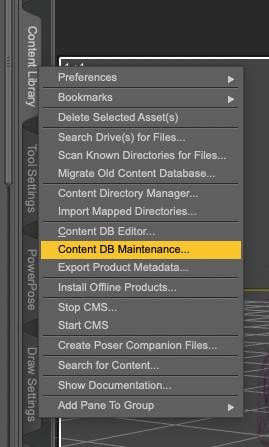
With your Content Library active, right click on the tab and select Content DB Maintenance:
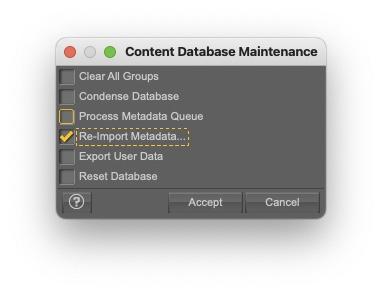
A window will open, select Re-import Metadata:
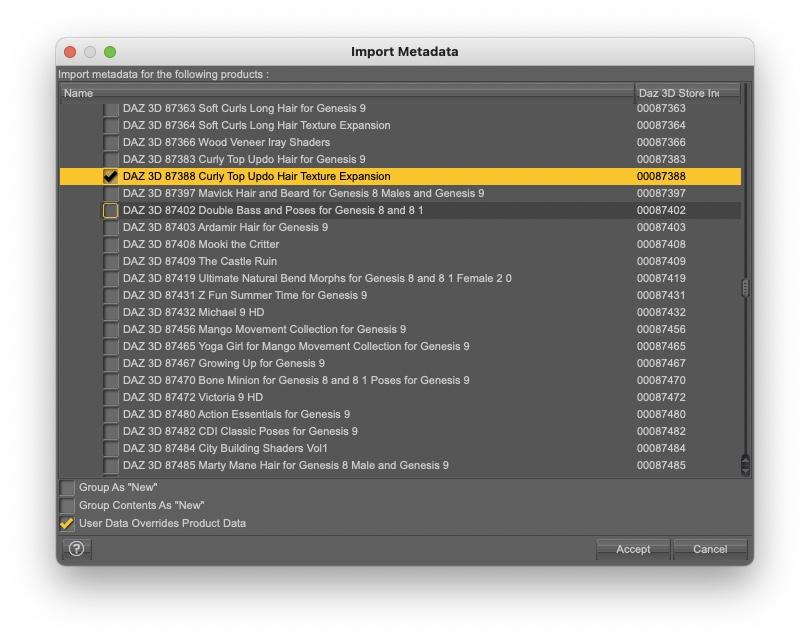
In the new window, unselect everything (the goal is to only import one product metadata, because it's faster this way) and search for the extension (easiest way to find it is scrolling down until you see it's product ID: 87388), then select the extension. You should have something like that:
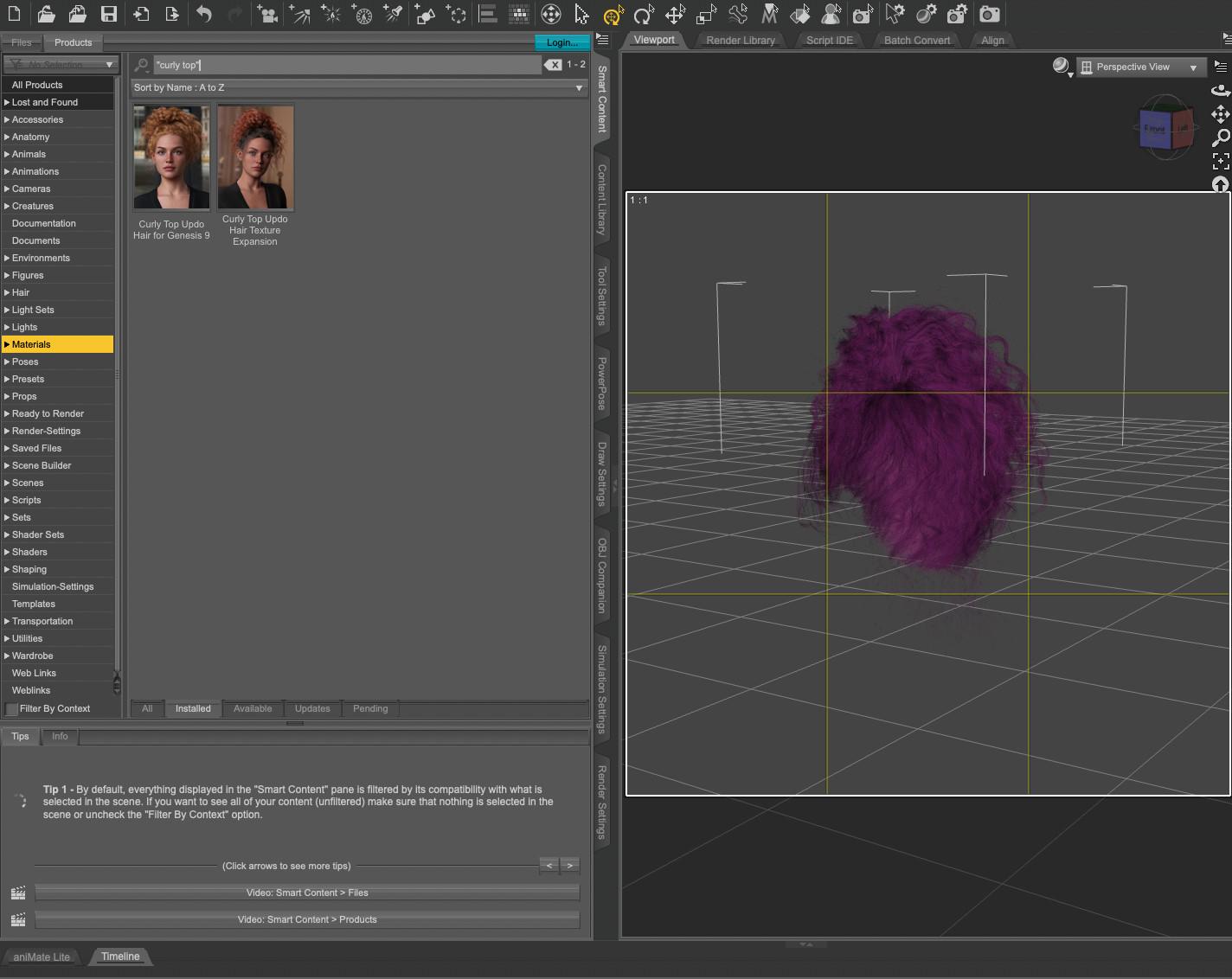
Click accept and after a couple of seconds, you should now be able to access the extension through Smart Content too:
For a more definitive fix, you'll have to open a ticket (I'll do it myself too).
DAZ Connect - content owner must re-authenticate - SOLVEDI also have no interest in using Daz Connect. I deleted all the cloud folder content a long time ago. I am not a Premier member. I don't allow login to download metadata. I haven't logged in for a long time. I see no benefit to logging in. My File/New advertisement still shows "See What's New Daz Studio 4.23". 4.23 hasn't been new for a long time! I have no interest in logging in to get new ads. DIM works reliably. Daz Studio works fine in offline mode. The File/New slowness to show the dialog content continues to be a big annoyance. Sometimes it takes 20 seconds to fully display. All this inconvenience just so Daz can show ads?
Daz 3D is part of

Connect
DAZ Productions, Inc.
7533 S Center View Ct #4664
West Jordan, UT 84084Licensing Agreement | Terms of Service | Privacy Policy | EULA
© 2026 Daz Productions Inc. All Rights Reserved.