-
How do I make Victoria 5 smile?
Thanks Richard.. ill try those two mouth morphs.
Also I found this product for expressions, does this look like it would work for my Victoria 5 and genesis 1 males?
https://www.renderosity.com/mod/bcs/exnem-basic-emotions/95056/
Test a new character Morph?I thought that would fix things, the ERC. That's why I wanted to offer to share the whole enchilada, as far as I've puzzled it out, at least. Let's give an example.

This is Sabrina. She's an entirely custom character. Some day, I'm going to dig into creating a fully custom skin for her. She has Iray materials for G8, but I rendered her toon in blender because I was busy and I can limit Blender renders to using 2 CPU cores, while Iray will use all four and slow down everthing else. Sabrina goes about 5'2" (157.48cm for silly metric people). Compare to G8 base female who is a shade over 5'9. When I designed Sabrina, I wanted her to work well with either Base female or Victoria poses. Since I don't have any V8 poses, the most recent iteration of Sabrina was built on proprotions similar to G8/G3. She has a full suite of Joint Controled morphs. Sadly, there is more work to do on them. Right now, her armpits show an unseemly gap, so that's going to require reworking the shoulder JCMs. She also has custom expression control MCMs that alter her base level emotes to fit her character. This is as close I've gotten yet to professional level character.
I wasn't planning to go over how I do all of that, but I was going to hit on a key point. Sabrina being so much shorter than G8 Basic Female.
It's not a good idea to make short morphs. There are some elements, like the various height moprhs that could be used, but the key thing is that it's hard on the figure (specifically, it increases the chances of bad results with rigging) if the size difference between the base shape and the morph is very large.) The image blow illustrates a lot of how I dealth with that.
On the left, in the white, is Sabrina, again. She divides into two morphs and two character controllers. So on left is the Full Sabrina dial. Next to her, in green, is only the Full Body Morph (FBM). The first thing you notice is the FBM is much taller. Very much taller. About 7 inches. Next along, in yellow, is just the FHM (Full Head Morph). What may be hard to see at this point is that the FHM is about the same size in that third case as it is in the first and last cases. The last case, in blue, is an alternate, more fit version of Sabrina.
Because I wanted to keep her proprotionally the same for poses, she's somewhat unrealistic. She should be a bit less skinny and probably a bit longer of torso compared to limbs, but that's the price one pays. I suspect I can deal with skinny, but I haven't decided if I will because I may have to remake all the body JCMs to do so.
In order to get the right effects (shorter, but otherwise normal, thus requiring a fairly constant head size), what I did was scale the whole figure down to 86.84%, I think. Then I used Head Propagating Scale to restore the head size. Leaving aside the Head scale, which was personal choice, this is how Daz wants you to make figures. One reason is it's hard on the tools trying to deal with extreme changes, but another is that it makes mix and match easier. If you "bake in" a height change, then you decide to mix the character with another, you must always have the height change, meaning using height or scale morphs to deal with it. If, instead, you set the height change to live on the main character dial, you and mix and match the individual body and head morphs and the figure will maintain, roughly, her supermodel height until you get around to specifying how tall you want her to be.
This was one of the things I wanted to cover, along with how to create separate head and body morphs. (Something I knew how to do for a while, but never got around to dealing with. My previous comment about G8 making it easier is that there is a tool in the Dev folder for making those separate morphs.)So did you box model and sculpt Sabrina in Blender and then create the rigging, weight maps, MCMs, & JCMs in DAZ Studio? That is a A -Z tutorial I would buy from the DAZ Store or elsewhere just to have a reference I can send to a professional printer although I understand most (or may not!) of the details of box modeling / sculpting in Blender might be left out.
Test a new character Morph?I thought that would fix things, the ERC. That's why I wanted to offer to share the whole enchilada, as far as I've puzzled it out, at least. Let's give an example.
This is Sabrina. She's an entirely custom character. Some day, I'm going to dig into creating a fully custom skin for her. She has Iray materials for G8, but I rendered her toon in blender because I was busy and I can limit Blender renders to using 2 CPU cores, while Iray will use all four and slow down everthing else. Sabrina goes about 5'2" (157.48cm for silly metric people). Compare to G8 base female who is a shade over 5'9. When I designed Sabrina, I wanted her to work well with either Base female or Victoria poses. Since I don't have any V8 poses, the most recent iteration of Sabrina was built on proprotions similar to G8/G3. She has a full suite of Joint Controled morphs. Sadly, there is more work to do on them. Right now, her armpits show an unseemly gap, so that's going to require reworking the shoulder JCMs. She also has custom expression control MCMs that alter her base level emotes to fit her character. This is as close I've gotten yet to professional level character.
I wasn't planning to go over how I do all of that, but I was going to hit on a key point. Sabrina being so much shorter than G8 Basic Female.
It's not a good idea to make short morphs. There are some elements, like the various height moprhs that could be used, but the key thing is that it's hard on the figure (specifically, it increases the chances of bad results with rigging) if the size difference between the base shape and the morph is very large.) The image blow illustrates a lot of how I dealth with that.
On the left, in the white, is Sabrina, again. She divides into two morphs and two character controllers. So on left is the Full Sabrina dial. Next to her, in green, is only the Full Body Morph (FBM). The first thing you notice is the FBM is much taller. Very much taller. About 7 inches. Next along, in yellow, is just the FHM (Full Head Morph). What may be hard to see at this point is that the FHM is about the same size in that third case as it is in the first and last cases. The last case, in blue, is an alternate, more fit version of Sabrina.
Because I wanted to keep her proprotionally the same for poses, she's somewhat unrealistic. She should be a bit less skinny and probably a bit longer of torso compared to limbs, but that's the price one pays. I suspect I can deal with skinny, but I haven't decided if I will because I may have to remake all the body JCMs to do so.
In order to get the right effects (shorter, but otherwise normal, thus requiring a fairly constant head size), what I did was scale the whole figure down to 86.84%, I think. Then I used Head Propagating Scale to restore the head size. Leaving aside the Head scale, which was personal choice, this is how Daz wants you to make figures. One reason is it's hard on the tools trying to deal with extreme changes, but another is that it makes mix and match easier. If you "bake in" a height change, then you decide to mix the character with another, you must always have the height change, meaning using height or scale morphs to deal with it. If, instead, you set the height change to live on the main character dial, you and mix and match the individual body and head morphs and the figure will maintain, roughly, her supermodel height until you get around to specifying how tall you want her to be.
This was one of the things I wanted to cover, along with how to create separate head and body morphs. (Something I knew how to do for a while, but never got around to dealing with. My previous comment about G8 making it easier is that there is a tool in the Dev folder for making those separate morphs.)how do I get V4 please?Do you mean the victoria 4 that is still in the store (though you have to search for her) or the Victoria 4 EZ that used to be part of the old starter content for DS 3? The full Victoria 4 should be where Divamakup says.
I was able to find the content installer that includes V4 EZ in my product library here (Search Daz Studio 3) though I'm not sure if it will install properly without DS 3. I didn't download it to check, so I can't even be sure it's available for download, though it had a manual download button on the product library page.
how do I get V4 please?If it's not under Smart Content >> Figures you should be able to find it under Content Library >> Products >> V >> Victoria 42 Base.
Lt. Parker - it would have been nice if ....Yeah, always assume clothing and accessories don't come with a package unless specificied or in a bundle since that is usually the norm. IRAY is the default renderer in DS, so unless it specifically says it has 3DLight shaders, assume it is IRAY only.
The bikini is this one https://www.daz3d.com/hongyu-s-bikini-2-for-victoria-7 with a custom camo texture/shader applied.
The outfit on the main promo is this one https://www.daz3d.com/apocalyptica-for-genesis-3-female-s
The beret is this one https://www.daz3d.com/headwear-for-genesis-2-and-3-male-s
Hope that helps
Glute and Breast Control Genesis 8 (Commercial)After these are released, growing up is all I will need before moving on to Gen 8. I purchased victoria 8 and most clothes and skins work so I am waiting on your tools mainly. Breast control isn't major for me but glute control I use all the time. I hope vascularity and skin builder aren't too far away. They both add realism and personality to everything I do. I purchased all of the Daz morphs that they put up for sale but shape shift is another one that I don't have to have but I prefer to use regularly. Just a heads up, if you were to ever consider making a skin builder for men I would buy that in a hurry. I am always struggling to find the extra realism that the girls have with my male models. Michael 7 didn't even have nipple hair.
Solved - Indie Game Developer LicenseFor anyone new looking at this discussion here are some thoughts on a Game Developer license.I do a bunch of 2D projects that do not require anything but a purchase from the Daz store. My library is diversified far beyond the scope of my projects simply because I fell in love with the items (and twitched until I had ithem). The smaller (more targeted) your library is the better and a good practice is to draft all scenes in advance. Here's why.
There are more talented Daz artists than some of us can keep track of and one of those "artists" is Daz Originals. Daz Originals often lists other artist (on a product page) next to their name, because these artists were paid by Daz to work on a Daz Original and Daz likes to give them "credit" for doing a great job. This does not entitle me to extend the license to their products. This "credit" or honorable/honourable mention benefits them when we click the links, see what other goodies they made, and buy something from their catalogues. If we find some hair, clothes or poses we like and tthe product pages does not display Daz Originals as the artist, but displays only other artist names (one may model an outfit while the other did the textures for it) then we must buy a license from the individual artist(s) to use their product(s) in a gaming environment. This holds true for 3d mockups/samples and 3d prototype one might use for promotional or funding/investment purposes. 3d printing is a no-no and requires a whole different license. So in short when I bought the Victoria 8 bundle, all products in that bundle were Daz originals, and can be utilized without further licenses. If I want to have deranged looking V8 in some wild hair, torn clothes, racing down some city streets , away from Zombies, I could have to buy a bunch more licenses for hair, dress, textures, expressions, poses, Zombies, their outfits, city streets, dumpsters and cars etc. In short every artist is selling an individual line of products and offer licenses for their line. If it's not on the product page in their catalogues, I can still approach the artist directly or via and request to purchase a license. They have the right to refuse and say, "Thanks but no thanks. No license from me," but because they have their art here for sale I doubt that would be the case. IMHO, the first most important license to obtain is the one for Daz Originals as all of the base bundles and original characters are Daz Originals. If you make over 100k a year you cannot buy this particular license. The license price depends on income and the one I bought stipulates it is for an annual persona;/business income under 100,000.
Daz Originals tag a portion (over a third) of their 9,100+ products as PC+ (similar to listing an additional artist called PC+) and gives an extra exclusive discount to PC+ members for these PC+ items (still Daz Originals). For anyone new reading this, here's how to quickly find Daz originals (and other individual artists).
* edited to add the word but
Install ManagerCould someone please explain this for me. Everytime I purchase something from Daz I have to download the Install Manager, Just had to do this with the latest Iray Skin Shader for Genesis 8 and an update to Victoria 8.
Thanks
Pete
Show Us Your Iray Renders. Part VIGenesis 3 on Polish' Road Cruiser. The background is part of the HDR source, I've added a rim light to give the hair a bit of a glow, a spec light to give the bike a bit of a shine. Rendered in Iray.
Good work with the lightning indeed!
My last portrait with Victoria 8.
 [Released!] EcVh0's People - Katarina HD For Genesis 8 Female [Commercial]
Looks great!
Please include a no brows option so we can use the Victoria 8 eyebrows.
Will do! Working on it right now :)
Thank you :-)
How long do we need to wait?
I have finished up the no brow option! There are still lots to add tho, so it might take awhile but I will post updates here everyday :)
Wear Them Allautofit yeah, and if you check the pdf, you'll see there are some sliders in teh parameters to help smoothe stuff out too. :D
How it works is you select the character you want to dress in the old non-compatible clothing and then click the preset icons of the incompatible clothing and Wear Them All intercepts the clothing preset and gives you a list of options of in a grey dropdown list of original DAZ model capatibilities like Victoria 4, Michael 4, A3, V3, M3, Genesis, Genesis 2 and so on. It is called autofit and it's intergrated to look like it's a part of the DAZ 3D autofit you should already of used before.
Ah yes, thanks for that, so it's integrated into auto fit, I understand now.
Wear Them AllHow it works is you select the character you want to dress in the old non-compatible clothing and then click the preset icons of the incompatible clothing and Wear Them All intercepts the clothing preset and gives you a list of options of in a grey dropdown list of original DAZ model capatibilities like Victoria 4, Michael 4, A3, V3, M3, Genesis, Genesis 2 and so on. It is called autofit and it's intergrated to look like it's a part of the DAZ 3D autofit you should already of used before.
Ah yes, thanks for that, so it's integrated into auto fit, I understand now.
Wear Them AllI just purchased this for GF3, where do you find it? The PDF suggest the clones are in the parameters tab, but I dont see the clone sliders anywhere.
How it works is you select the character you want to dress in the old non-compatible clothing and then click the preset icons of the incompatible clothing and Wear Them All intercepts the clothing preset and gives you a list of options of in a grey dropdown list of original DAZ model capatibilities like Victoria 4, Michael 4, A3, V3, M3, Genesis, Genesis 2 and so on. It is called autofit and it's intergrated to look like it's a part of the DAZ 3D autofit you should already of used before.
Novica & Forum Members Tips & Product Reviews Pt 9barbult's Top 5 for June 2017
- Ceridwen Render
- Nyarai for Genesis 3 Female Render 1 Render 2
- Harpwood Trail Render 1
- Victoria 8 Render 1 (I dialed in some of the morphs to make her older and heavier) Render 2 (again with some morphs dialed in, this time using the randomizer)
- Hair Lustre Shaders for Iray Render 1 Render 2 Render 3
Wear Them All"Princess of Magic II" for Victoria 3 on Genesis 3 Female. Courtesy of the "Baron" Baron_Von_ Harkonnen. All of his models are about 10 yr or older, but all of them have separate matzones making the application of Iray shaders a snap.

I love that one, doesn't look like its available anymore though!! Nice job!
[Released!] EcVh0's People - Katarina HD For Genesis 8 Female [Commercial]Looks great!
Please include a no brows option so we can use the Victoria 8 eyebrows.
Will do! Working on it right now :)
Thank you :-)
How long do we need to wait?
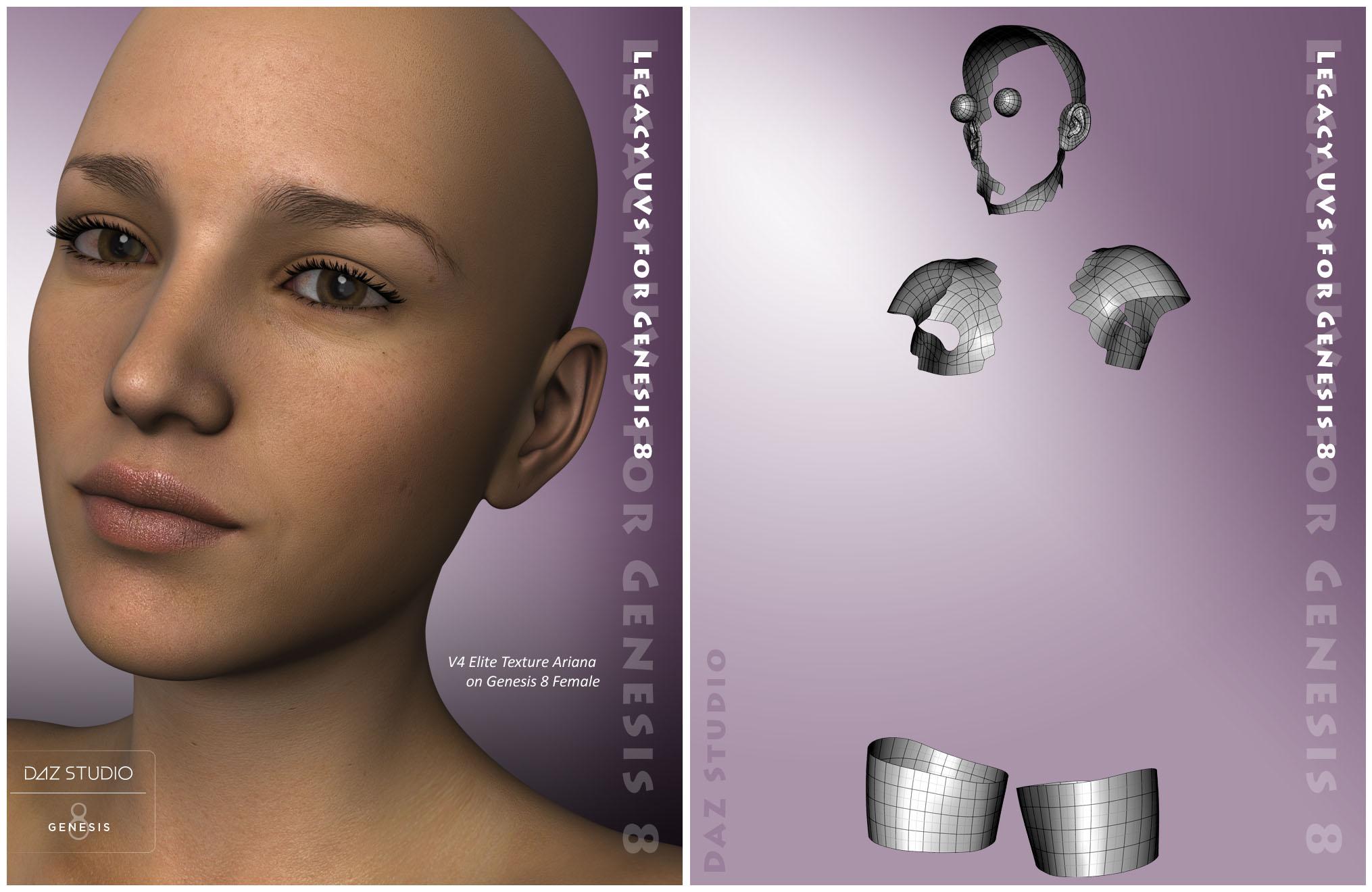
Legacy UVs for Genesis 8 [Commercial]Update: 27 October 2017
Released today: Legacy UVs for Genesis 8: Michael 4
https://www.daz3d.com/legacy-uvs-for-genesis-8-michael-4
Update: 8 September 2017
Released today: Legacy UVs for Genesis 8: Genesis 2 Male, Michael 5 and Michael 6
https://www.daz3d.com/legacy-uvs-for-genesis-8-genesis-2-male-michael-5-and-michael-6
Update: 21 July 2017
Released today: Legacy UVs for Genesis 8: Victoria 5 and Legacy UVs for Genesis 8: Victoria 6
https://www.daz3d.com/legacy-uvs-for-genesis-8-victoria-5
https://www.daz3d.com/legacy-uvs-for-genesis-8-victoria-6
Update: 14 July 2017
Released today: Legacy UVs for Genesis 8: Victoria 4
https://www.daz3d.com/legacy-uvs-for-genesis-8-victoria-4
Update: 8 July 2017
Released today: Legacy UVs for Genesis 8: Genesis 2 Female
https://www.daz3d.com/legacy-uvs-for-genesis-8-genesis-2-female
Original Post: 5 July 2017
Legacy UVs for Genesis 8: Genesis 2 Female and Legacy UVs for Genesis 8: Victoria 4 will be released shortly.
Because of the differences in the eye geometry on Genesis 8 I have added an additional attachment which attempts to replicate the eye geometry of earlier generations. This eye attachment loads with the geografts, though is itself not a geograft, and comprises surfaces which will take the MATs from legacy cornea and sclera surfaces. Full details are given in the PDF documentation.
Also, the geografts now load as one piece, not five, so that should make things simpler to manage.
This is a new thread for the Genesis 8 edition of the Legacy UVs. It is for issues, suggestions and questions which may arise.
 How do I make Victoria 5 smile?
Hi , I am new to DAzstudio but I have managed to create some Victoria 5 figures and add hair and clothes and actually get them to look the way I want. My project requires many images of characters having discussions, exhibiting various facial expressions. I found the controls for Expressions in the parameters panel when you have the head selected. However I only see sliders for 4 expressions, and none of them are Happy/Smile. I have sliders for angry, concentrate, fear and glare. I assume I've only got the basic freebie expressions. Does anyone know how to add additioal expressions for Victoria 5 and genesis 1 males? Thanks
Line running through arms of V8 skinThose come usually when the wrong UVs are chosen for a particular texture set. I also have seen them on textures sets that have been converted but converted using the wrong UVs.
I know what you mean. I have had this happen with G3 and the different UVs. However, this is V8 skin and there is only one base figure for to choose from for all G8 characters. One thing I did do is load the G8 character and then applied the V8 skin to it rather than loading Victoria 8 as a character.
EDIT: I did another test using the same pose and similar lighting. This time I loaded V8 from scratch vie smart menu, so there is no morphs or nothing just a DAZ default Victoria 8 load. I also tested out another skin and a different pose but the results are the same. This seams to be a G8 figure/shape issue rather than a skin issue.
This is shader SSS issue. Its sometimes appear. Depends on materials SSS settings.
Daz 3D is part of

Connect
DAZ Productions, Inc.
7533 S Center View Ct #4664
West Jordan, UT 84084Licensing Agreement | Terms of Service | Privacy Policy | EULA
© 2026 Daz Productions Inc. All Rights Reserved.