-
200 Free Morphs G9
Oh wow! I haven't had the funds available to pick up the morph packs yet, so this is an extra amazing gift! This will let me play around with G9 much more!!!
Thank you so much, Sickleyield. You have always been one of my very favorite PAs, and I really appreciate all that you do ^_^ Happy Holidays!!!!
So what's compatible with what...The new 8.1 UV separates the torso into body and head so that there's less texture stretching and more detail on the neck and head. You can use G3 textures on G8.1. If you want to Map Transfer them to the 8.1 UV, you can do that, but you don't really gain anything from doing that aside from maybe compatibility with 8.1 specific scripts. Of course, you could also use an 8.1 skin that's already set up for the PBRSkin shader. Expressions are different because 8.1 has new facial rigging. The facial controls might take some getting used to, but I consider it a positive change.
Head gamesDaventaki said:
Random dial spinning with Nikolai included also used his textures. One thing I realized we are missing is a shorten nails morph. I unchecked limits and used the rounded nails morph but if you go to far it makes the nails look funny.
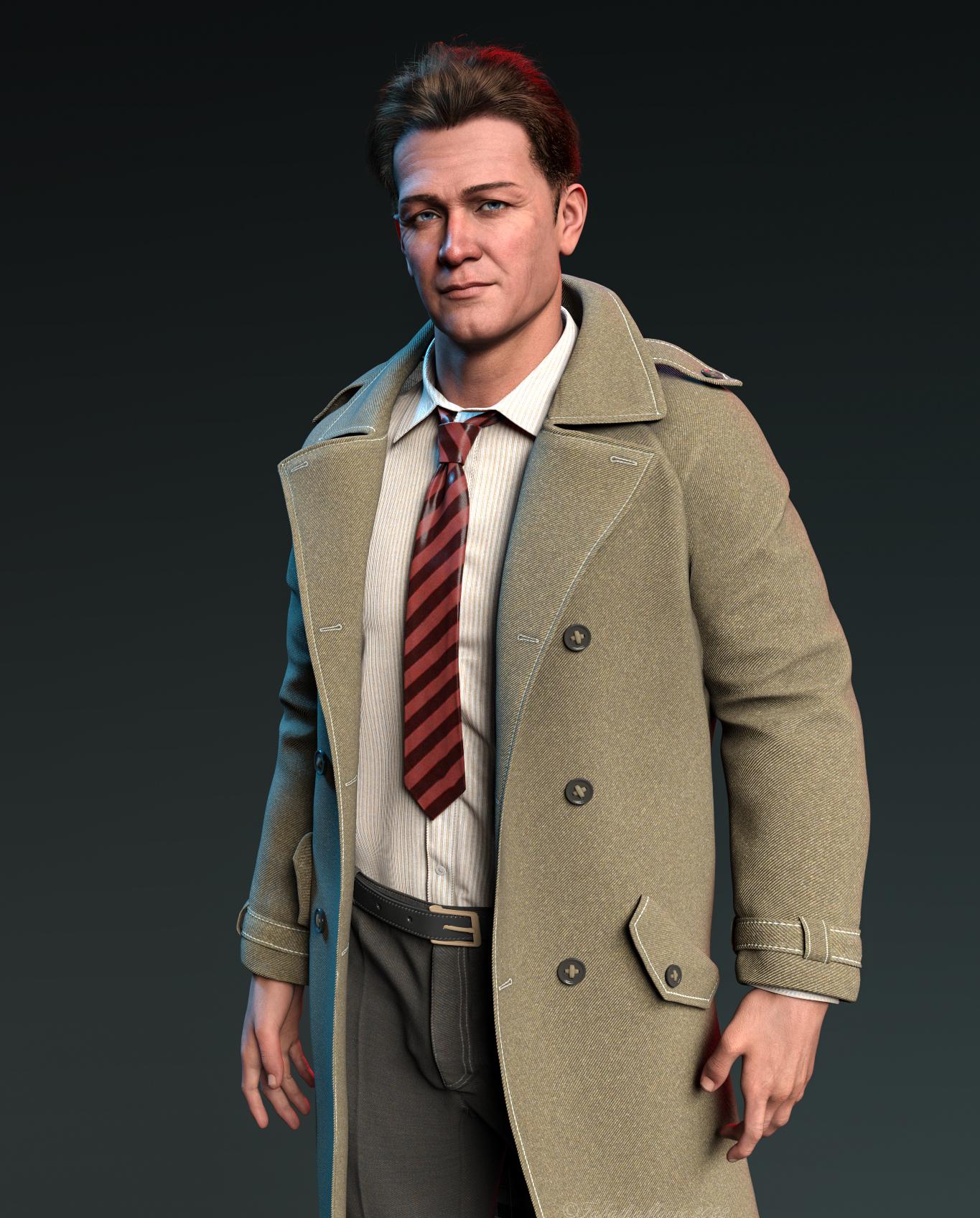
Looks like the Professor from Gilligan's Island (Russell Johnson), has come to investigate if his coconut powered cellphones are a commercial success.
So what's compatible with what...Thanks Gordig. I can probably use 8.1 then. I already did a morph from a Genesis 3 to an 8. I guess that'll work with 8.1 too. So I can use that morph (it's Brooklyn HD for Genesis 3, that I transferred to Genesis 8 a while back) on 8.1 but I'll have to get a new skin if I want to use the 8.1 UVs. Is that about right? And presumably there's something nice about the 8.1 UVs you don't get with 3 or 8? Am I right in thinking 8.1 expressions are better. In the promo images I've seen they certainly seem to be.
So what's compatible with what...Thought I'd do some Daz stuff over the holidays. Am still using Genesis 3 and 8, and haven't bought or used 8.1 or 9 things at all. Can someone explain to me in short what's compatible with what. e.g. I know I can switch skins/maps between 3 and 8. I don't think I can between 3, 8 and 8.1 (or can I). What about Genesis 9? I like the idea of a single rig you morph into male or female. Presumably no assets I have for 3 or 8 will work with that by default, clothes, poses, etc.
Then there's the new PBR shader system. Why would I use that over the Uber Shader? Is it more efficient? I read in a thread here there are problems with AO and things like that (though it looked pretty great regardless - one of those things you see if you're looking for them).
Is there a decent little summary somewhere of all these new things...
200 Free Morphs G9Thank you so much for this, love your morph sets[Released] Legacy Set Converter * Commercial *Thank you for that shameless plug!
 . Just ahead and grabbed the AMC to add to my toolbox. I believe that the blade blur might be a morph. I know that if I import the Ju88 to DS, the slider for "Prop Blur" does just that.Daz 4.11 Iray Dark Eyes Bug ?
I just started using G8 and im getting the black eyes too. Whats odd is that when I turn all of a G8 characters surfaces cutout opacity to 0%, I still see the dark spheres where the eyes would be in my renders. To remove them you have to make the eyes not visable in the perameters pane. Is that the eye moisture and sclera collision still being visible even with no surfaces present? Will the eye moisture morph work for me even if my figure is at world center? Im rendering in 3dl and If I convert to RSL textures the eyes are fine but my skin takes longer to render and doesnt look as nice
Some of the HD morphs in the Genesis 8 Female Head Morphs package stopped workingRichard Haseltine said:
Are there .dhdm files in \data\daz 3d\genesis 8\female\morphs\daz 3d\head\ files in the content directory to which the product is installed? If you have more than one active content directory are there matching files and folders in any of the others?
Hello Sir Richard
I had checked the path you referenced above and verified the parent directory to where the files are installed and they are there. In addition, with you pointing me to that folder, I had also discovered that the files were used recently (last night). So it looks like Daz is pointing to the correct directory. When I did my reinstall, it was pointing to the right directory. So I am not sure what is going on.
At first I thought it might just be the older characters that I 'rescued', but when I load up a fresh Genesis 8 female base character, it too is affected by the HD head morphs not working.
In Daz Studio, when I move an affected control, it seems like it is trying to do something, but when I ram it up to 100%, the end result is nothing.
since I have the same package for Genesis 3 Female, I tried the controls there and they are working fine. So it does seem like the problem is isolated to Genesis 8 female HD head morphs as other other Genesis 8
female morph packages are working. Also within that package the non HD morphs seem to be working.
Could there me some kind of master HD file with that package that might be corrupt or not there and that could be preventing the HD morphs from working? I don't get it, the files ARE there, but yet the log file says that Daz cant find them.
I hope we can find a solution to this soon because it is drastically affecting my characters that are supposed to look older. In fact, it was when I compared some older renders (before my mishap) to the newer ones, I noticed that the newer renders of the same character had less facial detail and the older characters look far too young. So that is what prompted me to investigate what was going on.
Also, as a heads up, I have to change hard drives, yet again, especially now with the release of Genesis 9.
Thank you,
Geo
Why does G8F take FOREVER to load?SofaCitizen said:
@Wonderland, just thought of a plan B if you wanted to try and disable the errors yourself. In Turbo Loader you can search for the morph that is throwing the error and uncheck it from there.
For example, in my previous example if the duplicate formula line listed the file "data/DAZ 3D/Genesis 8/Female 8_1/Morphs/PUBLISHING_ARTIST_NAME/PRODUCT_NAME/MORPH_FILE_TRIGGERING_CLASHES.dsf" then you could then put MORPH_FILE_TRIGGERING_CLASHES in the Morph search box and hit enter and that would give you the item to disable.
Again, that will only give you the option of disabling the second of the two products with a clash but perhaps allows you to have some control over managing this?
I just added to my last post while you were posting this. DS was updating metadata through Connect so I must have several items installed through Connect which maybe leads to duplicate formulas. I logged out of DS and now all products are in the wrong order but how do I uninstall all Connect items/?
Why does G8F take FOREVER to load?@Wonderland, just thought of a plan B if you wanted to try and disable the errors yourself. In Turbo Loader you can search for the morph that is throwing the error and uncheck it from there.
For example, in my previous example if the duplicate formula line listed the file "data/DAZ 3D/Genesis 8/Female 8_1/Morphs/PUBLISHING_ARTIST_NAME/PRODUCT_NAME/MORPH_FILE_TRIGGERING_CLASHES.dsf" then you could then put MORPH_FILE_TRIGGERING_CLASHES in the Morph search box and hit enter and that would give you the item to disable.
Again, that will only give you the option of disabling the second of the two products with a clash but perhaps allows you to have some control over managing this?
Some of the HD morphs in the Genesis 8 Female Head Morphs package stopped workingRichard Haseltine said:
Did you try reinstalling the product? How do you install your content?
Yes, I had mentioned that I have done that already. I am still using the DIM. I am thinking that this might be a "leftover" issue, from when I had deleted that folder in which Daz store d some vital information. While I have managed to fix many of the affected characters, I was wondering why some HD detail morphs didn't seem to be working anymore. I had traced nearly all the bad morphs to the Genesis 8 Female Head Morph package, and verified this through the log. So once I figured this out, I reinstalled the package, but to no avail. The problem still persists. As far as I can tell, Genesis 8 Female Head Morphs is the only one affected. Other packages and those HD morphs that came with store bought figures still work fine.
thanks
Geo
Perception check on G9 form definitionbluejaunte said:
No definition in the base shape is kinda the point. That shouldn't keep PA's from creating all that definition on their own. Raw G9 is just a base shape after all. So I don't know if you're looking at this the right way. Although of course if you somehow felt that the G9 characters that came out so far had less definition than before then I guess you could say the new base has negatively influenced creators. But nothing more than that though. There is no technical reason for less definition in characters.
I agree. I can see where some are coming from on detail and mesh definition, but G9 hasn't been out that long, so there is plenty of time for more detailed characters to come out and with the more dense mesh, hopefully users will see some amazing detail in the future. There are already 3rd party options for using older skins, better nipples, and gens and there will probably more and better ones as time goes on. I haven't spent much on G9 yet, but other than being able to easily transfer my older characters to G9, I have found everything else I need to start creating with G9.
[Released] Legacy Set Converter * Commercial *vikl1964 said:
Very nice product! Just bought and did a conversion with ease, but have one question. For aircraft that have "blade blur" geometry, is there some way to get that into the .duf files as well? And am I correct in thinking that any associated textures would have to be put in the Runtime folder? From what I reading in the above, it would appear so, but just want to confirm.
<Shamelss plug>
To convert the textures to Iray - Advanced Material Converter is your friend.
</Shameless plug>
I think that geometry is either a pose/morph, or you load a new prop item witb a texture.
I have a bunch of aircraft (Spitfires, In can check how best convert that).
Head gamesDaventaki said:
Random dial spinning with Nikolai included also used his textures. One thing I realized we are missing is a shorten nails morph. I unchecked limits and used the rounded nails morph but if you go to far it makes the nails look funny.
That is a great character and a great render of him!
Why does G8F take FOREVER to load?SofaCitizen said:
Wonderland said:
SofaCitizen said:
Check your logs! If you have any products that are causing duplicate forumlas then it will drastically slow the loading time to the figure. I managed to speed up my loading times the other day by fixing a product that was spamming my logs with duplicate forumla errors due to using a stupid value for the unique id.
I do get duplicate product warnings every time, but I have no idea how to resolve that. I also get a "migration failed' warning first, wait about 45 minutes, then get a pop up that says duplicate formula found, click OK, then it finally loads. I've sent several tickets to CS with the log, they wait a month or so then close the ticket. I've given up on them helping me.
Well, I will not name-names, but when I was researching into the product that was causing my issues I saw that several threads had been complaining about it and it had reported to CS as early as April - and yet I was still having issues with it in December. Therefore, the only possible assumptions I could take away from that is that either CS was not forwarding the error to the PA or the PA has no interest in fixing their product. I am aware that duplicate formulas are caused by "ID clashes" and while it has been said (quite fairly) that it's not possible for all PAs to always pick unique values, the IDs for this product were incredibly-poorly named and so there was no excuse there (IMO).
Here are the steps I took to resolve this issue myself. Please note that I am not an expert so this was very much a "bull in a china shop" approach, however it seemed to resolve the log-spam & load times while nothing "visibly" broke. Also, there is the caveat that if you amend a morph file this might also break other morphs that use/link it - in my case it was a set of expressions and so it seemed unlikely that there would be a linked chain of files.
Important: take a backup of any files before you edit them and only change them if you feel confident updating JSON files without breaking the syntax.
- Find the duplicate formula entires in the error log
- Open the dsf file listed in the "Duplicate formula found" line - something like "data/DAZ 3D/Genesis 8/Female 8_1/Morphs/PUBLISHING_ARTIST_NAME/PRODUCT_NAME/MORPH_FILE_TRIGGERING_CLASHES.dsf"
- Look at the line prefixed with "input:" which will give you the ID that is clashing inbetween the hash symbol and question mark - e.g. MORPH_FILE.dsf#CLASHING_ID?value
- It is this CLASHING_ID that you need to update the dsf file you have opened - note, because this is a URL string any spaces will be written as %20 so it's probably best to avoid spaces if you can.
- Pick a new ID value (NEW_ID) - this can be anything you want but does need to be unique across all DAZ products that you own and so you would probably pick something that is perhaps made up with the initials of the PA, product and morph file joined together. So using my above example this might now be "PANPNMFTC". If this doesn't seem unique enough you can always add more characters/numbers to it but you should probably avoid spaces and symbols so that you don't have to worry about encoding them.
- You now need to replace the CLASHING_ID with your NEW_ID in several places in the open file.
- Under "modifier_library" change the value for the "id" key
- Under "modifier_library"/"forumlas" there will be multiple instances of "operations"/"url" - the value of all these need to be changed. A possible batch replacement would be something like replace "#CLASHING_ID?value" with "#NEW_ID?value"
- At the very end there is a section for "scene"/"modifiers". In there replace the CLASHING_ID for the "id" value with NEW_ID but leave the trailing "-1" and replace the CLASHING_ID for the "url" value with NEW_ID but leave the preceeding "#".
- Save the file
- Go back into Daz and clear the scene
- (Optionally) delete all the contents of the log so you can see what new lines are generated.
- Add the base figure into the new scene
- If all is well then there should not be any more duplicate formulas relating to the file you amended, nor any new wierd errors which might mean a syntax error in the file and the figure should load quicker.
- If all is well, test the morph/expression you amended to make sure it still functions correctly
- Repeat all steps above if there are duplicate formulas for any other files.
Again, please note that the above is very much a hack-job and so if you do follow them you do so at your own risk (so do not ignore the bit about making a backup copy first). One or two of the above steps may not entirely be necessary and there is a chance that there is also a step or two that I am missing but this worked for me.
Obviously, in an ideal world, these things would be fixed properly by Daz QA or the PA themselves, but like with the "//Runtime" issue it currently does appear to be a thing we have to fix ourselves.
'Wow, thanks, but that looks really complicated. For now, could you let me know which known products have these issues so I can just uninstall them?
DAZ achieves new lows in customer support (but appears to have ambitions to go lower still)Wonderland said:
nemesis10 said:
info_b3470fa520 said:
Nemesis, I do generate serial numbers. Email me with your problem. [email protected]
If you have an installation issue, I usually offer tech support via Skype.
All is fine. I was using you as an example of how PA's deal withy serial numbers. Your product is support is execellent and has the added benefit that you are still alive.
The poster has a bind because the poster is in one of five states:
- the installer doesn't work on his current os so the serial number won't work and the product doesn't work
- Daz3d provides a new serial number and product which will fail since the installer doesn't work and a new serial number won't work
- a surgical remedy doesn't work since the surgery doesn't allow the serial number to work
- a virtualized version doesn't work since the installer never does the final step to allow the serial number to work
- and, finally, the PA provides a serial number that bypasses the problem but the PA is dead and thus cannot provide a serial number or any support
There doesn't seem to be a simple solution to the problem
Daz creates the installers, don't they? Couldn't they create a new installer with the correct serial number? Or if the customer could use the original installer on an older Mac and transfer the files through an external drive? Another possibility, get a Windows emulator for the Mac and open the file.
You are getting closer to the problem:
Daz3d may have created the installer a long long time ago (or may not have in this particular case) but that technology is gone. They can't create an installer with the correct serial number since the late PA is the only one who has access to the ability to activate the serial number. The problem with using an older Mac and transferring or a Windows emulator is that the installer writes "invisible" information to the system that doesn't seem to transfer hence the serial number doesn't work.
Experimenting with ML Deformer in UE5.1Krys Kryngle said:
Yes, so glad to see someone else experimenting with this. I'll share what I've found out, although I've taken a break from trying it (now I may have to start again).
First question is are you going from DAZ straight to unreal? If so, how did you get the alembic file exported?
I'm using Unreal to Blender with diffeomorphic. I went through the pain of putting all the joint limits in the Maya trainer and generated the 50,000 frame animation. I imported the skeletal animation into blender and got it to work fine. If anyone needs it for experimentation I'd be glad to share. It's just an FBX skeletal animation without the mesh so I don't think I'll be breaking any copyrights or anything. I can also save someone some time with the presets for Maya if anyone needs it. No sense typing in all those values if you don't have to.
I triangulated both meshes, the fbx and alembic, prior to exporting from Blender. This helped with one issue I was having. I think blender triangulates the alembic but not the fbx, or vice versa, so adding the traingulate modifier, applying it, and re-associating the shape keys helps. I have instructions on that if anyone wants.
I was able to get it working with a character at base resolution. I can't find a copy of my settings in Unreal but I remember bumping up most of the settings. I would really appreciate a copy of your settings to see what you used. I'll run another test and upload mine.
The biggest problem I ran into was bumping up the character resolution to sub 1 which is somewhere around 65,000 verts. I kept getting the results shown in the attached image. I tried many different settings but couldn't get anything to work. It would not let me increase the 'num morph targets per bone' without throwing an error after simulation (ran out of memory or something). If anyone was able to get this working, please, please, pleasefg post your settings in Unreal. I can't get this part working. So close...
I use a very different workflow. I originally started with Maya but soon switched to using Houdini, where I'm attempting to build a tool to automate things as much as possible. Here is a high level overview of my workflow.
In Daz Studio:
- I'm using the Daz to Maya plugin (just the Daz side of it) to export a subd 1 FBX of my character.
- I also use the Daz to Maya plugin to export an FBX of my training animation, which I made in Daz by just keyframing my character into various poses, around 500 frames in total at the moment. I'm slowly adding more poses to it, although I've not found much benefit in adding more poses to the training animation. Doesn't seem to improve the end result based on my initial experiments.
- Finally, on the Daz Studio part, I'm using the Sagan Alembic Exporter to export the same training animation as an alembic cache.
- One important thing with my workflow is that frame 0 of the training animation is unposed. This is because frame 0 of the Alembic cache gets used as the final character mesh at the end of this process.
At this stage I had the skinned subd1 character in FBX format, the training animation in FBX format, and the alembic cache of the same training animation. Theoretically this is all that's needed to use the ML Deformer but of course it was never going to be that simple.
The first problem I ran into inside UE and setting up the ML Deformer training was this error:
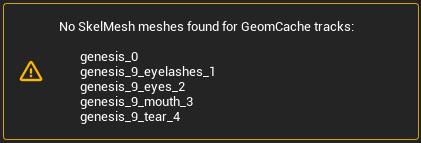
This led me down a path of trying to understand the internals of Alembic files as for some reason, UE was renaming the the tracks in the Alembic cache exported from Daz which meant that the tracks nolonger matched the parts of my character mesh. At least I think that's what was happening as I could find no information about this error.
The second problem I ran into was that the vertex order in the Alembic cache was different to that of my character mesh.
Also, UE was importing the Alembic cache at 24fps whereas it was importing the training animation FBX at 30fps, so I was getting a wanring about that as well.
To solve all of these things I decided to use Houdini:
- I import the character FBX, the alembic cache and the training animation into Houdini.
- I grab the geometry from first frame from the Alembic cache and this becomes my character mesh, which means that the vertex order matches.
- I fix up the paths/tracks of the Alembic cache, which solves the first error above.
- I rebind this new mesh to the skeleton and transfer the joint weights and materials across.
- I ensure that houdini is set up to export both the FBX animation and the alembic cache at 30fps.
- I also strip all of the properties/attributes from the alembic cache before exporting everthing (the character FBX, the training animation FBX and the Alembic cache) back out.
- All of this now happens automatically in Houdini. I don't need to do any manual work now that it's set up.
The new assets, exported out of Houdini now work perfectly for me in the ML Deformer setup.
I do a few others things in Houdini as well, not necessary for the ML Deformer to work, such as optimising the materials down to 10, packing the 4x4k head, body, arm and leg textures down to a single 8k texture, fixing up the eyes to work with the Metahuman eye material setup, renaming materials etc. I'm keen to continue building on my Houdini setup to work with Genesis 9 figures, alter the skeleton to better match the UE5 skeleton, handle clothing better anda few other things.
I did run into a similar problem you are having. At least it looked visually similar. I'm assuming that the vertex orders match between your character mesh and the alembic cache? For me the issue was due to some attributes/properties that were in the Alembic cache file exported out of Daz, which I now strip out in Houdini. I'll try to reproduce the problem again and see if I can work out what the exact cause was.
I tend to just run with the default settings in UE now as bumping things up didn't seem to make much difference to the quality of the end result. I haven't had any memory warnings though so it's possible that you're running out of GPU memory?
I'm in the process of updating my workflow for Genesis 9 so it's a bit broken at the moment but once I get it runnign again I'll do some more experiments and get back to you.
Why does G8F take FOREVER to load?Wonderland said:
SofaCitizen said:
Check your logs! If you have any products that are causing duplicate forumlas then it will drastically slow the loading time to the figure. I managed to speed up my loading times the other day by fixing a product that was spamming my logs with duplicate forumla errors due to using a stupid value for the unique id.
I do get duplicate product warnings every time, but I have no idea how to resolve that. I also get a "migration failed' warning first, wait about 45 minutes, then get a pop up that says duplicate formula found, click OK, then it finally loads. I've sent several tickets to CS with the log, they wait a month or so then close the ticket. I've given up on them helping me.
Well, I will not name-names, but when I was researching into the product that was causing my issues I saw that several threads had been complaining about it and it had reported to CS as early as April - and yet I was still having issues with it in December. Therefore, the only possible assumptions I could take away from that is that either CS was not forwarding the error to the PA or the PA has no interest in fixing their product. I am aware that duplicate formulas are caused by "ID clashes" and while it has been said (quite fairly) that it's not possible for all PAs to always pick unique values, the IDs for this product were incredibly-poorly named and so there was no excuse there (IMO).
Here are the steps I took to resolve this issue myself. Please note that I am not an expert so this was very much a "bull in a china shop" approach, however it seemed to resolve the log-spam & load times while nothing "visibly" broke. Also, there is the caveat that if you amend a morph file this might also break other morphs that use/link it - in my case it was a set of expressions and so it seemed unlikely that there would be a linked chain of files.
Important: take a backup of any files before you edit them and only change them if you feel confident updating JSON files without breaking the syntax.
- Find the duplicate formula entires in the error log
- Open the dsf file listed in the "Duplicate formula found" line - something like "data/DAZ 3D/Genesis 8/Female 8_1/Morphs/PUBLISHING_ARTIST_NAME/PRODUCT_NAME/MORPH_FILE_TRIGGERING_CLASHES.dsf"
- Look at the line prefixed with "input:" which will give you the ID that is clashing inbetween the hash symbol and question mark - e.g. MORPH_FILE.dsf#CLASHING_ID?value
- It is this CLASHING_ID that you need to update the dsf file you have opened - note, because this is a URL string any spaces will be written as %20 so it's probably best to avoid spaces if you can.
- Pick a new ID value (NEW_ID) - this can be anything you want but does need to be unique across all DAZ products that you own and so you would probably pick something that is perhaps made up with the initials of the PA, product and morph file joined together. So using my above example this might now be "PANPNMFTC". If this doesn't seem unique enough you can always add more characters/numbers to it but you should probably avoid spaces and symbols so that you don't have to worry about encoding them.
- You now need to replace the CLASHING_ID with your NEW_ID in several places in the open file.
- Under "modifier_library" change the value for the "id" key
- Under "modifier_library"/"forumlas" there will be multiple instances of "operations"/"url" - the value of all these need to be changed. A possible batch replacement would be something like replace "#CLASHING_ID?value" with "#NEW_ID?value"
- At the very end there is a section for "scene"/"modifiers". In there replace the CLASHING_ID for the "id" value with NEW_ID but leave the trailing "-1" and replace the CLASHING_ID for the "url" value with NEW_ID but leave the preceeding "#".
- Save the file
- Go back into Daz and clear the scene
- (Optionally) delete all the contents of the log so you can see what new lines are generated.
- Add the base figure into the new scene
- If all is well then there should not be any more duplicate formulas relating to the file you amended, nor any new wierd errors which might mean a syntax error in the file and the figure should load quicker.
- If all is well, test the morph/expression you amended to make sure it still functions correctly
- Repeat all steps above if there are duplicate formulas for any other files.
Again, please note that the above is very much a hack-job and so if you do follow them you do so at your own risk (so do not ignore the bit about making a backup copy first). One or two of the above steps may not entirely be necessary and there is a chance that there is also a step or two that I am missing but this worked for me.
Obviously, in an ideal world, these things would be fixed properly by Daz QA or the PA themselves, but like with the "//Runtime" issue it currently does appear to be a thing we have to fix ourselves.
Is there a solution to fix the stifness of woman private area in this pose?Glad, that someone adresses this. ;-)
I made some morph targets for my self as a solution. I used the magnet tool and GoZ for that.
One of the reasons, I was so disappointed with G9 has been the lack of more groups. I would have liked to have a genitalia group to fix exactly this issue and more body groups for creating smoother body bendings.Daz 3D is part of

Connect
DAZ Productions, Inc.
7533 S Center View Ct #4664
West Jordan, UT 84084Licensing Agreement | Terms of Service | Privacy Policy | EULA
© 2026 Daz Productions Inc. All Rights Reserved.















