-
Daz Studio BETA - version 4.23.0.4! (*UPDATED*)
Thanks for letting me refresh my memory. I believe I've ever seen that page before... though I did not recall anything about it when I saw that "bug". However, no ~ I don't think such an explanation should be relevant to the case and "bug" that I mentioned.
- A Companion File is a file in a native format, which is named identically to an asset of an imported file type1), that resides in the same folder on disk as the asset file it is a companion for, with the exception of file extension. Companion files can exist in the form of a native script (.dsa, .dsb, .dse) or a DSON format asset (.duf); however, an asset is only allowed to have one companion file. If a native script and a DSON file both exist within the folder of an asset of an imported type, preference is given to the native script2). -
As per my understanding, it's (specifically) for the case like: in a folder, there're three files, Michael 4.cr2, Michael 4.dsb, Michael 4.duf.... Well, cr2 file can be directly loaded as a user-facing file from Poser Format folder, or can be imported. In this case, when importing or loading Michael 4.cr2, Michael 4.dsb will be loaded with 1st priority. As a test, I deleted Michael 4.dsb and imported Michael 4.cr2, Michael 4.duf was loaded which is a Car scene I made. Yes, the logic is that Michael 4.cr2 can only have one Companion file. I deleted other 2 files, Michael 4.cr4 was just imported without PowerLoader dialogue....
However, for my case, I just need to simply import an OBJ file. An OBJ file does not need a "native Companion file" while being loaded. If the above logic appllies for the case of purely importing OBJ / FBX / DAE / BVH... format files, it'll certainly confuse the users... It doesn't make sense, IMHO. ...I'd rather be told that : do not place ANY native DS format files with the same name as OBJ's into a same folder...
 Autofit not working right
Psyckosama said:
PerttiA said:
You are fitting Ajax Hair and you have selected "Michael 4 Tunics and Coats" as the figure the hair was designed for...
I don't think "Michael 4 Tunics and Coats" has any type to select, it sounds like it is for "Tunics and Coats"That has nothing to do with anything. I just loaded something random, switched to something random. It would still show the autoproject templates if they were loading properlly..
Try picking "something random" that isn't limited to tunics and coats.
Autofit not working rightPerttiA said:
You are fitting Ajax Hair and you have selected "Michael 4 Tunics and Coats" as the figure the hair was designed for...
I don't think "Michael 4 Tunics and Coats" has any type to select, it sounds like it is for "Tunics and Coats"That has nothing to do with anything. I just loaded something random, switched to something random. It would still show the autoproject templates if they were loading properlly..
Autofit not working rightYou are fitting Ajax Hair and you have selected "Michael 4 Tunics and Coats" as the figure the hair was designed for...
I don't think "Michael 4 Tunics and Coats" has any type to select, it sounds like it is for "Tunics and Coats"Generation 4 assets in DAZ Studio 4.22My pleasure! I've been collecting aniBlock and animated pose collections since the Generation 4 days - so I have a whole lot of them for V4 and M4.
With Bone Minion being a thing, I don't have to use them on V4/M4, but I love it when I get a chance to. They still work great! I also have the RSSY 3Delight to Iray convertor. Some things from that era need to be converted, some things look great without conversion.
When it comes to conversion, I try RSSY and/or the Iray Uber and use whichever looks best - I usually get different result from both.
My Genesis 8 Female main hero uses clothing items and props from all generations except the older 1 and 2 Millennium stuff. I would, but I don't have anything she needs right now. But I use my Daz + membership to collect things from across all eras of figure, simply because the stuff is too cool not to.
Example from Vicky 3:
Liquid Knight On Sky 16 is freaking Cool!!!
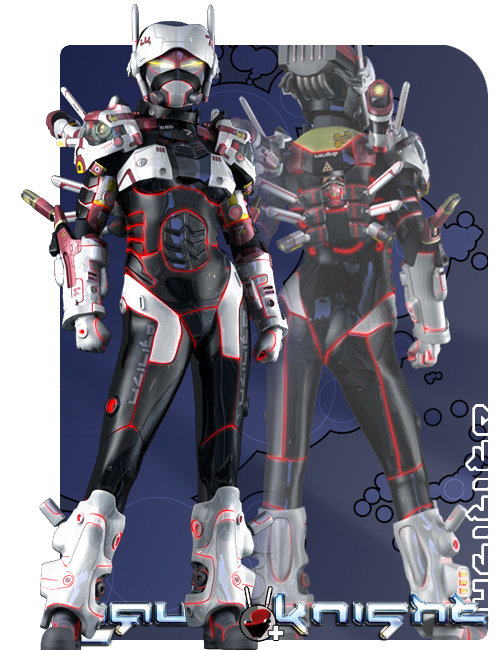
So is the Liquid Halo On Sky 16

...and let's not forget the Ton of amazing artwork created for Aiko 3!!!
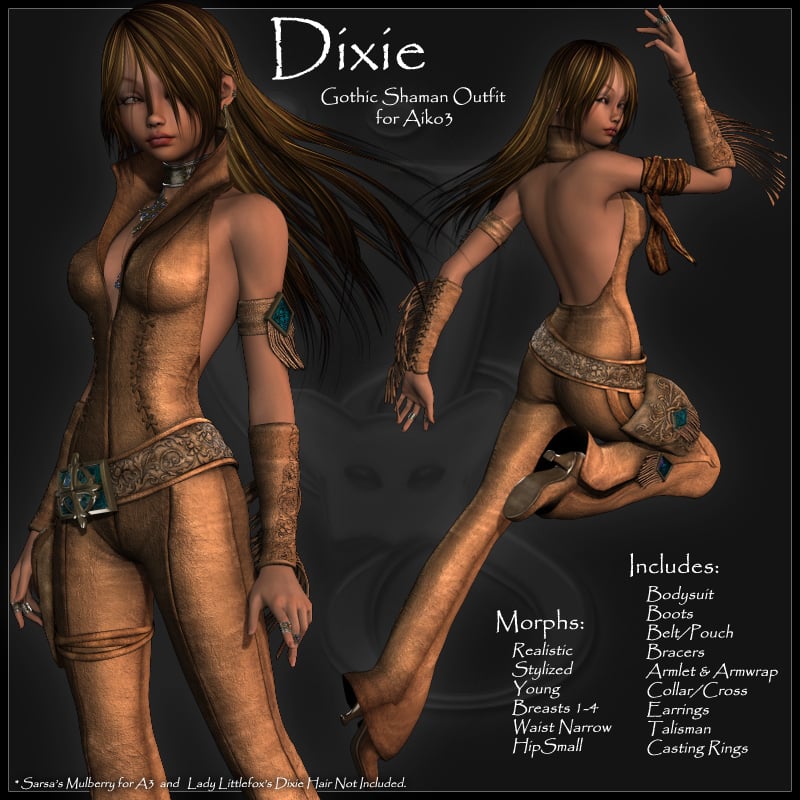
And that's a whole generation before Michael 4 and Victoria 4
The assets are great for current figures, but as we can see from the above promo, the figures themselves can look Fantastic as well!
So I just use whatever strikes my mood at the time.
I just bought the new one for Genesis 8 Male yesterday, but that still won't retire my use of DzFire's Cyborg Model 4 (Model 4 being a play on the initials: M4), which I use quite a bit. I have an Iray optimized version of him in my custom folder so I can load him in a heatbeat, and he's already holding a sword from Nightshift3D's awesome weapons bundle from that era
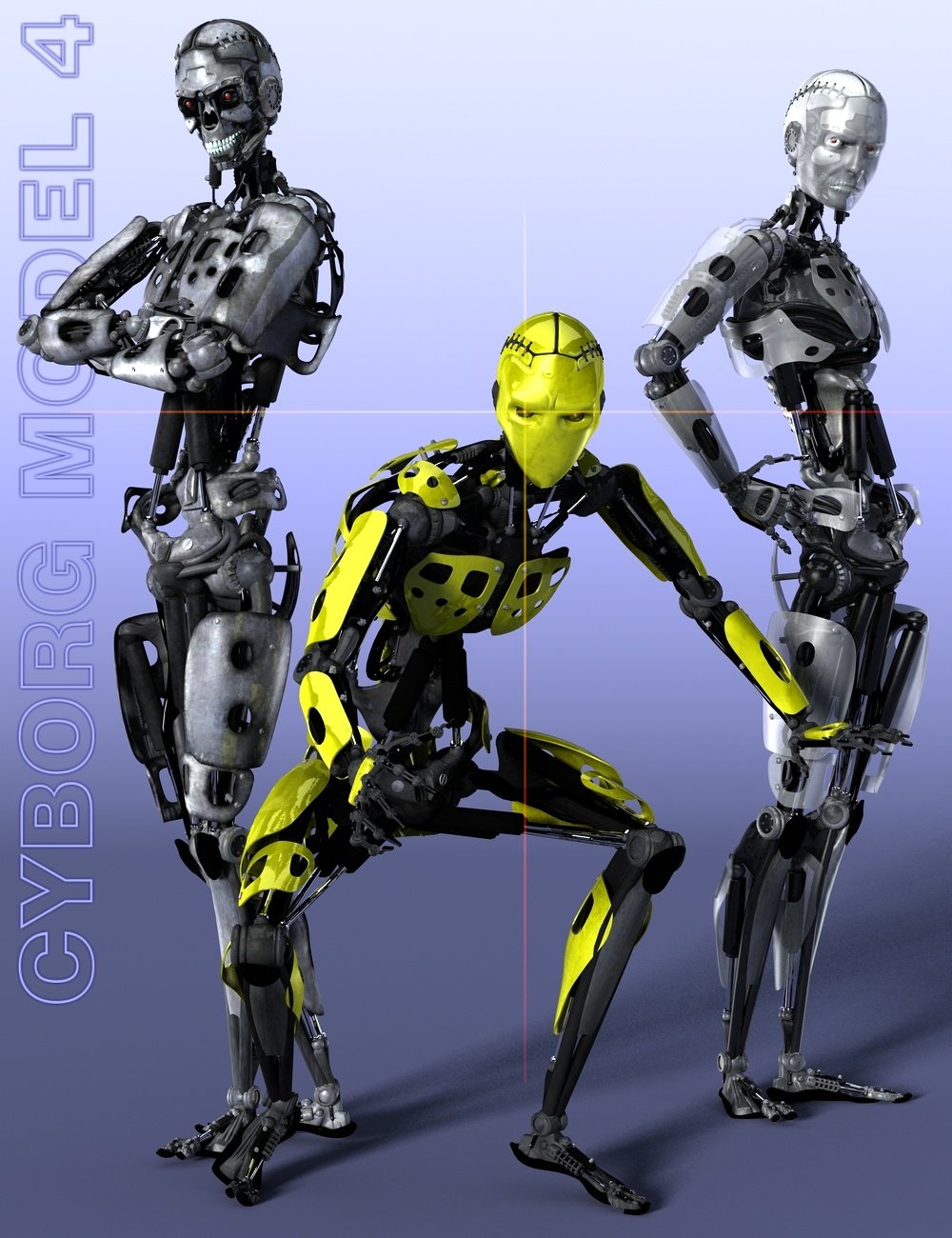
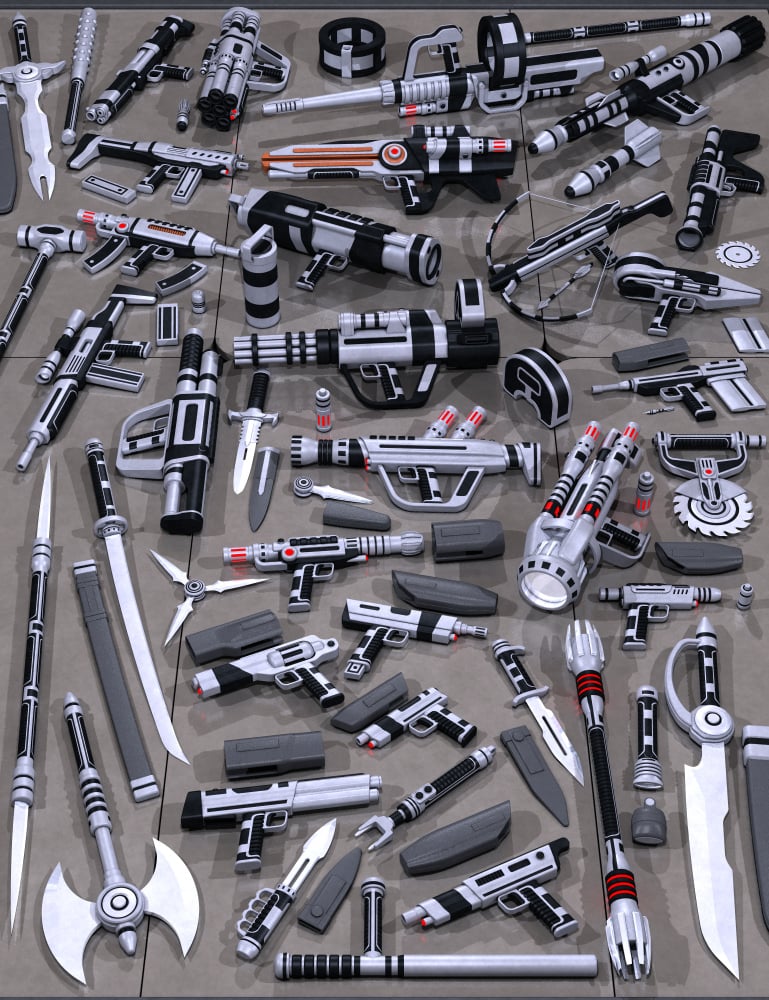
The point being, this stuff works great in our modern world! Especially since I also love to collect Iray Shader collections! :)
In the following video, I've replaced the swords with some really cool new lightsabers I got from here... but the cyborg she's fighting (toward the end of the video) is the one we see above.
Her guns are from Complicated Eve for V4 (by Uzilite - same vendor as the "On Sky 16" stuff above) as are her pants and boots. I enhanced them with added gloss and then also added some of JGreenlees Cybertronic Iray Shaders by making Geometry Shells, so I could use the 2 different colors, and the actual pants are glass from the Daz Iray shaders that come with Studio. The goggles are from Brazen for V4.
The robotic spider is Arachnoid, by Elele, which comes with aniBlock to put it in motion - a nice set of them! :)
 Generation 4 assets in DAZ Studio 4.22
Fixmypcmike said:
I use old assets all the time -- just used Michael 4 and Michael 2 yesterday. It's a lot easier to load old clothes, hair, etc on Genesis figures, but sometimes I need to use the actual pre-Genesis figures.
Me too. Generations 2-4 are part of my regular practice, even though I'm mostly using Genesis 3 and 8. I never stop using the cool assets from those periods. But Michael 4 is actually still being animated on a fairly regular basis in my world.
Generation 4 assets in DAZ Studio 4.22I use old assets all the time -- just used Michael 4 and Michael 2 yesterday. It's a lot easier to load old clothes, hair, etc on Genesis figures, but sometimes I need to use the actual pre-Genesis figures.
How do I search for Genesis 9 Male clothes?TesseractSpace said:
Actually I was wondering why nobody was complaining about this during the time of Genesis 1. Different point entirely.
In my day, we walked to school for miles uphill both ways...
Since Genesis 1, the store has actually improved. If you want to see characters, you can click 'Characters' on the top menu bar and get characters. When I first looked at Daz, and for years thereafter, looking for Characters always got you all of their associated clothing. It was maddening.
Genesis 1 was current when I started. Two things about male clothing for Genesis 1:
- Genesis 1 could wear Michael 4 and V4 clothing. Millennium 4 figures had had a very long run. So you could find M4 clothing separated from V4 clothing, and put it on Genesis 1 male.
- Genesis 1 unisex base was shaped like a teenage boy and shy of chest geometry. Unisex-designed clothing for Genesis 1 usually fit Genesis 1 male better than Genesis 1 female, who would see stretching at the bust. This is part of the reason for the design of Genesis 9, which has problems the other way.
I was tolerably happy with the clothing, therefore (though I had difficulty finding the right kind of characters) ... till fairly quickly Daz switched to Genesis 2 and I discovered that the usual split was:
- male clothing in small amounts, but it's often reasonable, though only occasionally historically accurate;
- female .... er ... clothing ... by the containership, but if the women are out adventuring with the men, the men will be dressed in full coverage cloth, combat boots, and body armor. The women will be in bikini bottoms and spike heels, with metal armor bras but bare midriffs.
At which point I gave up on Daz for a few years. I'm obviously not the market. It couldn't serve my purposes.
I'm really only back because I eventually realized that Genesis 3/8/8.1 shared enough clothing, and lasted long enough, to produce results such as prevailed after the long run of Millennium 4: there was enough male clothing, and enough credible female clothing, so it was worth painstakingly sorting through the female skimpwear to find men's and women's clothing I could use.
The store is still not set up to deal with the existence of two market segments. At this point I suspect it probably never will be, for reasons that drift too far off topic.M4 Blank CR2 for Content Developmenthttps://www.daz3d.com/michael-4-shapes
"Download the M4 Blank CR2 for Content Development From The Resource Files Tab of This Page"
I don't see a Resources Tab. Anyone have any idea where to get the M4 Blank CR2 from ?
Gone but Not Forgotten - SloshWerksSlosh could make anything. And he did. I enjoy all 51 of his products I bought. Michael 4 for G2M was a lifesaver years ago. UHT saved many hairs for me when Iray arrived. The Legacies series gave us needed morphs when Genesis 3 was new. And UV Swap gave me more skins to choose from for males. I was eagerly awaiting his next release.
Show us more of your 3Delight rendersSven Dullah said:
FirstBastion said:
I will mentioned that this render is with DS4.10 I don't think I would try to render with 3DL with any of the versions after DS4.12
May I ask the reason why?
Yes, I was curious too. While most of my renders are done in DS4.8, this one was in the latest 4.22 beta:
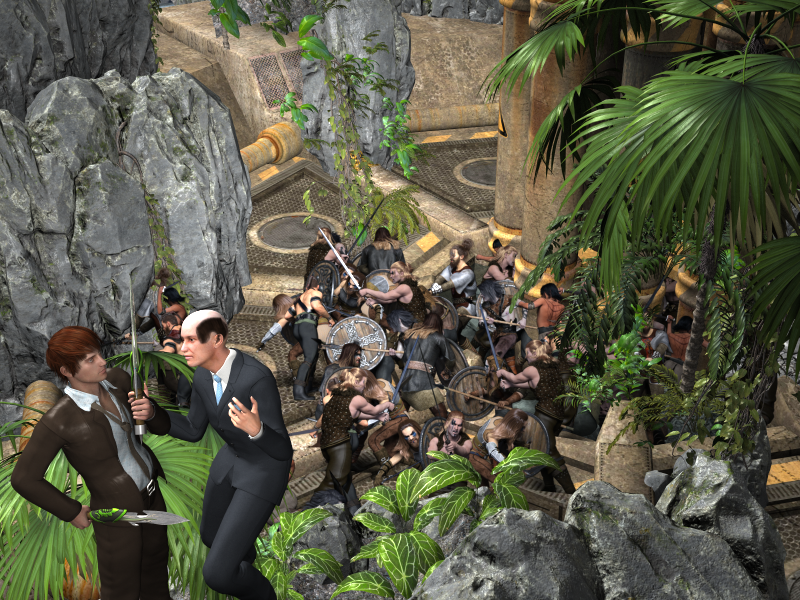
Tag: Fixmypcmike Pull #3
Title: Goths In Space, the Motion Picture
The Producer: "You idiot! When Jack Tomalin called it 'Goths In Space' he meant it evoked a gothic architecture style. He wasn't talking about actual Visigoths! And put those knives away, you're making me nervous!"
Pulls: 2544 336 3107 437
Dagger Dreams 15813 https://www.daz3d.com/dagger-dreams
Now-Crowd Billboards - Barbarian Warriors Fighting 81952 https://www.daz3d.com/now-crowd-billboards--barbarian-warriors-fighting-barbarian-warriors-vol-iii
GIS Nova 10995 https://www.daz3d.com/gis-nova
Misty River Gorge 47883 https://www.daz3d.com/misty-river-gorge
Also used:
Forlorn GIS Nova 18240 https://www.daz3d.com/forlorn-gis-nova
GIS Nova Lights 12224 https://www.daz3d.com/gis-nova-lights
DLD High Gloss Metallic Shaders 10137 https://www.daz3d.com/dld-high-gloss-metallic-shaders-for-ds
The Producer (bald man):
Genesis 1
P3DA M4 Business Suit 8411 https://www.daz3d.com/michael-4-business-suit
Mitch Hair (a freebie from AprilYSH) http://shop.aprilsvanity.com/free-items/mitch-hair.html
Stolz 15498 http://docs.daz3d.com/doku.php/public/read_me/index/15498/start
The Director:
G2M
Genesis Night Out Suit 15017 https://www.daz3d.com/night-out-suit
Kung Fu Hair 19369 https://www.daz3d.com/kung-fu-hair-for-genesis-2-male-s
i13 50 Essential Emotional Communication Poses 22975 https://www.daz3d.com/i13-50-essential-emotional-communication-poses
 *CLOSED* RRRR "That went well" Render Contest
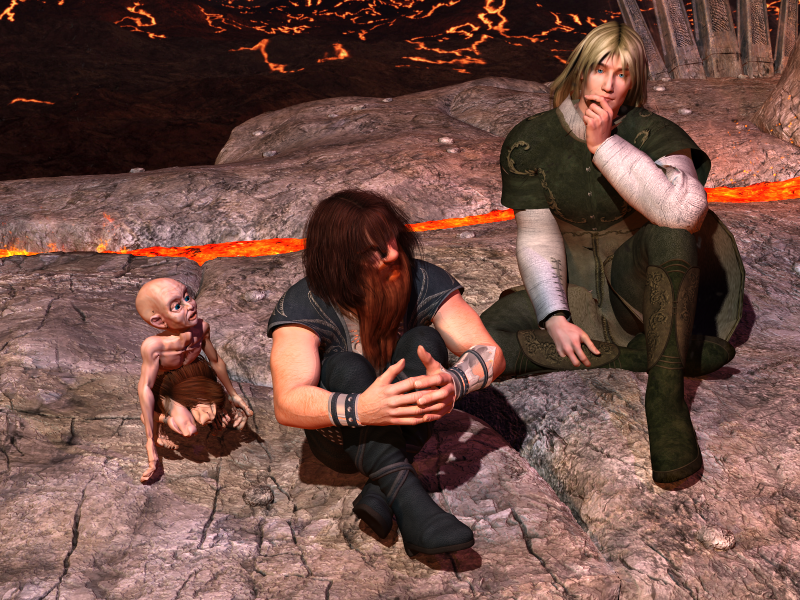
Tag: Fixmypcmike #5
Title: They Say Elves Never Get Lost
Gimli: "Well, here's another fine mess you've gotten us into, Legolas."
Pulls: 892 2064 2003 440
NJA Ponytail Hair for Genesis 2 Females 18764 https://www.daz3d.com/nja-ponytail-hair-for-genesis-2-females
ACIS for Genesis 14618 https://www.daz3d.com/acis-for-genesis
M3 High Fantasy Character & Clothing Bundle 2014 http://docs.daz3d.com/doku.php/public/read_me/index/2014/start
Easy Environments: Hell 23059 https://www.daz3d.com/easy-environments-hell
Also Used:
Gimli:
Genesis
GOM Dwarf for Genesis 16039 https://www.daz3d.com/dwarf-for-genesis
RAW Dwarfology 14801 https://www.daz3d.com/raw-dwarfology ;
Apple Hair 21768 https://www.daz3d.com/apple-hair-for-genesis-and-genesis-2-females
Michael 4 Long Beard 9322 https://www.daz3d.com/michael-4-long-beard
Doomed Poet Poses and Expressions 16116 https://www.daz3d.com/doomed-poet-poses-and-expressions
Legolas:
Michael 3
Mitsu Hair for Aiko 4394 https://www.daz3d.com/mitsu-hair-for-aiko
M3 In A Mood (freebie by Banbha)
Gollum:
Scrum (freebie by Sixus1)
 *CLOSED* RRRR "That went well" Render Contest
Tag: Fixmypcmike Pull #3
Title: Goths In Space, the Motion Picture
The Producer: "You idiot! When Jack Tomalin called it 'Goths In Space' he meant it evoked a gothic architecture style. He wasn't talking about actual Visigoths! And put those knives away, you're making me nervous!"
Pulls: 2544 336 3107 437
Dagger Dreams 15813 https://www.daz3d.com/dagger-dreams
Now-Crowd Billboards - Barbarian Warriors Fighting 81952 https://www.daz3d.com/now-crowd-billboards--barbarian-warriors-fighting-barbarian-warriors-vol-iii
GIS Nova 10995 https://www.daz3d.com/gis-nova
Misty River Gorge 47883 https://www.daz3d.com/misty-river-gorge
Also used:
Forlorn GIS Nova 18240 https://www.daz3d.com/forlorn-gis-nova
GIS Nova Lights 12224 https://www.daz3d.com/gis-nova-lights
DLD High Gloss Metallic Shaders 10137 https://www.daz3d.com/dld-high-gloss-metallic-shaders-for-ds
The Producer (bald man):
Genesis 1
P3DA M4 Business Suit 8411 https://www.daz3d.com/michael-4-business-suit
Mitch Hair (a freebie from AprilYSH) http://shop.aprilsvanity.com/free-items/mitch-hair.html
Stolz 15498 http://docs.daz3d.com/doku.php/public/read_me/index/15498/start
The Director:
G2M
Genesis Night Out Suit 15017 https://www.daz3d.com/night-out-suit
Kung Fu Hair 19369 https://www.daz3d.com/kung-fu-hair-for-genesis-2-male-s
i13 50 Essential Emotional Communication Poses 22975 https://www.daz3d.com/i13-50-essential-emotional-communication-poses
Suggestions on keeping track of assets?
Sounds interesting, thank you for sharing your procedure.Valiska said:
...
Multiple Content Directories
Anybody who's been hanging around long enough to accumulate a typical large library with several thousand installation files, and probably thrice as many user-facing files within Daz Studio, has found out that it's hard to keep track of the results, even with a Smart Content database.
So I have multiple content directories. Exactly what you want for content directories will vary, depending on what products you have, and what's important to you. Every possible organization has some disadvantages.
My method is to break up content into libraries based on subject matter first, and -- for poseable figures -- generation. It means I have a lot of libraries: I have 16 Daz Studio libraries. 11 of those are also Poser libraries. (There is no point in adding libraries of later Daz poseable figures to Poser, since they don't load. There will end up being some Poser-only libraries if I buy an updated Poser.)
They are:
- Main (General utilities, scripts, shaders, manmade buildings and manmade props)
- My Projects (Stuff I'm working on I don't want cluttering up the other libraries)
- Nature (Environments without human artifacts and lots and lots of plants)
- Vehicles (If it fits _in_ a set. If it _is_ a set, I probably put it in Main.)
- Animals 1 (Old animals, like Millennium Cat.)
- Animals 2 (Newer animals, like Horse 2, Dragon 2, and Dog 8).
- Hivewire (Dawn, Dusk, Luna, Harry the Hivewire Horse and descendants, Big Dog, lots of CWRW textures.)
- Hair (See below)
- Cloaks and Morphing Fantasy Dresses (See below)
- Millennium 3 (Before my time, but I have some.)
- Millennium 4 (A fair amount of stuff for Victoria 4 and Michael 4)
- Genesis 5 (Current when I started. Morphs, skins, characters, clothing)
- Genesis 6
- Genesis 7
- Genesis 8
- Genesis 9
Hair gets its own library because it's usually relatively easy to fit to figures of different generations, so I want it all handy to look at, for any character.
Cloaks and Morphing Fantasy Dresses get their own library because, for several generations, even though they fit different figures, they were using the same UV maps. A texture for a cloak for Michael 3 could easily be used on a cloak for Victoria 6. So I want these all available for inspection together too.
Humans figures get split up by generations because they have numerous add-ons and which generation they belong to isn't always clearly labelled. -- This is where the major disadvantage of my organization comes in. Products often can be used with characters of the same sex in multiple generations. If they don't have separate installers for each generation, then I have to pull them apart and install at least partly manually. So, for example, if it fits Genesis 3(7) Female and Genesis 8 Female, I have to duplicate some files and directories and install them by hand. This is a nuisance and I wish they all had separate installers for each generation. It's not enough of a nuisance to make me stop.
Animals are split into older and newer mostly on rendering considerations. Older animals might lack resolution in mesh, particularly, for closer renders. (Lyne's animals were wonderfully inspired, but they were built for ~Poser 4.)
In Main:
- I have old and new buildings, too. But I didn't split those, because some of the old buildings have plenty of model resolution and later add-on textures, and look perfectly good today. The ones that didn't get later boosts are obvious at a glance, or memorized.
- There is no particular point in trying to distinguish environments, architecture, and props on installation to a Daz library, since they are often in the same product, and may be installed in any of 5-6 places besides.
Main (Human Stuff)/Nature: the primary reason I have two different libraries for these settings and props is to reduce the number of items in each, so I have some hope of finding stray product parts, which are legion with respect to older products.
For the product collections that were made over years and comprise more than a dozen products, made for different programs, different rendering engines, sold now at different vendors, with add-on textures that apply to different parts of the entire model collection because not all of it existed when the first ones were made ... it still takes an evening or three to figure out how they interrelate, so I can export them. I have 13 products related to the Victorian Reflections Room, and figuring that out took an entire evening. The GIS environments took three. I doubt I'd have found all the parts for either, if I had all my content in one library. Just too much to scan when I start out only vaguely remember whether some part of the collection existed, and what exactly it was for.
Suggestions on keeping track of assets?...
Multiple Content Directories
Anybody who's been hanging around long enough to accumulate a typical large library with several thousand installation files, and probably thrice as many user-facing files within Daz Studio, has found out that it's hard to keep track of the results, even with a Smart Content database.
So I have multiple content directories. Exactly what you want for content directories will vary, depending on what products you have, and what's important to you. Every possible organization has some disadvantages.
My method is to break up content into libraries based on subject matter first, and -- for poseable figures -- generation. It means I have a lot of libraries: I have 16 Daz Studio libraries. 11 of those are also Poser libraries. (There is no point in adding libraries of later Daz poseable figures to Poser, since they don't load. There will end up being some Poser-only libraries if I buy an updated Poser.)
They are:
- Main (General utilities, scripts, shaders, manmade buildings and manmade props)
- My Projects (Stuff I'm working on I don't want cluttering up the other libraries)
- Nature (Environments without human artifacts and lots and lots of plants)
- Vehicles (If it fits _in_ a set. If it _is_ a set, I probably put it in Main.)
- Animals 1 (Old animals, like Millennium Cat.)
- Animals 2 (Newer animals, like Horse 2, Dragon 2, and Dog 8).
- Hivewire (Dawn, Dusk, Luna, Harry the Hivewire Horse and descendants, Big Dog, lots of CWRW textures.)
- Hair (See below)
- Cloaks and Morphing Fantasy Dresses (See below)
- Millennium 3 (Before my time, but I have some.)
- Millennium 4 (A fair amount of stuff for Victoria 4 and Michael 4)
- Genesis 5 (Current when I started. Morphs, skins, characters, clothing)
- Genesis 6
- Genesis 7
- Genesis 8
- Genesis 9
Hair gets its own library because it's usually relatively easy to fit to figures of different generations, so I want it all handy to look at, for any character.
Cloaks and Morphing Fantasy Dresses get their own library because, for several generations, even though they fit different figures, they were using the same UV maps. A texture for a cloak for Michael 3 could easily be used on a cloak for Victoria 6. So I want these all available for inspection together too.
Humans figures get split up by generations because they have numerous add-ons and which generation they belong to isn't always clearly labelled. -- This is where the major disadvantage of my organization comes in. Products often can be used with characters of the same sex in multiple generations. If they don't have separate installers for each generation, then I have to pull them apart and install at least partly manually. So, for example, if it fits Genesis 3(7) Female and Genesis 8 Female, I have to duplicate some files and directories and install them by hand. This is a nuisance and I wish they all had separate installers for each generation. It's not enough of a nuisance to make me stop.
Animals are split into older and newer mostly on rendering considerations. Older animals might lack resolution in mesh, particularly, for closer renders. (Lyne's animals were wonderfully inspired, but they were built for ~Poser 4.)
In Main:
- I have old and new buildings, too. But I didn't split those, because some of the old buildings have plenty of model resolution and later add-on textures, and look perfectly good today. The ones that didn't get later boosts are obvious at a glance, or memorized.
- There is no particular point in trying to distinguish environments, architecture, and props on installation to a Daz library, since they are often in the same product, and may be installed in any of 5-6 places besides.
Main (Human Stuff)/Nature: the primary reason I have two different libraries for these settings and props is to reduce the number of items in each, so I have some hope of finding stray product parts, which are legion with respect to older products.
For the product collections that were made over years and comprise more than a dozen products, made for different programs, different rendering engines, sold now at different vendors, with add-on textures that apply to different parts of the entire model collection because not all of it existed when the first ones were made ... it still takes an evening or three to figure out how they interrelate, so I can export them. I have 13 14 products related to the Victorian Reflections Room, and figuring that out took an entire evening. The GIS environments took three. I doubt I'd have found all the parts for either, if I had all my content in one library. Just too much to scan when I start out only vaguely remember whether some part of the collection existed, and what exactly it was for.
There's Always Another Sale Thread -- Discussions Only Pt 2Torquinox said:
miladyderyni_173d399f47 said:
I did pick up https://www.daz3d.com/solidgear-megabundle-for-victoria-4-and-michael-4 for $1.99 today. I know I can't use the bodysuits for any figures other than V4/M4 as they are second skins but still a good deal. Separately V4 Outfit is $1.99, M4 Outfit $23.95, and V4/M4 Texture Add-on $1.99. I even have a 3DL to Iray converter if applying base Iray shader doesn't give good results.
Of course if anyone knows of an easy to use product that would let me use V4 & M4 UVs on G3 or G8, I'd be even happier with this set. The second skins have nice textures.
I'm waffling on that one. I think those textures will take a lot of effort to beat into shape so they look the way I want at render time. I spend a lot of time reworking and adjusting textures.
 You say the body suits are second skins? I think that's a pass for me. I hope they work well for you!
I only really wanted the 2 outfits, but to buy just them would have been almost $25 vs. $2 for the bundle. There's precious few G3/8 things I would consider paying that much for, much less gen4, even from a PA I love. But I doubt I will ever use the second skins.
I don't know how to make or rework textures; I wish I did. I mostly just use shaders (hence my fondness for shader sets) or do very minor shader tweaks (change the diffuse color, make things glow). Is there a "Texturing & Shaders for the Clueless but Intelligent" type tutorial?
There's Always Another Sale Thread -- Discussions Only Pt 2miladyderyni_173d399f47 said:
I did pick up https://www.daz3d.com/solidgear-megabundle-for-victoria-4-and-michael-4 for $1.99 today. I know I can't use the bodysuits for any figures other than V4/M4 as they are second skins but still a good deal. Separately V4 Outfit is $1.99, M4 Outfit $23.95, and V4/M4 Texture Add-on $1.99. I even have a 3DL to Iray converter if applying base Iray shader doesn't give good results.
Of course if anyone knows of an easy to use product that would let me use V4 & M4 UVs on G3 or G8, I'd be even happier with this set. The second skins have nice textures.
I'm waffling on that one. I think those textures will take a lot of effort to beat into shape so they look the way I want at render time. I spend a lot of time reworking and adjusting textures.
You say the body suits are second skins? I think that's a pass for me. I hope they work well for you!There's Always Another Sale Thread -- Discussions Only Pt 2daveso said:
Now I can thank having DAZ+ membership a lot more. The current DAZ "sales" are out of my spend point. The new DAZ+ releases are at least affordabe overall. The only problem for me there is that quite a few of the new releases I don't really need. I'm not very into shaders, and the plants are getting to be a bit much as well. The sci-fi and military vehicles are becoming impractical.
An argument in favor of rejoining, at last.
The more Iray shaders the merrier IMO, & I love collecting the plants & flowers even though I never seem to remember to add the flora to my outdoor scenes. But I agree on the vehicles. Even when I do SF or cyberpunk, those never seem to be what I want. Also getting tired of rooms.
*****
I did pick up https://www.daz3d.com/solidgear-megabundle-for-victoria-4-and-michael-4 for $1.99 today. I know I can't use the bodysuits for any figures other than V4/M4 as they are second skins but still a good deal. Separately V4 Outfit is $1.99, M4 Outfit $23.95, and V4/M4 Texture Add-on $1.99. I even have a 3DL to Iray converter if applying base Iray shader doesn't give good results.
Of course if anyone knows of an easy to use product that would let me use V4 & M4 UVs on G3 or G8, I'd be even happier with this set. The second skins have nice textures.
Did anyone do a Clothing Converter from V3,V4,M3,M4 to Genesis 3,8,9 M&Fmyotherworld said:
that really works
Are you not happy with the Riversoft/Sickleyield ones?
https://www.daz3d.com/rssy-clothing-converter-from-victoria-4-to-genesis-8-female
https://www.daz3d.com/rssy-clothing-converter-from-michael-4-to-genesis-8-male
I own them but admittedly I don't think I've had the time to try them.
The best 3rd party software to create animations for Daz?Dartanbeck said:
Oh... Reisormocap. Yeah... Sci-Fi Moves and Spy Moves have some nice weapon handling motions.
So when I need to use such a weapon, I go through all of them and save each arm, the torso and the neck/head all as separate partial aniBlocks. This is how I get Rosie to use two pistols. I'm looking for the kick-back of the limbs. The actual pose of those limbs is much less important at first, because I'm going to aim them.
I went on without finishing! LOL
With all of these motions broken up and saved for individual limbs, I can run the same arm motion on both arms thanks to aniMate. Just load the same one twice and mirro one of them, alternate the starting frame, perhaps change the speed slightly... and again, at this point I'm only roughing in motion capture data that I can hand key frame over.
The method described in the course is such that that motion capture data from the aniBlock(s) remains intact, neatly neasted in that massive pile of key frames that fill the entire timeline.
Screw going into the graph editor, Okay, I do that too. But since all of my custom tools are located in the Properties of the Base figure, I can clearly see 'my' keyframes amongst and otherwise blank space in the timeline. OMG!!! Yes!!! That is So Cool!!! It's like having layers without having layers!
So, back to Reisormocap. I've been a fan of Posermocap from the start. Having those legacy packs as well as the new, I noticed that some of the older ones aren't in the newer packs, and vice versa. Just having a few more really well made and beautifully retargeted motion captures is Gold to me.
I play with them a lot, so I have a pretty good idea of where to go according to my vision - my story.
Lately I've been taking days off to Bone Minion a lot of my legacy animations to G8F. I love doing that because my mind just soars. Of course, with Rosie 8 even my genesis 3 animations are legacy. So I just keep plugging away during those days that I assign myself to do that. My Genesis 8 aniBlock collection is really sweet right now.
I mean... Michael 4 in the bathroom? Does anyone buy that?
I do! It's amazing how many different stories we can tell with those blocks that have Nothing to do with a bathroom - or Michael for that matter!
Bedroom too. Very useful stuff!
When it comes down to it, if it's true that time is money (it really is, actually) these packs of professionally captured motions are a really freaking great value.
Daz 3D is part of

Connect
DAZ Productions, Inc.
7533 S Center View Ct #4664
West Jordan, UT 84084Licensing Agreement | Terms of Service | Privacy Policy | EULA
© 2026 Daz Productions Inc. All Rights Reserved.