-
Can Geoshells be officially edited (Geometry editor, MeshGrabber) independent of its parent object?
delete polygons on the shell
Select the shell > Paramters Tab > Shell > Visibility.
There you can set parts of the shell On of Off. That's how you hide parts. No deleting them.
reloading the scene the shell is as expected, it follows the parent. The Meshgrabber indents stayed, though.
As explained by Richard, Shells have the exact same geometry as the object they were made from. The push modifier (offset) or MeshGrabber do NOT modify the geometry, they just move things around like a morph. Same amount of polygons, same vertices order, same rigging to bones. So yes of course, it still follows the original object's bones, and modifications to the Shell's geometry (movements) is taken into account.
this way one could create rather cool effects.
If you want total control over a shell... don't use a shell.
- Create a Geoshell. Export it as obj (or send it to ZBrush, etc).
- Edit this shell object (a pure copy of Genesis) with any 3D app. Let's say you want a tattoo on the arm : delete all shell's polygons but the ones on the part of the arm you need. Export that object as obj.
- Import the obj into Daz and use the Transfer Utility to fit it to Genesis like you'd do for socks, etc. You now have only a small portion of a "shell", which is a basic 3D object, fitted to the arm. But because it was made from a shell : it has the exact same shape as the arm (with the offset of the orginial shell) and the exact same UVs. Which makes it easy to texture it with anything you want.
- Such an object has most of the advantages of a shell : it moves with Genesis, adapts to morphs, accepts any shader and materials, still has UVs from the original arm, etc... without some eventual inconvenients of a shell.
Copying Morphs from G8 to G8.1Is there a quick and easy way to transfer over dialed-in morphs from a G8 character to a G8.1 character if both have already been loaded into the same scene?
No one asked me - Diomede screenshots on whatever - Warning AI Discussion OKAdjust the Hobbit Book Cover
Select the mesh contained within the cover wrap animation group. The morphs will appear in the general properties tray. Set the 1 point 5 to 1 morph at full strength.
.
A test render shows the cover distortion is greatly reduced. Yay.
No one asked me - Diomede screenshots on whatever - Warning AI Discussion OKFree Magazine/Book Rigged in Carrara - Apply your own covers and Pages
Model is posted in the Challenge #65 thread here. https://www.daz3d.com/forums/discussion/comment/7922816/#Comment_7922816 ; I will post a series of screen shots explaining how to apply your own covers and morph the model to fit, then pose/animate.
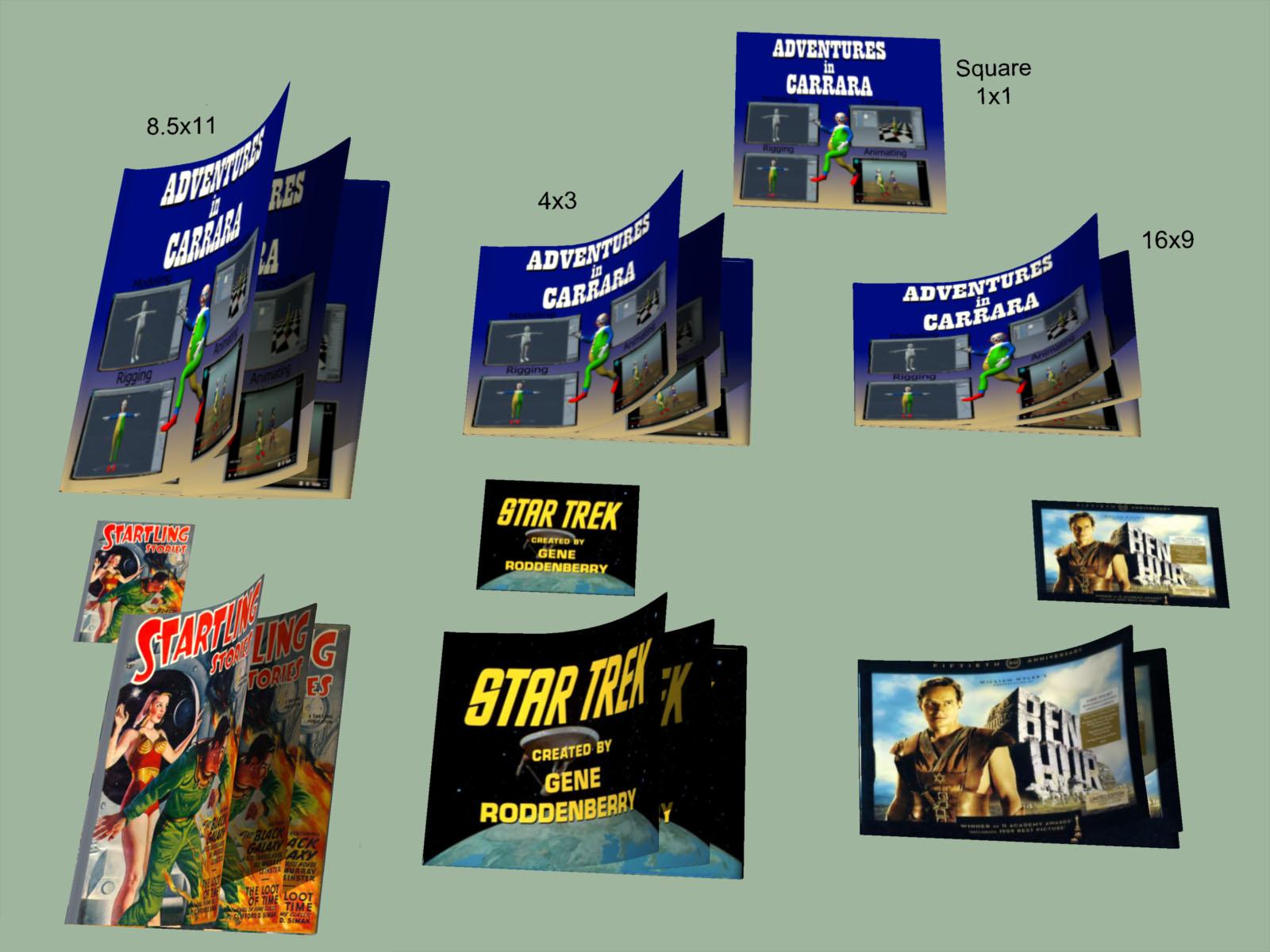 Using V4/G3F Morphs on a G8F
caraTRON.7263 said:
Okay, so what I need is:
GenX base product to convert from V4 or M4
GenX addon for Genesis 3 to convert to Genesis 3 instead of Genesis 1
You need the GenX2 Genesis 2 add-on too, it’s required by the Genesis 3 add-on.
G3 to G8 converter to then convert the morph from Genesis 3 to Genesis 8
And if the morph is made for Genesis 3, I only need that third one.
That one or the character converter, yes.
Do I need anything else?
If you want just the morph, no. If you want to use the textures you'll need the legacy UVs products which enable you to use V4 textures on G3F or G8F
The "V4 to G8" one is this: https://www.daz3d.com/legacy-uvs-for-genesis-8-victoria-4
The "V4 to G3F" one is sold at Renderosity, the vendor wasn't selling at Daz yet when they released it.
Also, are those last two products that I linked in my original post indeed interchangeable, or is there a difference in what they do that's going over my head?
They essentially do the same thing, but use different methods to do it.
Female Blouse/Shirt with Variable Button-UpIs there a buttoned blouse/shirt for a female model (preferably G8F, but not crucially since AutoFit exists) where you can control how many buttons are done up, taking it from fully or almost fully closed to very open? It doesn't necessarily need to be made completely open (though that would be nice), but I'd like it to go down to at least below the chest. (EDIT - I'm more interested in a morph where the shirt is unbuttoned to show the bra but still has one or more of the bottom-most buttons closed, than one where it's completely open. Sorry if that wasn't clear.)
(EDIT - A product has been suggested with a shirt that can be both closed and opened down to the midriff, which is the main thing I need, but I'm still interested in whether there is one that can be opened one button at a time. The shirt in this product works that way, but which buttons can be moved and the manner in which they are opened doesn't give the result that I want.)
That's the gist, but more details follow.
What I want to do is to create a "sexy secretary" character where the blouse is undone to show a significant portion of the bra and preferably some amount of skin below it, where the same garment can also be worn closed; if not completely closed, then at least closed enough that it looks normal. It would be much preferred if there were also intermediates between those two states, but not 100% essential.
The only item somewhat like this that I've found so far is this, but the unbuttoning options for that aren't very good for my purposes. As can be seen in the product images, it only opens enough that you can only really see anything inside if viewed from a sharp side angle, and if the other side is closed so as to not get in the way. This product has the right idea with multiple buttons being openable; it just can't open them in the right way. If it opened the same number of buttons as in the center pose of the main image, but more "pulled apart" - so more like the amount exposed by the jacket in the pose on the right - instead of those buttons barely being open, it would be great.
As another example of what I do want, what I'd like is a shirt which opens at least as much as this, and preferably one or two buttons more (so showing about as much as the right-most pose in the third to last product image, where the jacket is closed with no blouse), but can also be closed up.
Hopefully that gets the idea across sufficiently without rambling too much. Thanks. :)
will I ever be able to transfer my g8 chars to g9?I have worked on several characters at this point with the g8 bases. Lot of them use the torment skin and were built with quite a few daz morph mods for the face and body.
Would it ever be possible to convert them to g9 somehow in the future? Does anyone know if there is anything in the works that will let me do this? At the least a genesis 8.1 to 9 skin utility or something that converts the UV for g9 into g8?
Hands Morph into Paws and/or HoovesOso3D said:
It's a tricky issue. If I were doing such a thing, I'd probably make a morph for the animal form, and then a separate morph for the in between, because I strongly suspect just dialing it halfway wouldn't function well.
If by that you mean using a G8 hand (or full body morph) for the inbetween and an unrelated G8 hand or full body morph for the animal form, then that's fine, because it still allows me to shift between them, it just involves moving multiple dials at once. If I want an eight-stage transformation, then instead of taking one morph form 0 to 100 in eight increments, I can take morph A from 0 to 100 in four increments, and then take morph B from 0 to 100 in four increments while simultaneously decreasing morph A; where B is the animal form and A is the halfway form.
This however doesn't solve my main problem, which is that I don't have any good morphs to serve as morph B. The closest I've mdanaged is the images I attached, which I'm not happy with for the reasons I described. So morphs to serve as B, whether a single product or a combination of products, are the main thing I'm seeking.
The significance of my saying that I wanted to depict characters "in varying stages" of transformation wasn't that I wanted to do it all with a single slider, or a synchronized combination of sliders. The significance was that I want to do it using G8 morphs (or morphs for other human figures, G3 or V4 etc) that can be applied with sliders at all - even if it means chaining them in sequence instead of in parallel - as opposed to having the animal form be a Daz Dog or Daz Horse which cannot morph to and from a human figure. Maybe the final-final stage can be a true animal figure, but I want to get at least 80% there using morphs on human figures; the images I attached feel like 50-60% at best, and not a very good 50% at that.
Hands Morph into Paws and/or HoovesIt's a tricky issue. If I were doing such a thing, I'd probably make a morph for the animal form, and then a separate morph for the in between, because I strongly suspect just dialing it halfway wouldn't function well.
Carrara Challenge #65 - Turning Points - Stills, Comics, and Animations AcceptedWIP: My Project #2 - Books and Magazines
Free Carrara Magazine Model Attached in Zip File
A book or magazine spine is a turning point. Learning to read and write is a turning point. Reading a particularly meaningful book or magazine can be a turning point. Stories in books and magazines have turning points.
I have modeled a Carrara magazine as the centerpice of my second project, and to share with folks for their enoyment. It can be posed and animated. It has a few morphs to change its apect ratio and you can easily create your own. I will post more detail in my 'No One Asked Me' thread. Images created with this Carrara book and magazine prop are free to people for any use, commercial or personal. Adjust it any way you like. Just don't sell the mesh/figure as your own.
Key Features:
(1) Apply Your Own Cover and Page Images - Following an old tip by TimA / TangoAlpha, I have UVMapped the cover and the pages as a square. That way you can apply any image of any size to the default shader and then morph the book size to fit the aspect ratio.
(2) Animate Opening Cover and Turning Pages - The cover and the pages have been rigged so that they can be posed and animated. The same basic model and skeleton has been used for the cover and for the pages to make it easier to coordinate turning different sections.
(3) Page Inserts - The magazine comes in three parts. There is the wrapping, which includes the front cover, spine, and back cover. The front and back covers of the wrapping can be posed separately and have separate images applied. The wrapping is paper thin. There is a paper thin insert page which can be posed and have its own image. Insert more to turn multiple pages. There is a thick page insert, the back of which can be used for the left hand side of an open book. The thickness can be adjusted with a morph.
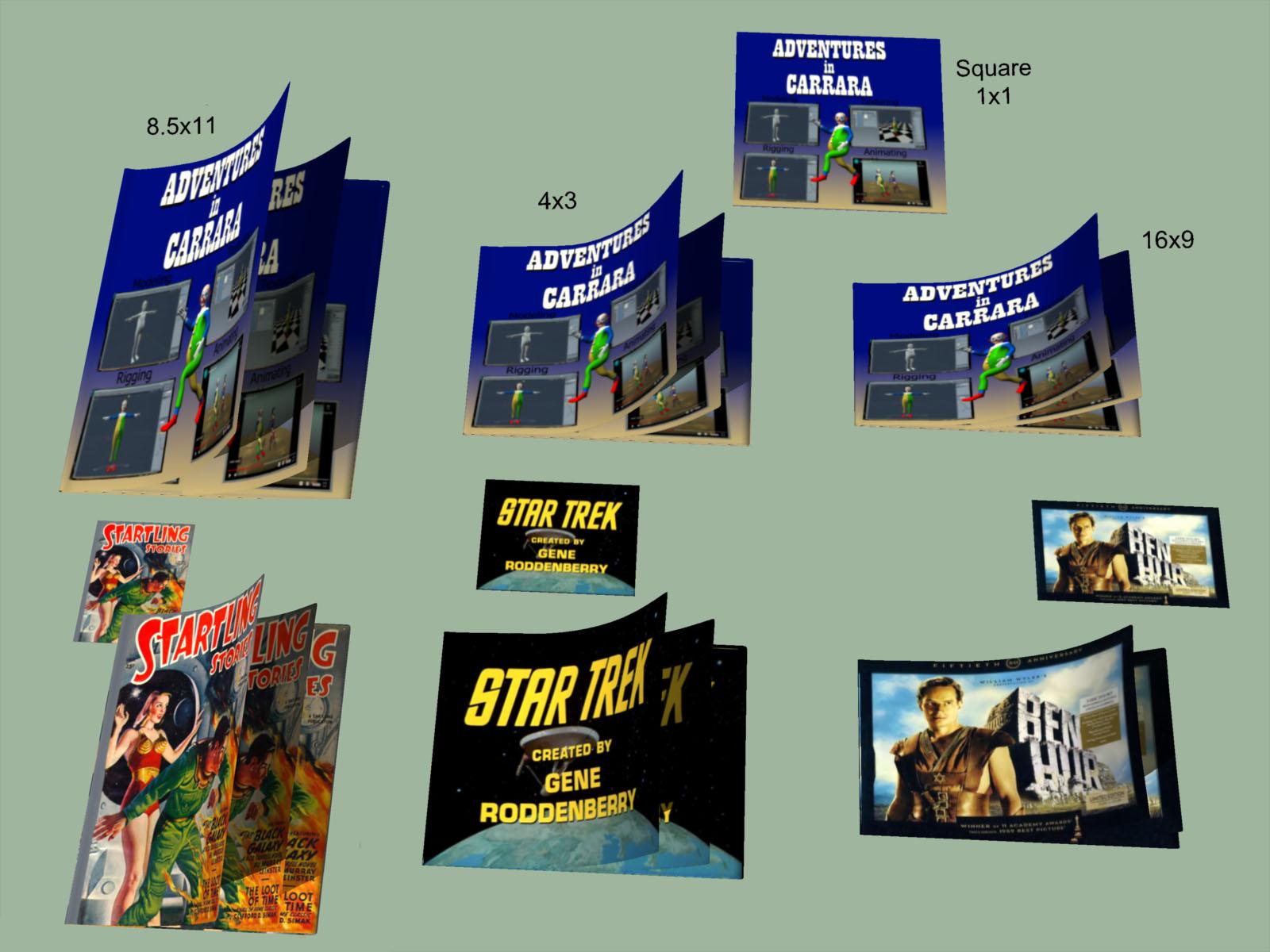
 Morph Dial vs Binary Shape vs Graft
But you could create a new property and ERC freeze the dial settings to create a single dial that you could set to partial strength, right?murgatroyd314 said:A "shaping preset" could also be a file that applies values to multiple morph dials (e.g. from one of the Genesis Head and Body Morph packs) without having a single master control dial that would allow for partial strength.
DAZ, MD, and Traditional Pattern Making - Graduation@lilweep - great insights as always. I'm still struggling with how to deal with FBMs that don't play well with others - but I have a few ideas on the way and your possible solution is an interesting one. I'm working on a similar script to import JCMs no matter which software you use to create them. Very similar to the create shapes morphs script, only the JCM pose needs to be loaded for reverse deforms. I'm using the createMorph function in the included code library that also clamps the morph to 0 and 1. I'm going to add hiddenTrueFalse and color fields to both the JSON and function to control the parm display as well.
This is the function definition so far:
function createMorph(oNode, fullPathFileName, morphName, reverseDeformationsTrueFalse, propertyGroup)and here's a single JSON example entry that 'drives' each morph for now. It could be modified for whatever morph you want to import, as long as the figure on the keyframe matches the deformation you're bringing in.
"ShapeName": "Minerva9",
"MorphName": "Minerva9_body_bs_Body",
"MorphPath": "Actor/Full Body/People/Feminine",
"KeyFrame": 210Thanks again all so much for your insights and sharing your experience. I'm learning so much.
Porting New Morphs to Different FiguresFile -> Save As ->Support Asset ->Morph Asset.
Porting New Morphs to Different FiguresGordig said:
Are you saving the spawned morph? That would make it available for other figures.
Probably not in the sense that you mean. I saved it in the Shape Splitter interface, which is what generates it as a morph slider. After that, how do I save it? Right clicking on the slider brings up no "Save" option, in Edit Mode or not. Where do I go?
I'm sure this is very simple, and I just don't know where the button I'm supposed to press is. >.>
Changing the value of a morph on a g8 figureRichard Haseltine said:
This seems to work, as a proof of conceept rather than a proper script:
// make sure a figure is selected
var oFig = Scene.getPrimarySelection();

var oObject = undefined;
// make sure we got a figure
if ( oFig && oFig.inherits( "DzSkeleton" ) ) {
	// get the object
	oObject = oFig.getObject();
}

// if we have a valid object
if ( oObject ) {
	// get the Forearm Size morph
	var oMorph = oObject.findModifier( "PBMForearmsSize" );

	// get its value channel, if it was found
	if ( oMorph ) {
		var oValChan = oMorph.getValueChannel();

		// if successful, set it to 1
		if ( oValChan ) {
			oValChan.setValue( 1 );
		}
	}
}
I was able to get this to work, but not for morphs that are built-in to G8.1. For example, the morph in the attached image has the "Morph" category next to "Owner", and it will be found by the above script. But if you attempt to find morphs that are built-in to G8.1 (such as facs morphs) the script will fail to find them. I noticed that these morphs do not have "Morph" next to the Owner, they have "Node". Is there some other way to access these types of morphs via script?
Porting New Morphs to Different FiguresAre you saving the spawned morph? That would make it available for other figures.
Porting New Morphs to Different FiguresShape Spliltter, and I imagine other utilities as well, creates a new custom morph slider, but that slider is then only available on the currently selected figure. How do I apply that new morph to other figures in the scene, or use it in an entirely different scene?
I have just gone through the headache of using Shape Splitter to create a partial morph when the figure I'm using to generate it already had several shaping morphs applied to it, as well as translation (ie it is somewhere in the scene other than the origin) and scaling. I don't want to have to do that again, and I suspect it would be even worse if the figure had any posing applied to it which this one did not (I think this would cause the same kind of problem as translation and scaling). It would make my life so much easier if I could insert a fresh figure, use that figure to create my new morph, and then apply that morph wherever I wanted. How do I do that? Nothing I've tried has worked and Google isn't helping. Thanks.
DAZ, MD, and Traditional Pattern Making - GraduationNo, I don't reset. The before and after is a keyframe of the shape dialed down to to 0 eight measure before and then eight measures after the "100%" dialed up '30' mark so it will blend into the next and previous shapes better. It's a work in progress, trying to transition between morphs with the least amount of shifiting of the fabric. So far I've found the more gently the garment settles on the figure while recording the animation instead of abruptly, it remains closer to the original shape and the better chance blending more smoothly with other shapes. (hence running the sim half or quarter time) I'll be sharing the results of a freebie showing this soon.
** Also I updated the scripts in the zip file - be sure to download again if you've already downloaded them.
barbult said:
Do you reset the avatar to the base shape between morphs? The video discusses a keyframe before and after the morph keyframe, but I didn't understand what the before and after shape was.
Using V4/G3F Morphs on a G8FOkay, so what I need is:
GenX base product to convert from V4 or M4
GenX addon for Genesis 3 to convert to Genesis 3 instead of Genesis 1
G3 to G8 converter to then convert the morph from Genesis 3 to Genesis 8
And if the morph is made for Genesis 3, I only need that third one.
Do I have that correct? Do I need anything else? Is there a better way of doing it, using better/fewer products?
Also, are those last two products that I linked in my original post indeed interchangeable, or is there a difference in what they do that's going over my head?
DAZ, MD, and Traditional Pattern Making - GraduationDo you reset the avatar to the base shape between morphs? The video discusses a keyframe before and after the morph keyframe, but I didn't understand what the before and after shape was.
Daz 3D is part of

Connect
DAZ Productions, Inc.
7533 S Center View Ct #4664
West Jordan, UT 84084Licensing Agreement | Terms of Service | Privacy Policy | EULA
© 2026 Daz Productions Inc. All Rights Reserved.