-
Perception check on G9 form definition
bluejaunte said:
No definition in the base shape is kinda the point. That shouldn't keep PA's from creating all that definition on their own. Raw G9 is just a base shape after all. So I don't know if you're looking at this the right way. Although of course if you somehow felt that the G9 characters that came out so far had less definition than before then I guess you could say the new base has negatively influenced creators. But nothing more than that though. There is no technical reason for less definition in characters.
I agree. I can see where some are coming from on detail and mesh definition, but G9 hasn't been out that long, so there is plenty of time for more detailed characters to come out and with the more dense mesh, hopefully users will see some amazing detail in the future. There are already 3rd party options for using older skins, better nipples, and gens and there will probably more and better ones as time goes on. I haven't spent much on G9 yet, but other than being able to easily transfer my older characters to G9, I have found everything else I need to start creating with G9.
[Released] Legacy Set Converter * Commercial *vikl1964 said:
Very nice product! Just bought and did a conversion with ease, but have one question. For aircraft that have "blade blur" geometry, is there some way to get that into the .duf files as well? And am I correct in thinking that any associated textures would have to be put in the Runtime folder? From what I reading in the above, it would appear so, but just want to confirm.
<Shamelss plug>
To convert the textures to Iray - Advanced Material Converter is your friend.
</Shameless plug>
I think that geometry is either a pose/morph, or you load a new prop item witb a texture.
I have a bunch of aircraft (Spitfires, In can check how best convert that).
Head gamesDaventaki said:
Random dial spinning with Nikolai included also used his textures. One thing I realized we are missing is a shorten nails morph. I unchecked limits and used the rounded nails morph but if you go to far it makes the nails look funny.
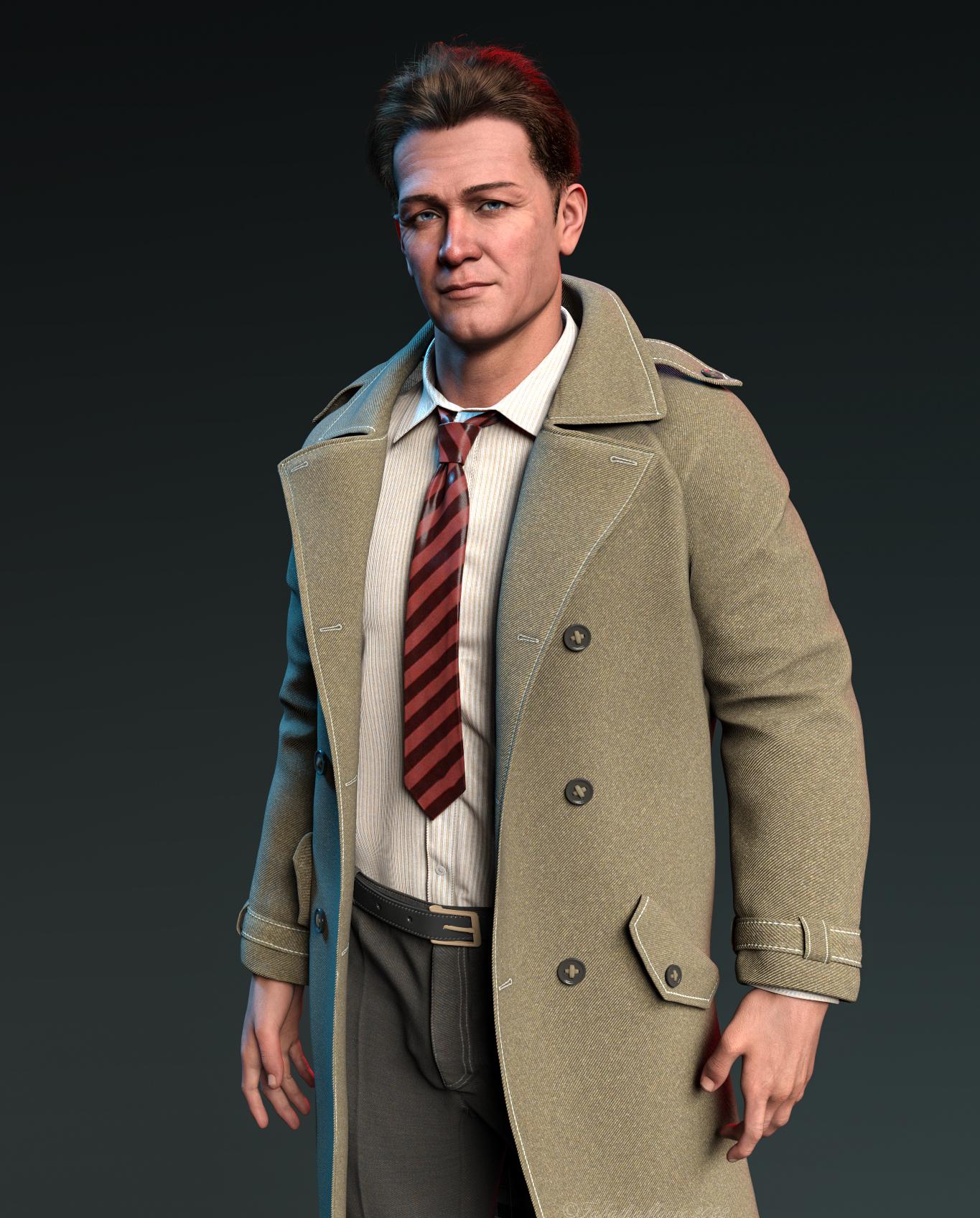
That is a great character and a great render of him!
Why does G8F take FOREVER to load?SofaCitizen said:
Wonderland said:
SofaCitizen said:
Check your logs! If you have any products that are causing duplicate forumlas then it will drastically slow the loading time to the figure. I managed to speed up my loading times the other day by fixing a product that was spamming my logs with duplicate forumla errors due to using a stupid value for the unique id.
I do get duplicate product warnings every time, but I have no idea how to resolve that. I also get a "migration failed' warning first, wait about 45 minutes, then get a pop up that says duplicate formula found, click OK, then it finally loads. I've sent several tickets to CS with the log, they wait a month or so then close the ticket. I've given up on them helping me.
Well, I will not name-names, but when I was researching into the product that was causing my issues I saw that several threads had been complaining about it and it had reported to CS as early as April - and yet I was still having issues with it in December. Therefore, the only possible assumptions I could take away from that is that either CS was not forwarding the error to the PA or the PA has no interest in fixing their product. I am aware that duplicate formulas are caused by "ID clashes" and while it has been said (quite fairly) that it's not possible for all PAs to always pick unique values, the IDs for this product were incredibly-poorly named and so there was no excuse there (IMO).
Here are the steps I took to resolve this issue myself. Please note that I am not an expert so this was very much a "bull in a china shop" approach, however it seemed to resolve the log-spam & load times while nothing "visibly" broke. Also, there is the caveat that if you amend a morph file this might also break other morphs that use/link it - in my case it was a set of expressions and so it seemed unlikely that there would be a linked chain of files.
Important: take a backup of any files before you edit them and only change them if you feel confident updating JSON files without breaking the syntax.
- Find the duplicate formula entires in the error log
- Open the dsf file listed in the "Duplicate formula found" line - something like "data/DAZ 3D/Genesis 8/Female 8_1/Morphs/PUBLISHING_ARTIST_NAME/PRODUCT_NAME/MORPH_FILE_TRIGGERING_CLASHES.dsf"
- Look at the line prefixed with "input:" which will give you the ID that is clashing inbetween the hash symbol and question mark - e.g. MORPH_FILE.dsf#CLASHING_ID?value
- It is this CLASHING_ID that you need to update the dsf file you have opened - note, because this is a URL string any spaces will be written as %20 so it's probably best to avoid spaces if you can.
- Pick a new ID value (NEW_ID) - this can be anything you want but does need to be unique across all DAZ products that you own and so you would probably pick something that is perhaps made up with the initials of the PA, product and morph file joined together. So using my above example this might now be "PANPNMFTC". If this doesn't seem unique enough you can always add more characters/numbers to it but you should probably avoid spaces and symbols so that you don't have to worry about encoding them.
- You now need to replace the CLASHING_ID with your NEW_ID in several places in the open file.
- Under "modifier_library" change the value for the "id" key
- Under "modifier_library"/"forumlas" there will be multiple instances of "operations"/"url" - the value of all these need to be changed. A possible batch replacement would be something like replace "#CLASHING_ID?value" with "#NEW_ID?value"
- At the very end there is a section for "scene"/"modifiers". In there replace the CLASHING_ID for the "id" value with NEW_ID but leave the trailing "-1" and replace the CLASHING_ID for the "url" value with NEW_ID but leave the preceeding "#".
- Save the file
- Go back into Daz and clear the scene
- (Optionally) delete all the contents of the log so you can see what new lines are generated.
- Add the base figure into the new scene
- If all is well then there should not be any more duplicate formulas relating to the file you amended, nor any new wierd errors which might mean a syntax error in the file and the figure should load quicker.
- If all is well, test the morph/expression you amended to make sure it still functions correctly
- Repeat all steps above if there are duplicate formulas for any other files.
Again, please note that the above is very much a hack-job and so if you do follow them you do so at your own risk (so do not ignore the bit about making a backup copy first). One or two of the above steps may not entirely be necessary and there is a chance that there is also a step or two that I am missing but this worked for me.
Obviously, in an ideal world, these things would be fixed properly by Daz QA or the PA themselves, but like with the "//Runtime" issue it currently does appear to be a thing we have to fix ourselves.
'Wow, thanks, but that looks really complicated. For now, could you let me know which known products have these issues so I can just uninstall them?
DAZ achieves new lows in customer support (but appears to have ambitions to go lower still)Wonderland said:
nemesis10 said:
info_b3470fa520 said:
Nemesis, I do generate serial numbers. Email me with your problem. [email protected]
If you have an installation issue, I usually offer tech support via Skype.
All is fine. I was using you as an example of how PA's deal withy serial numbers. Your product is support is execellent and has the added benefit that you are still alive.
The poster has a bind because the poster is in one of five states:
- the installer doesn't work on his current os so the serial number won't work and the product doesn't work
- Daz3d provides a new serial number and product which will fail since the installer doesn't work and a new serial number won't work
- a surgical remedy doesn't work since the surgery doesn't allow the serial number to work
- a virtualized version doesn't work since the installer never does the final step to allow the serial number to work
- and, finally, the PA provides a serial number that bypasses the problem but the PA is dead and thus cannot provide a serial number or any support
There doesn't seem to be a simple solution to the problem
Daz creates the installers, don't they? Couldn't they create a new installer with the correct serial number? Or if the customer could use the original installer on an older Mac and transfer the files through an external drive? Another possibility, get a Windows emulator for the Mac and open the file.
You are getting closer to the problem:
Daz3d may have created the installer a long long time ago (or may not have in this particular case) but that technology is gone. They can't create an installer with the correct serial number since the late PA is the only one who has access to the ability to activate the serial number. The problem with using an older Mac and transferring or a Windows emulator is that the installer writes "invisible" information to the system that doesn't seem to transfer hence the serial number doesn't work.
Experimenting with ML Deformer in UE5.1Krys Kryngle said:
Yes, so glad to see someone else experimenting with this. I'll share what I've found out, although I've taken a break from trying it (now I may have to start again).
First question is are you going from DAZ straight to unreal? If so, how did you get the alembic file exported?
I'm using Unreal to Blender with diffeomorphic. I went through the pain of putting all the joint limits in the Maya trainer and generated the 50,000 frame animation. I imported the skeletal animation into blender and got it to work fine. If anyone needs it for experimentation I'd be glad to share. It's just an FBX skeletal animation without the mesh so I don't think I'll be breaking any copyrights or anything. I can also save someone some time with the presets for Maya if anyone needs it. No sense typing in all those values if you don't have to.
I triangulated both meshes, the fbx and alembic, prior to exporting from Blender. This helped with one issue I was having. I think blender triangulates the alembic but not the fbx, or vice versa, so adding the traingulate modifier, applying it, and re-associating the shape keys helps. I have instructions on that if anyone wants.
I was able to get it working with a character at base resolution. I can't find a copy of my settings in Unreal but I remember bumping up most of the settings. I would really appreciate a copy of your settings to see what you used. I'll run another test and upload mine.
The biggest problem I ran into was bumping up the character resolution to sub 1 which is somewhere around 65,000 verts. I kept getting the results shown in the attached image. I tried many different settings but couldn't get anything to work. It would not let me increase the 'num morph targets per bone' without throwing an error after simulation (ran out of memory or something). If anyone was able to get this working, please, please, pleasefg post your settings in Unreal. I can't get this part working. So close...
I use a very different workflow. I originally started with Maya but soon switched to using Houdini, where I'm attempting to build a tool to automate things as much as possible. Here is a high level overview of my workflow.
In Daz Studio:
- I'm using the Daz to Maya plugin (just the Daz side of it) to export a subd 1 FBX of my character.
- I also use the Daz to Maya plugin to export an FBX of my training animation, which I made in Daz by just keyframing my character into various poses, around 500 frames in total at the moment. I'm slowly adding more poses to it, although I've not found much benefit in adding more poses to the training animation. Doesn't seem to improve the end result based on my initial experiments.
- Finally, on the Daz Studio part, I'm using the Sagan Alembic Exporter to export the same training animation as an alembic cache.
- One important thing with my workflow is that frame 0 of the training animation is unposed. This is because frame 0 of the Alembic cache gets used as the final character mesh at the end of this process.
At this stage I had the skinned subd1 character in FBX format, the training animation in FBX format, and the alembic cache of the same training animation. Theoretically this is all that's needed to use the ML Deformer but of course it was never going to be that simple.
The first problem I ran into inside UE and setting up the ML Deformer training was this error:
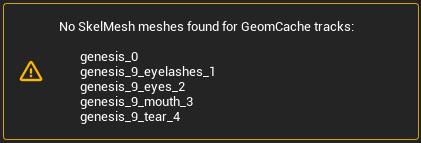
This led me down a path of trying to understand the internals of Alembic files as for some reason, UE was renaming the the tracks in the Alembic cache exported from Daz which meant that the tracks nolonger matched the parts of my character mesh. At least I think that's what was happening as I could find no information about this error.
The second problem I ran into was that the vertex order in the Alembic cache was different to that of my character mesh.
Also, UE was importing the Alembic cache at 24fps whereas it was importing the training animation FBX at 30fps, so I was getting a wanring about that as well.
To solve all of these things I decided to use Houdini:
- I import the character FBX, the alembic cache and the training animation into Houdini.
- I grab the geometry from first frame from the Alembic cache and this becomes my character mesh, which means that the vertex order matches.
- I fix up the paths/tracks of the Alembic cache, which solves the first error above.
- I rebind this new mesh to the skeleton and transfer the joint weights and materials across.
- I ensure that houdini is set up to export both the FBX animation and the alembic cache at 30fps.
- I also strip all of the properties/attributes from the alembic cache before exporting everthing (the character FBX, the training animation FBX and the Alembic cache) back out.
- All of this now happens automatically in Houdini. I don't need to do any manual work now that it's set up.
The new assets, exported out of Houdini now work perfectly for me in the ML Deformer setup.
I do a few others things in Houdini as well, not necessary for the ML Deformer to work, such as optimising the materials down to 10, packing the 4x4k head, body, arm and leg textures down to a single 8k texture, fixing up the eyes to work with the Metahuman eye material setup, renaming materials etc. I'm keen to continue building on my Houdini setup to work with Genesis 9 figures, alter the skeleton to better match the UE5 skeleton, handle clothing better anda few other things.
I did run into a similar problem you are having. At least it looked visually similar. I'm assuming that the vertex orders match between your character mesh and the alembic cache? For me the issue was due to some attributes/properties that were in the Alembic cache file exported out of Daz, which I now strip out in Houdini. I'll try to reproduce the problem again and see if I can work out what the exact cause was.
I tend to just run with the default settings in UE now as bumping things up didn't seem to make much difference to the quality of the end result. I haven't had any memory warnings though so it's possible that you're running out of GPU memory?
I'm in the process of updating my workflow for Genesis 9 so it's a bit broken at the moment but once I get it runnign again I'll do some more experiments and get back to you.
Why does G8F take FOREVER to load?Wonderland said:
SofaCitizen said:
Check your logs! If you have any products that are causing duplicate forumlas then it will drastically slow the loading time to the figure. I managed to speed up my loading times the other day by fixing a product that was spamming my logs with duplicate forumla errors due to using a stupid value for the unique id.
I do get duplicate product warnings every time, but I have no idea how to resolve that. I also get a "migration failed' warning first, wait about 45 minutes, then get a pop up that says duplicate formula found, click OK, then it finally loads. I've sent several tickets to CS with the log, they wait a month or so then close the ticket. I've given up on them helping me.
Well, I will not name-names, but when I was researching into the product that was causing my issues I saw that several threads had been complaining about it and it had reported to CS as early as April - and yet I was still having issues with it in December. Therefore, the only possible assumptions I could take away from that is that either CS was not forwarding the error to the PA or the PA has no interest in fixing their product. I am aware that duplicate formulas are caused by "ID clashes" and while it has been said (quite fairly) that it's not possible for all PAs to always pick unique values, the IDs for this product were incredibly-poorly named and so there was no excuse there (IMO).
Here are the steps I took to resolve this issue myself. Please note that I am not an expert so this was very much a "bull in a china shop" approach, however it seemed to resolve the log-spam & load times while nothing "visibly" broke. Also, there is the caveat that if you amend a morph file this might also break other morphs that use/link it - in my case it was a set of expressions and so it seemed unlikely that there would be a linked chain of files.
Important: take a backup of any files before you edit them and only change them if you feel confident updating JSON files without breaking the syntax.
- Find the duplicate formula entires in the error log
- Open the dsf file listed in the "Duplicate formula found" line - something like "data/DAZ 3D/Genesis 8/Female 8_1/Morphs/PUBLISHING_ARTIST_NAME/PRODUCT_NAME/MORPH_FILE_TRIGGERING_CLASHES.dsf"
- Look at the line prefixed with "input:" which will give you the ID that is clashing inbetween the hash symbol and question mark - e.g. MORPH_FILE.dsf#CLASHING_ID?value
- It is this CLASHING_ID that you need to update the dsf file you have opened - note, because this is a URL string any spaces will be written as %20 so it's probably best to avoid spaces if you can.
- Pick a new ID value (NEW_ID) - this can be anything you want but does need to be unique across all DAZ products that you own and so you would probably pick something that is perhaps made up with the initials of the PA, product and morph file joined together. So using my above example this might now be "PANPNMFTC". If this doesn't seem unique enough you can always add more characters/numbers to it but you should probably avoid spaces and symbols so that you don't have to worry about encoding them.
- You now need to replace the CLASHING_ID with your NEW_ID in several places in the open file.
- Under "modifier_library" change the value for the "id" key
- Under "modifier_library"/"forumlas" there will be multiple instances of "operations"/"url" - the value of all these need to be changed. A possible batch replacement would be something like replace "#CLASHING_ID?value" with "#NEW_ID?value"
- At the very end there is a section for "scene"/"modifiers". In there replace the CLASHING_ID for the "id" value with NEW_ID but leave the trailing "-1" and replace the CLASHING_ID for the "url" value with NEW_ID but leave the preceeding "#".
- Save the file
- Go back into Daz and clear the scene
- (Optionally) delete all the contents of the log so you can see what new lines are generated.
- Add the base figure into the new scene
- If all is well then there should not be any more duplicate formulas relating to the file you amended, nor any new wierd errors which might mean a syntax error in the file and the figure should load quicker.
- If all is well, test the morph/expression you amended to make sure it still functions correctly
- Repeat all steps above if there are duplicate formulas for any other files.
Again, please note that the above is very much a hack-job and so if you do follow them you do so at your own risk (so do not ignore the bit about making a backup copy first). One or two of the above steps may not entirely be necessary and there is a chance that there is also a step or two that I am missing but this worked for me.
Obviously, in an ideal world, these things would be fixed properly by Daz QA or the PA themselves, but like with the "//Runtime" issue it currently does appear to be a thing we have to fix ourselves.
Is there a solution to fix the stifness of woman private area in this pose?Glad, that someone adresses this. ;-)
I made some morph targets for my self as a solution. I used the magnet tool and GoZ for that.
One of the reasons, I was so disappointed with G9 has been the lack of more groups. I would have liked to have a genitalia group to fix exactly this issue and more body groups for creating smoother body bendings.Is there a solution to fix the stifness of woman private area in this pose?I misunderstood.
That image should be fine. The requirement is that it is textureless.
If DS supported soft body physics, then it could be solved easily, but one can only hope that it some day might come.
It is correction to a rather specific poseI, so I think it will be hard to find a morph to correct that. There are a number of morph products, and there might be one.
If it is essential to get it corrected, I think your best option is to create the morph yourself. It isn't that complicated to create morphs, but if you do not already know how to use a modeller, it might be a challenge.
Carrara Challenge #65 - Turning Points - Stills, Comics, and Animations AcceptedDiomede said:
WIP: My Project #2 - Books and Magazines
Free Carrara Magazine Model Attached in Zip File
A book or magazine spine is a turning point. Learning to read and write is a turning point. Reading a particularly meaningful book or magazine can be a turning point. Stories in books and magazines have turning points.
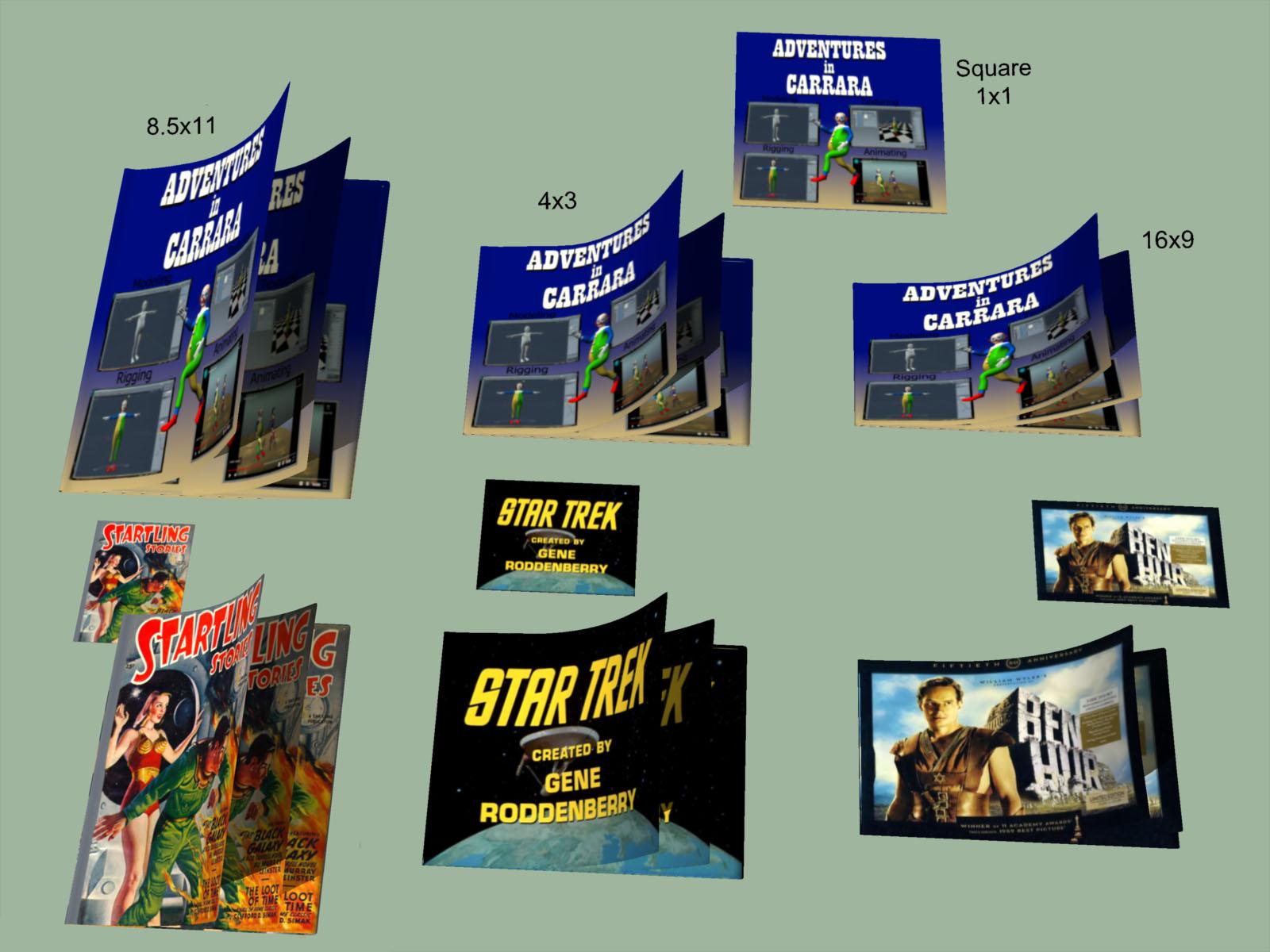
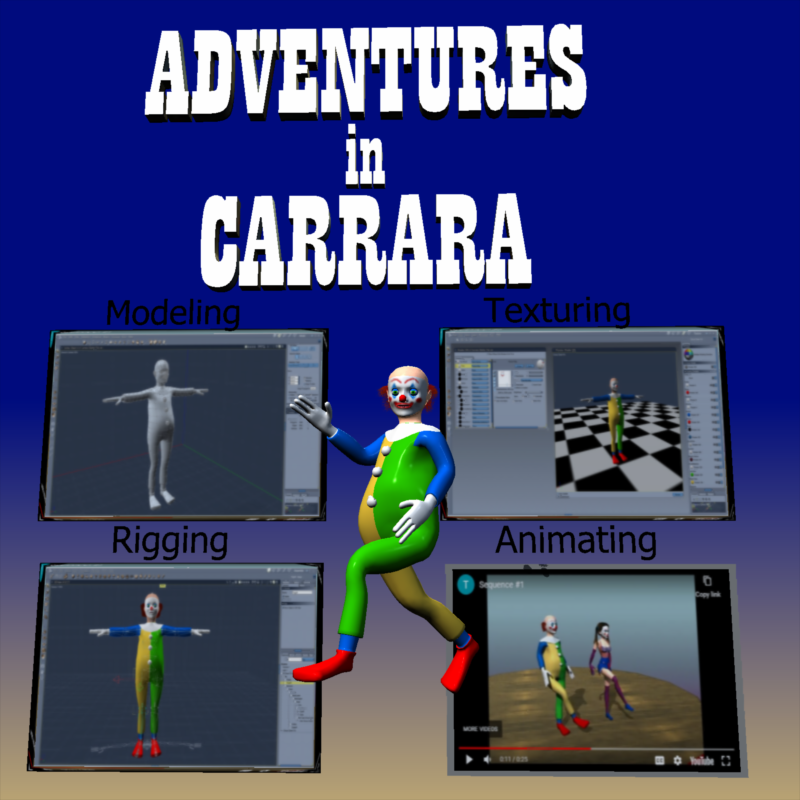
I have modeled a Carrara magazine as the centerpice of my second project, and to share with folks for their enoyment. It can be posed and animated. It has a few morphs to change its apect ratio and you can easily create your own. I will post more detail in my 'No One Asked Me' thread. Images created with this Carrara book and magazine prop are free to people for any use, commercial or personal. Adjust it any way you like. Just don't sell the mesh/figure as your own.
Key Features:
(1) Apply Your Own Cover and Page Images - Following an old tip by TimA / TangoAlpha, I have UVMapped the cover and the pages as a square. That way you can apply any image of any size to the default shader and then morph the book size to fit the aspect ratio.
(2) Animate Opening Cover and Turning Pages - The cover and the pages have been rigged so that they can be posed and animated. The same basic model and skeleton has been used for the cover and for the pages to make it easier to coordinate turning different sections.
(3) Page Inserts - The magazine comes in three parts. There is the wrapping, which includes the front cover, spine, and back cover. The front and back covers of the wrapping can be posed separately and have separate images applied. The wrapping is paper thin. There is a paper thin insert page which can be posed and have its own image. Insert more to turn multiple pages. There is a thick page insert, the back of which can be used for the left hand side of an open book. The thickness can be adjusted with a morph.
Bring on the adventures !!!
Here’s a suggestion for PAsrichardandtracy said:
Wonderland said:
Buy morphs and dial your own. Why would you use a stock figure for a book cover anyway? ...
I suspect that, if you're earning a living, or a substantial part of your living, from creating book covers then time & deadlines are critical and speed - so stock characters - will get you to the deadline with an acceptable cover. Generating your own character from stock morph packs takes time. Possibly to the point a deadline is missed. There are a wide variety of users here, all have different needs from the program and content. I suspect each of us is an expert in the way we as individuals use the program, so may focus on what we want a lot. Not everyone will always have the same needs & wants. But, it also happens that unless you ask, there's a chance no-one will think of doing what you want.
I do book covers and I would never deliver a client a stock character. I'd feel like I was cheating my client. Creating new characters from dial spinning is actually what I like best about DS and would always at least tweak characters even if on a deadline and NEVER use a DAZ core character without extensive alterations when used commercially.
DAZ achieves new lows in customer support (but appears to have ambitions to go lower still)nemesis10 said:
info_b3470fa520 said:
Nemesis, I do generate serial numbers. Email me with your problem. [email protected]
If you have an installation issue, I usually offer tech support via Skype.
All is fine. I was using you as an example of how PA's deal withy serial numbers. Your product is support is execellent and has the added benefit that you are still alive.
The poster has a bind because the poster is in one of five states:
- the installer doesn't work on his current os so the serial number won't work and the product doesn't work
- Daz3d provides a new serial number and product which will fail since the installer doesn't work and a new serial number won't work
- a surgical remedy doesn't work since the surgery doesn't allow the serial number to work
- a virtualized version doesn't work since the installer never does the final step to allow the serial number to work
- and, finally, the PA provides a serial number that bypasses the problem but the PA is dead and thus cannot provide a serial number or any support
There doesn't seem to be a simple solution to the problem
Daz creates the installers, don't they? Couldn't they create a new installer with the correct serial number? Or if the customer could use the original installer on an older Mac and transfer the files through an external drive? Another possibility, get a Windows emulator for the Mac and open the file.
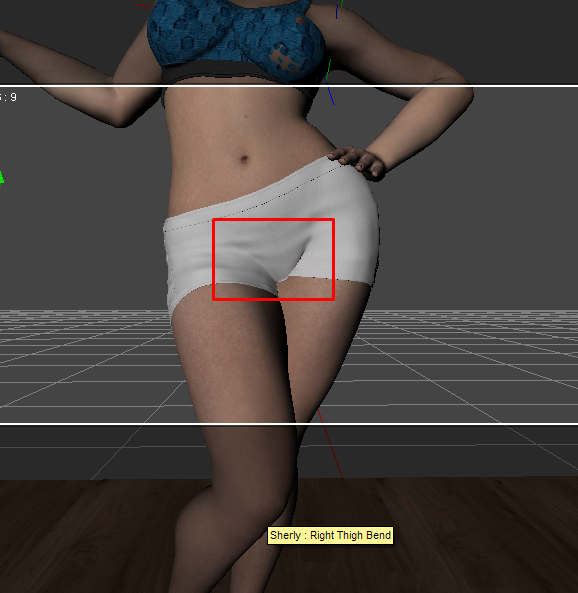
Is there a solution to fix the stifness of woman private area in this pose?I have this pose, the womanhood part looks a bit weird, coz it's stift and basically intersect with the thigh in this pose.
how to fix it? Is there a morph for this?
 Where to find anatomical elements for older generations of characters?
"Morphs++" pack for generation 4 figures was renamed "Shapes++" later, but the original name stuck.
https://www.daz3d.com/victoria-4-2-shapes
https://www.daz3d.com/michael-4-shapes
V4 didn't really have "Anatomical elements" as in a separate add-on, only a genital crease morph. It was indeed included in shapes++ pack.
Some of the HD morphs in the Genesis 8 Female Head Morphs package stopped workingHello All,
I had noticed, recently, that my HD morphs that are in the Genesis 8 Female Head morphs package, had stopped working. I don't know if this issue just started or, more than likely, it stemmed from the problem that I had in August when I had inadvertently deleted an important file as Daz was storing stuff, where it shouldn't have been. Anyway, I managed to fix most of those issues, but I had noticed that my older characters seemed "younger" than they supposed to be. (Yes, I did check to see that the SubD was at level 3 or higher). So I started to play with the forehead wrinkle morph and the crows feet morphs for the face and noticed that they didn't have any effect. I had uninstalled the Gen 8 Female Head Morph package and reinstalled it, and the problem still persists. So then I checked the log file and found something interesting:
Log:
2022-12-23 01:11:29.418 Loaded file: PHMForeheadWrinkleHDR.dsf
2022-12-23 01:11:29.419 WARNING: QFSFileEngine::open: No file name specified
2022-12-23 01:11:29.419 WARNING: ..\..\..\..\..\src\sdksource\general\dzmorphdeltas.cpp(784): Could not open HD file:
2022-12-23 01:11:29.421 Loaded Morph Deltas in 0 min 0.0 sec.
2022-12-23 01:11:29.421 Loaded file: PHMForeheadWrinkleHDL.dsf
2022-12-23 01:11:29.421 WARNING: QFSFileEngine::open: No file name specified
2022-12-23 01:11:29.421 WARNING: ..\..\..\..\..\src\sdksource\general\dzmorphdeltas.cpp(784): Could not open HD file:
2022-12-23 01:11:29.425 Loaded Morph Deltas in 0 min 0.0 sec.
2022-12-23 01:11:29.426 Loaded file: PHMEyesSize.dsf
2022-12-23 01:11:29.429 Loaded Morph Deltas in 0 min 0.0 sec.
2022-12-23 01:11:29.429 Loaded file: PHMEyesPuffyUpper.dsf
2022-12-23 01:11:29.431 Loaded Morph Deltas in 0 min 0.0 sec.
2022-12-23 01:11:29.431 Loaded file: PHMEyesPuffyLower.dsf
2022-12-23 01:11:29.433 Loaded Morph Deltas in 0 min 0.0 sec.
2022-12-23 01:11:29.433 Loaded file: PHMEyesIrisSize_neg.dsf
2022-12-23 01:11:29.437 Loaded Morph Deltas in 0 min 0.0 sec.
2022-12-23 01:11:29.437 Loaded file: PHMEyesHeight.dsf
2022-12-23 01:11:29.443 Loaded Morph Deltas in 0 min 0.0 sec.
2022-12-23 01:11:29.443 Loaded file: PHMEyesDepth.dsf
2022-12-23 01:11:29.446 Loaded Morph Deltas in 0 min 0.0 sec.
2022-12-23 01:11:29.446 Loaded file: PHMEyesAngledOuter.dsf
2022-12-23 01:11:29.449 Loaded Morph Deltas in 0 min 0.0 sec.
2022-12-23 01:11:29.449 Loaded file: PHMEyelidsLowerCreaseHD.dsf
2022-12-23 01:11:29.450 WARNING: QFSFileEngine::open: No file name specified
2022-12-23 01:11:29.450 WARNING: ..\..\..\..\..\src\sdksource\general\dzmorphdeltas.cpp(784): Could not open HD file:
2022-12-23 01:11:29.451 Loaded Morph Deltas in 0 min 0.0 sec.
2022-12-23 01:11:29.451 Loaded file: PHMEyelidsFoldDown.dsf
2022-12-23 01:11:29.453 Loaded Morph Deltas in 0 min 0.0 sec.
2022-12-23 01:11:29.454 Loaded file: PHMEarlobesLength.dsf
2022-12-23 01:11:29.455 Loaded Morph Deltas in 0 min 0.0 sec.
2022-12-23 01:11:29.455 Loaded file: PHMCrowsFeetHDR.dsf
2022-12-23 01:11:29.456 WARNING: QFSFileEngine::open: No file name specified
2022-12-23 01:11:29.456 WARNING: ..\..\..\..\..\src\sdksource\general\dzmorphdeltas.cpp(784): Could not open HD file:
2022-12-23 01:11:29.458 Loaded Morph Deltas in 0 min 0.0 sec.
2022-12-23 01:11:29.458 Loaded file: PHMCrowsFeetHDL.dsf
2022-12-23 01:11:29.459 WARNING: QFSFileEngine::open: No file name specified
2022-12-23 01:11:29.459 WARNING: ..\..\..\..\..\src\sdksource\general\dzmorphdeltas.cpp(784): Could not open HD file:
2022-12-23 01:11:29.461 Loaded Morph Deltas in 0 min 0.0 sec.
2022-12-23 01:11:29.461 Loaded file: PHMChinWidth.dsf
2022-12-23 01:11:29.463 Loaded Morph Deltas in 0 min 0.0 sec.
2022-12-23 01:11:29.463 Loaded file: PHMChinCleftHD.dsf
2022-12-23 01:11:29.464 WARNING: QFSFileEngine::open: No file name specified
2022-12-23 01:11:29.464 WARNING: ..\..\..\..\..\src\sdksource\general\dzmorphdeltas.cpp(784): Could not open HD file:
2022-12-23 01:11:29.466 Loaded Morph Deltas in 0 min 0.0 sec.
2022-12-23 01:11:29.466 Loaded file: PHMCheeksSlackHD.dsf
2022-12-23 01:11:29.466 WARNING: QFSFileEngine::open: No file name specified
2022-12-23 01:11:29.466 WARNING: ..\..\..\..\..\src\sdksource\general\dzmorphdeltas.cpp(784): Could not open HD file:
2022-12-23 01:11:29.468 Loaded Morph Deltas in 0 min 0.0 sec.
2022-12-23 01:11:29.468 Loaded file: PHMCheeksSink.dsf
2022-12-23 01:11:29.469 Loaded Morph Deltas in 0 min 0.0 sec.
2022-12-23 01:11:29.469 Loaded file: PHMBrowSlackHD.dsf
2022-12-23 01:11:29.470 WARNING: QFSFileEngine::open: No file name specified
2022-12-23 01:11:29.470 WARNING: ..\..\..\..\..\src\sdksource\general\dzmorphdeltas.cpp(784): Could not open HD file:So, low and behold, the log file told me I wasn't imagining things. For entries in regards to the aforementioned "Forehead Wrinkle HD" morphs, and the "Crowsfeet HD" morphs, I got a "Could not open HD file" error. But upon further examination, I could see that ALL of the HD files that I used in this particular character weren't loading up.
Now this only seems to be a problm with the Genesis 8 Female Head Morph package. Other HD morphs that came with other characters or packages seem to be working fine.
Any ideas of how I can go about fixing this?
Thanks,
Geo
Head gamesRandom dial spinning with Nikolai included also used his textures. One thing I realized we are missing is a shorten nails morph. I unchecked limits and used the rounded nails morph but if you go to far it makes the nails look funny.
How to save Face Transfer after the fact?Hi everyone,
Didn't know you were meant to click "save face" when using face transfer and have just been saving as subsets and files. The thing is, eventually, those files loose the face transfer shape and get distorted.
Is there any way to remedy this and prevent saved files from losing the shape?
Thanks in advance
Making Clones of G9 - Tutorialfaibolx said:
Catherine3678ab said:
Nothing wrong with experimenting. Indeed if making shape morphs then one does need to adjust rigging. But not for clones.
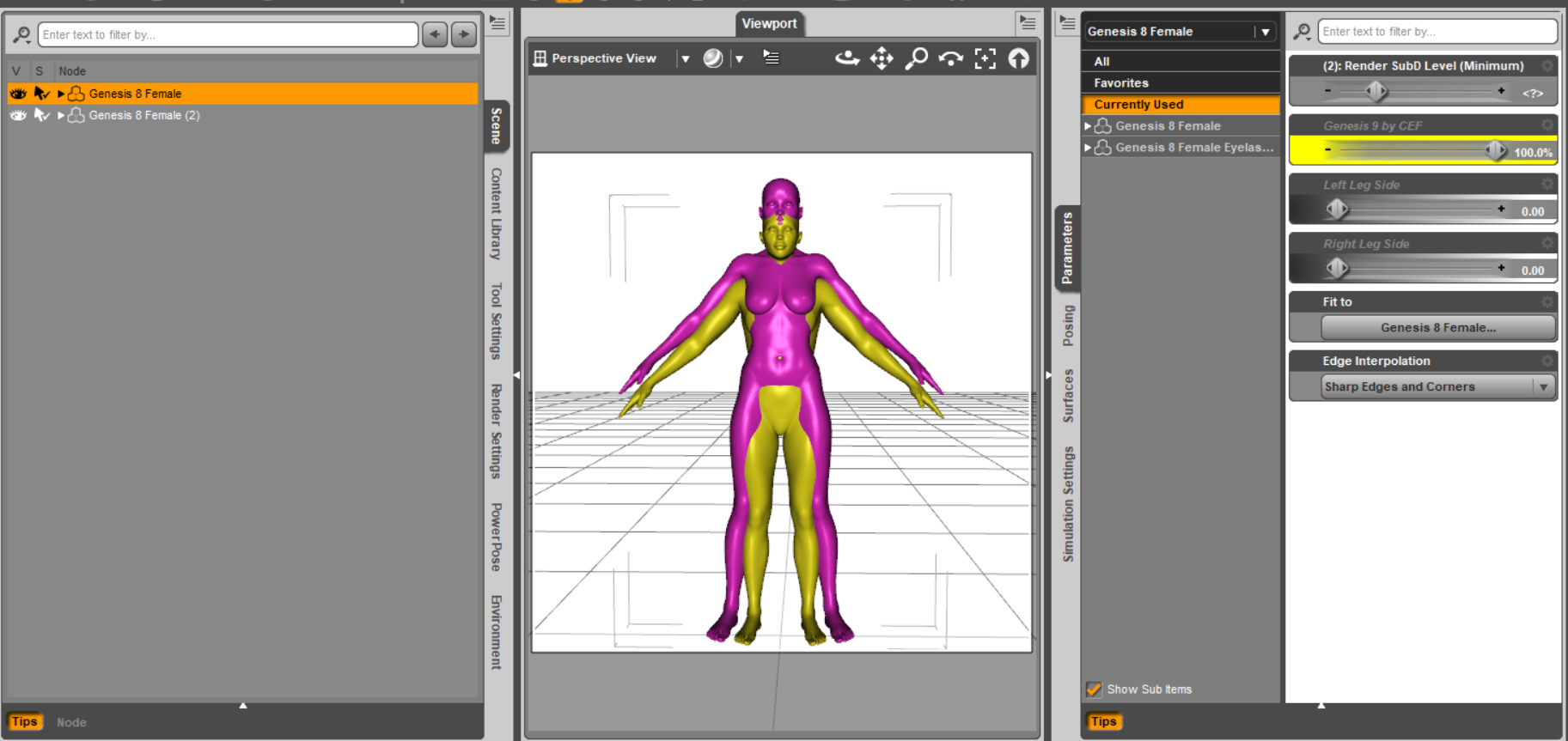
I have checked my autofit clones and yes, the G9 clone for G8F does indeed dial G8F down to G9's height. The autofit clone works and the clones fit as desired.
When you loaded the G8F mesh to G9 [having the G8F clone dialed in], those should be correct sizes. Then dial out the G8F clone from G9 and export out the G8F clothing mesh [no groups]. This would have the G8F clothing mesh at G9's height.
Then make the morph with it on G8F [default load, no morphs dialed in] [always reverse deformations]. When the G9 clone shape is dialed in, G8F should get shorter. With all shapes zeroed, save the new autofit clone.
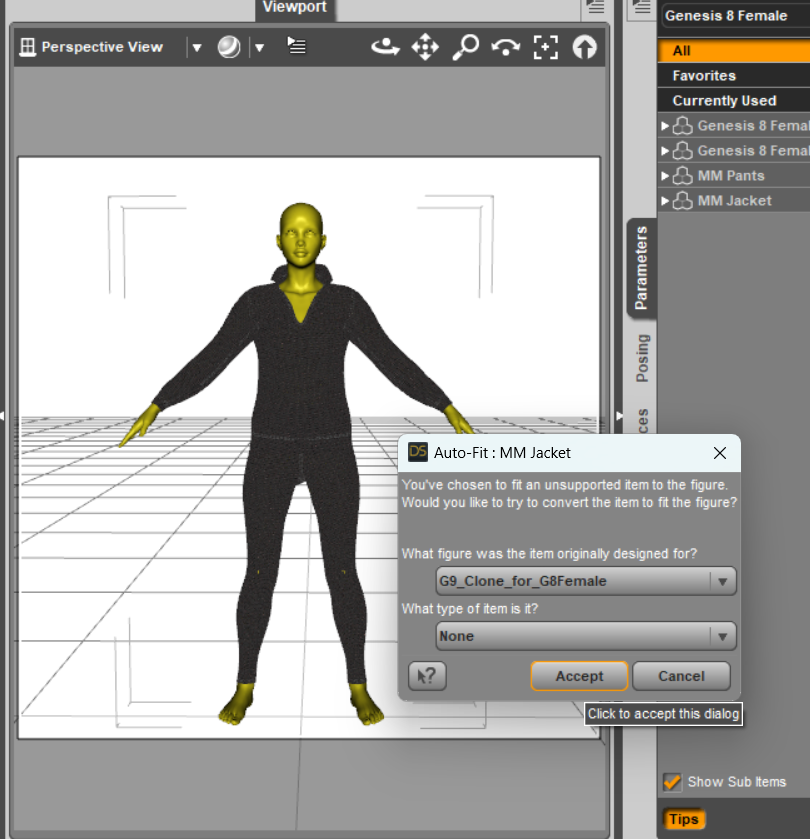
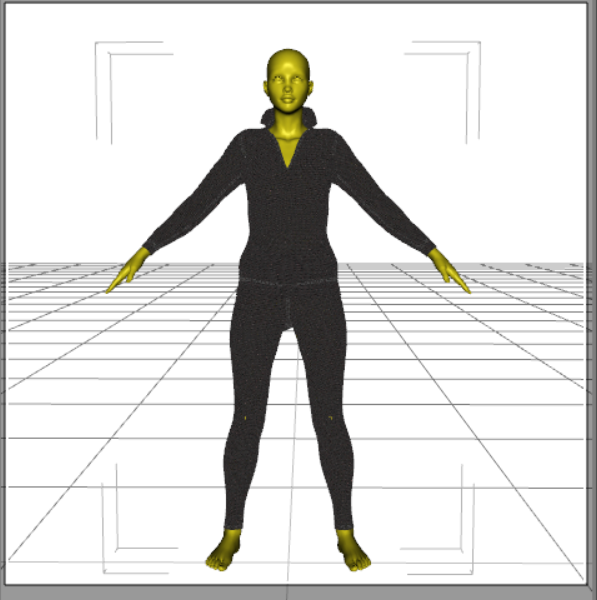
Then with G8F looking normal, add a G9 outfit and on the autofit dialog select the G9 clone that was made. Takes awhile for the program to adjust the weights but then the article of clothing should be fitting.
{With the sales I've downloaded a number of characters, the face of one apparently has infected my G8F so now I get to hunt that down}
eta: Naughty morphs found in the Christmas freebie from AngellsGraphics, Nadine for G8F.
Thanks a lot for your help Catherine, I finally made it to create the G9 clone, I was missing the step of dialing out the G8F Clone of G9 before exporting G8 mesh. I wish you a very happy holidays!

You're quite welcome, glad you figured it out :-)
And that's a lovely render, thanks for sharing :-)
Experimenting with ML Deformer in UE5.1Yes, so glad to see someone else experimenting with this. I'll share what I've found out, although I've taken a break from trying it (now I may have to start again).
First question is are you going from DAZ straight to unreal? If so, how did you get the alembic file exported?
I'm using Unreal to Blender with diffeomorphic. I went through the pain of putting all the joint limits in the Maya trainer and generated the 50,000 frame animation. I imported the skeletal animation into blender and got it to work fine. If anyone needs it for experimentation I'd be glad to share. It's just an FBX skeletal animation without the mesh so I don't think I'll be breaking any copyrights or anything. I can also save someone some time with the presets for Maya if anyone needs it. No sense typing in all those values if you don't have to.
I triangulated both meshes, the fbx and alembic, prior to exporting from Blender. This helped with one issue I was having. I think blender triangulates the alembic but not the fbx, or vice versa, so adding the traingulate modifier, applying it, and re-associating the shape keys helps. I have instructions on that if anyone wants.
I was able to get it working with a character at base resolution. I can't find a copy of my settings in Unreal but I remember bumping up most of the settings. I would really appreciate a copy of your settings to see what you used. I'll run another test and upload mine.
The biggest problem I ran into was bumping up the character resolution to sub 1 which is somewhere around 65,000 verts. I kept getting the results shown in the attached image. I tried many different settings but couldn't get anything to work. It would not let me increase the 'num morph targets per bone' without throwing an error after simulation (ran out of memory or something). If anyone was able to get this working, please, please, please post your settings in Unreal. I can't get this part working. So close...
[Released] Character Converter from Genesis 2 Female to Genesis 8 Female [Commercial]RiverSoftArt said:
n.jmurov said:
Did not work for me. I tried it on a custom G2F character and got the left eyeball falling out of the socket and a viciously disfigured left breast that can only be fixed in external software. Tried the 2019 and 2020 methods, deleting and re-creating the RSClone file, merging all the morphs on the original G2 into one prior to the conversion, the result was always the same.
I wonder if it missed a morph. When you convert a regular G2F character, it works? Can I see the Daz log from when you converted your custom G2F character?
Pretty much all my G2F characters are heavily customized, I've been tinkering with them for years and they have tons of ZBrush morphs. So far I've tried converting 4 of them and only 1 worked. i.e. it did not have obvious deformities. It did not look much like the original, though - I guess it can be adjusted by using the Tolerance parameter?
I'll try converting more and post the logs shortly. Thanks for supporting your product!
Daz 3D is part of

Connect
DAZ Productions, Inc.
7533 S Center View Ct #4664
West Jordan, UT 84084Licensing Agreement | Terms of Service | Privacy Policy | EULA
© 2026 Daz Productions Inc. All Rights Reserved.