-
Let's appreciate/discuss today's new releases - ongoing thread
Yay the new horse is coming out! I'll get the reindeer bundle and waited so long for Daz Horse 3! There is so much they can do with horses not just with realism but stylization too. They are such sweet animals.
They can have medieval, unicorn, and equestrian bundles and from the reindeer bundle description there might be morph bundles like there are for people but if we get the sleigh ride bundle we'll get those packs for free when they're released. The sleigh ride pack itself also looks like it has so many good things too. Then I can render someone petting a reindeer which would be so cute!
Maybe the new dragon will come soon too
G8.1 tear clipping with the eyesYou can add a smoothing modifier to the tear prop, and your clipping problem will go away. It works so well that I am surprised it is not applied by default.
In the scene tab, highlight the tear prop and click the drop down menu in the scene tab.
Edit>Geometry>Add Smoothing
If you make your morph the same, then it will work the same. Many pro morphs will contain hidden corrective morphs which allow them to work better when posing. You can find these in the data folder itself for the product. You can also look up the readme page for that product, which lists all files it includes. You will probably find a number of items that have MCM or JCM in their file name. These are the correctives. As your morph gets further from the default base Genesis shape, the more important these corrective morphs become.
DAZ Horse 3 - will there actually be any support this time?marcus.ames said:
MelissaGT said:
Cybersox said:
Well, the few images that have been posted look nice, but given how much potential a horse has for modification, it's hard not to look back and see how little has been done with the DAZ Horse 2 in the 10+ years that it's been out. So, will we actually see a lot of new qudrupedal charaters coming out when this is properly released? Or will DH3 be, as I suspect, merely a set up for yet another set of Centaurs, this time for G9? And, more importantly, will buyers of this advanced version end up getting hosed by only getting a base set of textures if DAZ pulls the same stunt they did on DH2 by having a multiple tiered price structure that requires buying yet another complete bundle in order to get all the morphs and textures?
The bundle states that purchasers will get access to all content for DH3, which includes breed morphs...so hopefully that means everything. I did purchase, so we'll find out.
I hope the mane/tail is more than just the black dForce hair mane. Horse mane/tails have more nuance than just one flat color. A black mane typically has red highlights towards the ends...a dapple grey has a darkish grey mane with many variations and then blonde/white highlights...I want to see those color variations...I don't want to see a single flat color. I'm also hoping we will see braided styles for mane/tail along with proper feather.
"Get access to" could just as easily be sales jargon for "meet the prerequisites to buy this other thing." If this is a sneak preview bundle, then there's going to be a Daz Horse 3 Pro Bundle around the corner that will make all the early adopters angry the same way it did with V9, I'd put money on it.
Buyers of V9's early release bundle were upset because they were given a stripper outfit that wasn't even usable because of the modeling on it. I can understand their rage. They didn't lose out on any of V9's textures. Not to mention I don't think they're doing pro bundles of anything anymore.
I also don't think buying the sleigh ride bundle means we're buying DH3. I think it means we're buying the sleigh and the reindeer morph of DH3...and that we'll be able to buy DH3 a few days early. But the details do say this, so I dunno -
 Missing files looking for G8F in G3F folder
I was going to attach an image showing the issue, but the forum software is buggered (yet again).
Inside each morph DSF file there is a pathway that points to the Parent mesh that the morph is meant to work with, the pathway in these files are pointing to the Genesis 3 folder instead of the Genesis 8 folder.
"parent" : "/data/DAZ 3D/Genesis 3/Female/Genesis8Female.dsf#Genesis8Female",
^^^^ That is what line 18 looks like in these files.
"parent" : "/data/Daz%203D/Genesis%208/Female/Genesis8Female.dsf#geometry",
^^^^ That is how they should look
The big problem is that these characters aren't done very well, as they are also missing rigging adjustments, that means facial pose controls like Eyes Closed wont work very well.
How to save Face Transfer after the fact?Catherine3678ab said:
I wrote this tutorial when Face Transfer first came out, covers several aspects: Using the Face Transfer Plugin in Daz Studio - Tutorial, uploaded to Renderosity where my name is: PetuniaPetals ;-) Enjoy.
Thanks for the reply.
I'm trying to remember my Renderosity login now, but does your tutorial cover this?
I'm not trying to learn how to save with file transfer but how to stop files I've made with face transfer and saved as a normal subset under local user's saved files? They seems to last quite a while and then suddenly are become unuseable.
Thanks again.
Nikolai 9 HDAnd now we have Mrs Klaus, Santa and the sleigh and Reindeer.
Plus the basic Horse 3 which is clearly needed for the Reindeer morph.
All set for tomorrow night...
G8.1 tear clipping with the eyesI'm back to this after a short break away from Daz!
When I looked at the issue in Blender, I decided the clipping was so bad it was beyond my level of skill to correct it (I had a go!) so instead I decided to convert her to a G8. I don't want to use a different character because she's supposed to look like a friend I'm making the picture for and Dannie is a great starting point

It seems a little bit silly to me, but G8.1 character morphs don't appear on G8 so I used the OBJ I exported to make a G8 shape then reapplied all the other changes I’d made but it seems there is more to a character than the shape. When I pose her eyes, they now pivot at the wrong point and move outside her head!
I'm now wondering whether there was any point in the G8 conversion. Would hiding the tear have achieved the same thing? I'm using G8 textures as the Albany character matches her skin quite well.
And if it does do something, can I use the proper 8.1 shape on an 8 character without having to create my own morph?
And for my own education...
What does my morph not do that the real one does?
Why is DS studio not showing 8.1 morphs on 8? They would work wouldn't they?
Sorry for all the questions!
 How to save Face Transfer after the fact?
I wrote this tutorial when Face Transfer first came out, covers several aspects: Using the Face Transfer Plugin in Daz Studio - Tutorial, uploaded to Renderosity where my name is: PetuniaPetals ;-) Enjoy.
Transfer utility from custom poseWhen you say create a figure, I assume you want to create a clothing item?
If the source in transfer rigging is not in default pose and/or base shape, you have to set shape to 'current' and expand options and check 'reverse source shape from target'.
Transfer utility from custom poseHi ! Since a really long time i try to use transfer utility with a custom pose. I mean,
- I use a G8F model
- i apply a custom pose
- I send my G8F as OBJ to marvelous designer
- I create my clothe, simulate on my G8F pose (not the basic T pose)
- I import the clothe create with marvelous designer to DAZ.
- NOW i want to use Transfer Utilty to create a figure.
The problem is, when you use transfer utility DAZ always restore your pose to ZERO and then create the figure.
Someone can help me ?
200 Free Morphs G9Oh wow! I haven't had the funds available to pick up the morph packs yet, so this is an extra amazing gift! This will let me play around with G9 much more!!!
Thank you so much, Sickleyield. You have always been one of my very favorite PAs, and I really appreciate all that you do ^_^ Happy Holidays!!!!
So what's compatible with what...The new 8.1 UV separates the torso into body and head so that there's less texture stretching and more detail on the neck and head. You can use G3 textures on G8.1. If you want to Map Transfer them to the 8.1 UV, you can do that, but you don't really gain anything from doing that aside from maybe compatibility with 8.1 specific scripts. Of course, you could also use an 8.1 skin that's already set up for the PBRSkin shader. Expressions are different because 8.1 has new facial rigging. The facial controls might take some getting used to, but I consider it a positive change.
Head gamesDaventaki said:
Random dial spinning with Nikolai included also used his textures. One thing I realized we are missing is a shorten nails morph. I unchecked limits and used the rounded nails morph but if you go to far it makes the nails look funny.
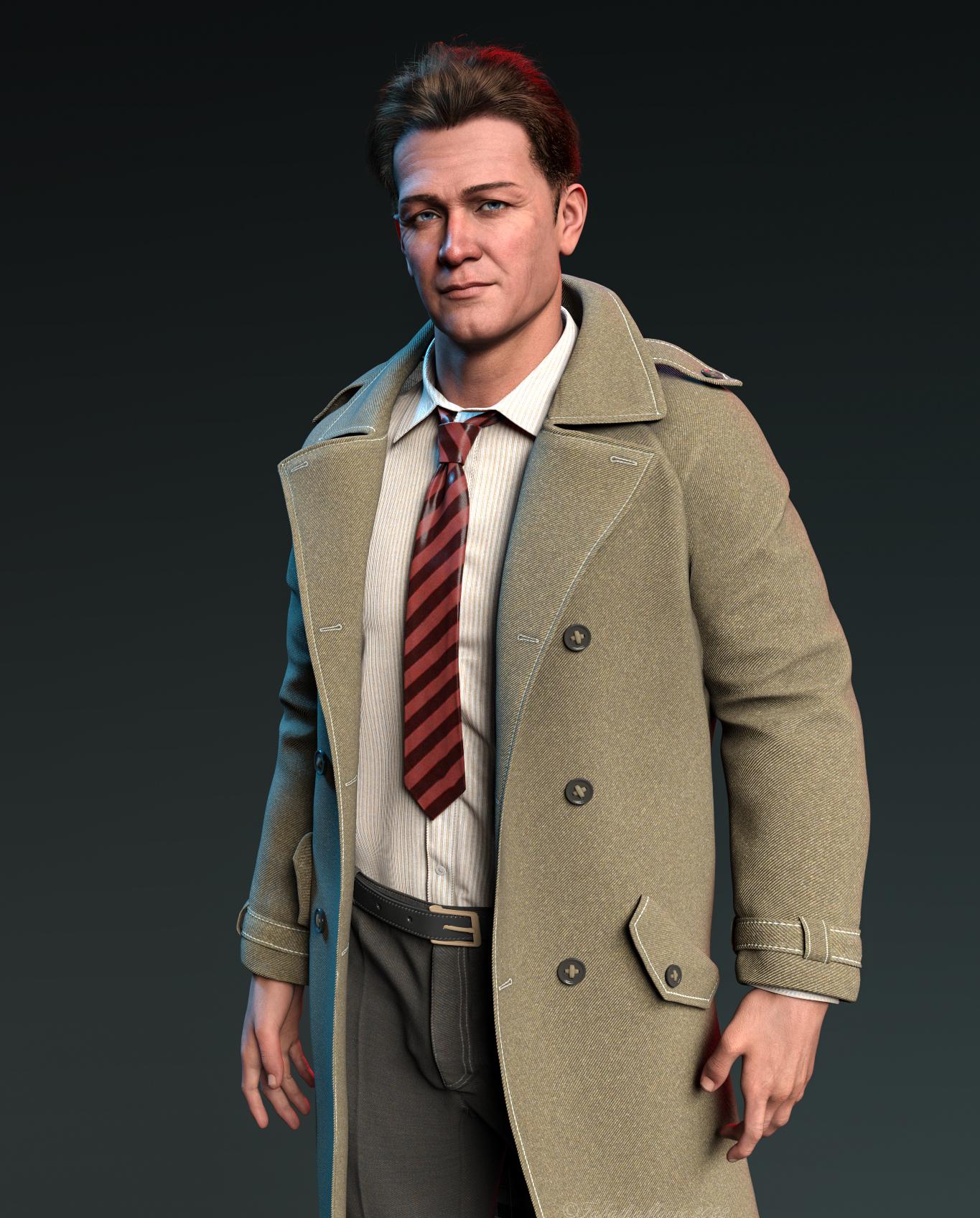
Looks like the Professor from Gilligan's Island (Russell Johnson), has come to investigate if his coconut powered cellphones are a commercial success.
So what's compatible with what...Thanks Gordig. I can probably use 8.1 then. I already did a morph from a Genesis 3 to an 8. I guess that'll work with 8.1 too. So I can use that morph (it's Brooklyn HD for Genesis 3, that I transferred to Genesis 8 a while back) on 8.1 but I'll have to get a new skin if I want to use the 8.1 UVs. Is that about right? And presumably there's something nice about the 8.1 UVs you don't get with 3 or 8? Am I right in thinking 8.1 expressions are better. In the promo images I've seen they certainly seem to be.
So what's compatible with what...Thought I'd do some Daz stuff over the holidays. Am still using Genesis 3 and 8, and haven't bought or used 8.1 or 9 things at all. Can someone explain to me in short what's compatible with what. e.g. I know I can switch skins/maps between 3 and 8. I don't think I can between 3, 8 and 8.1 (or can I). What about Genesis 9? I like the idea of a single rig you morph into male or female. Presumably no assets I have for 3 or 8 will work with that by default, clothes, poses, etc.
Then there's the new PBR shader system. Why would I use that over the Uber Shader? Is it more efficient? I read in a thread here there are problems with AO and things like that (though it looked pretty great regardless - one of those things you see if you're looking for them).
Is there a decent little summary somewhere of all these new things...
200 Free Morphs G9Thank you so much for this, love your morph sets[Released] Legacy Set Converter * Commercial *Thank you for that shameless plug!
. Just ahead and grabbed the AMC to add to my toolbox. I believe that the blade blur might be a morph. I know that if I import the Ju88 to DS, the slider for "Prop Blur" does just that.Daz 4.11 Iray Dark Eyes Bug ?I just started using G8 and im getting the black eyes too. Whats odd is that when I turn all of a G8 characters surfaces cutout opacity to 0%, I still see the dark spheres where the eyes would be in my renders. To remove them you have to make the eyes not visable in the perameters pane. Is that the eye moisture and sclera collision still being visible even with no surfaces present? Will the eye moisture morph work for me even if my figure is at world center? Im rendering in 3dl and If I convert to RSL textures the eyes are fine but my skin takes longer to render and doesnt look as nice
Some of the HD morphs in the Genesis 8 Female Head Morphs package stopped workingRichard Haseltine said:
Are there .dhdm files in \data\daz 3d\genesis 8\female\morphs\daz 3d\head\ files in the content directory to which the product is installed? If you have more than one active content directory are there matching files and folders in any of the others?
Hello Sir Richard
I had checked the path you referenced above and verified the parent directory to where the files are installed and they are there. In addition, with you pointing me to that folder, I had also discovered that the files were used recently (last night). So it looks like Daz is pointing to the correct directory. When I did my reinstall, it was pointing to the right directory. So I am not sure what is going on.
At first I thought it might just be the older characters that I 'rescued', but when I load up a fresh Genesis 8 female base character, it too is affected by the HD head morphs not working.
In Daz Studio, when I move an affected control, it seems like it is trying to do something, but when I ram it up to 100%, the end result is nothing.
since I have the same package for Genesis 3 Female, I tried the controls there and they are working fine. So it does seem like the problem is isolated to Genesis 8 female HD head morphs as other other Genesis 8
female morph packages are working. Also within that package the non HD morphs seem to be working.
Could there me some kind of master HD file with that package that might be corrupt or not there and that could be preventing the HD morphs from working? I don't get it, the files ARE there, but yet the log file says that Daz cant find them.
I hope we can find a solution to this soon because it is drastically affecting my characters that are supposed to look older. In fact, it was when I compared some older renders (before my mishap) to the newer ones, I noticed that the newer renders of the same character had less facial detail and the older characters look far too young. So that is what prompted me to investigate what was going on.
Also, as a heads up, I have to change hard drives, yet again, especially now with the release of Genesis 9.
Thank you,
Geo
Why does G8F take FOREVER to load?SofaCitizen said:
@Wonderland, just thought of a plan B if you wanted to try and disable the errors yourself. In Turbo Loader you can search for the morph that is throwing the error and uncheck it from there.
For example, in my previous example if the duplicate formula line listed the file "data/DAZ 3D/Genesis 8/Female 8_1/Morphs/PUBLISHING_ARTIST_NAME/PRODUCT_NAME/MORPH_FILE_TRIGGERING_CLASHES.dsf" then you could then put MORPH_FILE_TRIGGERING_CLASHES in the Morph search box and hit enter and that would give you the item to disable.
Again, that will only give you the option of disabling the second of the two products with a clash but perhaps allows you to have some control over managing this?
I just added to my last post while you were posting this. DS was updating metadata through Connect so I must have several items installed through Connect which maybe leads to duplicate formulas. I logged out of DS and now all products are in the wrong order but how do I uninstall all Connect items/?
Daz 3D is part of

Connect
DAZ Productions, Inc.
7533 S Center View Ct #4664
West Jordan, UT 84084Licensing Agreement | Terms of Service | Privacy Policy | EULA
© 2026 Daz Productions Inc. All Rights Reserved.