-
DAZ Studio quality - pet peeves
That certainly would cause problems when one PA links to another PAs morphs that duplicated a morph name/ID from another product.
Obviously, the earlier you can catch this sort of thing the better.
A tool that PAs can use during product build time would be ideal as the issues would be caught before the product was even finished.
Once customers are seeing the warnings while loading a character it's a bit late.
One could have that warning also trigger a message to the PAs that cause the mess.
They can fix it and submit an update before being allowed to submit any more products.
Taking time off current projects to be forced to fix the broken ones that are already in the store should be incentive to be more careful.
A user level tool for 3rd party sites like rendo would be nice to have.
Detailed Morphs? - Geometry questionYou can add the detail, load a second copy of the model at base resolution and withbthe morph applied, and bake to displacement - but of course that will not show in Daz Studio without rendering or using Iray Drawstyle.
Genesis 9Wonderland said:
morrisonmp said:
I have been experimenting with Genesis 9 characters (Michael, Minerva, Victoria, and a couple others) and while the textures are good and the facial improvements are excellent... I still hate the bodies. Gen9 is weirdly doughy and roundy and the proportions just "feel" wrong. I have not been able to make a G9 character yet (and I bought several of the morph sets as well) that I actually like having in a scene. And to me, YMMV, they don't fit well in scenes with G8/G8.1 models because the entire approach to making them just feels so very different.
I'd love to see some new sculpts using the G9 innovations that are not so odd-bodied.
Sorry for the rant... but the G9s just feel super weird to me.
I agree. G9/V9 is a bit too pudgy and short for my taste and the arms seem too long and legs too short. Some characters seem to have the head too small for the body. I know I can change all that but if I want to use stock poses it's extra work to make them work with proportions I use. I already make most G8 characters taller with longer legs and G9 needs even a bigger stretch. The only advantage I see now are the eyes and quick load time because I have very few G9 characters. It is kind of fun creating more characters from scratch though with G9 because I often get lazy mixing several G8 characters together rather than work on individual morphs. G9 will take longer to morph/pose but I'll probably be more creative doing it.
That's something I hadn't quite been able to put my finger on yet... The legs. I can't unsee it now. The legs are too short. I was just looking at the new muscle morphs pack images (on the store today) and I was like... yep, the legs feel wrong.
Transfer Utility and Load Morph don't work After Upgrading to DAZ 4.21 (64 Bit)How did the morph destroy the body? Most likelyIt could be that the scaling and axis settings are not correct (and were on the old system). Is Transfer Utility giving an error or is it just producing bad resuilts.
Transfer Utility and Load Morph don't work After Upgrading to DAZ 4.21 (64 Bit)I'm 3ds Max 2016 user and always editing morph using 3ds max 2016 and export to daz. In the previous version i' ve always succeed using transfer utility and load morph pro.Life looks so easy But after upgrading last version daz studio 4.21 64 bit everything seems downgrade. Transfer utility and load morph pro totally failed. The object morph like destroyed body that i've never met before.Transfer utility for cloth object always unsuccessfull That's really disappointing thats upgrade destroying not help anyway.KuJ dForce Medieval Dress for Genesis 9Thank you so much barbult for testing this. You were correct in assuming I am inexperienced with the dforce. I am..but I have been watching tutorials, as the one you mentioned,
and I couldnt get the dress to behave as it should. I do not know what a "Transfer Utility" is? I will look for it tho. Thank you again for you reassuance!
Where can I download this older rag doll freebie?Thank you Wendy. It looks also good. Will add it to my wish list. Otherwise I need to play with the Genesis doll morph I got from Mythcons some years back. But this doll is a bit human like and I like the toy look more. Want to use it in a country style room on a bed or a rocking chair as display. Well, something like that.PC component recommendations?Example configuration:
something like the below or similar:
- CPU: Intel Core i7-13700KF ~ £ 420 (or similar from AMD)
- Mainboard: MSI Pro Z690-A WiFi DDR4 ~ £ 220
- RAM: 32 GB DDR4 Ram: ~ £ 120
- Storage: M.2 ssd 2 TB: ~ £ 200
- GPU: RTX 3060 12 GB: ~ £ 390
- PSU min. 700 watt: ~ £ 100
Total: ~ £ 1450 (I have taken middle prices from idealo not the cheepest ones - a few weeks ago)
CPU fan: ~ £ 50
(a high end model like the Noctua NH-D15 would be ~ £ 100)plus case, case fans etc.
Notes:
CPU:
The i7-13700KF is extremely fast, has 18 cores and offers max. 24 threads. I use it in my new build and can say it is a lot faster in daily operation than the AMD Threadripper 3960x I used before. If you don't need the build-in GPU you can go with the i7-13700K (not ...KF) which comes without gpu and is a bit cheeper. Alternatively an Intel i7-13600K or KF is a bit slower, has a few cores less but is cheeper.
Regarding the build-in GPU. If you attach the monitor to that one, and use a current Windows 10 build you save a few 100 MB of vram. The latest Windows 10 interations do not reserve as much vram in general anymore but on top they reserve even less, if no display is attached to the gpu.Mainboard:
It is a DDR4 not DDR5 board and has one lan port 2.5 GB speed. If you need two lan ports or 10GB speed, expect higher board prices (as I wanted a 10GB connection to my NAS, I simply bought a 10 GB lan card for 87 € and put it in a free PCI slot - this was way cheeper than to go for a board that comes with 10 GB build-in).
DDR4 ram is expected to depricate in the next years. So, if you go with DDR4 (Ryzen 5 is also DDR4) buy the needed ram timely to not get hit by limited supply in the future. Alternatively go with Ryzen 7000 series or buy an intel board with DDR5 support (e.g. MSI PRO Z790-A WIFI DDR5). But board and ram will be more expensive.Regarding the Intel LGA-1700 socket: Rumors say, the 13th gen of Intel CPUs is the last one to use the LGA-1700. It is expected that the next gen of Intel CPUs will require a new mainboard with a new socket.
AMD: Same situation with AMD. Ryzen 5000 series uses socket AM4. The new Ryzen 7000 series uses socket AM5. So, if you buy a Ryzen 5000 CPU now you can't just replace the CPU with a Ryzen 7000 in the future. You need to replace the mainboard as well.
If you prefer to have a simple upgrade path (just replace CPU) it might be better to go with Ryzen 7000 and not Intel 13000 or AMD 5000. Ryzen 7000 uses AM5 socket and AMD wrote they will support AM5 at least until 2025 with new CPUs. Disadvantage is, that Ryzen 7000 needs the more expensive DDR5 ram and the AM5 mainboards are also more expensive than the older DDR4 boards with socket AM4.
RAM:
min. 32 GB and see mainboardStorage:
If you want to use it for many years you might want to read about experience with long term use before buying something. I personally have good experience with Samsung and Crucial SSDs and M.2s but that was just luck maybe.GPU:
The RTX 3060 12 GB is considered the sweet spot of processing speed, vram and price theese days. Alternatively there is the RTX 3060 Ti. It is faster but has less vram and costs more. In case of a decision I suggest to always go for more vram instead of more speed. Or better: try to get a used 3090 with 24 GB of vram (I use this one and it is hell of fast and has plenty of vram - good for DS and stable-diffusion).
Or wait for the lower end RTX 4xxx GPUs.PSU:
Don't go for the cheepest models. The most simple models tend to fail more early than higher end products and they could struggle with power demand peeks form the PC (CPU and GPU can request way higher watteges from the PSU than their official TDP values suggest - those peaks are only lasting a few milliseconds but very simple PSUs might cause a PC shutdown or blue screen because of it - it is rare, but it happens). Some vendors offer extended warranty for their higher end models. E.g. I got a 10 years warranty for a Corsair AX1600i PSU.Power cosumption and cooling:
The 13700KF at default settings in my board and at a high load (Cinebench R25 benchmark) consumed nearly 250 watt. That creates is a lot heat to be handled by the CPU cooler. But, those CPUs (Intel and AMD) and mainboards are set to very high voltage values at stock. In my case I just went into the MSI bios and lowerd the "CPU lite load" setting. As a result the CPU is now at 194 watt under Cinebench R25 with no reduction in speed and stability. Temps went down from around 90 degree C to around 75 degree C (watercooled system).
The RTX 3090 is similar to this regard. Default was 330 watt in Iray rendering at around 1950 MHz clock speed. I lowered the clock curve to a max. of 1800 MHz and reduced the allowed voltage quite a bit (can simply be done with the MSI afterburner tool). Result: before around 330 watt, after 245 watt. Speed wise it does not make a relevant difference in DS.If you go the intel route with LGA-1700 socket and build the system yourself, google for "LGA 1700 bending issue" before doing so. A lot of overheating, throtteling, bluescreen issues have to do with it (it's about a bend of the CPU when attached to the board so that the cooling plate does not have good contact the CPU die - this causes bad heat transfer to the cooler and results in overheating of those CPU areas that are not well covered). I had this issue and got above 100 degree C in my first Cinebench run because of it.
P.S. this post is partly a copy from another post I wrote in another forum for another software :-)
KuJ dForce Medieval Dress for Genesis 9Here is better way to fix the bad KuJ Medieval Drerss Under. Run it through the Transfer Utility with the Dress Long Loose template, and save it ias a Figure/Prop Asset. Then always use your saved version instead of the version that came with the product.Now you can leave the Genesis 9 Base Joint Corrrectives on and get proper shape to G9 shoulders, etc.
(solved) having problems creating morphs in blender to dazthanks after redoing everything and setting reverse deformation it all works I think I had keep vert order and poly morph off when I first tried reverse deformation but now everythings working fine.
(solved) having problems creating morphs in blender to dazlilweep said:
weird, why didnt you just set reverse deformations to Yes like someone suggested earlier
(youre probably not importing your morph on top of the default base shape so you have to turn this option to Yes to reverse out the existing changes you already have on the base shape. Alternatively, load your morph onto the base shape with no other morphs applied.)
I tried reverse deformations and it just did the opossite. the body got bigger the head got thinner and I'm importing to the same base shape I exported
(solved) having problems creating morphs in blender to dazAlso since you might not know this: remember to 'adjust rigging to shape' for your new morph so that the rigging gets realigned with any changes your morph introduces. If you dont adjust rigging, you might get some weird posing/expression issues when using your morph. You can bake the rigging changes to your morph dial by using ERC freeze - this will link the rigging change to the morph so dialling the morph will also dial in the changed rigging.
(solved) having problems creating morphs in blender to dazweird, why didnt you just set reverse deformations to Yes like someone suggested earlier
(youre probably not importing your morph on top of the default base shape so you have to turn this option to Yes to reverse out the existing changes you already have on the base shape. Alternatively, load your morph onto the base shape with no other morphs applied.)
Genesis 9outrider42 said:
If you are using them as is, the normal maps that bluejaunte uses are too compressed. The compression artifacts will show in closer shots. I remove the normal maps he has entirely now, and either use a HD morph or another set of normals. I ran into the problem you probably are getting, and at first I didn't realize what the issue was. It is all compression. Thankfully the important dual lobe textures don't suffer this.
Some of his color textures have compression in them as well. This isn't as big a problem, but can be visible under the right circumstances. I retouched some of these textures in different ways to get rid of the 'blockiness' I saw.
Finally, the displacement map that he started using on feet is pretty compressed, too. I tried different things. I upscaled it and resized it, and I repainted it a bit all to try and get that compression blockiness out.
I know that sounds like a lot, and it kind of is, lol. But the textures he uses for dual lobe are fantastic, and I haven't seen anybody else quite match that. The bump maps are fairly good, they are not as compressed like the other textures. I have touched them up in spots at times. The inner hands and feet being the targets.
So for those skin presets, just ditch the original normals. You may not even need normals depending on your intention anyway.
If bluejaunte happens to be reading this, don't be disheartened, your characters are still great. But I would really love it if they used less compression on these certain textures. If you have a raw uncompressed version of any of your textures, I'd love to have them. I'd pay!
Texture compression is a problem I am finding with a lot of products, especially environments. I urge PAs to please use better quality textures. I am sure some people will still cry that a product is too big of a download or something, but in my opinion it is better to have that quality than not. Textures can easily be resized or compressed by users. But it is very hard to get detail back into a texture that is horribly compressed and/or low resolution. I am not saying we need 100MB TIF textures, just not overly compressed textures. There is no point in having a 4K texture if it is highly compressed.
Thanks to my earlier exchange with you, yesterday I tried using normals from another character I liked on my main bluejaunte skin, and my problem was solved. Those bumps seem a little suspect too, but I left them alone. bluejaunte has hacked making a Genesis figure look like a photographed human being, and I'd use his figures as-is if I didn't need for my main character to have zero associations. Feet aren't an issue for me, since my characters are usually shod. Thanks for the follow-up, as I'm now back in business.
(solved) having problems creating morphs in blender to dazfelis said:
I don't know what can have happended.
But maybe from your original mesh try to move just a single face, and then make a morph to see how that works.
And how does it look in blender?
I think it is a little messed up in blender kinda hard to tell but I'm going to try to start from the begining
(solved) having problems creating morphs in blender to dazPerttiA said:
If the character you exported to Blender, already had some morphs applied, then you must select "Reverse deformations" when importing the morph back to DS
Unless "Reverse deformations" is used, the morphs are applied to the base mesh, which means that any and all morphs that were active on the model exported to Blender, gets their effect applied twice as strong.
Idk it didnt work im gonna try starting over
Genesis 9xyer0 said:
outrider42 said:
The 8k normal maps are pretty cool, not going to lie. But I still think bluejaunte's method of achieving these details is better for more situations. If you have one of his characters, the dual lobe maps on several of them are 8k in size, and they accomplish the task of emulating human skin patterns. This way the normal maps can be used for larger details. The normal maps can be way too strong for this detail in some situations. Though bluejaunte does a similar thing sometimes by cranking the bump maps way too high. I find myself turning them down, sometimes less than half the value he defaults them to.
I don't have V9, but I would suggest swapping her base color textures with the free G9 textures Daz gave us. The first set is based off Victoria 8.1. Just the base and trans color, leave the rest, and see how she looks. I think that would be a good strategy with her, keep all the normal, bump, ect, but replace the color and trans maps with others.
That also works extremely well with bluejaunte characters, as I mentioned in a few threads. Keep all the dual lobe and other stuff, just swap the color maps. You might need to adjust the trans color and value a bit to taste, but this strategy works incredibly well for how easy it is, and can really make your older characters pop. Plus since G8 and G3 have the same UV, you can even try this with your favorite G3 skins.
I went as far as converting bluejaunte textures to G8M, since they never made one. So I can use those dual lobe textures on males as well. Nix looks awesome with them.
I have bluejaunte's characters, and they are my first choice---except for extreme close-ups where I want to see microtexture. My main character currently uses a bluejaunte skin, which makes her look real in full body and torso shots, but I'm not happy with the lack of detail in close-ups. I've been switching out maps on skins, trying to find what looks best, and changing diffuse or translucency or volume values to get colors Daz avoids, but I haven't tried plugging other diffuse maps into bluejaunte shaders. Thanks for the idea.
If you are using them as is, the normal maps that bluejaunte uses are too compressed. The compression artifacts will show in closer shots. I remove the normal maps he has entirely now, and either use a HD morph or another set of normals. I ran into the problem you probably are getting, and at first I didn't realize what the issue was. It is all compression. Thankfully the important dual lobe textures don't suffer this.
Some of his color textures have compression in them as well. This isn't as big a problem, but can be visible under the right circumstances. I retouched some of these textures in different ways to get rid of the 'blockiness' I saw.
Finally, the displacement map that he started using on feet is pretty compressed, too. I tried different things. I upscaled it and resized it, and I repainted it a bit all to try and get that compression blockiness out.
I know that sounds like a lot, and it kind of is, lol. But the textures he uses for dual lobe are fantastic, and I haven't seen anybody else quite match that. The bump maps are fairly good, they are not as compressed like the other textures. I have touched them up in spots at times. The inner hands and feet being the targets.
So for those skin presets, just ditch the original normals. You may not even need normals depending on your intention anyway.
If bluejaunte happens to be reading this, don't be disheartened, your characters are still great. But I would really love it if they used less compression on these certain textures. If you have a raw uncompressed version of any of your textures, I'd love to have them. I'd pay!
Texture compression is a problem I am finding with a lot of products, especially environments. I urge PAs to please use better quality textures. I am sure some people will still cry that a product is too big of a download or something, but in my opinion it is better to have that quality than not. Textures can easily be resized or compressed by users. But it is very hard to get detail back into a texture that is horribly compressed and/or low resolution. I am not saying we need 100MB TIF textures, just not overly compressed textures. There is no point in having a 4K texture if it is highly compressed.
(solved) having problems creating morphs in blender to dazfelis said:
I don't know what can have happended.
But maybe from your original mesh try to move just a single face, and then make a morph to see how that works.
And how does it look in blender?
it looks fine in blender and i tried not changing anything same problem
Genesis 9morrisonmp said:
I have been experimenting with Genesis 9 characters (Michael, Minerva, Victoria, and a couple others) and while the textures are good and the facial improvements are excellent... I still hate the bodies. Gen9 is weirdly doughy and roundy and the proportions just "feel" wrong. I have not been able to make a G9 character yet (and I bought several of the morph sets as well) that I actually like having in a scene. And to me, YMMV, they don't fit well in scenes with G8/G8.1 models because the entire approach to making them just feels so very different.
I'd love to see some new sculpts using the G9 innovations that are not so odd-bodied.
Sorry for the rant... but the G9s just feel super weird to me.
I agree. G9/V9 is a bit too pudgy and short for my taste and the arms seem too long and legs too short. Some characters seem to have the head too small for the body. I know I can change all that but if I want to use stock poses it's extra work to make them work with proportions I use. I already make most G8 characters taller with longer legs and G9 needs even a bigger stretch. The only advantage I see now are the eyes and quick load time because I have very few G9 characters. It is kind of fun creating more characters from scratch though with G9 because I often get lazy mixing several G8 characters together rather than work on individual morphs. G9 will take longer to morph/pose but I'll probably be more creative doing it.
Head gamesAllenArt said:
Let's see those custom G9 faces folks, now that the morph packages are out ;).
One of my favorite things (when my muse is away) is making faces on my 3D characters. Seems I'm always rolling a new one. I bet I'm not alone. So let's see those faces! :D
Here's mine (so far). Someone remind me to make an "Ears Rotate In and Out" morph. I was kinda surprised there wasn't one in the Essential morphs ;) BTW, the nose here is pretty much custom. All else are Daz morphs.

Edit: just had to rotate his ears back a bit. What do ya think? Out or in? LOL
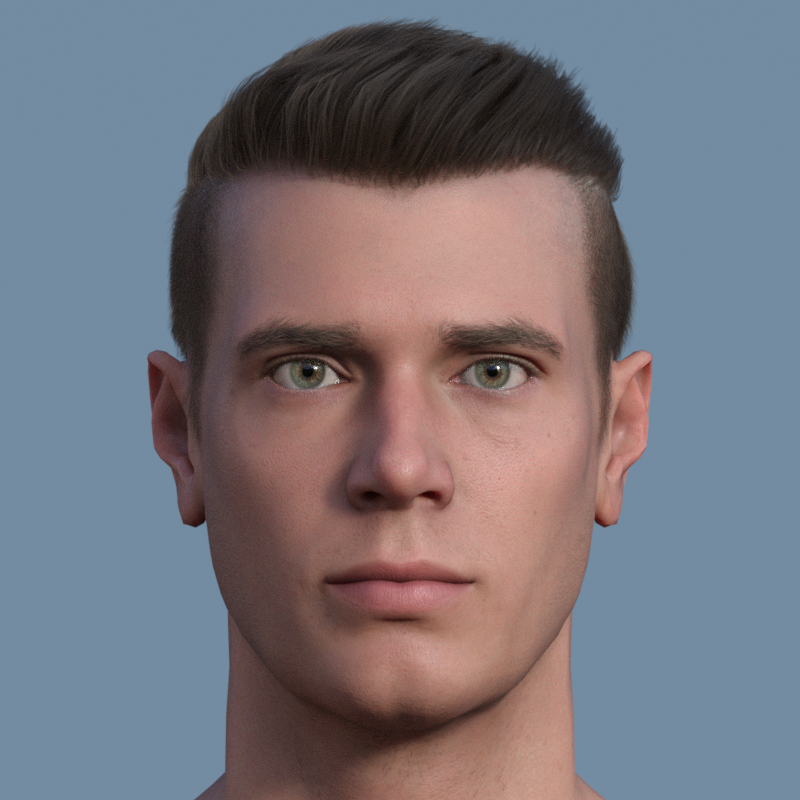
How did you get the ears to look like they do in the second image? Both faces are excellent!
Daz 3D is part of

Connect
DAZ Productions, Inc.
7533 S Center View Ct #4664
West Jordan, UT 84084Licensing Agreement | Terms of Service | Privacy Policy | EULA
© 2026 Daz Productions Inc. All Rights Reserved.