-
how about some buff blonde surfer dudes?
This is why I feel it's wrong to so heavily promote new characters with stuff like hair and clothing - which the product generally will not include. The way HD expansions are promoted, without hair or clothing and shown in some basic poses, should be how new characters are primarily promoted. Although, I like how new characters are now being shown with one or two pictures demonstrating how different looks can be achieved when combined with the morphs of others (which was what actually sold me on purchasing Lilith 7).
I understand it can be useful to give two or three 'dynamic artistic' renderings, but most promotional images should not show the character with hair or clothing, since the product doesn't include them and they can give a false impression as to how different it is from what's already out there. It helps the potential customer get a much better idea of what they're actually getting and whether it would be a desirable addition to what they already have.
Doing this would probably go some way in cutting down on the volume of Victoria/Michael-alikes, too!
list of G8 supported G3 UVsI tried the different textures on G8F when she first came out. Granting that I don't have all of them (and for some reason, I don't think I tried all of the ones I have), but the only ones I found that didn't work were: Girl 7's UV, Josie's UV, Bethany's UV, Sunny's UV, Rune's and Kalea's UV. Some of them were a bit surprising, given that the shapes weren't all that extreme. With the others that I did try -- I know I tried Victoria and Monique, probably not Mei Lin or Aiko, and I don't remember if I tried Lilith -- there was no visible issue in the viewport.
I am a bit confused by one of the promos for the "Genesis 3 Character UVs for Genesis 8 Female" product. The caption for that first image after the main promo says it shows G3F Base Female texture on G8F, with all sorts of breaks where the UV doesn't match up. That just doesn't happen. G3F Base Female UV and G8F Base Female UV are the same, by design. I wonder what that picture is meant to be showing? (Honestly, looking at it, I would say that's Victoria's texture, and not Jeane. That said, I had no issues putting Victoria 7's texture on G8F; I didn' see that sort of UV mismatch. THAT said ... I didn't try to render it, so there may be issues that show up on render that don't show in the viewport.)
Pose Blender is very interesting, isn't it?I just did a test in the new Pose blender between Victoria 7 and Olympia 8 and I was able to transfer Victorias pose to Olympia.
But with som clipping though if I transfered 100% of the pose, could be because olympia 8 has a bigger body morph than Victoria 7?
New guy full of questionsDaz have been developing the Genesis figures so higher numbers should be better than lower numbers. Genesis 3 introduced a new rigging system to make limbs bend more naturally. I still use the earlier figures a lot, I'm happy with the way they look.
When you say Mark 4 I think you probably mean Micheal 4. This goes back to the history of Daz. Before Daz Studio was invented Daz made content for a program called Poser. Their frst figures were Victoria and Michael. These went through improvements up to Victoria 4 and Michael 4 and then they introduced Genesis. They made morphs and textures for Genesis to make them like the older figures and these are Victoria 5 and Michael 5. This went on so Genesis 4 would have had a Victoria 8 and a Michael 8, I suppose they jumped to Genesis 8 so Genesis, Victoria and Michael would have the same numbers.
The older figures still work in Daz Studio. I'm an old time Poser user and I still use Victoria and Michael 4, sometimes version 3. You can use autofit to fit older generation clothing onto the new figures but it doesn't work between all generations. Some conversions are included with the figures and you can buy autofit clones to enable other conversions. Autofit is mainly useful for people like me who have built up a collection of stuff. It's less usefull for new users unless you see an old item that you really like, but autofit can be a bit unpredicatable and older items will usually have lower resolution textures than newer items and won't have Iray materials. On the other hand you can often get older generation stuff in sales at low prices and if you join the Platinum Club there's a lot of Generation 4 and 3 stuff you can buy very cheap.
I don't use smart content but I do use categories. I find this the best way to organise things. You can setup categories any way you want and organise you stuff in a way that makes sense to you.
Genesis 8 Male seems to be on his way...Didn't Olympia 8 come out at the last week of July? What if all other iconic characters, including the G8M launch does the same?
Per readme:
Olympia 8: 2017-07-25 (Tuesday)
Victoria 8: 2017-06-15 (Thursday)
The last week of this month will be edging into one of the big yearly sales most likely so if not this week, more than likely November.
The big sales have tended to run longer than a month the last couple years. They could always bracket it with Michael to start one sale and Josie to start the other. (I never remember whether it's the PA sale or the PC anniversary sale that comes first.)
New guy full of questionsHey there !
I'm Sandro from France and I'm just getting into 3-D characters, Daz3 seems like one of the good (and cheap) options to me (in conjunction with Blender probably).
I have some questions that will probably seem silly to the vets but hey you gotta start somewhere right ! :)
- First off, what is the difference between the Content Library and the Smart Content tabs ?
- What are the various Genesis models ? Are Gen3 better than Gen2 ? Why does it jump to Gen8 ?
- Lots of props and options seem to be for Mark4 or Victoria4, why ? They are presets that must be bought separately, are they "must-have" ?
- And last but not least, how do I know which is compatible with whom when I'm in the library explorer ?
Aside from the tutos I'm getting into that would be very helpful, thanks in advance.
Content Library is an old clunky way of organising your content with a search that doesn't work, and a folder structure that will make you pull your hair our. Smart content is a new clunky way of organising your content, with a search that doesn't work and a folder structure that will make you want to pull your hair out. Smart content tries to group products together with bigger pictures to help you find what content you're looking for.
You have Victoria 4/michael 4 , then Genesis 1, Genesis 2, Genesis 3. Each one of the base genesis figures also has victoria and michael attached, which is basically just a better model with higher quality textures. So you can get M5/v5 for Genesis, M6/V6 for G2 and M7/V7 for G3. When they moved onto G4, I guess they decided the 4 would conflict with the earlier products, so they decided to push the genesis numbering up to match with the victoria / michael numbering.
Yes, each generation offers a slight improvement of the previous ones.
Previous generation items can often be used with newer generation fgures using autofit, which comes built into Daz, or 3rd party plugins on the site
The clothing / poses / skins should all say which item they are intended for. Environments and props can be used with any figure. You get the genesis base figures free, so I usually just buy whichever clothes I want and just use which ever base model it needs. With all the sales etc you can usually pick up the various characters for really good prices, especially if you are on platinum club.
If you are starting out I would highly recommend that you buy a plainum club membership. You will get double your money back in vouchers and really good prices on various items. October is platinum month, so you'll probably be able to pick up a yearly membership for 40% off even.
Genesis 8 Male seems to be on his way...I think he will be. Haven't heard of another female figure coming out, and all these genesis 8 male placeholders are awfully suspicious.
Actually, Teen Josie 8 has a morph in something, although I can't remember exactly what right now.
Ah, it was this: https://www.daz3d.com/bibiset-for-genesis-8-female-s
That said, if Michael appears this month, he'll be nearly four months early. If Josie appears in September, she'll be right on time, historically speaking. (Josie 6 was September, Josie 7 was October. Or vice versa. Either way, she'll be roughly on schedule if she shows up next month.)
And while Olympia 8 was a Tuesday release, Victoria 8 was a Thursday release (and Morpheus was a Saturday release, but I really don't think he counts as a major release, even if he was very technically the last male base of his generation), so who knows? Actually, it might be that -- ignoring Morpheus -- they're staggering Tuesday-Thursday releases until they get back to the two-a-month tempo that G3 had. Again, who can say? (Well, apart from Daz, and they won't.)
Ice Dragon Art WIP'sThanks for the mention. However, reading it, it sounds like my tutorial takes Victoria 4 up to Genesis 8. Might want to edit that to say it's tips on getting Victoria 4 to Genesis 3 (and they'll see the other tips that apply to GenX2 in general.) The next post deals with doing materials tells what to keep when doing eyes, vs makeups.
Novica & Forum Members Tips & Product Reviews Pt 9LOL I still haven't had time to FIND my DIM yet. Here's the first cart I tested, then I combined the two. BTW, I totally agree with you @serenenight- I don't have time to tweak things either.
I did grab the military outfit, even though we all discussed how weird that belt was. For fantasy/other worlds, with shaders, I think it will look really cool. (Maybe with scales, tiled a lot...could be neat.) I'm looking mostly at sets, but grabbed some of these clothes as I can kitbash or use the bodysuits under them. Clothes make sense because they can be used on G8F. Hope this helps!

$18.95 $1.99 89%
-

$18.95 $2.39 87%
-

$29.95 $6.29 79%
-

$14.95 $3.14 79%
-

RareStone's Face Morphs Collection for Genesis 8 Femalenew
$17.95 $12.57 30% (new item)
-

Belle Dress for Genesis 8 Female(s)new
$16.95 $3.49 79% new item
-

Rock Diva Poses for Genesis 3 Femalesnew
$14.95 $3.99 73% new item
-

Grunge Pack for Sci Fi Prison Corridor
$9.95 $1.05 89%
-

$29.95 $6.29 79%
-

$19.95 $4.19 79%
-

$24.95 $5.24 79%

Urban Dweller Outfit for Genesis 3 Female(s)
$19.95 $4.19 79%
-

Mathius Vampire for Genesis 3 Male(s)
$28.95 $6.08 79%
-

Elegant Night Dress Genesis 3 Female(s)
$21.95 $4.62 79%
-

Timeless Outfit for Victoria 7
$19.95 $4.19 79%
-

Fifth Avenue Outfit for Genesis 3 Female(s)
$19.95 $4.19 79%
-

Sunny Summer Day Outfit for Genesis 3 Female(s)
$24.95 $5.24 79%
-

Jade Dream Outfit for Genesis 3 Female(s)
$19.95 $4.19 79%
Ice Dragon Art WIP'sOkay I wanted to give an update on how my conversions to G8F are going. I must say its been very much easier than I expected although a bit tedious and time consuming. On the plus side of things, I am becoming re aquainted with a bunch of a really gorgeous characters.
So this is what I have done so far.
I've moved all of my g3f characters up to G8f using the directions in this thread
I've moved all of my V4 characters up to G8F using Genx2 from from Cayman Studios v4 legacy product. Check out Novica's thread here, for tips and a link to a super easy to follow tutorial and directions
I'm in the process of saving all of my V4 character mats to DUF files and putting them all in a folder I can easily find, so that I can use them on my transferred V4 morphs on G8F. Once everything is saved its just the push of a button using Legacy UV's V4 for G8F . I made a main folder inside of Daz Studio under the Presets folder and named it V4 Skin Duf Conversion (original I know lol). I am making a folder inside of this folder for each skin, and all the make ups that come with each character. This is the tedious part, V4 characters come with a TON of options usually and you have to save each one separately if you want to keep the face make up separate from the body mats. So for instance, AK Malaik has 4 full body skins and something like 20 or more different make up options. When you go to do the make up make sure that you UNcheck all of the body parts that you don't want mats saved for (those are already saved in the full body skin) like arms, legs, teeth, gums etc. The make up doesn't affect those so you don't need them for the make up. I unchecked neck and kept head as well as some tattoos go pretty far back.
Once I am done converting all the skins and make ups to DUF I am going to have to work on moving all the V4 morphs from G3F up to G8F. And I haven't even started on moving Genesis and Genesis 2 characters up to G8F lol.
I haven't forgotten the clothing conversion either and will be updating that thread as soon as I get a chance. If anyone has V4 clothing that you have converted, I would love to add any of your renders and/or comments and suggestions to that thread.
Can DAZ Studio load animations via FBX?If you are using G3/G8
be aware that NONE of those BVH file will be of any direct use in Daz studio
as those figures exotic bone rigs are not properly recognized by the BVH importer in
Daz studio.
there are a few scripts available that require applying the BVH to G2 first and then retargeting to G3
and then G8.
I am already aware the mixamo BVHs do not match up with DAZ figures. They have made my characters look like car wreck victims quite a few times.

To fix the problem, I just load up the BVH files in BVHacker (free program), and rename the bones. That usually does the trick.

Graphmate also helps a lot for adjusting joints that are sticking out in odd directions.
Up until a year or two ago, Mixamo did actually have the option to use Victoria 4 and Michael 4 skeletal structure, but it was dropped for some unknown reason.
appreciating @wolf359's (and many other's) frustration with DAZ's symbolic-only support of serious animation on their new characters, I'm still going to gobble these BVH versions up like the treasure they are. The quality of these animations and the flexibility of the skeleton they come with are amazing (the feet stick, the smoothness and cleanliness (?) of the motion is amazing (to my eye)). I can't imagine I won't be able to find some use for them, even if it means applying them to V4 and converting them (as needed) up through the silly DAZ character heirarchy. Tools like Danceforms, Ikenima webtool, Motionbuilder, BVhacker, and iclone 3DXchange (and other general-purpose apps like poser, blender, carrara, maya, C4D, etc.) can certainly be used to convert/leverage these motions... (i hope)
I say "I hope", because like @BoingoTheClown, before I found the scripts mentioned in @firewarden and @Arnoldc's great mixamo to DS via FBX conversion tutorial (search for mixamo in the Daz forums), I did a whole lot of manual clicking... lol...
best to all,
--ms
@Arnoldc is the one who pointed me in the right direction for using Mixamo with DAZ. He helped me when I was floundering to get it to work at all, and he's done much more with those animations than I have. I haven't worked on animation in a while, but you've got me searching back through the forum to see what's new and maybe trying to get all those animations downloaded myself, just in case I need them. I've no idea what the cost will be to access the animations after the switch, plus the whole idea of having to upload your model and rig it every time... Just seems to add a needless step. Oh, well...
Can DAZ Studio load animations via FBX?If you are using G3/G8
be aware that NONE of those BVH file will be of any direct use in Daz studio
as those figures exotic bone rigs are not properly recognized by the BVH importer in
Daz studio.
there are a few scripts available that require applying the BVH to G2 first and then retargeting to G3
and then G8.
I am already aware the mixamo BVHs do not match up with DAZ figures. They have made my characters look like car wreck victims quite a few times.
To fix the problem, I just load up the BVH files in BVHacker (free program), and rename the bones. That usually does the trick.
Graphmate also helps a lot for adjusting joints that are sticking out in odd directions.
Up until a year or two ago, Mixamo did actually have the option to use Victoria 4 and Michael 4 skeletal structure, but it was dropped for some unknown reason.
appreciating @wolf359's (and many other's) frustration with DAZ's symbolic-only support of serious animation on their new characters, I'm still going to gobble these BVH versions up like the treasure they are. The quality of these animations and the flexibility of the skeleton they come with are amazing (the feet stick, the smoothness and cleanliness (?) of the motion is amazing (to my eye)). I can't imagine I won't be able to find some use for them, even if it means applying them to V4 and converting them (as needed) up through the silly DAZ character heirarchy. Tools like Danceforms, Ikenima webtool, Motionbuilder, BVhacker, and iclone 3DXchange (and other general-purpose apps like poser, blender, carrara, maya, C4D, etc.) can certainly be used to convert/leverage these motions... (i hope)
I say "I hope", because like @BoingoTheClown, before I found the scripts mentioned in @firewarden and @Arnoldc's great mixamo to DS via FBX conversion tutorial (search for mixamo in the Daz forums), I did a whole lot of manual clicking... lol...
best to all,
--ms
Can DAZ Studio load animations via FBX?If you are using G3/G8
be aware that NONE of those BVH file will be of any direct use in Daz studio
as those figures exotic bone rigs are not properly recognized by the BVH importer in
Daz studio.
there are a few scripts available that require applying the BVH to G2 first and then retargeting to G3
and then G8.
I am already aware the mixamo BVHs do not match up with DAZ figures. They have made my characters look like car wreck victims quite a few times.
To fix the problem, I just load up the BVH files in BVHacker (free program), and rename the bones. That usually does the trick.
Graphmate also helps a lot for adjusting joints that are sticking out in odd directions.
Up until a year or two ago, Mixamo did actually have the option to use Victoria 4 and Michael 4 skeletal structure, but it was dropped for some unknown reason.
Storefront sorting issuesIs anyone else having an issue with the sorts for the store being a bit off?
Normally, I have the store sort by "New Arrivals" on all pages -- that is, from newest to oldest. However, I've been noticing that for the different sales pages and anything but the main store, the sorting is just weird. For example, here's how the "Featured Daz Originals" page looks to me right now:
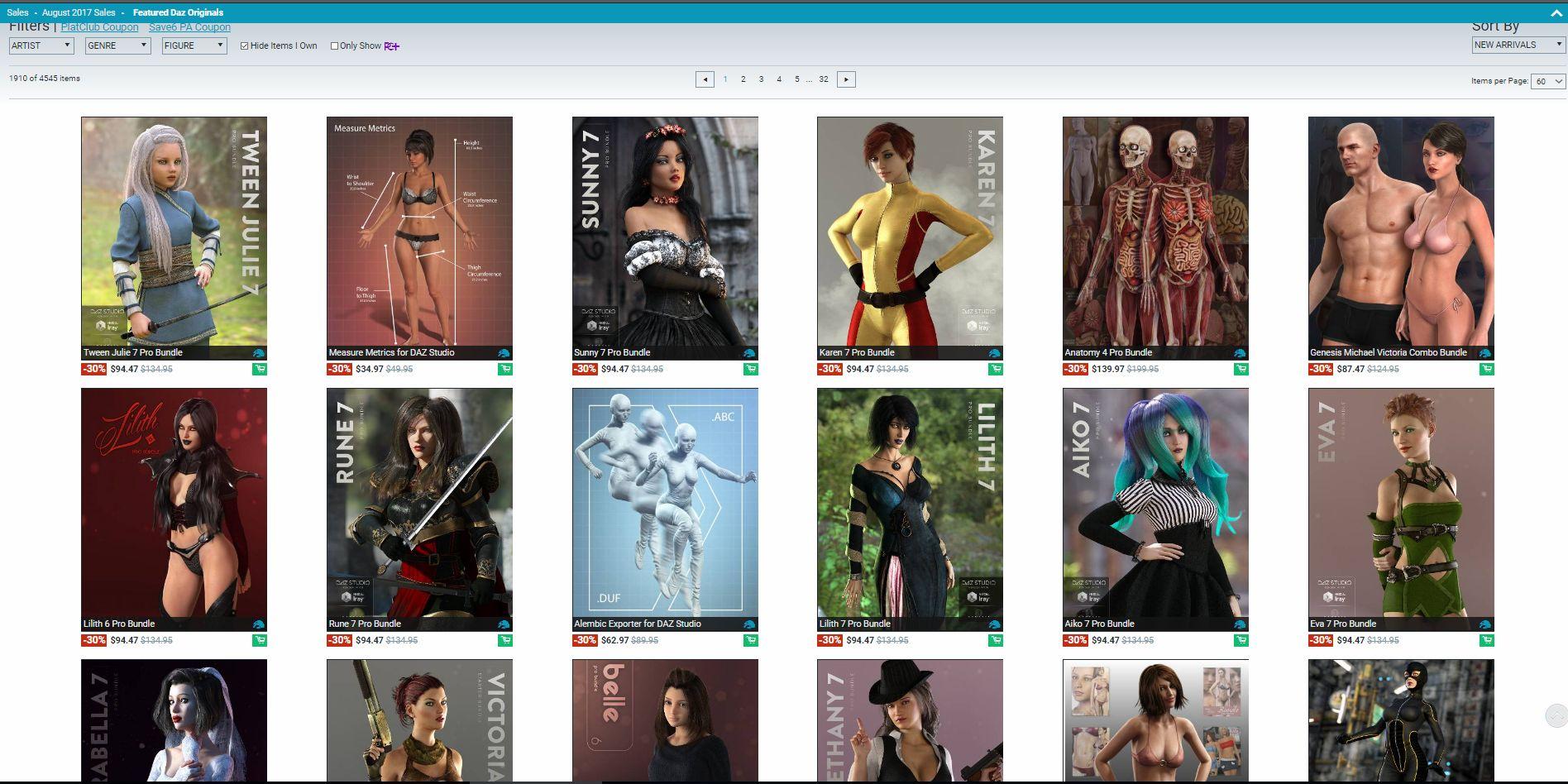
That's just not right, people!
Just on that screen alone:
- Measure Metrics is notably older than either Tween Julie 7 or Sunny 7 -- it has Olympia 6 as its title card character!
- Anatomy 4 Pro Bundle: way WAY older than Lilith 6 or Rune 7
- For that matter, Lilith 6 is notably older than Rune 7 and shouldn't be appearing first
- For THAT matter, the Genesis Michael Victoria Combo Bundle is older than any of the Genesis 2 or 3 characters and shouldn't be appearing there
- What is the Belle 6 Pro Bundle doing sitting between Victoria 7 and Bethany 7 Pro Bundles?
On the page just underneath where I've cropped:
- Victoria 4 Model 3D Suite appears before Super Bodysuit for Genesis 3 Female
- Callie 6 appears before Tween Julie 7 (solo, not bundle)
- Reptilian 6 appears before Super Bodysuit for Genesis 3 Male (which is, leave us note, not next to the suit for G3F, which it really should be)And so on.
It seems like this is a relatively recent occurrence. I only noticed it in the past week or so, and it's annoying enough that I think I'd have noticed if it had been like this for long.
Is everyone seeing that on their browsers?
Getting Back Into ThisIt seems that not many new releases at Daz can be used in Poser but some can. The older stuff is more likely to be Poser compatible. The store pages should tell you if an item works in Poser.
You can use Genesis and Genesis 2 with the DSON importer which is available free. Genesis 3 and Genesis 8 are not Poser compatible (they skipped Genesis 4 to 7). There are solutions available at other sites to import Genesis 3 into Poser, I haven't tried them, I don't think you get all of the Genesis 3 capabilities.
The Genesis and Genesis 2 base figures are Poser compatible with the DSON importer. Morphs, textures and clothes for them need a Poser companion file to import into Poser, the store pages should tell you which items are Poser compatible. And if you have problems Daz have a 30 day returns policy.
People have mixed results with the DSON importer. It works for me although it does put quite a load on Poser, some people have problems with it. You can get the DSON importer and Genesis, Genesis 2 Male and Female starter essentials all for free and try it out if you want to.
Anything made for Victoria 4, Mike 4 or earlier should be OK. I haven't seen any new items for them here (other sites still have them) but keep an eye open for sales. There have been some recent sales her where older generation items were on sale at big reductions.
I still use Poser although I find I'm using it less and Daz Studio more these days. I was reluctant to move to Daz Studio but it is very good now.
Skin material problemHow do they look rendered, in the engine the materials are amde for (Iray or 3Delight)?
I am including another pic. In this pic I have the same Genesis 3 Female model- but using two different skins that are both designed for Iray and for Genesis 3 Females. They are wearing the same dress and have the same pose. As you can see the dress renders normal, but the skin does not. I am also using the latest version of studio, but had the same problem with other versions as well.
I am wondering if there is something else I need to do before I apply the skin, rather than just find it in the character's materials forlder and clicking on the Iray listed version? Or perhaps if th ere is something I need to do to the skin after I load it that I am missing. I just apply the skin and go about rendering. I would say about a good third of my purchased skins have this problem- but the skin that comes with the various base figures themselves (Ie victoria 7's own skin, Genesis 3's own skin) all seem to work correctly. Maybe I need to do something more than just apply the new skin?
Maybe there is something wrong, or not checked properly in the surfaces tab? If there is, then it would have to affect some but not all of the other skins I load, because this problem is not one I have had with all of the ones I have purchased. Generally the only time I do anything to the surfaces tab is i f I am tweaking a texture for clothing or props.
Skin on the left is the Nala for Genesis 3 skin I bought tonight- which I am really excited to try because I think it will be perfect for my particular model I am making- other than the fact that it turns out way dark for me... The one on the right I believe is the base Genesis 3 female skin. I do notice that the non-Iray version changes the skin somewhat but it is still too dark and doesnt look right.
So thanks in advance... I hope someone can pinpoint what I am doing wrong. I know it has to be something silly that I am doing wrong on a tab I can move or something.
Seam with Genesis 8 based models displacementSo,
It's not a secret that displacement maps are a huge deal to enhance the realism of 3D rendering, specially with human figures. But, the displacement maps don't seem to work the same way with Genesis 8 as they did with Genesis 3. Except with Victoria and Olympia 8, all other Genesis 8 based figures (like Tara 2 and Elizabeth), I'm getting some seams when using displacement with subd.
Any ideas how to prevent this (without having to stop using displacement)?
Genesis 8 Male seems to be on his way...any guesses the theme for Michael 8?
I'll throw in a guess: not Michael 8. Yes, DAZ may actually use a different character for the launch of the G8 male. They might actually drop Michael. Of course, DAZ might actually make their entire store available to me free of charge; anything that is remotely possible - is possible.
What could possibly prompt me to come up with such a notion?
Because on the Back to School promo page, whereas it is written VICTORIA IS MY GIRL! - it only pronounces MICHAEL WAS HERE. And it says it with three trailing dots of the kind that people writing stuff on forums use to make it seem like there's more to what they're saying than there really is...
MICHAEL WAS HERE...
And that's it. That's my theory. Which is to say is mine, and nobody elses.
I have another theory.
It's about dinosaurs.
Ahem...
lol That made me laugh! :)
I just hope with G8M they fix some of the bend issues. Like when G3M raises his arms sometimes you get some weird shaping (I think it's the pectoralis minor). There's some nice improvement with G8F's bends, I'd like to see them go maybe a bit further with G3M as they tend to be more muscled and you can really tell when there are bend issues with really muscled characters.
Genesis 8 Male seems to be on his way...any guesses the theme for Michael 8?
I'll throw in a guess: not Michael 8. Yes, DAZ may actually use a different character for the launch of the G8 male. They might actually drop Michael. Of course, DAZ might actually make their entire store available to me free of charge; anything that is remotely possible - is possible.
What could possibly prompt me to come up with such a notion?
Because on the Back to School promo page, whereas it is written VICTORIA IS MY GIRL! - it only pronounces MICHAEL WAS HERE. And it says it with three trailing dots of the kind that people writing stuff on forums use to make it seem like there's more to what they're saying than there really is...
MICHAEL WAS HERE...
And that's it. That's my theory. Which is to say is mine, and nobody elses.
I have another theory.
It's about dinosaurs.
Ahem...
Genesis 8 Male seems to be on his way...Well the Victoria 8 was mostly, ignoring the extra character(s), the hair, and the poses they alway include was just underwear, sci-fi wear, and beach/teenage girl wear. I'd like to see Michael 8 be similarly themed although I'm not into sci-fi.
Daz 3D is part of

Connect
DAZ Productions, Inc.
7533 S Center View Ct #4664
West Jordan, UT 84084Licensing Agreement | Terms of Service | Privacy Policy | EULA
© 2026 Daz Productions Inc. All Rights Reserved.