-
Weird feet lines on Genesis 8
The most obvious answer... they were in the bathtub too long!
Other than that, either the bump map/normal map is too strong, or the foot morphs are too strong. Might want to check the hidden dials to see if a morph is over-blown.
How to separate body & head1- Incredibly fast and super efficient way to do it. With an objectively impressive script :
Amazing product to do that perfectly, even for much smaller morphs of Genesis (always tricky) : Shape Splitter
It creates the morph sliders in no time for head/body morphs. And do much more as you can basically separate any morph into multiple sliders.
Nicely explained there by Jay Versluis :
----------------------------
2- Manual way to do it. With D-Former, ERC Freeze, etc.
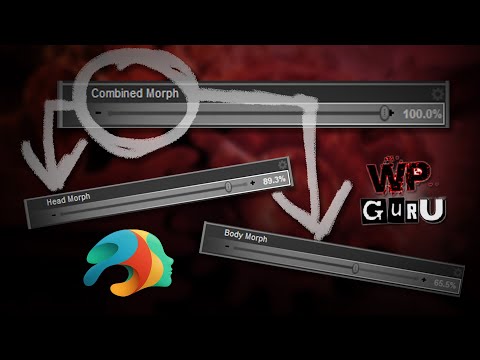
If you want to do it manually, understand how it works, there's an excellent tutorial on the subject by Benalive. It comes with a handy morph slider (link in the Youtube Description) that helps with smaller morphs too. But not as small as what Shape Splitter can do :
 Question about using DS from a different computer
Wonderland said:
hjake said:
Wonderland said:
outrider42 said:
I was going to suggest Splashtop myself. I have used it for about 5 years now. You can also use Splashtop on a phone or tablet through their Google/Apple apps, basically any device that has a screen can probably run Splashtop. I have used Splashtop on my phone several times in a pinch, and on every phone and tablet I have had over the years. I even used it on an Amazon Fire tablet. So this could be an option for you, too, and you wouldn't even need their laptop.
....'Wait, does this mean I could use DS or Photoshop on an iPad Pro and do everything with the Apple Pencil? If that would work, it would be life changing! I.would do that from home even!
I have not used the Apple iPad Pro so I don't know Splashtop's ability to run on the iPad. You could use the trial version to see. I do not know if pressure sensitivity or stylus angle will be recognized on the remote computer even if drivers are installed on local and remote. The stylus might just be considered a mouse. All work is done at the remote computer. The local computer/phone/tablet is operating the remote through a browser-like window.
My bigger concern would be input lag for something as sensitive as sketching and filling in an area where pressure and angle might be an issue.
Next is screen size. I have logged into the remote on my Samsung android phone but that was more to check on rendering or syncing status or to grab a file from the computer when I am away from a computer. Unless I use Samsung Dex to connect to a TV or monitor and my bluetooth a mouse and keyboard to my phone, then, voila, instant computer as grandma's cottage in the wood. Assuming you have wifi or plenty of data. :-)
I have used Daz Studio, Affinity photo, publisher, and designer, but not with a stylus. A wacom tablet is on my wishlist.
To work with Daz effectively I use the View tab for scene manipulation when I am not in full screen. If you are not in full screen mode, then long drags of the local mouse can take you off the remote screen and cause in predictable behaiour because Daz Studio thinks you are still dragging the mouse but at the edge of the remote screen.
Also you should be able to do your artwork on the iPad and file transfer to the remote.
If you intend to use the stylus as the mouse, not as a fine art tool, then it should work just fine.
Really everything depends on your internet connection speed at both ends versus your patience for input lag.
Actually, I use Splashtop at home all the time. Editing on my local computer. Rendering, video converting, and office work on my remote computers. With the headless video display adapter outrider42 suggested, and I ordered today, it means none of the computers have to be attached to a monitor and if they are then I may be able to use multiple screens from remote to local without actually having to connect a second screen to the remote.
I could use Windows RDP at home no problem but I find Splashtop a better fit for me.
I'd be using the pencil just like a mouse.
DS is, to put it mildly, not well optimized for a touch interface. To put it less mildly, it feels almost deliberately hostile to a touch interface. I went through a phase where I was working mostly on a Surface Pro, and C4D was great to use with a stylus, but I quickly gave up trying to use it with DS.
How to separate body & headIf a product comes with a full character morph (no separate head and body option), is there a SIMPLE way to extra only the body and / or only the head? Thanks in advance.
Weird feet lines on Genesis 8evacyn said:
Are you using a displacement map for the wrinkles? Maybe try removing that and any HD morphs and see if it goes away. I don't see them really on the base G8.
I've checked if is from the displacement map and is not. The first time I saw them was when I tried to sculpt the feet morph in blender.
dForce MRB Outfit + wind node issuesWind speed is by default a bit too strong by default in Daz. Which can cause such issues.
Ways to fix that :
1- Simulation Settings Tab :
* Increase Frames Per Second (FPS) Multiplier. Slower simulation, more stable. (from 3 to 10)
* Increase Iterations (Per Subframe) (from 8 to 32)
2- Surfaces Tab (for MBR Coat > Cloak, mostly) :
* Decrease Stretch Stifness to something like 0.55. Material will strech a bit, extending edges between vertices. This often helps with so called "explosion" issues.
* Decrease Bend Stifness to around 0.050. This decreases the resistance to extension. Similar effect to the precedent, shape changes more, avoiding "explosion" issues.
* Cloaks by default moves waaaaaaay too slowly. dForce parameters aren't great I'd say by default.
3- Set up your Genesis and Wind Node with keyframes in the Timeline :
* Decrease the wind node's Strength (mph) to 0, at frame 0. And set the wind node at a strength of 5 (default) or way less if it's too strong, at frame 25 (for example)
* Set Genesis to default pose at frame 0. Then your custom Genesis pose at frame 25.
4- Simulation Settings
* Frames to Simulate : Animated (Custom) ; Simulation Range : 1 to 50.
Now you simulate from default pose without wind to final pose with wind. On 50 frames. And with an FPS Multiplier and Iterations per Subframe that will help dForce to calculate properly.
P.S : Problem with this bundle is not so much the object but rather Genesis' nails geometry. Coat touches hands and the (terrible) nested polygons in nails cause trouble. Put simple gloves on those hands before simulation, or make a custom Genesis morph to smooth the nails until all nested polygons are "untangled". This will help big time with simulation stability.
Dimensional Scaling of BonesI would strongly recommend not doing any non-uniform scaling on any rig, ever. It's almost guaranteed to mess up animation, morphs and so on. Uniform scaling is usually OK. Far better to do a morph to shorten the fingers than a non-uniform scale. If you aren't sure how to do that, it would be a good skill to learn (Blender, for example).
One of the reasons is non-uniform scaling breaks batching (in game engines at least). The matrix math can also make weird things happen in the renderer, especially to surface normals.
DAZ Horse 3 - will there actually be any support this time?JOdel said:
Oh c'mon. The poor beast just needs a proper horse morph...
LOL! Good one
 Searching for so-called Baby Face Adult Male Face Character
Diomede said:
Greetings. I am looking for a rounder adult face character, male, preferably for G8M or G9M. The ideal would have face morph and matching skin maps - very slight stubble or 5 o'clock shadow would be a jackpot. Very slight. Would prefer not to achieve with a weight morph or a child morph, but will likely go that route if search is unsuccessful. Softer jaw line, less high cheek bones,... Ethnicity not particularly important. Think of someone who does not have the traditional 'leading man' looks, although may have been a leading man none-the-less. The opposite of John Hamm and Henry Cavill. Someone typically expected to be hired to play the Jimmy Olson sidekick photographer character, not the Clark Kent Superman investigative journalist character.
EDIT: speaking of stubble, is there a 5 o'clock shadow or stubble skin overlay or geoshell for G8M or G9M? Would be better to separate the search.
Both the Genesis 9 Base morphs to 100% Male / 0% Female, the Genesis 8 Male Base, and the Genesis 3 Male Base all qualify I think. Not as much as Lou Costello or Bob Costos, but reasonably in that general area.
DAZ Horse 3 - will there actually be any support this time?AlmightyQUEST said:
The rodent base was a more neutral base not quite like any of the animals it would morph into, so fingers crossed that's the plan here.
This is definitely not a neutral base, it's marked as a Thoroughbred breed. It's most likely unifinished and rushed to meet the xmas deadline and release the Reindeer.
As for abandoning the rodent, it's irellevant to this situation. This is a DO base, even if AM doesn't do anything for it further, there will be other PAs who will build around it and, at least for a while, Daz will certainly buy / comission items for it.Let's appreciate/discuss today's new releases - ongoing threadRichard Haseltine said:
I'd be interested to see the Luthbellina without the "tactical" stuff - just the clothes without the straps.
Please excuse that the render's a bit uncooked in places.
The sweater has a morph to fit over the belt; the jeans have morphs to fit in and out of the shoes, as well as three belt loop morphs; there are two morphs to adjust the tightness of the shoes; the gloves have no dedicated morphs. All have the standard fitting morphs.
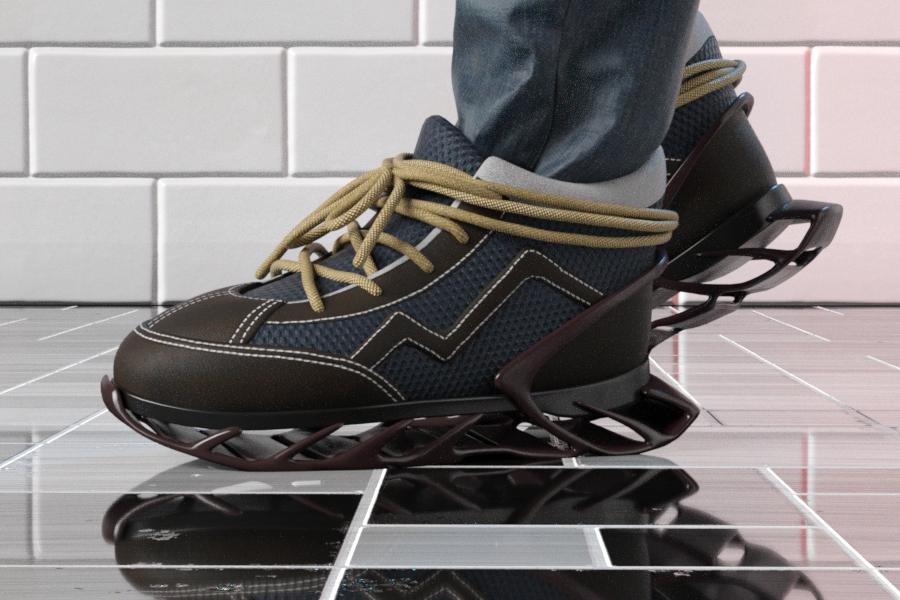
They're really nice items without the belts, and it's great to get some good regular clothing honestly, although I'm not 100% sold on the sneakers. The soles are a bit... out there if your characters don't commonly wear Yeezys or anything weird like that.
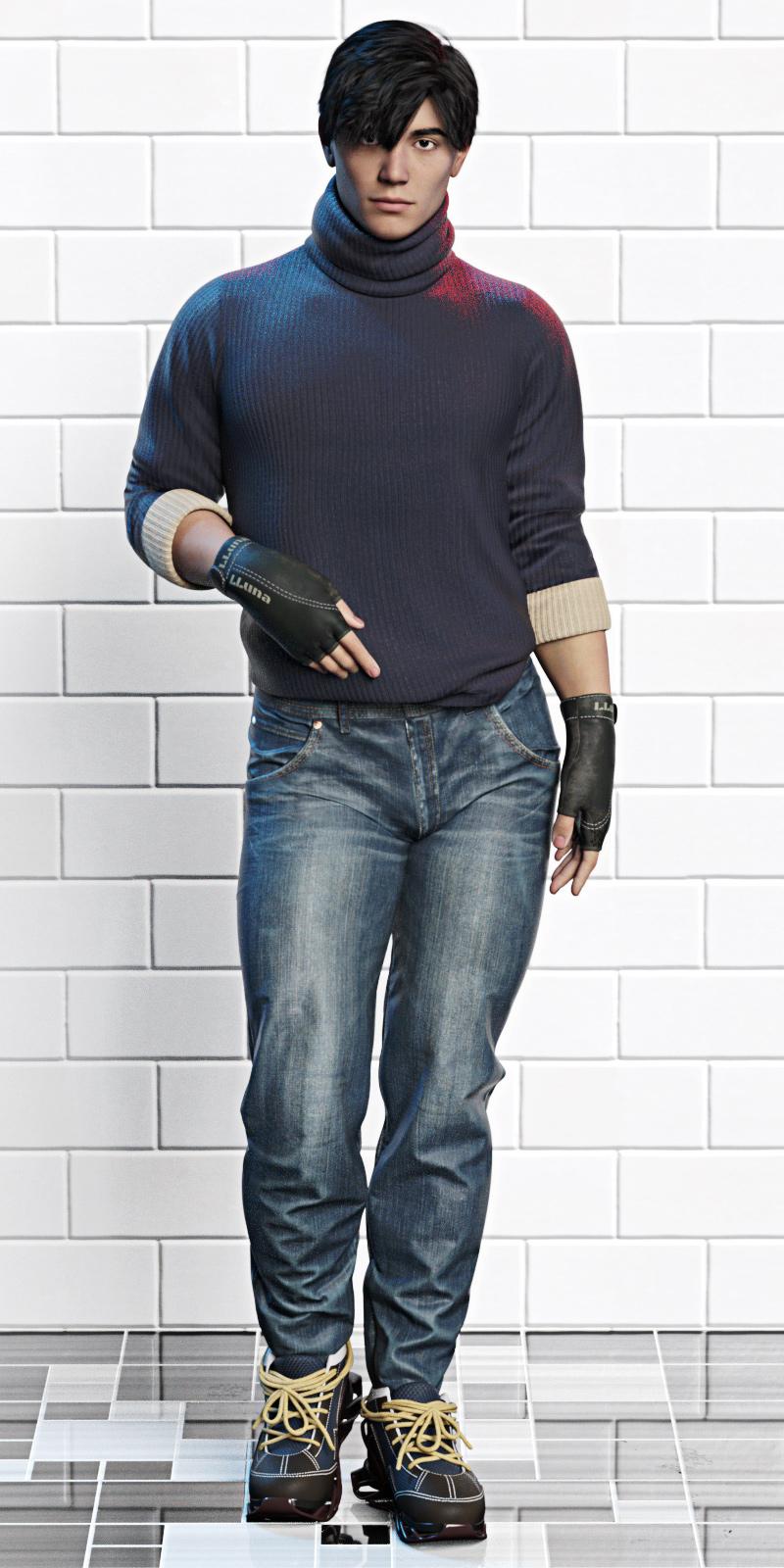
My kingdom for more actual gender-neutral standing poses.
EDIT: Very quick render of the shoes from the side (and it was very quick, because I hid everything except the jeans and shoes...) Great for running/parkour.
 Metadata problems - (Reason found)
https://www.daz3d.com/cc-angelic-accoutrements
GUID: 01c2990f-6003-4fe1-b0e4-9fafca217f14https://www.daz3d.com/only-dress-for-genesis-8-female
GUID: 6572a82b-1103-4b4e-9912-d781b8297b0279531 - Reindeer irradiator and poses (no link, it doesn't exist anymore in the store)
GUID: 869ce964-48cb-4179-b65a-5fe334e2bc8679534 - Sbibb kitten poses and morph (no link, it doesn't exist anymore in the store)
GUID: 5dd744e4-dd3a-45b2-bc31-2c3ff527b07chttps://www.daz3d.com/better-together-poses-for-genesis-8
GUID: 2f0b2a05-1cad-4508-944a-936b52b5e8e083933 - Half-timbered house (no link, it doesn't exist anymore in the store)
GUID: 65722092-e1a8-49e8-84eb-7a1f436dde12Edit to add: I have checked my user installed content and none of them conflict. Will update once I'm done searching the DSX files!
Searching for so-called Baby Face Adult Male Face CharacterGreetings. I am looking for a rounder adult face character, male, preferably for G8M or G9M. The ideal would have face morph and matching skin maps - very slight stubble or 5 o'clock shadow would be a jackpot. Very slight. Would prefer not to achieve with a weight morph or a child morph, but will likely go that route if search is unsuccessful. Softer jaw line, less high cheek bones,... Ethnicity not particularly important. Think of someone who does not have the traditional 'leading man' looks, although may have been a leading man none-the-less. The opposite of John Hamm and Henry Cavill. Someone typically expected to be hired to play the Jimmy Olson sidekick photographer character, not the Clark Kent Superman investigative journalist character.
EDIT: speaking of stubble, is there a 5 o'clock shadow or stubble skin overlay or geoshell for G8M or G9M? Would be better to separate the search.
DAZ Horse 3 - will there actually be any support this time?Oh c'mon. The poor beast just needs a proper horse morph...
DAZ Horse 3 - will there actually be any support this time?Cybersox said:
AlmightyQUEST said:
The rodent base was a more neutral base not quite like any of the animals it would morph into, so fingers crossed that's the plan here.
Perhaps, but let's not forget that that product line was abandoned after just a few releases, and that was after you had to buy the base first. I bought in thinking that we'd be getting rats, mice, weasels, etc, and instead there were only the odd choices of two diffent sets of squirrels and a porcupine.
That lack of follow through made me feel duped, and it really soured my on his products for a long time.
DAZ Horse 3 - will there actually be any support this time?AlmightyQUEST said:
The rodent base was a more neutral base not quite like any of the animals it would morph into, so fingers crossed that's the plan here.
Perhaps, but let's not forget that that product line was abandoned after just a few releases, and that was after you had to buy the base first. I bought in thinking that we'd be getting rats, mice, weasels, etc, and instead there were only the odd choices of two diffent sets of squirrels and a porcupine.
Is there a way to bake a geograft into the original mesh?Thanks for the reply.
Update Base Geometry requires the exact same number of vertices. The option to update everything overwrites everything and defeats the purpose. I had to use the transfer utility. It transfered most of the weight maps, but not the rigidity groups or maps. I had to manually do those as close as possible.
At the very least, I'm getting more comfortable with these tools. lol
Transfer Tool CrashingOk,
So here's an update... I watched several of Mada's videos, and browsed through the huge post that Felis linked above.
A couple things to note about my approach:
1). In D|S, I loaded G9DEV, set base feminine to 100%, zeroed, and exported "G9F"as OBJ.
2). Imported "G9F" into Hexagon, modeled the coverup, added materials, and exported the OBJ, coverup.obj.
3). Imported the coverup.obj into Blender to properly UV map, as Hex does a crap job of UVs. Exported coverup.obj and UV map.
4). In D|S, I loaded G9DEV, set base feminine to 100%. Imported coverup.obj, no pokethrough, and everything looks good.
5). Go to Transfer tool, set "G9F" as the source, and "current", and the coverup as the target. I selected full body template, and ran the tool.
6). Transfer tool works, but still have clipping. In the clothing, I see that there is a hidden slider for BaseFeminine_body_bs_Body, set to 100%. I set the slider to 0%, and the coverup looks normal, with no pokethrough.
Impressions:
1). I may be a bit daft, but still don't quite understand the G9 setup. I can see that for some common clothing, that it may be easier to model on the base character, and it will inherit some stretching/morphing for either the feminine/masculine morphs.
2). Going forward, say if I was to make a bikini for G9F, what would the process be, and would I go about it differntly than i did above?
3). What about if I was making a boxy 3-button suit for G9M? What should I do fifferently than if I was making it for G3/G8M?
Thanks, -David
Some of the HD morphs in the Genesis 8 Female Head Morphs package stopped workingRichard Haseltine said:
I also don't have mesages relating to QFS (which I would guess is Qt File System or Service, the file-handling code in the Qt framework used to build DS).
Try uninstalling the morphs, then go to \data\daz 3d\genesis 8\female\morphs\daz 3d\head\ in each content directory and make sure they really are gone, then reinstall.
Yes, upon uninstalling, the entire head directory disappears. I then reinstalled it.
I had discovered something intersting with one of my characters. The Crows Feet morph works on her, but only one side of her face. The other side, the control has no effect. She has Forehead Wrinkle set as well, but that also has no effect. What is even more interesting is that when I loaded the character later on today, the Crows Feet HD setting that was working, switched sides! It was initially on the right side of her face, but now it is on the left.
So, something weird is going on here.
Thanks,
Geo
How should i converting a G3 shape to G8Hmm ... your title is one question "How should i converting a G3 shape to G8" and your question in the first post is another topic.
To convert a shape to from G3 to G8, there are tutorials around however very briefly, one could make a clothing figure out of G8 {base mesh no geografts} fit to G3, dial G3 shape in, hide G3 and everything except the "clothing" and export out the .obj clothing of G8. The select G8 and bring the shaped .obj in as a morph.
........................
The question in your post:
I want to convert a product(https://www.daz3d.com/slinky-suit-for-genesis-3-female-s)to genesis8 and it include a pressure。
how can i use this pressure on genesis8
Select G3, load the clothing, the auto-fit usually pops up, select the appropriate clone ... and watch D/S turn the clothing into clothing on G8. If it's a keeper, select the clothing and resave it with a new name to new folders {so it doesn't overwrite the original files}.
n.b. If you haven't already, consider installing the auto-fit clones I made as they take into account the "T" and "A" poses.
Daz 3D is part of

Connect
DAZ Productions, Inc.
7533 S Center View Ct #4664
West Jordan, UT 84084Licensing Agreement | Terms of Service | Privacy Policy | EULA
© 2026 Daz Productions Inc. All Rights Reserved.