-
* Closed * RRRR "Picture, or it didn't happen" Render Contest
Pull#1:
- Cityscapes Backdrops #29331
- Sakura 8 #48329
- Wild Flower Plants Vol 4 - Wheatfields #58185
- Universal Dress: Brass And Bows #70065
- LB: The Expression Collection For Victoria 8.1 #80078
* Closed * RRRR "Picture, or it didn't happen" Render ContestThe RRRR is back for another round!
This time the theme is "Picture, or it didn't happen". It's a theme with endless possibilities, just render something that the render proves it really happened.
RRRR stands for Random Runtime Roulette Renders, and it's a contest that has been running for over seven years until it needed a well deserved break. We invite anyone to enter, specially all those new users who have shown up the past years. This is not the usual make a very nice render contest but more like tell a really great story, often fun, with your render!
How does it work?
Make your pull of 4 items, and if your any Lucky Bastards, you pull one extra item per LB.Who can play?
Anyone can play!How do you prepare yourself for play?
The rules are very simple, but first you need to have all your items in some kind of order in a text file, dumped from the itemized history into a text file or a spread sheet. Remove things like software, gift certs, and special plugins from the list and items that wil not work with the software you work with. For example if you have items for Poser, Bryce or Carrara, and want to use DAZ Studio, remove those other items from your list. If you have loads of older figures, M3, M4, a ton of non Iray stuff and you only want to use Studio with Iray, remove all the junk from you list.Then you use a randomizer to randomly pick items from your list (your Runtime/My Library) for your start pull . You can use items from any store. Now build a scene with those 4 items plus any other items you want to add to make a fun scene. For newcomers I heartly recommend looking at the previous contests below to get ideas how you can do this.
Working randomizer:: https://www.random.org/integers
There are some situations where you allowed to redraw, these are:
- You pulled something that doesn’t work, broken thing, only works in a version / software not used etc etc, or you forgot to remove that item from you list even though you knew it wont work, or figure that out later.
- You pulled a software or add-on to a software or anything you should have filtered out from the list.
- You pulled only huge environment props and will not be able to render a scene without crashing.
- You pulled an item you already have been using in two RRRR renders in this content and that was picked randomly. Three is a curse - rule!Lucky Bastard Rule!
I say this again: If you have Lucky Bastards, you pull one extra item for each LB you have, simple as that.
Explaination of Lucky Bastards.
Lucky Bastards, or LBs, are a form of handicap system which makes the contest a little more difficult for those who have won. No lucky bastards are in play now, but will be for the next run.
Current Lucky Bastards Standings:Player LB count Lucy45 1 Totte 1 acb 1 aprilshowers2065 1 How to play?
You pull, you compose and you Render. You post your images and pulls in this thread (Don't miss that, entries without pulls and posts in this thread will be disqualified!!).
Then the entry should also be posted in the Entries only threadBundles
If you pull a bundle, use two or three complete items from it, or more if you like, but you do not need to use all, but only picking a hairpin from Victoria 8 Pro Bundle is “too little”. Clarification: A bundle still counts as only one pulled item.Poses, Expressions and textures/colors
If you pull a pose pack, an expression pack or a texture/color pack, you only need to use one of them, not all. For example if you pull 500 expressions for Genesis 8 Female, use one, if you pull 128 colors for Frappe Hair, use one.
Accidenty breaking the TOS
If your entry is removed by the forum mods because it accidentally, not deliberate, broke the TOS, you do not have to redo that entry but can move on and make a new pull.The rules of madness!
Now you have successfully and randomly picked your items, make a scene, you can add other items as well but the one you picked should be prominent or cleverly used. Render it, post it and make us all laugh! Remember though that the renders must follow the TOS of the forum. As we have a theme on the contest, the render should in some way touch that theme.The contest categories!
There are two categories Best and Funniest. Every image will compete in both categories.Contest duration!
It starts now at Friday April 19, 2024, and will go on all over the holidays until Sunday June 23, 2024 at 23:59:59 local DAZ time.This months sponsors so far:
Totte (Code 66) is sponsoring with two items from his store
Elliandra is sponsoring with two items from her store
acb has sponsored with a $20 DAZ GC.
Luci45 has sponsored with a $25 DAZ GC.We want more sponsors!
Do you want to sponsor the RRRR?
Please chip in a gift card sponsorship, sponsors can play, they should play, they are even extra encouraged to play, as sponsors always plays for keeps.Maximum number of entries?
For this round it will be a maximum of 12 entries per player.So, good luck and start your render engines!
The older generation: Victoria 2/3, Michael 2/3 and their children rendersUltraScenery and a lovely sunny day. Definitely right for a Glamorous Victoria 3.
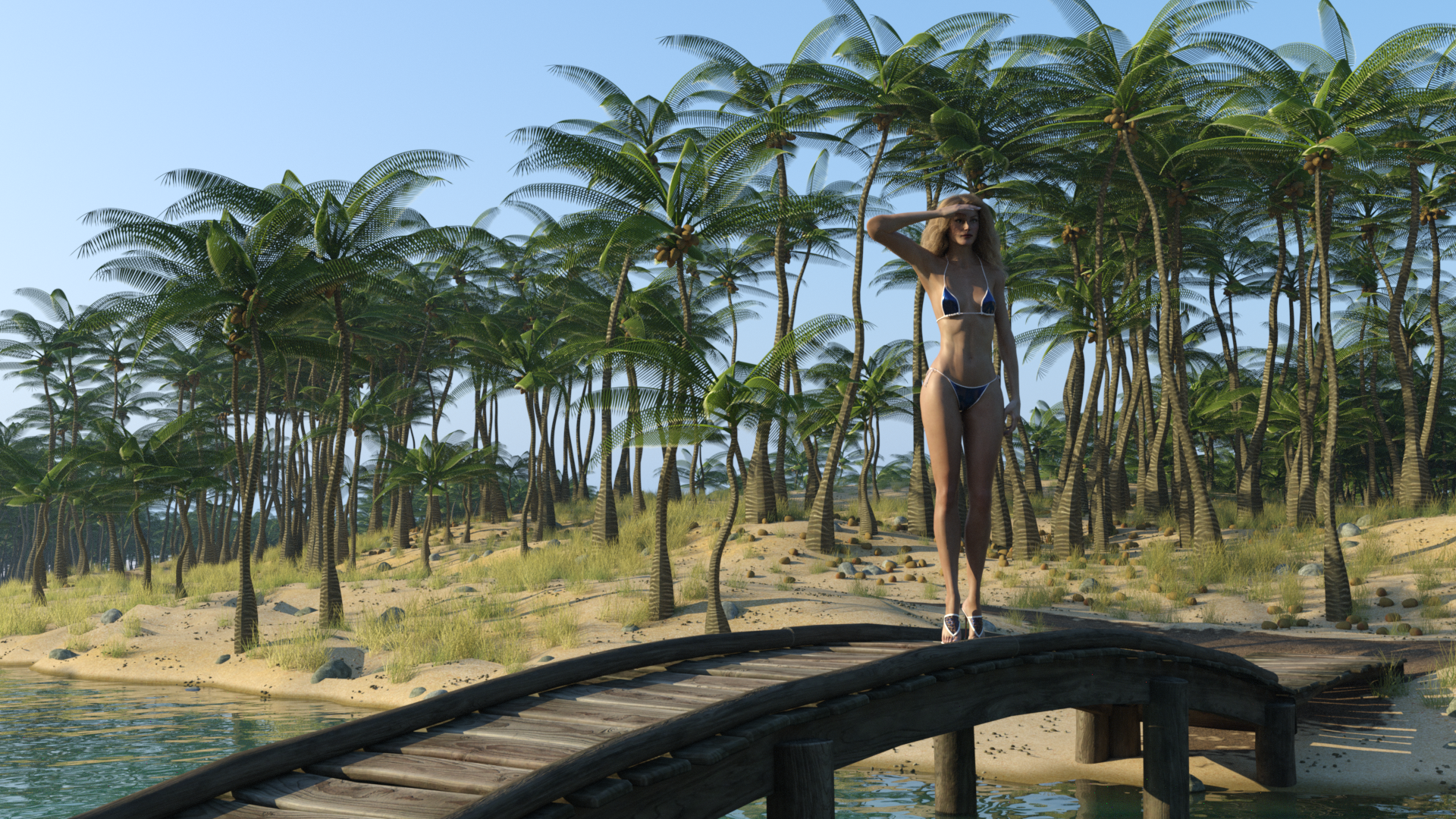
Regards,
Richard
Daz AI Studio DiscussionsBeta or not, it has a LOT of catching up to do if Daz wants this to be taken seriously in this field. Practically all of the other AI generators out there offer significantly more options and features than what DazAI offers. Many of these other options are also in beta themselves. While Daz is making some promises that they are going to improve this thing, these are only promises. That is a hard sell IMO. There is no guarantee that any of these features will come to pass, nor is there any guarantee that these features will work particularly well. As it stands, DazAI can only sell itself based upon its current state, and it is severely lacking in its current form. This being a beta is not an excuse or shield from criticism. Also, there is no timeline given on when this full release is coming.
Anybody who has played with AI for even a little bit is going to feel extremely limited by DazAI. Like me. I have only sporadically messed around with AI generators out of curiosity and even I feel immediately limited by this DazAI. It needs image to image with inpainting ASAP to even be remotely passable. People can already use any number of red haired freckled girl loras for Stable Diffusion and create images of a Victoria 9 style character consistently with other AI generators. Or any number of different characters. Even fairly obscure characters and real people have loras dedicated to them on CivitAI, which honestly is a bit frightening. But regardless of legality, the point remains that these options are out there on the largest AI website. And as I pointed out before, you can run these online, so you do not need a powerful computer. You can make the choice of running them locally or online, which is not a choice that DazAI offers.
My auto fit list is missing some characters?My Daz3D keeps crashing when I render a scenePerttiA said:
If you open the pane (tab) called "Scene Info", you can see the number of triangles and quads for the selected item
Window->Panes (tabs)-> Scene InfoSubD you will find in Parameters Tab->General->Mesh Resolution
"View SubD Level" is the one used for Viewport and "Render SubD Level" the one used for renderingDid another test with an empty scene.
First I loaded a simple primitive plane to determine the baseline for RAM and VRAM usage (I'm using W7 - VRAM usage on W10 is higher)
Then I loaded the Victoria 9 HD character as she comes, with no clothing and hair and rendered her with different SubD levels.
After SubD 3 the usage of RAM and VRAM start getting higher and significantly so with SubD 5
SubD 1 is the base geometry, SubD 2 divides each quad into 4 smaller ones, SubD 3 divides each of the quads from SubD 2 into 4 smaller ones etc...Rendering simple primitive plane (baseline)
RAM 6526 MB / VRAM 2735 MBVictoria 9 HD, SubD 1
RAM 10037 MB / VRAM 4329 MBVictoria 9 HD, SubD 2
RAM 10115 MB / VRAM 4357 MBVictoria 9 HD, SubD 3
RAM 10389 MB / VRAM 4475 MBVictoria 9 HD, SubD 4 (Default)
RAM 11508 MB / VRAM 4931 MBVictoria 9 HD, SubD 5
RAM 15981 MB / VRAM 6743 MBUseful and relevant information, thank you friend! I didn't know about SubD. This should be useful for me who is struggling with heavy scenes.
My Daz3D keeps crashing when I render a sceneIf you open the pane (tab) called "Scene Info", you can see the number of triangles and quads for the selected item
Window->Panes (tabs)-> Scene InfoSubD you will find in Parameters Tab->General->Mesh Resolution
"View SubD Level" is the one used for Viewport and "Render SubD Level" the one used for renderingDid another test with an empty scene.
First I loaded a simple primitive plane to determine the baseline for RAM and VRAM usage (I'm using W7 - VRAM usage on W10 is higher)
Then I loaded the Victoria 9 HD character as she comes, with no clothing and hair and rendered her with different SubD levels.
After SubD 3 the usage of RAM and VRAM start getting higher and significantly so with SubD 5
SubD 1 is the base geometry, SubD 2 divides each quad into 4 smaller ones, SubD 3 divides each of the quads from SubD 2 into 4 smaller ones etc...Rendering simple primitive plane (baseline)
RAM 6526 MB / VRAM 2735 MBVictoria 9 HD, SubD 1
RAM 10037 MB / VRAM 4329 MBVictoria 9 HD, SubD 2
RAM 10115 MB / VRAM 4357 MBVictoria 9 HD, SubD 3
RAM 10389 MB / VRAM 4475 MBVictoria 9 HD, SubD 4 (Default)
RAM 11508 MB / VRAM 4931 MBVictoria 9 HD, SubD 5
RAM 15981 MB / VRAM 6743 MBAI background solid colorI get solid background wen I select Victoria 9 on products.
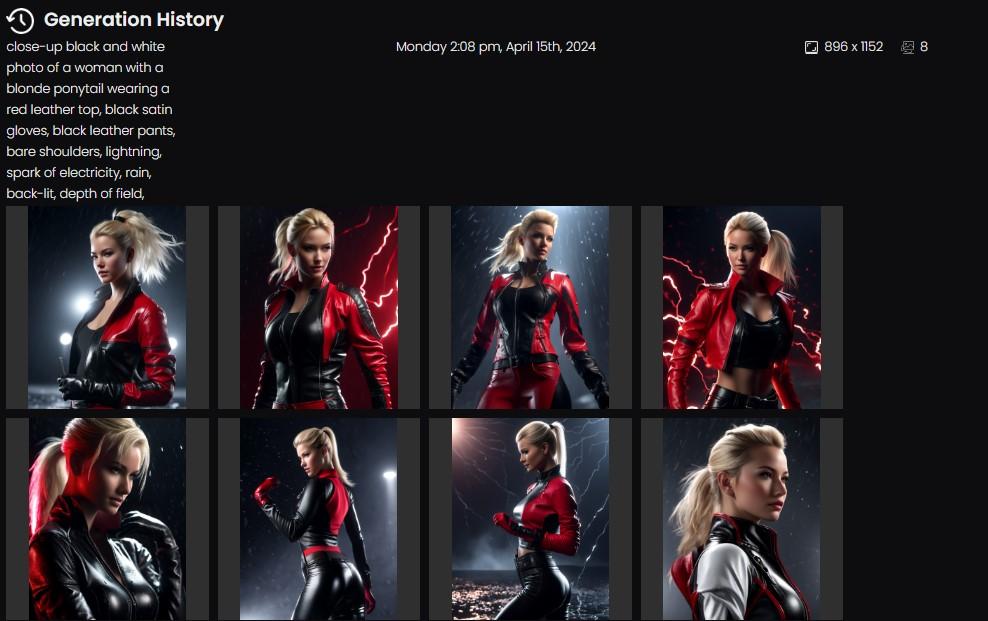
I tested the same prompt with and without Victoria 9 LoRA .
Adding the Victoria LoRA does have a high chance to add monochrome backgrounds.
monochrome
"A monochrome or monochromatic image, object or palette is composed of one color (or values of one color)."
Source: wikipedia
solid color
In applications like Photoshop the term solid color implies that the background consists of just one value of color everywhere.
Examples: white: #ffffff; black: #000000; gray50: #808080; crimson: #DC143C;
Solid color backgrounds can be removed very quickly in dedicated editing software.
Monochrome backgrounds provide an additional challenge because they feature many values across several shades of a color.
Without Victoria 9 LoRA:
With Victoria 9 LoRA:
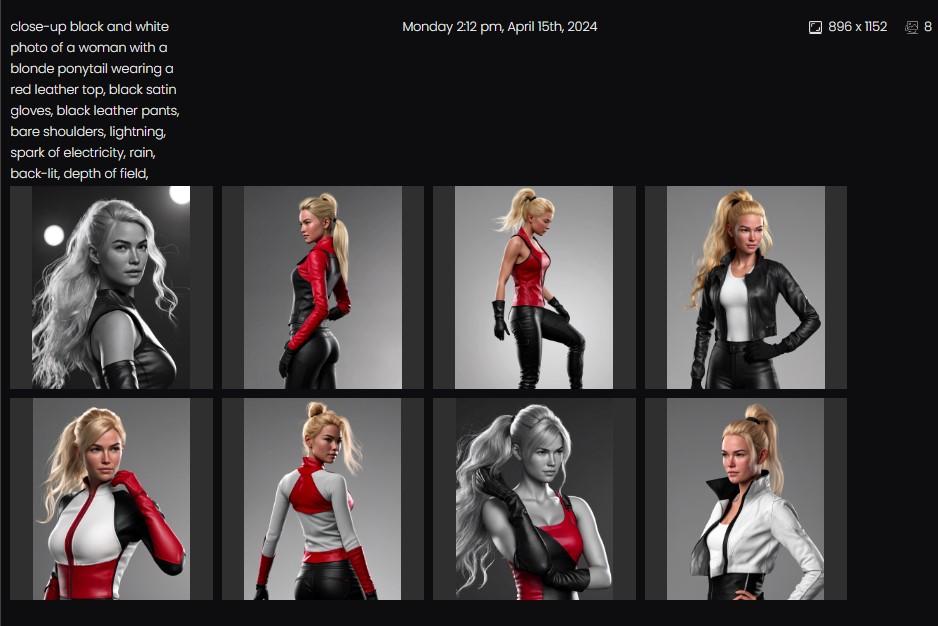
In this example the monochrome color turns out grayscale because of the specific black & white prompt.
My hope or guess is that they might add a slider to adjust the strength of the applied LoRA in future updates of Daz AI Studio.
Those who want a monochrome background would be able to get it by setting LoRA strength to 1.
Those who do not want monochrome backgrounds would be able to reduce the chance of the effect triggering by reducing LoRA strength to 0.6 - 0.8.
Why does the Victoria 9 LoRA trigger monochrome backgrounds?
This monochrome background effect may happen in this example because the Victoria 9 LoRA probably was trained with a lot of promo images who feature monochrome backgrounds.
If the goal is to remove this side-effect then a large number of images with environment backgrounds could be added to the pool of training material.
I am trying to get a picture of characters & props but with a solid single color background for some chroma key but no luck.
Inpainting
To be able to create true "solid color" backgrounds advanced features like Inpainting and layers may be required.
Then you could combine the selected subject with a solid color background layer.
Users may be able to export a selected subject with a transparent background as .png with an alpha layer.
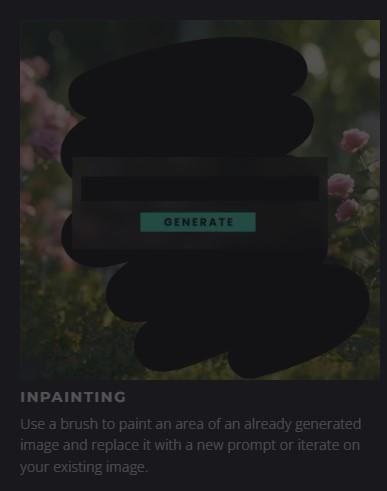
The basic idea of Inpaiting is to draw rough masks around subjects.
I think a content aware editing program would be an option here.
Segment Anything Model (SAM)
One way to isolate the subject from the background with the help of AI is to use a Segment Anything Model.
The user can left click on the subject to add a point in an area that should be selected.
The user can right click on the background to add a point in an area that should be removed.
Maybe they will add a SAM Model when Inpainting is added to Daz AI Studio?
You might also try adding "greenscreen background" to the prompt
Which solid background color should I use?
Make sure to check or test which background color works best with the application you want to use to separate the subject from the background.
greenscreen - bluescreen
Traditionally greenscreen or bluescreen is used on movie sets to isolate subjects from the background.
The downside of that method is that you may get color bleeding of green or blue color in other areas that also need to be removed.
You may need to check if your preferred application has options to deal with that additional challenge.
solid black
Some software applications interpret a solid black background as transparent.
Can be tricky to work with if your character has a darker skin tone.
If the solid background is not 100% black going with dark monochrome shades may yield worse results than light monochrome shades.
50% gray
Is often used in photo studio backgrounds.
Can yield quick results with certain blend modes in Photoshop if the background color is near #808080
solid white
Aiming for a solid white background color may work for a large number of cases.
I mostly add "white background," to the prompt to generate images with a light grayscale background.
Will products already owned work in AI Studio?I expected this thread to have 20 pages of opinions by now. Might as well add my thoughts at this point...
What is the future value of a 3D license?
How would Daz 3D customers feel if Daz AI Studio subscribers would get access to thousands of product licenses in the form of LoRA for a monthly subscription fee?
Limited access
I spent money on 3D product licenses because the access to them was limited by the requirement of paying a reasonably priced license fee.
Commercial Use
A key factor of paying a fee was the permission to use the assets for commercial purposes.
Is the value of 3D models lowered by AI alternatives?
If every subscriber of Daz AI Studio by default would get access to all available LoRA this would reduce the value of the 3D licences of the same models.
How many images with the face of Victoria can be uploaded to the internet until people get tired of the same look?
What is a reasonable price for a LoRA?
The key argument should remain that customers pay a license fee to be able to use licensed assets commercially.
The actual price needs to reflect the production time and the potential numbers of buyers.
Should allready purchased product licenses automatically include access to LoRA?
No.
- It takes time render a reasonable number of images to train LoRA.
- It takes time to properly train the LoRA with keywords and triggers.
- It takes time to properly test LoRA
- It may take less time to update existing LoRA for future base models.
Fair discounts?
- The price of LoRA could be reduced for those who purchased a standard license of the 3D model.
- Updates of the same LoRA for future Stable Diffusion base models could be sold at a reasonable discount for those who purchased previous licenses.
AI background solid colorMouser said:
I am trying to get a picture of characters & props but with a solid single color background for some chroma key but no luck.
Has anyone else had any luck?
I get solid background wen I select Victoria 9 on products. Enven with this description "beautiful radiant colors background" second picture is with Victoria 9 no selected.
Edit: You can still get some image with background try no include background description on the text.
There's Always Another Sale Thread -- Discussions Only Pt 2Blando Calrissian said:
Charlie Judge said:
Hmm, interesting. The new flash sale is advertised as Genesis 8 and 8.1 but nearly all the figures are Genesis 9.
Genesis 9: 156
Genesis 8.1: 24
Genesis 8: 22
Genesis 3: 4
Victoria 4: 1 (it's the Vicki 4.2 base)The selection has changed. It looks like it really was supposed to be Genesis 8 & 8.1 instead of a mistake on the banner.
Expression Randomzer For Genesis 9 [Commercial] * Released *barbult said:
I can't resist a fun tool like this.

This is the recipe it chose:
/Pose Controls/Head/Expressions/Built-In/Silly: 0.649
/Pose Controls/Head/Expressions/Expression Collection for Victoria 9/EC for Victoria 9 Bewildered: 0.519
/Pose Controls/Head/Expressions/Fanny/JS Fanny Exp Sad: 0.389
/Pose Controls/Head/Expressions/Pure Masculine/Lower Face/Pure Masculine 02 Lower: 0.259
/Pose Controls/Head/Expressions/Expression Collection for Olympia 9/EC for Olympia 9 Brave: 0.129I made it because I love being surprised ;-)
Thanks for the image!
There's Always Another Sale Thread -- Discussions Only Pt 2Charlie Judge said:
Hmm, interesting. The new flash sale is advertised as Genesis 8 and 8.1 but nearly all the figures are Genesis 9.
Genesis 9: 156
Genesis 8.1: 24
Genesis 8: 22
Genesis 3: 4
Victoria 4: 1 (it's the Vicki 4.2 base)Expression Randomzer For Genesis 9 [Commercial] * Released *I can't resist a fun tool like this.
This is the recipe it chose:
/Pose Controls/Head/Expressions/Built-In/Silly: 0.649
/Pose Controls/Head/Expressions/Expression Collection for Victoria 9/EC for Victoria 9 Bewildered: 0.519
/Pose Controls/Head/Expressions/Fanny/JS Fanny Exp Sad: 0.389
/Pose Controls/Head/Expressions/Pure Masculine/Lower Face/Pure Masculine 02 Lower: 0.259
/Pose Controls/Head/Expressions/Expression Collection for Olympia 9/EC for Olympia 9 Brave: 0.129Viewing Forum Attachments?Hmmm. I'm getting too old. I did get it to work in Chromium but even with NoScript disabled it still did not work in FF. Just another reminder to have a 1/2 dozen different browsers handy.
Thanks.
By the Way, I'm not only older than Victoria I'm older than Barbie Too!
Viewing Forum Attachments?I've been using various fourms since Victoria was in diapers. I can't figure out how to view attached screen shots in DAZ Forums. All I can see is the useless thumbnails. Even looking at the page sourcecode only links to the thumbnails. How do I see the actual screenshot?
G9 Items on G8It is possible to create your own autofit clone that is 'adequate' without modelling or spending money (eg G8F autofitting G9 clothes). I couldn't do anything else when I made my TriAx Victoria 3 and wanted G8F clothes on her. I posed V3 as close as I could to G8F's pose, then scaled each bone in X, Y amd Z to make it as close as I could to G8F in the base shape. Then saved the obj & made an autofit clone. There is up to a 0.2cm error in places, so I do need a smoothing modifier, but, the top, jacket & trousers below on a morph of V3 is all from G8F 'Denim Diva' (not the shoes):
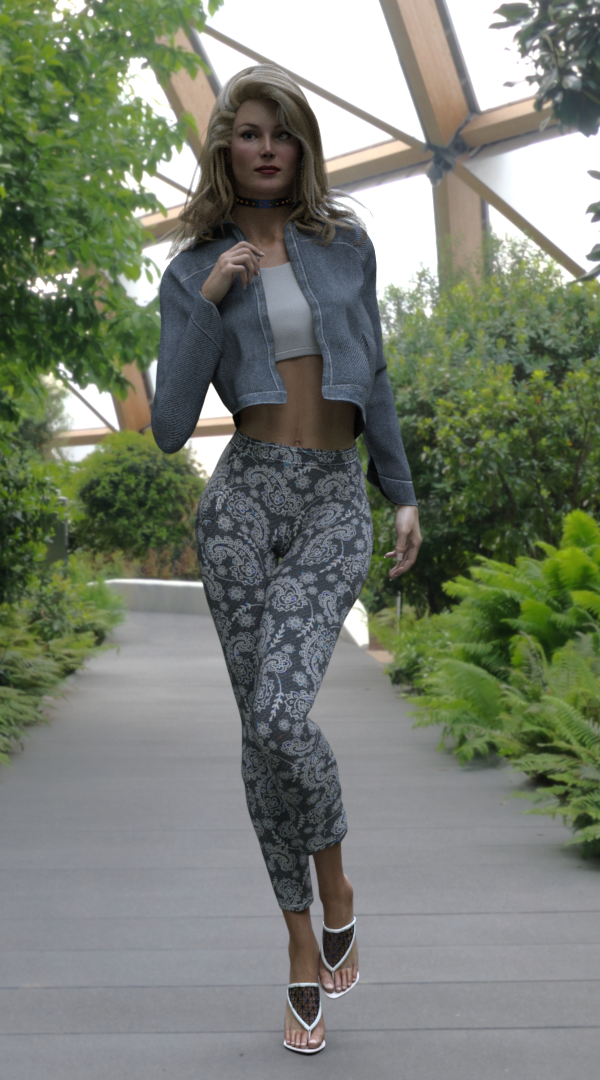
It does depend on the level of precision you need, but it's frequently a real surprise how far you can go with the tools built into DS and no need to purchase a thing.
Regards,
Richard
Let the Controversy Begin - Revenue Generating Potential for DAZ and PAsDAZ AI Studio is quite remarkable. It's important to remember it's still in Beta - but already does some things better than mature products. In the DAZ published blog about AI Studio, there is this excititing news about future functionality:
In the Layered Products: It gives you the ability to select environments, characters, lighting, and more as predetermined elements in your creations. This gives you quick, predictable iterations granting you even greater control over your generated images. Our Published Artists will be creating these Layered Products, currently Victoria 9 and Michael 9 are available for use.
This is huge. I've been using MidJourney and its challenging and quite unpredicatable (which is core to the MJ 'philosophy.')
The question will arise about purchased DAZ Assets.
A lot of work is involved in creating (I call it 'training') AI models - my understanding is they are using images not the 3D assets themselves (but I'm new to this I may be wrong.)
I for one would have no problem purchasing an AI Add-on to products I already own. It takes a lot of time and work to create those AI models. (It would be great if the actual images they used were made available to use in other engines for a price, that that's a reach.) This also means all your favorite products from all generations become 'fair game' as well.
I don't want to post it here since this Forum is dedicated to DAZ AI Studio, but I reached out to a PA who graciously gave me permission to work with a product I purchased and use it in MidJourney, results in my Gallery and Instagram. I don't pretent to be an expert, and it's far from perfect. I only used images to train the AI, not the 3D assets themselves, and I bought the asset, so I'm pretty sure it's within the license, but this is all so new.
It gave me real insight into how much work is involved.
(I'm hoping DAZ lawyers are working on a legal loophole using purchased, proprietary AI modules to allow people to copyright AI works, but I have no idea what I'm talking about here. That would be a huge selling point for thool vs other venues if they could do a legal tap dance like that.)
It's all so new, and there will be many so so many questions, but so so many possibilities - It's amazing.
Let's the controvesy being.
Celebrity Look-a-Likes for 3D figures Part 4shg0816_13461e8196 said:
Intenzo over at Renderhub has some characters (definitely NSFW). Any thoughts on any of those?
Here is the list -
PS1 - Riley Reid
PS2 - Eva Elfie
PS3 - Sasha Grey
PS4 - Original Creation
PS5 - Original Creation
PS6 - Victoria Sweet
PS7 - Angelica (Abby C)
PS8 - Original Creation
PS9 - Nickey Huntsman
PS10 - Emma Evins
PS11 - Original CreationNo links due to nudity and the named ones definitely come with a NSFW search caution
So for whom is this tool for?Mada said:
Padone said:
Ivy said:
.. Ai generated by where the prompts follow a storyboard or story script ..
That's exactly the weak point of AI and why it's not useful, I mean at all. In a story, even for static backgrounds, you need various different views of the same environment, from different camera angles. Now AI can't do that, it can't "remember" a scene and give you different shots of it. The same as AI can't do different shots of the same character, eventually interacting with other characters and the scene.
Its rapidly reaching the stage where it can do that, and also where loras would be useful in training the AI to create different shots from the same environment. Using the same character is also a lot closer, for example the AI is trained to use Michael and Victoria right now so you can definitely get consistency across images.
That would be phenomenal. If the AI can allow to "save definitions" of characters and environments for later use, then understand the "director language" for the camera and lights and figure poses, then we can reach a point where manually doing it in a 3D app is no more necessary. But honestly, I'm not as optimistic as you that this is any close. Actually AI is only good to generate single images not related by any context, that makes AI completely unuseful for storytelling.
Daz 3D is part of

Connect
DAZ Productions, Inc.
7533 S Center View Ct #4664
West Jordan, UT 84084Licensing Agreement | Terms of Service | Privacy Policy | EULA
© 2026 Daz Productions Inc. All Rights Reserved.