-
Daz Studio 5 development update
Daz Studio 4 still works very well, so I'm not hurry.
DS5 can wait for Nvidia GeForce RTX 50 Series Graphics Card and Gen. 10 characters.
Will DS5 get a refreshed UI like Daz3D Shop and Daz Central ?
Compatible with Windows 10/11 Dark mode would be appreciated.
Smart Content bug / lockedTry reinstalling Genesis 8 Starter Essentials, or at least the female version if using Central/Install Manager.
Tesla3dcorp Classy House file locations changed?Suddenly between yesterday and today, the .dsf file locations for Classy House changed from /data/Tesla 3d corp/ to /data/tesla3dcorp/ and now my working file is completely broken with missing dsf locations.
Since I loaded Daz Central last night to install V9, it must have updated itself then as it was fine yesterday. How do I get this restored to what it was??
Smart Content bug / lockedHey guys, I've encountered a problem with my smart content, it has happened since yesterday, I guess I bought some new products on daz store and used central to install like normally.
when I opened daz this morning, whenever I selected any female figure, be it gen8 or 8.1 it locks my smart content to a specific thing shown in the picture I attached. any other object or male figure I select works perfectly fine, I have tried uninstalling all the content I downloaded yesterday, to no effect..
I hope some of you will be able to help me out as this is a major obstacle for me continuing my work.mesh grabber will not appear (daz 4.21)Hi all. I have installe mesh grabber, but I can never find it. I don't think I've been able to find / use it once. ive installed it via daz central, and via the downloadable .exe. it's just not there in my tools menu, no matter what i try.
when i look at "installed plugins" it is not listed.
Has anyone else seen this issue?
Trouble opening Daz StudioSplit to its own thread as it was not related to the original one.
How far are you getting? Have you successfully installed Daz Central or Daz Install Manager? Have you logged in to your account through the installer? Have you isntalled Daz Studio and the free content? If you have managed to get that far, what happens when you try to start Daz Studio?
What did I do ? Set Daz Central base path and it Reset database?!Managed by DIM means that the paths are not sub-folders of the single folder Daz Central allows you to choose, it isn't an error. By overriding that with the Daz Central settings you have lost the database you were using - there is only one path there, shown in all applications - so go into Install Manager or Daz Studio and set it back to the T:/...Database folder. You should find your content diectories in Daz Studio are otherwise still correct.
What did I do ? Set Daz Central base path and it Reset database?!Currently moving my Daz library from my previous drive to drive T:\ after a new windows install

- As I was having a lot of issues with library management using DIM, I wanted to test out the Daz Connect method since I was already starting from a broken library.
- While downloading some of my files, the status bar keeps getting stuck on "Obtainging Data from Daz Connect" many times
- The only way I could get it moving again was closing and opening Daz Studio and selecting the remaining products in Smart Content and Install.
- Assuming that maybe it was Daz Connect, I opened Daz Central and saw that the Base Path was set to "Managed by DIM" (similar) I chaged this to the following

What have I done ? now all my items are reset like they were never installed.
 Problems with re-installing
UPDATE: Today, first thing I tried to install, and it finished the job. I did it before checking this thread, so I did so with daz central. Tho, I'm not super attached to using it. With my old computer, I used DIM and was happy with it. I tried daz central since it has pictures when installing items, but I don't have to keep using it. Would it be better at this point to uninstall everything and start again with DIM? If starting over is better, are there tips for deleting everything? Where I'm at right now, I have installed DAZ but not all my assets...
As Richard predicted, I was using the basic windows task manager in its basic way. I tried to follow instructions, so I took a screen cap in case I screwed up. There were 4 little boxes and I changed one to CUDA. Should I have done it to them all? Should I have picked a different one to make CUDA?
Problems with re-installingIf you do switch to Daz Install Manager (DIM) I would suggest uninstalling everything you installed with Daz Central and start over with DIM. If you have them installed by both methods it can cause conflicts at times. That's just a personal suggestion though. DIM is much more powerful and you can do a lot with it and is far superior. If you don't want to uninstall everything just be sure you don't install anything you already have installed.
Problems with re-installingAs Richard has said it would be better if you switched to using DIM instead. However, if you are going to persist with Daz Central then you can try opening task manager and killing Daz3d (which does not make sense since if it is not installed how can it be running?) or repeatedly "Logout and Login everytime until it completes" as suggested here (reddit thread) or here.
A quick search also reveals this, this and this which probably explain why I have heard about this issue before. However, the only solutions in those three is also to stop using Daz Central and use DIM instead.
Problems with re-installingTry using Install Manager rather than Daz Central https://www.daz3d.com/get_install_manager/
How were you checking the GPU usage? Windows Task Manager does not, by default, give useful information - instead go to the Performance tab (you will need to have enabled More Details,) seelct the GPU on the left, and use the little triangle icons on one of the graphs to set it to CUDA.
Problems with re-installingCan't help with the Daz Central issue as I exclusively use DIM to install all Daz stuff. However, the previous rendering issue could be due to a number of factors - assuming you do indeeed have an nVidia card then it probably means that the scene you are rending is too much for your graphics card's memory so it is reverting to the CPU. If you hadn't uninstalled then you could have done some tests or checked your logs.
If you get everything setup again you can go into the advanced rendering settings and switch off the CPU fallback for rendering. Then, after a restart, if you try to render something your card cannot handle it will just quit and leave you with a black image.
If that is the reason for your GPU not doing the work then there are a whole bunch of ways to try and resolve or work around that.
However, going back to the Daz Central issue - that does kinda ring a bell so there may have been others posting to the forums with that issue so you can try and search for a solution. One of them may be temporarily disabling your antivirus.
Problems with re-installingHello everyone!
Thanks for reading and helping. I'm in a unique position, I've had a daz since 2015, but I am also a beginner. I would muck around on my old computer just making pictures and not fully understanding the technical aspects. Well, this year I got a new computer, I want to do more and I want to learn this art properly. Everything on my old computer worked fine.
So I install everything and make some new pictures. I noticed that the wrong part of my computer was getting a workout (The CPU would get into the 90%s and the GPU sat at 1-5%) I didn't pay as close attention to my computer and it's preformance before with my old one, but was trying to pay closer attention with my new cool computer. So I thought "Maybe I installed wrong?" So I tried to uninstall and I think that screwed things up more because folders stayed around. I deleted a couple and got overwhelmed.
So I worry about that for a while before going "Okay I'll just try to reinstall and see what happens" and I got daz central installed just fine but Daz studio won't get past 56%
To be clear I know this is my error I messed around with this stuff without proper knowledge.
Can anyone help me get started correctly?
Thanks for your time!! I really appreciate all helpHow to Use Fisio: Experiments and Learnings6. Breaking the Chain
We found in the last example that Fisio Cohesion of 20 held the chain together. But what if you want to break it?
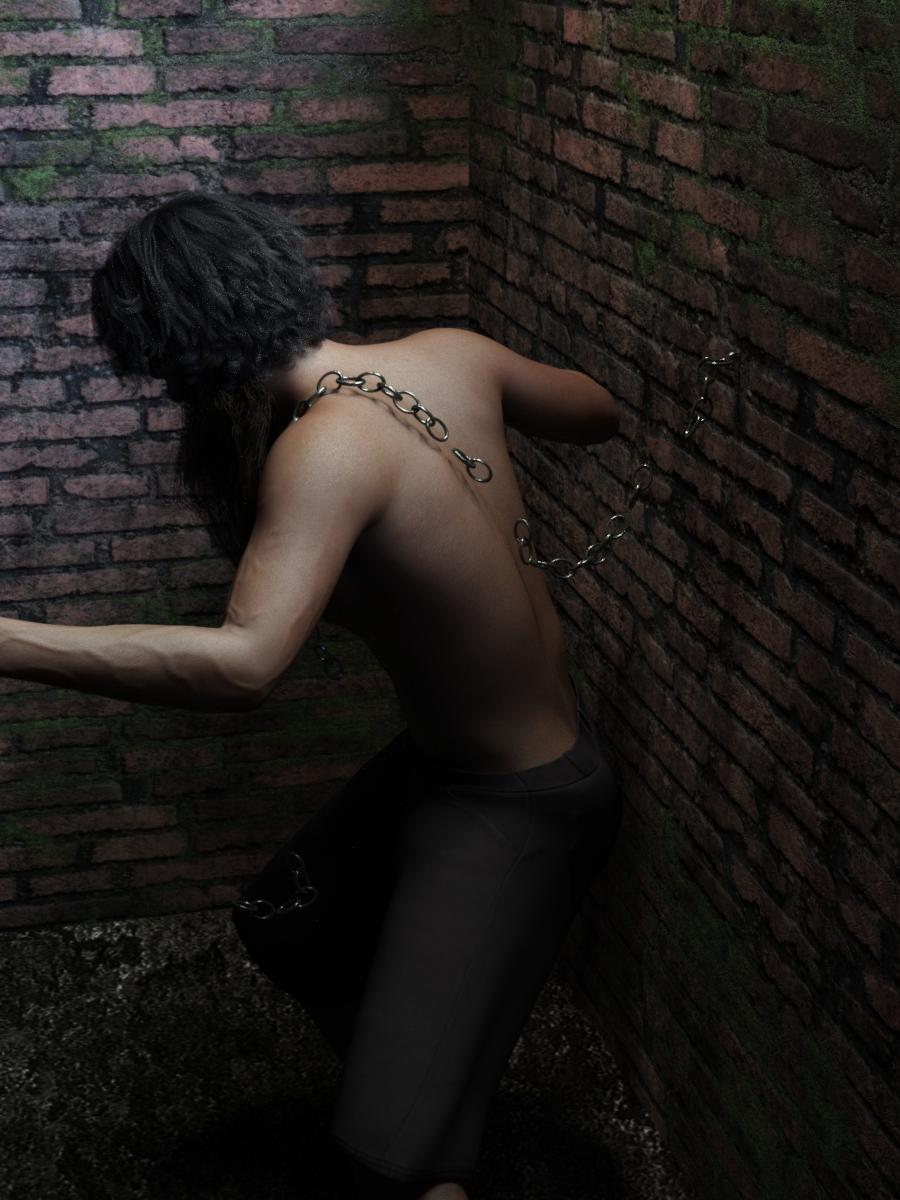
a. Use the same scene with figure as we did at the end of example 5. Give the G3M figure a pose and position the chain so it is over the left shoulder as shown in the images.
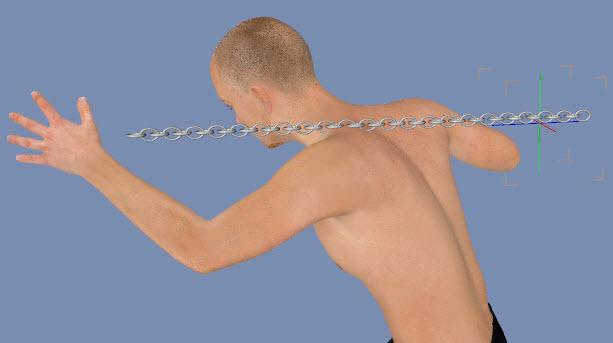
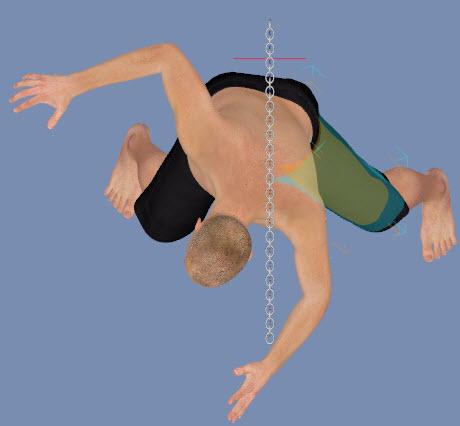
b. Set Fisio Scale to 0.25 and Fisio Material Setting Cohesion to 20 (same as the end of example 5). Note1: Cohesion values can be animated, so if you want the same value to be applied across all frames, be sure you are on frame 0 before changing. Note 2: If you have a Fisio Setting node in your Scene pane, change scale there and not in the Fisio pane.
c. Run the simulation. The chain will hold together to the end at frame 45.
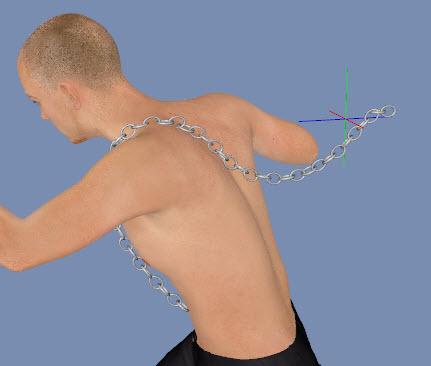
d. Increase Fisio Scale to 0.5 and you’ll get the same result.
e. Increase Fisio Scale to 1.0 and the chain will break into three pieces at frame 8. The central piece will remain over the shoulder even to frame 45.
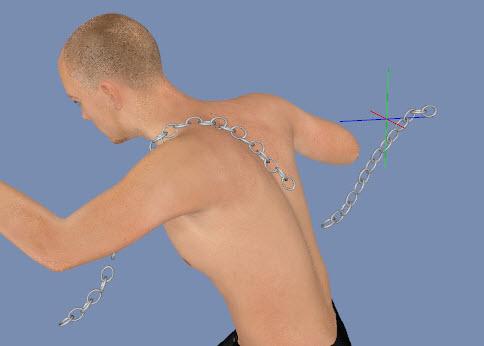
f. Increase Fisio Scale to 2.0 and the chain will break into multiple pieces at frame 3.
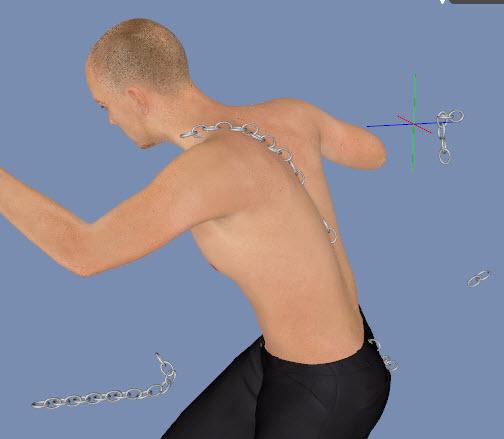
g. Now set Cohesion to 0 and leave Scale at 2. The chain breaks in a similar fashion.
h. Set Scale to 1.0 and 0.5. The chain breaks into multiple pieces but do not fall as far.
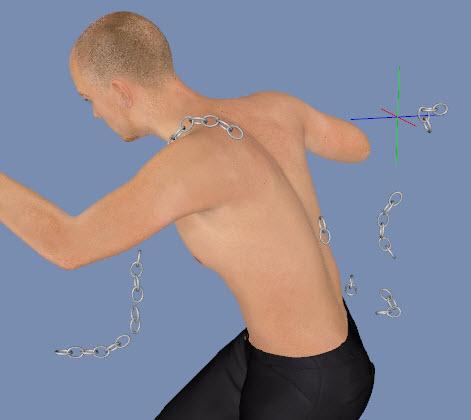
i. Set Scale to 0.25. The chain holds together until frame 15 then breaks into multiple pieces but is slower to break apart and slower to fall.
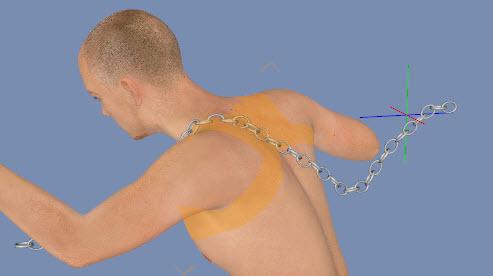
Key Learnings: (1) With Fisio Scale 0.25 and Fisio Material Cohesion 20, the chain holds together. As you increase Scale, the chain begins to break, first into large pieces and as scale gets even larger, many pieces. (2) With Cohesion at 0, the chain breaks apart into many small pieces quickly.
Put into action for a render:
 Update Meta Data Failure?
Richard Haseltine said:
IceDragonArt said:
PerttiA said:
IceDragonArt said:
I install my content with DIM to a separate drive. I do log in, I never work offline.
You do know that logging in to DS is only necessary when one has made the informed decision to use DAZ Connect inside DS as their primary installation method for the content?
I did not know that. Thank you! I cant use DAZ Connect ( and have zero desire to do so) due to postgre issues in any version above 4.11. Well thats great infromation!
Daz Studio uses PostgreSQL in several contexts, and both DIM and Daz central write to the database.
Unfortunately, that doesn't help me with mh postgre issues. And I've tried every single thing I could find on the issue more than once. Everything is where it should be, in the exact same spot oas the 4.11 version which does not give me the postgre error when I use it. So, I guess if I want to use whatever things can't be used without postgree (which I haven't come across yet in several years but I'm sure at some point I willl) I will have to use the 4.11 version. The message started with 4.12
Move files on other discYes, as long as you select the new location as a content directory (you need the folder that holds the Runtime and Data folders). Daz Studio and the Content management System don't care where the content directory is as long as they know, and as long as the files are in the correct relative location within it.
If you installed through Install Manager or Daz Central those do track the exact location of the files, if you kep the zip there is an option (after updating the destination path) to reinstall using current directories in Install Maanger (right-click in the Installed tab), otherwise you can batch edit the Manifests folder's .dsx files to have the new path.
New Carrara Freebie - Carrara Kanji Kit 1Dartanbeck said:
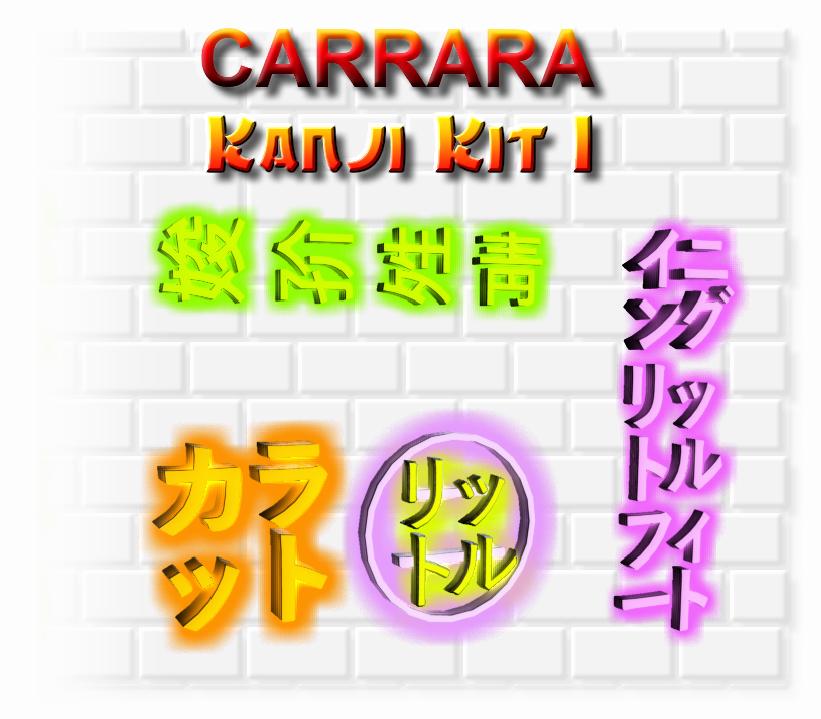 Download Carrara Kanji Kit 1
I am endeavoring to assemble a new cyberpunk city in Carrara using PhilW's Day and Night City and Central Business District - there are so many options - it's so customizable and easy to work with.
I wanted to have some Kanji-like neon signs that I could place around here and there. There's a really nice Kanji Kit in the store, but I don't have any funds right now. So I started making my own. They turned out to be pretty fun to work with, easy and fast to render, and since I have no clue what they mean (or if they're even Kanji) I can flip around and change their shaders to make these six props work for so much more.
I was just about to take a break and watch some Blade Runner: Black Lotus, then come back and start building the first part of my city.
Then it occurred to me: I should share these with the rest of the family! So here I am... sharing! LOL
Enjoy... if you want ;)
Thank you. Very generous of you. Looking forward to seeing your animations with these resources. I am adding them to my toolkit. Much appreciated.
New Carrara Freebie - Carrara Kanji Kit 1Here's a screen shot of the scene so far. Some of the skyscrapers aren't showing up.
Look at the lower center of the work area. Where the transform tool is indicated - that's the camera I shot from. So you see it's quite a distance to the other side. Just that there's a lot of fog and aura-effected lights. That will calm down as the space gets occupied.
Below we see the nighttime Skyscraper collection from Central Business District. To the left of that we see that well-laid-out browser folder PhilW left us with. I love that!!!
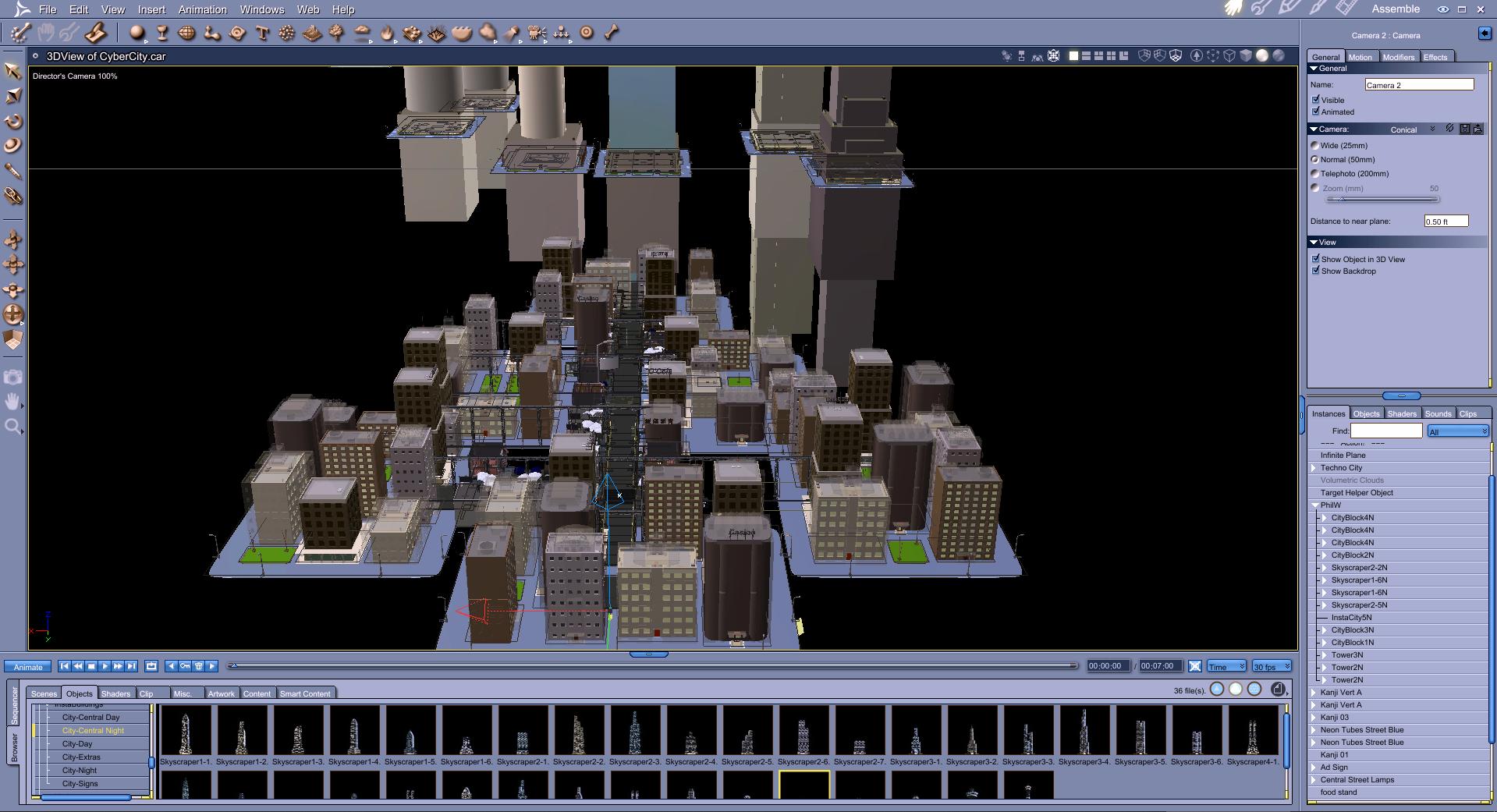 New Carrara Freebie - Carrara Kanji Kit 1
Besides PhilW's Night and Day City and Central Business District kits, I'm using future elements made by Coflek-Gnorg: Techno Town and Sci Fi City. Mostly just a few signs, the info stations (one by the tree) the food cart and those support structures we see all over. Since Coflek-Gnorg's kits had those cool futuristic street curb lights, I also used his streets combined with Phils. Phil's blend into the other, giving it that wet look. I love happy accidents, and that's one of them!
Once we get a few blocks laid down and move them into position, we start thinking about what the characters are doing and where they need to go. We want that journey to be really cool, no matter what else is going on. I used to try and fully dress out Everything. But that was just me not having a story, not knowing what's going on, and just wanting it to be a situation where no matter where we take a picture, it looks like it should.
With this, I'm dressing out other areas because we Will see parts of it in passing. But I'm mostly focussed on a specific set of motions through this place.
So after the blocks are intitially laid out, we start to notice the signs on the tops of the buildings and other elements included in each block, and move them around how they work best for us.
I'm blown away again at how easy this is to do in Carrara! Zooming the camera in and out? Wow! Why can't we do that in Studio?!!!
Grab as many things as we want and move them all together, even if their not in the same group! Ouch! That's So Good!!!
Carrara truly is King! I love this software! I really like Studio now too. But Carrara makes all of this just So Fun!
Daz 3D is part of

Connect
DAZ Productions, Inc.
7533 S Center View Ct #4664
West Jordan, UT 84084Licensing Agreement | Terms of Service | Privacy Policy | EULA
© 2026 Daz Productions Inc. All Rights Reserved.