-
Genesis 9 clothing questions & answers
Mada said:
Yes its intentional. Once you're happy with your transfer just delete the obj that's left in the scene. If you're like me and like to try different templates before settling on one, it means you don't have to keep on importing the obj :)
Thanks for the explanation, Mada.
Genesis 9 clothing questions & answersYes its intentional. Once you're happy with your transfer just delete the obj that's left in the scene. If you're like me and like to try different templates before settling on one, it means you don't have to keep on importing the obj :)
Diffeomorphic DAZ Importer version 1.6.0 released@Padone I am getting confused. It seems like a HD morph is only for the face? And not for ankles and wrists? I made a comparison picture between Blender and Daz, same pose, same figure G9. I added a link with an image that is, a comparison picture, to see what I am pointing at.
Anyone figured out how to use Geo-Grafting Navel and Nipples for Genesis 9?Padone said:
The HD morph has two components, a base mesh morph and a HD sculpting over that. The base mesh morph will follow the uv map, the HD sculpting will not, in that you can sculpt any feature anywhere, that's what HD sculpting is for.
I don't see that it's essentially different. If I, as a non-PA, make a base level morph I'm free to flatten out the existing nipples and make new ones elsewhere provided I'm prepared to make the appropriate changes to the UVs/textures. I'd just have to live with the compatibility issues. Now, since with Genesis 9 there is no base level nipple detail I suppose it would be possible to accidentally put the nipples in the wrong place but that would be immediately obvious once the textures are loaded. So if a PA moves some detail at any level it will be because they had a good reason to do so (probably because they’re making something so non-standard that compatibility isn’t an issue). But in most cases they will just follow the template and put them in the default position. I just can’t see any reason to try repositioning common details like nipples or crease lines in the HD morph when it’s just as easy and more logical and compatible to do it in the base morph.
DAZ Studio Clothing on Metahuman?I did make a sort of "clone" shape for their body for Genesis 8
I transfer weightmapping to the resulting obj export with G8 hidden on the Metahuman body FBX export in Blender.
It works but I cannot really be bothered with them too much.
Genesis 9 clothing questions & answersIn DS 4.21.1.26 Public Build, when running the Transfer Utility to rig an OBJ, the item is rigged and parented to G9, but the OBJ is left in the scene after the Transfer Utility finishes. Is this intentional? It is a change from the way 4.21.0.5 works.
[Solved] How to rig and save new clothes for GF9 AND Victoria 9?Here is my suggestion, which works for me:
- Load G9 Dev Load or G9 Base
- Import your OBJ
- Run the Transfer Utility and select the appropriate template that best fits the OBJ you have imported (probably loose bodysuit or loose long dress in your jumper example) and apply smoothing modifier. (I made a screenshot for you, but the forum is so broken it won't upload at this time.)
- The garment will now be be rigged and fit to G9 and parented to G9. Select that rigged parented garment in the Scene pane.
- Save as Figure/Prop Asset.
Daz Studio will use Auto Follow (not to be confused with Auto Fit) to make the garment fit unique character shapes like Victoria 9. This will be fairly successful for shapes that are not too extreme, like Victoria 9. It it doesn't fit perfectly, your recourse is to create your own custom morph for the garment to fit that particular character shape.
Dimensional Scaling of BonescaraTRON.7263 said:
Second, when you say "shorten the fingers," are you aware that I already said I don't want to shorten the third finger joint? If so, then I don't think I follow you. You seem to be saying that I should "make my own morph" (as opposed to using an existing morph asset) in a manner which does not use the dimensional scaling sliders but effectively achieves the same result; in which case, why? Why is using the sliders bad, but making a "morph" that does the same thing isn't?
It was a general point concerning the mathematics of matrix transformations, which I won't go into here. A "morph" or "blend shape" is some deformation of the vertices in a mesh. A scale is an adjustment to the transformation matrix in the rig. You can achieve the same effect either way, however in the latter case the matrices are used for other things, such as transforming surface normals during rendering, as well as applying themselves to all children in the node's hierarchy (although I think with Daz, apart from the root node the children don't inherit the parent node's scale). You may encounter problems, you may not. It depends on the specific transform and how the engine handles things like this. As a general rule though, I avoid non-uniform scaling.
[Solved] How to rig and save new clothes for GF9 AND Victoria 9?Hi Pushee-Ri,
The problem is the auto-generated shape for Victoria9 on your clothing. As you know, when you load your clothing and then change the character's shape (say to Victoria 9), DS automatically generates the Victoria 9 shape for the clothing. Often, this autogenerated shape has issues (such as those described by you). To get around this problem, you need to 'fix' the shape in an external modelling program and then use Morph Manager to import and overwrite the Victoria 9 morph with your corrected version. What is super important is that you must use the exact name of the morph/shape that your are trying to replace. In this case, it would be "Victoria9_body_bs_Body" (without the parentheses). You will often have to do this 'fix' for many of the other shaping morphs that are dramatically different (i.e. Large Breasts, Voluptous, etc...) from the base shape if you want your clothing to look good on other characters.
If you own zBrush, this fix is pretty easy to do. Basically,
(1) load Genesis 9 base,(2) load your clothing,
(3) make sure both are set to base resolution.
(4) Change the shape of Genesis 9 base (to Victoria 9), so that the clothing also changes.
(5) "Send to zbrush" with deformation box checked (send both the figure and clothing at base resolution).
(6) in zbrush select the clothing (subtool) and make your corrections using a combination of the standard brush and smoothing brush. Note: I like to use the masking tool, so that I can have precise control over the regions that I change.
(7) GoZ back to Daz Studio where you will want to overwrite the original "Victoria9_body_bs_Body" shape in the clothing. Some of the tutorials you have watched should have the exact boxes to change on the import (Sorry, I am not in front of my Daz computer so I can't give you the specific details).
Note:
Once back in Daz Studio, I like to export out the corrected shape as an obj file (at base resolution). I do this step in case something goes wrong, or I want to make some additional small tweaks/corrections.
Make sure that no other morphs are active when you go to zbrush, otherwise these changes will be incorporated into that shape/morph and result in unexpected problems (i.e., weird shapes).
[Solved] How to rig and save new clothes for GF9 AND Victoria 9?felis said:
Well, it might not be the right way, but for G9 clothing I just use transfer rigging right after import.
A) If the clothing is modelled to G9 base I just use transfer right away.
B) If the clothing is modelled to a shape, e.g. G9 female base, then in transfer rigging I use current, and in options tick 'Reverse Source Shape from Target'.
And then when saved, saved as a follower.
Thank you felis, I'm just working on an other project and will try it tomorrow (it's 16.30 here in germany ;-)
Limited Time Freebies Discussion ThreadPicked up a few items from the new Biweekly(ish) Freebies.
Wicked Asian Influence - G2F & is not something I'd use a lot but it's 2 piece and my centaur gals like to change up their style, or maybe 1 of them is into anime cosplay.
Wicked Seoul - G2M. The pull up shirt morph got my attention. Plus no shoes so I don't have to deal with that autofit issue
Agent Gun Poses G3M - very recent by Biweekly Freebies standard. No pistol prop included and poses are easy to tweak
[Solved] How to rig and save new clothes for GF9 AND Victoria 9?Well, it might not be the right way, but for G9 clothing I just use transfer rigging right after import.
A) If the clothing is modelled to G9 base I just use transfer right away.
B) If the clothing is modelled to a shape, e.g. G9 female base, then in transfer rigging I use current, and in options tick 'Reverse Source Shape from Target'.
And then when saved, saved as a follower.
Eye color on G9chevybabe25 said:
"though they appear to have left out the dilate morph"
The dilate morph is there, its just hidden under the pose tab instead of shaping. *shrugs*
Thank you.
But that seems very weird to me.
I assume it is done, due to it being muscle driven, but as there is no corresponding bone, it just look odd.
Eye color on G9chevybabe25 said:
"though they appear to have left out the dilate morph"
The dilate morph is there, its just hidden under the pose tab instead of shaping. *shrugs*
@chevybabe25 Thanks so much! I hope you're burning the midnight oil. We really need your help, mate.
Eye color on G9"though they appear to have left out the dilate morph"
The dilate morph is there, its just hidden under the pose tab instead of shaping. *shrugs*
[Solved] How to rig and save new clothes for GF9 AND Victoria 9?This is my first entry. Therefore a friendly "Hello" to all participants and the moderation.
I have created many dresses for GF8: modelled for GF8 Base, imported, Transfer Utility ... and the dresses fit any character: Base, Victoria 8, Amira 8, Chelsea 8, Girly Hana 8 etc.... without any problem.
But the G9 is driving me crazy.
I have read Mada's thread https://www.daz3d.com/forums/discussion/597726/genesis-9-clothing-questions-answers/p1 several times and watched J. Darling's video back and forth ... but I have not found the final solution.
If some of the experts here can help me on the subject of "How to rig and save new clothes that fit G9 Feminine Base (incl. dialed Characers based on it) and Victoria 9", I will write a step-by-step HTML / PDF tutorial on it. Guaranteed!
My steps so far:
1. Created a garment (loose-fitting jumper) for G9 Feminine Base in Blender and imported into DAZ. Fits perfectly on the GF9 Base.
2. Used "Create Follower" from the G9 Developer Tools with the garment object selected. Still fits perfectly and follows even extreme poses.
This is where the problems start - no matter how I save the garment, it is "destroyed" when I want to use it with Victoria 9: I get poke throughs and the chest area is pulled closer to the body and pulled down at the same time. I tried the following:
3 A) Just saved the garment right after "Create Follower" as usual as "Figure/Prop Asset". Ouch!
3 B) Used the "Transfer Utility" (Source Gf9 as "Current") after "Create Follower" and saved. Screech!
3 C) Just used the "Transfer Utility" (Source Gf9 as "Current") and saved. Ew!
It seems that I have overlooked or forgotten 1 or 2 steps. I hope the experts here can help me connecting the dots.
Some addtitional information:
DAZ Version 4.21.0.5
all Updates loaded
distributable projectThanks in advance!
Update 02.01.22: Scroll down the page to my entry, which starts with a big "Solved", if you're curious about the solution
Eye color on G9xyer0 said:
@felis There are two Eye Iris size morphs in the DO G9 Head Shapes pack, though they appear to have left out the dilate morph.
Yes I found the Iris morphs, but was surprised the other was missing.
Eye color on G9@felis There are two Eye Iris size morphs in the DO G9 Head Shapes pack, though they appear to have left out the dilate morph.
Experimenting with ML Deformer in UE5.1mrpdean_7efbae9610 said:
Krys Kryngle said:
Yes, so glad to see someone else experimenting with this. I'll share what I've found out, although I've taken a break from trying it (now I may have to start again).
First question is are you going from DAZ straight to unreal? If so, how did you get the alembic file exported?
I'm using Unreal to Blender with diffeomorphic. I went through the pain of putting all the joint limits in the Maya trainer and generated the 50,000 frame animation. I imported the skeletal animation into blender and got it to work fine. If anyone needs it for experimentation I'd be glad to share. It's just an FBX skeletal animation without the mesh so I don't think I'll be breaking any copyrights or anything. I can also save someone some time with the presets for Maya if anyone needs it. No sense typing in all those values if you don't have to.
I triangulated both meshes, the fbx and alembic, prior to exporting from Blender. This helped with one issue I was having. I think blender triangulates the alembic but not the fbx, or vice versa, so adding the traingulate modifier, applying it, and re-associating the shape keys helps. I have instructions on that if anyone wants.
I was able to get it working with a character at base resolution. I can't find a copy of my settings in Unreal but I remember bumping up most of the settings. I would really appreciate a copy of your settings to see what you used. I'll run another test and upload mine.
The biggest problem I ran into was bumping up the character resolution to sub 1 which is somewhere around 65,000 verts. I kept getting the results shown in the attached image. I tried many different settings but couldn't get anything to work. It would not let me increase the 'num morph targets per bone' without throwing an error after simulation (ran out of memory or something). If anyone was able to get this working, please, please, pleasefg post your settings in Unreal. I can't get this part working. So close...
I use a very different workflow. I originally started with Maya but soon switched to using Houdini, where I'm attempting to build a tool to automate things as much as possible. Here is a high level overview of my workflow.
In Daz Studio:
- I'm using the Daz to Maya plugin (just the Daz side of it) to export a subd 1 FBX of my character.
- I also use the Daz to Maya plugin to export an FBX of my training animation, which I made in Daz by just keyframing my character into various poses, around 500 frames in total at the moment. I'm slowly adding more poses to it, although I've not found much benefit in adding more poses to the training animation. Doesn't seem to improve the end result based on my initial experiments.
- Finally, on the Daz Studio part, I'm using the Sagan Alembic Exporter to export the same training animation as an alembic cache.
- One important thing with my workflow is that frame 0 of the training animation is unposed. This is because frame 0 of the Alembic cache gets used as the final character mesh at the end of this process.
At this stage I had the skinned subd1 character in FBX format, the training animation in FBX format, and the alembic cache of the same training animation. Theoretically this is all that's needed to use the ML Deformer but of course it was never going to be that simple.
The first problem I ran into inside UE and setting up the ML Deformer training was this error:
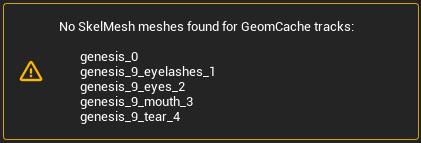
This led me down a path of trying to understand the internals of Alembic files as for some reason, UE was renaming the the tracks in the Alembic cache exported from Daz which meant that the tracks nolonger matched the parts of my character mesh. At least I think that's what was happening as I could find no information about this error.
The second problem I ran into was that the vertex order in the Alembic cache was different to that of my character mesh.
Also, UE was importing the Alembic cache at 24fps whereas it was importing the training animation FBX at 30fps, so I was getting a wanring about that as well.
To solve all of these things I decided to use Houdini:
- I import the character FBX, the alembic cache and the training animation into Houdini.
- I grab the geometry from first frame from the Alembic cache and this becomes my character mesh, which means that the vertex order matches.
- I fix up the paths/tracks of the Alembic cache, which solves the first error above.
- I rebind this new mesh to the skeleton and transfer the joint weights and materials across.
- I ensure that houdini is set up to export both the FBX animation and the alembic cache at 30fps.
- I also strip all of the properties/attributes from the alembic cache before exporting everthing (the character FBX, the training animation FBX and the Alembic cache) back out.
- All of this now happens automatically in Houdini. I don't need to do any manual work now that it's set up.
The new assets, exported out of Houdini now work perfectly for me in the ML Deformer setup.
I do a few others things in Houdini as well, not necessary for the ML Deformer to work, such as optimising the materials down to 10, packing the 4x4k head, body, arm and leg textures down to a single 8k texture, fixing up the eyes to work with the Metahuman eye material setup, renaming materials etc. I'm keen to continue building on my Houdini setup to work with Genesis 9 figures, alter the skeleton to better match the UE5 skeleton, handle clothing better anda few other things.
I did run into a similar problem you are having. At least it looked visually similar. I'm assuming that the vertex orders match between your character mesh and the alembic cache? For me the issue was due to some attributes/properties that were in the Alembic cache file exported out of Daz, which I now strip out in Houdini. I'll try to reproduce the problem again and see if I can work out what the exact cause was.
I tend to just run with the default settings in UE now as bumping things up didn't seem to make much difference to the quality of the end result. I haven't had any memory warnings though so it's possible that you're running out of GPU memory?
I'm in the process of updating my workflow for Genesis 9 so it's a bit broken at the moment but once I get it runnign again I'll do some more experiments and get back to you.
I'm close to releasing Sagan v3. It's a long story, but it'll preserve the vertex/face indices as they exist in DS, hopefully solving that problem.
It's also much faster.
Eye color on G9Yeah, I haven't really dived much into G9 yet.
I bought the Essentials Expansion when it came out, where I actually thought it was something else...
I can see that I need to wishlist Natural Eyes.
When I looked at it yesterday, I was a bit surprised that I couldn't find a morph for the pupils (expansion/contraction) and it doesn't look like there is one in Natural Eyes either.
Daz 3D is part of

Connect
DAZ Productions, Inc.
7533 S Center View Ct #4664
West Jordan, UT 84084Licensing Agreement | Terms of Service | Privacy Policy | EULA
© 2026 Daz Productions Inc. All Rights Reserved.