-
Transfer Utility expands breast area for a shirt
Hello there,
Recently, I would like to transfer a shirt from Marvelous Designer OBJ to Daz.
The OBJ shirt was imported to Daz fine. However, the shirt was expanded around the breast area after transfered.
Please see the photo in the attachment. I've try many options in the transfer untility, and got no luck.
Any advice is highly appreciated.
- Josh
[Solved] How to rig and save new clothes for GF9 AND Victoria 9?At 0:46 J. Darling suggests in his video that it is better to use the G9 base instead of a GF9 shape for rigging new clothes. Other users here on the forum (not here in the thread) have pointed out that it does not matter which shape (G9 Base, G9 Masculine, G9 Feminine) is used to model the garment. After my experience with the GF8 - and based on that advices - I used the G9 Ferminine shape. Hmmm ... OK - no comment on that advices

Even though J. Darling uses a tight-fitting garment and my garment prototype is extremely loose, I followed his instructions. For those who haven't seen the video yet: It's about "converting" clothes modelled for G9 Feminie shape back to G9 Base.
Due to my extremely loose clothing, I didn't really get a perfect fit for the G9 Base ... but for testing it was OK. After some file savings, exporting, re-importing and "transfer utilities", I finally have something that seems to fit Victoria 9 (even though the garment is modelled for G9 Base). It's the 1st day of the new year and normally the brain is a bit sluggish on this day. That's why I forgot what steps I took to save the garment.
I will try later today or tomorrow to create a new test prototype based on the G9 Base shape to provide you with more and better information.
1st conclusion of this thread: It seems to be "easier" (or at least better) for rigging to create new garments for G9 using the G9 Base (i.e. the first "character" that appears when you open the "Genesis 9" folder) than the "gendered" (morphed) versions like GF9 or GM9.
More information to follow soon - when my brain is working a bit better again
XTransfer morphs not loading in 4.21. [Solved]...here's a screenshot. I have no trouble with it in 4.20 but this is the message that pops up when I load the character in 4.21.(even the G2 morph that was transferred to G3F using GenerationX2 works fine in 4.20. I've made nio changes to the content linbrary settings for a long time.
 Map Transfer Question
I hope this is the right place for this discussion.
I really like the Map Tranfer usage to create the Female Genital Maps that some products do not come with or top create my own. Namely for this discussion i am using G9 Figure.
It is very easy to use this to Bake the G9 Female Gen Maps as DAZ provides the Gen Bake Maps for this feature, but is there anyway to use this for the Male gen map? For now the Gen Bake map only accounts for the female side maps. Can the DAZ team provide a way to use a seperate Gen bake for the males? I know the females get more attention! LOL! But it would be great if the males get some too from time to time, now that the G9 is one unified figure!
That would be great, so we can create the male side of the gen maps that are not supplied by some products and help us other vendors create easily the maps we need without using extra programs like Substance painter or the like.
Thank in advance.
XTransfer morphs not loading in 4.21. [Solved]Oh wow :-( Looks like Google has 'new and improved' their search engine again, egaads.
I think this might be the thread you're after: https://www.daz3d.com/forums/discussion/341526/xtransfer-module-1-genesis-3-to-genesis-8-morph-converter-commercial/#lates
It's "sensitive" in the most recent edition. Some posts on the last page may be of interest/help.
Cannot Export/Import OBJ for Clothing Morph - "Geometry Does Not Match"Hi lioncrud! After a failed morph load, the Morph Loader should place a message at the end of the Log file like this: Vertex Count mismatch 1106:1202 (Base:Morph). The first of these numbers is the number of vertices that the Morph Loader expects from the morph file. The second is the number of vertices the morph actually gives to the Loader. Import your item into Blender, select all the vertices, find out their total number and compare it with what the Morph Loader expects. If this number is higher, then something else was exported from the Daz Studio.
Daz Studio Pro BETA - version 4.22.0.15! (*UPDATED*)Saxa -- SD said:
*SNIP*
(3) Custom Morphs
Using visual menus to save various custom morph presets.
Yes Puppeteer is pretty nice, but always saw it as a more secondary posing mechanism, cos less people seemed to use it.
So maybe a workaround? I don't use.I have to disagree with ya there, as I heavily use puppeteer to essentially store entire scenes worth of poses, light setups, and props/scene elements, puppeteer is much, much more useful than one would think, or have the patience for…
I mean, there are a LOT of cool settings within studio, just crack it open and take a look, and experiment with it more if they're able that is…
But then again, I put an extraordinary amount of time tinkering and learning Studio's quirks, that I sometimes forget, that not everyone has the time.
Cannot Export/Import OBJ for Clothing Morph - "Geometry Does Not Match"Hi Dazzers,
So this item here is giving me a bit of a headache: https://www.daz3d.com/dforce-cgi-selene-outfit-for-genesis-8-and-81-females
I'm very accustomed to making clothing morphs in other programs (Blender) and re-importing to Daz3D. However this item, even when I export OBJ without loading into another program and try to load directly back onto item using Morph Loader Pro, does not match geometry. Trying to figure out why.
A few things I've already tried:
- Made sure I was exporting base mesh, no sub divides or higher resolutions
- The item has some sort of attachment, I tried exporting with and without it (simlar as you would do removing eyelashes from a base Genesis 8 character)
- Made sure exported file was set to DAZ scale.
- As noted, I tried exporting the file then directly trying to load it into Daz3d without any 3rd party program being involved. geometry doesn't match out of the gate, so I know it's not a 3rd party program (I use Blender)...something wonky going on with the export or thte import (Morph Loader Pro).
Can I use the Interactive License this way? Yes, I did read the EULAplasma_ring said:
nonesuch00 said:
hjake said:
...This is basically their interest in having restrictions on the interactive license that make it sound complicated. It's not; the standard license says you cannot transfer the files of a Daz product to another party. A 3D game that loads a 3D mesh a player can interact with or move around in realtime requires the developer to package that data with their game, so the interactive license is giving you permission to do that as long as you're not letting people access the data outside of playing the game as intended.
I'm hazarding a layman's explanation of this because every few months I see someone who is really concerned about what the interactive license covers, but all it's really asking you to agree to is that you won't provide the content you get from the Daz store to your players in a way that lets them get the content without purchasing it themeslves.
Thank you to plasma_ring and generalgamepalying for your input. I think every few months someone asks this question because DAZ has not provided a supplementary document explaining, in layman's terms, the terms and conditions and setting out example use cases. There is no legitmate reason why this could not be done be the same people who drew up the EULA. The only reason I can see to avoid provding clarity is because the EULA addendum 3.0 is only meant for those corporate entites that will run everything past their lawyer for explanation, not independant artists.
I have worked with many corporations that had long legal agreements but provide supplementary documentation as I mentioned above. They include a header statement saying that what is explained in the supplemantary documentation does not define or circumvent any terms in the EULA and that they recommend seeking legal council.
In the end it seems if I deal with the DAZ EULA, I will have to invest legal council prior to doing any development. I use DAZ content for 2D work but I am still very apprehensive about 3D content usage. In the new year I will have to prepare a use case scenario and submit a ticket to see their response.
[Solved] How to rig and save new clothes for GF9 AND Victoria 9?Oh, my goodness. I completely missed the fact that you were modeling on the feminine shape and not the base. The steps I outlined are for OBJs modeled on the base. I'm sorry. The trick that you need is that after carefully following the Josh Darling video, to create the G9 base fit from your female fit, you need to run the Transfer Utility again with the correct template, so it adds the right morph shapes and weight mapping for the G9 base. You shouldn't be afraid of adding smoothing modifier. Smoothing iterations of 2 and collision of 3 is pretty standard for Daz products and really helps fix tiny poke through issues. Don't turn on Interactive Update !!!!!!!!!!!. That is what causes terrible interface slow down.Genesis 9 clothing questions & answersbarbult said:
Mada said:
Yes its intentional. Once you're happy with your transfer just delete the obj that's left in the scene. If you're like me and like to try different templates before settling on one, it means you don't have to keep on importing the obj :)
Thanks for the explanation, Mada.
Apparently this is the result of fixing the crash logged here http://docs.daz3d.com/doku.php/public/software/dazstudio/4/change_log#4_21_1_24 . However, it is being reviewed for promotion to a feature due to its utility.
[Solved] How to rig and save new clothes for GF9 AND Victoria 9?felis said:
Are you modelling towards G9 base or G9 female base?
If not G9 base you must use reverse source shape from target.
Hi felis,
I use the G9 female base for modelling and followed your suggestions from above. You mentioned that this simple way works well for you.
The only explanation I have at the moment as to why it doesn't work for me is: there must be a step that is so obvious that it is not mentioned or I do something (based on my experience with GF8) that is not recommended while dealing with GF9.
Here is a step-by-step explanation of how I implement your suggestion:
1) import the garment object made for G9 female base
2) Select Edit -> Object -> Transfer Utility ...
3) Select "Genesis 9" as source and set "Current" as Source Item Shape
4) Select the object as target and "Default" as Target Item Shape
5) Select "Bodysuit Loose Template" as Projektion Template
6) Under "Options" mark "reverse source shape from target", select "Fit to Source figure", "Parent to Source figure" and "Add Smoothing Modifier"
7) Put the Content Type to "Follower" and accept
8) Save the garment object as "Support Asset" -> "Figure / Prop Asset" with "Set Compatibilty Base" set to "Genesis 9" and "Set Compatible" with set to "Genesis 9 / Base" (thats the save preset for me)
And after all I get that botched garment from my Screenshots when I load it for Victoria 9
Happy New Year to you! I think this will be my last entry this year
Can I use the Interactive License this way? Yes, I did read the EULAnonesuch00 said:
hjake said:
I guess the other point I will have to address is:
"are designed to require or encourage the use of CRT Content available through the online DAZ store either by (i) requiring the use of such CRT Content in order for the works to function, or (ii) allowing only limited function when the works are used other than in conjunction with CRT Content from the online DAZ store"
How can a product used in an Unity app that was processed through Blender (with garnish added) and integrated into the app be in anyway designed to require or encourage using the DAZ online store?
If I understand that, I am being instructed that I can use the product in my product as long as it is an advertising or portal to the DAZ online store.
What is "CRT Content"?
I know that Chohole told me that the interacvtive content doesn't allow you to make a Unity game using a boatload of IAP (In App Purchase) DAZ 3D products that you have bought and packaged with the intent of selling them to the game players via IAP or other means. If they did someone could just buy all the DAZ 3D Store product, convert them to UNity friendly format, and the sell them, modern by model, via IAP. Even could set up the unity app to poses, change clothing, hair, sets, animations and render as if the Unity App was just imitating DAZ Studio.
This is basically their interest in having restrictions on the interactive license that make it sound complicated. It's not; the standard license says you cannot transfer the files of a Daz product to another party. A 3D game that loads a 3D mesh a player can interact with or move around in realtime requires the developer to package that data with their game, so the interactive license is giving you permission to do that as long as you're not letting people access the data outside of playing the game as intended.
I'm hazarding a layman's explanation of this because every few months I see someone who is really concerned about what the interactive license covers, but all it's really asking you to agree to is that you won't provide the content you get from the Daz store to your players in a way that lets them get the content without purchasing it themeslves.
Ok, So this is Gen 9plasma_ring said:
It's interesting how much the perspectives vary between people who like it and dislike it. It's really hard for me to work with 8/8.1 now. The main thing I was thrilled about was the unisex mesh at first, but at this point it's just as important to me that G9 is more flexible across the board, at least for what I want to do.
I've spent years trying to get some characters' appearances down on Genesis 8 and could never hit a balance where they looked like real people without narrowing the range of expressions and poses they could do. And I don't mean photorealism is my goal, because it's not at all--my attempts with G8 just always ended up needing to be so simplified to avoid proportion issues and awkward posing that by the time they worked consistently I'd usually sacrificed most of the features I found visually interesting and they stopped looking like the characters.
This is very possibly just a skill issue on my part; obviously it's possible to create great-looking unique characters on Genesis 8. But I just did not have any luck customizing the morphs for characters that had been sculpted by accomplished character artists.
Just for kicks, here's a comparison of my WIP G9 updates with the G8 versions of the characters. This is subjective and I don't expect the G9 versions to appeal to people who don't like G9, but the G9 versions are what the characters have always been intended to look like and I feel like I can finally see their personalities even in fairly neutral expressions. One of the biggest improvements is that while the demons have more angular faces, the humans were always supposed to look softer in comparison. So now it's way easier for me to create a clear visual distinction between the two species and add some stylization to both without either looking more like a cartoon. Also the proportion morphs are great--demons in this setting are around nine feet tall on average and that really helps them look more naturally alien and not just like scaled up humans.

The G8 versions look super uncanny to me in comparison, even though those older renders have signficant editing to try to correct what were even worse issues in the raw render. I can better understand now why I would close Daz thinking I'd finally improved on a model only to open it again later and immediately think, "Yikes."
This doesn't mean that I think G8/8.1 are bad figures. They just didn't work for me personally as well as G9 does. I will happily buy whatever I need to, but while I would love some bend correction morphs, what I really need is pants. It's the number one G9 pants-based outfit buyer here, folks. The main part of my library I need to rebuild involves a lot of tight leather with thigh straps now that I don't have to futz with cross-gender autofit.
It seems G9 is working for you there. I think some of your characters look better and more unique in G9. Also, as I've said before, I appreciate you sharing your G9 work because you have shown more of the possibility of the G9. Cheers to that!
I don't hate G9. I don't care for V9 at all, and I don't love many of the characters I've seen so far - but that's aesthetic. Up to now, I hadn't seen enough reason to even download the essentials stuff. But I found a free navel-nipple fix on the so-called naughty site and Sickleyield adapted the DieTrying 200 morph set to G9 as well. She has done that for all the G figures, I think. RichardandTracy has made some pose converters available on Rosity - Those are just off the top of my head. There are many more such free enhancements now. So, even if one is not committed to spending money on G9 (and I'm not), it seems like there is finally enough reason to download the free stuff and take the figure for a spin. And at some future date, it might also make sense to buy something. I don't accept the "This will cost $1000" angle because there is always another sale.
Can I use the Interactive License this way? Yes, I did read the EULAhjake said:
I guess the other point I will have to address is:
"are designed to require or encourage the use of CRT Content available through the online DAZ store either by (i) requiring the use of such CRT Content in order for the works to function, or (ii) allowing only limited function when the works are used other than in conjunction with CRT Content from the online DAZ store"
How can a product used in an Unity app that was processed through Blender (with garnish added) and integrated into the app be in anyway designed to require or encourage using the DAZ online store?
If I understand that, I am being instructed that I can use the product in my product as long as it is an advertising or portal to the DAZ online store.
This part is saying that you can create addons for items you purchase from Daz as long as you need the original product to use it. So you can create texture expansions for a clothing set you didn't make, but the user who buys your textures needs to own the original clothing product to use them. You can create a package of character presets that use dials from a specific morph pack, but they have to be shaping presets that require the user to own the original morphs to work. This "encourage[s] the use of CRT Content" by expanding the potential uses for any item people have created addons for.
Let's appreciate/discuss today's new releases - ongoing threadPax Asteriae said:
Richard Haseltine said:
I'd be interested to see the Luthbellina without the "tactical" stuff - just the clothes without the straps.
Please excuse that the render's a bit uncooked in places.
The sweater has a morph to fit over the belt; the jeans have morphs to fit in and out of the shoes, as well as three belt loop morphs; there are two morphs to adjust the tightness of the shoes; the gloves have no dedicated morphs. All have the standard fitting morphs.
They're really nice items without the belts, and it's great to get some good regular clothing honestly, although I'm not 100% sold on the sneakers. The soles are a bit... out there if your characters don't commonly wear Yeezys or anything weird like that.
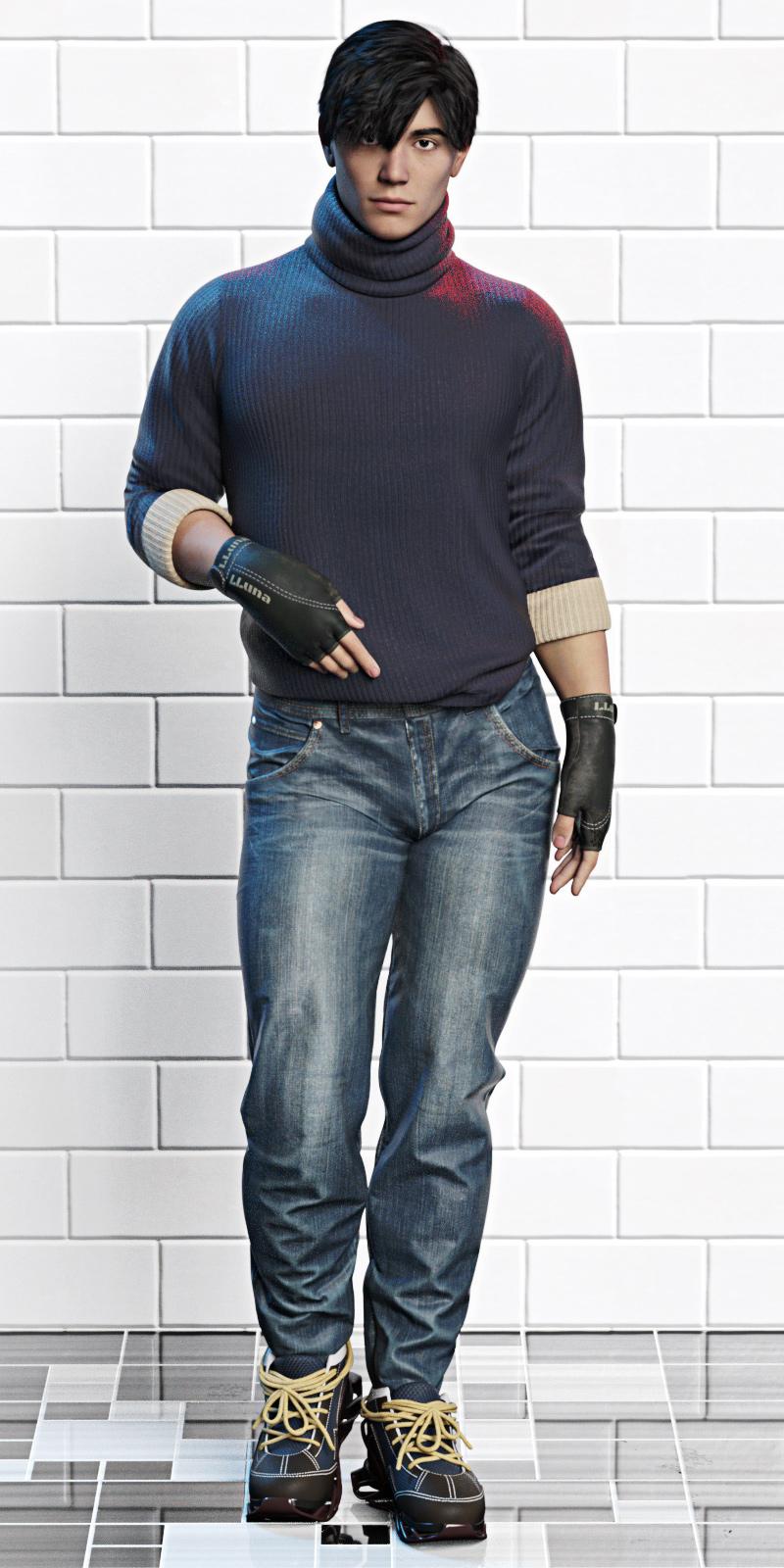
My kingdom for more actual gender-neutral standing poses.
EDIT: Very quick render of the shoes from the side (and it was very quick, because I hid everything except the jeans and shoes...) Great for running/parkour.
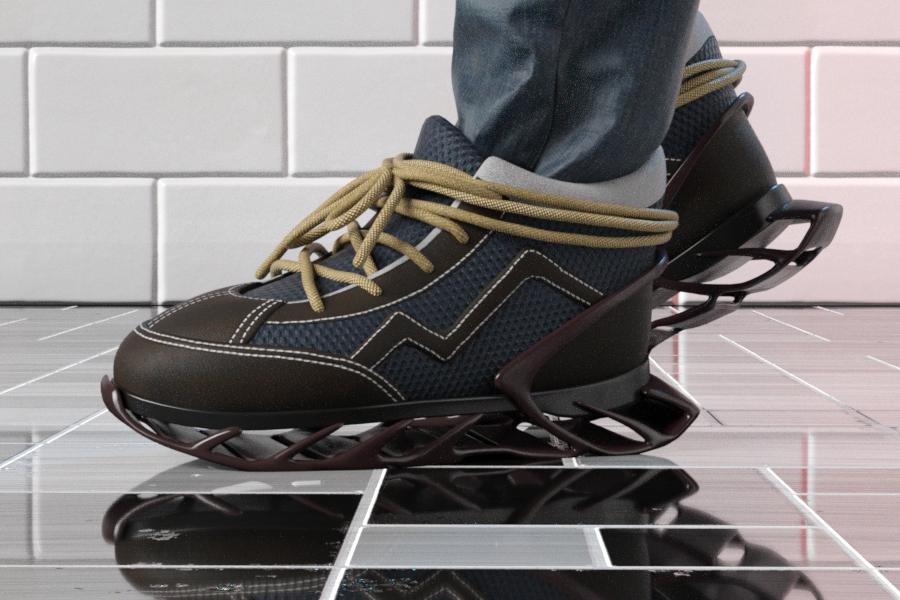
Thanks for posting this. I love their stuff, but it looks like G9M's chest definition issues are carrying over to the shirt. I can see a horizontal line at the bottom of his pecs that runs all the way across.
AOBB's head morph Scarlett G9 for G9F based on Vivien Leigh. No materials nor textures.Scarlett G9 refers of course to Scarlett O'Hara from the movie "Gone With The Wind" (1939) - Vivien Leigh's most famous role and one she won an Oscar for. I even found in DAZ store the Scarlett O'Hara outfit from the beginning of the movie, so I obviously had to dress her in the "Southern Belle" clothes for the promos.


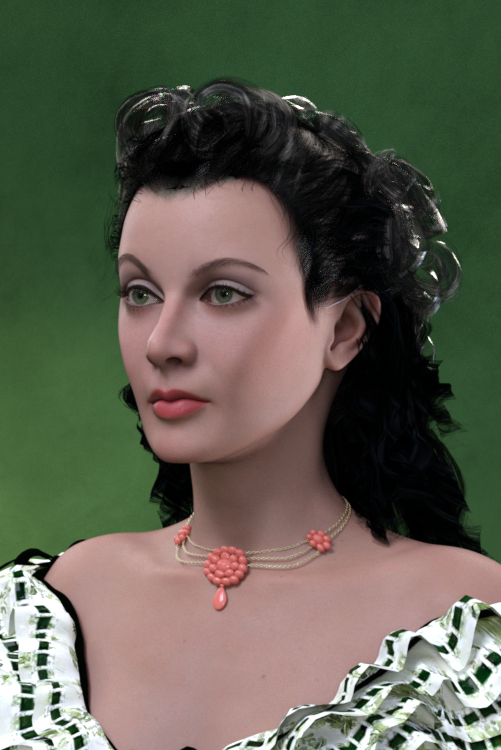
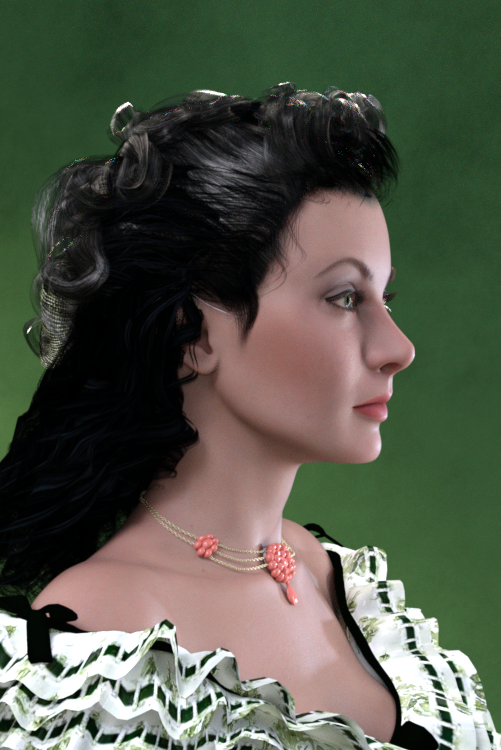
Assets used in promos:
Victoria 9 (body shape and makeup - foundation)
Lully's LIE Makeup (Renderosity)
Pen Hair G2F
Deeta Hair G2F
Southern Belle outfit G2F
BOSS Pro Lights
Wow, this was a difficult sculpt. It took me almost a month of every day "zbrushing" to get this likeness right. Every day I thought I already had it right just to look at the model appaled the next day. Now I think this is the best I can come up with and it is decent, so here you have it.
Non-commercial use only, please.
Enjoy, let me know what you think and of course - I am waiting for your renders with Scarlett!
Cheers,
AOBB
Dumb Question re DIMfrank0314 said:
You have an account. The one you're using. Just give them the info from the old account (they will have you do something to verify it was your account I'm sure) and they can transfer over all the purchased products from the other account.
Oh really?! This is a new thing 'cause they couldn't do this years back. I will look into the matter when I'm finished setting up this new beast :-)
Thanks.
Dumb Question re DIMYou have an account. The one you're using. Just give them the info from the old account (they will have you do something to verify it was your account I'm sure) and they can transfer over all the purchased products from the other account.
200 Free Morphs G9Thank you SickleYield; that debludger morph alone is worth the download, in my opinion.
Daz 3D is part of

Connect
DAZ Productions, Inc.
7533 S Center View Ct #4664
West Jordan, UT 84084Licensing Agreement | Terms of Service | Privacy Policy | EULA
© 2026 Daz Productions Inc. All Rights Reserved.