-
Celebrity Look-a-Likes for 3D figures part 3
Haruchai said:
Strobe_Light said:
Anybody know of any good christian bale look alikes for g8m?
The only ones I know of are by magnus1781. They have two head morph versions for free on their DeviantArt page.
C. Bale by magnus1781 on DeviantArt
C. Bale (v2) by magnus1781 on DeviantArt
They also supply textures that need to be applied manually via the surfaces tab.
The textures from Tristan8 are an alternative to the facegen ones. That is what I use.
Blender Noobie having issues with morphs (shape keys). Please help?Impressive work, Ryuu.
I know you said you were going to do the wing membranes as cloth sim, but I failed to see the magnitude of your undertaking -- You picked a hard one for your first time out with Blender's cloth sim.
So, you picked another of my main 3D study and usage for over two decades, and cloth sims can be a fickle b's, especially in Blender, though, the newer algorithms play nicer than the 2.4 - 2.7 versions.
However, I cringe every time I see someone pushing 'solidified' (cubed) mesh during cloth sims in these new tutorials (the past several years) -- after B2.71 when I first made my first Blender Cloth Simulation (Marvelous Designer-ish) prototype -- I started working on it a year before the first commercial cloth sim addon was published, and then it has exploded from there with many addons (by faster/better coders than I) and tutorials available. At that time, there was only the free 'Cloth Sewing Springs' patch for B2.68 which I was working from with the default cloth sim, Blender API Python scripting, and tessellation algorithms/addons. I did add both a faux cloth edge function and a solidify function after cloth sewing welding, and simulation finals to go along with either Sub-d (for quadmesh) or trimesh with quad boundaries subdivisions.
You are working against the sim, and quadrupling the time-step against the cloth-cloth/cloth-collision interactions. You can work from single-sided flat mesh, and add solidify and sub-d modifiers after the sim. Also, you can now use the cloth sculpt brush to help along any fixes, or flat out just use instead. Though, I have not been working in Blender cloth sim since my B2.8x version with the dynamic UI templates -- I have played with the cloth sculpt some for my Daz Studio/Blender morphing bridge addon, but other than some testing, have limited usage so far (coding the DS side has been a little difficult).
Also, have you looked into vertex group pinning (though, my last usage B2.8x still only allowed one pinning group) along with 'empty'(s)? I remember a few tutorials back in the B2.5 - 2.8 series with cloth attachment simming for gaming.
I would also suggest looking into the Modelling Cloth addon by Rich Colburn -- I believe it is updated for B2.9, and might work in B3.x, but I only have used it in B2.79 -- It works as an independent cloth sim from Blender's default with pinning and cloth pulling.
Blender's cloth sim suffers (or did ? -- not sure about B3.x series) from two big shortcomings (IMO); 1. Mode switching kills (non-baked) simuation data (I don't bake - I work 'live' like all my other cloth sims), and 2. No native user interaction (such as cloth pull/pushing), and limited hook-empty work-flows have to be employed -- It can be achieved via 3rd party addons.
Sorry, for the diatribe -- So, if you are going for shapekey driven rig posing, I believe you can achieve what you are trying to do, but if you are going for straight animation, I think you have a hard road ahead with the membranes. I am not an animator, so I only use animation to drive the cloth sim for clothes creation and morph targets with posing. If you are shooting for animation, hopefully someone more knowledgeable with cloth sim animating in Blender will come along to give you better pointers.
Love your dragon, and I am rooting for you to succeed with this...
how to convert Michael 4 morphs to genesis 2?Leana said:
From memory, for V4/M4 you don't have them in the list of source figures in GenX2 like Genesis figures, you need to use the "load files" option to load the cr2 and the various morphs you want to transfer.
There's a lot of information about transferring morphs manually in this thread: https://www.daz3d.com/forums/discussion/24093/transferring-morphs-from-genesis-to-g2m-g2f-and-from-g2m-g2f-to-genesis-now-with-clones/p1
it warked!
I dragged Michael 4 figure to genx and it got loaded after that i did the same for the morphs i didn't know it was posable and so easy too.
thank you very much for the help!
Creating Single Dial Morph but, it doesn't include some morphs - help.Well, if the master dial was linked to a sub-master dial and only the master ws saved as a morph asset then when it was loaded in a new figure the sub-master would be missing.
How to Create a Mirror Morph for Mesh GrabberJust a note to add here: Before you do the second load using morph loader pro (where you rename the morph, set reverse deformations to yes, and select x-swap under morph mirroring) be sure to set the morph dial to zero, not 100, or it will not work correctly.
Freebie Challenge NOV 22 - "Thieves, Robbers, and Fraudsters all around!" - Entries Thread OnlyInspired by "The Lies of Locke Lamora"
The Lies of Locke Lamora is a 2006 fantasy novel by American writer Scott Lynch, the first book of the Gentleman Bastard series.
It describes the adventures of a group of street artists, thieves and scammers, known as the Gentleman Bastard. Their adventures are set in a city called Camorr. Locke is leader of the group, consisting of Jean Tannen, an expert fighter; Calo and Galdo Sanza, jack-of-all-trades identical twins; and Bug, a young apprentice. In the picture Locke Lamora (right) and Jean Tannen (left), my version of them based on the book descriptions.
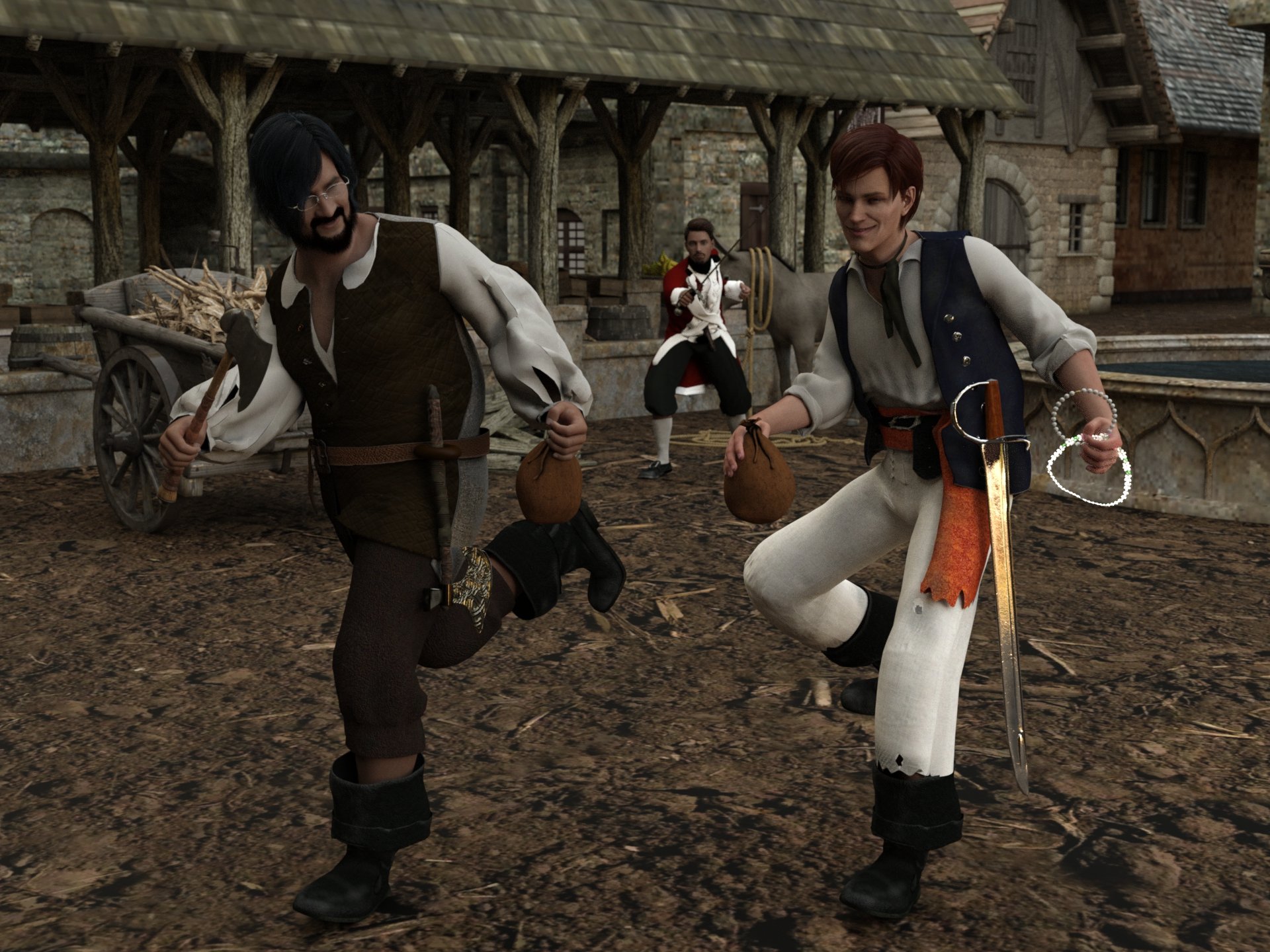
2 entry freebie contest november 2022 : "Thieves, Robbers, and Fraudsters all around!"
Freebies
Medieval_Village_Market
https://sharecg.com/v/96510/gallery/21/DAZ-Studio/Medieval_Village_MarketFantasy hatchet
https://sharecg.com/v/99630/browse/21/DAZ-Studio/Fantasy-hatchetViking-Axe-Freebie
https://www.deviantart.com/kalhh/art/Viking-Axe-Freebie-886573282A british Soldier Uniform fer Genesis 8 by Paspu
https://www.renderosity.com/freestuff/items/89719/a-british-soldier-uniform-fer-genesis-8Walther 2.0 simple hair for G8M
https://sharecg.com/v/97283/browse/21/DAZ-Studio/Walther-2.0-simple-hair-for-G8MPearl Necklace for G8F by antje
https://www.renderosity.com/freestuff/items/87951/pearl-necklace-for-g8fDiamonds are a Girl's BFF - G8F
https://sharecg.com/v/98392/gallery/21/DAZ-Studio/Diamonds-are-a-Girls-BFF-G8FUPDATE - V Devil May Cry 5 Hair Prop for G8M
https://sharecg.com/v/93558/browse/21/DAZ-Studio/UPDATE-V-Devil-May-Cry-5-Hair-Prop-for-G8MFreebie Ferrier Outift
https://www.deviantart.com/komyfly/art/Freebie-Ferrier-Outift-916993684Captain Barbossa by Paspu
https://www.renderosity.com/freestuff/items/91488/captain-barbossaFreebie Mr Gibbs by Paspu
https://www.renderosity.com/freestuff/items/91448/freebie-mr-gibbsHDRI gothic manor
https://polyhaven.com/a/gothic_manor_01Xigbar for Genesis 8 Male by LexaKiness (50%)
https://www.renderosity.com/freestuff/items/82317/xigbar-for-genesis-8-male
"STRONG" for G8M Character Morph & Pose by Mar3D
https://www.renderosity.com/freestuff/items/82833/strong-for-g8m-character-morph-amp-pose
No count
money bag set by kalhh: no longer available.
a93 - Zorro Sword Prop G8F-G8M: no longer available.Hope you like.
how to convert Michael 4 morphs to genesis 2?From memory, for V4/M4 you don't have them in the list of source figures in GenX2 like Genesis figures, you need to use the "load files" option to load the cr2 and the various morphs you want to transfer.
There's a lot of information about transferring morphs manually in this thread: https://www.daz3d.com/forums/discussion/24093/transferring-morphs-from-genesis-to-g2m-g2f-and-from-g2m-g2f-to-genesis-now-with-clones/p1
Daz Studio 4.21[.0.x] Pro, General Release!bishbosch said:
Is there up-to-date documentation for the new (and old) FBX export settings? The environment I'm trying to transfer to Unreal as an FBX is exploding, with parented things like windows and doors scattering, which wasn't happening before.
I can't export anything to Character Creator 4 anymore. I have tried all sorts of combiations in the new FBX dialog and CC4 still blows up on import.
Freebie Challenge NOV 22 - "Thieves, Robbers, and Fraudsters all around!" - Main Thread3D Art Freebie Challenge November 2022 "Thieves, Robbers, and Fraudsters all around!"
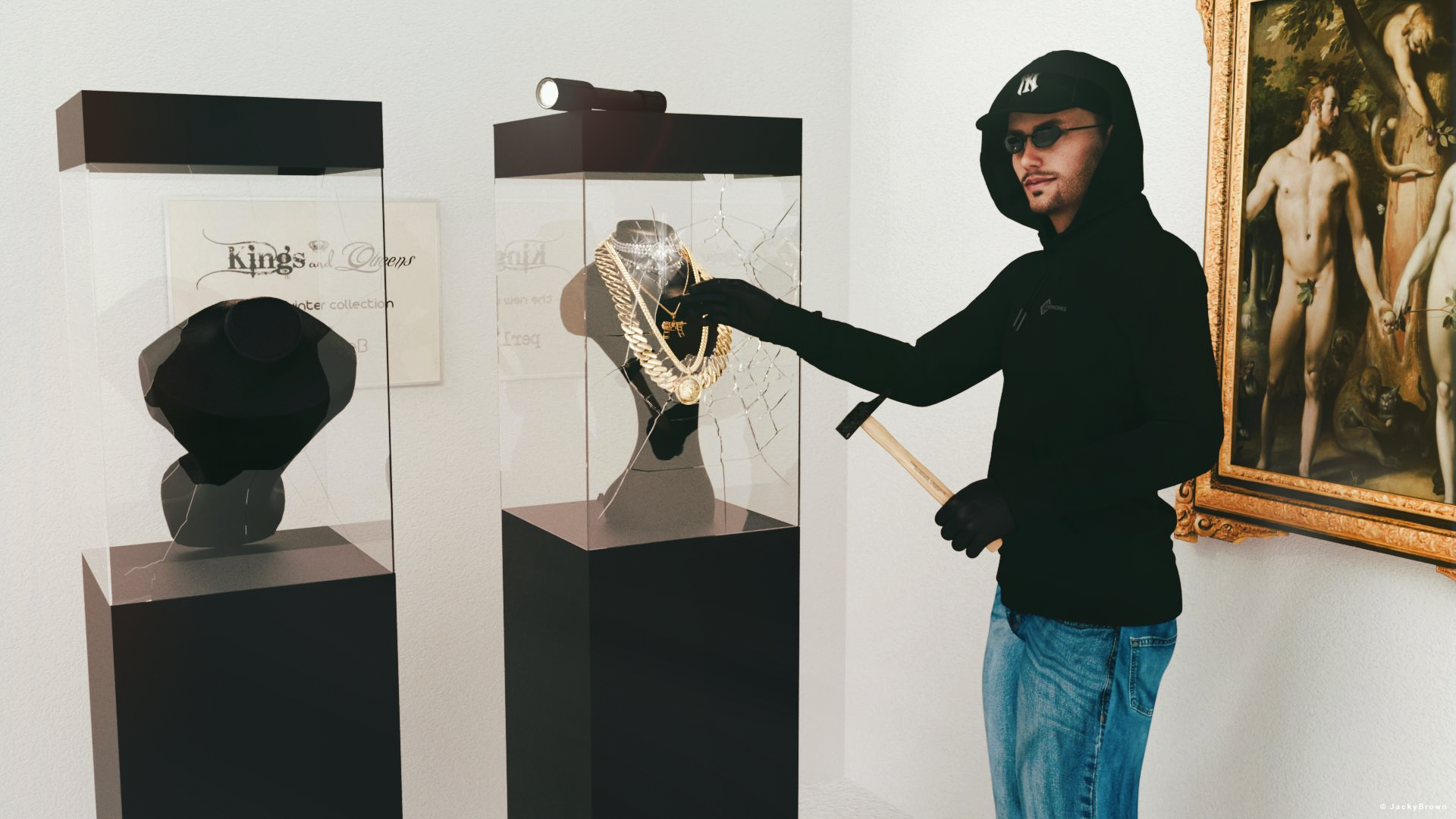
This didn't turn out quite what I had in mind, but I just had to try...
"The burglary at the jewelry store"
[Best watched at full size for details.]Starring: Walther 2.0 by Ruslanomar
The tale:
"Last showcase!" W. shouted to his mate when suddenly the light came back on, "FREEZE!" the police said...
Non-Motion Picture Soundtrack:Nick Lowe - I Love The Sound Of Breaking Glass (© 1978) https://www.youtube.com/watch?v=t-dpiIzYQ5g
Inner Circle - Bad Boys (© 1987) https://www.youtube.com/watch?v=jynW907oKDw
COUNTABLE FREEBIES: (Alphabetic order)#01! Bishop Necklace G8M-FREE by SdeB
https://www.sdebstore.com/collections/free-stuff/products/bishop-necklace-g8m-free **#02! Cuban Link Chain G8M-FREE by SdeB
https://www.sdebstore.com/collections/free-stuff/products/cuban-link-chain-g8m-free **#03! Dante DMC5 Free Stubble for Genesis 8 Male by InTheFlesh
https://sharecg.com/v/94752/gallery/21/DAZ-Studio/Dante-DMC5-Free-Stubble-for-Genesis-8-Male **#04! Diamonds are a girl's BFF G8F jewelry by perlk
https://www.renderosity.com/freestuff/items/92567/diamonds-are-a-girls-bff-g8f-jewelry **#05! EA Sidecut Hair for Genesis 3 & 8 Female(s) by EichhornArt
https://www.renderosity.com/freestuff/items/82972/ea-sidecut-hait-for-genesis-3-amp-8-femela-s- **
[Skullcap used]#06! Fiberhair Goatee Beard for Genesis 3 Male by RedzStudio
https://www.renderosity.com/freestuff/items/75957/fiberhair-goatee-beard-for-genesis-3-male **#07! Frame DIN-A by klausdbg
https://www.sharecg.com/v/66868/gallery/5/3D-Model/Frame-DIN-A **#08! G8M Walther 2.0 by Ruslanomar
https://sharecg.com/v/97276/gallery/21/DAZ-Studio/G8M-Walther-2.0 **#09! Hammer (.obj) by offrench
https://www.renderosity.com/freestuff/items/52734/hammer **#10! Heavy Curb G8M-FREE by SdeB
https://www.sdebstore.com/collections/free-stuff/products/heavy-curb-g8m-free **#11! Iray car related shader presets 'megapack' by Tom2099
https://www.deviantart.com/tom2099/art/Iray-car-related-shader-presets-megapack-539622361 **#12! Lights for Daz Studio w/ Iray by DrBoots
https://www.deviantart.com/drboots/art/Freebie-Lights-for-Daz-Studio-w-Iray-579993105 **#13! Military Paint shaders for DAZ Studio *IRAY* by Tom2099
https://www.deviantart.com/tom2099/art/Military-Paint-shaders-for-DAZ-Studio-IRAY-643567243 **#14! Mirror/Frame (.obj) by hypnagogia
https://sharecg.com/v/77468/gallery/5/3D-Model/Mirror-Frame **#15! Necklace Display Bust (OBJ Version) by LuxXeon
https://www.renderosity.com/freestuff/items/73726/necklace-display-bust-obj-version **#16! New Walther 2.0 tanned skin + hair system by Ruslanomar
https://sharecg.com/v/98463/browse/21/DAZ-Studio/New-Walther-2.0-tanned-skin-%2B-hair-system **#17! Police Gloves for Genesis 8 by zoro_d
https://www.renderosity.com/freestuff/items/82851/police-gloves-for-genesis-8 **#18! RGB HDRi Soft Lights for Daz Studio - Iray by VAlzheimer *1
https://gumroad.com/valzheimer (5th item)#19! Shattered Glass (.obj) by Spacebones
https://sharecg.com/v/66942/gallery/5/3D-Model/Shattered-Glass **#20! "STRONG" for G8M Character Morph & Pose by Mar3D
https://www.renderosity.com/mod/freestuff/strong-for-g8m-character-morph-amp-pose/82833 **#21! SWT Off-Brand FlashLight for Genesis 8 Females by SWTrium
https://www.renderosity.com/freestuff/items/83844/swt-off-brand-flashlight-for-genesis-8-females- **#22! SY 200 Morphs for Genesis 8 Head and Body by SickleYield
https://sharecg.com/v/91888/view/21/DAZ-Studio/SY-200-Morphs-for-Genesis-8-Head-and-Body **#23! UV remapped dforce G8M Jeans by perlk
https://www.renderosity.com/freestuff/items/90916/uv-remapped-dforce-g8m-jeans **#24! Wild Star Glasses for Genesis 8 by zoro_d
https://www.renderosity.com/freestuff/items/89848/wild-star-glasses-for-genesis-8 **NO-COUNT ITEMS:
--- Hoodie for G3M by Tab
++ Surf's Up Hat from Surf's Up Outfit and Board for G2M by Sarsa [Customized texture]PURCHASED/PAID FOR ITEMS: None 100% Freebies
*1 E-mail address required
** Registration required
#x! Countable Items (Bold ones are used by me for the first time I think.)
--- No longer available freebies
++ Free with DAZ Studio (or the Essentials)
$x. Purchased/Paid For Item
Rendered with DAZ Studio 4.10.0.123 (nVidia Iray)Other free software used: GIMP v2.10.32 and Irfanview 4.60
Postwork: used the AltaLux Image Enhancement Filter (Effect) by Stefano Tommesani that comes with Irfanview and some filters (oa) that come with GIMP. Also used mcjDenoise (https://sites.google.com/site/mcasualsdazscripts9/mcjdenoise) and mcjLut by mcasual (https://sites.google.com/site/mcasualsdazscripts9/mcjlut) with the free FilterGrade Cinematic LUTs Pack (https://filtergrade.com/free-cinematic-luts-video-editing/).
"The burglary at the jewelry store"
how to convert Michael 4 morphs to genesis 2?Leana said:
For autofit and to use M4 textures on G2M you will need this: https://www.daz3d.com/michael-4-for-genesis-2-male
To convert M4 morphs to G2M you can use GenX2. You would need the base program and the G2 add-on:hi thanks for replying,
I already have genx for genesis, genesis2 and genesis 3 but there is no option for Michael 4 and those morphs don't appear in genesis 2 the only morph I have is Michael 4 base figure
do you know of a way to copy the shape of the morphs like using auto fit and transfer utility? I use those to convert g8 to g2
Why are Genesis 9 characters so small?Genesis 9 is not really smaller per se, just real world average. G9 is at the average female height of about 5'7". G8F was 5' 10 & 1/2 inches and G8M is 5; 11 & 1/4". Victoria 8 was 6' 1" I have noticed tha twith the body morph sioze sliders you can make dwarves and faries to Giants with ease. To get a 6 foot tall G9 male, try 107 to 109% on the scale slider.
How do I avoid "Topology has changed..." trying to GoZ back to Daz Studio?bigD3d said:
Hello,
I ran into this issue tonight and thought I share what worked for me in case it helps other who come across the forum entry later on...
My item i'm sending to ZBrush is an older V4 clothing item (and I see this issue most often with older meshes like this). I found that I could update the mesh in Daz and then when I used ZBrush, added a morph, and sent it came back the morph was taken. To make the change you can:
Edit > Figure > Geometry > Triangulate...
This converted the entire mesh into triangles, and I'm guessing closed or connected any loose edges/vertices, etc. If you have loaded a texture on it, you can save the figure and the material, and it would propably be best to also save as a new product. The old textures won't work if you reload them onto the item though. But the surface groups are still there so you can add 3rd party textures.
Its not a perfect solution, but hope it helps someone. Oh, and this is Daz Studio 4.16. I'm not sure when this Triangulate... option came, but just in case...
thanks
Thank you a lot! It works!
Creating Single Dial Morph but, it doesn't include some morphs - help.Hi, I've come up against this issue before, you have a character that you made, you test it out several times and decide it would be great to just have one dial to add the figure on to the base. So, you load a scene with the figure set up already and create your single dial morph [SDM]. You test it to see if it's working, it is, dials to base then back up, save it and close the scene. On restarting you dial in your new dial only to find it doesn't work, it dials in some morphs but, not all of them which makes it redundant. I've just created one with Casey for G9, I've made my changes, loved it, then created the SDM. All looks good then load a new G9 and test the morph but, only the some of the dials you previously had dial in. I remember thinking I'd found a solution to this but, I've not come across it in a while and can't remember what the fix was if there was one other than screenshotting all the dials and recreating the SDM.
So, how can I solve this. I've just tried to make the SDM again but, noticed when it came to the ERC Freeze that the Casey 9 wasn't included in the list at all. What am I doing wrong? I'm baffled because usually don't have a problem. It's been at least a year or two since I had this problem.
Thanks
suggestions for Genesis 9Let's talk about deformers and morph targets ... i have to admit i tend to use muscle morphs rather often and i ran into trouble with Vicky. You will easily see it when you take a look at the example picture below:
While arms/biceps/elbow work nicely there's some issues with the stomach/abs that tend to act up ... but what really bothering me are the collarbones, the armpits and the shape of the lats and especially the traps: when the arm rises they seem to vanish (on the right side) and there's a hollow between neck and shoulder ... any suggestions?
Freebie Challenge NOV 22 - "Thieves, Robbers, and Fraudsters all around!" - Main Threademanuela1 said:
Inspired by "The Lies of Locke Lamora"
The Lies of Locke Lamora is a 2006 fantasy novel by American writer Scott Lynch, the first book of the Gentleman Bastard series.
It describes the adventures of a group of street artists, thieves and scammers, known as the Gentleman Bastard. Their adventures are set in a city called Camorr. Locke is leader of the group, consisting of Jean Tannen, an expert fighter; Calo and Galdo Sanza, jack-of-all-trades identical twins; and Bug, a young apprentice. In the picture Locke Lamora (right) and Jean Tannen (left), my version of them based on the book descriptions.
2 entry freebie contest november 2022 : "Thieves, Robbers, and Fraudsters all around!"
Freebies
Medieval_Village_Market
https://sharecg.com/v/96510/gallery/21/DAZ-Studio/Medieval_Village_MarketFantasy hatchet
https://sharecg.com/v/99630/browse/21/DAZ-Studio/Fantasy-hatchetViking-Axe-Freebie
https://www.deviantart.com/kalhh/art/Viking-Axe-Freebie-886573282A british Soldier Uniform fer Genesis 8 by Paspu
https://www.renderosity.com/freestuff/items/89719/a-british-soldier-uniform-fer-genesis-8Walther 2.0 simple hair for G8M
https://sharecg.com/v/97283/browse/21/DAZ-Studio/Walther-2.0-simple-hair-for-G8MPearl Necklace for G8F by antje
https://www.renderosity.com/freestuff/items/87951/pearl-necklace-for-g8fDiamonds are a Girl's BFF - G8F
https://sharecg.com/v/98392/gallery/21/DAZ-Studio/Diamonds-are-a-Girls-BFF-G8FUPDATE - V Devil May Cry 5 Hair Prop for G8M
https://sharecg.com/v/93558/browse/21/DAZ-Studio/UPDATE-V-Devil-May-Cry-5-Hair-Prop-for-G8MFreebie Ferrier Outift
https://www.deviantart.com/komyfly/art/Freebie-Ferrier-Outift-916993684Captain Barbossa by Paspu
https://www.renderosity.com/freestuff/items/91488/captain-barbossaFreebie Mr Gibbs by Paspu
https://www.renderosity.com/freestuff/items/91448/freebie-mr-gibbsHDRI gothic manor
https://polyhaven.com/a/gothic_manor_01Xigbar for Genesis 8 Male by LexaKiness (50%)
https://www.renderosity.com/freestuff/items/82317/xigbar-for-genesis-8-male
"STRONG" for G8M Character Morph & Pose by Mar3D
https://www.renderosity.com/freestuff/items/82833/strong-for-g8m-character-morph-amp-pose
No count
money bag set by kalhh: no longer available.
a93 - Zorro Sword Prop G8F-G8M: no longer available.Hope you like.
All The Links Check Out Plz Post In The Entries Thread!
DAZ, MD, and Traditional Pattern Making - Graduationlilweep said:
clcny20 said:
omg! this thread is a godsend!
I've used MD to make clothing for the Sims 4, and wanted to do the same for Daz--and sell it in store, but I'm running into so many issues.
The underarm distortion, for one. I'm unclear on weightmapping using daz.
Next, if I want to make a buttoned/unbottoned morph, how would I create the morphs in MD and have them work for use with the clothing options as one?
Don't even get me started on packaging

you might want to look at Esha's content creation tutorials on Daz Store (if theyre ever on sale), theyre not perfect but might address a few of those questions about content creation workflows for making conforming clothing using MD, morph creation, rigging, packaging.
I think one way to get better weight mapping for conforming clothing is to create a 'tight' version of your outfit that hugs the figure skin tightly. Using the transfer utility on this tight version will usually give much better transfer of the weight mapping than using the final draped outfit. Then, you would have a 'final' version of the outfit as a morph/replacement of the tight version.
After transfering weights, you can smooth out some of the weight mapping and use JCMs to correct the figure when it fails under certain joint rotations. SickleYield uploaded a recent video to youtube about smoothing and making JCMs for clothing. The Esha tutorials also go into this.
It's theoretically possible to make JCMs with Marvelous Designer, but the problem is that it becomes kind of impossible to simulate clothing at certain joint rotations - this is because the Daz figures have major intersecting geometries (the thigh intersects a lot with the pelvis when it rotates up and the upper arm intersects a lot with the lats when it rotates down), and MD wont be able to create simulations around those intersections. It's probably a lot easier to just do simple correctives using sculpting tools in Blender or Zbrush etc than use MD for JCMs.
Oh wow--the tighter version of the clothing sounds genius! Okay, I think I'm going to try that later on today, and see if it works.
JCM's scare me...they seem intimidating, but I must brave them, I guess, if I want to have something worth selling. I'm so in awe of creators that have made baggy-armed clothing...like, how?!
Thanks so much for taking time to answer my questions! I truly appreciate it :)
No one asked me - Diomede screenshots on whatever - Warning AI Discussion OKSave the Morph Asset - Check ONLY the New Morph
No one asked me - Diomede screenshots on whatever - Warning AI Discussion OKOpen a new Daz Studio Scene and Use Morph Loader Pro
- Load Genesis 9 base in Studio
- Use the edit menu to start morph loader pro
- Load your morph obj
- In dialogue, generally a good idea to get in habit of using 'deltas only' even when not needed.
- If works, will get a confirmation screen. Yay.
No one asked me - Diomede screenshots on whatever - Warning AI Discussion OKSetting Smoothing to 0 and Exporting as a Morph
- make sure smoothing is at zero (much of detail appears to disappear)
- return to assemble room
- export the file
- in OBJ dialogue, choose Daz Studio (Morph) preset
I am beginner to Daz Studio, I have tried my luck in vain...Halcon Bluesky said:
@SofaCitizen, what I do in my free time is experimenting with the controls using Iray renders with some HDRs, I find these good and the time to render is relatively short.
The props with lots of polygons will take more time depending how you want your figure(s) to be positioned and ready for the shoot.
I want to have more useful things, hair men/women, environmentsand more figures male/female.
Whithout it, I can't do anything that may look good.
Not that I may want to be an instant artist, just to be safe my work may be appreciated not to fall into the ridicule.
Well, I don't think I anyone who posts here in the forums or gallery would get ridiculed - I imagine because it's only Daz users frequenting those places and everyone was a beginner at some point. That would probably go the same for Renderosity as well I imagine. Other image-hosting places where comments can come from a larger variety of people, including randoms who can create accounts quickly and easily would be different tho. I think the worst you would get here is just no reaction, which in itself can be a little disheartening sometimes. However, I still try and post the scenes that I am reasonably happy with, either for a competition/challenge or just for a random idea that I had as they can still serve as something that I can be proud of as I take steps towards getting better. Perhaps as I go along and improve I will start taking down the earlier ones when I start noticing more and more about how I can improve them - or alternatively I will look back at an old scene, see how I can improve it and use that focus to make a new version that is two or three times better. Thus, using that old render as a benchmark to give myself more confidence and pride in how much I have learned?
That was a bit of a ramble, sorry. I probably need another coffee to wake up a bit.
The point is that I think you shouldn't wait until you are an expert before you post anything. Perhaps try the New User challenges? Those are designed to help inexperienced users work on certain areas of DazStudio and if you post to that thread then people are much more likely to post some helpful comments as it is expected that the images will not be perfect and people are using that to learn and get better.
@SofaCitizen, I am curious what Daz product did you use for the "The Calm Before The Storm" render
It was funny that shower scene. it cost me a fortune a product similar to that, kind of useless, because it use too much memory!
Ahh, yes. I wasn't sure if that one would be against the Daz's guidelines (I believe it would be by the letter of the rule even if not by the spirit) so I did not post it here and so did not get a chance to list the assets. I believe the environment was a Zeddicus one and the spider was a monster one that I had to over-morph to de-emphasise the non-natural parts. I'll fire up the scene later and list them out here when I finish work.
However, just on the memory issue - I usually go through the scene and remove stuff that isn't going to be seen to cut down on render times and also just to get things out of the way. It can be a bit time consuming but it can make a massive difference. I did pick up a few scripts to help with that during the sale - although while those can save some time they also add some other things to watch out for. For instance one script I have tries to remove things that the camera cannot see - but it seems it does not support iRay decal nodes and so I can't just run it without some manual adjustments.
Daz 3D is part of

Connect
DAZ Productions, Inc.
7533 S Center View Ct #4664
West Jordan, UT 84084Licensing Agreement | Terms of Service | Privacy Policy | EULA
© 2026 Daz Productions Inc. All Rights Reserved.