-
New to DAZ3D - Moving Content to diff HD
Daz content at least should already install to People/Genesis #/Hair (or clothing, or character). Poser format content, as for Victoria 4 etc., is another matter.
DIM can use multiple content directories, you ust need to remember to select the right one for each installation.
One thing to be aware of is that the Content Management System on the machine you didn't install from won't know about your content - you can reimport metadata, from the Content Library option menu>Content DB Maintenance, but your own categories and saved fiels won't be added unless you use the same dialogue to export user data on the other machine. You could also set the Content Cluster to be on the portable drive for each machine.
Mix and match products from various levels?There is no Genesis 4. If you meant Genesis 8 than the answer is yes as Victoria 8 is a morph for Genesis 8 Female.
Mix and match products from various levels?Can you mix and match products from different lovels, i.e. use morphs designed for Genesis 4 on Victoria 8, kinda stuff. Sorry if that's a dumb question, but I'm totally new to all this.
LJ Studios - Art Work and TipsLight Fixation
Victoria 2, Rendered in iRay
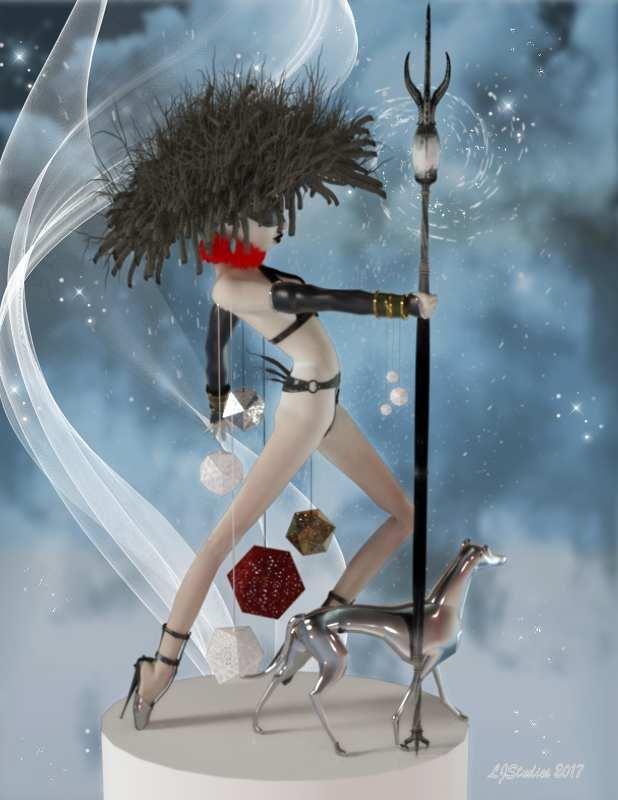
Dog 3Zi Glass Dog by sannzi.
Environment: Background # xmas Surprise by Capelito.
Environment: Lighting # FWSA Soft Light Probes by Forbidden Whispers.
Postwork * Ron's Particles by deviney.
Postwork * Ron's Wisps by deviney.
Postwork * Ron's Angel Dust by deviney.
Shader: Clothing * Mec4d PBS Shaders vol.1 for Iray by Mec4d.
Shader: Clothing * Mec4d PBS Shaders vol.2 for Iray by Mec4d.
Shader: Clothing * Pd-Daz Studio Soft Leather Shaders by Parrotdolphin.
Shader: Dog # Ultra Genesis Studios - Ornamats by Ultra Genesis Studios.
Warrior: clothing: Arm Cuffs * V3-Warrior-Character+outfit by A::DP.
Warrior: clothing: Blind fold # RDNA V Implants by Traveler.
Warrior: clothing: Earring * Stonez4All by janimatrix.
Warrior: clothing: Geodiscs Luster Quasar rontonton 15 N291216 by Alex.
Warrior: clothing: Gloves # RDNA V Hunter by Traveler.
Warrior: clothing: Neck Ruff * Renaissance Ruffs for V4 by Rosemaryr.
Warrior: clothing: Pants Kj Pant for Victoria 2 and Stephanie by aerysoul. 13th row fourth column
Warrior: clothing: Shoes * Fetish Pumps V4 by Reiko-Kano.
Warrior: clothing: Staff # Galeara's Claw Staff by Arki.
Warrior: clothing: Top Magical Vest for V2 by aerysoul.
Warrior: Hair * Beaver Den Freebie by Alessandro_AM.
Warrior: Poses Hand Pose Vol. 1 for Victoria by HarpoonVolt. Hand poses
Warrior: Textures Serenity and Death by FrogLace Studios. Non-Commerical* - Free Registration is required to obtain the freebie
# - No longer available.Rendered with iRay. I used Victoria 2 with my Art Doll morph applied. The pose was created for her body using an image of an art doll I found on pinerest and then applied the hand poses listed in the product list. Used my go to shaders by MEC4D for the metal surfaces. The image was post worked using Ron's fabulous brushes (see list for the particulars).
Genesis 8 Male Anatomical Elements?True. I just wished they offered more than one Pro bundle for Genesis 8. Like maybe one that includes the Head morphs, Body morphs and Facial expressions and have the naughty bits available in it too.
Genesis 1 had this:
https://www.daz3d.com/genesis-michael-victoria-combo-bundle
which is close to what you asked for, but none of the latter releases had a similar bundle
Morphs from G3 to G8This is strangely convenient ... but what on earth happened?
So, what I did was I got it so that the script takes that one morph youare instructed to mark favorite, and it finds out what folder it is in. It then scans the folder and subfolders for all the files. If the file ends in png, it copies it. If it ends in dsf it processes it, changing all the relevant data in the file to apply to G8.
Oh, OK. I misunderstood what the script was supposed to do.
[...] It's worth noting that GenX shapes usually have a helper shape of the base figure. Like a Genesis shape transfered to G3 needs the Genesis bas shape to look right. THis will apply to G8 as well, and GenX may or may not have placed those the shapes in the same folder as your transfered shapes. In your case, it sounds like it did, so that's why M4 came over. But for others, this is something to keep in mind.Actually, it didn't, as far as M4 is concerned. The shape it pulled over -- and all of the G2M DAZ figure shapes, as far as I can tell -- were from Slosh's Legacy Shapes. (See below.)
Looking at the directory structure, the GenX shapes actually are in the top level of the DXD Gen X folder. As far as I can tell, it looks like your script doesn't parse above the directory it's concerned with, if you see what I mean. The shape I was asking it to move was in the Genesis 2 Male folder, so it pulled that entire folder over. For reasons that I don't know at the moment, copies of the Slosh shapes are in the DXD Gen X/Genesis 2 Male folder, which explains why they came along. (At a guess, a failed transfer or some such.) But the helper shapes that GenX requires definitely did not get pulled over. And I don't think I'll try that one right now, since it might well result in pulling the entire GenX tree structure along and, well, that's a lot. I had planned to be a bit more careful this time through, since I had enough morphs in G3M that his loading time got VERY slow.
I was thinking of trying a couple of the actual DAZ shapes. That seems like it might make the script try to pull over the entire morphs folder; is that what would happen, do you know?
That behavior is a fairly accurate description.
If you have:Folder Subfolder Morph.dsf SubSubfolderThe script will find that the morph is in Subfolder. It will then find all other files in Subfolder and SubSubfolder but not Folder.
IIRC, Daz figures are in Morphs/Daz 3D/Product Name. As such, moving one the script will take anything under Product Name, but not look above that at Daz 3D. So it should be perfectly safe.
This does lead to one possible issue. Some Rendo vendors put stuff in the Vendor folder and also in product folders under it. So if you happen to choose a morph they they put in their vendor folder, while they have separate products in product folders, the script will move everything for that vendor. OTOH some vendors put morps in subfolders. Like "All MCMs in their own folder under the product." If you happen to chose one such MCM only that part of the product will transfer.
Usually, the safest way to do this is to look for a root property. Like Victorias usually have a head morph, body morph, and a Victoria silder that controls both. The Victoria slider is the best target because that one is usually in the most effect place to get a proper transfer. Unfortunately, I can't think of a safe way to allow the script to account for the whims of the vendors.V4.2 morph content not loadingWhen loading the Victoria 4.2 model I am pleagued with countless error interuptions asking to manually hunt down specific channels files:
It takes forever to track down these coutnless files and basically makes this mode unusable. So maddening!
So how do I "Make sure that the Poser content directories are set up correctly"??!!?! so these errors stop and actually load the content permanently?
Is this fixable in DS 4.9 for Mac Sierra?
Thanks
Black characters for M8??Wow, this Albino girl is gorgeous. Is this character out there or did you make her yourself. The features and the skin, lovely.Thank you, ALLIEKATBLUE! TMI warning: I morph dialed her using (probably) elements from every morph pack available for G3F along with judicious usage of percentages of 2 or 3 purchased characters including GenX2 (usually avoiding Victoria 7 in order to bypass the sameness that results). Skin is Brooklyn, by Raiya of course.
With DO Head Morphs, 200 Head Morphs, all of Thorne's Head Morph Kits, and Fantasy Creature Creator HD (yes, but in small amounts) I never found myself in a situation where I needed to change a facial feature but couldn't because there was no morph that did it, as would happen with Genesis 2. With Zev0 burning the midnight oil and Thorne's announcement that their G3 morph kits were all being ported over to G8, and RareStone's pack that does a lot of special things, including ears, nostril shapes, multiple fine tuners of lacrimals, 35 brow parameters!, etc., I should be in similar shape with G8F by October, although I may not have scores of premade full head morphs from which to draw. Unless I finally implement Sickleyield/Redz/SingularBlues (and whoever else helped)'s G3toG8 morph directions, but hopefully someone will write a script and automate the process.
But back to black characters for M8: Bringing over from G3M every black/brown character head morph available (in both stores) would still give only a few more than twenty. But with that variety plus DO G8M Head Morphs and the soon-to-be-released 200 Head Morphs for G8M, there will be plenty of power to dial up black men to your heart's desire. I have found, though, that men are much more difficult for me to morph satisfactorily than women. When I make a funny-looking girl/woman, she's still a female. But when I make a funny-looking male, he's just funny-looking.
(Released) EcVh0 Pale Skin Shader for Genesis 8 Female [Commercial]Just a quick tip for everyone who has this. If you have gotten the Olympia 8 pro or Beginners pack the character Sharah comes with SSS maps that can be used with this shader with no alteration, and she comes with her make up baked into the SSS maps too so you don't have to mess with them either. Plus they all come in Brow and No Brow options. So it really is as easy as plugging in her SSS maps into the Translucency Chanel and perhaps changing the Specular map for her own to have another skin for this shader with no extra work. You can use it with the original shader EcVh0 has as well. This example shows the differences you get with Olympia 8's SSS (Face), Sharah's (Torso) and Victoria 8's SSS maps as well (Legs) with the original shader but the arms show how Shara's work with the pale shader too. Sorry for the crappy render it was just a viewport proof of concept test that I screen captured to save time.
This is the closes posting I have seen that explains how to use the Pale Skin. Can you explain EXACTLY what goes where and how, if you are not using olympia. I am using SC Chloe/Vic8. Thank you!
Yet Another What Character Is That Thread [solved]That is just Victoria 7Fiddling with Iray skin settings...I am a total Iray newbie, having spent all my time with 3Delight. I have a few questions:
QUESTION 1:
I have some characters with fantasy skin colors, i.e. soft gray, green, blue, or creating golden tan, etc. In 3Delight, all I needed to do was play with the Diffuse Color, Subsurface Color and Specularity to make this change on normal fair human skin. Same thing with eye color. There are some lovely eye sets for Victoria 4 which add subtle changes to Diffuse Color to create more options for a single map, such as this product:
There are several ways you can alter skin color in Iray. The easiest being altering the color in one or all of these: Base Color, Translucency Color, SSS Reflectance Tint, Glossy Color, or Glossy Specular. Or of course you can alter the diffuse map in photoshop or similar.
QUESTION 2:
In 3Delight, I would hide individual surfaces by setting the opacity to zero. I use this technique often in kitbashing. Is there a way to do this in Iray?
Thanks! This is a great thread.
In Iray it is called Opacity Cutout - set it to zero, and the material will be invisible.
Hope this helps!
Fiddling with Iray skin settings...I am a total Iray newbie, having spent all my time with 3Delight. I have a few questions:
QUESTION 1:
I have some characters with fantasy skin colors, i.e. soft gray, green, blue, or creating golden tan, etc. In 3Delight, all I needed to do was play with the Diffuse Color, Subsurface Color and Specularity to make this change on normal fair human skin. Same thing with eye color. There are some lovely eye sets for Victoria 4 which add subtle changes to Diffuse Color to create more options for a single map, such as this product:
https://www.daz3d.com/sg-frosty-gaze
How do I do this in Iray? Can I change this via surfaces or do I need to make changes to the maps in Photoshop?
QUESTION 2:
In 3Delight, I would hide individual surfaces by setting the opacity to zero. I use this technique often in kitbashing. Is there a way to do this in Iray?
Thanks! This is a great thread.
V8 Sale Like Current M8 SaleHey, sorry if this isn't the right place to post this, and I'm sure there's no way of really knowing, but I'll take any amount of insight.
I'm just starting out, signed up for the Platinum Club and have started picking up a few assets. When I saw the M8 Pro bundle deal that also included M4/5/6/7 Pro bundles for free, I snatched it up in a heartbeat. My question is if I already missed the boat on a similar deal on Victoria 8's (and 4-7) Pro Bundles, or if I should hold out hope for one in the future. Thanks!
There was one just like this when V8 was launched.
So then I'm probably SOL? /sigh
We can't know for sure that there won't be anything similar in the future. Maybe they'll do the same thing when V9 comes out.
 Okay, I probably shouldn't think that far ahead. Make-up for genesis 8?
The overlays used for Victoria 8 and Olympia 8 (I think) shoudl work on other materials as they sue the Diffuse Overlay, rather than a modified version of the basic map. The downside is that they don't show in Iray, and don't work in 3Delight (I think the 3delight materials just use LIE).
V8 Sale Like Current M8 SaleHey, sorry if this isn't the right place to post this, and I'm sure there's no way of really knowing, but I'll take any amount of insight.
I'm just starting out, signed up for the Platinum Club and have started picking up a few assets. When I saw the M8 Pro bundle deal that also included M4/5/6/7 Pro bundles for free, I snatched it up in a heartbeat. My question is if I already missed the boat on a similar deal on Victoria 8's (and 4-7) Pro Bundles, or if I should hold out hope for one in the future. Thanks!
There was one just like this when V8 was launched.
So then I'm probably SOL? /sigh
V8 Sale Like Current M8 SaleHey, sorry if this isn't the right place to post this, and I'm sure there's no way of really knowing, but I'll take any amount of insight.
I'm just starting out, signed up for the Platinum Club and have started picking up a few assets. When I saw the M8 Pro bundle deal that also included M4/5/6/7 Pro bundles for free, I snatched it up in a heartbeat. My question is if I already missed the boat on a similar deal on Victoria 8's (and 4-7) Pro Bundles, or if I should hold out hope for one in the future. Thanks!
There was one just like this when V8 was launched.
V8 Sale Like Current M8 SaleHey, sorry if this isn't the right place to post this, and I'm sure there's no way of really knowing, but I'll take any amount of insight.
I'm just starting out, signed up for the Platinum Club and have started picking up a few assets. When I saw the M8 Pro bundle deal that also included M4/5/6/7 Pro bundles for free, I snatched it up in a heartbeat. My question is if I already missed the boat on a similar deal on Victoria 8's (and 4-7) Pro Bundles, or if I should hold out hope for one in the future. Thanks!
What Upcoming Daz Original Genesis 8 Character Are You Waiting For?I never get why people are always going on about needing characters of different heights, with the body morphs and scaling you can make any character any height and proportions, spin some dials folks.
The issue is rendering males and females together. The women are freakishly tall, so after scaling them to an average height all the poses you buy are jacked and need a lot of adjustment - holding a glass, sitting on a chair, etc. If the genesis females were average height, all the PA's poses wouldn't need so much adjustment.Pose presets aren't supposed to be perfect for every single character made, whether the character is "normal" height or not. You're supposed to have to make minor adjustments to them if you alter the size much from the default.
That's the point - it's more than just minor adjustments. Victoria is 5'10", which is quite a rare height for women. To adjust her to an average US height of 5'4" requires quite a bit of adjustment, more than just minor tweaks I'd expect due to differences with morphs.
IMHO, it would be far better to scale the Genesis women to average height, then if someone wants a super tall model they could spin the dials to do so. You don't even notice the height difference until you have other objects for reference.
The morph heights should be based on the base figure and have amy scaling applied on additional dials, which is how past versions of Michael and Victoria have been set up. Meaning that if you dial the head and body into the Genesis 3 Female base, for example, Victoria 7 will no longer be 5'10", but whatever the default height for G3F is.
Black characters for M8??The lack of quality darker-skinned characters is at least partially due to the relative paucity (compared to Caucasian resources) of black photographic full nude models. Raiya (the Queen) seems to have a source that no one else uses, although she has re-used darker skins a few times on different characters—for example, Keira for Stephanie 5 / Sapphire for Victoria 7 and Nala and Nia / Olivia for V5 / Kelly for Victoria 7; (there's a male example as well, but I can't be bothered to find them). A couple of Saiyaness' (the Princess) skin sources betray that their owners may have lived harder lives (Imari's jaundiced eyes and eye bags, Nyarai's darkened lower eyelids and rough soles—are they from the same resource?) than their/her Caucasian counterparts, which could be their/her financial incentive for submission to having their/her entire body photographed. Finally, the primary sources for skin resources are reportedly located in Eastern Europe, which has historically had a lot less inhabitants of African descent.
When lesser character creators release people with non-photographic-looking skin textures, I pass on them (having a hard drive peppered with their previous attempts). Other customers are evidently passing on them as well. And this, I think, is the basis for the oft-repeated, "darker characters don't sell as well." If you peruse Raiya's and Saiyaness' stores, you will see that they apparently have no hesitation at releasing darker-skinned characters (Raiya Genesis 3: 25% dark-skinned, Saiyaness: 9/7 split light/dark); indeed, Raiya told me that she would like to make more, but there are so few skin resources. And she said that her darker-skinned characters sell as well or better than her Caucasian characters, Monique 6 being only one instance of this.
For authentic African-descended morphs, I suggest GenX-ing (the full monty) reciecup's Generation 4 products (which are being retired at an alarming rate) at the other store, and any other African characters that you like from previous generations. reciecup's head morphs alone capture so many previously nonexistent types in Daztopia. And samsil (at the other store) has two characters that provide excellent unseen-in-Daztopia types. I have found his skins to be unusable for my purposes, although his African hair more than atones for this (wish they had more morphs though). After over a decade of Poserverse/Daztopia, there are enough African morphs and skins to fill a big story, but the customer will have to fix their own plate.
Seconding Raiya, Saiyaness, and Reciecup. They are top shelf and then some.
Also worth looking into, insofar as face morphs go, are SickleYield's Faces of Africa sets for G2 and G3.
What Upcoming Daz Original Genesis 8 Character Are You Waiting For?I never get why people are always going on about needing characters of different heights, with the body morphs and scaling you can make any character any height and proportions, spin some dials folks.
The issue is rendering males and females together. The women are freakishly tall, so after scaling them to an average height all the poses you buy are jacked and need a lot of adjustment - holding a glass, sitting on a chair, etc. If the genesis females were average height, all the PA's poses wouldn't need so much adjustment.Pose presets aren't supposed to be perfect for every single character made, whether the character is "normal" height or not. You're supposed to have to make minor adjustments to them if you alter the size much from the default.
That's the point - it's more than just minor adjustments. Victoria is 5'10", which is quite a rare height for women. To adjust her to an average US height of 5'4" requires quite a bit of adjustment, more than just minor tweaks I'd expect due to differences with morphs.
IMHO, it would be far better to scale the Genesis women to average height, then if someone wants a super tall model they could spin the dials to do so. You don't even notice the height difference until you have other objects for reference.
Daz 3D is part of

Connect
DAZ Productions, Inc.
7533 S Center View Ct #4664
West Jordan, UT 84084Licensing Agreement | Terms of Service | Privacy Policy | EULA
© 2026 Daz Productions Inc. All Rights Reserved.