-
Genesis 3 female anatomical elements - SKU to find in DIM? Or how else to install?
Somehow this is missing from my current install of stuff... The automated installer keeps failing. I have Victoria 7 Pro that should include it among with some other Genesis 3 female Pro packs but I cannot find it in DIM. The SKU # would pull it up easy, but I can't find it.
Can I skip or Kill DAZ Connect...which sucks, btw.One of my gripes is the fact that you cannot modify files in connect. I modify texture maps all the blessed time and resave to my directory. Can't do that with Connect files. It won't let you. :(
What problems are you having? For example, you wish to add freckles to a V8 texture. You load Victoria 8 via Connect, you load the texture. You go to the Surface Tab and select her torso. You click on the diffuse texture of a body part which which will show you the name and location of the texture file. You copy down this information and go to that location in the computer. You copy (we never mess with original files) the textures in the folder and past them in a new folder of your choosing i.e "Mary's Textures". You fire up Photoshop or what ever you using the edit the textures and add freckles. You return to your loaded V8 and replace the texture in the Surface Tab. You save a material preset in a new place "Mary's Freckles" and done.
Before i could save them in the same file. Now I have to make a separate one. It's easier for me for organizaion sake to use the same folder. That way I can switch more easily between the original and the modified one.
That was an intentional change because too many people were overwriting important files. Also, any additions would erased everytime there was an update. It is still best practices to keep the files separately, and maybe, keep a favorites folder where you have added the appropriate metadat so you see all the textures at once?
I don't need the app to hand-hold me. If I screw something I up I can redownload it. Best practices are a matter of opinion and my opinion differs. This is just extra work that I don't need to waste time on as time is a precious commodity. In doing this for over 10 years with Poser and DAZ not ONCE have I overwritten a file I needed. I DON'T NEED THE INTENTIONAL CHANGE. If it was made optional, then that I can back but not forced.
Filigree Hoop Earrings for G3F and/or G8FIf anyone is interested, I've also uploaded these earrings for Poser 11/Pro with Superfly materials as smart props for Victoria 4.
Lingere Robe Set - Poses don't workHi I have the lingerie robe set from Daz Studio and the clothing works however, whenever I try to add a post to my Genesis/Victoria it doesn't load. I am double-clicking the pose that I want. My other poses do show and work this seems to be the only one with the issue. Has anyone else had this problem?
Thanks,
Rey
Can I skip or Kill DAZ Connect...which sucks, btw.One of my gripes is the fact that you cannot modify files in connect. I modify texture maps all the blessed time and resave to my directory. Can't do that with Connect files. It won't let you. :(
What problems are you having? For example, you wish to add freckles to a V8 texture. You load Victoria 8 via Connect, you load the texture. You go to the Surface Tab and select her torso. You click on the diffuse texture of a body part which which will show you the name and location of the texture file. You copy down this information and go to that location in the computer. You copy (we never mess with original files) the textures in the folder and past them in a new folder of your choosing i.e "Mary's Textures". You fire up Photoshop or what ever you using the edit the textures and add freckles. You return to your loaded V8 and replace the texture in the Surface Tab. You save a material preset in a new place "Mary's Freckles" and done.
Before i could save them in the same file. Now I have to make a separate one. It's easier for me for organizaion sake to use the same folder. That way I can switch more easily between the original and the modified one.
That was an intentional change because too many people were overwriting important files. Also, any additions would erased everytime there was an update. It is still best practices to keep the files separately, and maybe, keep a favorites folder where you have added the appropriate metadat so you see all the textures at once?
Can I skip or Kill DAZ Connect...which sucks, btw.One of my gripes is the fact that you cannot modify files in connect. I modify texture maps all the blessed time and resave to my directory. Can't do that with Connect files. It won't let you. :(
What problems are you having? For example, you wish to add freckles to a V8 texture. You load Victoria 8 via Connect, you load the texture. You go to the Surface Tab and select her torso. You click on the diffuse texture of a body part which which will show you the name and location of the texture file. You copy down this information and go to that location in the computer. You copy (we never mess with original files) the textures in the folder and past them in a new folder of your choosing i.e "Mary's Textures". You fire up Photoshop or what ever you using the edit the textures and add freckles. You return to your loaded V8 and replace the texture in the Surface Tab. You save a material preset in a new place "Mary's Freckles" and done.
Before i could save them in the same file. Now I have to make a separate one. It's easier for me for organizaion sake to use the same folder. That way I can switch more easily between the original and the modified one.
Can I skip or Kill DAZ Connect...which sucks, btw.One of my gripes is the fact that you cannot modify files in connect. I modify texture maps all the blessed time and resave to my directory. Can't do that with Connect files. It won't let you. :(
What problems are you having? For example, you wish to add freckles to a V8 texture. You load Victoria 8 via Connect, you load the texture. You go to the Surface Tab and select her torso. You click on the diffuse texture of a body part which which will show you the name and location of the texture file. You copy down this information and go to that location in the computer. You copy (we never mess with original files) the textures in the folder and past them in a new folder of your choosing i.e "Mary's Textures". You fire up Photoshop or what ever you using the edit the textures and add freckles. You return to your loaded V8 and replace the texture in the Surface Tab. You save a material preset in a new place "Mary's Freckles" and done.
M4/V4Assuming you used standard install paths, In DS Content Library: Poser Format > My DAZ 3D Library > Figures > DAZ People > Victoria 4.2 (or Michael 4)
Genesis..What and whereGenesis is the name given to the line of figures created by Daz and used in Studio. The latest iteration is Genesis 8. The base figures are free easily downloaded and installed in Studio if you use DIM (Daz's download manager). Look for Genesis 8 Female (or Male) Starter Essentials.
Characters such as Michael, Victoria and others are based and require the base figure from which they come.
Beta - G8F Carrara preseti can open those make-up layer pngs now (ty
 )
)the ones i wasnrt able to open cause of color layer depth error.
but i dont know what to save as for carrara. tif mebbe?
2 months of fiddling, still havent found why the victoria 8 body morph does that thing on 3 toes.
1st, why thos 3 toes
- tried testing if the blended rigging conversion did something, but her rara preset works fine in DS
- dont see is a single axis scaling thing
- male skimpwear!!
G3F has a male morph? Is this in the Daz body morph packs or an add-on? Yesterday I transferred one of my M4 characters over using GenX but it's a wee bit more feminine on Genesios 3 than when I made a V4 male version of the same. Could use a good Victoria male-type morph to go with, if anybody knows of one.
Oh, and definitely more male skimpwear, please. Mike should not have to steal his sister's clothes in order to look more sexy, unless of course he wants to.
 Raiya and Outoftouch, Dylan and Super Messy Updo
Raiya has been using Victoria and Michael as the bases for her characters since she started (other than a few for the Aikos, S4 and Lilith 6). Most of the characters made for Genesis 3/8 males have that goofy look that they have shining through the morph, and it's not nice, imo.
Using my purchased characters in a virtual world uploaded through the unity game engineHey, I am playing in a virtual world called sinespace and I bought Victoria and Lanie to use as my primary avatars there. Since I have to upload them through Unity Game engine would that be ok?
V4.2 morph content not loadingCan you post a screenshot of your Content Directory Manager showing the Poser-formats?
If you have more than content folder, make sure only one has a "Runtime:Libraries:!DAZ:Victoria 4" folder.
Which Way Do I Go, Which Way Do I Go?Hi! I have been away from cg for awhile and am starting to get back into it. I have tons of Victoria 4 stuff. When I got out of it a few years back, V4 was astandard and the Genesis line was just coming out. What I am seeing now looks like a disorganized, horrid mess. Genesis 8, Victoria this and that, just stuff all over the map with little idea how it interrelates, what goes with what, etc. Initially, I stuck with V4 becasue it was pretty straightforward (and easy to use in Poser), but now, it seems like trying to decipher an unknown language.
My question is this; Is there any publication or resource that explains the various figures and how they relate? Mostly, it's about content. I have tons of V4 stuff that I payed tons of money for. I have no intention of spending another ton of money to upgrade to better figures without understanding the way the system currently works. A resource that gives a fairly detailed description of all the Daz figures and how thet are related would do the job. Does something like this exist?
Thanks!
Fitting V4 Skeleton to Genesis 3Hello Everyone,
As you probably know, there is no skeleton figure for Genesis 3 so I'm trying to make the Victoria 4 Skeleton (https://www.daz3d.com/v4-skeleton) fit to it unless there is a better option. I was wondering if there was a way to make the Victoria 4 Skeleton fit to Gensis 3 without warping the skeleton. I've tried using the autofit feature and selection Victoria 4 as the original figure, but the skeleton ends up getting warped. Does anyone have any recommendations on how to do this?
ZDG random Daz Studio discoveries and questions.I've been rather quiet for the past few months about this new Generation 8 thing, and for good reason. I don't have a lot for generation 8 that I can use is the first side of things.
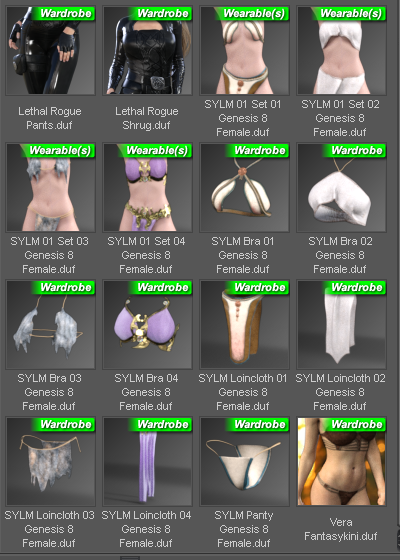
The other side is I have zero faith that anything in the pro bundles actually works for the same reason that stuff from the Victoria 7 through six months later also did not work on G3F figures. I am well aware of how long it takes to make outfits and submit them to daz, we are talking months after the outfit came out of the 3D modeling program. And the final shape for G3F was not finalized up till the last few days before launch. So there is just no way in hell the outfits will ever work without FBMs for each and every figure shape. I get the feeling that generation 8 was no different with the shape of G8F/V8 not being finalized up to " 'T'-minus seconds" before launch. So you can probably guess how that will work out with stuff submitted before the final shape of the figure was settled on.
 (Apollo 1 flashbacks)
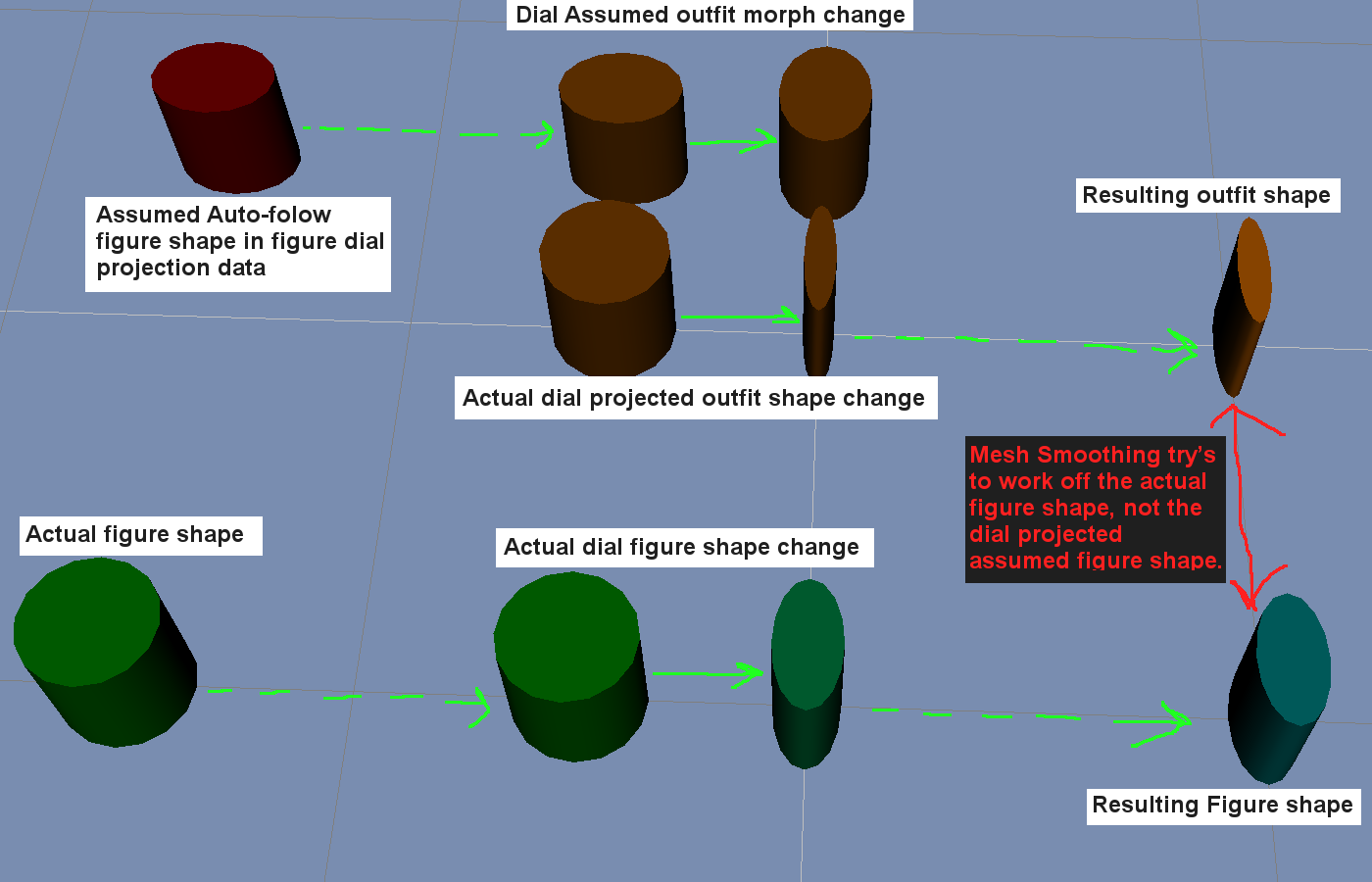
So I've been biting my tongue on the matter. I'm sure eventually PA's will start to have stuff that came out of the 3D modeling programs made from scratch to fit the final G8F shape, tho that will take some time to filter through QA to the Daz Store.
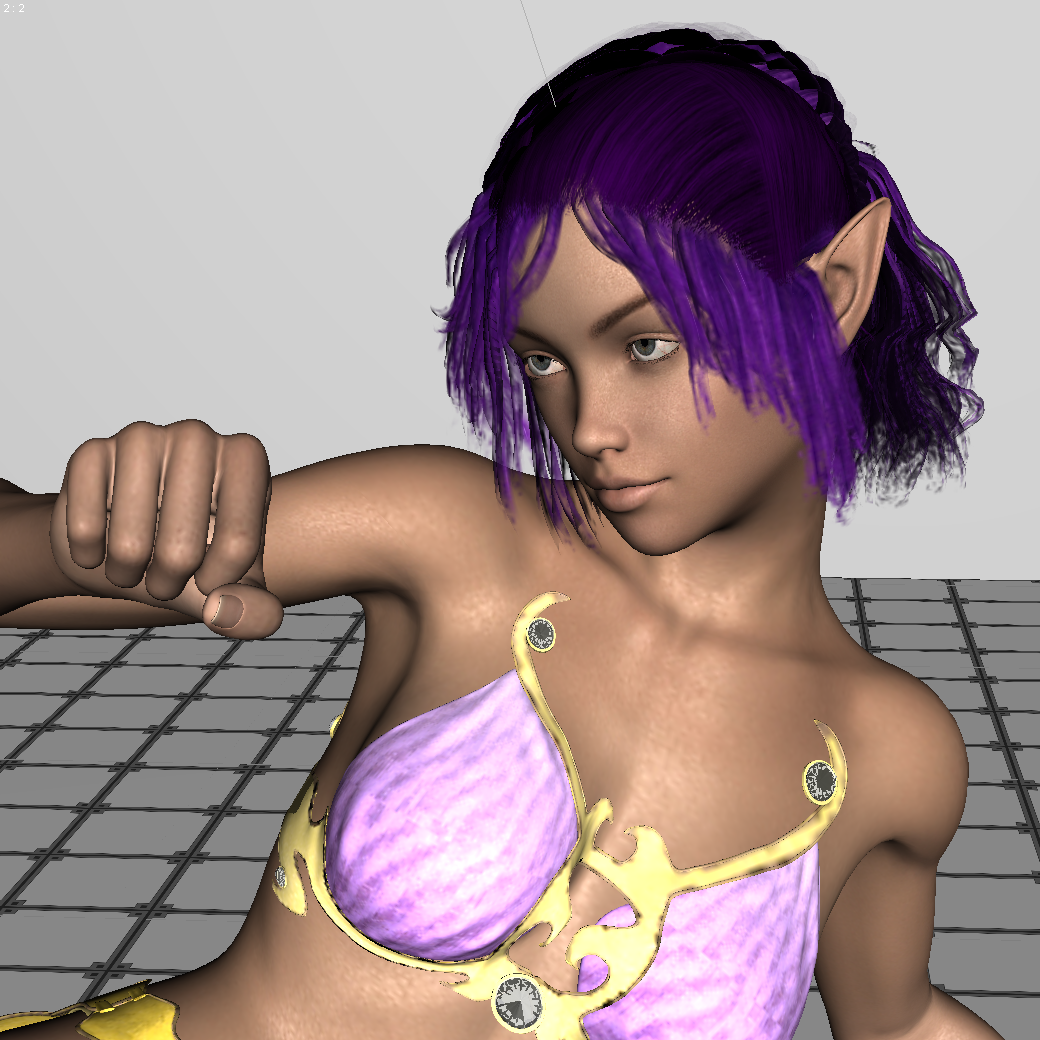
I will inject, simply because it's in the former screen-cap, I do not see any major problems with SY Fantasy Wear, tho my collection of gen8 poses does leave a lot to be desired, lol. I just got that hair and figure last night and have yet to look into them much at this point. The outfit does appear to miraculously be close enough to the final launch G8F shape that it appears to work well with autofollow, and that is far better than Pro Bundle stuff released over six months after the launch of G3F. I think Sickleyield has a time machine or something, lol.
Ghastly's Ghastly Freebees. (Ghastly's Gizmo-trons)Hi, just wondering if there are any plans to convert some of these Lolo Hai outfits to other figures. They are awesome! Those Gerudo inspired outfits would look great on my Victoria 7.
Iray for idiots?Lets keep is simple for the first step
You change render settings to NVIDIA Iray,
Your G8 Male loads with Iray materials as standart, for starters just let him stand there as the creators made him ;)
now, you don't need any lights you usually need: in your reder setting tab there is a selectable called Environment select either sun sky only (draw dome on and further down draw ground on) hit render : there he stands on a grey plane and the background is some offwhite blue
or you select Dome only or dome and scene (draw dome on adn draw ground on) hit render: similar but the background is some blurry colours in grey green yellow blue.
If you want to go further some checks at surfaces will be necessary. Latest DS will turn all your surfaces to Iray material while rendering but its faster if you tell it in advance to make it Iray.
You can do that by chosing your Item (lets say trousers) in the scene tab, choose them as well in the surface tab and then find the shader presets in your content library, there is the Iray /DAZuber select the uppermost !Iray Uberbase and apply to the trousers ( and everything welse that doesn't come with the blueisch styled surface sliders
Lights, for starters forget about them and use the lights from the environmetal sun ( there is a dial in the Environment showing the time of the day and you can rotate the dome to get the light from a different direction.
Happy trying!
Thanks, I'm sure others will profit from this but it's too complicated for me now. For example: What's an "environmenal sun"? What's a "shader preset", what's a "DAZuber". I'm old school DAZ (since Version 1). I've got a DAZ original spotlight, a G8 male (nude), no floor, no props, no scenery and mild curiosity but no real interest in Iray until and if I outlive my current hardware.
When you are ready to mke the leap, we would all be glad to help you. Some of this things will be obvious to you when you see them in context. 3delight is a lot like lighting a stage set and a little like painting; while IRay is a bit more like photography. iF you went out in the middle of the day and took a photo, you would expect that there would be ambient light outside; iRay replicates this. A shader preset is a preset that changes color and texture of something; loosely, I think of shaders as the generic such as bronze metal while a material as the combination of a shader applied to a specific geometry such as bronze arrowhead. Daz Uber shaders are as old as Michael and Victoria 4 (I think); they give attributes like translucence, light emission etc... Iray's are very sophisticated with normal maps, and all sort of cool things. The best thing about them is that they are physically based which means that you can derive new shaders by understanding the old ones since they follow set rules. An opal texture in 3Delight is a complex thing since some physical effects have to fudged or fake; in Iray, you can figure out the physical principles of an opal from an engineering text and just set it up.
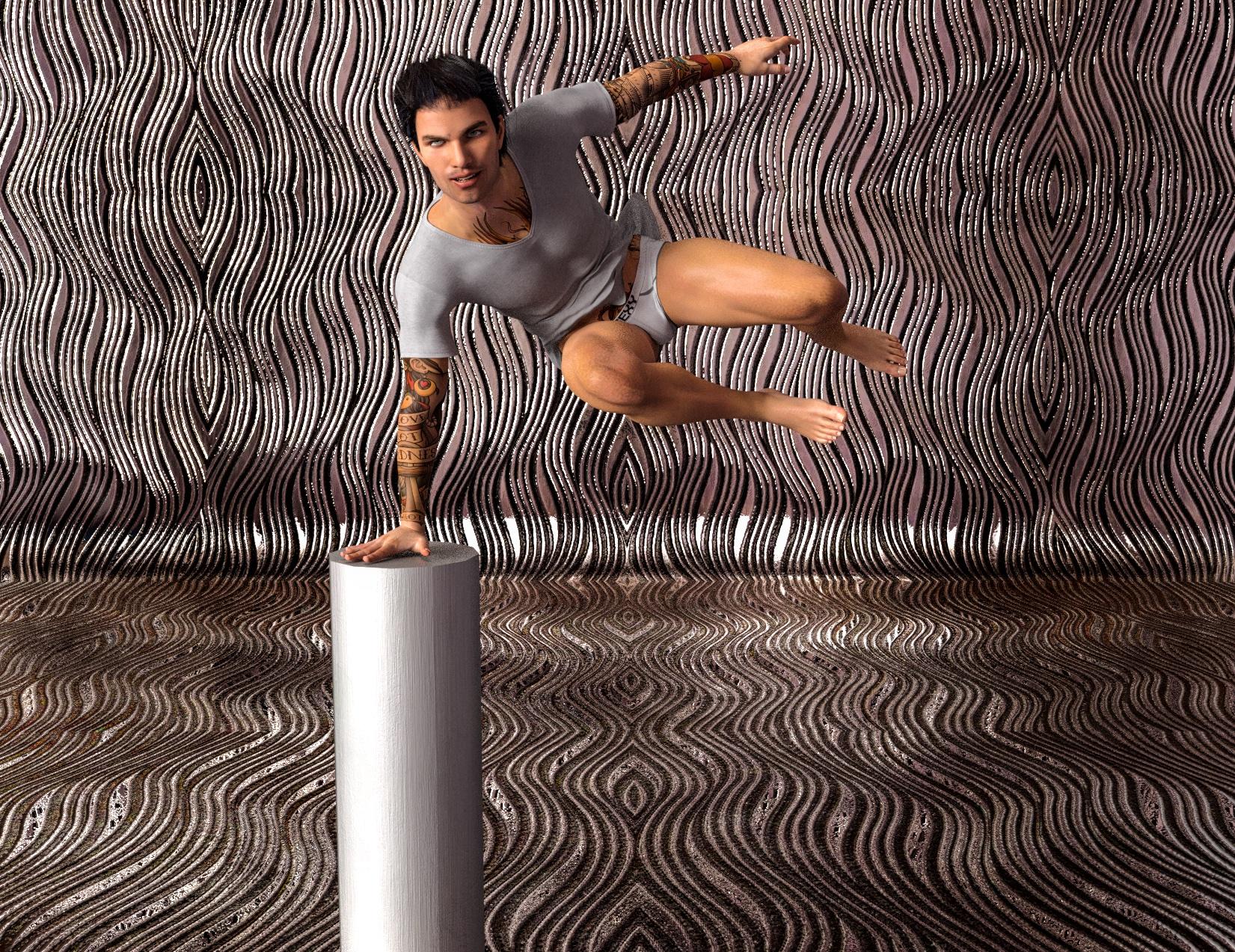
I decided to do a quick render to see how simple it could be. I created a new scene, added a Micharl 8 character from the store, Marcelo, dressed him, added hair, added a pose and primitive, added a backdrop prop, added textures to the backdrop and primitive by selecting the surfaces and applying a shader, added a HDRI background to the enviroment (the HDRI is a multicolored abstract pattern that adds a faux skydome that produces both diffuse and highligt lights. All of this took all of 7 minutres and I told the computer to render.
 Morphs from G3 to G8
I never planned on making a general tool for converting single morphs. Rather I had a particular issue in mind when I started thinking of doing this. That is, a good Body morph has a lot of helper morphs it needs. Most of those helpers should work fairly well with G8, because similar geometry. Some won't because A pose, but I'd guessed they would be rare.
There might be dozens of such morphs, so the problem I was aiming to solve was "how to quickly transfer all of them." I had discuvered a way using the Transfer Utility, but it was tedious, still, in that you had to be able to find all of the morphs in parameters, and that's even harder than it sounds. I had hoped, then, to exploit the fact that Studio automatically know where all the morphs are, because they are conntected. All the helper morphs for Victoria are connected to Victoria so that they will turn on when, and to the same degree that, Victoria is activated. But it turns out that isn't clearly exposed in the API. I could get the system to admit THAT the connections existed, but not to ID the actualy property.
The final solution was that I figured out how to reliable get Studio to return the file location of any one morph, regardless. Since a properly configured product will have that morph either in the root product folder or a sub folder, I had a way of finding all of the morphs associated with a particular product. This was actually an advantage. Because I might make a morph that has a controller that changes how a root element of the figure behaves, and trying to use the links to do the copy might lead to parts of G8 getting overwritten with G3 files. This way, only the files for that product will be copied.
However, there are downsides:
First, not all vendors do things right. The latest Studio makes it much harder to do it wrong, but it's not impossible. I can't predict how all the files are stored so there may be some morphs that the script doesn't handle well. If it's anything major, I expect I'll hear about it.
Second, GenX pust everything in the same folder.
You can actually tell it not do that, and make folders on a case by case basis. But it defaults to one folder. It might or might not make subfolders on the fly. Basically, if you use GenX defaults, the script will transfer all the GenX stuff it finds, which will probably be a lot.
I will stay it is not impossible to make something that does a single morph, but I won't, for now. Largely because that would mean maintaining 4 scripts instead of two. If I ever learn how to add a UI control to script, I will revisit that, because then it can just be an option, rather than separate script. But my present goal is to make enough money that I can eat next week, so I'm not thinking too much about figuring out DzWidget. To the extent I am pondering changes, I'm thinking of how to merge the two scripts back down to one, reliably. I just need a figure detection loop. It's only the two file process loops that differ. Everything else is the same between them.Daz 3D is part of

Connect
DAZ Productions, Inc.
7533 S Center View Ct #4664
West Jordan, UT 84084Licensing Agreement | Terms of Service | Privacy Policy | EULA
© 2026 Daz Productions Inc. All Rights Reserved.