-
Wear Them All
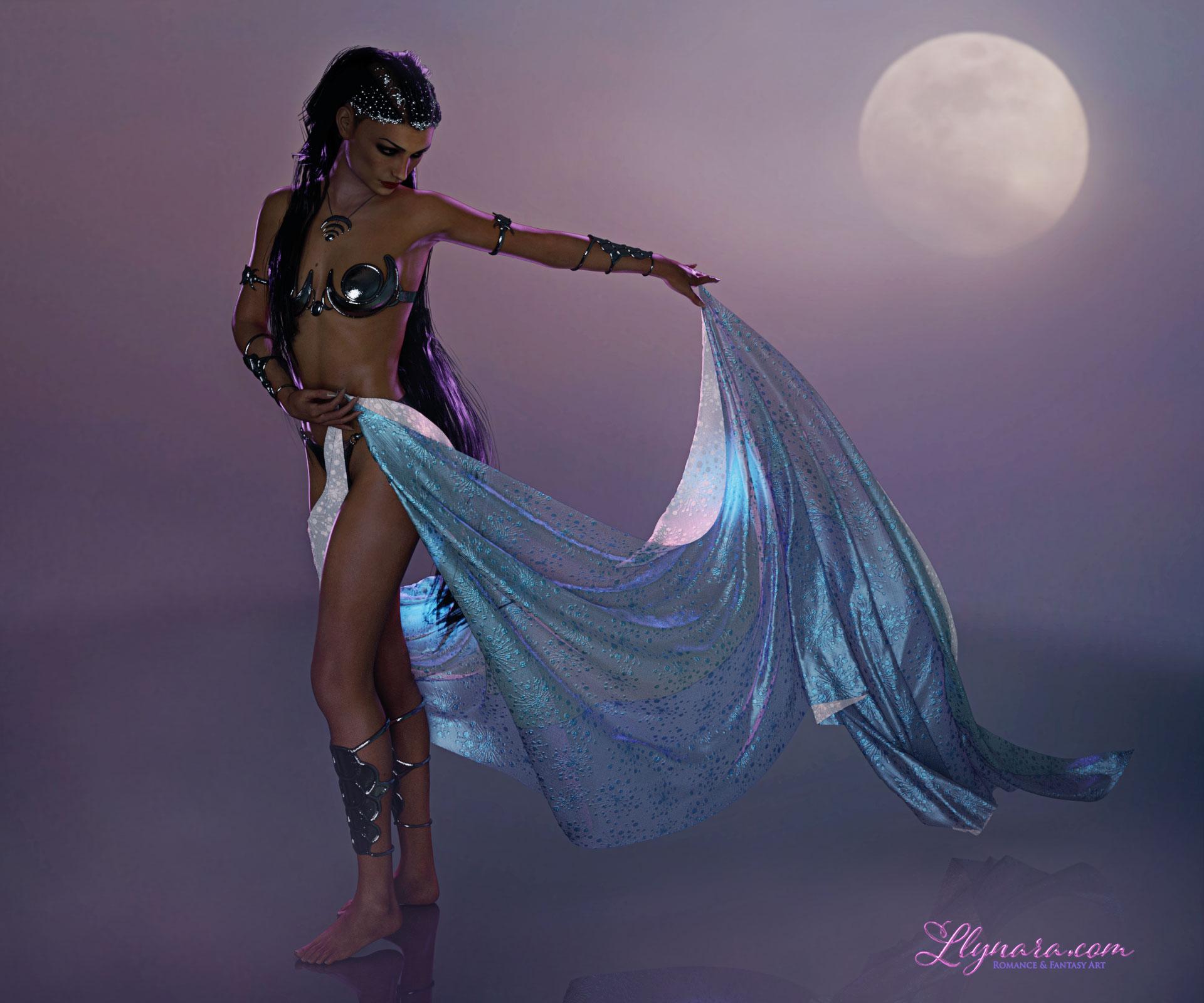
While we're patiently waiting for a Wear Them All for G8 (I hope and dream!), don't forget you can use G3 as a bridge for now. Just autofit to G3, then fit from G3 to G8 in the same scene. Here is P3D Fara for V8 wearing Classic Fantasy: Lady of the Moon for V4. I reshaded the textures with Mec4D PBS Vol 1 metal shaders.
Wow! Gorgeous! I love the purple rim lighting - great touch! :D
What Upcoming Daz Original Genesis 8 Character Are You Waiting For?What is this baked in height morph? Don't have Leo but his bundle is in my wishlist so I'm weighing the pros and cons.
victoria 8
 Help identifying character (from i3 College Uniforme for G3)She looks like Georgia by Raiya: https://www.daz3d.com/georgia-hd-for-victoria-7Wear Them All
While we're patiently waiting for a Wear Them All for G8 (I hope and dream!), don't forget you can use G3 as a bridge for now. Just autofit to G3, then fit from G3 to G8 in the same scene. Here is P3D Fara for V8 wearing Classic Fantasy: Lady of the Moon for V4. I reshaded the textures with Mec4D PBS Vol 1 metal shaders.
Novica & Forum Members Tips & Product Reviews Pt 9Here's a few things that I don't think have been showcased yet:
Moondance
Made with:
- P3D Fara for V8
- Dance of the Veils for V8
- Rim Light Rig Iray
- Firegem Hair for G3F
- Classic Fantasy: Lady of the Moon for V4
- Wear Them All
- Ron's Fog Brushes
- Sveva Reflections Floor (Rendo)
Llynara's Loony Bin (WIP Thread)Moondance #3
I decided I liked the bluish color scheme more, so added a blue paint overlay
Made with:
- P3D Fara for V8
- Dance of the Veils for V8
- Rim Light Rig Iray
- Firegem Hair for G3F
- Classic Fantasy: Lady of the Moon for V4
- Wear Them All
- Sveva Reflections Floor (Rendo)
From Daz studio to Carraraactually the aniblock importer is no longer required to get an animation and figure into carrara,. even dynamic cloth sim's can be opened in carrara from a saved DS scene file (duf format)
Bake any simulations or aniblock animations to the DS timeline.
then save the DS scene DUF
open carrara,. load the saved DS scene from your My scenes folder in your DS content library.
Carrara suppoerts Genesis/genesis 2 and all previous generations of Poser/DS figures EG: Vicky/Victoria 2/3/4 _ Michael/2/3/4
Genesis 3 and above require Triax weight-mapping which carrara does not currently support.
Meaning of Error MessageMy lip-sync and Mimic Live plug-ins are almost ready.
But Mimic Live is sending me the messages I've attached, below.
One of the messages appears on startup- the other two when I try to use Mimic, or try to configure the character (Configure File).
The configuration process doesn't seem to be working correctly. The character is genesis2, I wonder if g2 is not supported; I believe Aiko, Genesis and Victoria are supported. (I'm sure what or where 'log' is, on the 'Error Starting Capture' message.)
How should I proceed, considering these message?.
Wake me up when Sept endsI managed to grab the Pro Bundles for Victoria 7, Aiko 7, and Anneka for $23.6 each during one of the sale days, so I'm pretty happy. I'm new to Daz though, so there's a LOT for me to spend my money on, and I'm not so restricted by whether or not something is Gen3 or Gen8 as those of you who have been here for longer are.
That would be the one day of the sale I was referring to as interesting... but there was nothing in the new releases that i wanted that day... Figured there would be more of those better mega fast grabs, but so far... just a bunch of nearly obsolete stuff.
The bundles can be great when you don't have any of the items... but when you have some of them, the value disappears quite quickly given how niche the other items tend to be. It's a shame that bundles don't discount to compensate for that...Is Daz Victoria 7 or genesis free?
Great informative response. I use daz to create base meshes for zbrush since it saves a oitnof time. Is genesis more accurate or customizable compared to v4 or something? Does daz studio offer an automatic install of v4 and genesis and morph ++?The Genesis base figures are free, the named characters like Victoria are not free. The Genesis figures are distinct from the older figures, such as Victoria 4, though maps for Victoria 4 will work on the original Geensis (and on later Genesis figures with purchased add-ons). Morphs can be converted using the Transfer utility in Daz Studio or (up to Genesis 3) the GenX2 plug-in.
I don't understand. I thought Victoria was just an older version of genesis. Does putting erika for v4 on a genesis model look better than on a v4 if I decided to convert morphs?Not usually.
V4 is much older and before Genesis. Genesis was a totally new figure. The original (Genesis) was androgenous and morphed male/female (Michael 5/Victoria 5). Genesis 2 re-established split gender meshes and Victoria 6 is on the Genesis 2 Female and Michael 6 is on Genesis 2 Male. The same with Genesis 3 and V7/M7. Now, the current series Genesis 8 (why does everybody think this whole renumber the sequence thing really works?) with Victoria 8 and Michael 8...
Converting morphs, because that's all the Victoria series is, since Genesis, between generations may, but very seldom does, improve them over the original...most of the time they'll look pretty much the same or, sometimes, not quite as good.
Is Daz Victoria 7 or genesis free?The Genesis base figures are free, the named characters like Victoria are not free. The Genesis figures are distinct from the older figures, such as Victoria 4, though maps for Victoria 4 will work on the original Geensis (and on later Genesis figures with purchased add-ons). Morphs can be converted using the Transfer utility in Daz Studio or (up to Genesis 3) the GenX2 plug-in.
I don't understand. I thought Victoria was just an older version of genesis. Does putting erika for v4 on a genesis model look better than on a v4 if I decided to convert morphs?Victoria 1 to 4 were figures available before Genesis.
When Genesis 1 was released DAZ also provided a "base named character" for Genesis called Victoria 5. "Base characters" for Genesis figures are basically what Aiko 4 or Girl 4 were for Victoria 4.
They've done the same for all Genesis bases, there's the Genesis figure itself, and then a "base character" called Victoria: G1 has V5, G2F has V6, G3F has V7 and G8F has V8.
If you convert a character made for V4 to use it on a Genesis figure it should benefit from the various enhancements in bending / expressions / ... of that figure (and autofit abilities for clothes), but the character itself would basically look the same.
Is Daz Victoria 7 or genesis free?The Genesis base figures are free, the named characters like Victoria are not free. The Genesis figures are distinct from the older figures, such as Victoria 4, though maps for Victoria 4 will work on the original Geensis (and on later Genesis figures with purchased add-ons). Morphs can be converted using the Transfer utility in Daz Studio or (up to Genesis 3) the GenX2 plug-in.
I don't understand. I thought Victoria was just an older version of genesis. Does putting erika for v4 on a genesis model look better than on a v4 if I decided to convert morphs?Not usually.
V4 is much older and before Genesis. Genesis was a totally new figure. The original (Genesis) was androgenous and morphed male/female (Michael 5/Victoria 5). Genesis 2 re-established split gender meshes and Victoria 6 is on the Genesis 2 Female and Michael 6 is on Genesis 2 Male. The same with Genesis 3 and V7/M7. Now, the current series Genesis 8 (why does everybody think this whole renumber the sequence thing really works?) with Victoria 8 and Michael 8...
Converting morphs, because that's all the Victoria series is, since Genesis, between generations may, but very seldom does, improve them over the original...most of the time they'll look pretty much the same or, sometimes, not quite as good.
+++
It's been pointed out that I wasn't very clear in my first paragraph...
So using your Erika for V4 as an example, there probably won't be any improvement converting it to Genesis.
Wake me up when Sept endsI managed to grab the Pro Bundles for Victoria 7, Aiko 7, and Anneka for $23.6 each during one of the sale days, so I'm pretty happy. I'm new to Daz though, so there's a LOT for me to spend my money on, and I'm not so restricted by whether or not something is Gen3 or Gen8 as those of you who have been here for longer are.
Is Daz Victoria 7 or genesis free?
I don't understand. I thought Victoria was just an older version of genesis. Does putting erika for v4 on a genesis model look better than on a v4 if I decided to convert morphs?The Genesis base figures are free, the named characters like Victoria are not free. The Genesis figures are distinct from the older figures, such as Victoria 4, though maps for Victoria 4 will work on the original Geensis (and on later Genesis figures with purchased add-ons). Morphs can be converted using the Transfer utility in Daz Studio or (up to Genesis 3) the GenX2 plug-in.
Is Daz Victoria 7 or genesis free?The Genesis base figures are free, the named characters like Victoria are not free. The Genesis figures are distinct from the older figures, such as Victoria 4, though maps for Victoria 4 will work on the original Geensis (and on later Genesis figures with purchased add-ons). Morphs can be converted using the Transfer utility in Daz Studio or (up to Genesis 3) the GenX2 plug-in.
Is Daz Victoria 7 or genesis free?And does the latest genesis or v7 enhance or is compatible with characters like v4 erika? Thanks"Brace yourself, my dear wallet! There's always another Sale - and Glitches!"Sad this unicorn got missed in the sale: https://www.daz3d.com/dione-unicorn-girl-hd-for-victoria-6 Her hair is there though...Released: Looking at Poses for Genesis 8 Female and Victoria 8 [Commercial]My first product is released today; I hope everyone likes it.
There are poses and props in the product.
Any queries, please post here.
Novica & Forum Members Tips & Product Reviews Pt 9As something to consider-
It's tough (unless you make notes in your wishlist, which of course I never remember to do) to keep track of what clothes have presets for certain pose sets. One of the nice clothes vendors, Aave, does just that. I had some poses wishlisted, and I wondered why (because I have so many, don't need any more) so then I realized they must go with outfits. So if you see any outfits in the Mega Fastgrab, please let people know what pose sets go with them- because those pose sets may turn up there on a different day.
Here's what I am seeing right away- (and yippee!! Remember a couple days ago when I forgot to check out and lost all those Megas? Sunny is back! So watch for ironman and DesignAnvil if you need these other pose sets. Always a Lady is Aave, who is featured today.
Sunny For Genesis 3 Female(s) in M.F. (Mega Fastgrab) has presets for Always A Lady poses. (Also M.F. Today!) And I love those poses, use them all the time.
The His Shirt for Genesis 3 Female(s) has morphs for:
Fashion Model Poses Capses Fun and Flirty Poses for Victoria 7 Mei Lin 7 Variety Pose Pack (I think this is what the product page meant, it was Variety Pack for Mei Lin 7) Greek Goddess Poses for Olympia 7Hongyu's Shirt for Victoria 7I've been wating to buy this product for a while now and at about 8 dollars it's even more of a temptation. But I've wondered about two things that perhaps someone here might be able to answer. How far up does the shirt button so that it looks less revealing and is it possible to fit a bra underneath it?
Thanks!
Daz 3D is part of

Connect
DAZ Productions, Inc.
7533 S Center View Ct #4664
West Jordan, UT 84084Licensing Agreement | Terms of Service | Privacy Policy | EULA
© 2026 Daz Productions Inc. All Rights Reserved.