-
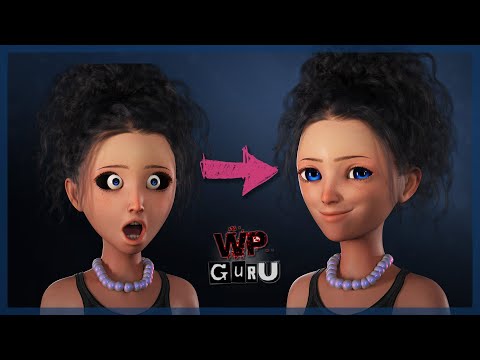
Isn't this the COOLEST way to Sculpt Morphs in Blender??
I think I came up with an advanced method I detail it all in this tutorial.... But basically I exported genesis 8 female base from DAZ.... After setting to base resolution deleting the eyebrows I saved the scene and double click the diffeomorphic export to blender script and saved the DBZ file ...imported using easy import daz button on the diffeomorphic add-on in blender....
Here is the tutorial

where I show the method and talk about possible real world reasons why you might want to use this
Then i sculpt the morph while I'm animating because if you sculpt the mesh while you're animating... The animation still works ....and if when you import the character with Diffeomorphic you check Face Units, Expressions Visemes FAC FACS expressions and Body morphs you have all those tools that you can use to help you sculpt your new morph.. As well as classic animation...ie moving bones...all the Blender sculpt brushes and the fact that you can import morphs...any morph ....if you want from your DAZ library into Blender with DIFFEOmorphic and apply them during your sculpting...plus any pose.... isn't this the best thing ever? or did I fail in my logic somewhere can somebody please let me know
Genesis 9 QuestionI didn't read your initial post as an attack on G9, and I think it's interesting to hear a newer user's take on it. I think there will probably be vendor-created fixes to some of G9's bend issues, but it's difficult to say; I still see a lot of creators focusing on G8/8.1, and im not sure if it's because they're still working on G9 products or because they don't plan to support G9.
I prefer G9 because I have to fight less with it to do what I want to do, but I also customize the assets I use heavily, adjust mesh in ZBrush as needed before rendering, and do extensive postwork. I'll manually paint over entire sections of a render if it doesn't work. Expressions are one of the most difficult things to fix in post if they're off in the original, and I've had much better results with G9 taking custom morph mixes without it completely warping the way expressions look.
That's especially critical to me because most of the characters I make are meant to be used as story actors, so they need to be flexible in using as many poses and expressions as possible. The unified figure also helps here, because it means not having to use autofit to kitbash pieces from female outfits (which tend to be higher quality, more detailed, and have greater variety) onto male characters. Any piece autofit turns into rubber is a thing I have to remember to fix every time a character is in a pose that moves it unnaturally. I can sometimes make this work with some careful geometry editing, but it's unreliable.
Being able to use all the morphs for a generation on one figure is also really liberating and lets me do things I couldn't with G8.
A specific thing I had trouble with was G8's face often looking wonky to me if it wasn't ideally proportioned, which meant that I ended up making characters more movie star pretty than they were meant to be. With G9 I find it much easier to create characters who look interesting, dignified, and charismatic while more closely resembling people from everyday life.
I think this is why I prefer to think of G8/8.1 and G9 as different tools for different needs, because I fought with G8. 8.1 was a big improvement to me, but the persistent feeling of "I can't get this to look right" was always there. I think a lot of people who never felt that way about G8 do feel that way about G9, and it may never hit the mark for them, just because it serves different priorities.
If 8 and 8.1 continue to be popular figures (which it looks like they will be), there's a good chance vendors will keep producing items for them, or that there'll be conversion scripts to make the newer G9 stuff usable on G8.
Is DAZ ever gonna be better with handling dense geometry?Interpretted languages have to be turned into instructions step-by-step, a JSON file is read and turned into data once, by a dedicated aprser, on loading and is then the same as data serialised in a pure binary format. The comnparison is not valid.
Daz needs to read all the proeprties in so that it can link them correctly and display the sliders. If it did not then it would have no way to know whether setting one proerpty should trigger changes in others. Building these links is the principle cause of slow l;oading, but is the price to be paid for a flexible, extensible system. Uninstalling, or disabling (for example through Turbo Loader), unneeded properties (characters and morph sets, principally) is the way to manage this. Daz is aware of the issue, but it is also aware of the need to meet the desire for flexibility in adding morphs and characters; soem degree of tradeoff is almost certainly going to be necessary.
Genesis 8.1 and 9 Clothing on Genesis 8 and 3If it starts asking for autofit, you can fit the Genesis 8.1 item onto Gen 8 easily by changing the Scene ID of your Genesis figure to match the clothing. PerttiA explains it pretty succinctly here: Genesis 8.1 / Victoria 8.1 - Page 43 - Daz 3D Forums.
If you want to apply Gen 8 male clothing to Gen 8 female characters and vice versa, the Genesis 8 Cross-Figure Resource Kit is a great investment and works so well. You can then save the new morph into the clothing too. I really recommend it.
Is DAZ ever gonna be better with handling dense geometry?Daz's issue is simply that it uses a "human-readable" format for data and, as such, also has to "decode it" with a form of "texutal processing". Additionally, because it is using such a bloated format, they also use "file compression", to combat the textually bloated files.
As opposed to many 3D programs that use an actual "custom format" like a "transportable database", which does not require compression, because it's already reduced down to raw-data, and already formatted, and requires no real processing to read, other than injecting it into defined arrays.
EG...
Das has stuff like this... Just a simple TXT file (Wrapped up in a zip/rar/arj/cz/gzip etc...) {First, unzip it to a temp location or RAM = wasted time}name = "some/long/file/name/and/path/to/some/file.dx"
object = 1.000000032, 423.45456666, 234.34234343... (insert millions of long numbers here. 3x for every individual triangle in the object, even though you only need 1/3 of them, unless the triangles are THE entire object itself with no shared sides)
attributes = {some wasted empty values and some used} (Insert hundreds of object-component traits that could be reduced to NULL, or they are repeating and redundant)Now it has to read those values, line by line, and turn all those "text numbers" into "floating-point-values" {actual numbers, not pictures of numbers drawn as "words/text".}
#############
While other files use something more like this... {No unzipping}
[Data-chunk ID - not a file-path-name] {1-4 bytes}
[Bbi7d7] {This is the same 3 number set above, as 2 byte floating-point values as actual numbers, as bit-data not text-strings, also, often these THREE points are shared between triangles, not saved EACH for every triangle}
[sfh7d56f] {This is ALL component attributes, actually relevant and used, only, no redundancy or NULL values used}Without needing to be "processed", these fit 1:1 into a data-form or "cast" or "user-type"... [0][##,##,##] = point1, point2, poin3 of triangle 0
Usually, the format tends to be something that the "rendering engine" can also digest easily, if it isn't EXACTLY that same format being saved, for even faster loading.
It is the same issue that programming languages have. Python, is an "interpreted" language. {Something reads the text and then that real program does things, based on that text.} As opposed to "C++", which literally compiles directly into something like "machine" or "assembly", and what you code is just used to guide the compiler into creating this "raw instruction set", which requires no external programs to run it. That is why C++ is 300x to 10,000x faster than any "interpreted" programming language. (The only things making those languages "seem faster", is the fact that they ALL use "C++" or other languages "pre-compiled API" files, to do the actual work that the interpreter just can't do fast enough.)
This issue is also extended to the fact that Daz3D seems to "load all transforms" onto every model, even if you are NOT using them, because "you may use them". The more transforms you add (morphs), the slower everything loads. Most people who are not buying hundreds of "styled people", have no problem loading things fast. Daz3D only has to load the base-model and a FEW custom people and morphs. However, if you have 300+ people, they are ALL being loaded onto the model, with a base-pose of ZERO, but, like soup, if it's an ingredient you MAY taste... "It's in there".
That's why Daz loads real fast when there is nothing in the actual library, besides default models and morphs. That's also why things break if ONE person makes a model with a morph that is saved as NON-ZERO... it applies itself to EVERY morph, because it's pre-loaded onto the original model, messing up the original model, but not actually messing it up. (It just seems that way, because it's always present, unless you find it and zero it out yourself and save it that way, fixing it for them.)
Can't apply material to specific Wardrobe items@laisanae, I have this product so did a quick test before dinner.
I concur that the first time I tried this I had the same result that you did - applying the materials just did nothing and I only got a plain shiny white outfit.
However, if you load the items with white icons (in the wearables subfolder if not using Smart Content) instead of the light blue icons then the materials do work fine. These are the ones that then say "MRB Smooth Morph Maker" in their names in the Scene list.
There might be some documentation that explains this but I am hungry so I am going to eat now.
The MixablesVagans: at g8, i am starting to make my outfits for "fit" to each together in style, and in textures, too. Of course these are mixable with other outfits as well.
And yes, example for Kokeny Dress have a morph for my Upcoming Egres Outfit (but it will work other type skirt or pants as well). It means i would like build a proper wardrobe for mix and matchable pieces. Im allways to try a consistens style in texturing, and i wanted to "sign" somehow the belonging part with this title, for separating them from my outher outfits.
I hope i explained understandable, sorry about my painful english grammar :)
Sade
:
Working in DAZ very slowYou would not know that you had multiple copies of items/morphs, I didn't and the only way I found out, was when I started wondering why the length of the lashes didn't stick - Every second time I opened a previously saved scene, the length of the lashes were at the default 0% instead of 100% that I had saved the scene with.
As I was troubleshooting the lashes, I found duplicate versions of the morphs included in one 3rd party characters morphs, but I also found a lot of (duplicate) morphs from the Starter Essentials included in other characters morph folders and even copies of the G8 base figures (the base mesh) within some characters morph folders. There were also clothes that had (duplicate) character morphs from not only the starter essentials but also other creators morph packs included.
Once I had removed all the extra morphs and items from places where they were not supposed to be... After a few days, I realized closing DS had not hanged even once since I removed the duplicated items/morphs, and hasn't hanged since.
Finding those duplicates is not easy if one isn't familiar with where everything should be and why.
Note; The filename being the same does not mean that a file is a duplicate, one must look inside the file and compare the contents.
Getting on the 9 train, or notPast as Future said:
PerttiA said:
Past as Future said:
Anyone can confirm that G9 works on 4.15?
Depends on what you mean by "works".
G9 loads into the scene ok and one can pose and morph the figure like any previous generation.
Yeah, I mean if figure could be loaded, morphs, pose and materials applied, clothing fits etc.
I remember when G8 appeared (original, not 8.1), it worked in 4.8 (with some limitations like can not use new face mimic tool or apply poses from G3)
Everything else works, but the new LIE's may not due to the changes/improvements in how LIE is handled.
looking for deer familytsroemi said:
daveso said:
MelissaGT said:
Gordig said:
You probably won't find better (certainly not for the money) than the Hivewire Horse addons at Renderosity.
This. There are some gorgeous deer morphs for the Hivewire Horse on Rendo. Wait for them to go on sale...CRCW goes 50% quite often. You need to buy the base Hivewire Horse and then the deer morph of your preference (there are a few)...and yes they are sold separately.
I've been eyeballing them for months. They've come and gone and come again on sale dozens of times. The horse and mule deer are on sale now. No doe or fawn to bew had though, at least I have not dound any at rendo or anywhere affordable. thre was a site , i think poser stuff, Lynn was the name, but I know she passed, but the site was around for a bit. Cant remember the name of it. she had a lot of great products. If I remmember right they were in obj format. i hav poser so it would be eay enough to set up and export to DS
It's Lynn's Creations you're looking for I think; she had loads of animals in different formats, some poseable, some static. I think they're all rather low-poly and low-res textures though. The website might still be around.
I'd also encourage you to get the Hivewire horse and add-on morphs, these animals are just gorgeous and very life-like. Does shouldn't be a problem with them, and for a fawn, you could maybe make some morphs of your own?
Edit: No, can't find the place anymore, sadly.yes, that was it. I did buy quite a bit from her site, but its on some way back CD or something. The site was up for a bit, and if I remember right everything went up for free. I searched too and could not find it.
Whose characters for G9 you're expecting?beregar said:
Wonderland said:
The only thing I'll really need G9 for is extreme closeup realistic portraits because the eyes are so much better (although they often need tweaking.) Mousso is my go to PA for combined beauty & realism and I'm starting to like some of Colm Jackson's characters.
I wish Colm did guys since his characters are very well done and come with all kinds of interesting choices - at least the new ones... though I guess the fact he makes good female characters wouldn't necessarily translate over to males.
with G9 maybe they can transfer over well enough, though for G8 and G8.1 I would love to see a figure of his that matched his female characters, as they are amazing!
I'd also like to see Lee 9, with Vietnamese style. Think we have enough Chinese style Asian figures, yet Viet, Thai, Laotian, Burmese, Indonesian, Japanese, Indian, or even a mixed culture would be cool.
Getting on the 9 train, or notPerttiA said:
Past as Future said:
Anyone can confirm that G9 works on 4.15?
Depends on what you mean by "works".
G9 loads into the scene ok and one can pose and morph the figure like any previous generation.
Yeah, I mean if figure could be loaded, morphs, pose and materials applied, clothing fits etc.
I remember when G8 appeared (original, not 8.1), it worked in 4.8 (with some limitations like can not use new face mimic tool or apply poses from G3)
Getting on the 9 train, or notPast as Future said:
Anyone can confirm that G9 works on 4.15?
Depends on what you mean by "works".
G9 loads into the scene ok and one can pose and morph the figure like any previous generation.
Getting on the 9 train, or notI'd need some extra correctives for G9 armpits, elbows, knees and hips to embrace it fully. Especially elbows and knees.
When I'm placing G9 character next to G8+ and the older generation is equipped with morph enhancers... The newer generation looks slightly off. For now it's sit and wait until Genesis 9 grows more.
Genesis 8 or 8.1 shapes on genesis 9?Has anyone had any luck with sorting the weird armpits on G9 after a transfer? If not what would people recommend, make jcms or weight paint in daz? I already have a decent knowledge of blender so think jcm might be the answer.
Clothing not fitting after morphre: Genesis 8 Female Body Morphs
hmm, best way to explain is - they are like grade school level morphs, or good start, and cover a decent amount of possibilities. Absolutely you could use with projection manager.
Those other reccos allow alot more morph customization. If that's what you want.
Forgot to mention - for legs and quite a few other body sections this would be way more relevant > https://www.daz3d.com/shape-shift-for-genesis-8-female-s
The rarestone and EJ morphs were for head/face, but so extensive. Had used these so often I kinda had forgetful moment they didn't deal with body, like shape shift did. My bad. Just typing and moving on too fast. Rest is good.

edit: oh, if you do morph, absolutely use adjust to rig or some poses will be wonky.
SF-Design - Easy Feet for Gen 9Siciliano1969 said:
SF-Design just released the teeth morph set and a home run! Hoping soon for the easy-feet for Gen 9. I can do all of this in Zbrush myself, but those morphs make it much quicker. Here are some of my morphs with toe lengths I have done in Zbrush plus nail morphs et
That is some fantastic work you've done. Did you ever think about selling of making these morphs available?
What is the workflow for creating a head morph for the Genesis 9 figure?I'm going to bump this as I'm also experiencing issues adjusting rigging to the eyes. Similarly, I'm well aware of the procedure for G8.1/G8 etc. Some clue as to the proper workflow would be greatly appreciated.
hansolocambo said:
it means that one has to make morph morphs.
Seems OP already did that.
Genesis 9 we are back in the game Carrara usersUPDATE: Eyes Size Not Just Position
- in my G9 facial morph example above, I tested for eyes that change position, but not eyes that change size
- for eyes that change size, more steps are required
- the generous Jay Versluis has posted a video that shows how to create a follower morph for the eyes if you change the size/shape of the G9 Face
 help with D-Force
Yeah once in a while object is modelled in a similar way that textures were not PBR but biased with added shadows etc. Combination or one of (1) changing various dForce sim settings, (2) using Marvellous Designer, or (3) making a morph to smooth out any wierd shapes added to object would eventually fix this.
Daz 3D is part of

Connect
DAZ Productions, Inc.
7533 S Center View Ct #4664
West Jordan, UT 84084Licensing Agreement | Terms of Service | Privacy Policy | EULA
© 2026 Daz Productions Inc. All Rights Reserved.