-
Skeleton, Question.
This is an excellent skeleton. The Michael 4 and Victoria 4 anatomy bundles will go on sale occasionally. They are great packages to have.
Dracorn's Render ThreadVictoria 8 Drow
I wanted to do black-as-coal skin for Victoria 8. I'm working in Iray now and that's something new for me. I've never been able to get it to look good in 3DL, mostly because the dark skin would fade of all details in low light. I have come to find that's because with pure black skin, you must kick the highlights in to high gear - essentially create that oily quality. Now I'm a total noob when it comes to Iray. I'm still trying to figure out what all the surfaces do. Lacking an all-in-one location tutorial for Iray skin, I have gleaned information from various sources, but my favorite method is to buy a character and deconstruct it to find out what makes the clock tick.
So my example is Aran HD for G3M - what a great character. His skin is coal black and the highlights are so bright that he doesn't disappear into the shadows.

Now I'm working with Victoria 8, and since there isn't a G3M/G8M to G8F clone out yet, I can't use Aran's skin. So my solution is to go into Photoshop and darken the skin myself. I'm using Victoria 8's base skin (which is fine because I'm not planning on selling this character). I used Aran's face texture as a guide to match the brightness (or darkness) level.
First I desaturated the skin, but not completely, because I wanted just a little color. Next I decreased the brightness and increased the contrast. I fine-tuned that with Levels (shadow, mid, highlights). Here's the result:
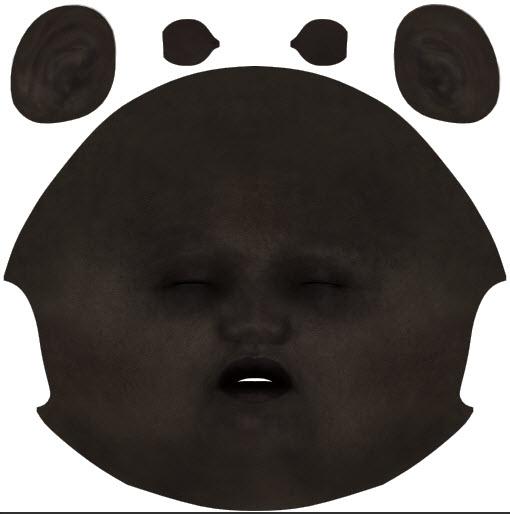
I took screen prints of each adjustment so I could repeat these steps with each texture, then manually loaded them onto Vicki 8.
The next step was to copy Aran's settings (since I still don't know what I'm doing in Iray). I must say I've learned quite a bit by doing this.
So here is my initial drow skin (with black hair). Just a simple render in Iray with the headlamp.
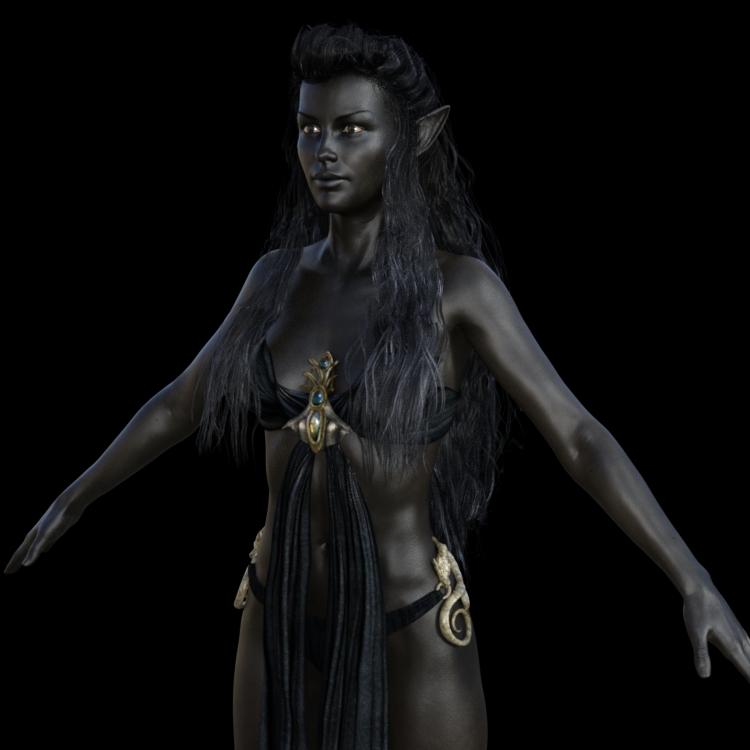
I plan on playing with this a little more. I want to tone down the shine a little, as in bright light, she looks like she's made of hematite. Also, the palms and underside of her feet need to be lighter than the rest of her skin. Lips and nails still don't look right. I haven't touched her mouth yet. I discovered that a little change in the glossy color can really make a difference.
Morphs from G3 to G8Yes, I also appreciate the work you put into this. Thanks
AT RISK if you use this script on DAZ Connect products.
Updated the script to support connect but I do not own connect content, so it is not tested.
Somewhat Unpredicitable results when there is more than one Library.
This should not result in breakage, but transfers will fail. However, should is not equal to safe. Breakage of your stff is still possible.
Updates to the script now allow correct handling of main library files if you have 2 or more libraries. It should also properly find and copy files from other libraries, but this is not yet tested. The script will only save files to your main library, so if you want to have the files in a secondary lib, you need to copy them there yourself.
We now return to your regularly scheduled comment, already in progressIT'S DONE!
No, actually it isn't. But it works. Props to mork for doing a lot of the heavy lifting so I didn't have to.
What am I talking about? Well, way up thread I said I had a method for transfering Morphs with their ERC intact. Which I did... Do. You know what I mean. I also said it was too dangerous to be released into the wild. New-queue-lar levels of dangerous. I figured if I could work out a way to automate some or all of the process, then actually do that automation, I'd release that.
Well, I did it.
Let's talk limitations first.
This software is so Alpha it's slightly Omega. Use at your own risk. It probably can't break anything, but they said the same about the RMS Titanic.
Fingernails. Toenails. It won't do them. The geometry was too darned messy for me to work out how to reliably handle them, so I skipped it entirely. The nails will, instead, follow the nailbeds. As a result they should be free of distortion and well shaped, but they may not match exactly, and any special nail morphs won't transfer. However, the script doesn't know about this limit, so if a nail morph file is included in the process, it will process it. The results of that should be, effectivelly, an empty morph, but a possibility for error exists.
The script is not interactive. No UI, no notification. I don't know how to do that stuff. This is my first Daz Script. (I don't think small, unfortnately.) If I do a later release, I may add something, but my main goal has always been just getting it to work. Still no reall UI but Progress bar is implemented. So far the longest time between updates to the bar is 2 minutes 11 seconds. So allow five or six minutes before worrying the script is frozen. At this point, try the cancel button on the bar. Note, it make take sometime before the cancel takes effect.
One user reported total fubar after forcequitting. I can't say how this script could cause that directly, but even so, it implies that Daz might be doing important stuff while it seem frozen, so only force quit as a last resort.
It almost certainly won't handle Connect products. Right now it tries to write back to the same library it is working in. I mean to fix that at some point, after which it might be able to work with Connect. Should now handle connect properly, but I'll need feedback from Connect users to confirm.
It will also probably fail if you have more than one library, if the source morph is not in your base library. Again, something I mean to fix, but I only have the one library, and don't feel like making a new one atm. It wasn't necessary to reach "it works." This is not trivial. To make it easy to use, I wanted to be sure to use the Studio UI to find morphs, rather than requiring the user to find them. But because of a quirk in the way morphs can be saved, so morphs own themselves, and don't seem to report their file location. So I had to hack around to make it work. Hacking the hackery to distinguish between Connect and non Connect makes me cry. Fixed, see above.
As a result of this hackery, some files may not trasfer at all, ever. Basically, because they own themselves, and report their names generically, they may have the same "label," as far as the script method is concerned, as another file or files. This means the script will always find one of them and never find the others. I can't think of a way around that, right now. I did work around the most common way this happens by having the script first ask for the file's location and only hack around when it doesn't get an answer, but I don't have enough products, frankly, to test all the possible failure modes.
I pretty much didn't document it at all.
It reads compressed and uncompressed files but only writes uncompressed.
Did I meantion no UI. Because no UI. At all. Well, a progress bar with history and cancel buttons, but that's all. It seems to take about 9 seconds, on average to run one morph. This would be about 4 to 7 minutes for an average character, and about double that for a typical Morph pack. During this time, Studio will be busy. Make a sammich or something. Call your mom, if you have one. These numbers are based on 50 to 100 morphs and my slow laptop, so your values will vary. But don't go forcequiting because something like 200 Plus is taking a long time. that's twice the size of any test I've run. Clicking new History button will allow you to see what the script is currently working on, and the progress bar attempts to display that info, anyway, but it might not fit.
The script is attempting almost 24,000 operations per file. Mind you, when working with a file where most of those ops are invalid (most expressions, for ex) it will run much, much faster. But morphs tend to run slow.
Reports of looping behavior have been diagnosed and corrected. The Script no longer attempts to deal with all Libraries, but will, draw on the last library it finds matching content in. The Base library is checked first. Connect is checked last. I can't predict more than that. This may lead to mismatch or issues if you have a single product in spread across more than one library. But, as far as I know, you shouldn't be doing that.How to Use
- Load Genesis 3 Female. Make sure it is selected.
- Find one (1 and only 1) Morph from the set you wish to transfer and mark it as favorite. (if you mark more, the script will only work with first one it finds, which may not be the one you want).
- Run the script
- Studio will lock up, and you will get the wait manipulator. It's thinking. Remember, 9 seconds per morph file. Ish
- Studio will become responsive. This means it's finished. It may have errored out, but it's finished.
- Load Genesis 8 Female. Find your morphs
- Report any misbehavior to this thread.
- Enjoy
There's no ERC freezing, there's no trying to fix transfer related distortions (although the eyes might be slightly small, that related to the fact that G8's eyesballs are closed meshes and G3's are not). There's, in fact, nothing more to do. Once the Script finishes successfully, the figure will be fully set up, and all the links between the files will be maintained.
This is true even with respect to files that link to other products, irrespective of whether you have transfered those other products. The script doesn't "tranfer" as much as it translates. All of the commands built into the G3 files are present in the resultant G8 files. This means it transfer whimsically misspelled name for Victoria 7, then transfer Victoria 7 later, the first product will be connected to V7 (after you reload the figure, if it is open).
Good night, and good luck.EDITS
2017/08/08: Updated script to correct type missmatch error in expressions/morphs containing links to Mouth Open Wide.
2017/08/11: Updated to handle Connect, multi-library support and progress.
2017/08/15: Updated to properly copy pngs, corrected nested for loops, maybe fixed process looping.
2017/08/16: Actually fixed looping behavior.
2017/08/19: Fixed bug created by inattention during last fix.I'm not getting it....
I downloaded the script and copied it to "Scripts" in my Daz3D library. But, I'm not seeing it showing up anywhere. I did try to run it using the "Script Ide." But, nothing happened. What am I missing?
Michael 8With as many "bikini armor" sets out there for woman, making one for men isn't solving a problem, it's perpetuating it. Sorry.I for one am heartily enjoying this "problem" in theory. The outfits looks extremely rushed and lacking details, though. Compare Dark Prince to Throne Defender which was V8's equivalent. I can't decide if it's just the lighting, or the texturing, or what.
I love the promos for the launch. They're all just lovely fanservice like Victoria usually gets.
"Brace yourself, my dear wallet! There's always another Sale - and Glitches!"Anyone remember how long the Victoria 8 promotion lasted? (the same buy V8 and get V7,V6,V5,V4 free one)
The extra discount says: "EXPIRES AUGUST 31, 2017 11:59PM MST (UTC-7)."
Not sure if the free promo will end at the same time or not.The typical new figure release is for two weeks, with the banner live and the various discounts working. It is most likely M8 will do the same, with the free Pro Bundle offers available until the end of this month.
My message still says 2 and 20%, Llynara, so nothing has changed yet. (But it's only 40 minutes since you posted. Even if they're working on it, it could take quite a while to make it active for everyone affected.)
"Brace yourself, my dear wallet! There's always another Sale - and Glitches!"Anyone remember how long the Victoria 8 promotion lasted? (the same buy V8 and get V7,V6,V5,V4 free one)
The extra discount says: "EXPIRES AUGUST 31, 2017 11:59PM MST (UTC-7)."
Not sure if the free promo will end at the same time or not."Brace yourself, my dear wallet! There's always another Sale - and Glitches!"Anyone remember how long the Victoria 8 promotion lasted? (the same buy V8 and get V7,V6,V5,V4 free one)
Michael 8I like him. In fact, he is the type of guy (Gabriel Aubry) I was going to suggest as the model for Genesis 8 Male. I love his eyebrows because they have never been plucked---ever. The hair that is not in the Pro Bundle looks like OOT (thinness of hair strands) on the top. Maybe it will be released tomorrow. We get 12 items in the Pro Bundle (up from 11), but I have no use or desire for the Dark Prince or Sci-Fi Settler (or their parts).
And if it was OK to say that Victoria 8 looked masculine, then perhaps I can say that the full body renders of Michael 8 on his promo page (body language and positioning) make him look like he would be more interested in Gianni than Victoria.
Out of sheer curiosity, since you seem to be an expert on the issue, how does one look "gay", xyer0? :)
@RKane_1 since I recognize that I am diplomatically impaired during Mercury retrogrades, thank you for saying this. I would have done it badly. That was a ridiculous statement.
Michael 8I guess he's less ugly than Victoria 8 but I still prefer Michael 7Michael 8I like him. In fact, he is the type of guy (Gabriel Aubry) I was going to suggest as the model for Genesis 8 Male. I love his eyebrows because they have never been plucked---ever. The hair that is not in the Pro Bundle looks like OOT (thinness of hair strands) on the top. Maybe it will be released tomorrow. We get 12 items in the Pro Bundle (up from 11), but I have no use or desire for the Dark Prince or Sci-Fi Settler (or their parts).
And if it was OK to say that Victoria 8 looked masculine, then perhaps I can say that the full body renders of Michael 8 on his promo page (body language and positioning) make him look like he would be more interested in Gianni than Victoria.
Out of sheer curiosity, since you seem to be an expert on the issue, how does one look "gay", xyer0? :)
How to save a Layer Image Editor (L.I.E.) Preset?I really really dislike the use of the diffuse layers for make up and eyebrows. Doesn't show up in the working window at all so you can't see what it looks like unless you either use the iray preveiw which bogs down a lot of people's machines, or you have to spot render or do a whole render every time you change the make up. I can go through quite a few make up changes for one render so the added time and aggravation just aren't worth it for me.
I am very excited for you though and I am sure that Daz will love your character!
I'm sorry to hear that. Because it sounds like my only other options is to create a ton of L.I.E. presets, create new paths and file hierarchies, then learn how to do text/code rewriting to rewrite the paths, or the other option - bloat the files down with 72 images just for the makeup options alone and have huge file sizes - and I'm not sure people would want such large files A) taking ages to download and B) taking up valuable space on their hard drives. lol I think I'll have to go with the diffuse layers for the eye makeup for now, at least for this character. As it lets me cut the images for the makeup down from that otherwise 72 images to a much more manageable 22 images. Victoria 8 uses the diffuse layers for her makeups and eyebrows and I've not seen a lot of complaints about it on the forum. But I'd understand if you're not interested in diffuse layered makeup. :) I can't twist your arm. lol *hugs*
Edit - Her eyebrows won't be on diffuse layers, they will be on the full texture maps. The lipstick will also not be on diffuse layers. It will just be the eye makeup on the diffuse layers and I'll have very clear preview images for the makeup options to show what they look like clearly. :) I know it's not a perfect solution, but I guess with characters with a lot of different makeup and several different eyebrow options, there really isn't a 'perfect' solution. lol
No need to apologize its hardly your fault Daz wants to go to this type of thing. I do feel bad for the content creators though because I really can't use that as I need to be able to do things in a reasonable amount of time. Its a step backward as far as I am concerned, its bad enough that one can't see the HDRI in the background without either rendering or iray preview, but to start doing it on models where people may change out make up more than several times per render just makes no sense to me. And the difference in quality, honestly, is so miniscule that it doesn't make the aggravation worth it. Again, not your fault, and I will probably buy your first character anyway because we are friends and I want to support you. But I won't be purchasing from vendors that use this system in the future. And to be honest, I don't need another single character and I am at this point, quite cabable of doing my own make up on a character so its more the vendors and DAZ's bottom line that will be impacted. And I'm sure, being only one person, they really don't care.
Black EyesCould you post an example and on which character you have this issue? Also which lights are you using?
Natsuko for Aiko 7 is the one that I noticed it on yesterday. I've seen it on others though, Cathy HD for Victoria 7 did it too (I refunded Cathy HD a while back so don't have it anymore).
I'll put an example up this evening.
I'm just using the Daz Studio standard spotlights but I'm certain it's not the lights.
I have four characters in the scene, three show the iris colour that I choose and one shows black irises.
If I swap the 'Natsuko' skin around on the four characters in the scene then the black eyes problem goes onto whichever has the Natsuko skin.Smart Content Not Visible After DS 4.9.4.122 Update (Windows 10) [SOLVED]Victoria 4 is a Poser-format item, so that's why the figure won't show under daz Studio Formats - it should be under Poser formats>My Daz 3D Library>Figures>DAZ People (replace My Daz 3D Library with the actual isntall folder, if different).
"Brace yourself, my dear wallet! There's always another Sale - and Glitches!"I'm also seeing 20%, even though I own them all. Seems like my M4 Pro and Carrara (M5 Pro) purchases aren't counting.
That happened with Victoria 8 also. Customer support is your friend. :)
Michael 8Sorry, just not into him. If he was real, I wouldn't date him. My favorite is still Michael 4. Like Victoria 8, I just don't find him attractive. I have more than enough males from previous generations and so far, I have to say, I'm just not impressed with Gen 8. I have soooo much content already, that I have a feeling I'll be good with just the G8 bases and morphs and some merchant resource morphs and may wait for G9 and great sales on older content... Actually, I have more content than I could probably use in a lifetime, so I'm happy I'm not swayed to purchase him

Very much agree. Loads of stuff to still learn to use........ learning, the final frontier.......
"Brace yourself, my dear wallet! There's always another Sale - and Glitches!"Yeah, once again, I own M4, M5, M6 and M7 pro... and I'm getting an extra 20% of M8 for my previous purchases?
Which means, I'm sticking to Generation 4 and Gen1, 2 and 3 for the foreseeable future.
Michael 8 and Victoria 8 just don't make any sense to me.Smart Content Not Visible After DS 4.9.4.122 Update (Windows 10) [SOLVED]Richard:
I should start my answer by just stating for the record that all content I've downloaded just goes where it wants to go when downloading it - I know sometimes people set up their own folders and sub-folders and organize things how they want, which apparently can confuse DS, so I just let it put things where it wants to and don't mess with it. That said, I don't have an intuitive grasp of how it catagorizes things. So, in poking around in the Content Library, Victoria 42 Base shows up in Products>V, but double-clicking her there does not load her into the scene... and I can't find her at all in Categories or DAZ Studio Formats. I don't know if that's because I'm looking for her in the wrong place in the Content Library pane, or because DS can't find her itself. On the other hand, I can find the Gen3 Male model in DAZ Studio Formats>My DAZ 3D Library and can load him from there... but can't locate him in Products or Categories.
I've attached some screencaps that hopefully will provide more and clearer information about what can be found there than I could provide by trying to describe it in writing.
Any ideas? I am grateful for any help.
Using the Genesis 3 Male Clone for Genesis 8 FemaleI recently released a free pose on ShareCG that made the G1/G2/G3 clone morphs in G8F visible to the user. Much to my disappointment, I was quickly informed that it wouldn't be nearly as useful as I thought because the morphs do not come with corresponding adjustments to the rigging. My excitement at having transgender morphing capabilities in G8F via the G3M clone morph was dashed…or was it?
As it turns out, there is a surprisingly simple solution to the rigging issue, and perhaps ironically, it might only be available in Poser. All you have to do is right-click on the clone morph in the Parameters tab and select "Match centers to morph." Poser will automatically re-rig the figure for you, and the new rigging will apply to whatever extent the morph is dialed! It basically becomes a fully functional shaping morph!
There were a couple of minor issues initially. In sufficiently extreme poses, the area around the nipples looks unnaturally squashed. As it turns out, this is a problem even with the default female shape of G8F. It's just more noticeable on a male chest. It didn't take long for me to find out that the squashing was caused by automatic translation of the "pectoral" body parts that occurs when the figure is posed in certain ways. After making sure that the figure didn't also look weird without this translation, I quickly devised a PZ2 file that would turn it off.
Another minor issue was an unnaturally sharp crease that happens along the lower edge of the pectorals if the chest is bent forward. A quick bit of custom morphing fixed that, and I then created a PZ2 file that INJects the new morph as a JCM enslaved to the appropriate dial on the chest. I'll probably be releasing both adjustment poses on ShareCG very soon.
Technically, this is a clone of the Genesis 3 Male, but since the Genesis 8 Female is virtually identical to Genesis 3 Female with slightly different shoulder creases, it's probably not unreasonable to think of this as a kind of Genesis 8 Male. This is especially true if you also set Genesis 3 Female to -1 (you'll have to change the limits), which mimics the effect of reversing the difference between the G8F and G3F shoulder creases, thus approximating what a real G8M's shoulder creases might be like.
This guy was made via the procedure I've just described, with a few extra dials spun as finishing touches (e.g. a bit of "Shoulder Width," "Torso Length," and "Body Tone"). Victoria 8's head is also applied, so for a name, I'm torn between Victor and Vittorio (the latter being an homage to Pdxjims' great work with a custom V4 male).
The nipples/areolae may look a bit big, but I think that's more of a texturing issue, since they look significantly smaller with the default texture set. Of course, he's no Michael 8, who apparently debuted just as I was in the midst of writing this, but at least for those who like having a transgender morphing option, this seems like a great starting point!
It'll be fun to see if I can turn Michael 8 into Michelle via an analogous process! Transgender morphing is back, baby!
Seriously, though, the timing of my discovery and the release of the official G8M/M8 is uncanny!Michael 8orange banner isn't up but check your exclusive offers in your messages section get extra bonuses if your lucky plus if you get michael don't forget to add any of the other michael bundles you don't have that are listed into your cart to get them free
Yes, we must be careful though. My orange banner is not correct. It states I own one previous pro bundle and that is incorrect, I own 2 previous pros, 3 if they include M5 that came with Carrara. They fixed this later with V8, maybe they will do the same in this case too.Yes, good advice, I own 4 Michael Pro bundles, and it says I only own 3. Not sure if to wait a while, or submit a support ticket. No orange banner either, so maybe I will wait a few more hours.
 Orange banners almost never show on my phone but they always do on my monitor. Did you check your messages?
Hi HorusRa,
I usually have no problem getting orange banners, but strangely nothing this time....BUT.... it is in my exclusive offers messages, but the number of owned Michael Pro bundles is wrong.
I have bought Michael 4,5,6,7 Pro bundles in the past, and Daz has calculated this as owning 3 Pro bundles !
 Hopefully just another Daz glitch (sigh).
I don't think they counted Victoria 4 in the last promo for Victoria 8 - so I they probably won't include Michael 4 as counting toward the number of pro bundles. I think they might be just counting the Genesis line.
Yes,
Interestingly, they are counting the M4 Pro bundle as one of the FREE Michael Pro bundles, so maybe this is where I saw the confusion. It is quite feasable they may only be giving discount for Genesis Pro bundles owned, and if as you suggest, V4 wasn't counted, then my exclusive offer total is right.
I have started to put some Michael 8 items in my cart, and the discounts are correct, so looks like I will be spending my day making purchases, downloading content, and doing that all important first render! Happy days.
 Michael 8
Y'know, I'm the same way. I'm not feeling the love for the G8 line at all, and don't like using them, except when I have to. And as for previous content....I'm currently going through my "Lost and found" categorization in Smart Content and I have products there that I have completely forgotten about. Including half a dozen or so stonemason products - so I'm installing it all, correcting the metadata so it will actually show in Smart Content, and I've realized...I don't need to buy stuff for a long long time.
Sorry, just not into him. If he was real, I wouldn't date him. My favorite is still Michael 4. Like Victoria 8, I just don't find him attractive. I have more than enough males from previous generations and so far, I have to say, I'm just not impressed with Gen 8. I have soooo much content already, that I have a feeling I'll be good with just the G8 bases and morphs and some merchant resource morphs and may wait for G9 and great sales on older content... Actually, I have more content than I could probably use in a lifetime, so I'm happy I'm not swayed to purchase him
How do you change the metadata to add to smart content? I still haven't figured that out...
Haslor is working on a tutorial. If you have access to the PC forum, there's more about it there:
https://www.daz3d.com/forums/discussion/24231/request-for-comment-content-folder-structure/p1
Daz 3D is part of

Connect
DAZ Productions, Inc.
7533 S Center View Ct #4664
West Jordan, UT 84084Licensing Agreement | Terms of Service | Privacy Policy | EULA
© 2026 Daz Productions Inc. All Rights Reserved.