-
Opinions?
I've just finished redoing my Daz runtime (thank you Daz for the simplicity). Now I'm moving on to making my nightmarish Poser ones. What I'm wondering, and yes I realize you can do it however you want, I'm wondering if it really makes any difference whether you say, have a Victoria 4 top folder with sub folders of hair and clothing, etc, or since so many designers make clothes to fit V4, A4, G4, S4 too, and hair with some adjusting will fit any character, should I just put Clothes and Hair, etc in their own top folders outside of the V4 one??
Thoughts?
Thanks!
* closed* RRRR The're ba....ack! Render contestTag: Chameo #4
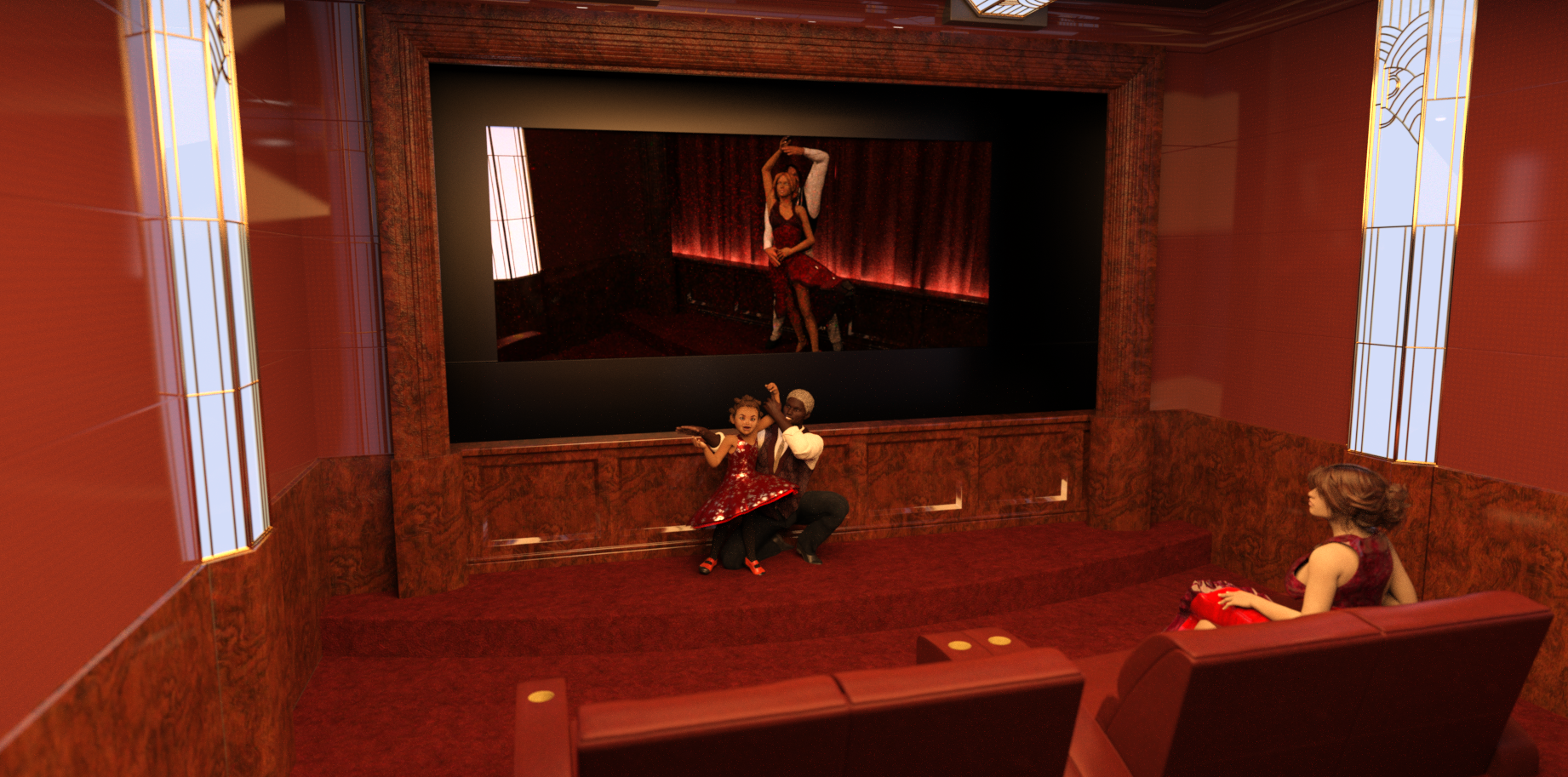
Title: Gonna Be Mom When I Grow Up
After a long day of filming, salsa starlet Lola just wants to fall into bed - but sleep will have to wait until little Lana and Daddy put on a special show just for Mommy.
Used:
Jade for The Kids 4
Latin Stage
Navy Blues for Grantham Hall Suit
Private Art Deco CinemaAlso Used:
- Cool Coils
- Sparkles for Studio
- Victoria 4.2 Base
- Sweetheart for Kids 4
- Michael 4 for Genesis 2 Male
- Selena Hair for Genesis 3 Female(s)
- Novarys for Genesis 3 Female(s)
- Dash for Michael 7
- Casual Style for Genesis 3 Male(s)
- Hipster Chic for Men
- Josette Pumps
 Fit Genesis, Genesis 2 Shoes to Victoria 8?
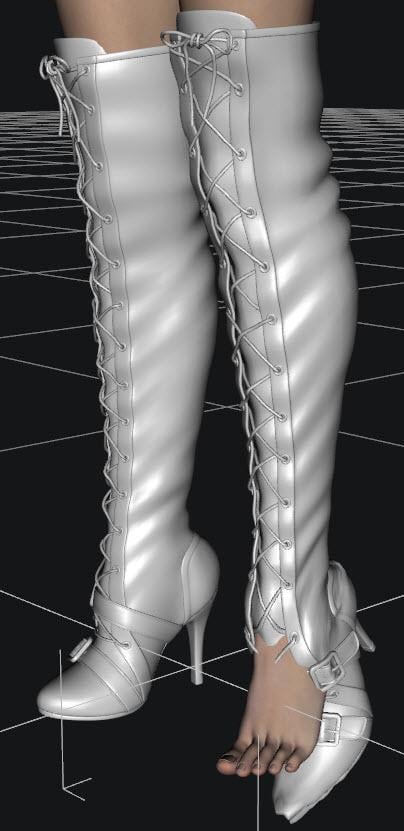
I am trying to fit Over the Knee Lace Up Boots for G2F to Victoria 8. I am using SickleYield's tutorial for fitting V4 shoes to Genesis 2 / Genesis 3 and am not having much luck.
Below is a screen shot of the boots manually fitted to V8 without using autofit. I had to adjust the scale and even select parts of the boot in the scene tab and manually pose them. After transferring the rigging, I tried the autofit for the G2F clone, and Full Body - with no luck. Is there a new method that will work for V8?
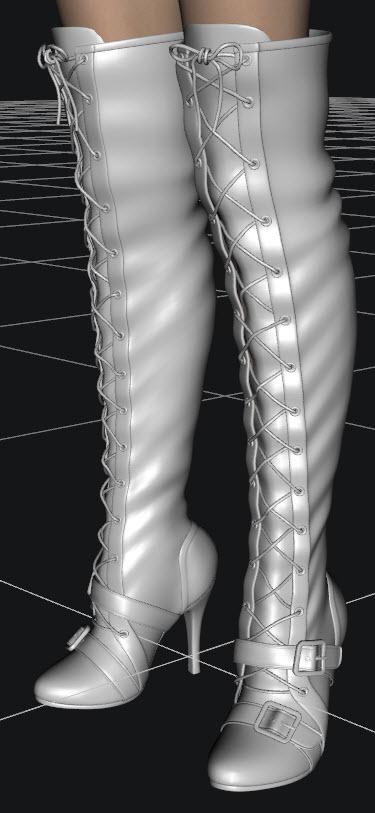
After Autofit:
 How do I make Victoria 4 figure smile?
If I wanted to make my Victoria 4 figure smile, how would I make this happen?
Been a while since I really used Victoria, but choose head. In the parameters tab, choose all. Then in the search bar, type in smile. There should be a few choices that come up.
Animation QuestionDaz Studio ships with Animate Lite. You can open the Animate2 pane (usually at bottom or go to Windows > Panes > Animate2) and then view the walks in the dropdown menu.
Note, the canned walks work with older figures like victoria 4 through genesis 2. If you're using newer figures, you'll likely need to find another source like aniblock products.
Victoria 4 Skinshader from 3DLight to IrayDS should convert them at render time, or you can select teh surfaces and apply the Iray Uber Base shader (from Shaders>Iray). Of course those won't be optimised, but if you manually apply the base shader you can adjust settings - look at a figure already set-up with Iray materials for an example, but bear in mind that it's unlikely that a Victoria 4 character will have all of the map types used by many Iray set-ups.
Victoria 4 Skinshader from 3DLight to IrayIs there a skinshader for V4 that converts the 3DLight materials of the skin so I can use them in Iray?
Genesis 3/8 UVs for Genesis...?@Inkubo and at all.
Yes thats totaly right. If i want to bring another Skin (UV) on my Charakter, than i want a better Skin, which looks more natural. And beyond all doubt Victoria 8 has a better, more natural looking Skin than everything i can find for G2. So a backward Converter would make more sense than to convert a not so nice skin to a Charakter which already has a better one. I would buy a bachward converter. A forward Converter makes no sense for UVs. A forward Converter makes sense for poses and morphs but not for UVs.
But in my case the best solution would be a set of Poser Companion Files for G3 and G8 and the clothes for them.
Yes, of cause, not every one has Poser, because it's not Free. But if we are fair, if you want to bring DS to the functionality of Poser and buy all the addons and so on, then you can easly spend the Same amount what you have to pay for Poser
Greets
Jan
Hair in FW Kamilla for V8 product? *solved*https://www.daz3d.com/fw-kamilla-hd-for-victoria-8
If anyone can make out the dark hair blending into the dark background, anyone recognize it? I keep thinking it's an april hair, but don't think I recognize it.
How do I make Victoria 4 figure smile?Sorry, I have to ask, why are you using Victoria 4 given the many newer options? No offense intended...I'm just honestly curious.
Carrara Challenge #36 - Pinups and Cheesecake and Hunks - Oh My! - WIP Thread --Meet Ringo Monfort!Thanks for the link, HW. Very interesting. Apparently, Queen Victoria inspired more lasting virtue than the Puritans. Sort of goes against the general reputation of Australians, though.
 Can definitely see the point of the anti-sugar folks. And Stezza, I'll let her know about the Cricket. She is a sports fan..
I now return you to your regularly scheduled WIPs. Nothing new to post from me, yet. "Art Frahm in a kilt" is still on my agenda. Have thrown together a quick elevator set, but still need a formal top for G3M to go with the kilt. Do you think it would be better to have a one-man scene with his drawers around his ankles (and celery), or multiple guys in kilts (and holding celery), only one of whom has his drawers around is ankles while the other guys look at him like he is not supposed to be wearing anything underneath the kilt?
Carrara Challenge #36 - Pinups and Cheesecake and Hunks - Oh My! - WIP Thread --Meet Ringo Monfort!thank you @diomede and @Unified Brain :)
@Bunyip02, love that landscape - great feeling of depth
@PhilW that looks much better
@Diomede, as for Halloween, we look on it as an American thing which is invading our country - keep that to yourself. So Halloween is hand in Hand with McDonalds Registered Trademark.
I think the Irish that got dragged out here by the English as convicts were too busy trying to stay alive at first to worry about being Pagans ;)
EDIT: Oh here's something
In my 60 years of being an Aussie, I have never seen Halloween as being high on my list of things to celebrate, even though celebrating is high on my list of things to do.
Most Aussies have come to know about Halloween from the many Hollywood movies that include the Halloween celebration in their movie script.
So Aussies have generally come to view Halloween as a particularly North American celebration that like Thanksgiving and Independence Day, has no real relevance to us 'down-under'. Even more so, by refusing to celebrate Halloween, many of us see ourselves as rejecting a US cultural influence that seems by stealth, to be overtaking much of our independence and home-grown culture.
So it's kind-of-weird to now realise that Halloween is actually a Celtic tradition that was embraced by the USA but not by Australia, even though Australian culture has lovingly embraced most Celtic traditions.
Smarter people than me who have researched this phenomenon have come to the conclusion that it was an accident of history that explains why this Celtic tradition of Halloween was embraced by USA but not by Australia. How British colonialism determined whether your country celebrates Halloween.
See, at a particularly formative time in Australia's history, the then monarch of Great Britain and Australia, Queen Victoria, introduced a strict Victorian social code that among other things, called for a deep disdain for all things that might be perceived as indulgent - like celebrating the Celtic Halloween.
The Victorian backlash against Halloween just happened to coincide with the colonization of Australia but was at a time that was well after the American colonies had broken away from the British crown.
So it appears to be just an accident of history as to why Australia did not embrace or celebrate Halloween. Methinks that the push back against perceived American cultural influences, kids wandering the streets at night and the high-sugar rewards, continue to keep Halloween from gaining mainstream popularity in Australia - despite its beloved Celtic origins.
that's from here https://www.quora.com/Why-dont-Australians-celebrate-Halloween
Brooklyn HD issuesHi,
Can anyone with Brooklyn HD help me? I run into some issues with her:
+ When I load Brooklyn HD character into Daz Studio, the Viewport become very laggy, when I pan around or rotating the view.
+ On the scene tab, the character is shown as "Victoria" (her based model) and not Brooklyn HD.
These issues is minor, and actually don't affect my work. However I want to know if anyone else has these issues, or there is something wrong with my installation.
Thank you very much
Morphing Fantasy Dress issue - anyone else?That's really weird! I don't think it's a G8F issue, as the G2F version of the Morphing Fantasy Dress fits fine on G8F. Here's the G2F version of MFD on Victoria 8:

I even tried dialling in some pretty extreme shapes to V8, but the G2F version of the dress fits great (though some poses require smoothing turned up) and it doesn't have any of the issues I'm seeing here. I hope they fix it, as I was interested in getting the "Iconic MFD Bundle 1" as I figure it probably has more movement morphs and would be more updated. But so far what I'm seeing isn't inspiring confidence in moving from my trusty G2F version (or even Genesis 1 version).
Not To Worry, Friend, "There's Always Another Sale™"Today was a pretty good haul for a newbie like me; We'll Match That rocked my world! But now I've got two Goblars, which is two more than I think I'll ever use. I also accidently got two different when-will-I-ever-use-this horror nurse uniforms, but I'm somehow okay with that. These 22 products cost a total of $20, and include the head and body morphs for both G2M and G3M, which alone would have been worth that price.
Cyclorama: Halloween Backgrounds
Sin - Character and Outfit for V4
Crazy Locks Hair for Genesis Male
Genesis 2 Male Head Morphs
Genesis 2 Male Body Morphs
West Park Treatment Room Specimen
Good Nurse / Bad Nurse
Dark Trees Pack 1
Halloween Fun
Horror Nurse
Cody Hair for M6
Fiora Hair for Genesis 2 Females and Victoria 4
MHE: Fruit
Iconic MFD Bundle 1 for Genesis 8 Female(s)
Pure Hair: Catwalk for Genesis
Cafeteria Eating Area
School Hallway
Genesis 3 Male Body Morphs
Genesis 3 Male Head Morphs
Goblar
Impish Delight for Goblar
Vampyres Bane Poses for Genesis 3If you're refering to Goblar and Impish Delight for Goblar, the second product is a pose pack, which can be used on any G3 character, though it was developed to work with Toon Generations 2 and specifically Goblar. (Poses for G3M work fairly well on the females and vice-versa.)
However, if you're saying you needed two carts in order to get both the Halloween freebies and the Match It freebies, you can contact Customer Service, (use the Contact Us link at the bottom of the page,) and request a refund for the duplicate product. Daz has the best Customer Service I've ever seen, and they will be happy to refund the cost of the duplicate, when a single cart should have worked correctly with both offers. (Store credit is the norm, but if you want a refund to the payment source, Paypal or Credit Card, just ask. They'll do that, too.)
I'm glad you're happy with the purchase, and welcome to this insanity we like to call Shopping Cart Jenga. But be careful you don't get addicted to it! (Like most of the rest of us...!)
Not To Worry, Friend, "There's Always Another Sale™"Today was a pretty good haul for a newbie like me; We'll Match That rocked my world! But now I've got two Goblars, which is two more than I think I'll ever use. I also accidently got two different when-will-I-ever-use-this horror nurse uniforms, but I'm somehow okay with that. These 22 products cost a total of $20, and include the head and body morphs for both G2M and G3M, which alone would have been worth that price.
Cyclorama: Halloween Backgrounds
Sin - Character and Outfit for V4
Crazy Locks Hair for Genesis Male
Genesis 2 Male Head Morphs
Genesis 2 Male Body Morphs
West Park Treatment Room Specimen
Good Nurse / Bad Nurse
Dark Trees Pack 1
Halloween Fun
Horror Nurse
Cody Hair for M6
Fiora Hair for Genesis 2 Females and Victoria 4
MHE: Fruit
Iconic MFD Bundle 1 for Genesis 8 Female(s)
Pure Hair: Catwalk for Genesis
Cafeteria Eating Area
School Hallway
Genesis 3 Male Body Morphs
Genesis 3 Male Head Morphs
Goblar
Impish Delight for Goblar
Vampyres Bane Poses for Genesis 3FWSA Zariah HD WHICH HAIR?https://www.daz3d.com/fwsa-zariah-hd-for-victoria-8
its also here
https://www.daz3d.com/fwhp-natalie-hd-for-stephanie-8
thanks!
More pre-made poses available for download?There are free poses available from a number of sources, but not usually here. You might check the Freebie forums for locations where you can find what you are looking for. Note that poses tend to be base figure-specific, i.e. Victoria 4, Genesis, Genesis 2, Genesis 3, Genesis 8, etc. Although sometimes poses made for one figure may work for others, there can be problems that would require manual correction. Making your own poses (or modifying existing ones) isn't that difficult using the various posing sliders found under the Parameters tab - it just requires a little practice.
Many thanks. Ill have a go at pose creation myself today. :)
Novica & Forum Members Tips & Product Reviews Pt 9Collective3D Movie Sets Home Interior BD Aspen for Victoria 8 Denim Jumper Outfit for Genesis 8 Female(s) Anita Hair for Genesis 8 Female(s)
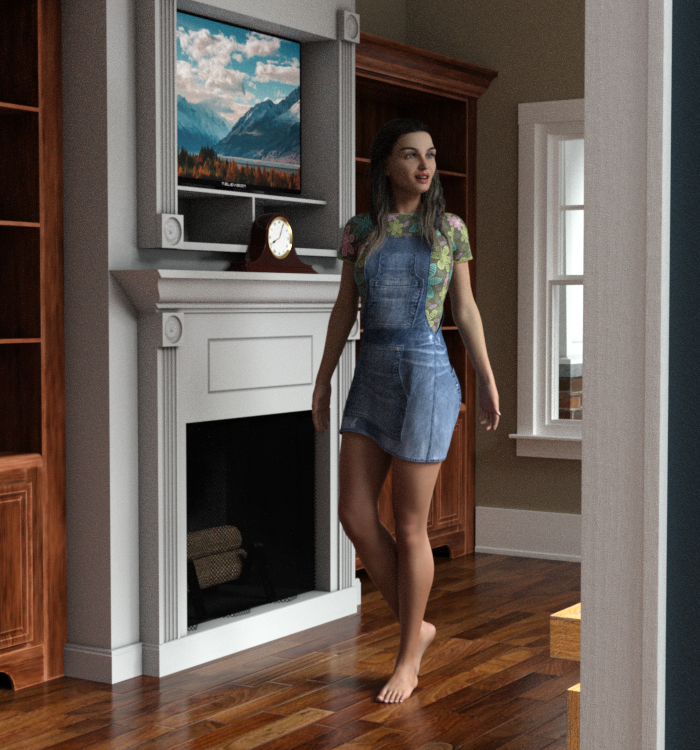
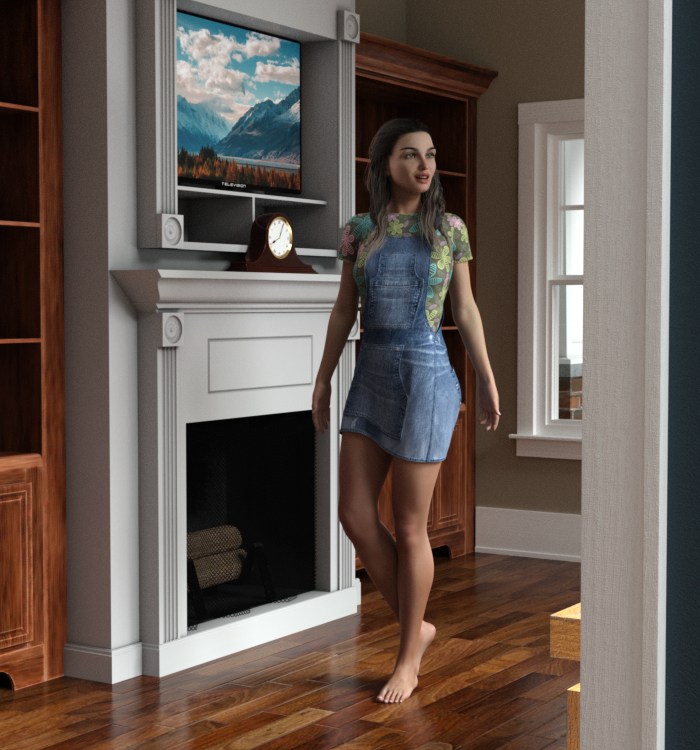
The Movie Sets Home Interior is just perfect for a two room scene. The door jam makes an interesting frame for renders shooting from another room, and going back the other way, you then have that room in the background. This is using Pro-Studio Lighting, 14R. Plus one Ghost Light, the reason for my post.
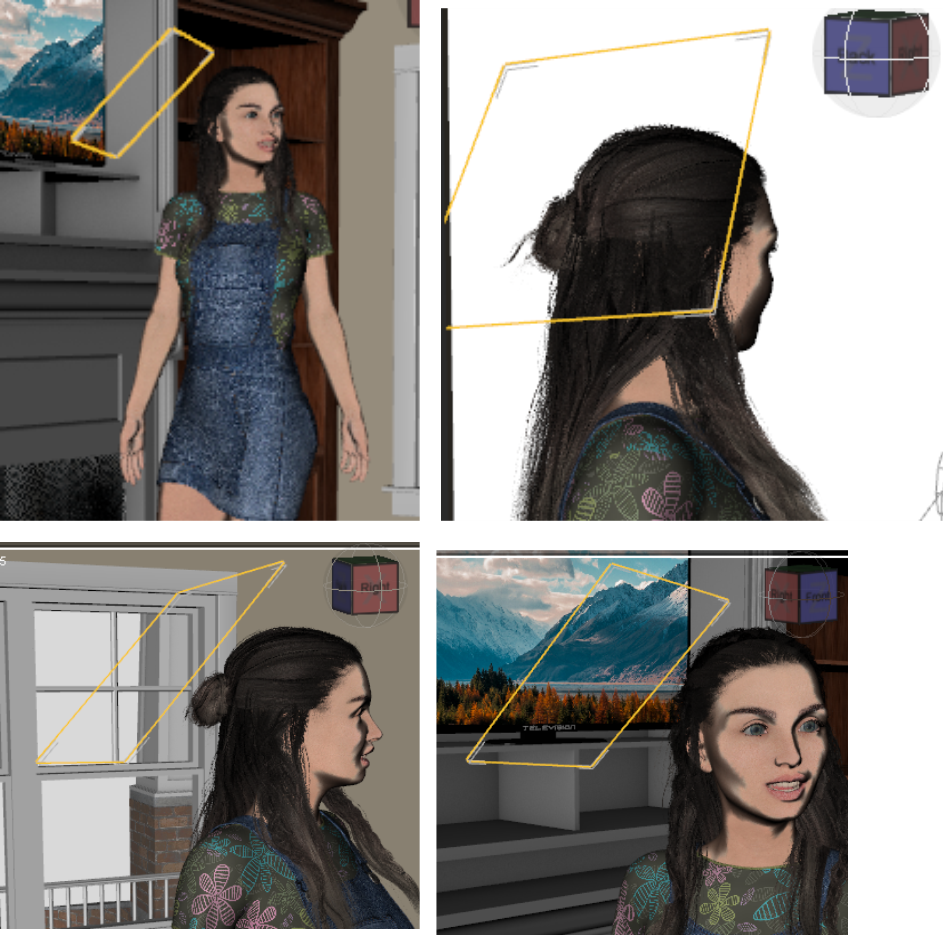
For anyone who hasn't tried Ghost Lights, or even those who do, a tip. As you know, you click and make the light (that black and white checkered plane) invisible BEFORE you do the presets. TIP: Have it selected with the Surface Tool (the three sheets of paper icon, above the viewport) and it will be outlighted in orange. So when you move it around to make changes, you see it easily!
To save yourself some testing time, when you first place the Ghost Light, start at the TOP. If it isn't right from the top, it won't be right anywhere else. I've shown the different views so you can see where this light was located to get the final result.
I don't put dark hair in front of a dark background without at least a dim rim light. Ghost Lights are perfect for that. I would, of course, first rotate the camera slightly to see if that will get the dark hair in front of a lighter background. If that isn't possible, add light to the hair. I prefer from the back and off to the side. I also don't like it when faces seem to float because not only is the dark hair/background together, but the neck too! I try to do a bit of cheek and neck when I add a Ghost Light.
TIP: Don't just do a thin line for a rim light, it looks very staged, or even hand drawn. When outlining a head/hair against a dark background, experiment and light more than a teeny line. It may look better with a wider strip, and if you are highlighting hair, get it so the lighting hits strands unevenly. Even if there's just small in and outs, it keeps it from looking hand drawn.
Second TIP, don't rim light all the way to the top, or all the way to the bottom. The mind will do "closure" and see the head without it being half-semi circled in rim lights. And it looks more natural. When you do light it, consider if you want a really strong rim, or just one to make a difference. And let those characters' heads get noticed instead of blending into the background!
Before and after: here's the before, rendering the after. This room doesn't render fast, there's only one character, and no props were added to the scene for the shelves. They open in new windows, click back and forth.
Screenshots of viewport. The orange outline makes the Ghost Light easy to find as it's selected by the Surface Tool.
 More pre-made poses available for download?
There are free poses available from a number of sources, but not usually here. You might check the Freebie forums for locations where you can find what you are looking for. Note that poses tend to be base figure-specific, i.e. Victoria 4, Genesis, Genesis 2, Genesis 3, Genesis 8, etc. Although sometimes poses made for one figure may work for others, there can be problems that would require manual correction. Making your own poses (or modifying existing ones) isn't that difficult using the various posing sliders found under the Parameters tab - it just requires a little practice.
Daz 3D is part of

Connect
DAZ Productions, Inc.
7533 S Center View Ct #4664
West Jordan, UT 84084Licensing Agreement | Terms of Service | Privacy Policy | EULA
© 2026 Daz Productions Inc. All Rights Reserved.