-
How long have you been doing 3D?
I started computer graphics in 1984 on a BBC Model B, using a lot of graph paper to draw 3D objects, the drawing them on the computer as X,Y coordinates using MOVE and DRAW commands. But my first real introduction to computer graphics was with Imagine and Vistapro on an Amiga 1200 in the early 1990's. I got my first pc in 1996 and managed to get a version of Imagine for it. I got a copy of Poser (version 1) free with a magazine, and then version 3. Because I finally had a job and some money, I bought Poser 5 in 2004 and of course the place to be was Daz with their superb Victoria 3 and Michael 3. Since then I've gone to Poser 6, 7, 2010, 2012, 2014 and Poser 11 Pro. Also in that time Vue 4, Vue 6, Vue 7 Infinite and I'm now fairly settled with Vue 11 Complete. Although I've tried several version of Daz Studio since the first beta versions, I have never been able to get to grips with the interface (especially the content manager) - until version 4.9. I tried it a couple of months ago and it suddenly seemed a lot easier.
Why don`t Daz sell Anatomical Elements as a stand alone.The more obvious answer is going to be that it would likely massively cut into sales of their optional 'pro' bundles for whichever Victoria/Michael set comes out first for the newer generation.
I honestly don't feel that there would be a legal necessity to push the entire store to be labelled as adult if they did it, any more than phsyical art stores need to be if they happen to sell artistic manuals which spefically deal in nudes.
If they honestly believe that, for some odd reason, then they could just as easily do a compromise of an 'anatomical bundle', which includes the primary figure and the anatomical extras, without needing to pay the excessive amount for all the other poses and clothing.
Personally, I think they should do that for at least Victoria/Michael, along with the basic additional face/body shaping morphs. That's all the stuff you really need to be able to have basic all-around use for art. I would absolutely buy that on day one! Instead, I have to wait for the pro ones to have a steep 70% or so discount, before I can even consider them... Which, in turn, is bad business practice for Daz, since it means I'm prevented, as a potential customer, from purchasing any of the other products which have Victoria and Michael as requirements for use.
Sure, I could get Victoria and Michael as basic figures, but I want to at least have the option for nudes if I ever need them. So, have to wait for the pro options to discount.
don't know what the hell happendmy install manger and daz studio are all playing up i can't long in to iver and my victoria 4.5 base said it's disapered
may i ask a questionThe product is for Poser, so although it should work in Daz Studio, it won't be a simple install. I haven't tried this myself because I have Poser installed, but I imagine this should work:
Poser uses a folder called Runtime, where it stores all content - figures, poses, materials etc. Usually, Renderosity products come as a .zip file. Try making a new folder on your content drive - name it something like Poser Content (not really important what you call it). Then unzip the product into that folder.
Go to your Content Library in Daz Studio. Where it says Daz Studio Formats, see if you have a folder called Poser Formats. If so, then right-click on it and select Add a Runtime Directory. If you do not have a Poser Formats folder, right-click in the grey area underneath Daz Studio Formats and select Add a Base Directory.
Now navigate to the Poser Content folder that you made earlier and click OK.
Your new content should appear in the folder under Pose.
EDIT: I forgot to add, but maybe not obvious - you will need to load Victoria 4 from your Daz content before you try to apply the Poser content.
3D Printing Plugin for Daz Studio - GamePrint [Commercial]Sorry if its already been asked, i dont recall seeing it, but how well or is it even possible using figures with tattoos? I do alot of my characters with body art or fantasy makeups and am wondering how well that would transfer to print or if it can even be done currently?
The follow are renders of a DAZ Victoria 8 model with tattoos that the team is started work on. This is a very intensive paint job. The model is 12 inches which the team will shortly support "collectable" orders. I will post the final images as soon as they complete the model.
3D Printing Plugin for Daz Studio - GamePrint [Commercial]I've been a DAZ user since 2002. When I met the Gameprint team a few years ago, I suggested to them that it would be great to be able to support the DAZ community with the ability to 3D print high quality 3D models using Gameprint. The team took on the challenge and I decided to invest in the team. The team worked really hard to produce the technology to fix 3D files to make them print in high quality and investigated different methods to produce colored prints. We looked at all of the latest 3D printers that support color but were disappointed either in the quality of the colors (dull, muddy, fuzzy) or the quality of the material being 3D printed (either too brittle - like sandstone or unable to support fine details like layered paper). In a prior life, I worked in both the toy industry and in the video game industry, so I suggested to the team that they use an approach that has worked for the collectable figurine business for decades - use real artists. The team worked for over a year, perfecting the ability to 3D print and paint DAZ figures. Working with the team early, I was fortunate to be one of their earliest beta-testers. The first tests, were to produce high quality 5" models. Here are some of their early 5" models that they printed and painted for me. These 5" models were modified and posed Victoria 7 characters. The Asian Warrior 5" model was painted as a collectable where as the soldier was painted as a standard 5".
Novica & Forum Members Tips & Product Reviews Pt 9@ladair I know you lost all your emails so if there's something you need to know price-wise, let me know. Can you folks tell me what you paid for Yvoire? You may be able to get it cheaper at 60%. (I have new debut in cart.) Right now at 60% it's 15.98
One I want to point out (that goes to 51%, I haven't checked to see if that's the right discount, just got online) is Tara 2 HD for Victoria 7 and Victoria 8 by @Kayleyss. Don't let the main promo fool you, there's other brows, including "soft" versions. I have a new release in the cart. And although she won't look quite the same on G3F/ G8F you don't have to have the Victorias.
Novica & Forum Members Tips & Product Reviews Pt 9A lot of items went into this image. Certainly a kit bash event. Comments Always welcome.
Description
Boo and Happy Halloween. Many thanks to all PA's
Made with...
- Dark Trees Pack 1
- Victoria 4.2 Base
- Them Bones 3
- Jack Pumpkin
- DeadCorn Bundle
- Parkside Heath
- Millennium Cat Bundle
- Atmospheric Effects Cameras for DAZ Studio
- Bat - Silverkey3d
- The Caged Cart
- Witch Hunter for V4
- The Iron Gate
- Nimos Hay Bales
- Morphing Flames
- TerraLUNA 3
- Armillary Sundial Prop For Poser
- RDNA Scatters Vol 4 - Bats
- The Road to Madirac
- Iray Ghost Light Kit
- Cloey Hair for Genesis 3 Female(s)
- SY Rigged Speedy Smoke Iray
- Witchykin Outfit for Genesis 8 Female(s)
- Kim for Genesis 8 Female
- Midnight Skeleton for Genesis 8 Male

Lots of depth in this one and the color tone is perfect for it!

I have been experimenting with Legacy uvs for Genesis 3 Victoria 6
The girl on the left uses Modern muses yzande v6 with Lilac Diffuse colour and the girl on the right (Aiko 7) uses Summer from the other site beginning with R.
I really like the pale purple!
Looking for stuff to recreate characterAlso I heard the new Genesis 8 is backwards compatible with Genesis 2, Genesis 3, Victoria 4, Victoria 6, and Victoria 7 and will work best with 3D Printing.
I was wondering if those were both true?Genesis 8 has AutoFit clones for all of the previous Genesises. It can use the maps from the Genesis 3 figure of the same sex (mostly, there are diffrences in the eye set up). Therea re ways to transfer morphs, but no one-click solution is provided.
Stupid Question About DAZ Original ShadersThey are, like any other content not labelled a Merchant resource, for creating images - which you can of course distribute and use as you wish (with a limited exception for the Anne Marie Goddard Digital Clone for Victoria 3).
Looking for stuff to recreate characterSo its been years since I done anything with Daz. I wanted to come back especially since they now have 3D Printing options.
I wanted to recreate this character of mine: https://i.imgur.com/orn4U23.jpg
Which I was looking for something similar to that hair style (I remember I was also having trouble getting that rainbow hair pattern when I was trying it with Genesis 7, so I would like advice on how to get that too) and quality wings that a pose-able.
Also I heard the new Genesis 8 is backwards compatible with Genesis 2, Genesis 3, Victoria 4, Victoria 6, and Victoria 7 and will work best with 3D Printing.
I was wondering if those were both true?Novica & Forum Members Tips & Product Reviews Pt 9I have been experimenting with Legacy uvs for Genesis 3 Victoria 6
The girl on the left uses Modern muses yzande v6 with Lilac Diffuse colour and the girl on the right (Aiko 7) uses Summer from the other site beginning with R.
Novica & Forum Members Tips & Product Reviews Pt 9A lot of items went into this image. Certainly a kit bash event. Comments Always welcome.
Description
Boo and Happy Halloween. Many thanks to all PA's
Made with...
- Dark Trees Pack 1
- Victoria 4.2 Base
- Them Bones 3
- Jack Pumpkin
- DeadCorn Bundle
- Parkside Heath
- Millennium Cat Bundle
- Atmospheric Effects Cameras for DAZ Studio
- Bat - Silverkey3d
- The Caged Cart
- Witch Hunter for V4
- The Iron Gate
- Nimos Hay Bales
- Morphing Flames
- TerraLUNA 3
- Armillary Sundial Prop For Poser
- RDNA Scatters Vol 4 - Bats
- The Road to Madirac
- Iray Ghost Light Kit
- Cloey Hair for Genesis 3 Female(s)
- SY Rigged Speedy Smoke Iray
- Witchykin Outfit for Genesis 8 Female(s)
- Kim for Genesis 8 Female
- Midnight Skeleton for Genesis 8 Male
Celebrity Look-a-Likes for 3D figures Part 2Alina is spot on, she instantly strikes me as Jolie even with totally different hair and outfits.
BTW, has anybody ever tried counting how many Jolie inspired characters there are for Daz? We should make a betting pool on it or something.
LOL !!
I have an Old "Angelina" morph for the vestigial Daz Victoria 2
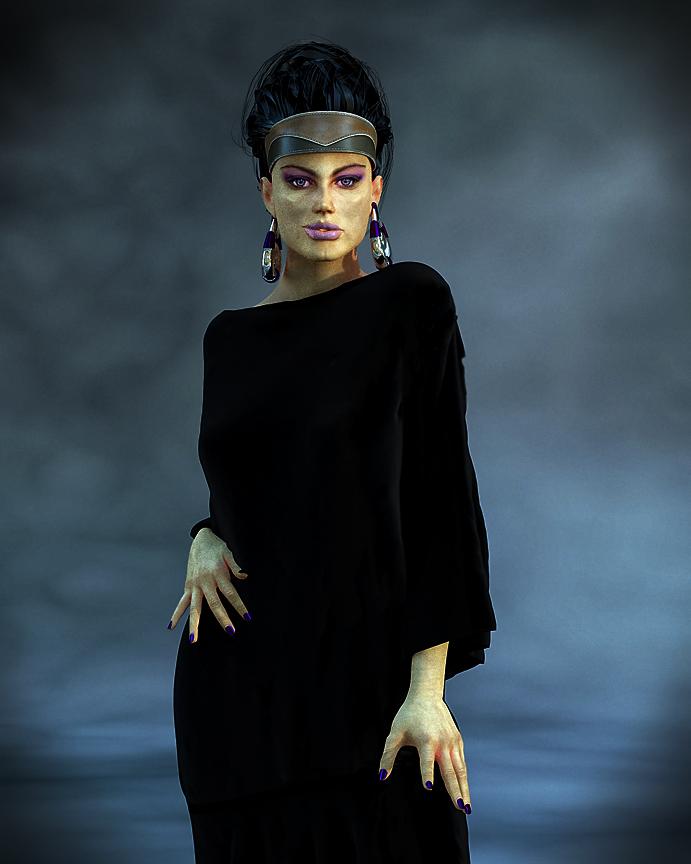 Celebrity Look-a-Likes for 3D figures Part 2
"I have a Kyle morph but it's for Michael 3. I know there's a way to transfer morphs from Generation 4 figures to the various
Genesis figures but I'm not sure it can be done with M3. "Hi if you have the GENX 2 plugin and all of the Millenuim3 support files
you should be able to move Mike 3 shapes at least up to Genesis 3Here is one of my all time favorite face morphs for victoria 3 by "Blackhearted"

Below is the Genesis 2 female with that same
morph animated in Daz and rendered in Maxon C4D
Shader Creating & Settings for Carrara - Q&A - Come One, Come AllSomething I just grabbed that I wrote in another thread:
At the risk of sounding like a broken record, I've really taken a liking to using my "Invisible" shader (set everything to invisible) on all eye parts except the lacrimals, then replacing the eyes using Arki's EYEdeas 3+ eyes. There is an enormous amount of really good eye maps made for M4 and V4, and EYEdeas 3+ includes remapped UV versions for both of those, plus the ones that use Arki's maps, which are also really cool.
This is one of Rosie's eyes. The shot on the right shows how the refraction of the cornea fills the cornea with colors from the iris (instead of seeing straight through the cornea), which might look a little strange here, but looks great when placed in the living figure.
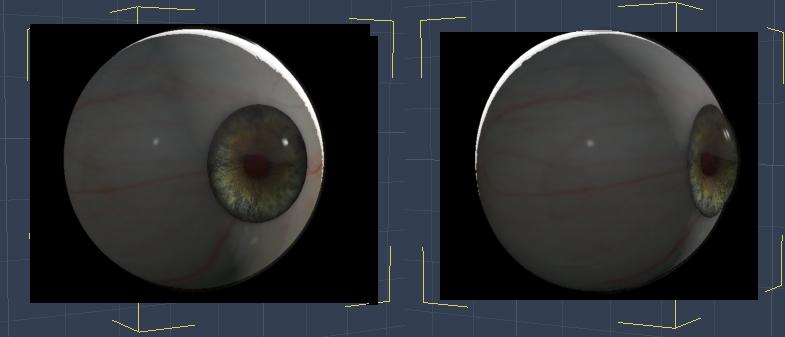
(two quick renders of just one eye model)
I really like having the flexibility of using these eyes. For Genesis figures, I've been using the separate Right and Left individual eyes. After setting up the character's final shape, I bring in the eyes and copy over the actual scale from the Motion tab, then parent them each to their respective eye. But I can further tweak their size if I like, which is really valuable to have.
As an added bonus, we can now link lights specifically to these eyes - we cannot do that on the actual figure's eyes because we cannot separate parts of a rigged figure for light linking in Carrara.
I never heard of Eyedeals before, but now I'm thinking it might just be a 'must have'. Looks like the V4/M4 version is on sale at the moment, so it might be an 'ideal' time to pick it up :)
They've only been made for M4/V4. But a really special product in many ways.
[cut]Dart... I just grabbed Arki's EYEdeas 3+ for Victoria 4 and Michael 4 but also grabbed Arki's EYEdeas 3+ - Vol. 01 - Natural 1 also there is another, EYEdeas 3+ - Vol. 02 - Fantasy 1, note that both of the latter require the one you mention. Since you mention using these in Genesis I suspect they will also work in G2. I also noticed that Arki has a G3 and G8 version, EYEdeas 4 and 5... they have IRay material presets and a few other features.
Regarding Jeremy Birn's Digital Lighting and Rendering book... I just received it, 3rd Edition, earlier this week... started to give it a glance and then thought I'd better get going on Animation in Carrara Video Tutorials - by PhilW since I've had it TODO longer.
Yes. I have also bought Arki's EYEdeas 3+ - Vol. 01 - Natural 1 expansion, but I don't think I got the Fantasy one yet. I love Arki's maps, though for Rosie I'm back to using some V4 maps I have - and just bought a bunch more that were on sale. Dart's EYEdeas 3+ are using Indigone's Endless Eye Kit for V4 , now available at ShareCG (I got them when Daz3d's forum had a freebies section we could upload to), which are mostly procedural, like Indigone's V4 Skin Shader Kit and Lights., with the exception of a few mask maps for the various eye parts.
As for Genesis and Arki's EYEdeas, these eyes will actually work for anything that needs this anatomy of eye. Anything! That's the beauty of having separate eye figures!
They come as conforming pairs of eyes for V4 and M4, either UV Mapped for V4 or M4's eyes or using Arki's own custom mapping, of which she's included a huge selection of maps to mix and match.
Darn I always feel like I'm trying to sell these thngs! LOL I'm actually just very happy to own the is all :)
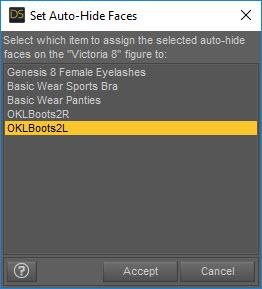
Dracorn's Render Thread9. In the Set Auto-Hide Faces box, choose the boot you want and click Accept.
10. Now click on the boot in the scene tab. Click File, Save As, Support Asset, figure/Prop Assets.
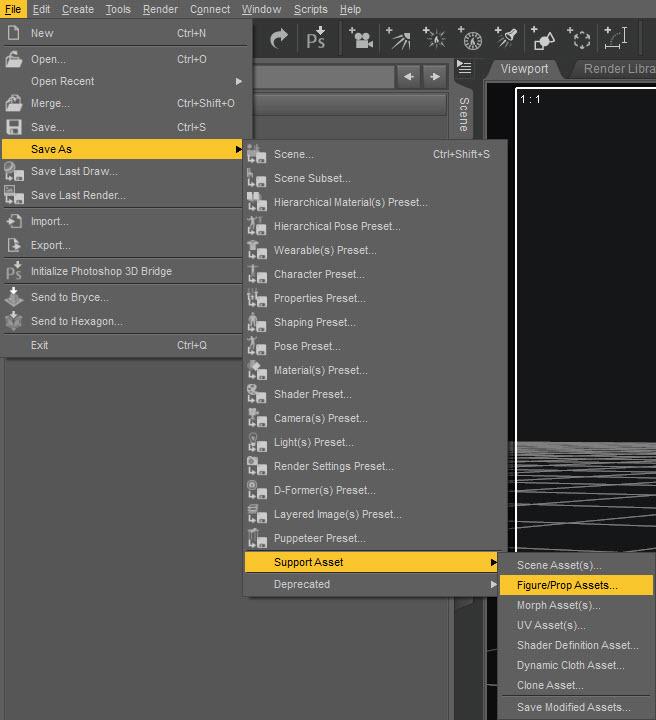
10. Name the file and click OK. You are also creating an icon at this step, so make it look nice.
11. In the Figure/Prop Assets Save Options, just click Accept.
TEST IT12. Hide the boot and select Victoria 8.
13. Go to My Library, Figures, select your file and load it. You will see that it loads and fits V8 with no toe poke through. If you hide the boot, you will see V8's missing foot.
MAKE YOUR ICON LOOK GOODNot too pretty. Or maybe V8 with no feet.

14. Select the boot in the Scene tab and rename it. I use "AutoFit G8 OKLBoots2 Left G2F." Position your view so that the boot is prominent on that side.
15. Do File, Save As, Support Asset, figure/Prop Assets again and overwrite your existing file. When you go back to My Library/Figures, you will see that the icon shows the boot without the toe sticking out.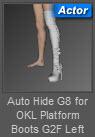
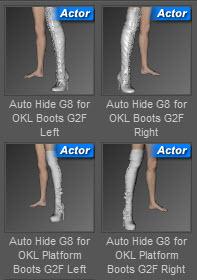
16. If you want the right boot to show and the left leg to be bare, you will need to delete the left boot for the leg to be visible.Dracorn's Render ThreadTUTORIAL:
Making Auto Hide Presets for Genesis 8 Previous Generation Shoe Fits, Using Geometry Editor
NOTE: This can be used with any generation.
1. With Victoria 8 loaded in the scene, use autofit to fit the desired shoes. Do NOT apply any foot pose but leave V8's feet flat. They will protrude out of the shoe.
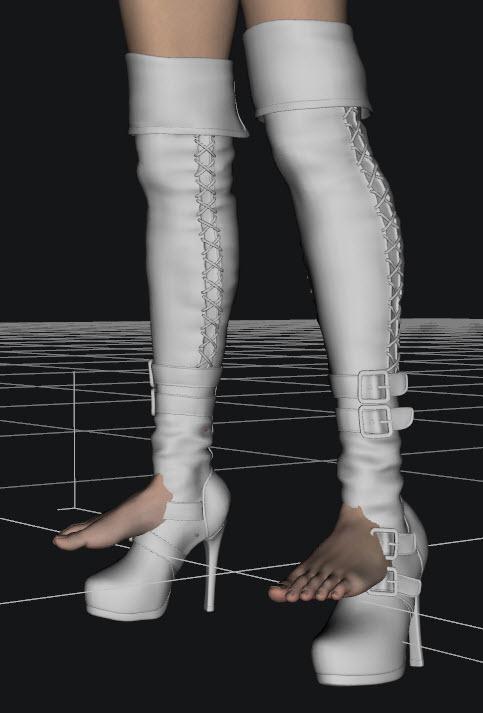
2. Hide the shoes in the scene tab. (This gives you an idea of where to select in Geometry Editor) Select V8.
3. Select Tools, Geometry Editor.
4. Right click on one of V8's legs. In the menu, choose Selection Mode, Lasso Selection.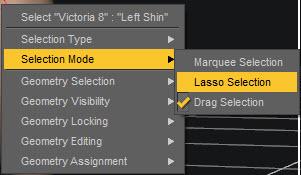
5. Drag the lasso around the foot and partially up the ankle. You don't really need to go up the leg unless there is poke-through. This will select all surfaces within the selection.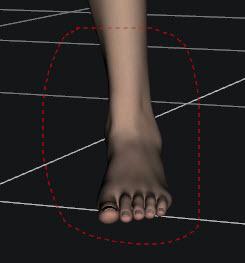
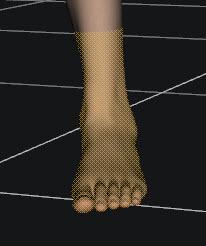
8. Right click on the foot with the geometry selection. In the menu, choose Geometry Assignment, then select Set Auto-Hide Faces for Attachment.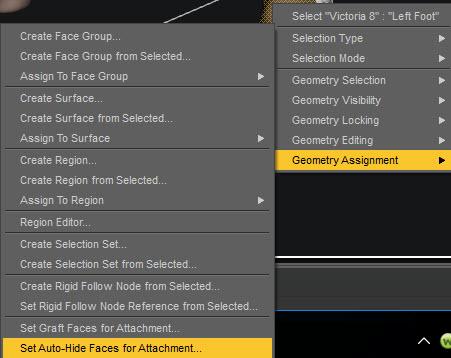 Shader Creating & Settings for Carrara - Q&A - Come One, Come All
Something I just grabbed that I wrote in another thread:
At the risk of sounding like a broken record, I've really taken a liking to using my "Invisible" shader (set everything to invisible) on all eye parts except the lacrimals, then replacing the eyes using Arki's EYEdeas 3+ eyes. There is an enormous amount of really good eye maps made for M4 and V4, and EYEdeas 3+ includes remapped UV versions for both of those, plus the ones that use Arki's maps, which are also really cool.
This is one of Rosie's eyes. The shot on the right shows how the refraction of the cornea fills the cornea with colors from the iris (instead of seeing straight through the cornea), which might look a little strange here, but looks great when placed in the living figure.
(two quick renders of just one eye model)
I really like having the flexibility of using these eyes. For Genesis figures, I've been using the separate Right and Left individual eyes. After setting up the character's final shape, I bring in the eyes and copy over the actual scale from the Motion tab, then parent them each to their respective eye. But I can further tweak their size if I like, which is really valuable to have.
As an added bonus, we can now link lights specifically to these eyes - we cannot do that on the actual figure's eyes because we cannot separate parts of a rigged figure for light linking in Carrara.
I never heard of Eyedeals before, but now I'm thinking it might just be a 'must have'. Looks like the V4/M4 version is on sale at the moment, so it might be an 'ideal' time to pick it up :)
They've only been made for M4/V4. But a really special product in many ways.
[cut]Dart... I just grabbed Arki's EYEdeas 3+ for Victoria 4 and Michael 4 but also grabbed Arki's EYEdeas 3+ - Vol. 01 - Natural 1 also there is another, EYEdeas 3+ - Vol. 02 - Fantasy 1, note that both of the latter require the one you mention. Since you mention using these in Genesis I suspect they will also work in G2. I also noticed that Arki has a G3 and G8 version, EYEdeas 4 and 5... they have IRay material presets and a few other features.
Regarding Jeremy Birn's Digital Lighting and Rendering book... I just received it, 3rd Edition, earlier this week... started to give it a glance and then thought I'd better get going on Animation in Carrara Video Tutorials - by PhilW since I've had it TODO longer.
Shader Creating & Settings for Carrara - Q&A - Come One, Come AllHere's another little article I wrote before I was entirely used to using them:

Being mostly self-taught, learning by asking questions, reading what other's ask and say... it's really different to start taking occasional online courses on the subjects - learning that there are 'basics' that all animators/filmmakers know, that I had no clue about. I discovered "Iris Gleam" through my own observations, and was always planningon getting my characters fixed to be able to display such a thing without special lighting - at least not a LOT of special lighting. My solution fell in my lap - I didn't need to persue altering the original iris mesh shapes anymore! ;) Funny how that happens!
A forum pal bought and sent to me the latest edition of Jeremy Birn's Digital Lighting and Rendering book, which is a tremendous help. It was Jeremy who has illustrated the common ways that CGI professionals use to create this Iris Gleam, so I immediately went into my V4 Rosie character, saved as a CAR file, and did a quick edit to her Iris shape to make them concave instead of their default convex curve, which was kinda easy, but I did a very quick job of it - so to do a 'saved' version, I'd need to start over.
 It was just that time when Daz3d added Runtime DNA to the store! Arki, an artist for both RDNA and Daz3d, had this great RDNA product (now at Daz3d), EYEdeas 3+ for Victoria 4 and Michael 4, which is modeled just the way Jeremy recommends! What a time saver, I bought them immediately!
 Earlier on than the subject of Iris Gleam, Jeremy was talking about light-linking - the process where a light only affects certain (linked) things in the scene - and that it's common to adjust the mood of a scen by linking to the eyes alone. Well in Carrara, we cannot link to specific bones of a rigged figure. Not a real issue because we could just copy the mesh and paste it in separately - Carrara will let us link lights to items that are parented to specific bones!
 Much better than that (in my opinion), Arki's EYEdeas don't need to parent (but the kit includes models meant for that as well), but actually can be loaded as a single, conforming item, which puts both eyes exactly where they need to be, with a plethora of useful adjustment morphs, which then turn perfectly along with the eyes pose dials on the figure! Parented ones would too... but this makes it super-simple to select for light linking... Handy!
As it turns out, with the special shaders I made and Arki's modeling, I don't need special light linking... they just work with whatever light is already available. Special tweaking of Highlight and Shininess was the real trick - well... along with this nice eye model!
I've just added this to my characters in early August of this year... so you see how I'm still tweaking even my main figures. But I suppose full production still won't change that either. The cool part is that, even though I now render with full refraction and reflection enabled, it hasn't changed my render times! ;) Love that!
Daz 3D is part of

Connect
DAZ Productions, Inc.
7533 S Center View Ct #4664
West Jordan, UT 84084Licensing Agreement | Terms of Service | Privacy Policy | EULA
© 2026 Daz Productions Inc. All Rights Reserved.