-
How long have you been doing 3D?
Since 2003 - 2004 with Poser, tried Daz Studio when it first came out, but I found the 3D workspace really laggy so went back to Poser till couple years ago when I moved over to Daz Studio.. Been a member here since 2005 and my first order was Victoria 3 Base, Victoria 3 Head & Body Morphs and Anya for Victoria 3/SP/Laura..
How long have you been doing 3D?I remember playing with Poser 4 and not having a clue what I was doing. I know Victoria 3 was the go to Character. I could not afford the full version of V3 so I got a started bundle with the Low Rez version of her. I think I remember Daz Studio 1 which I did not understand. It was not until Daz 4 that I got a grasp of DS.
Of course I am ashamed to admit, my Poser 4 copy was not legit. I have bought all the copies of Poser since except for 2014 versions.
edit I joined Daz in 2004.
Interactive License?I own he indie like license and still see the interactive add on price. Strange thing
Victoria 8 pro bundle charges an extra 50 which you would think covers all content in the pack. But the basic Victoria model alone charges the same 50 for the add on.
I think daz has a few things to work out
Interactive License?If you buy it for a bundle (victoria 8 bundle), do you get an interactive lesson for each item in the bundle (meaning you pay 50$ to use all item in the bundle in a video game)?
Any hooved options for G3F beyond Fawna?If you have GenX2, you can transfer Dione Unicorn Girl.
Dracorn's Render ThreadSo here's a Victoria 8 and Iray conversion of Enchanted Dreams, with a morph conversion of G1's Mina morph for the face. Boss Pro Light Set.
I really like the conversion you did. My first thought was that you had rendered "Glinda the good witch" from the Wizard Oz even though your character isn't a strawberry blonde

Trish
Wow, Trish - that's a really cool idea. Retexture the dress and hair, put a wand in her right hand... Sounds like fun!
Carrara CharactersMarinating....
That figure looks awesome btw, we really should be encouraging the creation of carrara characters., now I'm sure of it...
The thought of a rig for facial expressions is scary, I'd much rather use shape morphs. Does that mean every expression would require the object file morphed to be distributed with the character files?
If we had a skeleton, and a mesh attached to or that uses that skeleton, would we be able to utilize saved poses for it? So if we made a universal skeleton, we could essentially make universal poses as well???
Facial expressions - it is not necessary to use the skeleton rig to add bones to the face. Can rely entirely upon morphs. Can create a morph area for the head. Then create morphs in that area. A figure could be created and distributed that has some base morphs to work from. People can then add their own. I've never tried distributing morphs, but there is a load feature in the morph editing dialog. Although I assume that means people can share morphs the way we used to for Victoria 3 and Michael 3, someone more used to creating stuff for distribtion would have to confirm that.
Poses - poses can be saved for animation groups. They are called NLA clips and can be saved to the browser. They are then loaded from the browser to the animation timeline for use. Again, I assume they can be shared with people with the same animation group (mesh and skeleton), but others would have to confirm.
Thanks for the kind words on the custom figure.
Dracorn's Render ThreadSo here's a Victoria 8 and Iray conversion of Enchanted Dreams, with a morph conversion of G1's Mina morph for the face. Boss Pro Light Set.
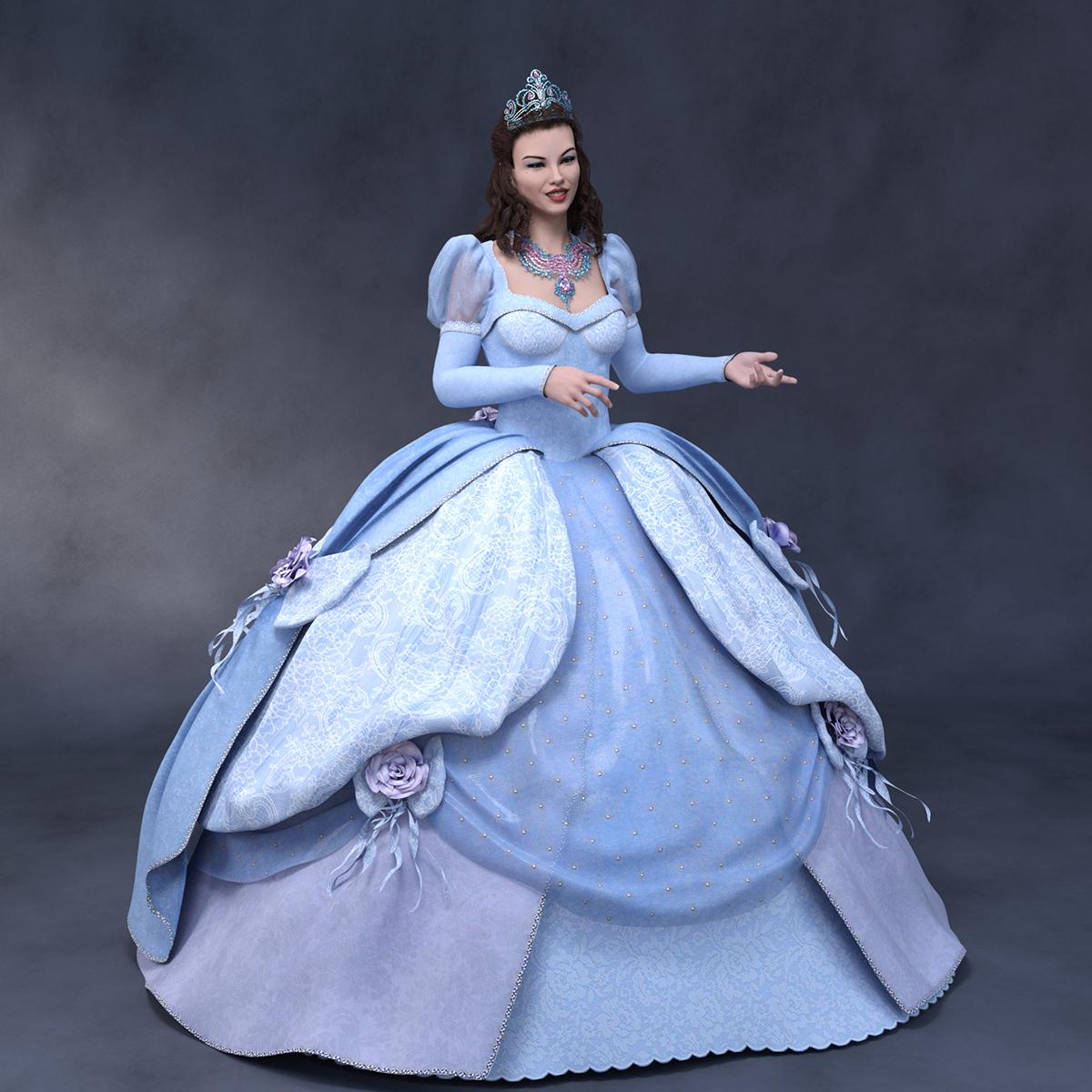
I really like the conversion you did. My first thought was that you had rendered "Glinda the good witch" from the Wizard Oz even though your character isn't a strawberry blonde
Trish
Apply Genesis 3 Body/Head to Victoria 8 Actor?Hi, sorry for the newbie question. I have loaded a Victoria 8 actor into the scene and tried applying the Kara (Genesis 3 female) body by first selecting the Victoria 8 root node in the Scene tab, and then double clicking the "Kara Body Apply". Nothing happens. Also nothing happens when I double click "Kara Head Apply". Is this a compatibility issue?
The skin/nails/eyes (textures I suppose) are able to apply just fine.
anatomy is grey for genesis 3 and 8Have you applied the gential skin to your G3? Or the "normal" skin? The genitals have their own skin preset. For Victoria 7, check out the Iray material folder and look for "Victoria 7 Gen MAT".
As for the new Gens, I don't own that product; but I've heard that the products from other sites often do not accept the gen materials that come with characters, as they have a different UV mapping.
anatomy is grey for genesis 3 and 8Tried adding the defult genesis 3 genital and it came out grey or silver no matter what I did.
I have tried
-selecting the genital and adding skin content (nothing happend)
-download a diffrent genital, specifaly "New Gens For Victoria 8" that was compatible with 3 (not grey, but dosen't match the colour of the rest of the skin)-selecting muf.duf form the character content (only one works and the skin's too dark)
useing the surface selcet tool to copy hip and paste to the genital ( I can only selcet the head/torso/legs and when I paste any fo em, the colurs way off
any suggestions? I tried all these steps and still can't think of anything. (excuse my poor english)
Slightly confused by new installers - what's "Poser CF"?I tried DS and don't like it so what files do I need for Poser ONLY?
Have hair, hairPS and hairPoserCF still confused!
Depends on the product - if you have Hair adn Hair PoserCF then you'd need both (and the DSON Importer). if there's also a Poser isntaller in its own right it may be supporting multiple figures, with the Hair PS files for (at a guess) Michael 4 or Victoria 4 and the hair and Hair PosceCF for a Genesis (in whichase the hair PS would be standalone for supporting the older figures, as long as it included the textures).
Jaderail is looking down on the STUPID THREAD XHow Daz3d breaks up families.....
Man: "I really like Victoria 8. I also think I want dforce."
Woman: "A divorce? Let me guess, you met her over the internet right? Where can I get a hold of this Victoria lady?"
Man: "Calm down just for a moment. You know, maybe that's not what I actually said, but perhaps you've read my mind anyway."
Woman: "Fine. Maybe I'll finally get around to calling this Michael 8 guy who keeps popping up on my screen."
...
 Legacy UVs for Genesis 8: Victoria 4 can't apply textures
Jennifer, it does not look as though any textures have been loaded at all. Material files need to be in .duf format to load (see the PDF: http://docs.daz3d.com/lib/exe/fetch.php/public/read_me/index/45575/45575_legacy-uvs-for-genesis-8-victoria-4.pdf). I suspect your MATs are still in .ds or .pz format. Load them onto V4 or Genesis and then resave them as ordinary .duf Material Presets.
Unless the textures load differently for V4? I've clicked on them just as I do for newer models, my Iray preview screen "reloads" and I still see the white texture..I'll try the resave thing but I believe both figures are duf already. :-(
Yea, you can't do that. Older materials are pre-duf days and use a different format. The easiest and fastest way to load V4 materials onto newer models is to use Draagonstorm's V4 to G2F batch converter and then use those presets to load V4 textures onto G8F. Her script auto-saves them into duf format, from there DS can apply the materials to the right material zones.
https://www.daz3d.com/v4-skins-batch-converter-to-genesis-2-female-s
Legacy UVs for Genesis 8: Victoria 4 can't apply texturesFrom the product page:
There is a simple three stage loading procedure:
- 1. Click the 'Prepare Genesis 8 Female' icon
- 2. Load the Victoria 4 textures
- 3. Click the 'Apply UVs' icon
Sounds like you have to use the script everytime and can't just change the UVs manually. Just a guess though since I don't have the product.
Yes, I have the read me which has the three steps. Unless I'm loading textures wrong or if they aren't already in duf, I don't know..I've been doing it as specified :-(
Legacy UVs for Genesis 8: Victoria 4 can't apply texturesJennifer, it does not look as though any textures have been loaded at all. Material files need to be in .duf format to load (see the PDF: http://docs.daz3d.com/lib/exe/fetch.php/public/read_me/index/45575/45575_legacy-uvs-for-genesis-8-victoria-4.pdf). I suspect your MATs are still in .ds or .pz format. Load them onto V4 or Genesis and then resave them as ordinary .duf Material Presets.
Unless the textures load differently for V4? I've clicked on them just as I do for newer models, my Iray preview screen "reloads" and I still see the white texture..I'll try the resave thing but I believe both figures are duf already. :-(
Legacy UVs for Genesis 8: Victoria 4 can't apply texturesFrom the product page:
There is a simple three stage loading procedure:
- 1. Click the 'Prepare Genesis 8 Female' icon
- 2. Load the Victoria 4 textures
- 3. Click the 'Apply UVs' icon
Sounds like you have to use the script everytime and can't just change the UVs manually. Just a guess though since I don't have the product.
Legacy UVs for Genesis 8: Victoria 4 can't apply texturesJennifer, it does not look as though any textures have been loaded at all. Material files need to be in .duf format to load (see the PDF: http://docs.daz3d.com/lib/exe/fetch.php/public/read_me/index/45575/45575_legacy-uvs-for-genesis-8-victoria-4.pdf). I suspect your MATs are still in .ds or .pz format. Load them onto V4 or Genesis and then resave them as ordinary .duf Material Presets.
Jaderail is looking down on the STUPID THREAD XHow Daz3d breaks up families.....
Man: "I really like Victoria 8. I also think I want dforce."
Woman: "A divorce? Let me guess, you met her over the internet right? Where can I get a hold of this Victoria lady?"
Man: "Calm down just for a moment. You know, maybe that's not what I actually said, but perhaps you've read my mind anyway."
Woman: "Fine. Maybe I'll finally get around to calling this Michael 8 guy who keeps popping up on my screen."
 Jaderail is looking down on the STUPID THREAD X
How Daz3d breaks up families.....
Man: "I really like Victoria 8. I also think I want dforce."
Woman: "A divorce? Let me guess, you met her over the internet right? Where can I get a hold of this Victoria lady?"
Man: "Calm down just for a moment. You know, maybe that's not what I actually said, but perhaps you've read my mind anyway."
Woman: "Fine. Maybe I'll finally get around to calling this Michael 8 guy who keeps popping up on my screen."
Daz 3D is part of

Connect
DAZ Productions, Inc.
7533 S Center View Ct #4664
West Jordan, UT 84084Licensing Agreement | Terms of Service | Privacy Policy | EULA
© 2026 Daz Productions Inc. All Rights Reserved.