-
Daz 3D Introduces dForce Physics Engine
Does it not work on Genesis 2 or older?
I just tried to Dforce on Platinum Cocktail with Victoria 6, https://www.daz3d.com/platinum-cocktail-for-genesis-2-females it simply did not work at all. It just ran 1% then DAZ froze.
That will depend on the clothing, not the figure it was made for.
So what does that really mean? That Plat Coctail does not work? How do I see that before starting? Can I even do that or is it a trial and error thing?
Daz 3D Introduces dForce Physics EngineDoes it not work on Genesis 2 or older?
I just tried to Dforce on Platinum Cocktail with Victoria 6, https://www.daz3d.com/platinum-cocktail-for-genesis-2-females it simply did not work at all. It just ran 1% then DAZ froze.
That will depend on the clothing, not the figure it was made for.
Daz 3D Introduces dForce Physics EngineDoes it not work on Genesis 2 or older?
I just tried to Dforce on Platinum Cocktail with Victoria 6, https://www.daz3d.com/platinum-cocktail-for-genesis-2-females it simply did not work at all. It just ran 1% then DAZ froze.
Charmed Dress for MFDThe original texture set called Charmed had a texture for the Steph petite MFD as well as the standard Victoria one. Are you sure that you are trying to use the right texture set. The Steph Petite MFD was mapped differently to all the Victoria ones.
Rendering EyesFor the Victoria 8 make-up - are you rendering or at least using the Iray preview mode? The make-ups use Diffuse Overlay which doesn't show in Texture Shaded preview mode.
Hi all seems ok now, many thanks for your help
pete
How to get an A3 clothing item onto G3 in 2017, by the numbers...The item you link to is for Genesis not G3, it means you have the shapes of the generation 3 figures (Aiko 3, Victoria 3, Freak 3, Michael 3 etc) and will be able to autofit any Generation 3 clothing to Genesis, then you could autofit it to G3 if you have the correct clones.
The "Go Back and Do It Again" ChallengeI finally had a chance to go back and play with this. The original was one of the first cards that I did for my Tarot deck, and was actually the reason I reopened DAZ Studio after not touching any sort of rendering for years - I had been working strictly in digital collage, but I couldn't find figures in the pose I wanted, so I decided to set them up and render them myself. Everything else was assembled in GIMP.
In the new render, I retextured and slightly changed the shape of the goblet from The Church Props, used David and Victoria 5 with lightly adjusted poses, added a cyclorama background (LB Summer Sunset Skies). The lighting is a combination of a three-point setup and sun-sky in the iRay render settings. No postwork...
Wonderful. Your "then" and "Now" images have a very different style. I like both of them because of their different styles. Your new image has huge improvements on the water, sky and the metal. Thank you for sharing.
Products Installed on DIM and pending on ConnectI'm sorry for the delay, I was waiting for the day I'd have enough time to do the whole procedure.
I made the steps 1 to 7, the strange thing was that Bryce didn't show up on DIM this time. I notice because I had problem with 10 products related to it. It didn't show up on products to download, to install or installed. The filters were the same. I opened and closed DIM 3 times. So I downloaded from marketplace and installed manually. Then installed the 10 products from DIM.
On Daz Studio I waited the sign below saying "Migrating x of 2109 items" to finish. After that the result is that there is no products pending to install.
I checked the products from the last example, they look like this attached image "Gothika Cabinet": warning icon, red point at below/left. The product "Genesis 8 Female Body Morphs" are not been listed on Content Pane->Products folder, but I loaded a figure and the morphs are there on shaping pane.
Moving forward, I selected Content Library Pane->Content DB Maintenance->Process Metadata Queue and Re-import Metadata. Now, the missing items appeared, but the warning icons persisted. Nothing to install yet.
I closed Daz, opened again, now logged in. Now appeared 14 items pending to install, I can list them:
1 Genesis 2 Female Body Morphs
2 Genesis 2 Female Head Morphs
3 Genesis 2 Male Body Morphs
4 Genesis 2 Male Head Morphs
5 Daemonessa SSS
6 A4 and H4 for Genesis
7 Genesis Evolution: Body Morphs
8 Genesis Evolution: Head Morphs
9 Daz Studio 4.9 Beta (we can ignore this one)
10 Manly Men M5
11 FW Honey HD for Victoria 7
12 Brutes Bruisers Thugs and Tough Guys for Freak 5
13 Daz Dragon 3 Morphs
14 Expressions for Teen JosieRe-import Metadata has no effect.
Thank you
3D Art Freebie Challenge-November 2017-Remembering the Fallen -Main Thread OnlyA piece of my heart
Janis Joplin - First Lady of Rock'n'Roll. (1/19/1943 - 10/4/1970)
We lost her way too soon.No Count: Genesis 2, Michael 4, Lumberjack shirt & vest - DAZ free content
Paid: Amarseda hair, Genesis bootsFree items:
Janis:
Mini skirt #
Tights#
Shoes #
Glasses #
Bangles 1 #
Bangles 2 #
Microphone & cable row 4Guy 1:
Koz Messy hair - downloads - 6 down
MMBlousonSetForM4 part 1 & 2
Shoes #
guitar pose #
mcjstrat guitarGuy 2:
Kaz Longhair evo - downloads - 3 down
shirt #
pants #
Gibson guitar row 6Stage: Rock-Stage #
Poses from several sets adjusted with some dial tweaking.
# free site registration required.Software Used:
PoseRay
Paint Shop Pro 7
Rendered in DAZ Studio 4.8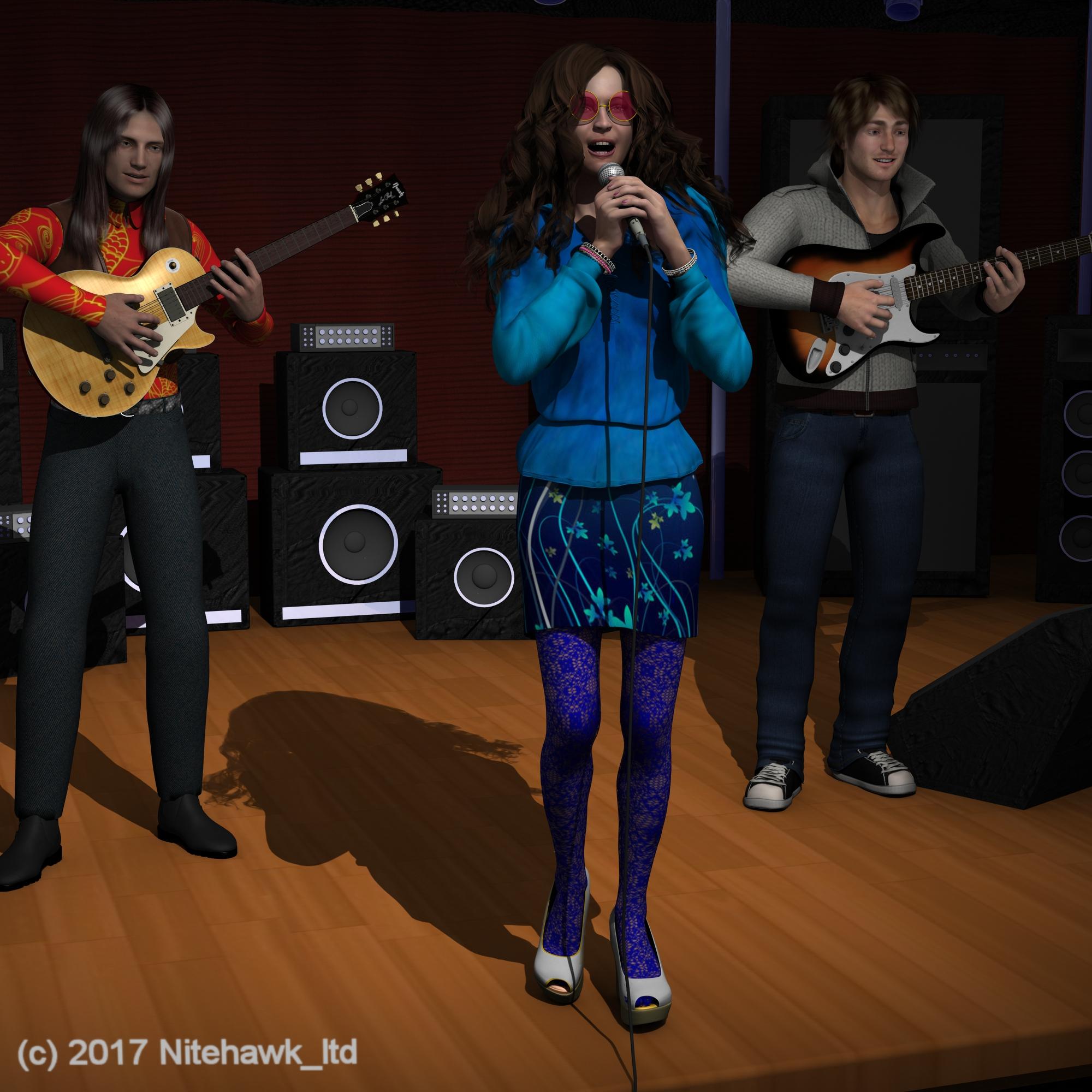 Looking for a Dress Like This One...
It looks like a corset on top. Perhaps you could couple a corset on top of the Morphing Fantasy Dress. Perpahs with something like one of these?
https://www.daz3d.com/fwsa-teagan-hd-for-victoria-7-and-lf-faux-corset
https://www.daz3d.com/isolabella-dress
https://www.daz3d.com/rebellion-dress-for-genesis-2-female-s
I think the straps are probably going to have to be added with post-work.
MimicMolly's Renders & WIPsHere is "Carly 7", originally I just wanted to GenX her but perhaps due to the fact she's originally based on Aiko 5, there's always a distortion in her eyes. Like the eyes bluge out of the sides so I have to select them individually and scale them down to around 94% in order for her to look right. I feel like if I were to properly remake her, I'd have to redo her again using only GF3 morphs because another problem she has is that her shoulders and neck look strange. (As shown on these various skin tests.)
Speaking of skins, I'm too picky with her since most of the skins I have don't look exactly as I imagine the character to be. So far, Aiko 5 base skin is the closest I have found to this ideal light golden skin tone. I don't have many G3F skins, due to the fact they're currently unusable in Genesis 1. I think Mika 7 bse skin looks okay but I'm not satisfied with the look. I'm so used to fiddling around with the legacy skin settings that I'm not sure how I'd edit this for it to look perfect.


I think it could be done with further experimentation. If not, perhaps I can see if P3Design or Vyktohria have similar skins. (I like the thicker eyebrows they use on some of their characters, like on P3D Evi for Girl 7 or VYK Oxanna.) Any suggestions would be great too, I know I've missed some products here and at Renderosity. >_<
I also tried with the Victoria 7 and Olympia 7 base skins. Like Mika 7, the eyebrows are too thin but somehow they make her look a bit grumpy. Understandable, she doesn't look right at all.
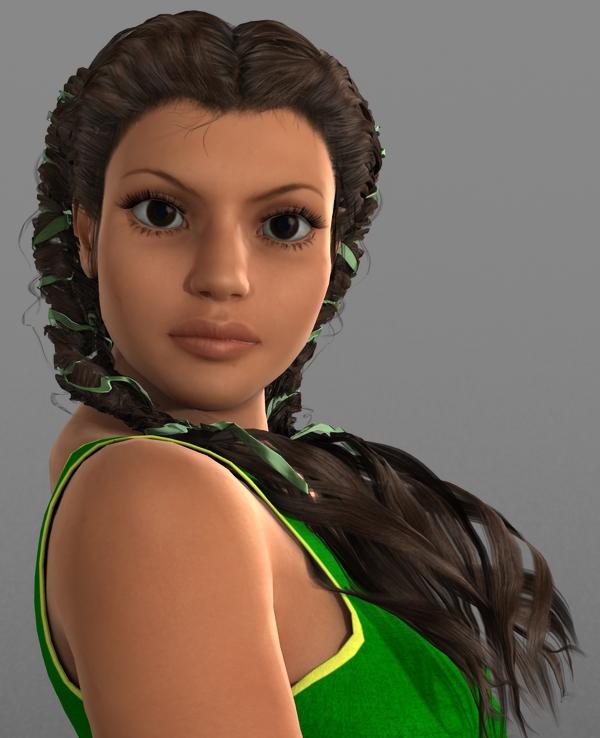

Right now I'm in the process of remaking her using Mika 7 as the base. Other morphs I'm using are the usual Genesis 3 Female Head Morphs and 200 Plus - Head & Face Morphs for Genesis 3 Female(s). I know I still have a long way to go.
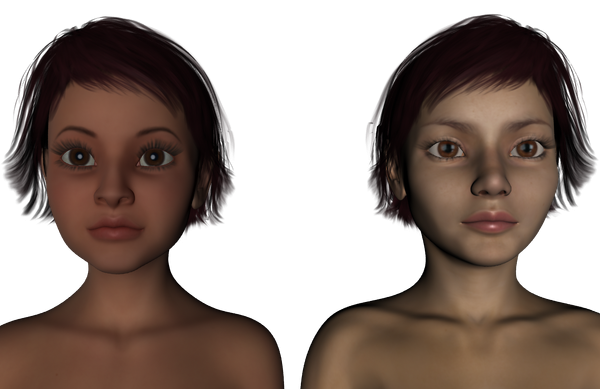
Although the original character preset (in Aiko 5 skin) is far from perfect, I'm trying to see if I could at least get the mouth right. Like many other people's "signature" characters I'm aware that they can change over time. I want to get Carly's face to look a bit rounder. I like her nose in the GF3 version, though it can always be more rounded. I'm aware this is tricky since a lot of the 7th and 8th generation characters have more angular faces. I miss the cute rounded faces based on Victoria 4 and Genesis 1. The problem, again is the GenX'ing since something about G3F messes up the eyes. (I don't have trouble with G2F by the way.)
As for Carly's body. I have found her easy to make with the Genesis 3 Female Body Morphs. As long as she is pear shaped, curvy hips a bit of a chubby tummy, thicker legs, and smaller breasts, I'm good. Sorry that I didn't make a sample render, perhaps in another post in this thread. XD
Creating new morph channels with scriptM = Morph
P = Parameter
A = Alias
You need to remember that while in the Poser fiel the morph really does belong to a body part once the item is imported and converted for DS the morph belongs to the shape, and a slider is automatically added to the figure node linked to the modifier on the shape - the Alias is created so there's still a parameter on the body part as there was in the Poser version. I'm not sure that you even need to create the float slider on the figure node, but if you do it's probably necessary to create an ERC link to the actual modifier.
The standard way to add morphs to a Victoria 4 style figure is via ExP, like the daz morph sets, and DS does havea tool - the ExP Exporter - to facillitate that.
SereneNight's Sci-fi FunOwen goes diving! I had to try to kitbash some gear for him, since most of the diving gear belongs to Victoria- And I don't own the recent stuff.
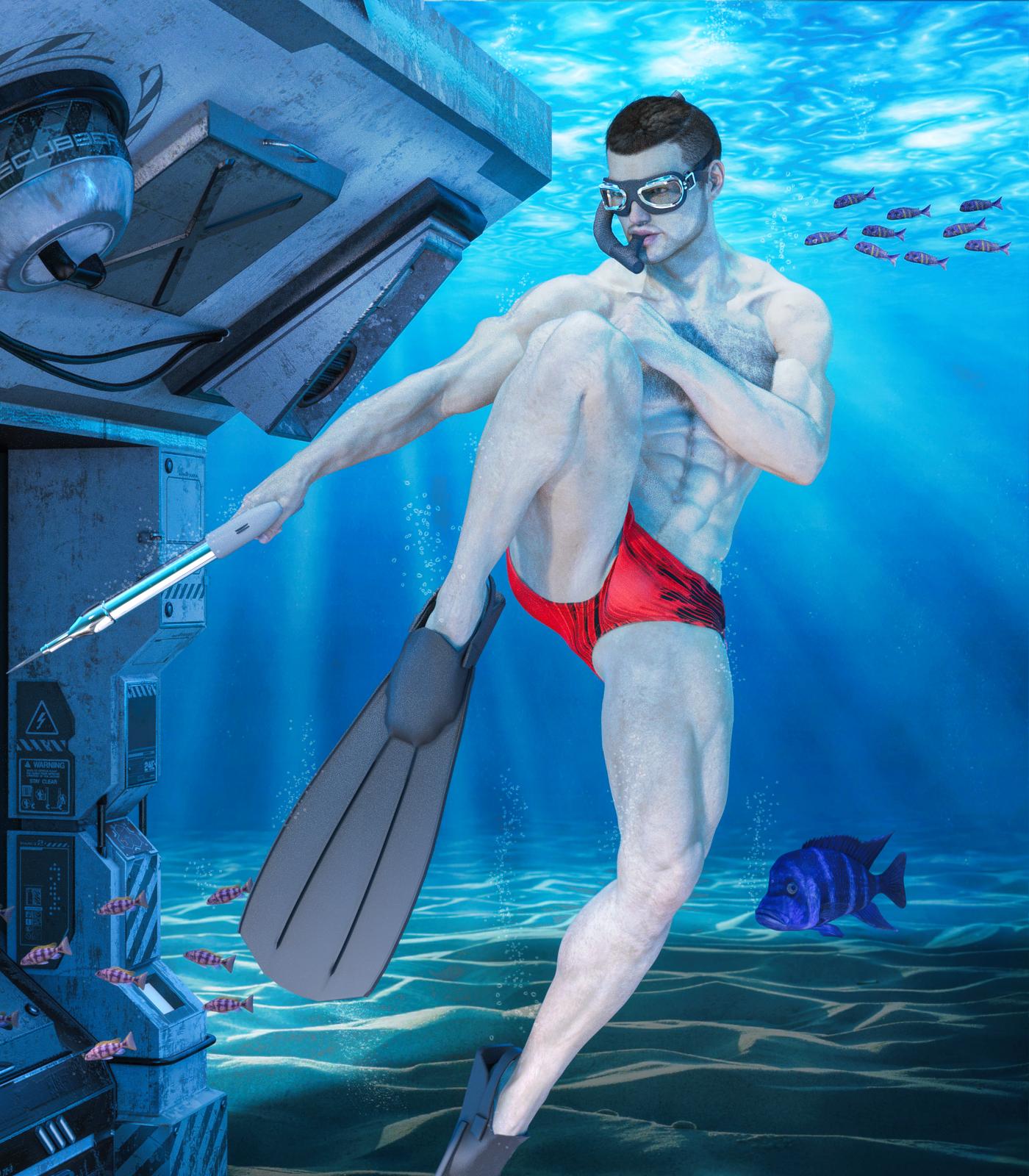
LOL I love the look on that fish's face! Like, "Don't turn around dude, please don't turn around..."
Creating new morph channels with scriptHi,
I've been playing around on an idea of creating new morph channels on the fly, much like Poser's PMD files do. Sadly the PMD plugin AFAIK died off as of DS 4. I think I'll give it a shot using a script.
As a test, I setup/modify Victoria 4 cr2 file to add a channel to accept one of NGM morph, and compare it to a plain Victoria 4 with the same channel created by script.
As far as my test go, it seems that when loaded to DS4.9, only the root object (DzSkeleton) has a DzObject. All other bodyparts doesn't have DzObject. All the morphs/magnets loaded (like Morph++) has a corresponding DzModifier contained in the root's DzObject. All of them has the name/label with "MorphChannelName_BodyPartName" format, i.e. "FBMVoluptuous_chest". In closer inspection, the DzModifiers will have 1 DzFloatProperty with the same name of the DzMorph, and path with "/Morphs/Imported/[BodyPartName]" format, i.e. "/Morphs/Imported/chest". Setting several of the default morphs property hidden flag to false will cause those morphs listed in V4's BODY part in the "Morphs/Imported" group. With the editor's parameters tab in edit mode, such morphs will have an "M" icon in front of it.
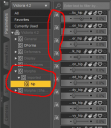
All those familiar morphs in the "Morphs | Shapes" group have a corresponding DzFloatProperty in their respected DzNode. However, with the parameters tab in edit mode those morphs will have a "P" icon in front of it.
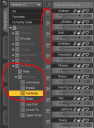
Curiously, if I select a bodypart other than root, the icon in front of the morphs is "A" instead of "P".
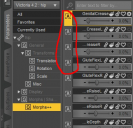
Upon opening the parameter settings, I found that the "P" and "A" will refer to the "M" in the root. With that info, I wrote this script
// DAZ Studio version 4.9.1.30 filetype DAZ Script

var oRootNode  = Scene.getSelectedNode( 0 ).getSkeleton();
var oObject    = oRootNode.getObject();

// Create new morph
var oMorph = new DzMorph;
oMorph.setName( "NGM_0_chest" );
oMorph.setLabel( "NGM_0_chest" );

// Create new property to replace the one already exist
var oMorphProp = new DzFloatProperty( "NGM_0_chest", true, false);
oMorphProp.setLabel( "NGM_0_chest" );
oMorphProp.setPath( "/Morphs/Imported/chest" );

oMorph.insertProperty( 0, oMorphProp);

// Add modifier to root
oObject.addModifier( oMorph );

// Create new property for the root node
var oNewProp = new DzFloatProperty( "NGM_0", true, false);
oNewProp.setPath( "/Morphs | Shapes/NGM_V4" );

oObject.addProperty( oNewProp );
Running the script to a plain V4 will a new "M" parameter in "/Morphs/Imported/chest" as well as a "P" parameter in "Morphs | Shapes/NGM_V4". However, after injecting the morph data from the PZ2 file, the sliders of those 2 new parameters / morphs don't have effect. In contrast, if I use the cr2 where the corresponding channel already edited in, sliding "M" parameter do have effect / the morph works.
How can I fix this problem?
THX
Rendering EyesFor the Victoria 8 make-up - are you rendering or at least using the Iray preview mode? The make-ups use Diffuse Overlay which doesn't show in Texture Shaded preview mode.
No but will give it a try
thanks
Rendering EyesFor the Victoria 8 make-up - are you rendering or at least using the Iray preview mode? The make-ups use Diffuse Overlay which doesn't show in Texture Shaded preview mode.
Rendering EyesTry selecting the eye surface and turning Thin Walled on - though that will affect the way the eye looks when rendered it should reduce the noise. You can also try rendering larger and downsampling, or upping the render quality so thast the rest of the scene doesn't converge while the eyes are far from converged. Spot Render the eyes to a new window, possibly with higher settings, and overlay that image on the regular render is also an option.
No still didn't work after many hours trying, so in total frustration I uninstalled all relating to 4.10. Tried to redownload through the "download and install" just opened the dim and nothing else, so manually downloaded it, whilst doing so checked the download history and discovred that the first download, despite saying download complete actually only downloaded part of it as was seen by size downloaded compare to actual size. (no it is not my firewall preventing it)
Sucessfully reinstalled it, and now again after many hours trying, and providing I use IRAY surfaces only for the make-up eyes etc it seems to work ok. Except Victoria 8 the make up, skin eye surface doesn't want to load. So I hope someone from Daz Tech. Department reads this
Thanks
Pete
GENERAL FREEBIE REQUESTS Part 2I am wondering if there are any animation poses for Victoria 4 where the figure can kick doors open, like in action movies?
Maybe you could use or modify something from this freebie: http://www.sharecg.com/v/74016/gallery/21/DAZ-Studio/capoeira-aniblock-sampler
or a paid one: https://www.renderosity.com/mod/bcs/rhapsody-karate-kicks-aniblocks-for-v4/98203 or https://www.daz3d.com/animate-cheerleading-pack
I'll probably consider karate kick poses from Renderosity as early as next week when I have some extra funds.
GENERAL FREEBIE REQUESTS Part 2I am wondering if there are any animation poses for Victoria 4 where the figure can kick doors open, like in action movies?
Maybe you could use or modify something from this freebie: http://www.sharecg.com/v/74016/gallery/21/DAZ-Studio/capoeira-aniblock-sampler
or a paid one: https://www.renderosity.com/mod/bcs/rhapsody-karate-kicks-aniblocks-for-v4/98203 or https://www.daz3d.com/animate-cheerleading-pack
GENERAL FREEBIE REQUESTS Part 2I am wondering if there are any animation poses for Victoria 4 where the figure can kick doors open, like in action movies?
Daz 3D is part of

Connect
DAZ Productions, Inc.
7533 S Center View Ct #4664
West Jordan, UT 84084Licensing Agreement | Terms of Service | Privacy Policy | EULA
© 2026 Daz Productions Inc. All Rights Reserved.