-
Is G3 the new V4 ?
kyoto kid said:
...working on an older system, I tend to avoid anything HD so I am glad it is an add on.
That's not what I meant. :) Of course HD detailing should always be optional to use on a figure, because there are going to be uses for abckground filler and so on, where it just isn't needed (and for those whose systems wouldn't be able to use it). But plenty of PAs manage to sell a single character where the HD morphs are included as part of the product. When it comes to Daz's own characters, however, they separate the HD morphs into a compeltely different product. To me, that feels disingenuous, because we're well beyond the stage where HD is being retrofitted. Victoria/Michael 7, much less 8, should have come with HD morphs included in one product, not forcing us to spend extra money on another product.
Most content creators are doing it. So, the people who own the store should be able to, also.
Celebrity Look-a-Likes for 3D figures Part 2On the digital creations celebs, CS03 is definitely adriana lima, one of the more popular/famous victoria secret models, not allessandro ambrosio (another VS model).
Agree on the other 2, kim K and Megan Fox.
If he does a jasmine tookes Ill buy it.
Neither one is a perfect fit, but the eyebrows and skin texture match Allessandro far better than Adriana. The shape of their eyes is very close to CS03, in neither case do the lips match perfectly. They have similar jawlines. The iris color is a match for Adriana, but that is only the default promo picture.
Except for the fact that the overall physical shape of the body in no way resembles ambrosio but very closely matches lima, as well as the shape of the head, quite different in real life, textures notwithstanding. To me Adriana Lima just jumps out, the resemblance is 'obvious', I do not see ambrosio at all, but no worries, not worth arguing over.
Possible to combine shaping preset and posing preset into one slider?The step of using "File>Save As>Support Asset>Morph Asset" to save your new Custom Charater Shape as an new Morph Product / Asset permanetly to your DazStudio library leads to the Morph Asset Save Options dialogue.
There you have to choose in which Library to save the Morphs to, this depends on whether you have more than one - can be configured in the "Content Directory Manager".
I recomend you to save your own content creations into your own Library / Content Directory to have things seperated from your purchased products - and to easier find them later with the file browser search.
Yea if you remember the Content Directory where you saved the morphs to - you can use a file browser and search for the Property-Names.
(side info a Property / Morph can have a name and a lable to identify it but for the Morph Asset file name in the Asset Directory the Name gets used - can lead to confusion if the both name and lable differs much - my advice choose a meaningful name and use Prefixes like me: CTRL_ERC_MyNewCharacter.duf or FBM_MyOverAllBodyShape.duf or FHM_MyHeadShape.duf or PHM_MyNoseShape.duf so its easier to find them later and you can guess what they will do)
You can search and find them with a file browser to see where they get stored to your file system in this special "data" folder.
Fror example: The properties / morphs are saved in a special folder called "data" within your DazStudio Library. For Genesis 3 Female the path is ...\DazStudio_Library\data\DAZ 3D\Genesis 3\Female\Morphs where DazStudio_Library is the Content Directory I choose in the Morph Asset Save Options.
The next thing you have to fill in is the "Author" and the most important the "Product Name". This is important because this will influence the path and folder further down in the Morphs folder of your figure asset on your harddrive in which the "Morph Asset" files will be saved to - that consist of sperate [Property-Name].duf files for every Morph you have selected in the Morph Asset Save Options dialogue.
A good advice is also:
Seperate head from full character morphdial?
To do that use the ERC-Freeze Action. With this you save your custom Character shape to a new Character controller Property.
(EDIT_2: the list of Sub-Components for your custom Character shapecan include your own created morphs and other purchased Product Shapes and all these Sub-Components can have custom Values - for example you dont have to fully apply the Victoria 7 Shape maybe set it to 50% and mix it with another Character Shape. The common dependencies chain to have at least Head and Body morphs seperated goes like this: the Character controller includes Sub-Components with Shape Properties like FullBody and FullHead morphs.
So =) for your custom Character Shape master controler you can include your Addon Sub-Components mixed with other Character Shape Sub-Components with even other seperated Shape Properties like for example extra Addon face or breast Shapes, custom Correction Morphs for different areas and what not - I mean keep yourself organized with the Properties and everything should go nice and smoothly
 )
)For more information on saving Morph Assets you can have a loock at this thread:
How to save the parameters changes in Actor and etc?
Where you can find more information on:
- Asset Directory / Content Directory
- Content Directory Manager
- How to delete Morphs
- Properties mass editing
- changing Property Groups of new or existing Properties
For more information on ERC-Freeze you can have a look at my post @
TUTORIAL - Creating a Genesis/G2F/G2M/G3M/G3M Full Body Morph for DAZ Studio Pro 4.6 by RKane_1
Where I cover most of these subjects:
- ERC-Freeze
- ERC-Bake
- create a new property for ERC-Freeze
- how I save new properties to a figure/object
- how I save Figure/Prop Assets
- how I use ERC-Freeze
- ERC-Freeze Options
- Property Hirarchy
...I try to cover everything this time - its allways a big clutter like with this forum - you have to read to all the post untill you find some information that is uselful to you.
Any quetions left?
Is G3 the new V4 ?Victoria 4 was introduced in 2006 with V 4.2 in 2008. That is longevity. Obviously G3 didn't last long, as G8 is already released. Since 2011, there is a new genesis every 2 years. It appears that right now G3 has the most products and support by vendors/PAs, and from what I've read G8 isn't really a big hit ... at least not yet.
thoughts ...Read where?
I dunno. I see a lot of new Genesis 8 products, even at the other site. I see a fair amount of stuff still being released for Genesis 3, or here combo G3 & G8. I like the combo stuff, I am more likely to buy it.
I don't have much experience, as I was a Poser + Octane user stuck on V4 until Genesis 3 swayed me over to Studio and Iray. Genesis 1 & 2 looked nice but the compatibility kept me at V4. I think that's what really led to V4 lasting a long time.
I have bought V8, Genesis 8 morphs and a number of other Genesis 8 things, but I haven't put effort in to using it yet. With a large Genesis 3 library now, it's just not really offering me anything to entice me to switch. I could be one clinging to Genesis 3, only time will tell. Here's what will get me to migrate to Genesis 9 - MORE POLYS!!! The number of polys is getting a bit long in the tooth for stills. With how powerful the latest generation of video cards are, seems like they are being overly Grinchy about it.
3D Printing Plugin for Daz Studio - GamePrint [Commercial]3D Print at home using GAMEPRINT.
We’ve added a new “Download STL” button to our plugin and wanted to tell what happens when you click it.
First, why should you print your Daz3D models? Well it’s great way to learn how to 3D print, and hand paint on your own. Also, it's a great way to celebrate your Daz modelling efforts, and bring your hard work to life.
Your model will be uploaded to our server and repaired without many configurations steps. Removing all manual work and automating the process for you.
Here's exactly what we do.
First, we analyze and scale your model depending on the size 3, 7 and 12 inches and look for thin areas at the same time. Thins areas could be hair, clothes, fingers, wingtips, etc. We then thicken these regions to ensure printability.
We also scan for the intersection between different meshes, this could acquire when you add clothes or hair to let's say Victoria from Genesis 8 series. So we rebuild the mesh of the model and ensure all touch points are merged in the meshing step.
We also remove all internal geometries to ensure that you print only the outer shell and avoid wasting any time, and material printing something on the inside, and we do your slicer a big favour with this step as will make your model slice seamlessly.
After you click the button, it usually takes 4-6 minutes depending on the complexity of the model. You will have a progress bar, and you can close your browser tab if you like, we usually email you when the STL is ready to download.
Here are a few pictures showing BEFORE and AFTER using our plugin. To further explain the impact of thickness adjustment I’ve added an AFTER images to show what our fixer does to different scales.
Note, that printability is the top priority for this process and should beat renderability. So the outcome is more in favour of printing, and specific areas could get swollen! This is specific with miniatures, as there are a lot of thin areas when models are scaled down to 3 inches.
A good hack is to remove things that don't scale nicely, i.e. eyelashes and transparent parts from the model as they will look abnormal when thickening.
Another good trick is to remove any unnecessary parts of the scene. Our fixing algorithm’s resolution is distributed equally around the bounding box. If something exists in the scene you don't want to print, remove it to speed up the process and give more resolution to things that have importance.
"We hope you enjoy bringing your character to life and enjoy 3D printing it seamlessly using our automatic repair/optimisation plugin designed especially for Daz 3D characters. Please keep the feedback coming, and we look forward to seeing your models come to life."
GAMEPRINT
Darius 8The discussion about Genesis 8 Pro Bundle prices made me curious enough to check the prices I paid before Darius ($49.60): Monique 8 - $23.33, Lucas 8 - $40.80, Stephanie 8 - $35.09, Teen Josie 8 - $37.78, Michael 8 - $52.91, Olympia 8 - didn't buy Pro Bundle, Victoria 8 - $22.03
AVERAGE: $35.83
If males don't sell as well, then why are the three highest prices (counting Darius) from the males? Is there a surcharge for the extra appendage?
EDIT: (I own all the Genesis 3 Male Pro Bundles; so, I didn't lose out on discounts except for Michael 8 (I didn't own Michael 4 Pro Bundle).
Monique 8/Iray SkinAs for Monique 8: if you have the model, take a look and tell me what you think.I don't know, she actually looks fine to me. This is a Monique render, no color correction, default skin settings.
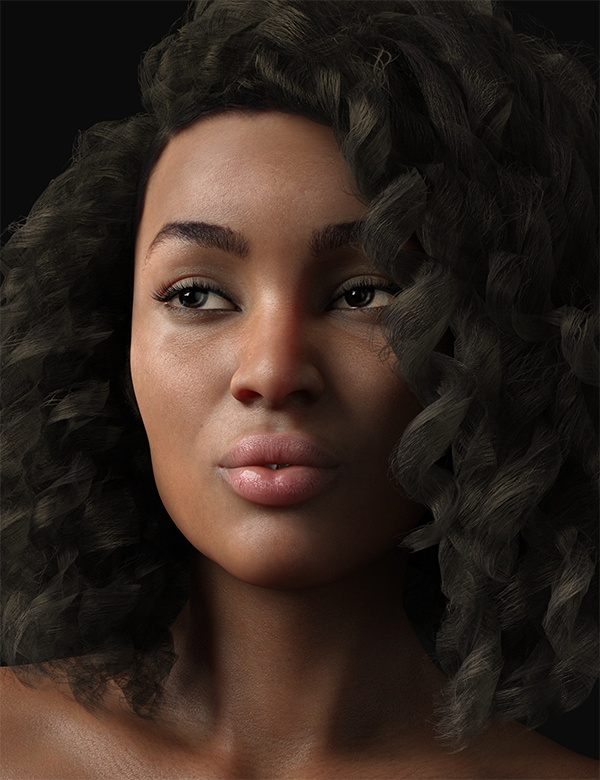
Human skin does tend to come out a bit orange to me by default though, so I usually knock that out in Photoshop.
I don't think translucency should be necessarily low. In human skin a high amount of light is actually scattered through the skin. About 94% of reflectance comes from SSS. Problem is, this really looks the most right with Chromatic SSS, and that is bugged to high heaven in DS. So often when I am setting up skin I still use mono SSS and lower translucency to avoid a single-color takeover of my skin. This is preventing me from developing and releasing skin shader settings right now, I really wish it would get fixed. :\
For what little it may be worth: the difficulty I have with Monique 8's settings is that her translucency, in particular, should not be high. At the very least, it shouldn't be as high as Victoria 8/Michael/Olympia/Stephanie/Lucas, but every single Daz base character has translucency set at 0.9. Dark skin simply isn't as translucent as paler skin; that is quite literally one of the evolutionary reasons for its existence.
This is true, but melanin is mostly at the basal layer of the epidermis, not sitting on the surface, so dark skinned characters would still have a very significant SSS contribution. I would expect the scattering and depth to be different. I don't find much references on this when I look.
I have trouble trying to bring DAZ darker characters to lower translucency also. Like lighter characters they get much more pale, and it's harder to tint diffuse without flattening the skin tone. It might require actually editing the diffuse in an image editor which won't kill detail like that.
I wonder if maybe the issue, or an issue, is that the shader needs to have separate epidermis/dermis/subdermal layers -- represented specifically as such, rather than mixed together within the model the way they are.
That aside ... For what it's worth, I just compared the settings for the newly released Darius 8 to last month's Lucas 8. The settings are identical. Absolutely identical. Same strengths, same colors for everything. I'll bet the same is true for Monique and the rest of the G8 females. That can't possibly be right.
The values for scattering and transmitted measurement distance are identical, and the values are so small that there's not a lot of space to pull them lower. I'm not sure how you could make the shader model they're using work for both dark and light skins.
As it stands, because they've got translucency on blast, they artificially darkened the palms and soles for Darius and Monique 8. Looking at their textures in the directory makes me want to weep, especially because Daz had done a very good job with the textures on their dark-skinned base characters, all the way back to Mil4. Their hands and feet probably look terrible in 3Delight, or else their Subsurface settings are just as wonky as everything else.
If you wind up with glowing hands and feet, then change your settings, don't ruin the damn texture.
That said, the fact that Darius and Monique don't look horrible in Iray points strongly to the settings for literally every other character this generation being very wrong, because they do look excessively orange and tan.
Theoretically this is what the chromatic sss solves vs the older mono (the traditional 3 layer setup has a blend of a bluish version a yellowish/greenish version and a redish version of the textures that one sets different scattering distance for, chromatic sss has one map, lets you set the ammount the reds, greens and blues scatter). I say theoretical because its... fiddly. And I'm the sort of person who likes fiddling with material settings.
The easiest basic fix is still to set the translucency strength lower .5 or point .6 (the translucency medium preset in the character materials does this) why this isn't the default... ¯\_(ツ)_/¯
Celebrity Look-a-Likes for 3D figures Part 2On the digital creations celebs, CS03 is definitely adriana lima, one of the more popular/famous victoria secret models, not allessandro ambrosio (another VS model).
Agree on the other 2, kim K and Megan Fox.
If he does a jasmine tookes Ill buy it.
Neither one is a perfect fit, but the eyebrows and skin texture match Allessandro far better than Adriana. The shape of their eyes is very close to CS03, in neither case do the lips match perfectly. They have similar jawlines. The iris color is a match for Adriana, but that is only the default promo picture.
Monique 8/Iray SkinAs for Monique 8: if you have the model, take a look and tell me what you think.I don't know, she actually looks fine to me. This is a Monique render, no color correction, default skin settings.
Human skin does tend to come out a bit orange to me by default though, so I usually knock that out in Photoshop.
I don't think translucency should be necessarily low. In human skin a high amount of light is actually scattered through the skin. About 94% of reflectance comes from SSS. Problem is, this really looks the most right with Chromatic SSS, and that is bugged to high heaven in DS. So often when I am setting up skin I still use mono SSS and lower translucency to avoid a single-color takeover of my skin. This is preventing me from developing and releasing skin shader settings right now, I really wish it would get fixed. :\
For what little it may be worth: the difficulty I have with Monique 8's settings is that her translucency, in particular, should not be high. At the very least, it shouldn't be as high as Victoria 8/Michael/Olympia/Stephanie/Lucas, but every single Daz base character has translucency set at 0.9. Dark skin simply isn't as translucent as paler skin; that is quite literally one of the evolutionary reasons for its existence.
This is true, but melanin is mostly at the basal layer of the epidermis, not sitting on the surface, so dark skinned characters would still have a very significant SSS contribution. I would expect the scattering and depth to be different. I don't find much references on this when I look.
I have trouble trying to bring DAZ darker characters to lower translucency also. Like lighter characters they get much more pale, and it's harder to tint diffuse without flattening the skin tone. It might require actually editing the diffuse in an image editor which won't kill detail like that.
I wonder if maybe the issue, or an issue, is that the shader needs to have separate epidermis/dermis/subdermal layers -- represented specifically as such, rather than mixed together within the model the way they are.
It would be really nice to have something like this.
That aside ... For what it's worth, I just compared the settings for the newly released Darius 8 to last month's Lucas 8. The settings are identical. Absolutely identical. Same strengths, same colors for everything. I'll bet the same is true for Monique and the rest of the G8 females. That can't possibly be right.
The values for scattering and transmitted measurement distance are identical, and the values are so small that there's not a lot of space to pull them lower. I'm not sure how you could make the shader model they're using work for both dark and light skins.
As it stands, because they've got translucency on blast, they artificially darkened the palms and soles for Darius and Monique 8. Looking at their textures in the directory makes me want to weep, especially because Daz had done a very good job with the textures on their dark-skinned base characters, all the way back to Mil4. Their hands and feet probably look terrible in 3Delight, or else their Subsurface settings are just as wonky as everything else.
If you wind up with glowing hands and feet, then change your settings, don't ruin the damn texture.
That said, the fact that Darius and Monique don't look horrible in Iray points strongly to the settings for literally every other character this generation being very wrong, because they do look excessively orange and tan.
Yeah, there's something about their new settings that still needs work. I haven't figured out what it is yet.
Monique 8/Iray SkinAs for Monique 8: if you have the model, take a look and tell me what you think.I don't know, she actually looks fine to me. This is a Monique render, no color correction, default skin settings.
Human skin does tend to come out a bit orange to me by default though, so I usually knock that out in Photoshop.
I don't think translucency should be necessarily low. In human skin a high amount of light is actually scattered through the skin. About 94% of reflectance comes from SSS. Problem is, this really looks the most right with Chromatic SSS, and that is bugged to high heaven in DS. So often when I am setting up skin I still use mono SSS and lower translucency to avoid a single-color takeover of my skin. This is preventing me from developing and releasing skin shader settings right now, I really wish it would get fixed. :\
For what little it may be worth: the difficulty I have with Monique 8's settings is that her translucency, in particular, should not be high. At the very least, it shouldn't be as high as Victoria 8/Michael/Olympia/Stephanie/Lucas, but every single Daz base character has translucency set at 0.9. Dark skin simply isn't as translucent as paler skin; that is quite literally one of the evolutionary reasons for its existence.
This is true, but melanin is mostly at the basal layer of the epidermis, not sitting on the surface, so dark skinned characters would still have a very significant SSS contribution. I would expect the scattering and depth to be different. I don't find much references on this when I look.
I have trouble trying to bring DAZ darker characters to lower translucency also. Like lighter characters they get much more pale, and it's harder to tint diffuse without flattening the skin tone. It might require actually editing the diffuse in an image editor which won't kill detail like that.
I wonder if maybe the issue, or an issue, is that the shader needs to have separate epidermis/dermis/subdermal layers -- represented specifically as such, rather than mixed together within the model the way they are.
That aside ... For what it's worth, I just compared the settings for the newly released Darius 8 to last month's Lucas 8. The settings are identical. Absolutely identical. Same strengths, same colors for everything. I'll bet the same is true for Monique and the rest of the G8 females. That can't possibly be right.
The values for scattering and transmitted measurement distance are identical, and the values are so small that there's not a lot of space to pull them lower. I'm not sure how you could make the shader model they're using work for both dark and light skins.
As it stands, because they've got translucency on blast, they artificially darkened the palms and soles for Darius and Monique 8. Looking at their textures in the directory makes me want to weep, especially because Daz had done a very good job with the textures on their dark-skinned base characters, all the way back to Mil4. Their hands and feet probably look terrible in 3Delight, or else their Subsurface settings are just as wonky as everything else.
If you wind up with glowing hands and feet, then change your settings, don't ruin the damn texture.
That said, the fact that Darius and Monique don't look horrible in Iray points strongly to the settings for literally every other character this generation being very wrong, because they do look excessively orange and tan.
Darius 8Most of the previous pro bundles ran about $35, some less than that.
I don't think that's true. Monique's did because she landed in the middle of the PC+ sale and there were additional discounts. I don't think the other G8 bundles where that cheap though.
The only other ones (besides Monique) I got at release were Victoria 8 Pro and Michael 8 Pro and I paid $46.26 each for them. So, The current $49 low for Darius is not much more than that.
I did get Monique 8 Pro at release with extra PC+ Anniversary discounts for $25 and Teen Josie Pro as a spotlight item during the PC+ sale for $32.40, but that was later than release.
Darius 8Most of the previous pro bundles ran about $35, some less than that.
I WISH! LOL
Bundles released in September, October, and the first half of November were treated to extra discounts due to the PA Festival and the PC+ Anniversary sales. Traditionally, Pro bundles are released with a 30% intro discount, or $94.47, just like any other new release. If you're a PC+ member, you also get the 30% DO discount, bringing the intro price down to $66.13. Daz has had some unbelievable discounts thrown in from time-to-time, but $35 as typical? No. Sorry. That's just not accurate.
Now, if you're willing to wait 60 days or longer to pick up a Pro bundle, they do go on sale, and sometimes are offered at stupid-cheap prices when purchasing a new release. I got Victoria 7 Starter bundle for free last year, with a new release pruchase. (Don't recall if it required one or multiples to qualify.)
The basic rule of thumb is that, once you've gone past the New Product intro period, EVERY DAZ Original goes on sale multiple times a year for at least 70% off if you're a PC+ member. SO, if there';s nothing in a set that's screaming "Buy Me Right Now!" you can save a bundle by waiting a few months.
That said, lately DAZ has seemed to recognize that and has been offering a lot of convoluted ways to get the price down without actually reduce the list price of the bundle itself, and a number of recent Pro Bundles... and the previous poster's $35 per Pro Bundle figure on release is actually not far off. Looking at some figures that I know I bought during the initial release period, I can see that the Monique 8 Pro Bundle set me back just $27.99 (and I only had to have the Monique 6 Pro Bundle to get that discount,) the Lucas 8 Pro Bundle was only $25.60, Stephanie 8 was 33.10, Teen Josie 8 PB was $37.79, the Mika 7 PB was 23.80,and the Elijah Pro Bundle came in at the ridiculous price of just $6.61. That's less than lunch costs at many fast food places!
Darius 8Most of the previous pro bundles ran about $35, some less than that.
I WISH! LOL
Bundles released in September, October, and the first half of November were treated to extra discounts due to the PA Festival and the PC+ Anniversary sales. Traditionally, Pro bundles are released with a 30% intro discount, or $94.47, just like any other new release. If you're a PC+ member, you also get the 30% DO discount, bringing the intro price down to $66.13. Daz has had some unbelievable discounts thrown in from time-to-time, but $35 as typical? No. Sorry. That's just not accurate.
Now, if you're willing to wait 60 days or longer to pick up a Pro bundle, they do go on sale, and sometimes are offered at stupid-cheap prices when purchasing a new release. I got Victoria 7 Starter bundle for free last year, with a new release pruchase. (Don't recall if it required one or multiples to qualify.)
Darius 8He seems ok. I'm seeing no orange banner and nothing in the exclusive offers area either. No incentive with the past Pros as I have 6 & 7 Pros already. Bad timing being first of the month with rent and such. Without any discount I'll be forced to pass. May only get the base this time. =( It's all good though.I have an exclusive offer in the messages. Exclusive offer is "You have one of the past Darius pro bundles, so have an extra 10% off". Mildly surprised at how limited it is compared to recent offers; I wonder why? (I have both Darius 6 and 7 pro bundles, so this is probably as good as it's going to get.)
Additional discounts for the other non-bundle items are showing up in the cart now. Assuming they stabilize where they are, they're quite nice. The additional discounts are only for the other items and not the bundles, at the moment, but that may change when they kick the store to make everything settle out, if they need to do that.
The Capsces Poses and Expressions don't currently have a promo image in the pro bundle, but they're listed at the bottom in the Included items; without that promo, it looks at first glance as though there are only 10 items in the Darius pro bundle, compared to 11 in the Olympia, Teen Josie, Stephanie, Lucas, and Monique 8 pro bundles, and 12 in the Victoria 8 pro bundle . The LINK for the Capsces poses has a placeholder text of LINK, which actually goes to a product in the store, which makes for an oddly funny false drop.
Hmmm... I'm getting an offer of 25% off Darius 8. The lowest I can get the Pro bundle to is $49.60. Has anyone gotten it lower?
Darius 8Most of the previous pro bundles ran about $35, some less than that.
The only gen8 pro bundle that went down that low for me was Monique 8, when combined with the discount. Lucas also went around 40 a week or two after the release I believe, which was also pretty low; Michael and Victoria ran about the same as Darius 8, I think... maybe I’m forgetting how much I paid though
RRRR - What can go wrong? Render ContestThis one could be fun...
Chameo Pull 01:
1. Jepe's Jewels and Tears for Victoria 4 - Genesis 2 Female
2. Taylor for Stephanie 6
3. Ceremonial Horse Armor
4. Michael 7
LB #1. HotCabanaWear
LB #2 Boudoir Secrets
LB #3 Nature Shaders
LB #4 FWSA Amalthea for Ninive 6The single most useful feature needed in the next Daz StudioInstall Steam. I believe it has options to allow a controller to work in programs.
I can understand that part of what keeps DS free is outsourcing the funcionality to the community devs (KeyMate, etc) but there needs to be some sort of "hand-off" or "hand-over" when/if one of those community devs dies so the plugin can be updated (if there's not already such a plan in place).
While not so much a program include, but more of a policy change: texture templates with everything, no exceptions. If it has a UV map, it must have a template. Also, Script source so users can edit as needed, or add functionality/change certain parameters to work with their Runtimes. Case in point, the V4 to G2F Animation Converter looks for "Victoria 4.2", but the loader names it "victoria 4.2". That capital letter means everything. The script fails if it's not a capital V. By the same token, the G2F figure must be named Genesis 2 Female, not Victoria 6, Lilith 6, Mei Lin, Aiko 6, etc. Changing this in the script so it reads the base figure instead of display name would make it faster.
Peek-a-boo... Wha'd I miss?Welcome back.
We are now on the 8 series - don't panick you haven't missed that much.
Due to some confusion over the numbering issue daz went from Genesis 3 with Victoria 7, Michael 7 etc to Genesis 8 and Victoria and Micheal 8 etc.
DS now has Iray as a renderer as well as 3delight and very recently dforce dynamics was introduced.
Is G3 the new V4 ?G8F Victoria was stated to have outsold any prior versions of Victoria, including V4, on introduction day, if I remember the post in the forums by a hefty percentage so from a business perspective G8 has been a hit.
Cumulatively I have no ideal for Victoria 8 sales stand in relation to V4 and other older figures sales as those are artificially inflated by giveaways (one could have gotten Victoria 7 free this past weekend, I had gotten her free though last year around the same time of year). You can be almost sure V8 has sold less total numbers than V4 and you can probably guess that V4 also has still outsold all the other Victorias from the Genesis lines. Eventually though, a new Victoria will technically have so many improvements that generation will outtotal V4. V4 is sort of a no-go for gaming development for example. It requires much more work than later generations of Victoria.
Is G3 the new V4 ?Victoria 4 was introduced in 2006 with V 4.2 in 2008. That is longevity. Obviously G3 didn't last long, as G8 is already released. Since 2011, there is a new genesis every 2 years. It appears that right now G3 has the most products and support by vendors/PAs, and from what I've read G8 isn't really a big hit ... at least not yet.
thoughts ...Daz 3D is part of

Connect
DAZ Productions, Inc.
7533 S Center View Ct #4664
West Jordan, UT 84084Licensing Agreement | Terms of Service | Privacy Policy | EULA
© 2026 Daz Productions Inc. All Rights Reserved.