-
Tags generated when updating metadata not working in search
Renaming folders in Content Library don't wipe the metadata but just turn the metadata as Orphaned References... (as the white-framed exclamation mark on the thumbnail of files...) and it doesn't remove Userwords in Tag either ~~
So, how did you regenerate the metadata... ?
Tags generated when updating metadata not working in searchI had to rename some folders in my library. Doing so wiped the metadata of everything in the folders. Ok fine, whatever, I regenerated it.
However, when the metadata automatically generates tags by parsing the filename, those words are not working in search.
I'm not sure what to do. There's no way I can manually type out tags for hundreds of files.
The same such tags priorly generated automatically for the files in the folders I DIDN'T have to rename are fine. And they're like the same format. fu_bar_pose.duf and all three of "fu" "bar" and "pose" work in search for the untouched files, not the ones I had to update.
[SOLVED ]No resources are associated with Gen 8 male anymoreAh, broken metadata just for G8 Essentials !
 [SOLVED ]No resources are associated with Gen 8 male anymore
When I had a similar problem, it was because a product changed Genesis 8 'Compatibility Base' and I had to reinstall Genesis 8 too: Compatibility Base is the key metadata to link an item's geometry with other items related to this item, like materials, shapes, poses, etc and which then allows Smart Content to show you poses, materials, shapes, etc, for G8M when you have one G8M figure selected.
If you can remember which product you recently installed that could have done that, it could be useful to send a ticket to Daz.
[SOLVED ]No resources are associated with Gen 8 male anymoreFigured it out. It wasn't mapping to ANYTHING genesis 8 because Genesis 8 lost all pointers to it in the database. Had to uninstall and reinstall Genesis 8. TY for sending me looking for the metadata. I figured if I lost everything I would start with the one that tied to everything.
[SOLVED ]No resources are associated with Gen 8 male anymoreOdd ~ A guy had the similar issue a couple of days ago and the culprit was proved to be that the relevant metadata were lost in cms database.
You may try re-importing the metadata of some products that you expect them to be shown in Category list, for instance, a couple of character products of G8M or G8F... as I notice there's even no category of Figure in that short list ....
Smooth Out Imperfections in Clothing When Posed?n.aspros123 said:
crosswind said:
If you fix the deformation with Hexagon, check this thread: https://www.daz3d.com/forums/discussion/comment/9021201/#Comment_9021201
If you fix it with Blender, suggest you not do it with Daz to Blender bridge though it works for DS 4.22 / 4.24... because it'll make the process a bit cumbersome.
Just directly export to OBJ and fix it with Blender. Then import OBJ with Morph Loader Pro, with the settings in below screenshot.
Thanks for your input @crosswind
Just need to ask: Do I save just the G8F in posed form, dForced and the tank top, as an .obj? Nothing else?
Yup, Ctrl + Select the posed G8F and the wearable, with the settings in Export. (screenshot 1). Nothing else. G8F will be used as the reference when fixing deformation on the wearable. In Blender or other applications, just make fix on the wearable and then export wearable to OBJ.
Or do I save G8F and Top as separate .objs in Base Resolution? Reason I'm asking is Jay Versulis has a youtube video and he sends the genesis and clothes separtely.
Not necessary at all. Export them together as above-mentioned. And yes, setting Resolution Level to Base Resolution on the wearable or setting View SubD Level as 0 is a must .. before exporting.
Smooth Out Imperfections in Clothing When Posed?crosswind said:
If you fix the deformation with Hexagon, check this thread: https://www.daz3d.com/forums/discussion/comment/9021201/#Comment_9021201
If you fix it with Blender, suggest you not do it with Daz to Blender bridge though it works for DS 4.22 / 4.24... because it'll make the process a bit cumbersome.
Just directly export to OBJ and fix it with Blender. Then import OBJ with Morph Loader Pro, with the settings in below screenshot.
Thanks for your input @crosswind
Just need to ask: Do I save just the G8F in posed form, dForced and the tank top, as an .obj? Nothing else?
Or do I save G8F and Top as separate .objs in Base Resolution? Reason I'm asking is Jay Versulis has a youtube video and he sends the genesis and clothes separtely.
Smooth Out Imperfections in Clothing When Posed?If you fix the deformation with Hexagon, check this thread: https://www.daz3d.com/forums/discussion/comment/9021201/#Comment_9021201
If you fix it with Blender, suggest you not do it with Daz to Blender bridge though it works for DS 4.22 / 4.24... because it'll make the process a bit cumbersome.
Just directly export to OBJ and fix it with Blender. Then import OBJ with Morph Loader Pro, with the settings in below screenshot.
A Few Questions for Substance 3D Painter UsersThat utility looks very useful for setting things up between the two progams, so I'll take a closer look when I come to needing to import/export etc. Looks handy although it wouldn't have helped in my case since I refer to the internal way it works, not just the setup,.but thanks for the suggestion, much appreciated.
Thankfully I've figured-out the second issue. I was making the mistake of trying to sync across layers, not just channels.
Victoria 4 crashes Daz StudioBejaymac said:
How are you loading it ?
EXP based figures have two problems in DS4.
First is Power Loader, it hasn't worked right since DS4.0, the problem is that it is meant to read the PZ2 files in the runtime folder, instead it heads into the data folder looking for DSF files, and will load anything it finds in there instead of the PZ2 files. We first learned of this issue when people complained about not being able to load the Sub Dragon, instead they got the LE that's part of the Genesis Starter Essentials, the remedy from DAZ was for users to delete the DSB script file and to stop using Power Loader.
Second issue is that since 4.12 they all generate over a dozen circular link errors, this is due to changes made to the Poser Import plugin when the IK system was added to DS4.
AFAIK there have been no fixes for either issue,
I am not seeing any sign of these issues in a vanilla Victori 4.2 and shapes++, at least.
Daz Studio and LinuxGiven the same DUF scene, my cursory tests show that the Wine set up is loading and rendering faster than the Bottles one. Has anyone noticed this too? I do prefer the Bottles framework as it's UI easily lets me configure environment settings and file paths.
I stuck with Bottles rather than plain vanilla Wine and after months of usage I found one likely fix to the slow loading times.
In my Bottles (51.24) setting I have two choices for the Wine compatibility layer, called Runner: sys-wine-10.0 and soda-9.0.1. All along I've used Soda, and the I/O performance leaves a lot to be desired. The CMS phase, when Daz3D starts the persistent storage and goes online to communicate with Daz server, is slow; once I load a DUF scene file, the process of reading and getting the initial render (Filatment or Cartoon Shaded) is also glacial.
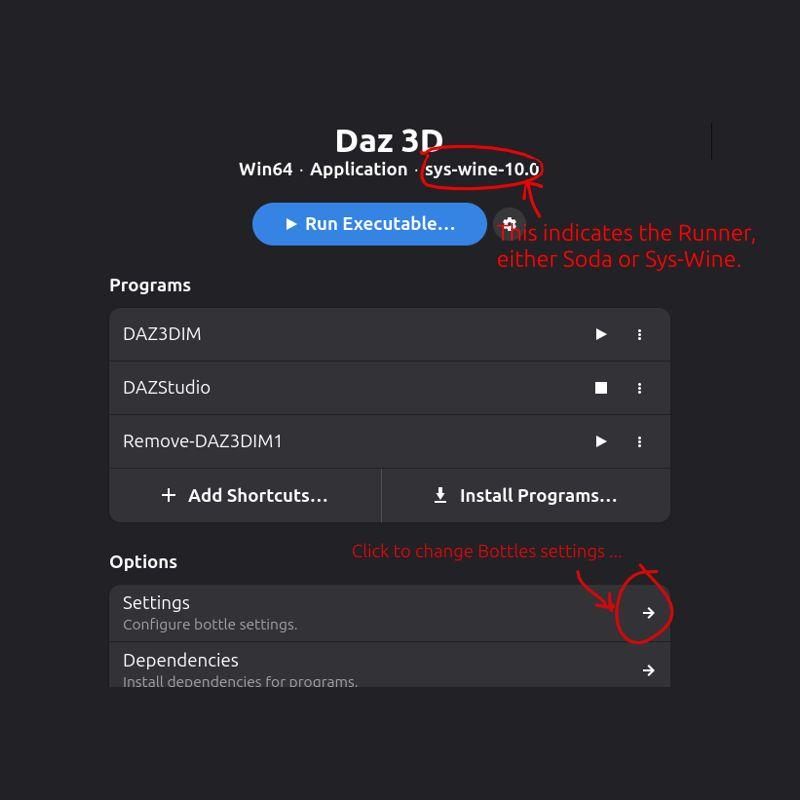
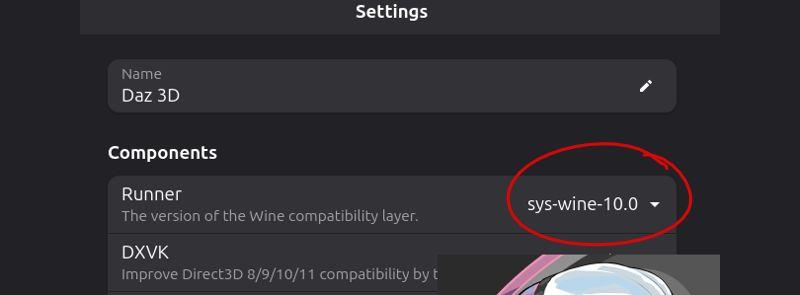
By switching the Runner from Soda to Sys-Wine, this initialization steps run much faster. Updating the settings was simple; however, the switch appears to reset the Daz3D settings as, once again, I had to enter my credentials for my Daz account; the DIM directories also reset to their default. Now, evertime I load a DUF scene I've used before, I see Daz3D rebuilding its metadata, as if populating its data structures anew. The switch from Soda to Sys-Wine comes with a cost, but with the run time speed up it appears to be worth it.
I'm still evaluating the outcome of the change.
--- Update ---
That part about "Daz3D rebuilding its metadata" wan't exactly as I expected. I needed to manually kick off this step.
How did I know this was necessary? One big indicator is that the Smart Content pane displays all products grayed out, even though DIM reports separately that these have been installed. Conceptually there's a disconnect in how DIM sees the database contents and how Daz3D does; hence the need to re-sync the Daz3D content library metadata.
(This is a simplified view of things. If, as in my case, Bottles deployed Windows guest in one branch of the Linux file system -- my home directory -- and the content library files are saved to another sub directory, then the Daz3D Content Directory Manager settings need to be updated beforehand. Only then will the following metadata refresh work.)
To properly rebuild the metadata in Daz3D:
- Bring up the Content Library panel.
- Right click on the panel tab and select Content Database Maintenance.
- In the new pop up window, select Re-Import Metadata and click Accept.
The metadata re-sync took less than two minutes for me. For good measure, i restarted Daz3D and now it sees every asset that I've installed via DIM.
Cheers!
Victoria 4 crashes Daz StudioBejaymac said:
How are you loading it ?
EXP based figures have two problems in DS4.
First is Power Loader, it hasn't worked right since DS4.0, the problem is that it is meant to read the PZ2 files in the runtime folder, instead it heads into the data folder looking for DSF files, and will load anything it finds in there instead of the PZ2 files. We first learned of this issue when people complained about not being able to load the Sub Dragon, instead they got the LE that's part of the Genesis Starter Essentials, the remedy from DAZ was for users to delete the DSB script file and to stop using Power Loader.
Second issue is that since 4.12 they all generate over a dozen circular link errors, this is due to changes made to the Poser Import plugin when the IK system was added to DS4.
AFAIK there have been no fixes for either issue,
PowerLoader works as expected on my side. I can choose to load various group of morphs in the PowerLoader dialogue. All pz2 files are loaded with no issue ~~ Then I don't know about the circular link errors. I didn't find any error or warning messages in DS log... where to identify the error ?
Besides, I don't thing either of the above "issues" shoud lead to a DS crash.
[Released] RSSY Clothing Converter from Genesis 8 to Genesis 9 [Commercial]Joe.Cotter said:
Is this thread still being monitored?
I have a situation where something broke where the product will not function at all. It starts, I can import files but not folders, and when I select convert or force convert, it runs through the list of files as if it is working and then ends up with 0 converts after x minutes. The log file just says "skipping." I have tried to uncheck all of the recommened check boxes but that didn't help. I then tried to uninstall and reinstall and still nothing. It seems to have a cache issue but I have no idea what that file(s) would be or where to find it/them if exists
It sounds like the metadata broke in your Daz Studio. Try selecting one of the checked items and clicking Force Convert. If that works, multi-select the items and try Force Convert
Victoria 4 crashes Daz StudioHow are you loading it ?
EXP based figures have two problems in DS4.
First is Power Loader, it hasn't worked right since DS4.0, the problem is that it is meant to read the PZ2 files in the runtime folder, instead it heads into the data folder looking for DSF files, and will load anything it finds in there instead of the PZ2 files. We first learned of this issue when people complained about not being able to load the Sub Dragon, instead they got the LE that's part of the Genesis Starter Essentials, the remedy from DAZ was for users to delete the DSB script file and to stop using Power Loader.
Second issue is that since 4.12 they all generate over a dozen circular link errors, this is due to changes made to the Poser Import plugin when the IK system was added to DS4.
AFAIK there have been no fixes for either issue,
[Released] RSSY Clothing Converter from Genesis 8 to Genesis 9 [Commercial]Is this thread still being monitored?
I have a situation where something broke where the product will not function at all. It starts, I can import files but not folders, and when I select convert or force convert, it runs through the list of files as if it is working and then ends up with 0 converts after x minutes. The log file just says "skipping." I have tried to uncheck all of the recommened check boxes but that didn't help. I then tried to uninstall and reinstall and still nothing. It seems to have a cache issue but I have no idea what that file(s) would be or where to find it/them if exists
DAZ > Blender > Unity?i am running into the same thing, also a noob. Im running into this using the Golden Palace addon, and its probably similar where the face structure is based on bones and not normal morphs, so they wont load. no matter what I do, I cant get Golden Palace morphs to load into unity unless they are baked, and i want to animate morphs from GP.
Ive spent 3 straight days working on this, and AI keeps having me do sometimes contradictory steps to fix it. Ive tried daz to untiy bridge, daz export, daz export to obj and then import to blender, nothing.
it apparently has to do with how unty handles bones vs morphs. it is fn annoying to not just work.Show us your Daz AI Studio ImagesThese are wonderful! Here are some good ones I did back in May. I lost some files on a different hard drive after formatting C:, so I don't have the prompts any more. So sad your partner got greedy and stopped providing the AI. Could you consider putting an AI on your local machine and training it on your data? There are plenty on GitHub and I've downloaded several. AI tells me how and writes code, but my higher-end machine isn't enough to run an image generator yet, though there is a version of Stable Diffusion that connects online with daily tokens. I've been having AI write code for me because I never learned programming except Access 2003, and I've been away from that for quite a few years. It writes Python or Javascript and I test. So far I've had good results with trying to embed many science fiction story metadata in ChromaDB, a vector database. I started with AnythingLLM which requires no code and is great for beginners. Now, I'm trying to learn LangChain. Fun stuff!
Anyone know of an AI project like DAZ that gets permission to train on its artwork? Right now I'm in GIMP massively altering some cartoons I generated with CoPilot in my drawing style, so I won't infringe on the poor artist's rights before I make my video for YouTube.
Meanwhile, I found these in Amazon Photos so the quality isn't as good as original. Hope you enjoy them. BTW, you can't copyright AI-generated art if you don't alter it, so have fun with these. They are public domain [US Copyright Law]. Enjoy!
Series 1 I tried to get the girl pulling a full hand truck up the stairs but got these. The picture I Frankensteined together in GIMP from old photos and the file boxes in the last one is on this blog post https://www.tumblr.com/danniswrites/775584343217373184/deadly-job-136-file-boxes-by-myself?source=share ; I do love the stair pictures I got! And Victoria is awesome, if only the AI knew what a hand truck looks like. It's hard to find pictures on the Web, too, because they come in many different kinds. Sorry to send you to my blog but I can't find the final photo.
Series 2 is Victoria and Michael in a train station. These came out great!
A Few Questions for Substance 3D Painter UsersJust hoping to pick the brains of any Substance 3D Painter users on here, cause there's a couple of things ...
The first quesiton is regards compatibility with Daz Studio, which of course I know it is capable of doing perfectly, but I'm just wondering if there's some sort of Daz Studio configuration preset to import into the project and export settings to set it all up perfectly for working with Daz Studio. Basically, something that sets-up Substance Painter specifically for using material workflow and channel formats expected by Daz Studio. At the moment I'm still just playing around with getting used to the program itself, but eventually I'm going to have to look into this stuff and thought, well, no point me trying to figure it all out if it's already being done a million times so there's no doubt a known set-up and procedure for it.
The second question is regards working in Substance Painter itself. To be fair to myself here, I think I'm picking it up pretty quick, and for the most part it all works as I would expect it too (which is nice). But there's something very basic that's puzzling me! Say, for example, I drag the "3D Voronoi" texture into the Layers area. It asks me which material channel I'd like to use it in, and indeed it then effects that channel. So I first off all drop it into the "Base Colour" channel, and then repeat the procedure, this time dropping it into the "Height" channel. It does exactly as expected, and I dropped it into those channels because I want the exact same texture to effect both the "Base Colour" and "Height" channels.
But the problem comes when I then start adjusting the parameters for the texture (in this example 3D Voronoi). Obviously, if I adjust the parameters of the "3D Voronoi" that is sitting in the "Base Colour" channel then it does effect it, but the problem is that the "3D Voronoi" that is sitting in the "Height" channel is not following those same parameter changes. So what I'm getting at is, how on earth are we meant to maintain parameter sync of the parameters between the channels, so that when, as in this example, I want exactly the same "3D Voronoi" texture parameters in both the "Base Colour" and "Height" channels.
It seems like something that should be very obvious, but I have to admit it's got me really baffled that one has!Importing DAZ Decals into Blender?Thanks Crosswind, I'll see if I can get Make Decal to work for me.
And thanks to you, Padone.
I can see that Diffeo considered the decal upon import, it just doesn't show on the figure for some reason.
Enjoy your vacation! 8^)Daz 3D is part of

Connect
DAZ Productions, Inc.
7533 S Center View Ct #4664
West Jordan, UT 84084Licensing Agreement | Terms of Service | Privacy Policy | EULA
© 2026 Daz Productions Inc. All Rights Reserved.