-
Not To Worry, Friend, "There's Always Another Sale™"
Will the items on the loyalty product page be there for the entire month of December? Example, the Victoria 8 Pro Bundle / Michael 8 Pro Bundle.
Compatible figures and required products. How restrictive are these?Are you talking about the required products or the compatible products? I don't know which bit you are answering.
I read your links, but I'm none the wiser. It's all Greek to me. I have no idea what any of that means in terms of knowing whether I can use a product with the G3 nad G8 figures.
So if it says it's compatible with Victoria 4, will it also load on Genesis 3 or 8?
Help properly using the female anatomical elements.As agent unawares says, when you load a figure such as Victoria 8, she loads with the customized mesh and textures designed by Daz. What you then add the AE, they update the mesh by “geografting” a new mesh over the previous one. Since the AE are common to lots of characters, the AE don’t, however, have any way of automagically knowing what texture they should have. So you have to reapply whatever character skin you’re using after applying the AE. That way, the texture portion of the skin associated with those bits gets properly applied.
Compatible figures and required products. How restrictive are these?OK, Hi. New user here.
I'm trying to gather the bits I need to construct figures for my Indie Fantasy novel. (Two albinos in black cloaks with swords, two dark skinned warrior types in armour with swords (or in roman style clothing plus swords would do.), 1 man and 1 woman of each.
I am finding it very frustrating that I find things that would look good but the product page says (for example) 'compatible figures' Victoria 4/Michael 4. It may also say something like 'required products' xyz body morphs and facial morphs. Sometimes it may say something like 'required product' Michael 4.
So, the question. If it says compatible with Victoria 4, does that mean that it will not work on Genesis 3? Or will that thing in the Daz window that you can use to make something fit (sorry, I can't remember what it actually says and I'm not able to run the program right now to find out) be able to adjust it to Genesis 3?
I assume that when it says required products then it actually will not work at all without those products. Is that right?
Thank you.Not To Worry, Friend, "There's Always Another Sale™"thanks Cris!
I just tried the victoria hd by itself and with new product and see what you mean, reported.
Not To Worry, Friend, "There's Always Another Sale™"I just tried the victoria hd by itself and with new product and see what you mean, reported.
3D Print at home using GAMEPRINT3D Print at home using GAMEPRINT.
We’ve added a new “Download STL” button to our plugin and wanted to tell what happens when you click it.
First, why should you print your Daz3D models? Well it’s great way to learn how to 3D print, and hand paint on your own. Also, it's a great way to celebrate your Daz modelling efforts, and bring your hard work to life.
Your model will be uploaded to our server and repaired without many configurations steps. Removing all manual work and automating the process for you.
Here's exactly what we do.
First, we analyze and scale your model depending on the size 3, 7 and 12 inches and look for thin areas at the same time. Thins areas could be hair, clothes, fingers, wingtips, etc. We then thicken these regions to ensure printability.
We also scan for the intersection between different meshes, this could acquire when you add clothes or hair to let's say Victoria from Genesis 8 series. So we rebuild the mesh of the model and ensure all touch points are merged in the meshing step.
We also remove all internal geometries to ensure that you print only the outer shell and avoid wasting any time, and material printing something on the inside, and we do your slicer a big favour with this step as will make your model slice seamlessly.
After you click the button, it usually takes 4-6 minutes depending on the complexity of the model. You will have a progress bar, and you can close your browser tab if you like, we usually email you when the STL is ready to download.
Here are a few pictures showing BEFORE and AFTER using our plugin. To further explain the impact of thickness adjustment I’ve added an AFTER images to show what our fixer does to different scales.
Note, that printability is the top priority for this process and should beat renderability. So the outcome is more in favour of printing, and specific areas could get swollen! This is specific with miniatures, as there are a lot of thin areas when models are scaled down to 3 inches.
This image has been resized to fit in the page. Click to enlarge.
This image has been resized to fit in the page. Click to enlarge.
A good hack is to remove things that don't scale nicely, i.e. eyelashes and transparent parts from the model as they will look abnormal when thickening.
This image has been resized to fit in the page. Click to enlarge.
This image has been resized to fit in the page. Click to enlarge.
Another good trick is to remove any unnecessary parts of the scene. Our fixing algorithm’s resolution is distributed equally around the bounding box. If something exists in the scene you don't want to print, remove it to speed up the process and give more resolution to things that have importance.
"We hope you enjoy bringing your character to life and enjoy 3D printing it seamlessly using our automatic repair/optimisation plugin designed especially for Daz 3D characters. Please keep the feedback coming, and we look forward to seeing your models come to life."
GAMEPRINT
Identify Anyone?hahah This same question comes up nearly once a week. I THINK that it's Cathy's shape with Danny's textures.
Help properly using the female anatomical elements.Load Genesis 8 Basic Female.
Load her lady bits.
Load Victoria 8 All Maps.
There are no longer separate genitalia presets for main DAZ characters, they load hierarchically with the main skin preset if you have the genitalia loaded.
3D Art Freebie Challenge-November 2017-Remembering the Fallen -Main Thread OnlyDAZ 3D Art Freebie Challenge November 2017
"Remembering the Fallen""Those of us left"
Free stuff
Genesis 8 model,
SubDragonLE - came with 4.10
Dragon poses - Anton's dragon poses - http://www.fantasy3d.com/pfiles/dl.cgi?dir=characters&char=Other Characters:Dragon
Spear - https://www.daz3d.com/the-malaik-lance
Sword - http://www.sharecg.com/v/69647/browse/11/Poser/Sword-pack-ver-2
Fir Trees - http://www.morphography.uk.vu/dlheidi.htmlOutfit
Bardot Skirt (used with chain texture, though you can't really see it in this render) - from Dforce starter essentials
Little Black Dress - https://www.most-digital-creations.com/little_black_dress_g8.htm
Boots and Top - Ghastly's - http://www.sharecg.com/v/71947/view/21/DAZ-Studio/Ghastlys-Skimptastic-Battle-Outfit-Genesis-1?interstitial_displayed=Yes
Cape - Dark Storm Arm Armor - from Genesis 3 Female Starter essentials
Leopard prints - https://danielak.deviantart.com/art/Reptile-Skins-and-Animal-Fur-146421123
Most fabrics - Iray leather shader, colored, modified for fursPaid stuff
Terradome 3, using snow texture.
HSTW Body Morph Kit,
HSTW Head Morph Kit.
Victoria 5 Elite Ponytail.3D Art Freebie Challenge-November 2017-Remembering the Fallen -Main Thread OnlyHey... re-posting as the first time it's not showing from my end.
DAZ 3D Art Freebie Challenge November 2017
"Remembering the Fallen""Those of Us Left"
Free stuff
Genesis 8 model,
SubDragonLE - came with 4.10
Dragon poses - Anton's dragon poses - http://www.fantasy3d.com/pfiles/dl.cgi?dir=characters&char=Other Characters:Dragon
Spear - https://www.daz3d.com/the-malaik-lance
Sword - http://www.sharecg.com/v/69647/browse/11/Poser/Sword-pack-ver-2
Fir Trees - http://www.morphography.uk.vu/dlheidi.htmlOutfit
Bardot Skirt (used with chain texture, though you can't really see it in this render) - from Dforce starter essentials
Little Black Dress - https://www.most-digital-creations.com/little_black_dress_g8.htm
Boots and Top - Ghastly's - http://www.sharecg.com/v/71947/view/21/DAZ-Studio/Ghastlys-Skimptastic-Battle-Outfit-Genesis-1?interstitial_displayed=Yes
Cape - Dark Storm Arm Armor - from Genesis 3 Female Starter essentials
Leopard prints - https://danielak.deviantart.com/art/Reptile-Skins-and-Animal-Fur-146421123
Most fabrics - Iray leather shader, colored, modified for fursPaid stuff
Terradome 3, using snow texture.
HSTW Body Morph Kit,
HSTW Head Morph Kit.
Victoria 5 Elite Ponytail.Help properly using the female anatomical elements.As I typed that subject I had to snicker. Feel free to hit me with all the jokes that came to mind when you read it. I can take it. I am a big boy.
So i have been playing with Daz for a little bit now and love it. I enjoy this so much so, that I decided to buy the Gen 8 pro-bundle for myself, and am enjoying that content as well. With all that said, it appears that i have an anatomy preset for female genetalia, and seeing that gives me a few ideas, but when i tried to apply it, the skin is all screwed up. I tried to copy and past skin materials from Victoria 8, but it doesn't look like it has worked. The genitalia is barker and there is a clear outline of where the part was slotted into the model. I just want the skin to match the surounding skin. Any ideas as to how to make that happen?
Thanks.
How do I get Victoria's clothes off?LOL...thought that would make ya'll smile! Anyway, I just got victoria 4.2 and love her! Thank you so much guys!
But I can talk her into taking off that terrible purple undergarments! She's shy you see?Any idea's on how to take off her clothes so they don't interfere with other outfits I get her into?
Thanks and hope this brought a laugh or two...
Danny
Buy her a beer or two
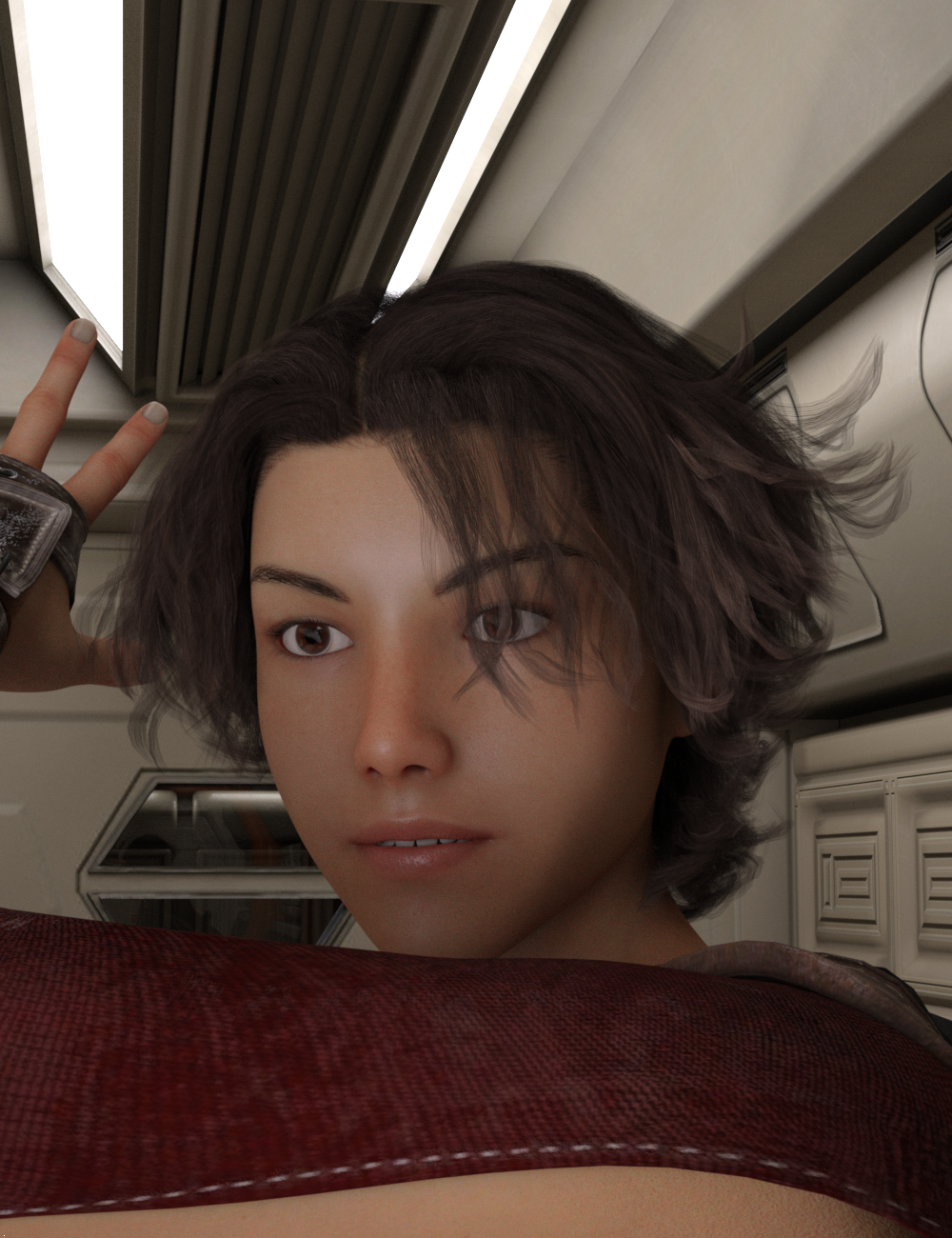
Daywalker's delightful delights.A new image of the character I made. For this one, I wanted her to have a more normal appearance, so I used a combination of the materials from FWSA Elizabeth for Victoria 8 and the eye textures from the Growing Up for Genesis 3 Female Merchant Resource. The set is Kindred Arts Poseiden Station Iray with one additional emissive surface set as a "ghost light" for facial illumination. After seeing how she turned out, I do plan to do her as a Genesis 8 Female.
 Specific fashion model style characters?
As far as morphs, I think these get pretty close:
https://www.daz3d.com/kallisto-for-genesis-3-and-genesis-8-female
https://www.daz3d.com/dharla-for-genesis-8-female
https://www.daz3d.com/fwsa-elizabeth-hd-for-victoria-8
And at least the first and last one here:
Looking for the name of this female modelHmmm She looks familiar. Maybe a modified version of Victoria 8? You might ask @Zeddicuss - It looks like they use her in many of their product promos. :)
yes, I think a slight modification of Victoria 8.
Looking for the name of this female modelVictoria 8 in a nut shell.
Is G3 the new V4 ?I generally prefer Genesis 3 overall, because I have the most stuff for it and I'm too lazy to move every single morph over to Genesis 8, lmao.
That said, what I use Daz for, I pretty much use everything I can get my hands on: Genesis 3, Victoria 4, David 5, Laura 3, Monique 8... (even non-Daz characters like Dawn and Baby Luna. Dusk is too much of a bulky butterball for me to use) I don't limit myself to just one generation or figure set entirely. And with programs like CrossDresser (which sorely needs an update, as it's showing it's age, bad), Marvelous Designer and Blender, fitting clothes not native to one generation to another is fairly easier, though not without its problems.
But I often prefer to use Genesis 3, simply because there's more variety and utilities out there for it. Time will tell if Genesis 8 has the same staying power.
Looking for the name of this female modelHmmm She looks familiar. Maybe a modified version of Victoria 8? You might ask @Zeddicuss - It looks like they use her in many of their product promos. :)
Many?!?
 I would be hard pressed to not find her in any of their promos! I think this is the figure:
https://www.daz3d.com/sasha-for-victoria-7
Looking for the name of this female modelHmmm She looks familiar. Maybe a modified version of Victoria 8? You might ask @Zeddicuss - It looks like they use her in many of their product promos. :)
Daz 3D is part of

Connect
DAZ Productions, Inc.
7533 S Center View Ct #4664
West Jordan, UT 84084Licensing Agreement | Terms of Service | Privacy Policy | EULA
© 2026 Daz Productions Inc. All Rights Reserved.