-
Daz, what's happening?
I'm probably going to get a lot of flak for this (although I might add, I'm glad someone else has noticed the quality of the merchandise being pushed out into the store), I'm honestly seriously disappointed and upset at the disparity between Male and Female. G8F is getting an average of 7-12 items every other day, whereas G8M is lucky to get more than 3. When G8M first released, there was only maybe a 120 difference between the two figures, for obvious reasons that G8F releases months prior. But now it's just getting ridiculous, with the differences entering 700.
It's been said that male products don't sell as well as female products.
G8F has Victoria, Olympia, Stephanie, Teen Josie and Monique. G8M has Michael (opposite to Victora), Lucas (opposite to Stephanie) and Darius (opposite to Monique). Where's Leo 8 at, opposite of Olympia, or Teen Ryan 8, opposite of Teen Josie?
Don't know about Leo, but we have not seen Ryan's female counterpart yet, since he was paired with Julie, not Josie.
Also not to mention, and it's probably just a personal pet peeve of mine, but I can't STAND how bland and plastic the characters' palms and soles look like that are being pushed out for G8M. Michael 8's palms and soles look so life-like and detailed, yet all the characters coming out after him just have a single layer of color going across their palms and soles making them look less human and more mannequin-like.
I hope I wasn't being too harsh or critical. I'm not a vendor myself, I know how hard it can be to make figures and such, but I do hope my criticism about the disparity between the two sexes and the lack of detail to the characters' palms and soles would help bring more life into the store. I used to buy an ocassional item here and there, and now I'm just checking the store every day and leaving with disappointment. I don't render a lot, my PC can barely handle more than two figures, but it's fun to play around and create a character and give them a story, possibly for a fictional story.
Not all vendors will bother with minute details like details on the palms of the hands or soles of the feet, for various reasons.
Not To Worry, Friend, "There's Always Another Sale™"There were big differences between G2 and G3. Though the morphs may have appeared to look and work the same, the workings "under the hood" were different. With G3 and G8, the differences are more subtle. G8 bends better, and does expressions a lot better, but the basic shape is so close to G3 that one can convert clothing between the two generations very easily using Sy's tutorial on DeviantArt.
I would say that techniology-wise there is less diffrence between Genesis 3 and 8 as between Victoria 4 and 4.2. From a user standpoint, the biggest difference is the incompatible poses, but here is a free pose conversion utility with a simple dial that allowes Genesis 3 poses to be directly applied to 8...
Daz, what's happening?I'm probably going to get a lot of flak for this (although I might add, I'm glad someone else has noticed the quality of the merchandise being pushed out into the store), I'm honestly seriously disappointed and upset at the disparity between Male and Female. G8F is getting an average of 7-12 items every other day, whereas G8M is lucky to get more than 3. When G8M first released, there was only maybe a 120 difference between the two figures, for obvious reasons that G8F releases months prior. But now it's just getting ridiculous, with the differences entering 700.
G8F has Victoria, Olympia, Stephanie, Teen Josie and Monique. G8M has Michael (opposite to Victora), Lucas (opposite to Stephanie) and Darius (opposite to Monique). Where's Leo 8 at, opposite of Olympia, or Teen Ryan 8, opposite of Teen Josie?
Also not to mention, and it's probably just a personal pet peeve of mine, but I can't STAND how bland and plastic the characters' palms and soles look like that are being pushed out for G8M. Michael 8's palms and soles look so life-like and detailed, yet all the characters coming out after him just have a single layer of color going across their palms and soles making them look less human and more mannequin-like.
I hope I wasn't being too harsh or critical. I'm not a vendor myself, I know how hard it can be to make figures and such, but I do hope my criticism about the disparity between the two sexes and the lack of detail to the characters' palms and soles would help bring more life into the store. I used to buy an ocassional item here and there, and now I'm just checking the store every day and leaving with disappointment. I don't render a lot, my PC can barely handle more than two figures, but it's fun to play around and create a character and give them a story, possibly for a fictional story.
Not To Worry, Friend, "There's Always Another Sale™"If the end results appear identical I'm not sure if it is important whether the versions are exactly the same or not.
My take on that is that G3 is better for bending and has several other advantages to G2... but when you're moving a skin mat and a morph from Generation 4 or Generation 3 to Genesis, Gen2 is is the last generation that will take those earlier skin mats without Cayman Studio's geografts - and geografts don't play well with LIE and other geografts...
That creates a situation where although you can get something the Victoria 4 or 3 era to work with Genesis 3 - sometimes you're better off stopping at Genesis 2 and dealing with the unique problems that generation suffers from.
And when I first got into this, I had no idea what all of this meant. Now I'm a DAZ-nerd through and through.Im new and purchased content missing fileNo you need to take note of the required products for the items in the store
Kerry HD for Victoria 7
SKU:38573
Artist:
Compatible Figures:
Genesis 3 Female
Compatible Software:
DAZ Studio 4.10
Required Products:
Genesis Evolution: Head Morphs - where are they hiding?"that work around"
Unfortunately, amandamilobooks, there is no "that", meaning no single workaround that works for everything. As scorpio indicated, there are various figures that DAZ has produced over the years that differ from one another in a variety of fundamental ways. A new user can easily become confused by this, especially if they do not understand these differences. To begin with, Genesis refers to a specific figure. Genesis 2 (Males and Females) are different figures again. Similarly, Genesis 3 (Males and Females) are yet again different figures. And so forth. With each of these generations of Genesis figures denoted by the numeral, changes and advances in the technology that they use renders them incompatible in certain ways and to certain degrees with their predecessors. These changes mean that content designed specifically to work with a figure from one generation will not necessarily work with a figure from another generation. For example, the Genesis: Evolution Head Morphs product was designed for Genesis (Genesis 1, if you like), and will not work out of the box for subsequent versions (Genesis 2, 3 or 8), nor will it work with previous generations of DAZ figures such as Victoria 4, Victoria 2, etc. (BTW, I would suggest avoiding the use of shorthand terms like "Gen" in reference to Genesis, as it can lead to confusion. If you say Gen 3, you might mean Genesis 3, but someone else might think you are referring to generation 3 - which would mean figures such as Victoria 3, Aiko 3, Michael 3, etc.)
As for the "workarounds" that scorpio referred to, they can be of two types:
1. User-created cludges that are often complicated and may yield varying results:
and
2. Conversion utilities designed for the purpose packaged for sale in the store.
Rule number one is to be very aware of the differences between the various generations of figures and their associated content, and using one with another will require some sort of conversion, possibly with mixed results.
As for where you can find the workarounds or conversion utilities, that will depend on which generations of figures you are wanting to convert to and from, as well as what type of conversion you are trying to do, as converting morphs is different than converting poses which is different than converting hair which is different than converting clothing, etc.
If you could be specific about what generation of figure that you are trying to convert from and what generation of figure you are trying to convert to (i.e Genesis 2 to Genesis 8), and the type of content (or, better yet, the specific content) that you are attempting to convert, that would help others direct you to potential solutions. Warning: do not confuse morph conversion with conversion of morph packages. Morph packages are items like those you have referenced - Genesis: Evolution Head Morphs and Genesis 3 Male Head Morphs are two morph packages for different figures, each containing a large number of morphs designed to change very specific parts of the figure's anatomy in very specific ways. They are largely intended to be used to create or modify characters based on the respective figures. Confusion can arise, since one often finds the resulting characters, or those purchased premade in the store, referred to themselves as "morphs". That is that shorthand problem again, as the should more properly be referred to as character morphs. I mention this because workarounds and/or utilities may exist to convert character morphs from one generation figure to another, but I am not aware of anything that would allow wholesale conversion of morph packages that are available in the store, such as those you mentioned and others, from one figure to another. That is why there are discrete morph packages offered in the store for head and body morphs for each separate figure. For example, there are head and body morph packages for each of the male and female figures for each generation (with the exception of the Genesis figure, which is androgynous) - so you will find male and female head and body morph packages for generation 3 figures, generation 4 figures, Genesis, Genesis 2, Genesis 3 and Genesis 8.
Confused with all the figures names: Genesis, Victoria...I think many artists must remember too that Daz probably "phases" out some of the different character version in time. This being that many artists have spent thousands, maybe even millions of hours fashioning their own characters, morphs, clothing, ect.... for sale on the marketplace. Once a version is created, a good company can't just axe that version and tell the customers to move onto the next version because so many artists are still using those versions. For example, many artists still sell to this day, new items for Victoria 4 because they still like that version. Just my take on the matter. Cheers all!
Daz, what's happening?LoL...."(insert sexy adjective of choice) model poses for ( insert character of choice)" which contain maybe a slight variation of every other pose set of a similar name for all other generations. I might be more inclined to buy a new set called "normal people standing around, looking average.".
That's why I was glad to see Prosimo's Daily Things Poses set appear in the store and bought it right away.
Warning! Contains sexy poses like Vicky looking at her watch.

I particularly like the "sexy pose" where it looks like she's sniffing her armpit to see if she needs deodorant. hahah
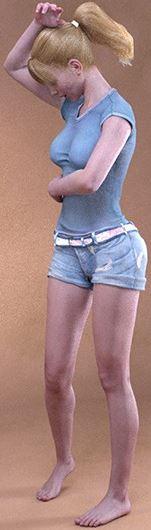
I know, I know, that's not what the pose is supposed to be, but I swear that's what I thought it was at first glance. lol
...sure looks like it.
Daz, what's happening?LoL...."(insert sexy adjective of choice) model poses for ( insert character of choice)" which contain maybe a slight variation of every other pose set of a similar name for all other generations. I might be more inclined to buy a new set called "normal people standing around, looking average.".
That's why I was glad to see Prosimo's Daily Things Poses set appear in the store and bought it right away.
Warning! Contains sexy poses like Vicky looking at her watch.
Now, those are some sexy poses! Actually, it seems like a pretty varied set. Into the WL for now. :)
How do you switch between orbit and pan in the perspective cam?did you know that Victoria 4 in less than five years has become, with Genesis, G2, G3 and now G8, a great-great-great grandmother? Only rabbits can breed that quickly
LOL I had to laugth hard about that comparison.
Did you read my post here? The single most useful feature needed in the next Daz Studio
I would use the Aim At Selection action default shortcut Ctrl+Shift+A - this works like the Point At Property but just once not continiusly - with the Perspective View and Cameras in a way that the possition of the current View stays as it was but it gets rotated to focus the current Selection in the Scene.
While on the other hand the Frame At Selection action default shortcut Ctrl+F doesnt rotate the View but does something like a Pan and a Zoom to center the focus to the selected node in the Scene. I have worked for years now with only using Frame At Selection Orbit and Pan with my customized Mouse Button Modifiers and had no problem with that.
I would suggest you to use the default or some customized Mouse Button Modifiers for the Viewport 3D navigation. I avoid to use the View Control gizmos in the corner and autohide it.
The Qube I think is quiet usefull (I like my findly Companion Qube™
 ) - not just for orientation on which side your view is but I also like the Vantage function of clicking the Qubes sides Edges & Corners for to aligning the view. I think there is nothing wrong with the Qube.
Its a little screen gizmo Addon in DazStudio and also something similar exits in Poser to simplifiy the 3D Navigation for beginners. But I dont recomment you to use it all the time.
If I have to compare the DazStudios 3D navigation with other 3D software like Blender and ZBrush im my pipeline they all not just have different default controlls but also dont provide such little screen gizmo Addons.
So my first start with 3D software in common leads me to the conclusion that before I can work with all these sofware I have to learn at least one technic to control the 3D navigation and set them up almost the same in all 3D software if possible. The sometimes mindblowing shortcuts and 3D navigation modifier settings in ZBrush is another story but at least Blender and DazStudio are very customizable.
See my thread for more info: changing Mouse Button Modifiers
I've also added the post: Viewport Navigation Guide + My custom Mouse Button Modifiers to my thread
I belive I saw something similar years bevore but now I've created my own because after some posts and discussions that I've had in the last weeks I think there should be somethink like this with everything on one image.
I've also made a quick Google Search for: DazStudio mouse button modifiers
- I found this discussion: DAZ Studio Camera Controls via Keyboard and Mouse - Daz 3D Forums
- The official Carrara Guide: Daz Documentation Center: Home » Old ArtZone Wiki » Public » Software Guides » Carrara » Carrara 6 » Chapter 7: Setting Cameras
Camera Navigation
Carrara lets you directly manipulate the current camera by using the camera controls to track, dolly, pan, and bank the camera.
Use the camera controls to interactively adjust the position of a camera.
To work faster, you can move and orientate the camera with a 3-button mouse using the following shortcuts:
-
Option/Alt + Left Mouse Button will rotate the camera (Dolly).
-
Option/Alt + Right Mouse Button will Track the camera horizontally and vertically.
-
Option/Alt + Middle Mouse Button will move the camera back and forth.
-
If your mouse is equipped with a Mouse Wheel you can use it to move your camera back and forth.
I think as I once started with Daz Studio I found this - read half of the manual and realized that it was of Carrara not for Daz Studio.
But I like these shortcuts and I changed the Daz Studio Mouse Button Modifiers to that. Orbit: Alt+LeftMouse | Pan: Alt+RightMouse | Zoom: Alt+MiddleMouse
Son of a...
Almost 2 years and never knew that was possible. Never even noticed that option @ the bottom of the custo window. /slaps self
Time to re-bind with Blender-style keys. Woot.-
How to Customize Daz Studio - to speed up Workflow!? [WIP]

- Is there no official Documentation for this cant find any?
LK Posts: 23 August 2016 @ DAZ Studio Camera Controls via Keyboard and Mouse
default? Daz Studio: Mouse Buttom Modifiers ?
Ctrl+Alt+LMouse - Rotate Camera
Ctrl+Alt+RMouse - Move ? camera
Ctrl+Alt+MMouse - Zoom camera
- This is what I've found as I used the Documentaton Center Search:
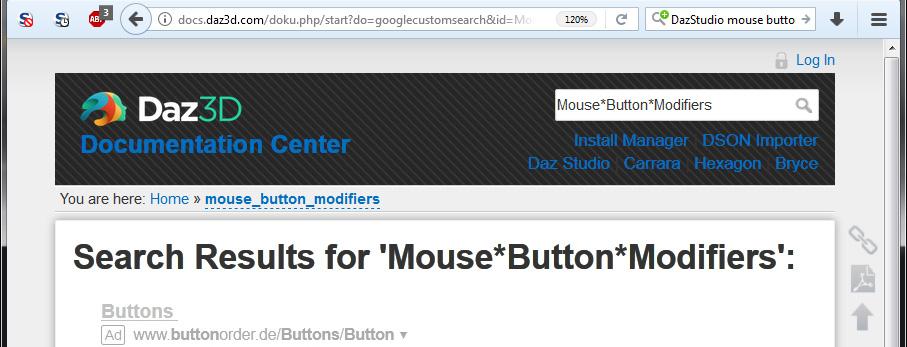
- Workaround: use "site:daz3d.com" in your favourit internet browser search engine - then create a Bookmark and you can use it to start your searches with site:daz3d.com in front. I've read this hit somewhere from someone here in this forum.
- Of Course you can also read and search the DAZ Studio 4.x User Guide - PDF in your browser.
- But this looks also interesting: Home » Public » Software » Daz Studio » v4.x » Reference Guide » Scripting » API Reference » Object Index » DzViewportMgr
Greetings
Syrus
Daz, what's happening?LoL...."(insert sexy adjective of choice) model poses for ( insert character of choice)" which contain maybe a slight variation of every other pose set of a similar name for all other generations. I might be more inclined to buy a new set called "normal people standing around, looking average.".
That's why I was glad to see Prosimo's Daily Things Poses set appear in the store and bought it right away.
Warning! Contains sexy poses like Vicky looking at her watch.
I particularly like the "sexy pose" where it looks like she's sniffing her armpit to see if she needs deoderant. hahah
I know, I know, that's what the pose is supposed to be, but I swear that's what I thought it was at first glance. lol
I thought she was "taking a smellfie" too. LMAO
Laurie
Daz, what's happening?LoL...."(insert sexy adjective of choice) model poses for ( insert character of choice)" which contain maybe a slight variation of every other pose set of a similar name for all other generations. I might be more inclined to buy a new set called "normal people standing around, looking average.".
That's why I was glad to see Prosimo's Daily Things Poses set appear in the store and bought it right away.
Warning! Contains sexy poses like Vicky looking at her watch.
I particularly like the "sexy pose" where it looks like she's sniffing her armpit to see if she needs deodorant. hahah
I know, I know, that's not what the pose is supposed to be, but I swear that's what I thought it was at first glance. lol
Anyone know what outfits these are in the Jenn for V7 promo?I'd guess your looking for Dragon Rider outfit?
Additional Products used in Promo Images:
some of it looks like that, but the boots and the chain bikini thing don't look like they're from that outfit..
Anyone know what outfits these are in the Jenn for V7 promo?I'd guess your looking for Dragon Rider outfit?
Additional Products used in Promo Images:
Anyone know what outfits these are in the Jenn for V7 promo?Daz, what's happening?LoL...."(insert sexy adjective of choice) model poses for ( insert character of choice)" which contain maybe a slight variation of every other pose set of a similar name for all other generations. I might be more inclined to buy a new set called "normal people standing around, looking average.".
That's why I was glad to see Prosimo's Daily Things Poses set appear in the store and bought it right away.
Warning! Contains sexy poses like Vicky looking at her watch.
Oooooo! Thanks for the heads up, wishlisted pronto :)
Im new and purchased content missing fileBeing new to daz im still learning my way around but i purchased the kerry victoria 7 pack. I downloaded it via the daz manager, but when i go to load her to my scene it pops up:
Missing File "data/daz 3d/genesis 3/female/morphs/daz 3d/victoria 7/ctrlvictoria7.dsf"
After which the hair ect... does not render correctly. Any help is greatly appreciated.
Daz, what's happening?LoL...."(insert sexy adjective of choice) model poses for ( insert character of choice)" which contain maybe a slight variation of every other pose set of a similar name for all other generations. I might be more inclined to buy a new set called "normal people standing around, looking average.".
That's why I was glad to see Prosimo's Daily Things Poses set appear in the store and bought it right away.
Warning! Contains sexy poses like Vicky looking at her watch.
What's this character with the yellow make up from Elianeck's light set?It's Sybil for V7: https://www.renderosity.com/mod/bcs/sybil-for-victoria-7/116951/
Understanding ContentYou may have bought it with the intent to use in Carrara, but the content was made in Poser format. The Runtime folder is a legacy of when Daz made the millenium figures (Victoria 1 and Michael 1) to be used in Poser. At that time, Daz Studio did not exist. Runtime = Poser. Studio can read it. Carrara can read it. But runtime is NOT the native format of Carrara. In terms of Runtime, Studio and Carrara are in the same boat. Can read runtimes because can load and render old Poser content.
Daz Documentation Center says....
http://docs.daz3d.com/doku.php/artzone/pub/tutorials/poser/poser-misc41
I think 90% of the stuff in my runtime folder is stuff I bought in the DAZ store to use in Carrara. Like V4 stuff etc.Daz 3D is part of

Connect
DAZ Productions, Inc.
7533 S Center View Ct #4664
West Jordan, UT 84084Licensing Agreement | Terms of Service | Privacy Policy | EULA
© 2026 Daz Productions Inc. All Rights Reserved.