-
Freja 9
I opened the boat up first thing and tried to see if there was a morph to get rid of it, but couldn't find it. And if I was out in open water when a storm blew-up, I would not want that tent over me, because if you need to bring down the sail, that tent will get in the way, or trap water in the boat, or just help a wave flip you over.
The problem with anything ancient that was a textile or leather, is that there is precious little that survives to the modern age. As one website I was reading noted, what is found is generally the best items a person had, not everyday wear. I understand now why Sutton Hoo was such a great find. I actually lived down the street from it when I was stationed in East Anglia.
I'm looking for this girl angels-secrets-lingerieIt looks like they've been using variations on this character since at least G2, so it's probably just a custom morph.
https://www.daz3d.com/celestial-poses-for-genesis-2-female-s
Genesis 9lilweep said:
Serene Night said:
Still waiting for masculine content to drop. We've had a ton of female stuff, but in order for me to invest in g9 I really need a ton more morphs, a way to import my existing g8 characters and better male muscle morphs.
i imported all my g8 morphs to g9 pretty easily using the G8 Clone for G9 and using transfer utility (transfer morphs only, transfer Favorites only)
unfortunately, didnt transfer rigging, so just need to remember to 'adjust rigging to shape' after dial spinning any of my G8 morphs on G9.
I transferred the things I wanted to genesis 9 but I find native content works better, plus without the hd it isn't the same look.
HH Sayble for Genesis 8.1 Female [Commercial]Herschel Hoffmeyer said:
black_angel_x said:
I always waited for the matching char out from Mystique 2, sadly the Model delivered isn´t as nice as the Mystique 2-Version. I mean the Mystique 2-Version hat that special touch between natuarl beauty and beauty idealized but now it just look like the beauty idealisazion was overdone. I kind of hope the real Mystique 2-Version will come out too. just my opinion.
Outside of the breasts, all the details in the Mystique 2 character are actually turned up (for the body) and the face was not mine. Her skin tone is more tan. Is it mostly the body or the face we're referring to? I'm just confused and trying to narrow the reason. I think someone prior to you said the same thing that all dials are turned up on Sayble over Mystique character. Like I said, outside of the breasts, all dials are about 60% of that character. The breasts in the Mystique character were the included breast morph in the Mystique 2 line.
Sorry for resurrect this, I hope you dont mind, but I didn´t found a way to contact you outside of the DAZ-Forum. Thank you for clearing this up for me, it´s like I suspected, a different face and I still searching for that.
Last year was a little bit rough for me, so I was occupied with other things. Can you give me a hint where to look for it, somehow I seems I saw this face before but I can not make out where, it just bugs me ;-)
BTW: I realy like all your work here, you are a great artist and if I find/get the matching face, I promise I buy Sayble too, just to appriciate your work on it (even if the body was not that important to me) :-)
slow down gen 8 famLAG while posing seems to be a common theme over the past couple of years, I do wonder if it's the poor IK system that's the cause of it.
You don't have long load times, your log shows the base G8F loads in 45 seconds, there are people around here that would kill for load times that short, as it takes them 15 minutes or more to get the base G8F to load.
Almost all of those errors are down to you not having the Head Morph pack, the Body Morph pack and the Expressions pack installed.
AIUTO...CHI CONOSCE L’ITALIANO? PARTE TREDICITiziano said:
Imago said:
Tiziano said:
Peccato che queste siano in un formato che non posso usare.
Che formato è? Spesso e volentieri Carrara o Blemder possono aiutarti. E poi trovi bizzeffe di servizi gratuiti di conversione online, basta cercare "3D format conversion" e sei a posto. Essendo un semplice prop non devi preoccuparti di rig o morph.
Il formato è .dae.
il DAE è importabile in DAZ|Studio e anche in Blender, per dire
AIUTO...CHI CONOSCE L’ITALIANO? PARTE TREDICIImago said:
Tiziano said:
Peccato che queste siano in un formato che non posso usare.
Che formato è? Spesso e volentieri Carrara o Blemder possono aiutarti. E poi trovi bizzeffe di servizi gratuiti di conversione online, basta cercare "3D format conversion" e sei a posto. Essendo un semplice prop non devi preoccuparti di rig o morph.
Il formato è .dae.
Apply custom morph without distorting clothesYou might need to create a projection morph
Apply custom morph without distorting clothesIt sounds as if the morph is baking the figure's displacement in, though I am not sure why it doesn't then move the whole figure on application. You should have as few modification as possible applied to the figure when creating morphs.
Request: Please List Products Used in PromosOpen request to artists: can you please list the products you used in your promo images?
Example: you make a model named Jane Doe for Josephene 8 and use Haydina Hair, Classic Bikini, and Sparkling Jewelry in the promo images.
Would it be possible to actually put IN the notes Haydina Hair, Classic Bikini, and Sparkling Jewelry?
I ask because there are a lot of characters where I want to buy the character AND the hair in the promo, but I can't find the latter.
Here's a good example:
https://www.daz3d.com/samantha-for-genesis-8-female
I have the character. What's the hair? Who knows?
The same goes for hair packages. On a scale of 1-10, I think the model used in the promo image is 12 beautiful.
https://www.daz3d.com/alyssa-ponytail-hair-for-genesis-8-females
What model is it? Who knows? Is it a custom character that doesn't exist anywhere? Is it one that exists on a different site?
It's one of the reasons I love Sabby's stuff over on Renderosity -- 99% of her character models list everything used in the promo images, so I can put together the whole set instead of just a bald, naked morph.
I'm not the only one who would benefit. In the couple of weeks I've been here on the forums I've seen at least a dozen threads to the effect of "can anyone tell me who this model/hair is?"
Just a request from a humble customer. :D
Thank you!
Genesis 9Serene Night said:
Still waiting for masculine content to drop. We've had a ton of female stuff, but in order for me to invest in g9 I really need a ton more morphs, a way to import my existing g8 characters and better male muscle morphs.
i imported all my g8 morphs to g9 pretty easily using the G8 Clone for G9 and using transfer utility (transfer morphs only, transfer Favorites only)
unfortunately, didnt transfer rigging, so just need to remember to 'adjust rigging to shape' after dial spinning any of my G8 morphs on G9.
What are the default settings for Genesis 9 eyes?MimicMolly said:
If you want to create morphs in an external app, it's better to use the Dev Tools load version of G9. It will load without eyes, eyebrows, teeth, and eyelashes. Then you make sure it is at the Base Sub-D at 0 and export that.
in most cases you will still need to make corrective morph for G9 eye and mouth for fit adjustments supporting the custom figure morph. so this person still needs to know the info they asked for.
Apply custom morph without distorting clothesI've tried creating a simple custom morph which adds a bump to the skin in Blender.
When I import the morph file back into Daz I need to tick 'Reverse Deformations' (otherwise the figure is heavily distorted)
This works well and the morph shows on the figure, but now if I add any clothes they are majorly distorted (as in dragged widly across the scene). How can I resolve this?
My figure is not at zero position when I export to Blender to create the morph, I wonder if that is the issue.
Free Flexion Enhancement for G8/8.1F. Also SWM Flex Vein ControlAs promised, I thought I'd share my latest study using TD'S brilliant morphs, combined with a number of other muscle morph products. Here, Gertha (G8.1F) strikes several poses in the bright sunlight of a Chinese garden. I am sharing her TD settings as well. Because she is a full-on bodybuilder with quite a bit of muscle mass and separation, I have elected not to use the Split Bicep Preset because it seems to "overdrive" her bicep size to a disproportionate degree when combined with her other settings. I am open to more instruction on that in case I am missing (or misusing) something, though I did read TD's slider descriptions at the top of the thread.
Note: One thing I did notice is that TD's morphs do not seem to be included when a Shaping Preset is saved. Have no idea why.
Freja 9MimicMolly said:
I'd love see comparisons (untextured) between Freja 9 and Freja 8. Maybe Kayo 8 or Noska 8.1 too. Just to see if it's worth getting Freja 9 for the body shape, or attempt to transfer the G8F/G8.1F fit characters myself to G9.
There you go, both with "Body Bulk" applied.
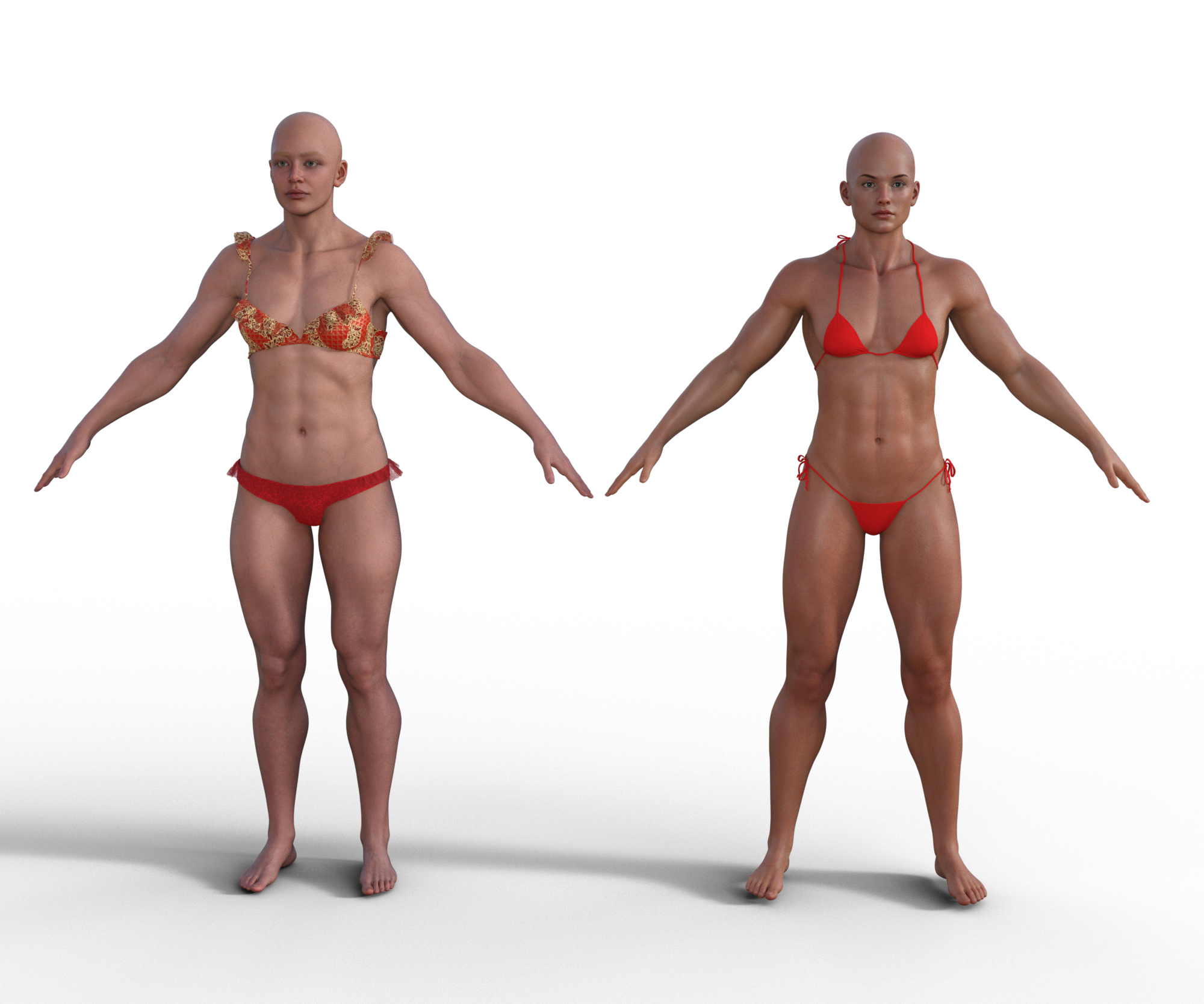
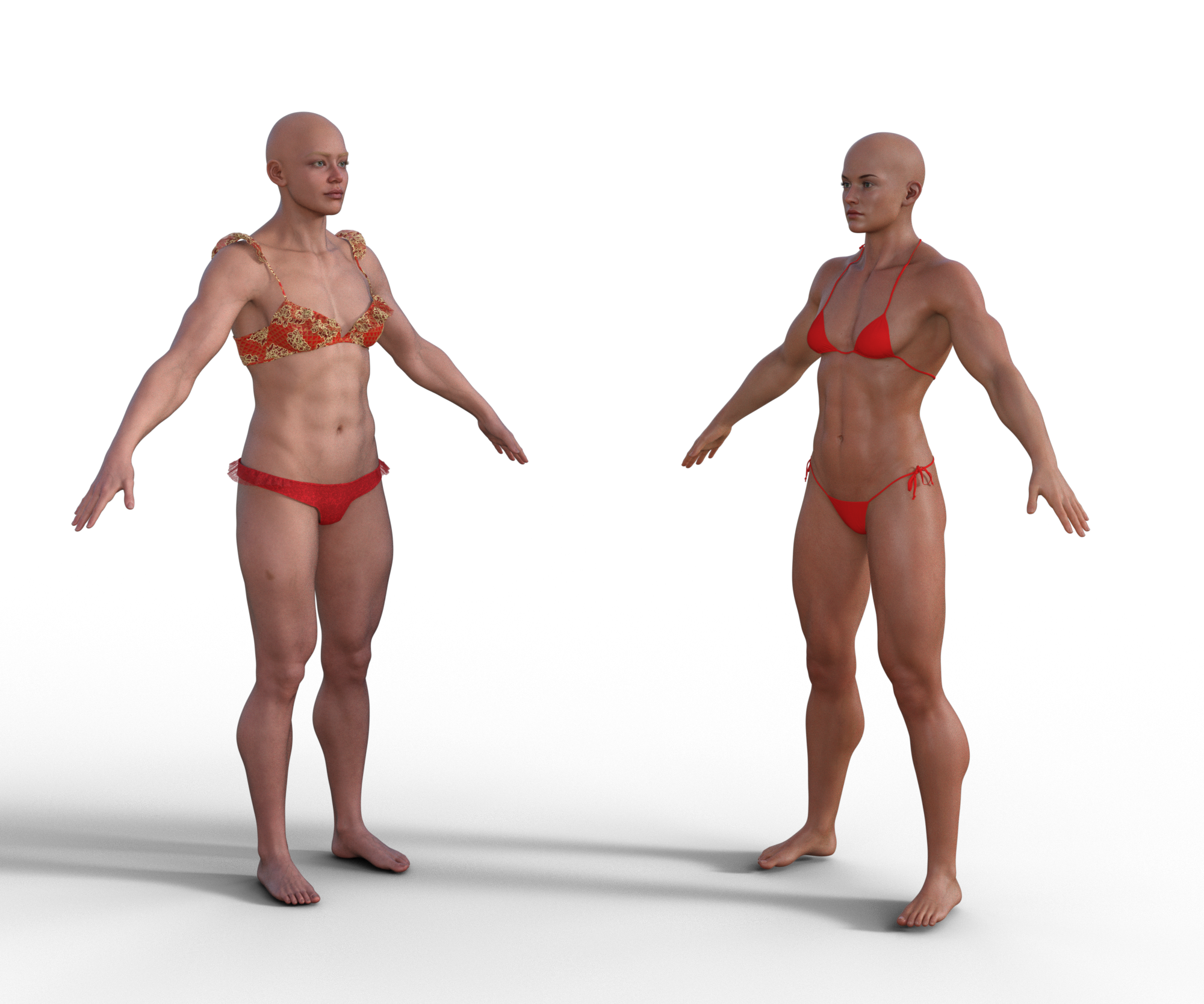 Freja 9I'd love see comparisons (untextured) between Freja 9 and Freja 8. Maybe Kayo 8 or Noska 8.1 too. Just to see if it's worth getting Freja 9 for the body shape, or attempt to transfer the G8F/G8.1F fit characters myself to G9.Pax's Pretty Boys Thread
I picked up HID Donna because not only is she cute for the times I do render women, but she has male textures too, and I wondered how well the little trickster prince up there would look with them. The answer, it turns out, is very cute. I did discover though that despite all the new morphs for expressions G9 has, it doesn't have the ones I wanted to try to emulate a cute smile I saw in a TV series... Maybe a little more experimenting is in order.
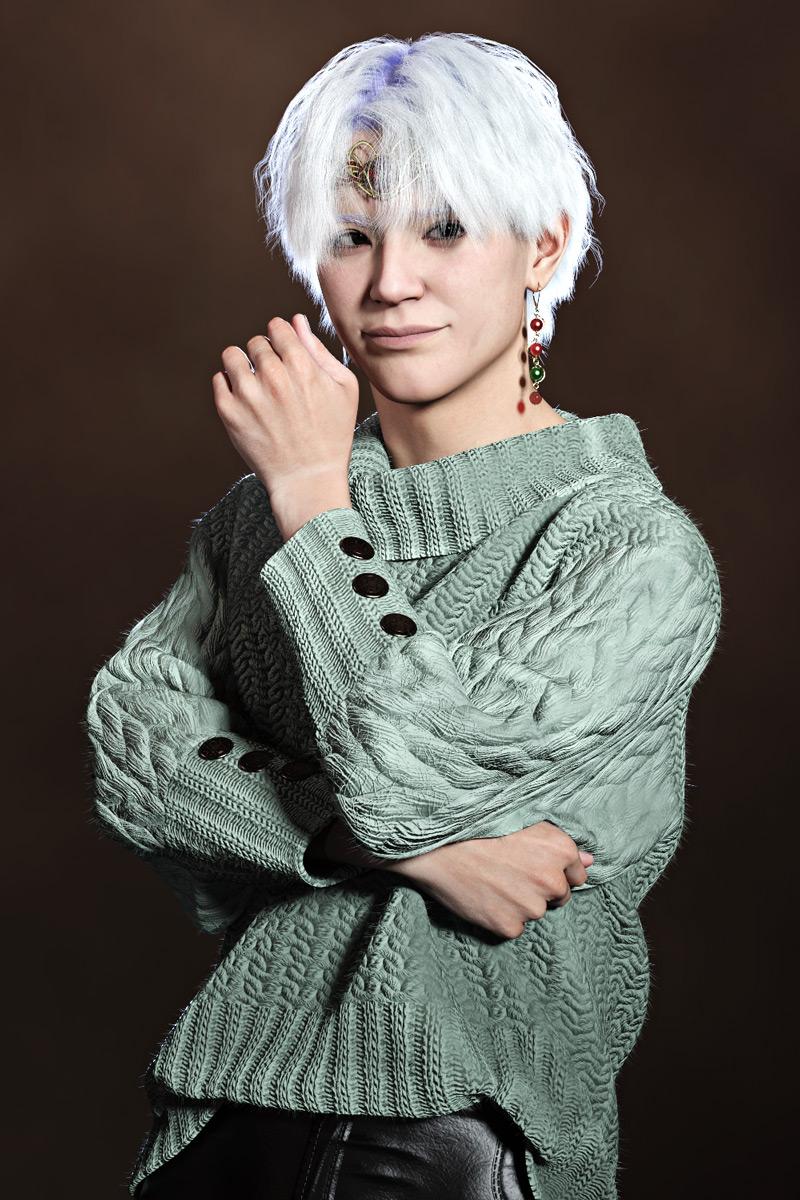
I also picked up the Freya mega-bundle, because with the character, the hairs and the other things I wanted and the stuff that was on offer at the bottom of the page, it worked out cheaper to buy the works than cherry-pick. And honestly, this time I very much had my eye on the skin for Alex, rather than the (very awesome) morph. Alex is A Pain because he's very pale; previously he's been using some of the base G9 SSS maps, but the Freya textures are nice and pale so I'm happy.
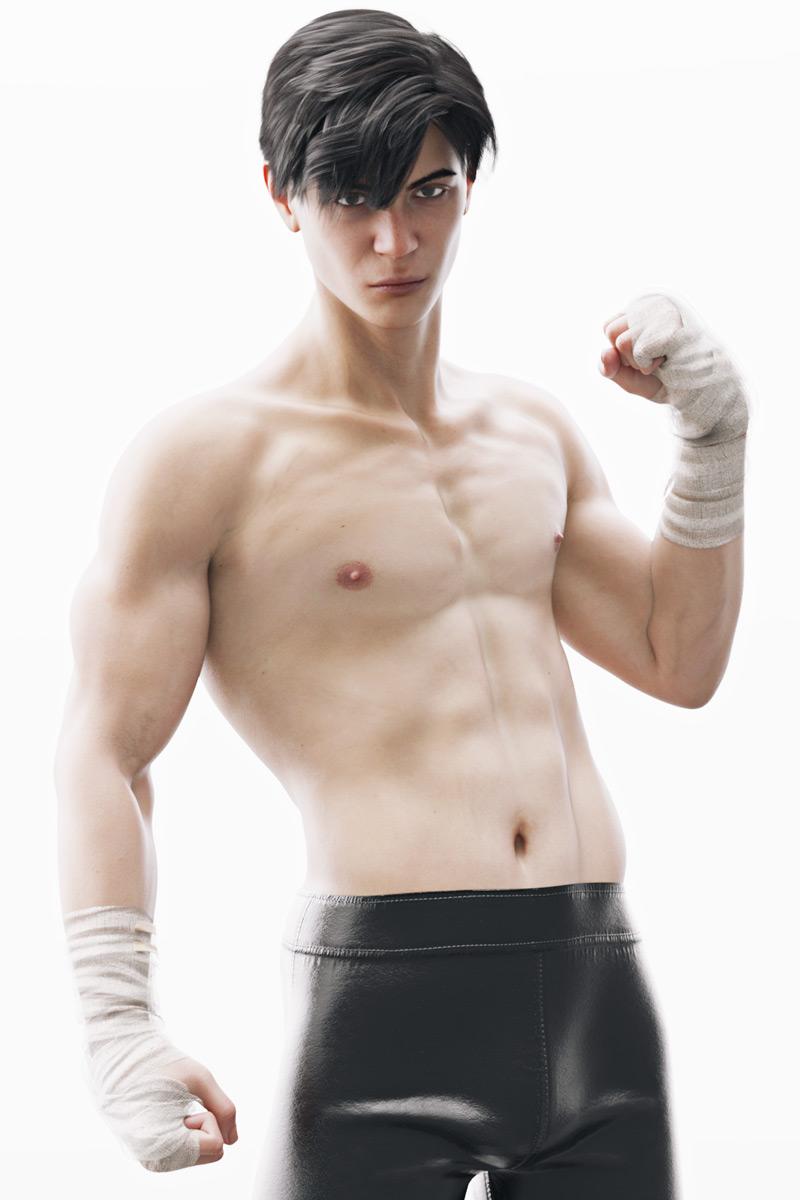
I have a sneaking fondness for high-key imagery.
Not so keen on the outfits though; Freya 8 had some fantastic practical outfits, while Freya 9's... well, she's gonna get more than just chilblains in those, honestly. Alex is in the pants from the dForce Warrior Outfit, but how did he get into them?? Snake-hipped so-and-so. They're very definitely designed to be worn under things. The ones from the Comfy Style dForce Outfit that came with Minerva that the l'il trickster is wearing are more detailed.
I really shouldn't be such a sucker for hairs...
slow down gen 8 famRichard Haseltine said:
That means you have a character (Devious Dolls' Vivi) that has an additional moprh associeated with it to improve the look or avoid issues when used with the body miorphs Breasts Cleavage. Since you don't have the body morphs installed (apparently) then the attempt to make the link fails, but that doesn't matter as you don't need to corrective morph. Sometimes it may be an issue, if it is failing to find a property that should be there, and it is certainly useful trouble-shooting information if you are creating your own morphs, but that doesn't apear to be the case here. In general if a message starts Warning it is pointing something out that might be a reflection of an issue (e.g. a naming issue or saving issue if you were creating your own morphs) but isn't an ouright error.
no I do not do their own morphs, the model itself terribly slow when either basic or finished character, I do not even know where to look for the cause
slow down gen 8 famThat means you have a character (Devious Dolls' Vivi) that has an additional moprh associeated with it to improve the look or avoid issues when used with the body miorphs Breasts Cleavage. Since you don't have the body morphs installed (apparently) then the attempt to make the link fails, but that doesn't matter as you don't need to corrective morph. Sometimes it may be an issue, if it is failing to find a property that should be there, and it is certainly useful trouble-shooting information if you are creating your own morphs, but that doesn't apear to be the case here. In general if a message starts Warning it is pointing something out that might be a reflection of an issue (e.g. a naming issue or saving issue if you were creating your own morphs) but isn't an ouright error.
Free Flexion Enhancement for G8/8.1F. Also SWM Flex Vein Controlwindli3356 said:
RenderPretender said:
windli3356 said:
terry_duquette said:
I don't see any attached picture, but it sounds like you didn't download/install the other file, there is the SWM Control, and the main one is the Duq7 Flexion, that is where all the missing sliders would be. TD
I think DAZ forum seem to have problem posting screenshot this morning, and yes you were right! I missed 1 file, now I have everything intact! and just wow~ what can I say, this is the best bicep morph solution for G8F period. I can never thank you enough friend :D Can't wait to see what you can do with G9
Looks great! Is that a native G8F in the pic with TD's sliders?
Yup~ that's a native G8F with @terry_duquette's slider, normally would take me huge effort to look like that by converting G8M to G8F
Looks fantastic! Shortly, I'll post some images of my most recent dabblings into TD's dials, and I'll try to share my settings.
Daz 3D is part of

Connect
DAZ Productions, Inc.
7533 S Center View Ct #4664
West Jordan, UT 84084Licensing Agreement | Terms of Service | Privacy Policy | EULA
© 2026 Daz Productions Inc. All Rights Reserved.