-
Transfer utility for generation 4 Characters
Lets not forget Michael 4 and Victoria 4. Everything seems to fit and transfer back and forth with genesis Characters but not generation charcters.
M4 and V4 are old products so it's highly unlikely you will see any new addons made for them. There are plenty of products in the store to enable the morphs and textures to be used on newer figures. If you get GenX and transfer the V4 and M4 shapes to newer figures, then you can use them with newer clothing and skins. Here is V4 and Genesis 2 female with the base V4 morph and the base skin
Easiest way to rig a new characteryou can try legacy rigging and then convert to weightpainting afterwards.
if you name your body parts they can be dragged into a heirachy and a skeleton created
and also thats why I suggested the universally used biped as it is a safer for redistribution industry standard naming convention or use the Poser legacy one that DAZ copied with Victoria and theiir cronies up until genesis 3
extra limbs as in 6 legged creatures you would have to choose how best to name them
Martial arts combos for Victoria 8I think that the combos are great, but it would be much easier to use them if they would target the same location. A martial arts construction kit would be probably more useful.
A spell casting construction kit would be very nice, too.
About face morphs for a new modelGood day everyone,
I am a totally newbie to this DAZ-3d and I am just begining to learn the tricks. So I need some help. I am REALLY enjoying working
with DAZ and it is giving me alot of joy to use.
Once I figure out all the tricks on how to use DAZ-4.10, I can start creating new models and giving them to you - and then see what you guys can do with them.
I am in this adventure for the FUN and good times and not to sell the models I will be creating.
I have 2 questions.
In these past 2 weeks I have been making a new Marilyn Monroe model (face + body) using the G3F and doing another for the G8F base model.
So far, they are not bad, but they still need more sculpting in the face for more realism.
I am using these 2 morphs builders...
https://www.daz3d.com/200-plus-head-and-face-morphs-for-genesis-8-female-s
-
https://www.daz3d.com/rarestone-s-face-morphs-collection-for-genesis-8-female
-...because I discovered that having 2 of these programs I can better sculpt a better face with more details , instead of just using one.
Even tho they are both exceptional and wonderful to use, one program has features that the other is missing, specially for the nose
amd eyebrows, so using both
adds more to my resources in sculpting a more detailed face. I want to create a detailed realistic face and not a simple quickie.
I know there was a "SAV_Marina" model already created for the Victoria 4 model, and it is very nice, but I want to take things a
little forward another step and start using the newer Genesis-8 female base figure. Afterall, DAZ is moving forward in its evolution,
and I think more new models should be created for the G8F with as much face feature realism as possible.
My first question is , when posting these new models for everyone , does everyone also need to have these 2 morphs builder programs installed in
in their DAZ-3d (?) for them to have the same face and body morphs be seen?
or will the DAZ program automaticly recognize the facial morph changes to the base figure and add these changes?
-- if they need these 2 morph builders installed already, it may become a bummer for some people to not use them because it may cost alot.
What is everyone else using in their DAZ as the basic face morph builder?
My second questions pertains to saving up these morphs better.
I have read alot of post already and seen Youtube videos, but I am still confused, with everyone having a diferent way to save
the face + body features morphs.
What is the correct way to save both new face+ new body morphs together ?
I know these may seem like silly questions, but I am still learning.
[Released] Look At Me Pose Control [Commercial]This is a lot to do.....
Creating a Custom Action
Any DAZ Studio script can be used to create a custom action to allow you to automate tasks and place them in the toolbars. For example, if you use Victoria 4.2 a lot, you can create a custom action that will allow you to click on a button to load her into the scene without having to search for her.
To create and use a custom action:
-
Locate the item you want to make an action for. This can be a figure, material file, pose file, etc., as long as it is in the DAZ Studio script file format.
-
Right-click on the thumbnail and choose Create Custom Action from the menu. You will not get any messages indicating that the action has been created.

If you choose the same menu item again, you will get two error messages, one that indicates the file already has a custom action and the second that indicates the action already exists as a menu entry in the Customize dialog.

-
Choose Edit > Customize from the menu to open the Customize DAZ Studio dialog.
-
Click on the plus sign (+) next to the Custom label and the custom action just created will be listed.
-
Right-click on the action and choose Edit Custom Action from the menu.

-
The Edit Custom Action dialog will come up. The Menu Text will show the same file name as the thumbnail and along with a generic Description.

If needed, edit the Menu Text and Description.
-
Click on Accept to accept the changes to the action or on Cancel to abort the operation.
-
Right-click on the action again and choose Change Icon from the menu.

-
A default load dialog will come up. Locate the JPEG or PNG file to use as the icon and click on Open. This can be an image you create or the same graphic used for the thumbnail in the Content tab.

-
In the Activities tab in the right hand pane, select which toolbar to add the action to, for example to the Load, Pose / Animate, or Render tab.
-
Click on the plus sign (+) next to the selected toolbar and then on the one next to the Actions label.
-
Select the action in the left hand pane and drag it to where you want it to be on the toolbar.

Result:
-
Click on Accept to accept the changes or on Cancel to abort the operation.
-
Activate the toolbar where you added the action and there will be a small icon with the image you selected as the graphic in the location you placed it. If you did not add an graphic icon, the space will be blank. Hover over the icon and the Menu Text and Description you entered will be visible.

-
Click on the button and the figure will load into the scene. If the action was a preset that applies a material, pose, etc., make sure the figure is loaded and selected.

----------------------------------------------------------
All for Daz NOT listing an item in its category...
I might exepriment with this.
Better would be a Smart Content Category that I controlled like "Favorites" or "Recent" or even "User" that I could add products to...
Just find the script in the Content Library Pane and Right Click. The second to last option is "Create Custom Action". It creates an action under the Scripts menu. Done!
 [Released] Look At Me Pose Control [Commercial]
This is a lot to do.....
Creating a Custom Action
Any DAZ Studio script can be used to create a custom action to allow you to automate tasks and place them in the toolbars. For example, if you use Victoria 4.2 a lot, you can create a custom action that will allow you to click on a button to load her into the scene without having to search for her.
To create and use a custom action:
-
Locate the item you want to make an action for. This can be a figure, material file, pose file, etc., as long as it is in the DAZ Studio script file format.
-
Right-click on the thumbnail and choose Create Custom Action from the menu. You will not get any messages indicating that the action has been created.
If you choose the same menu item again, you will get two error messages, one that indicates the file already has a custom action and the second that indicates the action already exists as a menu entry in the Customize dialog. -
Choose Edit > Customize from the menu to open the Customize DAZ Studio dialog.
-
Click on the plus sign (+) next to the Custom label and the custom action just created will be listed.
-
Right-click on the action and choose Edit Custom Action from the menu.
-
The Edit Custom Action dialog will come up. The Menu Text will show the same file name as the thumbnail and along with a generic Description.
If needed, edit the Menu Text and Description. -
Click on Accept to accept the changes to the action or on Cancel to abort the operation.
-
Right-click on the action again and choose Change Icon from the menu.
-
A default load dialog will come up. Locate the JPEG or PNG file to use as the icon and click on Open. This can be an image you create or the same graphic used for the thumbnail in the Content tab.
-
In the Activities tab in the right hand pane, select which toolbar to add the action to, for example to the Load, Pose / Animate, or Render tab.
-
Click on the plus sign (+) next to the selected toolbar and then on the one next to the Actions label.
-
Select the action in the left hand pane and drag it to where you want it to be on the toolbar.
Result: -
Click on Accept to accept the changes or on Cancel to abort the operation.
-
Activate the toolbar where you added the action and there will be a small icon with the image you selected as the graphic in the location you placed it. If you did not add an graphic icon, the space will be blank. Hover over the icon and the Menu Text and Description you entered will be visible.
-
Click on the button and the figure will load into the scene. If the action was a preset that applies a material, pose, etc., make sure the figure is loaded and selected.
----------------------------------------------------------
All for Daz NOT listing an item in its category...
I might exepriment with this.
Better would be a Smart Content Category that I controlled like "Favorites" or "Recent" or even "User" that I could add products to...
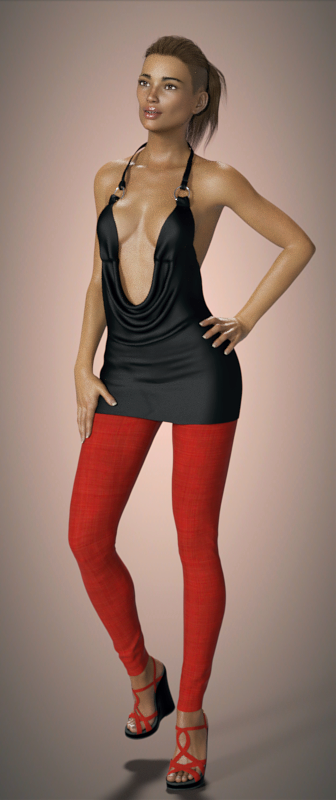
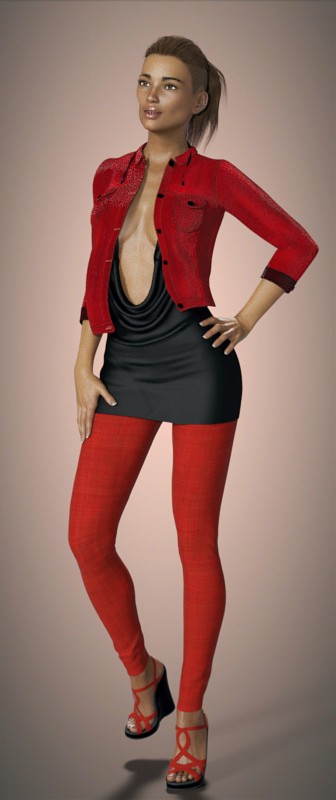
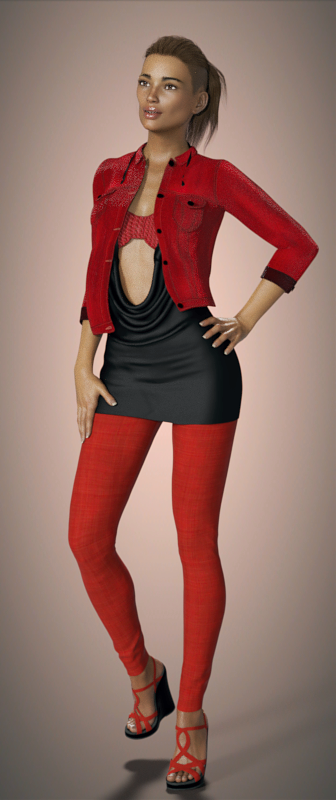
Novica & Forum Members Tips & Product Reviews Pt 10Back in the saddle to render some products- I mentioned the Cowl Neck Mini Dress (Gen3F) for a swimsuit cover? Well, I started in that direction... but got sidetracked. I wanted to see if that dress was really as sexy as the promos, and oh my goodness. It's definitely something I'll never use as a dress, or without putting a top under it. But here it is, with the different kitbashing.
I pu the Linley Outfit (Gen3F) jacket over it. You'll need to expand the jacket a bit. Note, that jacket has good material zones- pockets, sleeve hems, sleeves, buttons, etc. Very easy to customize. This jacket is very casual and doesn't really "match" the luxury of the draping cowl midriff, but will give you an idea of what a jacket will look like over the dress.
Vintage Bikini is a nice one to have in your library. Why? Because it's got many material zones. The piece between the cups is a zone, the cups are one zone, the piece on the bottom is another zone. (So you can slim down the top by hiding that bottom part.) Using Surface pane, use the opacity and take out the straps so they don't poke through at the neck. I used Destiny Garden's DG Iray Tropical Fabrics Shaders for the bikini top. I suggest tiling of 40 for patterns, you really don't want large patterns IF you're trying to get the sections to blend. That small piece inbetween the cups looks a bit funky with bigger tiling, and looks "off" if you have it different than the cups (IMO.) A darker color seems to blend better too.
TIP: Make that center piece between the cups about 10 numbers LIGHTER than the cups and underneath, and it will look the same color.
You can stop there and have a very short mini, sexy outfit, or add a form fitting Abigail Outfit (Gen3F) pants. I didn't have to do anything to them, so keep those in mind underneath really tight dresses.
Nydo Hair (Gen3F) is being worn by FW Ana-Sofia HD (V7)
 I want to re-install DAZ 3D 4.6 and all my content...
So your saying not to use the Connect install function? Only DIM?
Yes. That is my recommendation, based on numerous problems I have had with Daz Connect. I have used Daz Connect for almost everything, because I like the graphical interface and integration with Daz Studio. However, I have lived to regret it. I often think of uninstalling everything and starting over with DIM. But I keep thinking Daz will fix the Daz Connect bugs. For the most part, they have not. These are some of the Daz Connect design limitations and some of the bugs/issues I have reported and still suffer from:
- Many script products do not work when installed with Daz Connect. You have to use DIM or manual install for them. Many are still offered with Daz Connect installers that do not allow the product to function. It is up to you to figure out that Daz Connect installation is the problem and then uninstall and reinstall some other way.
- When a product is updated to change the paths of the files, Daz Connect update does not delete the old incorrect files, it just adds the new files. Now you have duplicate files showing up. This is a mess and very confusing. (This happens a lot with PC+ products, because they are often released with wrong file paths).
- Sometimes DIM gets product updates that never show up in Daz Connect. Recently this happened with the Growing Up products that Zev0 updated to add clothing support morphs to. I finally gave up and uninstalled them with Daz Connect and installed with DIM.
- Sometimes Daz Connect gets updates, but the file content is not updated the same way the DIM is updated. Recently several products were updated to add support for Genesis 8 to the existing Genesis 3 support. DIM got the new content files. Daz Connect only got the name change and no new content files.
- Sometimes (rarely) Daz Connect updates have corrupted files.Then the product cannot be used. This happened recently with the Old Country Farmhouse. I'm still working with Customer Service to resolve this issue. The DIM version is fine. I may have to give up and just install that. But I keep trying to get Daz to fix the Daz Connect issues.
- If you ever have to reset your database, because it gets corrupted, restoring metadata will not work to make Daz Connect remember what you had installed. Every product will show up as uninstalled (available) even though the files are all on your computer in the right place. Restoring metadata does work for DIM installed products.
- Daz Connect cannot install generation 4 figures (Victoria 4, Michael 4, etc.) So if you want to use them, you have to set up DIM anyway, or manually install, if that is available.
- I started using Daz Connect when we were told that Daz would start releasing products in an encrypted form and only Daz Connect would be able to install them. Daz has not released an encrypted product for about a year, I think. So, is Daz Connect really necessary for anything anymore? Won't DIM work just fine for everything, including the things that Daz Connect cannot install?
- Daz Connect cannot install plugin products.
- Daz Connect cannot update Daz Studio.
If I were starting over today, I'd use DIM.
Generation 8 Advantages?Honestly, I've bought the majority of the G8 figures (Victoria 8, Michael 8, Teen Josie 8, Stephanie 8, Monique 8, Lucas 8 and Olympia 8), but I also own all of the previous figures as well, and despite having bought so much G8 stuff, I find that I keep using the G3s as my primary figures. Why? Because there's currently a much wider variety of base archtypes to use as starting points with the G3s, and a lot of my favorite add-ons haven't been released and/or updated for the G8s yet. Given that they're nearly impossible to tell apart in most renders, that the G3 stuff is running for much less on average with all the recent sales, and that everything made for the G3s works just fine on the G8s, my personal take is that you're currently getting a lot more value for your buck buying the G3s. That will change somewhat in six to eight months as the G8s get caught up to where the G3s are, but in the meantime, I'd advise going through the store to see which figures/characters/accessories you see that you like and what figure system they're for.
Cannot load "Gothic Housemaid A4/V4" into my senceI bought "Gothic Housemaid A4/V4" and want to load it into my scene. I load and select Victoria 4.2 then click the clothes content icon in content library, but no clothes was loaded in the scene. Please help me to solve the problem. Thank you.
I have another question, why i can't find the Housemaid clothes in the smart content. is it normal? ( i can find other clothes in the smart content)
Newbie friendly bundle for free (V4.2 and M4 included)In case someone has missed it: right now there is a bundle called Dark Ops ready to Render available for free in the DAZ shop.
Included are Victoria 4.2, Michael 4 and lots of usefull stuff.
I hope it's okay to post this here, as I think it's fitting for the "New Users" forum, as they would benefit most from getting this bundle, I guess
Official Release of Carrara 8.5 **Update - 8.5.1.19**After a lot of hard work, long nights, and even longer days by our development team we are happy to announce that Carrara 8.5 is available for purchase in the DAZ 3D store. We would like to thank all of our loyal Carrara customers for their patience and support with this project.
Carrara 8.5 Pro is priced at $285.00 for a limited time. Carrara 8.5 Standard is priced at $149.95.
Current owners of Carrara will receive a 50% discount on either product for a limited time. Platinum Club members get an additional 40% off, which means it's never been a better time to join the Platinum Club.
Carrara 8.5 Pro
Carrara 8.5 StandardIncluded in Carrara 8.5 Pro are the Michael 5 and Victoria 5 Pro Bundles and Carrara Shaders - over $250 worth of Genesis content.
Carrara 8.5 standard ships with the Michael 5 and Victoria 5 Starter Bundles and Carrara Shaders - over $140 worth of Genesis content.Here's a quick look at some of the new features:
Native DSON Importer means seamless integration of:
- TriAx™ Weight Mapped figures (Genesis, G2F, G2M)
- General Weight Mapped figures
- Legacy Parametric Figures (4th Generation and earlier)
- DSON presets
- Scenes
- Scene Subsets
- Wearable(s) Preset
- Character Preset
- Properties Preset
- Shaping Preset
- Pose Preset
- Hierarchical Material(s) Preset
- Material(s) Preset
- Shader Preset (preset must be for a Carrara shader)
- Camera(s) Preset
- Light(s) Preset
- Support for multiple UV sets (through Hierarchical Material(s) Presets and Material(s) Presets)Native AutoFit functionality means:
- Conversion of legacy parametric clothing to TriAx™ weigh mapped figures
- Automatic Morph Projection quickly gives you the fit you need for your figure's shape.
- Automatic Weight Map Projection allows AutoFit clothing to bend and pose smoothly with the figure.
- Morphs built into clothing are carried through the AutoFit process.Improved Sequencer, Keyframing and Animation Tools
- New keyboard shortcuts to:
- Play/Stop animation
- Advance the frame
- Preview a frame
- Key Frame Filters
- Sample – Creates a key at every frame of the animation.
- Smooth – Smooth out wild keys to get an even looking animation
- Reduce – Programatically determine which keys are unecessary and eliminate them.
- Graph Editor Box allows for fine tuning of animations
- Easily adjust timing
- Simple yet powerful manipulation of amplitude
- Scale, and translate key frames along the Graph Editor.
- Marquee selection of key frames for Graph Editor.Smart Content and CMS Integration
- Carrara can now access the CMS database; PostgreSQL or Valentina.
- New smart content pane allows users to browse smart content by:
- File
- Category
- Product
- File view provides selection based filtering so that the user only sees items compatible with the current instance tray selection.
- Double click and drag and drop loading are both supported in Smart Content Tab.Parameters Actions
- Zero, Memorize and Restore:
- Figure
- Figure Shape
- Figure Pose
- Selection
- Selection Shape
- Selection Pose
- Selection Tree
- Selection Tree Pose
- Selection Tree Shape
- Provides users with powerful tools to reset a pose, shape or both.
- Memorize and Restore allow user to take a snap shot of the model's current pose and/or shape and restore all or part of it.Improved Fit to Functionality
- Automatic projection and following of morphs for TriAx™ Figures
- No more relying on built in clothing morphs to fit clothing over a figure. Carrara automatically projects any morphs for a TriAx™ figure onto items conformed to the figure.Improved Viewport Avatars
- Spotlight, Sunlight, Moonlight, Tube Lights and Shape lights have all received a makeover and can easily be identified in the viewport.this is a welcome list of new features.
Native DSON Importer means seamless integration of:
- General Weight Mapped figures
- Hierarchical Material(s) Preset
this 1 extra interesting, sounds like this is how to uv swap.
- Support for multiple UV sets (through Hierarchical Material(s) Presets and Material(s) Presets)
Legacy Footwear on G8FFitting older gen footwear to new figures is often hit and miss, with more often than not a lot of misses.. The only option is to try a tutorial by Sickleyield https://sickleyield.deviantart.com/art/A-Reminder-on-Autofitting-Shoes-to-Genesis-2-or-3-412985230 as well as https://www.daz3d.com/forums/discussion/59515/another-converting-victoria-4-footwear-to-genesis-2-maybe-g3f-small-update which I did a while back both of which should help you hopefully..
That will do it for Genesis 2 and 3, if you follow that you might be able to work it to G8.. The main thing is to have the relavant clones and to make sure to have both options as unsupported when auto fit pops up as it can screw things up..
But in the end a lot of the footwear will not work properly no matter how hard you try..
Generation 8 Advantages?Daz had overtaken (overtook?) my life, so I took an 18 month break. Now I'm a full-on addict again. When I returned about six weeks ago, I saw that G8 had come out. So I have dropped about $1,000 bucks on all things G8 (between this and other Daz content sites), assuming I needed the latest and greatest.
But my question is....apart from better poses/expressions, etc., do you all think renders of G8 characters look more realistic than, say, Victoria 7 or Michael 7? Am I wasting money?
Visually, (outside of the improved posing and expressions) I have found they are virtually undetectable. But if you like the assets you are buying, then you are not wasting your money. I still use g3 about as much as I use g8, it's all about what look I'm going for and which character catches my eye when I'm trolling through my library to set up a new scene
Generation 8 Advantages?But my question is....apart from better poses/expressions, etc., do you all think renders of G8 characters look more realistic than, say, Victoria 7 or Michael 7?
Apart from better poses and expressions, they render almost exactly the same, since they can use the same materials and have almost identical geometry. Eyes are slightly better. You would be very hard pressed to tell G3 wearing V7's skin from G8 wearing V7's skin.
I add that most of the G8 characters use the new dual lobe settings while the G7's were before the texture change; fortunately it is easy to change them.
I have so much to learn...

Yes, Nemisis.please share...........
Agent Unawares is correct that dual lobe arived with G8 and can be used with any figure but pretty much none of the G7 characters use it and more than half of the G8 characters do. I use the EchVo shaders to convert the surfaces (all of 3 minutes work if i'm slow). The effect is a more realistic skin texture which is less waxy, plastic and shiny with better interaction with glancing light. For example, FW's Quenton has a pale matte texture very different than other characters of his. Here is a wonderful set of renderings by Divamakeup showing some of the skin attributes: https://www.daz3d.com/forums/discussion/192341/michael-8/p10
Generation 8 Advantages?But my question is....apart from better poses/expressions, etc., do you all think renders of G8 characters look more realistic than, say, Victoria 7 or Michael 7?
Apart from better poses and expressions, they render almost exactly the same, since they can use the same materials and have almost identical geometry. Eyes are slightly better. You would be very hard pressed to tell G3 wearing V7's skin from G8 wearing V7's skin.
I add that most of the G8 characters use the new dual lobe settings while the G7's were before the texture change; fortunately it is easy to change them.
I have so much to learn...
Yes, Nemisis.please share...........
Generation 8 Advantages?But my question is....apart from better poses/expressions, etc., do you all think renders of G8 characters look more realistic than, say, Victoria 7 or Michael 7?
Apart from better poses and expressions, they render almost exactly the same, since they can use the same materials and have almost identical geometry. Eyes are slightly better. You would be very hard pressed to tell G3 wearing V7's skin from G8 wearing V7's skin.
I add that most of the G8 characters use the new dual lobe settings while the G7's were before the texture change; fortunately it is easy to change them.
I didn't want to count things that can work with all characters, it's more of a DS improvement than a G8 improvement. For someone who doesn't want to tweak shader settings, though, G8 does generally have better defaults as far as I'm concerned.
Generation 8 Advantages?But my question is....apart from better poses/expressions, etc., do you all think renders of G8 characters look more realistic than, say, Victoria 7 or Michael 7?
Apart from better poses and expressions, they render almost exactly the same, since they can use the same materials and have almost identical geometry. Eyes are slightly better. You would be very hard pressed to tell G3 wearing V7's skin from G8 wearing V7's skin.
I add that most of the G8 characters use the new dual lobe settings while the G7's were before the texture change; fortunately it is easy to change them.
I have so much to learn...
Generation 8 Advantages?But my question is....apart from better poses/expressions, etc., do you all think renders of G8 characters look more realistic than, say, Victoria 7 or Michael 7?
Apart from better poses and expressions, they render almost exactly the same, since they can use the same materials and have almost identical geometry. Eyes are slightly better. You would be very hard pressed to tell G3 wearing V7's skin from G8 wearing V7's skin.
I add that most of the G8 characters use the new dual lobe settings while the G7's were before the texture change; fortunately it is easy to change them.
Generation 8 Advantages?But my question is....apart from better poses/expressions, etc., do you all think renders of G8 characters look more realistic than, say, Victoria 7 or Michael 7?
Apart from better poses and expressions, they render almost exactly the same, since they can use the same materials and have almost identical geometry. Eyes are slightly better. You would be very hard pressed to tell G3 wearing V7's skin from G8 wearing V7's skin.
Daz 3D is part of

Connect
DAZ Productions, Inc.
7533 S Center View Ct #4664
West Jordan, UT 84084Licensing Agreement | Terms of Service | Privacy Policy | EULA
© 2026 Daz Productions Inc. All Rights Reserved.