-
Genesis 9
takezo_3001 said:
xyer0 said:
We both know how long it takes K.H.Image to release a morph set. Genesis 9 suggests why Genesis 1's run was only 20 months. Is 20 months long enough for K.H.Image to release a set?
Lol, I would not wait that long and will give up buying anything else for G9, F** knows I already spent too much as it is on 'ole noodle-limbs here, who's idea was it to truncate this character's JCM morphs anyway? :P
Victoria 8 was released 2017 JUN 15. K.H.Image V8 Bends was released 2018 OCT 11. Almost 16 months. G8F Bends came out over a year later.
Genesis 9xyer0 said:
We both know how long it takes K.H.Image to release a morph set. Genesis 9 suggests why Genesis 1's run was only 20 months. Is 20 months long enough for K.H.Image to release a set?
Lol, I would not wait that long and will give up buying anything else for G9, F** knows I already spent too much as it is on 'ole noodle-limbs here, who's idea was it to truncate this character's JCM morphs anyway? :P
Genesis 9takezo_3001 said:
xyer0 said:
PixelSploiting said:
I literally bought HH Belle because the figure comes with working correctives. I can always dial the body morph for this character too 100% and then use other morph packages to customize if I don't need pinup character physique for this particular shot... But the thing with limb and ribcage bending as they should is great.
Yes. I'm trying to wait for a comprehensive bend corrective package to be delivered so I can keep my G9 morph count to a minimum. But who knows when or if that will be forthcoming.
K.H.Image's natural bend morphs can't come soon enough, that's why I'm holding off buying V9! It's really horrifically bad for anything besides full clothing/armour, so I'm still using G8.1 until then!
We both know how long it takes K.H.Image to release a morph set. Genesis 9 suggests why Genesis 1's run was only 20 months. Is 20 months long enough for K.H.Image to release a set?
Genesis 9xyer0 said:
PixelSploiting said:
I literally bought HH Belle because the figure comes with working correctives. I can always dial the body morph for this character too 100% and then use other morph packages to customize if I don't need pinup character physique for this particular shot... But the thing with limb and ribcage bending as they should is great.
Yes. I'm trying to wait for a comprehensive bend corrective package to be delivered so I can keep my G9 morph count to a minimum. But who knows when or if that will be forthcoming.
K.H.Image's natural bend morphs can't come soon enough, that's why I'm holding off buying V9! It's really horrifically bad for anything besides full clothing/armour, so I'm still using G8.1 until then!
Guy 7 useable with Genesis 8. Is it possible?
There is the Map Transfer utility built into Daz Studio that will convert the character specific UVs to the base G3M UV. It takes a bit more clicking, but it's not that hard to use.I used Xtransfer for the morph and its worked perfectly. I applied the Toon Hal texture set. Looks like the uv converter is going to have to stay on my wish list.
XTransfer Module 1- Genesis 3 to Genesis 8 Morph Converter (Commercial)zombiewhacker said:
Like for instance, if all I want to do is transfer over specific characters like Victoria 7, Ophelia 7, Michael 7, Ivan 7, and PA characters like Henryk for Michael 7, will I be able to do this in 4.21.05 and higher?
I have used the product to transfer over Henryk in 4.21.05 fine so my guess is yes. Would you like a render?
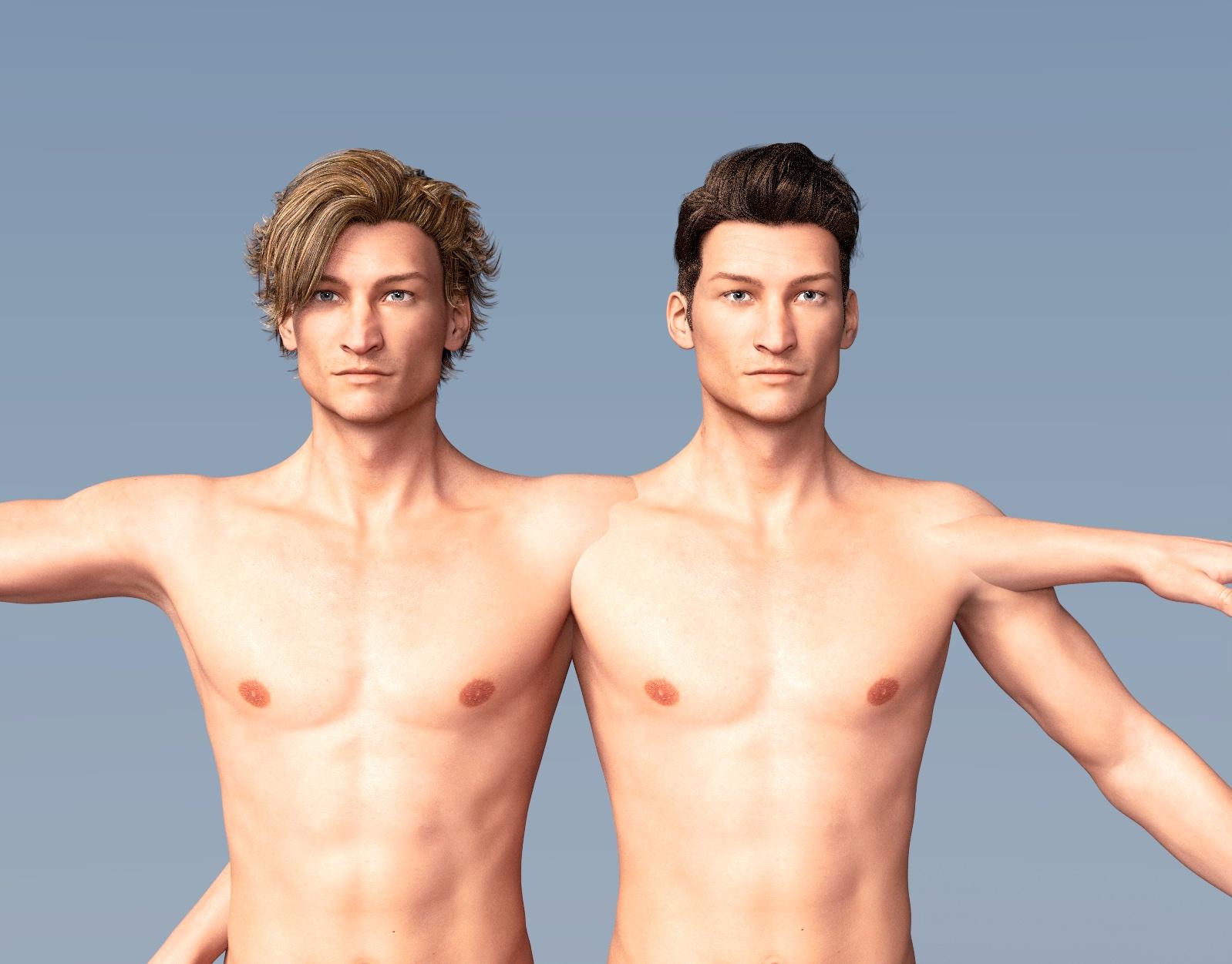 Puppeteer
tigerwomble said:
Hi
I'm Neewbie interested in posing facial expressions.
I'm looking at Puppeteer and I see that it also requires head and face morphs.
Does Puppeteer create facial expressions. Or does it just adjust the size, proprotions and poisions of a static face.
Do I need Face morphs to create truly expressive faces?
How do Face morphs and puppeteer work together?
Thanks
Tigerwomble
Puppeteer doesn't create any morphs, poses or expressions on it's own.
What Puppeteer does do is let you memorize one pose or expression, then memorize another (or more) and transition between them as points on a grid.
By moving the mouse between the saved points, the figure is moved between the memorized positions in a smooth progression, so the mouse is effectively puppeteering the figure in real time. This does not require a premade expression, as you could dial everything, but the expressions that can be acheived with just the base figures tend to be very limited. I strongly advise getting at least one very good expression pack that comes the dials in addition to the base set sold by DAZ. SimonWM's sets are a good recomendation for this as they cover all of the basic expressions with dials, give you aniblocks as well as poses, and are constantly on sale at good prices (his Gen 8 bundle for both G8F and G8M, for example, is at $10.48 in the store as I type this.) At the same time, DO NOT buy and install a large selection of expressions all at once, and be wary of products that include a lot of expressions along with poses. Why? Because most expressions include special morphs and every morph you add to your figure base has to re-load every time you load that figure. Add too many morphs and your loading times atart to slow down really badly.
So, why use Puppeteer rather simply doing everything yourself or just using preset packs? The advantages are many - first and most obviously, if you want a pose that's somewhere between two poses you already have, it lets you wiggle around until you get something close to what you want. This can be especially useful if you have pose packs that have settings just for an arm, leg, head, etc. as you can save the same base pose twice with only the one limb or the expression changed, allowing you to tweek just that one aspect with the fluidity of a dial. Likewise, if there are two memorized positions and one of them is a neutral zeroed pose/expression, it can be used to create more subtle or more extreme variations of the same because not only does puppeteer let you move between the two saved points, but it also lets you go past the saved points and amplify the effect beyond the default 100% level. That's really useful as often you may want to use a slight application of an expression while at other times you want to go all Marvel comics and really exagerate to get the effect you want. And there's more. Because Puppeteer allows you to move between multiple saved positions, you can put down three or more poses or expressions in a triangular formation and create different poses that mix all three by moving the mouse at different points between them. And yes, this can also be used to create new "random" body shapes simply by putting different characters that use the same base in the different positions. Finally, you can also line up multiple poses in a straight line to create the key frames for animated sequences by moving the mouse position slowly down the line of saved points. While much the same thing can be done using the timeline pane, doing it with Puppeteer allows you to experiment with different speed progressions and see the results as you're performing them. A few bugs to be aware of though - because puppeteer saves all aspects of the figure and preset poses often change the scale, the physical position, or some element of the expressions of the item that they're affecting, this can cause unexpected effects and jitter, so it's usually better to zero the expressions completely while refining motion. Also, you can save puppeteer setups, but it has to be done in a puppeteer preset format that only puppeteer can read, so make sure you save those before stopping work.
If that's all a bit much, DAZ actually has a quite good video on puppeteer in the help section
DAZ Studio impossibly slow in editingHi,
I use DAZ Strudio 4.21 on a Core i7 8700, extremely fast SSD, 96GB RAM, RTX 3090 mit 24GB GRAM.
But when editing, it can be extrremely slow. e.g. when I try to pull a hand to another posistion in a scene wit 1 character and envirunment, it takes about a minute to just react. Also loading characters takes at least 30 seconds - which I dont understand when a SSD can transfer 3GB/s and a Quadcore CPU and High-End GPU are processing.That even happens when I use a fast preview like cartooin (in iRay mode I would understand halfway).
What can be done to edit faster? What is this caused by? Do you experience the same effect?
Thanks
Genesis 9 shape to Genesis 8?Yes, technically G9 could be converted to G8 but what I did might not be the fussy way you've ever seen ~
1) Have a G9 Clone for G8 (self-made or use 88330)
2) Fit G9 to G8
3) Use transfer utility to transfer favorate G9's morphs from G9 to G8, and dial them in G8 plus G9 Clone
4) Adjust rigging to shape and freeze~
(Then you may create single head / body morphs with control if needed, Morph Loader back..)Screenshot as below to have a V9 on G8F but there's no V9 texture assigned by now. Texture conversion will take some time ~ But still, I myself don't think such a conversion is really worthy even meaningful. You'll have none of G9's features on it but just the morphs ~ Besides, there's no way to convert HD morphs from G9 to G8 ~
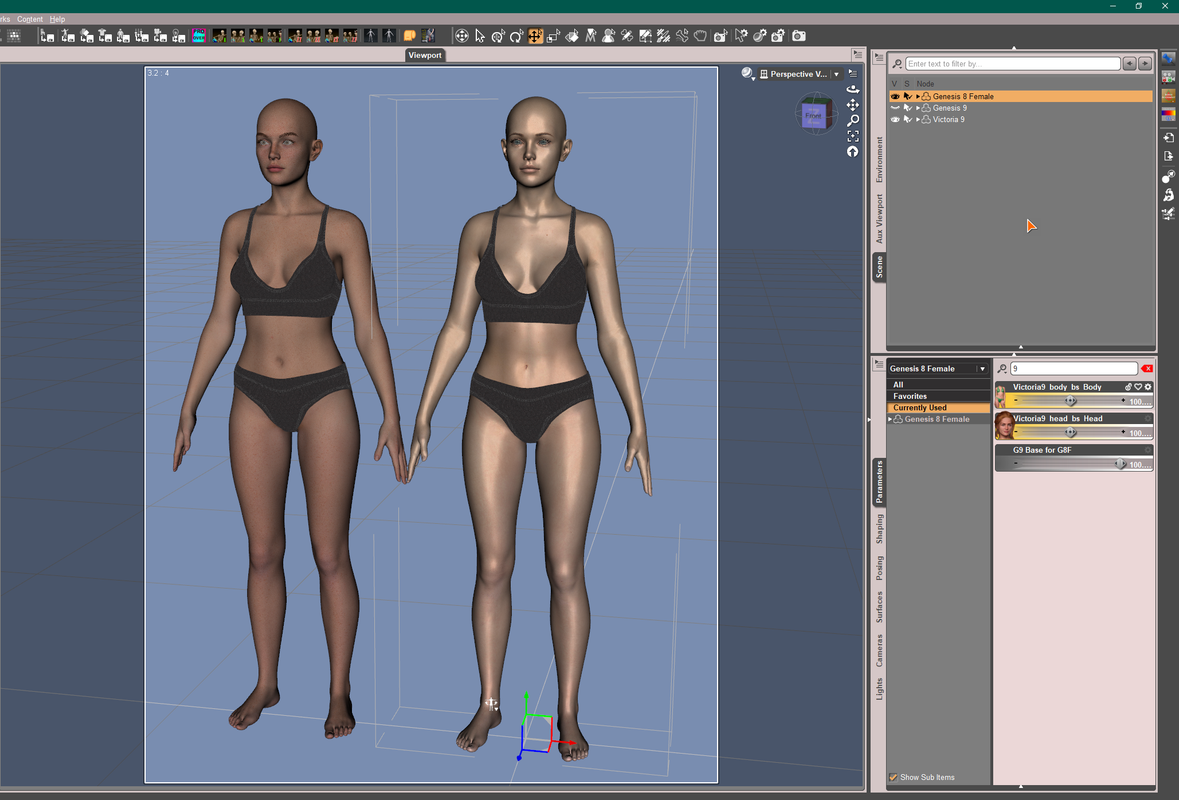 Angela 9 HD
I like her face quite a bit and her skin looks great to me. I don't care for the body, but then again, I never use the body morph that comes with any character, using my own custom shapes instead.
Genesis 9 shape to Genesis 8?Thing is the process for gen 8 to 9 isn't that great cause you have to do it through daz itself atm. Right now many are waiting for certain people to do gen 8 to gen 9 morph coversion scripts and I know there is a vendor who is said to be doing one for everyting and is known for it. (ie clothing, poses, hair, moprhs, etc.) I just cant remember the name off top of my head atm.
EDIT: I would wait for conversion scripts to come out cause knowing this vendor, he will make one for gen 9 to gen 8.
Guy 7 useable with Genesis 8. Is it possible?I used Xtransfer for the morph and its worked perfectly. I applied the Toon Hal texture set. Looks like the uv converter is going to have to stay on my wish list.
Breast Control for Genesis 9 (Commercial)Matt_Castle said:
vagans said:
What's your opinion on shifting nipples to a HD morph instead of being geometry? It seemed a weird decision that I fail to see benefits from.
With respect, although I somewhat agree with the sentiment (I do like be able to edit morphs in Blender), I have no idea what people grumbling about G9's changeover to using HD nipple geometry are actually hoping to achieve. (Particularly when it's in a product thread by someone who, presumably, was not responsible for that decision making).
I've made that argument multiple times (although most if not all of them have been moderated away).
Character SplitterMike3D said:
The only way you can mess something is if you overwrite an existing moprh. This can only happen if the Name you choose for your split morphs is the same as an already owned morph, located in the exact same path (same Vendor folder and same Product folder). If you use your own Vendor name in the Settings tab, you're totally safe.
Maybe I'll add a discard/confirm dialog in the future, to warn the user in case of a file overwrite.
thank you! now that i know what is safe, i can start experimenting with your script ^^
Genesis 9 shape to Genesis 8?Hello there,
I've seen a subject to apply/transfer Genesis 8 shapes to Genesis 9 but I'm still kinda confused with the process (since english is not my mothertongue) and not sure if it can work from 9 to 8. Did anyone tried to do it?
Breast Control for Genesis 9 (Commercial)vagans said:
What's your opinion on shifting nipples to a HD morph instead of being geometry? It seemed a weird decision that I fail to see benefits from.
With respect, although I somewhat agree with the sentiment (I do like be able to edit morphs in Blender), I have no idea what people grumbling about G9's changeover to using HD nipple geometry are actually hoping to achieve. (Particularly when it's in a product thread by someone who, presumably, was not responsible for that decision making).
Genesis 9 was not made with nipple geometry at the base resolution, and that cannot now be altered without breaking every morph. The choices at this stage are either to use geografts (which already exist) to add that geometry, or to move to a different generation... and are people really going to complain any less if Daz force a replacement of Genesis 9 after three months?
Character SplitterThe only way you can mess something is if you overwrite an existing morph. This can only happen if the Name you choose for your split morphs is the same as an already owned morph, located in the exact same path (same Vendor folder and same Product folder). If you use your own Vendor name in the Settings tab, you're totally safe.
Maybe I'll add a discard/confirm dialog in the future, to warn the user in case of a file overwrite.
Thanks for the tip, although it is already mentioned in the Installation instructions, some people may have missed it.
FBX Morph Export RulesIt seems that you only installed some of DAZ official morph products with which the naming convention matched the strings you specified when exporting fbx. That'll do if the morphs you want are all there. I myself never use standard fbx for export, just used DDI from very beginning. But I have no need of FaceCap, so maybe the FACS related 'blendshape' may only work for FBX。
FBX Morph Export Ruleswell i can't find any morph that didn't come over to blender that means i can have a riged character in blender that i can just dial in and not nessecarily have to create new ones everytime thats nice. to each there own theres no ONE PERFECT way to do anything
How can I fit the gat to my character hair? (Have Picture)Making a natural fit, easy or not, depend on the morphs along with the products you use and a couple of proper tools. For most of the cases, I just dial in the morphs of the hat/hood/hair and use Mesh Grabber to make them well match from one another.
Sickleyield's hair helper is a good product but it cannot handle all the cases. Especially some of its morphs will drag the hair into the head and it will looks worse. Just because the hair fits on the helper, the collision in between the hair and the figure's head will be a problem. You have to do lots of tweaks. You may well judge the products then decide what tool you're gonna use. For dForce hair, you may also take a look at https://www.daz3d.com/dforce-hair-helper-and-knitted-hat
For this Rera Hair, a non-dforce one, I just roughly dialed some morphs of the hair and hood, gave them a couple of drags by using Mesh Grabber. (sometimes you need to grab and drag both of them) The hair could be well 'wrapped' into the hood. If some fine and messy hair are not easy to be selected, you may use Geometry editor to select them, even hide them.
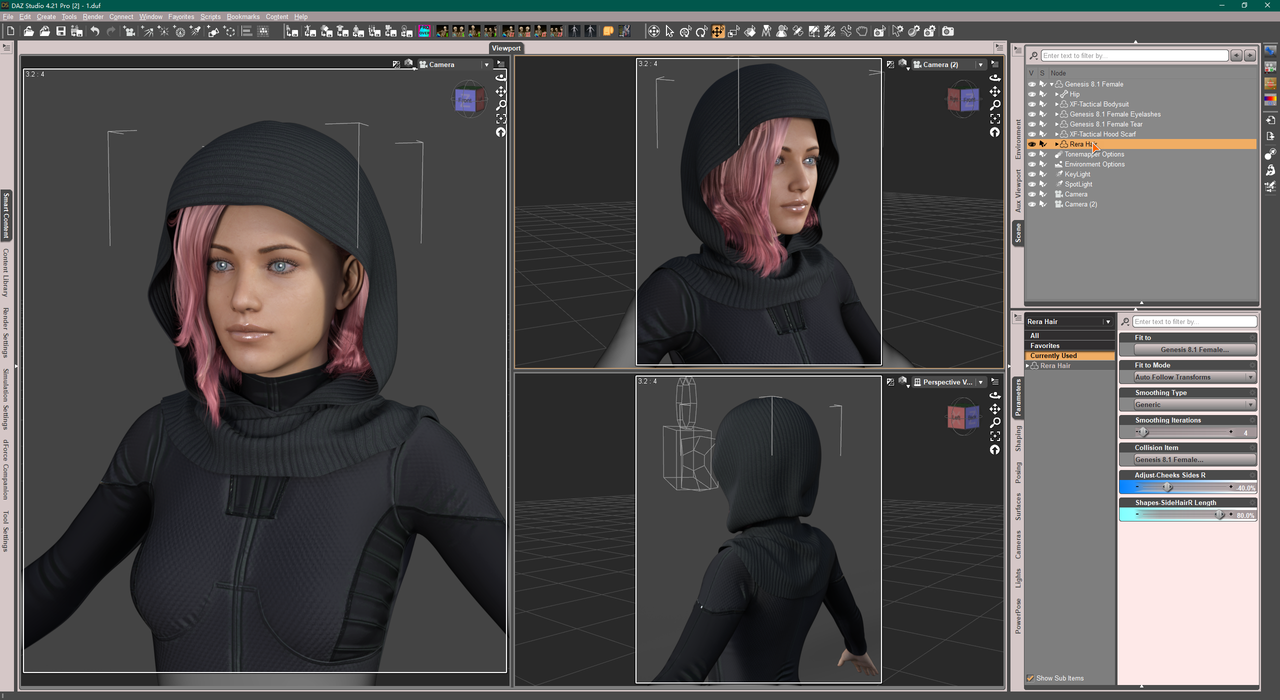
Beside, Mesh Grabber can save the 'dragged result' as a morph, you may reuse the morphs to fit the hair to other hats/hoods by dialing different percentage. That'll save some time~
Daz 3D is part of

Connect
DAZ Productions, Inc.
7533 S Center View Ct #4664
West Jordan, UT 84084Licensing Agreement | Terms of Service | Privacy Policy | EULA
© 2026 Daz Productions Inc. All Rights Reserved.