-
UltraScenery - new territory [Commercial]
Enchanted April said:
I just want to show my first finished attempt with US and I have to say, I'm so in love with that tool.
Dreams become true and I'm so thankful for all the tips and tricks I've got here in the forum. But still a lot to learn... ;)
Baba Yaga! Nice!
UltraScenery - new territory [Commercial]I just want to show my first finished attempt with US and I have to say, I'm so in love with that tool.
Dreams become true and I'm so thankful for all the tips and tricks I've got here in the forum. But still a lot to learn... ;)
Dungeon Modular by 3dlab not showing in search (Sorry fixed)dortybassa said:
I just searched and it didn't show up for me.... messed about with the filters and it popped up.
I had mature content enabled and still didn't pop at first.
Do you have DazDeals plugin enabled?
As soon as I posted in the forum I went to shop for some other items and that's when I noticed that I didn't have my "show mature content" enabled. As soon as I did that everything was good. Thanks for responding though! I didn't even know they had added that feature till I heard it mentioned in the Genesis 9 announcement stream.
Thoughts on computer specsWhat Expozures said on the cards.
On the CPU, it will have very little benefit towards rendering time - and thanks for that comparison with what I assume is same GPU Expozures. The CPU will help with the loading of things and of course overall system responsiveness. When you're looking at simply render time, with an hour long render it's such a small slice of the pie it's insignificant.
On system integrators, you probably want to look at some YouTube channels like Gamer's Nexus and JayzTwoCents. Search their channels, I know for one Gamer's Nexus reviews some system integrators.
Not to make you wait more, but the RTX 4090 might be worth considering. It might stretch the 4K budget a little more though. If Nvidia's claims are true it might be worth the cost price/performance (wait on 3rd party benchmarks of course). I only mention it since they will be on the street next month, and at least if you consider it then it won't surprise you and make you think "dang I should have waited." The big announcement on September 21, 2022 - place your bets!
inquire said:
Richard Haseltine said:
inquire said:
Where is the content chat, if I care to read it? Does that contain the video that was shown on YouTube?
I'm not sure what you mean - there was a chat running alongside the stream, but that was removed soon after the stream ended.
Oh, OK. Not available.
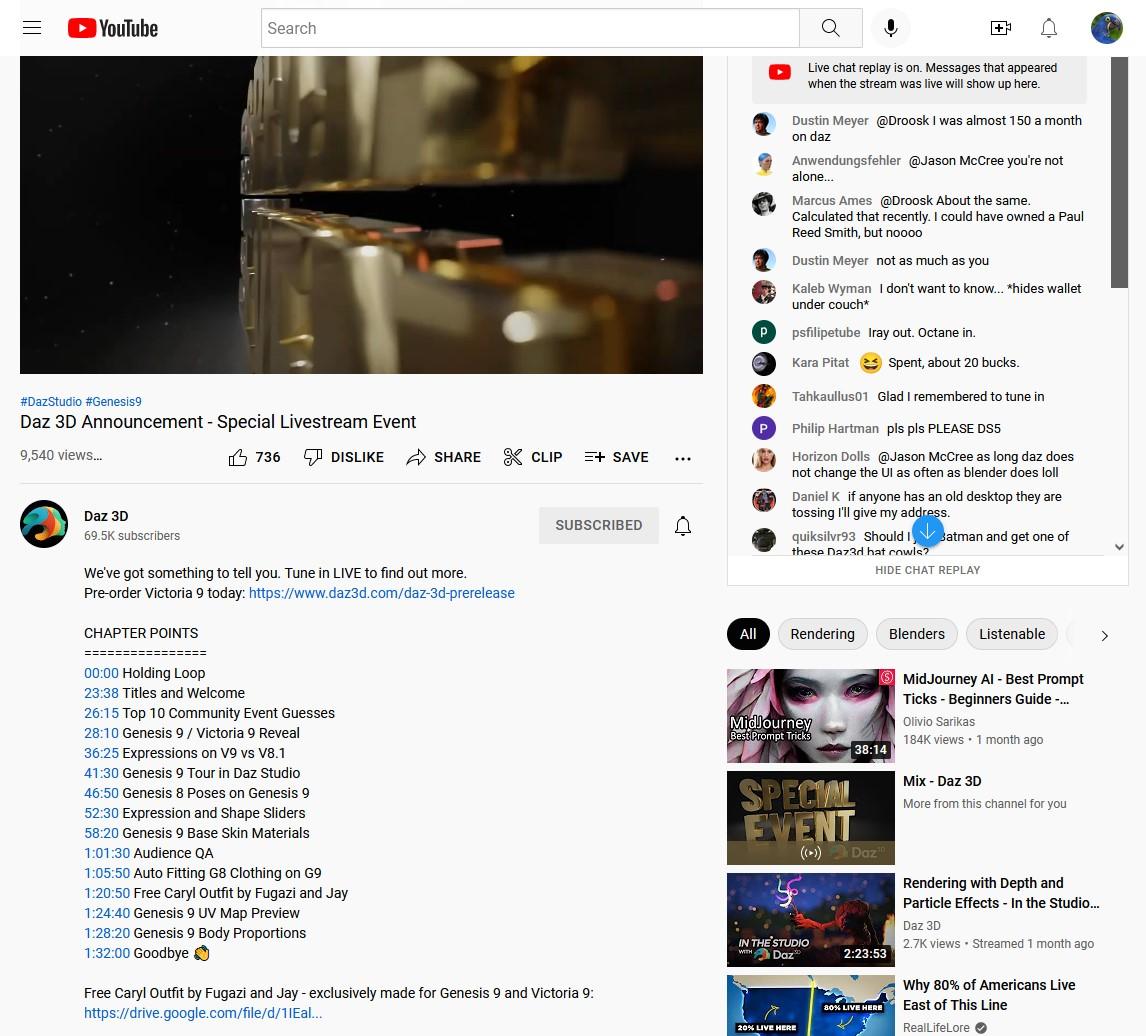
I don't know where Richard got that info. If the chat was removed, it is back now. Note the link to the freebie in the text beneath the video. Watch the video on YouTube, not embedded in the forum. You can get the freebie without having to have watched the live stream, as it turns out. But don't expect too much.
 Dungeon Modular by 3dlab not showing in search (Sorry fixed)
So I have spent the better part of an hour trying to find the Dungeon Modular product by 3dlab and could not find it. I thought perhaps that maybe I had forgotten its name correctly so I searched every possible thing I could think of to search for it in the DAZ store and yielded no results. So finally I did a google search and there it popped up so I found the store link that way. I know sometimes PA's leave Daz and so there goes their catalog but I knew that it was made by 3dlab. Once I found it a clicked his store link and it's not even on his storefront. Just wondering if anyone else has had this similar issue with other products? VOID PREVIOUS STATEMENT: I forgot about our new feature for the mature content and saw mine was un-ticked. As soon as I ticked it and searched again it showed up in the search. I apologize immensely for MY screw up lol. Thanks.
The big announcement on September 21, 2022 - place your bets!Jason Galterio said:
Pendraia said:
Don't want to go the database route? Fine. Why not assign each creator a prefix and double check that the prefix is used in the morph name? Then there would only be a conflict with the creator's own work.
One potential issue with this is that when you create a custom morph for a character it needs to have the same name as the character morph for it to autofollow when you dial the character in.
That said I frequently use my initials as a prefix for other morphs but I mainly do freebies.
The worst issues I have had are packages that have a different morphs named using real names.A package might have six morphs; Angelica, Bethany, Cathy, Denise, Erin, and Francine let's say.
Then this package will conflict with a full character set using one of those names.
Tracking down the "multi" package can be a pain because you can't search for the top level package name.
Freebies, other store products, etc, I install to their own Runtime. So those are easy to remove/revise if there is a problem.
There is no reason why character morphs for the actual character can't have a prefix my Diva morph is named plDiva. It's the clothing that needs to have the same morph name to autofollow.
The big announcement on September 21, 2022 - place your bets!Pendraia said:
Don't want to go the database route? Fine. Why not assign each creator a prefix and double check that the prefix is used in the morph name? Then there would only be a conflict with the creator's own work.
One potential issue with this is that when you create a custom morph for a character it needs to have the same name as the character morph for it to autofollow when you dial the character in.
That said I frequently use my initials as a prefix for other morphs but I mainly do freebies.
The worst issues I have had are packages that have a different morphs named using real names.A package might have six morphs; Angelica, Bethany, Cathy, Denise, Erin, and Francine let's say.
Then this package will conflict with a full character set using one of those names.
Tracking down the "multi" package can be a pain because you can't search for the top level package name.
Freebies, other store products, etc, I install to their own Runtime. So those are easy to remove/revise if there is a problem.
SOLUTIONS for Installation of DAZ Studio 4.20 Pro to Blender 3.1.0I dont think its installing anything. I checked all paths were correct, then installed the bridge.
ran a system wide search for *Blender.dsa
It found nothing.
I have daz 4.20 and blender 3.3Genesis 9 Coming Soon! Preorder Victoria 9 HD TodayMasterstroke said:
Victoria 9 promos remind me so much of actress Juliene Moore.
Julianne Moore – Google SucheShe did to me too. Unfortunately, I never liked the look of Juliene Moore. LOL But, the world contains all kinds and I like my library to as well ;).
DisappointmentGator said:
I'll let some experts chime in, as I am certainly not. I never used the original Genesis. But it seems the universal mesh wasn't that well recepted.
To me it seems like a negative to vs. dedicated male and female meshes. I (and I assume the majority of people) could care less about androgonyous shapes. I don't care about fitting male clothes to female and vice versa - for the rare exceptions, I'll create my own morphs for it.
Without dedicated meshes, don't you have more texture stretching and compression issues?
In another thread one of the forum moderators said that working with the original Genesis was "a nightmare" for content creators, but that this isn't the case for G9, which is much easier to work with. The fact that G2 quickly split back into male/female showed that DAZ realized they'd got it wrong with Genesis; the fact that they have gone back to a unimesh for Genesis 9 suggests that they think they now know how to do it right, and that the advantages outweigh the disadvantages.
DAZ don't always make great decisions, but I don't think they'd simply repeat a past mistake on something as important as a new character generation. I don't think their modelers would let them.
I don't believe that the point of the unimesh is simply to support androgynous characters. From what Jay said, it sounded as if it was done to make it easier to create other characters (i.e. non-human) off the same mesh. It also has the advantage that clothing will work better cross-figure. There'll be limits of course: Michael probably won't look great in a bra for the same reasons that I don't look great in a bra. But between a shared mesh and dForce, clothing that isn't extremely gendered ought to transfer pretty well. Or at least that's what I understood them to be implying.
ETA: Oh yeah, and what Expozures mentioned. Concerned with loading times regarding morphs as well.
Loading times on morphs seem to be largely a product of having too many morphs installed. My understanding, however, is that morphs are loaded based on the base character. In other words, if you have 10 morphs for G8M, and 1000 morphs for G8F, your G8M is going to load up pretty fast, and G8F is going to take forever. By the same token, once you add G9 to your system, those 1000 G8F morphs aren't going to slow down G9 at all (and G9 won't make loading G8F any worse).
The catch, of course, is that if you have male and female G9 characters, then all those morphs will contribute to slow the load times of G9. When we had G8M and G8F, at least G8M wasn't making it slower to load G8F. So that is a difference. Still, it may take a while before we accumulate enough G9 content for that to be a concern.
Slider Preservation?Padone said:
I know there are options in morph loader to preserve the current shape but don't know if this affects geografts. This is not specific to blender, you may have better luck asking to the daz forum. As for unreal I know nothing.
i think you would have to load morphs to each object separately. So load morphs to figure and load morphs to geografts as two seaparte steps.
Maybe im wrong on that point.
Slider Preservation?milkwasabi said:
I apologize if I'm not asking this in the right place, I'm new to this forum. Is it possible to export from Daz, import to blender, and export from blender to import back into Daz and preserve sliders and whatever else? To simplify my question (Or the opposite... Lol) I'm trying to modify a body shape in blender, but I want to modify it while it has the attachments I put on (for example, breastacular and golden palace) because to my knowledge I can't import my modified genesis 8 into Daz and apply after the fact. (If this isn't true, please let me know how! Would make this so much easier haha) Also for future reference, is it possible to use collision in these sort of assets (breastacular and golden palace) for Unreal? Sorry, I suck at summarizing myself and putting things into words but any and all help is appreciated, thank you!!
Do you really need to sculpt changes to the geografts at the same time?
If your concern was about being able to add geografts to a modified figure after having sculpted the figure in Blender, you actually can add geografts to the edited figure in Daz provided you load in the changes to your figure using Morph Loader Pro. This process just imports the edited figure into Daz Studio as a new morph (or "shapekey", to use blender parlance).
Usually the process for creating Daz morphs would be to export the objects or figures from Daz Studio at their Base Resolution without any attachments (i.e., without eyelashes, tear, the geografts you mentioned).
Then after you modiffy, i.e., sculpt changes in Blender, you would export out of Blender as an obj and load in the changes using Morph Loader Pro.
Note: You can only make changes to the mesh at base resolution (unless you have the HD toolset, which only vendors get access to.) For that reason, any high-res changes you sculpt in Blender would have to be baked down from high res mesh onto the base resolution mesh into displacement or normal maps.
Important points to remember:
- Blender won't preserve vertex order on import/export unless you tell it to (preservation of vertex order is needed for the morphs to look like theyre supposed to)
- Morph Load Pro requires vertex count to remain the same between original and morphed shapes, otherwise it wont import.
Morph Changed on Loadand I get no error messages indicating missing files.
Well, the solution is there. Just read the list of missing files. Look for some of them with Google. And you'll get what you need pretty quickly : a list of the bundle(s) you had installed when working on that scene that you're obviously missing now. Install it, or them and you'll be good to go.
I then unbatched the file [...] when I rebatch the file and open it [...]
batch, unbatch ? I guess you're talking about archiving, compression ?
"the" file (please be precise) should not be tempered with if you don't know much what you're doing.
The .duf file of your scene is FINE. Do not touch that.
Fix missing missing Daz bundles until you don't get any "missing file" message. And all will be good. There should be a pop-up when opening your.duf file that tells you precisely what is missing, which makes the google search easy peasy. You can also find a list of those files in the Daz log.
help > troubleshooting > view log file
or
C:\Users\YOUR_NAME\AppData\Roaming\DAZ 3D\Studio4\log.txt
The big announcement on September 21, 2022 - place your bets!Wonderland said:
BeeMKay said:
Wonderland said:
Wow, really? I always update to the newest NVIDIA studio driver but I have a LOT of content. I think every set of morphs ever sold, some from PAs who are no longer at DAZ and TONS of characters, expressions, a ridiculous amount of products. I only have 16GB RAM but I'm constantly releasing RAM with Norton Utilities. Do you think more RAM will make a difference? Everything else runs fine, Adobe Photoshop, Premiere, VR PC games... DS is the only program I have a problem with.
Do you have sufficient room on your C drive (or whatever is your Windows dive)? I found that when I had less than 100GB there, the system began to act wonky when I used DAZ. I have a 980TI card, and no issues with the current version of DS, though I'm using it in Beta.
No, I don't have much room on the C drive and tried to install DS on an external SSD drive and that didn't work and may have screwed some things up. If I could ever get CS to help me with all this, it would be amazing.
The problem will not be solved by installing DS elsewhere, because it's a general Windows problem (at least that's what I was told). A larger C drive could help, or removing all non-essential programs except DS, and see if that helps. It could be Norton, though. So another option to test this out would be to unplug your PC from the internet, and temporarily disable Norton. Again, this would be just to "search" for a possible source of the problem.
Has anyone shown their awesome Eeevee renders?The blender forum is here https://www.daz3d.com/forums/categories/blender-discussion
Genesis 9 Coming Soon! Preorder Victoria 9 HD TodayVictoria 9 promos remind me so much of actress Juliene Moore.
Julianne Moore – Google SucheThe big announcement on September 21, 2022 - place your bets!Rod Wise Driggo said:
- Converters and tools: It will probably take some time for guys like Zev0, RiverSoft or ManFriday to release new tools for the new generation. Probably they will come up with solutions to use older character skins on Gen9 as well. So I tend to wait so see what will be available.
It's worth pointing out that Zev0 currently has two empty placeholder threads in the PA forum, so they might be waiting for the release of G9 to approach or arrive before they announce what the products are.
Slider Preservation?I know there are options in morph loader to preserve the current shape but don't know if this affects geografts. This is not specific to blender, you may have better luck asking to the daz forum. As for unreal I know nothing.
The big announcement on September 21, 2022 - place your bets!AllenArt said:
FWIW, Fugazi's and Jay's freebie link is now in the description of the video..you don't need to search chat for it.
Thank you for letting us know!!!

Daz 3D is part of

Connect
DAZ Productions, Inc.
7533 S Center View Ct #4664
West Jordan, UT 84084Licensing Agreement | Terms of Service | Privacy Policy | EULA
© 2026 Daz Productions Inc. All Rights Reserved.