-
UV Mapper help
UV Mapper is pretty good for very, very basic models.
If that is unavailable, there is Blender... But.. unless you know Blender, it's probably not worth the frustration.
One program I do want to look at and have considered buying a few times, is Ultimate Unwrap (https://www.unwrap3d.com/u3d/index.aspx). Never used it but it looks as if it should be OK.
I have written a freebie modeller (http://www.chestnutpens.co.uk/misc/modeller.html) that was originally written for generating finite element analysis models. I have dragged it, fighting me all the way, into being a modeller suitable for creating DS compatible models with basic UV mapping (Box and 'Current View' are the only two it can cope with), however I have used it to map about 75% of my freebie models available at Rendo. The remainder (mostly cylindrical) were mapped with UVMapper. The most awkward models that I mapped with my modeller were the Arch Bridge and Lutchyns Bench, both of which needed quite a lot of thought over how to map them. Neither program can cope with unwrapping a model, which is unfortunate as unwrapping makes the mapping process so, so much easier. If being rash enough to consider my modeller, can I suggest that you read the User Guide first & see if it's a program you could work with. I wrote it for myself and it works the way I want to work - which may be deeply frustrating for you. The most useful sections in the user guide would be "3.2.8 How to Model for Rendering" to "3.2.11 How to Create a Morph Target" (pages 35-51)
Regards,
Richard
Teeth issues with G8.1globally said:
crosswind said:
You did right... not necessary to set SubD to 0 since SubD has no effect or impact with Base Resolution Level. Is it a 8.1 figure? There're 2 Mouth Realism HD morphs on a 8.1.. Have you turned both of them off..?
Yeah i turned both 8 and 8.1 mouth realism off. What is best practice? both off? ive often had issues with the teeth and i never know what is best for exporting (most videos on creating morphs skip the part where you prep the model for export or they just set the model to base and thats it) If i did right can we explain why we see a difference between the two? the teeth look slightly stretched to me and maybe slightly deformed too.
Hmm.. weird ~ You zeroed figure's shape before Morph Loading back, correct? You chose Restore or Zero? In other words, were those two Mouth Realism HD morphs restored? Don't restore them, keep them Zeroed before loading back the morph...
After importing and dialing the morph, if you still need Mouth Realism, as per my exp, I suggest give 50% to each of them, even lower...
Geometry Editor - hiding/deleting edge strands?Hm, yes looks like you're right. It looks like DS is having an issue with in some cases not hiding polygons in the viewport even if they technically are hidden, which has been confusing me. If you look at the video here you can see that if I select some polygons on the sphere and then select Hide Selected Polygons, the do indeed hide visually.However, if I do the same with the hair strand the polygons do not hide visually. But if I select Delete Hidden Polygons anyway, they actually delete so they must be hidden technically. I just discovered this by accident - I haven't tried it before since I didn't see any point in trying using Delete Hidden Polygons since hiding them didn't seem to work in the first place.
https://www.screencast.com/t/aPuox29k
Yeah, it's a 'feature' of Ds
 there's a trick (maybe sometimes), you set the resolution level to Base first...
https://mega.nz/file/jS4XBTAQ#krHpfzlByDtkpUkpb7qkTQ8aPURiX1I6VgmbMZKgL3I
I can see that in Blender there is a black line connected to the polygon group like a rubber band when you move it, is that an edge or a polygon that connects it to the rest of the mesh, so that it actually is connected?
No, in fact I happened to partially select it. You're right... I just tried again. If I selected the Linked polygons, it is not connected.
https://mega.nz/file/OCZRXDJQ#xo1upKHrpc2LJj85GmG7qgAl7VHBCeXxa0iQniskFjY
But I really don't understand why the morph you made in Hexagon finally brought you a 'deformed' hair...
It takes two minutes to GOZ from Zbrush back to DAZ. It used to be instant and fast.I just tried making a morph for PS Loong Hair, viz Brush Goz, and it's taking about 10-15 minutes for the Goz morph to be processed by DAZ Studio; after giving the morph a name. It never used to be like this, even with dense hair. It's got to be an issue with 4.21.
i'm on a i7-9#### processor with 32gb ram and SSD hard drive.
It takes two minutes to GOZ from Zbrush back to DAZ. It used to be instant and fast.crosswind said:
So such an issue incurred after you upgraded Ds to 4.21.05? or it just happened all of a sudden? And what's your GoZ version, 1.14.0.5 ? Have you ever tried resinstalling GoZ on both sides of ZBrush and Ds?
To give an update, it turned out it was the hair. The hair is a ... ... fiber mesh or something? It's dense. I think that's why it too so long. If I try to morph the body, then it happens fast. The problem was only with hair that uses the fiber mesh thing. The hair is from Redz Studio Katz.
Teeth issues with G8.1Hello,
i have just exported my character as an obj (mainly to combine all of the morph dials in to one) but when i load it in with morph loader pro the teeth seem to have changed (see attachment (new single dial on left and original on right)). When i exported i turned off all HD morphs, set to base, set sub d to 0 and turned off Mouth realism HD. Could it be because i turned off Mouth realism? I was under the impression that all HD had to turned off when exporting.
Hope someone has an answer to this.
Thanks
Geometry Editor - hiding/deleting edge strands?crosswind said:
As far as I can see they are edges, not polygons. If you use Polygon select in DS, they will not select, only if you use Edge select you can select them. And Edges can't be hidden or deleted in Geometry Editor.
Same in Hexagon, they will only select if you choose Edge selection, not if you use Polygon or any other type of selection...
Yes, certainly you can select it by using Polygon Selection as long as you make it 'close' enough... like this:
https://mega.nz/file/XXYTXSiJ#Gn9bQFt5sU25WFHPmcc8nbHz3jwu8pn93b3HAdCspWg
But it'll be cumbersome by selecting polygons bit by bit, so using Marguee or Lasso will be easier...Hm, yes looks like you're right. It looks like DS is having an issue with in some cases not hiding polygons in the viewport even if they technically are hidden, which has been confusing me. If you look at the video here you can see that if I select some polygons on the sphere and then select Hide Selected Polygons, the do indeed hide visually.
However, if I do the same with the hair strand the polygons do not hide visually. But if I select Delete Hidden Polygons anyway, they actually delete so they must be hidden technically. I just discovered this by accident - I haven't tried it before since I didn't see any point in trying using Delete Hidden Polygons since hiding them didn't seem to work in the first place.
https://www.screencast.com/t/aPuox29k
Like I said above, the strand/edge group is not connected to any other part of the mesh either as far as I can see. If you move it, it doesn't affect any part of the mesh, in Hexagon. If I select some other random edges and move them you can clearly see how they are connected to other parts of the mesh. It's only in DS, when applying the morph so the strand group moves, it affects other parts of the mesh. So I wonder what's going on here.
In your video, while using Polygon Selection, actually the 'strand' has already been selected. You need to zoom in to take a look. The highlights of Polygon and Edge are different, the latter looks much apparent (highlighted in orange color)... Acutally you can first use Edge selection to select the 'strand' then convert it to Polygon Selection, then hide or delete the selected... (RMB Menu : Geometry Selection - Convert Selection - Convert to Polygon Selection...)
Still, I have no idea about Hexagon but it looks like the strand is really 'separated'... but in Ds and blender it is 'not' if it was partially selected ... I just roughly made this 'fixing morph' in blender:
https://mega.nz/file/ffxkmIhQ#gp3FlTMZ7x6IxLwNbHMZHjl1SIBBSOY8184jgD774R0I can see that in Blender there is a black line connected to the polygon group like a rubber band when you move it, is that an edge or a polygon that connects it to the rest of the mesh, so that it actually is connected?
Missing Morphs for purchased characterFBM: Full Body Morph, e.g. a body morph of a character
MCM: Morph Corrective Morph, use a morph dial to correct or fix another morphHow to export cloth from daz to Marvelous Designer, welded?Nope, the 'unwelded' garments cannot be 'welded' in Ds. You can weld them in Maya or Blender etc. however they cannot be imported to Ds as a morph anymore but only a new object...
How to export cloth from daz to Marvelous Designer, welded?The cloth when exported to MD, it's' fallen apart.
Can it be welded when exported and still be able to reimported back as morph?
Getting on the 9 train, or notSerene Night said:
Hands: need a way to increase details in this area. There are a lot of sizing morphs but veins, knuckles and shapes would be nice. The hands overall seem smaller in this generation on the men, and there are plenty of sizing morphs but I need detail as well as size.
Ears: more shape and variety to the ear folds within the ear. I do have plenty of rotation and size morphs but not enough to adjust for lobe etc and the shape of the ear morph.
At Renderhub, undeadcrabb's In Depth Anatomy provides several ear morphs, although not enough to cover the capabilities of Rarestone's & EmmaAndJordi's packs for G8. Uncanny Valet's Gopniks has separate full hand and feet morphs for G9 that add detail.
Scale a mesh with skeleton setupThe character and size morph are made by me. Both are seperate morphs. For the size I scaled in DAZ, saved as obj and loaded it back in as a morph.
The character is a G8 figureScale a mesh with skeleton setupCould you first tell me what the 'size morph' was that you loaded to this character ? It came from a product or was made by you? BTW, this character is a G9, correct?
Scale a mesh with skeleton setupcrosswind said:
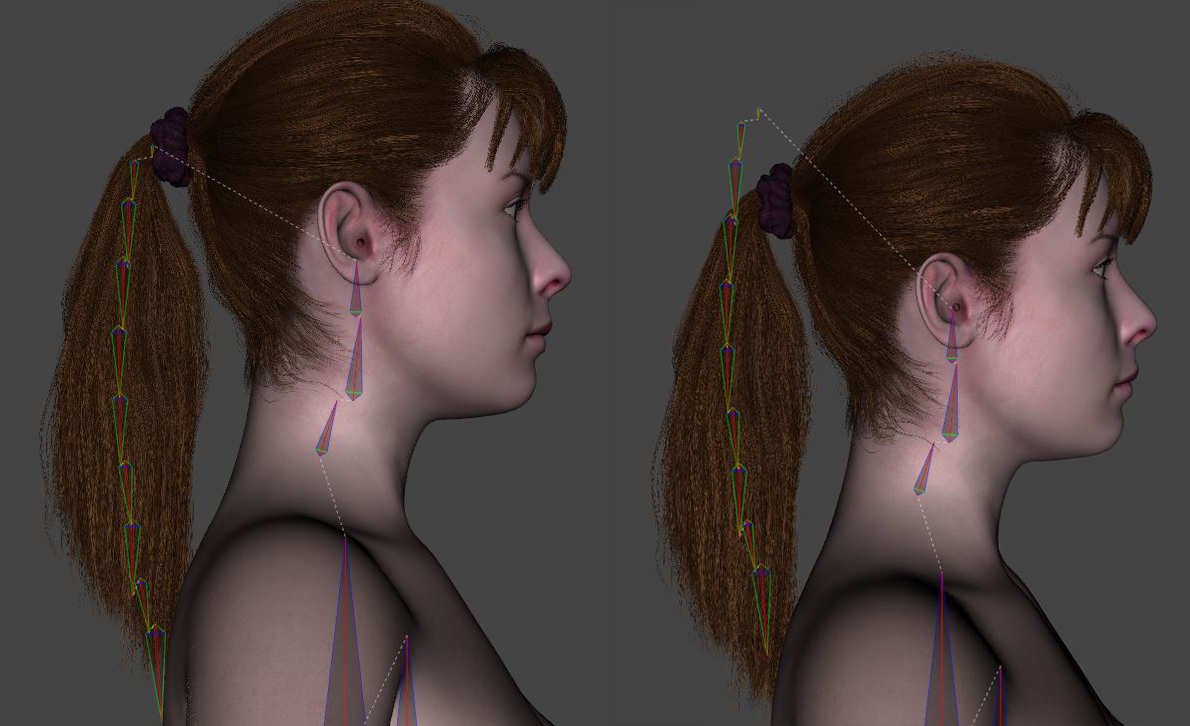
If this 'size morph' is a partial head morph of the character, you need to fix the corresponding 'auto-triggered' morph in the hidden properties of the hair, e.g. rig the bone of the tail to the right position, export to obj, Morph Loader Pro - Import back to the hair to overwrite the hidden 'size morph' as a delta...
When I use the hidden slider to scale, it does not break the hair rig. So I guess this is the root of the issue. I tried what you said and made a morph out of the scaled down and manually fixed hairs. Loading it back to the hairs without scaling but it doesn't solve anything. Not sure if I got you right. I can not use the morph to scale the hair, because the hair is fittet to genesis 8. -Scaling like this will never match the character. Can you be more detailed on the last part and on how to overwrite the 'size morph' delta please?
The size morph of the character is a full body morphLet's appreciate/discuss today's new releases - ongoing threadFace morph is pretty great, though
Scale a mesh with skeleton setupIf this 'size morph' is a partial head morph of the character, you need to fix the corresponding 'auto-triggered' morph in the hidden properties of the hair, e.g. rig the bone of the tail to the right position, export to obj, Morph Loader Pro - Import back to the hair to overwrite the hidden 'size morph' as a delta...
Getting on the 9 train, or not
I have transferred G8 characters to G9 through quite some steps, although there definitely is some distortion around the eye area. A character converter dealing with such problem is much welcomed. As long as I don't need to mix G8 with G9 characters, or unless I want to use the G9 makeup products, I will just use the original G8 version of my characters because IMVHO G9 is not that advanced in comparison with G8, except the eye texture...Timbales said:I'm looking forward to an eventual fix to G9's UU chest creases, or an easy transfer utility for previous generations body shapes. Unfortunately, I don't think previous generation male shapes are going to be compatible to mix with G9's because of the chest. That comes in handy with male shapes, since male characters are fewer. I enjoy dial spinning and mixing different characters together.Getting on the 9 train, or notI'm looking forward to an eventual fix to G9's UU chest creases, or an easy transfer utility for previous generations body shapes. Unfortunately, I don't think previous generation male shapes are going to be compatible to mix with G9's because of the chest. That comes in handy with male shapes, since male characters are fewer. I enjoy dial spinning and mixing different characters together.absolute vrs relative pathMainly an 'SOP' may be as below: (mostly like a PA usually does..)
0) ... all making and necessary preparation......
1) Save Scene, Figure / Prop assets (DSON User Files) to 'user-face' folders (Environments, People, Props .... etc. + 'Vendor' and 'Product' sub-folders as needed);
2) Save UV / Morph assets (DSON Support Files) to data folder with 'Vendor' and 'Product' names;
3) Save texture maps to \Runtime\Textures\ + 'Vendor' and 'Product' sub-folders......
4) Assign texture maps from 3) to Surfaces ......
5) Save necessary ...Presets files to the folders along with 1) .....
etc.So if following the standard procedure, normally you don't have to worry about 'paths' problem...
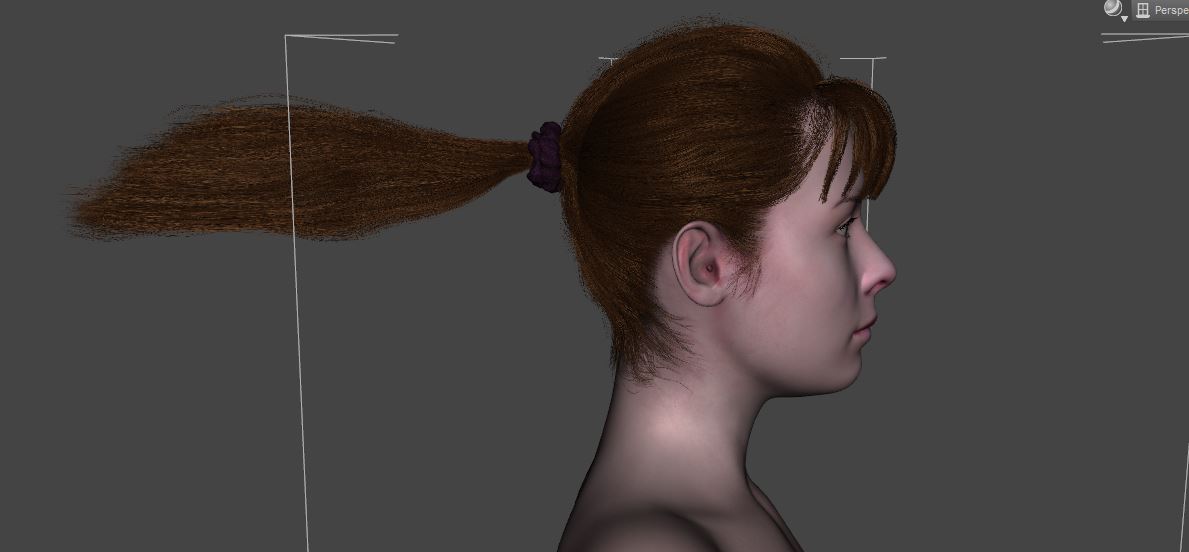
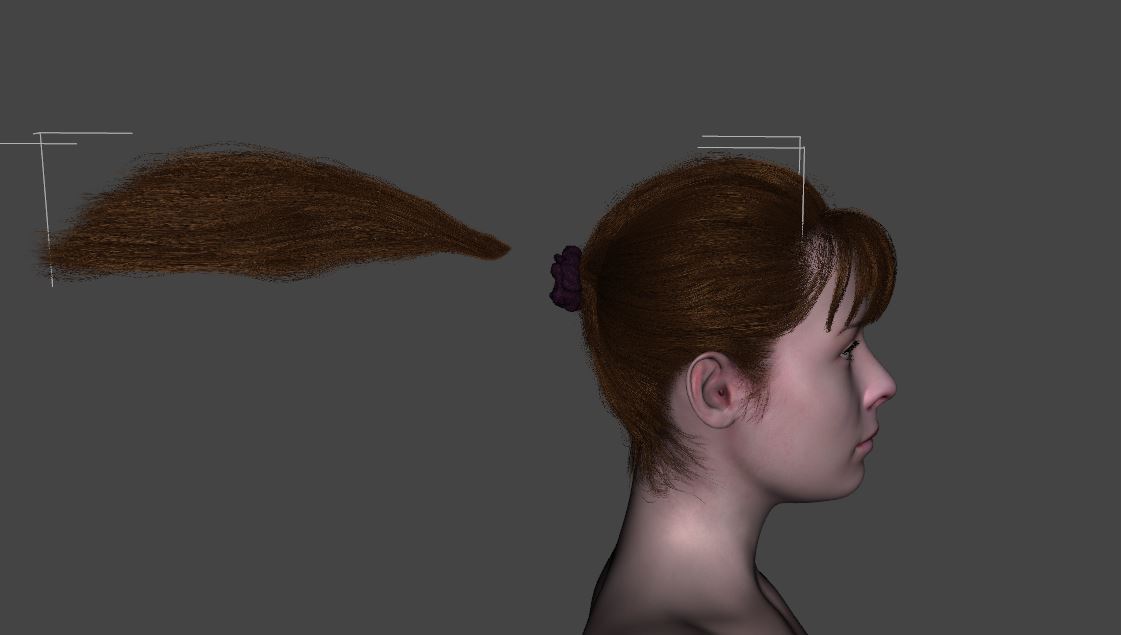
Then better set a 'Test Library' for the products you make, copy all Content to this lib or use Content Wizard to build an IM package of your product and use DIM to install it to the lib for testing...Scale a mesh with skeleton setupI have a hair with rigged parts. When I load the "size morph" for my character the hair rig falls apart.
What can I do to tell DAZ to scale the skeleton along? With "bone visibility" I can see that the skeleton is the problem.How can I fix this?
Daz 3D is part of

Connect
DAZ Productions, Inc.
7533 S Center View Ct #4664
West Jordan, UT 84084Licensing Agreement | Terms of Service | Privacy Policy | EULA
© 2026 Daz Productions Inc. All Rights Reserved.











