-
Hello can someone please help me with something
I believe you can alpha out a tooth or morph it small. You could model a tooth with root to take the place of that tooth and then use that for the extraction.
Looking for this modelLeana said:
Onyx is most likely this one: https://www.renderosity.com/marketplace/products/122992/onyx-for-genesis-3
yeah I found that one just looking for the character morph
Redz Kaz for Genesis 9I actually like the Kaz morph; it is very much a Redz style. I did a quick render:
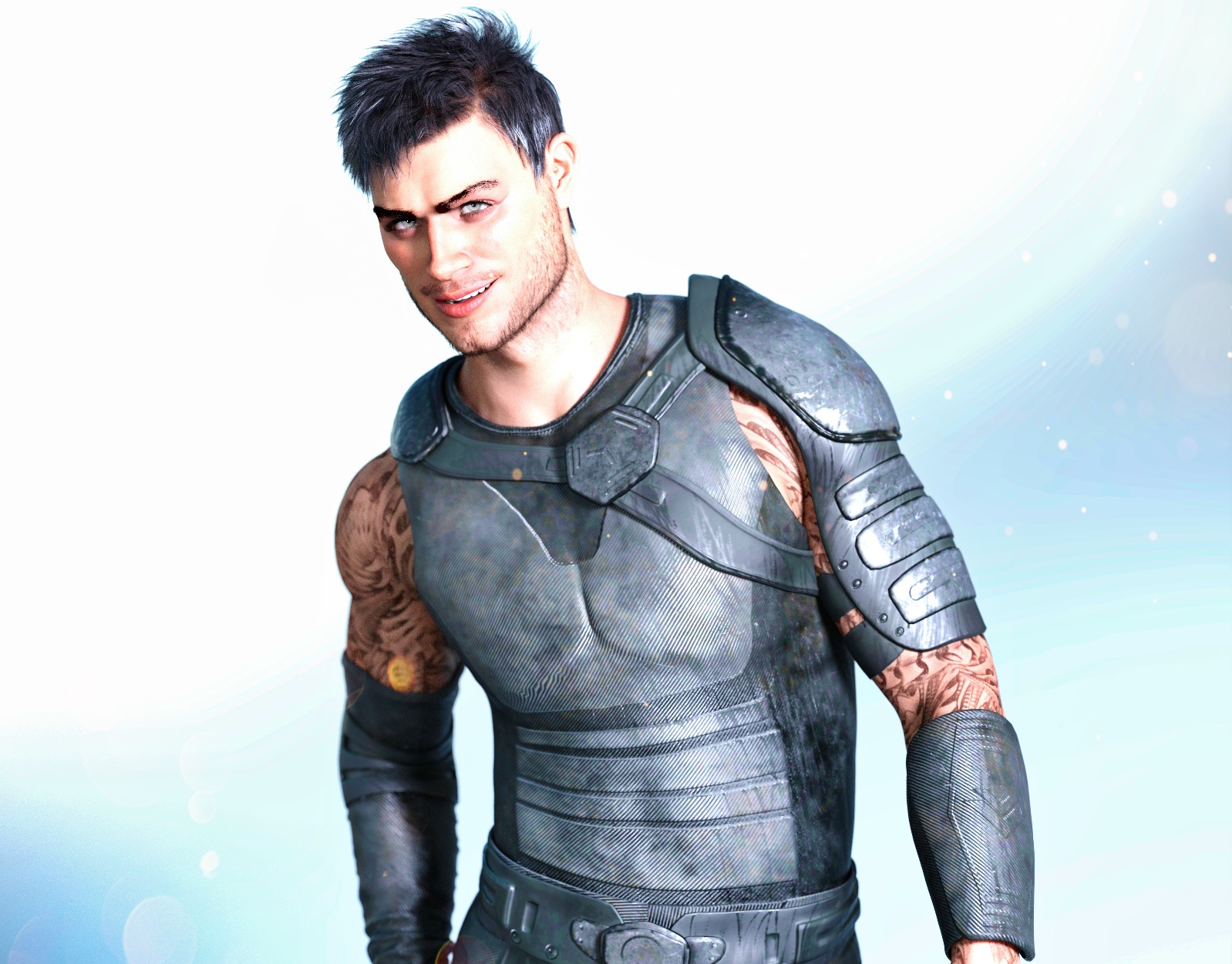 Looking for this model
Leana said:
Onyx is most likely this one: https://www.renderosity.com/marketplace/products/122992/onyx-for-genesis-3
yeah I found that one just looking for the character morph
[SOLVED] Subtle Distortion of Genesis 8 and 8.1 Female FiguresSofaCitizen said:
Also, have you don the whole "show hidden and zero figure" on BOTH machines? It sounds like you did this on the 2nd with no difference to account for the figure being a little smaller but perhaps that is because the first machine that you assumed was the "correct" version actually has a default morph making things a little bigger and it is infact the second machine that is correct?
Brilliant!
I had NOT performed those checks on the old PC, because, as you said, I had assumed it was giving me the "correct" version of the characters. I sent one of my test files to a friend and had him render it for me. The result matched the image from my NEW PC, not the old one.
I ran the "show hiden and zero figure" checks on G8.1 F on the old PC, and found a suspicious morph called "Nipple Fix". I turned out to be in a freebie by someone named Felldude, which I picked up at Renderosity in 2019. The freebie was supposed to be for adding freckles to characters, so I have no idea why the artist included morphs for nipples, let alone whatever else that morph was affecting - but he must have screwed up and made his morph affect all figures. I found another thread related to this freebie here:
https://www.daz3d.com/forums/discussion/381301/freckles-duf-the-daz-snipe-hunt
Once I removed all the files for that morph from the Das library on my old PC, the model rendered exactly like it did on my new PC.
Many thanks for your help - and everyone else who offered assistance! :)
Genesis 9 EyesAngells said:
If you have a custom face morph , how do you get the eyes to match if you are using vendors morphs mix and match, and exporting the obj and using morph loader to import the morph back into ds. How do you work to make they eyes match, will rigging to shape work or do you have to use a deformer to match the custom face morph?
Genesis 9 eyes are a separate figure from the main body, in the same way that clothes are separate from the main body, so you have to make a separate morph for the eyes too. Give it the same name as your morph on the head (notice i said same 'Name' and not same 'Label')
When eye morph has same name as the head morph, it will be automatically dialled in on the eyes whenever the head morph is dialled in on the body.
When saving out morph asset, remember to save both the body morph and then separately the eye morph.
There is a youtube video im too lazy to link to
Genesis 9 EyesIf you have a custom face morph , how do you get the eyes to match if you are using vendors morphs mix and match, and exporting the obj and using morph loader to import the morph back into ds. How do you work to make they eyes match, will rigging to shape work or do you have to use a deformer to match the custom face morph?
Shape Splitter - Divide, Combine and Save (The new version is already available. 1.2.1)[Commercial]Hi, I realize things have changed drastically with Genesis 9's introduction, but for those of us still using the previous generations, is there a chance you'll release your script to transfer morphs between genders? It would really make the creature library far more versatile. Also, thank you for this script; it's been helpful plenty of times.
Why do user-made morphs erode the teeth? It is preventable?Look for a morph called "Mouth Realism HD". For some reason it used to be set at 100% by default on the base figure, and I used to get your problem all the time before I found that out.
Shape Splitter - Divide, Combine and Save (The new version is already available. 1.2.1)[Commercial]Thanks so much for the solution to my problem, CGI3DM. It worked. And it works for G8 as well as G8.1. I never use G8.1, so I was having the problem with G8, and your instructions worked.
I will have another question for you later, after I figure out how to describe the other issue I am now facing.
CGI3DM said:
The problem with the teeth is due, in most cases, to a morph(s) that is loaded by default, Mouth Realism HD (8.1). It must be changed to 0% before performing the spawn/Combine.
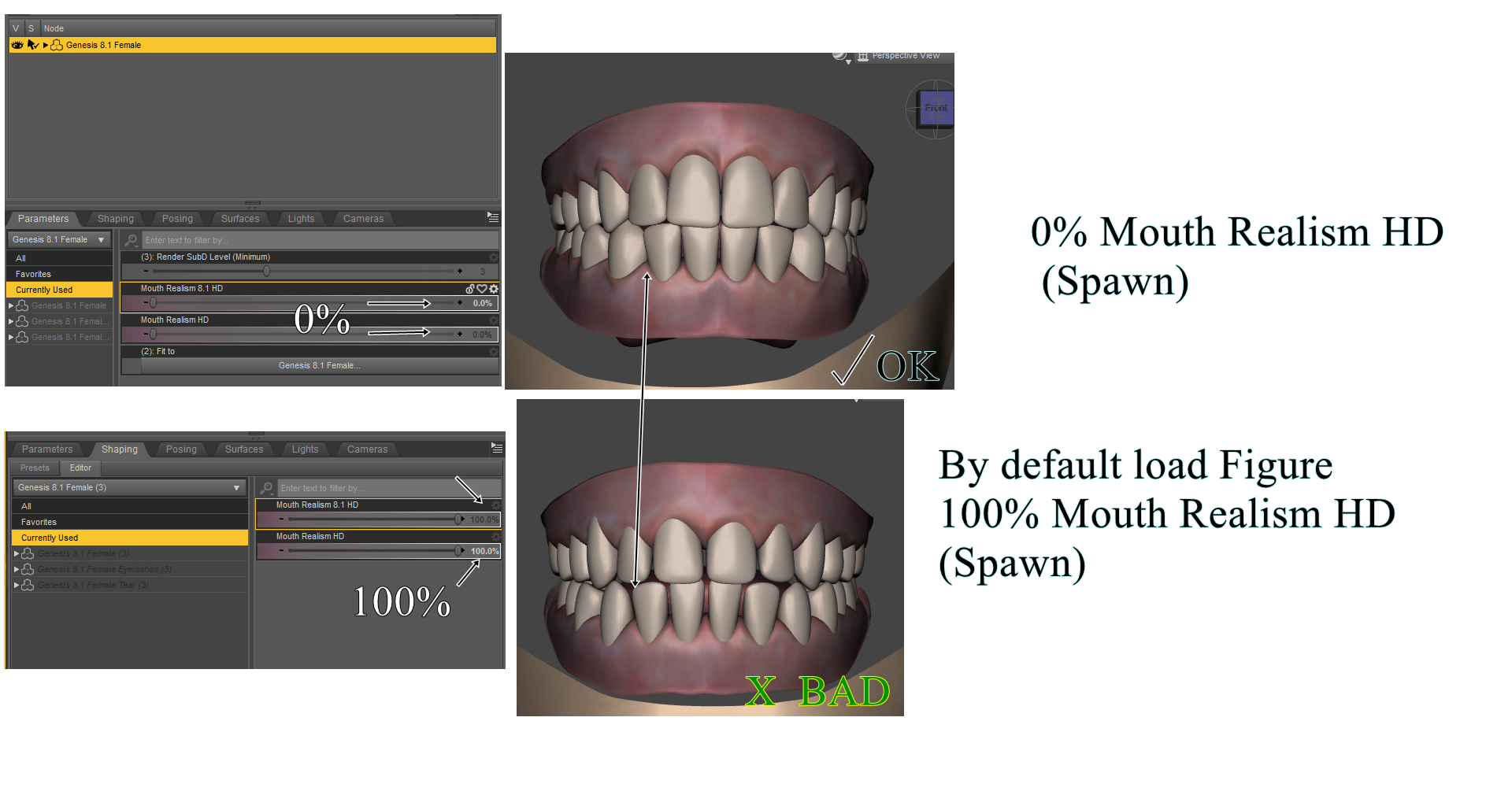
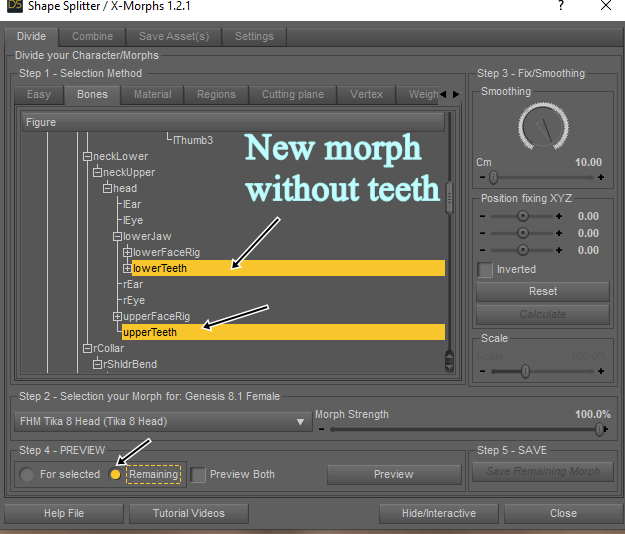
And for morphs(created) with teeth problems, you can use the "Bones" option, and select "lowerTeeth" and "UpperTeeth". With "Remaining"
 Adjusting bones on a new DIY morph
You should also do ERC freeze, to get it to follow your morph.
Try to see this
 There's Always Another Sale Thread -- Discussions Only
DAV Sidra HD for Genesis 9 Feminine
https://www.daz3d.com/dav-sidra-hd-for-genesis-9-feminine
From the Details description "Sidra is sculpted at 4 Levels SubD and texturized with 4K detailed skin.", Level 4 SubD?! holly cow would bring my rig to it's knees. No 8K normal map, all textures seem to be 4Kx4K, so now we are deviating from the Gensis 9 listings? oh this is a PA asset bought by Daz3d so it's up to the PA, well that kinda doesn't cut it when Gensis 9 details ......ugh.. okay.
there are 14 Promo on the product page. this is a Level 4 SubD scupt morph pack, Geoshell, and 2 textures blue and black. There is not 1 of the 14 promo shows that show the skin detail of the body, only head shots. all promos are clothed except the last 2 promos which only show head and some neck. No teeth morphs, promos with teeth showing look like defualt Gensis 9 teeth, reminds of 80's si-fi with an actor sipping a soda through a straw. really alien with human teeth, no texture nada, just normal. The last 2 promo shots show the head and some neck and they look streached. there is a weird line acorss the chest, extra smothing, upper lip looks smooth but rest of face has detials, shoulders have a weird white atrifact and the other shoulder shows it more prodementally, think this is caused by the lighting, but again - without seeing what the skin looks like it just looks odd, is the skin scales? smoothish? or a combiation of both. No bending promos, all generally standing pinup posed, all promo shtos are cut at hips, no detials of legs or rest of body. Hand shot in 1 promo looks like default Gensis 9 hand painted blue with detail around fingernails - skin looks very generic.
Is it too hard to have 1 promo that shows what it looks like on Genesis 9 Male, since Gensis 9 is all about the muti female/male thing. What does this product loook like on default Gensis 9 , no SubD level , on a male without the Geoshell?
There are 14 promos shots with 3 outfits shown. 2 of the outfits are listed on the product page clearly. what's the 3rd clothing item? Why does 1 of the promoshots have a green detailed texture clothing (if that IS actual clothing) - is this the same 3 outfits or something entirely different?
yes it seem like I am being overly picky, I use Daz3d products in other applications other than Daz Studio. HD doesn't eally do anything for me at all, so I need to know what details will look like IN Daz Studio , but also what will it look like outside of Daz Studio exported, what will I lose, how can the prodcut be used in kitbashing with other products etc.
This is simlar to Josie 9 by another PA and a Daz3d orignal, face makeup, no nails or toes nail colors, no 8K normal, no HD.
Man it's getting hard to figure out what a prodcut is, isn't, how usful it is in other programs etc. no material zones shown on clothing items UGH.
Adjusting bones on a new DIY morphHi.
I am playing with making some morphs on Blender using Obj files. I am importing them back into Daz using Morph Loader Pro. In general, is working ok for small local changes.But I have an issue with a figure I am making taller than the original by stretching the legs. When applying poses it is pretty obvious that I need to update the bones in the legs.
I am following a process that only uses exported Obj objects directly. Not using either Daz to blender bridge or the Diffeomorphic add-on. My base figure is 8.1.Here are two screen captures. The left is the sample of how much I stretched the legs compared to the 8.1 figure. The right image is the jelly leg I get after a simple posing inside Daz.

My question is Where I update the bone structure?
XTransfer Module 1- Genesis 3 to Genesis 8 Morph Converter (Commercial)I guess I'll continue using the Transfer Utility thing I've been doing to transfer morphs over to G9 then. Shame.
Freebie Challenge FEB 23 - "I see Red" - Entries Thread OnlyLadie in red

Genesis 8f
freebies:
1.char morph
https://www.renderosity.com/freestuff/items/83567/liza-for-genesis-8-female
2.skin
https://www.renderosity.com/freestuff/items/90583/skin-with-freckles-daz3d-iray
3.eybrows NSFW
https://www.renderosity.com/freestuff/items/86527/irene-angevin-for-g8f-custom-character
4.hair
https://www.renderosity.com/freestuff/items/87894/dane-hair-g8f
5.hibiscus
https://www.renderosity.com/freestuff/items/76283/hibiscus-flower
6.dress
https://www.renderosity.com/freestuff/items/92417/cutesy-cap-sleeved-dress-for-g8f-dforce
7.necklace
https://www.renderosity.com/freestuff/items/92627/elizabeth-necklace-for-g8f
8. BG
There's Always Another Sale Thread -- Discussions OnlyAngela 9 HD Space Infantry - 40$ for an add-on with a slightly different morph and a scar is just... wow.
Freebie Challenge Feb 23 - "I see Red" - Main Threadaki3d said:
Ladie in red
Genesis 8f
freebies:
1.char morph
https://www.renderosity.com/freestuff/items/83567/liza-for-genesis-8-female
2.skin
https://www.renderosity.com/freestuff/items/90583/skin-with-freckles-daz3d-iray
3.eybrows
https://www.renderosity.com/freestuff/items/86527/irene-angevin-for-g8f-custom-character
4.hair
https://www.renderosity.com/freestuff/items/87894/dane-hair-g8f
5.hibiscus
https://www.renderosity.com/freestuff/items/76283/hibiscus-flower
6.dress
https://www.renderosity.com/freestuff/items/92417/cutesy-cap-sleeved-dress-for-g8f-dforce
7.necklace
https://www.renderosity.com/freestuff/items/92627/elizabeth-necklace-for-g8f
8. BG
All freebies check out but please add some NSFW warnings to the links that need it
 then please move to entries Shape Splitter - Divide, Combine and Save (The new version is already available. 1.2.1)[Commercial]
The problem with the teeth is due, in most cases, to a morph(s) that is loaded by default, Mouth Realism HD (8.1). It must be changed to 0% before performing the spawn/Combine.
And for morphs(created) with teeth problems, you can use the "Bones" option, and select "lowerTeeth" and "UpperTeeth". With "Remaining"
Finding rogue morphs?Anyway, this is how I fix rogue morphs. I first find the .dsf file where the morph is stored. For example, for G8F, all morphs should be stored under:
\data\DAZ 3D\Genesis 8\Female\Morphs\
If the .dsf file is compressed, I decompress it first. Then I change one line in this section:
"modifier_library" : [
{
"channel" : {
"id" : "value",
"type" : "float",
"name" : "Value",
"label" : "Rogue Morph",
"auto_follow" : true,
"value" : 1,
"min" : 0,
"max" : 1,
"clamped" : true,
"display_as_percent" : true,
"step_size" : 0.01
},
"value" stores the default value of the morph. Above, it's set to 1, which means it gets automatically turned on. In my case, this is bad.
So,
CHANGE:
"value" : 1,
TO:
"value" : 0,
And save the file again. That should stop the morph from turning on.
Genesis 1 to Genesis 9 Clothing/Hair/Character/UV ConverterFSMCDesigns said:
There will probably be a converter to come out at some point, although I don't think it will go all the way back to Genesis 1. Your best bet is to get the GenX addon in the store and bring your genesis 1 morphs up to G3 and then wait for the new converter to come out. Personally I would just start creating all new characters for G9
I got GenX and couldn't figure out how to make it work (yes, I followed the readme). I would get a "morph" that I could transfer, but when I did so, dialing up the morph did nothing. I eventually just gave up on it and eyeballed it the best I could. Got it close enough that you can't really tell the difference in renders...and then my computer crashed again (different computer) and I had to make it again. I'm gonna back it up this time...
Daz 3D is part of

Connect
DAZ Productions, Inc.
7533 S Center View Ct #4664
West Jordan, UT 84084Licensing Agreement | Terms of Service | Privacy Policy | EULA
© 2026 Daz Productions Inc. All Rights Reserved.