-
Messed up geometry after converting from Genesis 3 to Genesis 8
takezo_3001 said:
Havos said:
Is this true? Everything I have read, and my own observations too, is that G8 and G8.1 is exactly the same mesh. Only the rigging has some difference, in particular the face. If they were not the same mesh, G8 morphs would not work on G8.1 (and they do), nor could you use G8 geografts on 8.1 (and you can).
That makes sense, but that doesn't explain the mirrored morph issue, I'll double-check to make sure, when I first made my leg morphs with G8 I did not recall this issue, but I did notice the issue with G8.1, as it morphed the entire right side when the morph was dialled...
deji2109 said:
I used G8. I finally figured it out. It was a particular morph that I used on all my characters that was causing it. The slider in question turned out to be Lilith 7 Body HD details. When I turned the slider down to zero, the anomalies went away.
Cool, glad you figured it out, yeah I have both Gen-x and Riversoft's plugins and HD morphs are nobody's friend when it comes to transferring morphs.
Thanks. Yeah I turned off every single slider one by one and eventually saw that one. I guess I didn't really know what I was doing because I have the Riversoft Converter and the Xtransfer morph converter. HD morphs are a pain.
Messed up geometry after converting from Genesis 3 to Genesis 8deji2109 said:
crosswind said:
You used the latest version converter script?
I used the 2020 option in this one https://www.daz3d.com/character-converter-from-genesis-3-female-to-genesis-8-female
If you're about to convert G3F to G8F, strongly recommend G3F to G8F Morph Converter 1.1 made by darkhound1 (offsite commercial link removed). Single mesh conversion, clean, accurate and fast... No offense to RSA's script but the method he made was a bit fussy and some steps are not really necessary. I believe for most of the users incl. me, we only need a purely clean single mesh and use Head Splitter on G8 to separte head / body morphs, even in most cases, we just need an accurate head morph...
Messed up geometry after converting from Genesis 3 to Genesis 8Havos said:
Is this true? Everything I have read, and my own observations too, is that G8 and G8.1 is exactly the same mesh. Only the rigging has some difference, in particular the face. If they were not the same mesh, G8 morphs would not work on G8.1 (and they do), nor could you use G8 geografts on 8.1 (and you can).
That makes sense, but that doesn't explain the mirrored morph issue, I'll double-check to make sure, when I first made my leg morphs with G8 I did not recall this issue, but I did notice the issue with G8.1, as it morphed the entire right side when the morph was dialled...
deji2109 said:
I used G8. I finally figured it out. It was a particular morph that I used on all my characters that was causing it. The slider in question turned out to be Lilith 7 Body HD details. When I turned the slider down to zero, the anomalies went away.
Cool, glad you figured it out, yeah I have both Gen-x and Riversoft's plugins and HD morphs are nobody's friend when it comes to transferring morphs.
Messed up geometry after converting from Genesis 3 to Genesis 8takezo_3001 said:
Did you use G8.1 instead of G8 as the recieving character by chance? I ask because G8.1 figure is not symmetrical like G8, as the left/right half of the character does not match, unlike with G8... A nightmare if you want to create limb morphs, so using DS's mirror morph import feature is useless!
I used G8. I finally figured it out. It was a particular morph that I used on all my characters that was causing it. The slider in question turned out to be Lilith 7 Body HD details. When I turned the slider down to zero, the anomalies went away.
Messed up geometry after converting from Genesis 3 to Genesis 8takezo_3001 said:
Did you use G8.1 instead of G8 as the recieving character by chance? I ask because G8.1 figure is not symmetrical like G8, as the left/right half of the character does not match, unlike with G8... A nightmare if you want to create limb morphs, so using DS's mirror morph import feature is useless!
Is this true? Everything I have read, and my own observations too, is that G8 and G8.1 is exactly the same mesh. Only the rigging has some difference, in particular the face. If they were not the same mesh, G8 morphs would not work on G8.1 (and they do), nor could you use G8 geografts on 8.1 (and you can).
Any news of a Pose Architect for Genesis 9 in production?FSMCDesigns said:
Seriously? i could never figure out that product worked. Any pose you create for G8 you can save and then use the free converter to convert to G9
https://www.renderosity.com/freestuff/items/93219/g8fm-pose-transfer-to-g9
Ever watch a movie or read a book and find a plot hole that is blatantly unbelievable? Like how Dom's kid (Fast and Furious) born in 2013 defied aging and in the 8th installment (2017) the movie depicted him at age one? It is a distraction. A plot hole disengages you at some point. This disengagement is due to unbelievability, and that hey, wait a minut, moment. This can occur in animations or still photo realistic images that depict scenes and poses. The pose in the product you linked to at Rendo, would be a face toppler, near impossible to keep your balance. How can she stand on her toe leaning forward while reaching back. The scene needs a wall to hold the model up,else the pose is unbelievable and unrealistic and frankly has an amateur vibe to it. Ever see a comic scene where a DUI check sends an abbreviated soul face-planting the pavement? That's about the only place unbalanced poses work well. The pose architect, is designed to create very cool but believable poses that are well balanced. Even contortionists in unbelivable poses, can look believable when the body is balanced with the hand as flat as possible or whatever is needed to create that COG (Center of Gravity). These are the things, the Pose Architect brings to the table . . . retaining balance while bending/moving body parts. If one doesn't understand the COG and it falls outside of the BOS (Base of Support) the pose is considered unstable and thus unbelievable. When we stand the BOS is in our feet but differs dramatically if we hold our feet close together or stand on one foot. Everytime we move our COG changes. Carrying obects and lifting boxes/babies reaching, stretching etc changes the COG. The weight of a person also affects COG. So does pain. My hubby has had two back surgeries (spinal fusions) and suffers from chronic pain. His COG is no longer behind his navel and is more to the back of his spine and because of that he is considered a high risk for falling. So for disabled, chronic back pain models these poses would not be believable but for all other normal average models, this product is spot on. . A perfect remedy for instability. Body poportions can vary and affect the center of gravity, which is why I own all of the architect poses and have G9 ( a shorter model than G8) in my cart. I don't need to worry about calculating COG and BOS because 3D-Universe created Pose Architect.
Messed up geometry after converting from Genesis 3 to Genesis 8Did you use G8.1 instead of G8 as the recieving character by chance? I ask because G8.1 figure is not symmetrical like G8, as the left/right half of the character does not match, unlike with G8... A nightmare if you want to create limb morphs, so using DS's mirror morph import feature is useless!
Genesis 9 clothing questions & answersChangelingChick said:
It wasn't intended as a tool for users. That's why it's under dev tools. To be specific, there is not end user available documentation at this time. But this is the procedure:
- Make your head shape
- Use the Adjust Rigging to Shape. For a head, ONLY select the Neck 1 and Children bones to adjust and ONLY select the Head as Influencing. Be sure that the *only* active morph is the one you've made. If you intend to have the Base Feminine or Masculine heads ERC'd in, do NOT have those active. They already have rigging in them. Uncheck the following bones:
- Right Eye
- Left Eye
- Left Eyelid Upper
- Left Eyelid Lower
- Right Eye
- Right Eyelid Upper
- Right Eyelid Lower
- Put your parameters in Edit mode, and select your morph.
- Use Adjust Eye Rigging
The morph will have all of the bone adjustments you've made thus far and the eye adjustments ERC'd in.
Overall, you can skip the tool unless you have a particularly extreme headshape and just use the typical adjust rigging to shape. You'll just have to ERC freeze the adjustments yourself. It saves maybe 15 seconds.
Will have to save this as I have def not been doing some of this, ive just been 'adjust rigging to shape'-ing the bones and calling it a day
Genesis 9 clothing questions & answersLook! I think ChangelingChick's procedure worked great. I made this stupid head morph with Mesh Grabber. I just flattened the forehead and lowered the whole eye area for a test. I applied the saved morph to JS Fanny. Here is a comparison of the morphed and unmorphed character.
Acheron Pit InstallationHello,
I bought the Acheron Pit environment for my Daz Library recently, however when I downloaded the files I noticed that it only had the "Runtime" folder listed in the Content. Usually, when I download a new environment it always has the "Data", "Environments" and "Runtime" folders together which I just copy to my library.
I wanted to know if there is something that I am missing in order to make the environment work regarding the instalation of the files or if the download was incomplete to begin with?
P.D The Runtime folder has "Geometries", "Libraries", "Textures" and "Support" subfolders inside but I dont really know how to exactly transfer them to get them to work on the software.
Thanks,
Genesis 9 clothing questions & answersIt wasn't intended as a tool for users. That's why it's under dev tools. To be specific, there is not end user available documentation at this time. But this is the procedure:
- Make your head shape
- Use the Adjust Rigging to Shape. For a head, ONLY select the Neck 1 and Children bones to adjust and ONLY select the Head as Influencing. Be sure that the *only* active morph is the one you've made. If you intend to have the Base Feminine or Masculine heads ERC'd in, do NOT have those active. They already have rigging in them. Uncheck the following bones:
- Right Eye
- Left Eye
- Left Eyelid Upper
- Left Eyelid Lower
- Right Eye
- Right Eyelid Upper
- Right Eyelid Lower
- Put your parameters in Edit mode, and select your morph.
- Use Adjust Eye Rigging
The morph will have all of the bone adjustments you've made thus far and the eye adjustments ERC'd in.
Overall, you can skip the tool unless you have a particularly extreme headshape and just use the typical adjust rigging to shape. You'll just have to ERC freeze the adjustments yourself. It saves maybe 15 seconds.
Space Road Stop and Add-Ons [Commercial]kerabera said:
the robotic legs are one of my first try/work/test of daz3d, it's very bugged and not friendly use (they are not a morph for genesis 3 but a new mecanisme, all the axes are differents from the base bone of genesis character so pose of genesis don't work) so i don't put it on sale. but I still use them in promo given the huge time I spent on them at the time.
yes the common part where public can access are a "clean/poor" style but the futur part where only the staff of the sattion can access like reactor will be more wire,cable and pipe stuff.
Too bad. They are very cool legs! The add-ons you are working on look great! Looking forward to them.
(Released!) Vellus Horizon Shader System USER GUIDE IN COMMENTSlilweep said:
So... are you going to make this for Genesis 9?
I use it all the time but too lazy to do texture transfer for the displacement maps to G9 UV.Also, can you save the geoshell as just 1 whole Wearable preset - nobody has time for setting everything up manually.
Just finished the Genesis 9 version today. Added a bump map to drive additional visibility options. I like the way it turned out, and I'll start packing it up tomorrow!
ETA: scratch that, I see some ways I can make this much better, so more work to do!
Arrak for Genesis 9 [commercial]Richard Haseltine said:
Are the mandibles on the chin grafts or morph?
I must admit, with my innate bloody-mindedness, I am tempted to overcome my arachnophobia (Arrak? No, phobia!) and have the webbing be used by Dr Arrak for binding up injured body parts.
The mandibles are morphs...so not posable
Dr Arrak....good evil villian name
Arrak for Genesis 9 [commercial]Are the mandibles on the chin grafts or morph?
I must admit, with my innate bloody-mindedness, I am tempted to overcome my arachnophobia (Arrak? No, phobia!) and have the webbing be used by Dr Arrak for binding up injured body parts.
Rudimentary DSF parser in C#Nice work on this. I've also been playing around with Daz files. I got the DSF object by using "paste special" in Visual Studio. I took Genesis <version>.Dsf and selected all then copied into the source code.
This gave me a rotoobject which I renamed and modified to suit the task. I also did morph files, a sample I posted here (your code didn't inlcude the modifier_library).
I hope this helps! :)
public class Rootobject
{
public string file_version { get; set; }
public Units units { get; set; }
public Asset_Info asset_info { get; set; }
public object[] pedigree { get; set; }
public Modifier_Library[] modifier_library { get; set; }
public Scene scene { get; set; }
}public class Units
{
public int length { get; set; }
public string angle { get; set; }
public int time { get; set; }
}public class Asset_Info
{
public string id { get; set; }
public Contributor contributor { get; set; }
public string revision { get; set; }
public string modified { get; set; }
}public class Contributor
{
public string author { get; set; }
public string email { get; set; }
public string website { get; set; }
}public class Scene
{
public Modifier[] modifiers { get; set; }
}public class Modifier
{
public string id { get; set; }
public string url { get; set; }
}public class Modifier_Library
{
public string id { get; set; }
public string parent { get; set; }
public Presentation presentation { get; set; }
public Channel channel { get; set; }
public string region { get; set; }
public string group { get; set; }
public Formula[] formulas { get; set; }
public Morph morph { get; set; }
}public class Presentation
{
public string type { get; set; }
public string label { get; set; }
public string description { get; set; }
public string icon_large { get; set; }
public float[][] colors { get; set; }
}public class Channel
{
public string id { get; set; }
public string label { get; set; }
public bool visible { get; set; }
public bool locked { get; set; }
public int min { get; set; }
public int max { get; set; }
public bool clamped { get; set; }
public bool display_as_percent { get; set; }
public float step_size { get; set; }
public int value { get; set; }
public bool auto_follow { get; set; }
}public class Morph
{
public int vertex_count { get; set; }
public Deltas deltas { get; set; }
}public class Deltas
{
public int count { get; set; }
public float[][] values { get; set; }
}public class Formula
{
public string output { get; set; }
public Operation[] operations { get; set; }
}public class Operation
{
public string op { get; set; }
public string url { get; set; }
public float val { get; set; }
}Regards,
Dorian
AOBB's freebie head morph Jimmy v2 for G8.1M based on James Stewart. No materials nor textures.Thank you, nonesuch00! I think the screenshot of the Pureref photo reference sheet that I was using will help you and others see why the model looks the way it does.
Perlk - I love that render. You've really captured Jimmy's essence in it.
 I am looking forward to seeing the image re-rendered with the new morph. It will be interesting to compare both renders.Exporting Unreal environments to Daz or Blender
You can try this: Daz To Unreal – Environment Transfer – David Vodhanel
It's a bit iffy though due to the variety of ways that environments are setup.
AOBB's freebie head morph Jimmy v2 for G8.1M based on James Stewart. No materials nor textures.A genuinely kind and humble man with a strong, moral backbone and a will of iron. A great movie star and war hero. A devoted husband and father. A man with a rascally sense of humor. What a guy!!!
I give you the freebie head morph of a young James "Jimmy" Stewart (from the 1930s):

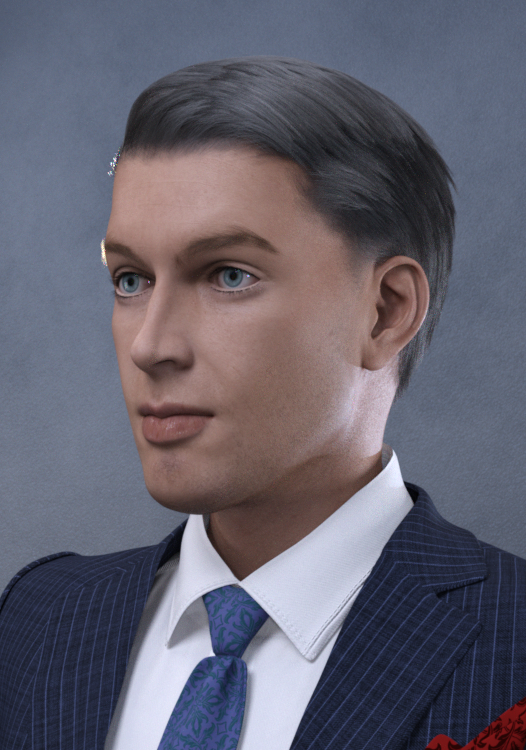

Assets used in promo images:
Thadeus hair for G8M
Bold Brows II for G8M (Brow 10)
MI Two Piece Business Suit w texture expansion for G8M
Lashes utilities for G2,3,8
BOSS Pro Lights
Natural Eyes II for G8.1M
The skin materials/textures are the generic G8.1M model's materials/textures. They just look different, because of the BOSS Pro lighting.
Noncommercial use only.
Please enjoy, let me know what you think and if you make a render with Jimmy, please post it in this thread for me (us) to enjoy. I am thrilled when you post the renders with "my" head morphs.

AOBB
Edit: I have attached my photo reference sheet for comparison.
Where Can I Get Victoria 4.2 Morph++ PackShapes ++ should be the right product. Did you install to the same Content Directory as the base, and if you don't use the PowerLoader tool did you run /Runtime/Libraries/!DAZ/DzCreateExPFiles-v4.bat (for Windows - command script of the same name for Mac) and then inject the morphs from the Pose library, under poser formats, Daz' Victoria 4>Morph Injections (as I recall)?
Daz 3D is part of

Connect
DAZ Productions, Inc.
7533 S Center View Ct #4664
West Jordan, UT 84084Licensing Agreement | Terms of Service | Privacy Policy | EULA
© 2026 Daz Productions Inc. All Rights Reserved.