-
G8F Eyes Closed eyelid distortion. Please help!
This may be useful to someone with the eyelid push-away-when-closing problem.
I solved the problem illustrated in the figures attached to my Dec 22 post above. But as so often is the case, that created a host of new ones.
Ever since I first bought and installed SC Lucy (sku# 50707) that character's head and body morphs loaded full on every time I loaded any G8F or G8.1F character for the first time. Those morphs are based on the Josie 8 character so those head and body morphs loaded, too. I just learned to zero the Lucy morphs before doing anything else. Zeroing those also zeroed the Josie morphs. But even after zeroing them, they remained attached to the G8F and G8.1F characters. They would show up as currently used with zero as the parameter level.
Yesterday, complete frustrated with the eyelid close problem, I decided to remove Lucy from my system. My reasoning was that the Lucy morph behavior was an anomaly. Maybe it was related to the eyelid problem. I had installed the character with DIM so I removed it that way, too. But the Lucy - Josie problem remained. It still came fully on with each new G8F or G8.1F character and remained attached to the character once zeroed. I had to go through the library directories, searching for SC Lucy related files with a file manager and deleteing every one of them. Then the G8.1F eyes closed normally. I redownloaded Lucy and reinstalled it using DIM. But the eye's closing problems did not reappear.
Now every single one of my G8F and G8.1F scenes -- essentially all my scenes -- throws file not found errors on the Lucy related files. Takes a long time to load since the waring appears twice and waits to be clicked on. But then saving the scene eliminated that problem. A seconday problem arose. All the many morphs from the Handspan Studios Genesis 8 Female Body Morph Resource Kit got deleted along with the Lucy files. And they did not get reloaded with the reinstallation of Lucy. Any that I used in any scene triggered a file not found warning. Finding that Kit again and loading it manually solved those errors.
I have no idea why the presence of the Lucy morphs caused this problem. When I explored the hidden properties associated with eyes and eyelids, it appeared that not one was active. Nor do I have any idea why the lucy morphs always loaded fully activated with every new G8F and G8F.1 character and loaded at zero with saved characters. The eyelid problem only affected G8.1 characters. It appears that when I first installed it (2019-04-11 7:54:24 PM) the Lucy installer put many of the files in non standard directories. Those were the ones that were loading automatically because uninstalling Lucy alone did not solve the problem. Reinstalling Lucy put the morphs in the correct locations.
Just FYI
Height morph brakes them chest "baloons"?Reinstalled the Daz 3d height morph as well and it is still broaken.
Height morph brakes them chest "baloons"?So I had to reinstall my entire asset library lately because my hard drive died and now that I tried to load one of my character presets I noticed that her "baloons" were miss morphed and were being dragged below where they would be normaly, so I changed the height default Daz studio chest morph and them "baloons" stayed in place while the rest of the character moved along with the morph. I had a "breastacular" graft applied to them "baloons", if the graft isn't applied everything works properly, I will try to reinstall everything and get back here then.
Sagan: A DAZ Studio to Blender Alembic ExporterHi,
I don't know of any product, but I can't believe that this doesn't exist... maybe ask a general DS question in one of the other forums?
But if you've got modeling skills, you could just export the character at base res, select the faces you want for the cap, and import that back into DS with the Transfer Utility.
Or in C4D you can you somehow parent the hair cap geo to the Head bone, and use something like Blender's Shrink Wrap modifier?
In any case, "extract hair cap" seems like a perfect example of a simpler, more specific applet I should write. I'll put that on the list.
crazy hairLantia Vertel said:
I had a similar issue in the past, and there is a solution:
1) Select the hair in the scene.
2) In the Tool Settings panel, select "Join Editor" as "Active Tool".
3) Now, in the "Node" field, select "chest" (see the screenshot) and once chest is selected untick "Inherit Parent Scale" in Node Attributes section below.
4) You may need to repeat the same for different nodes (like neck, abdoment, etc), as you don't want them to affect the hair. For a hair, only head should have "Inherit Parent Scale" checked.
That will work only if the chnage is the result of scaling - it won't help if it is a morph, however
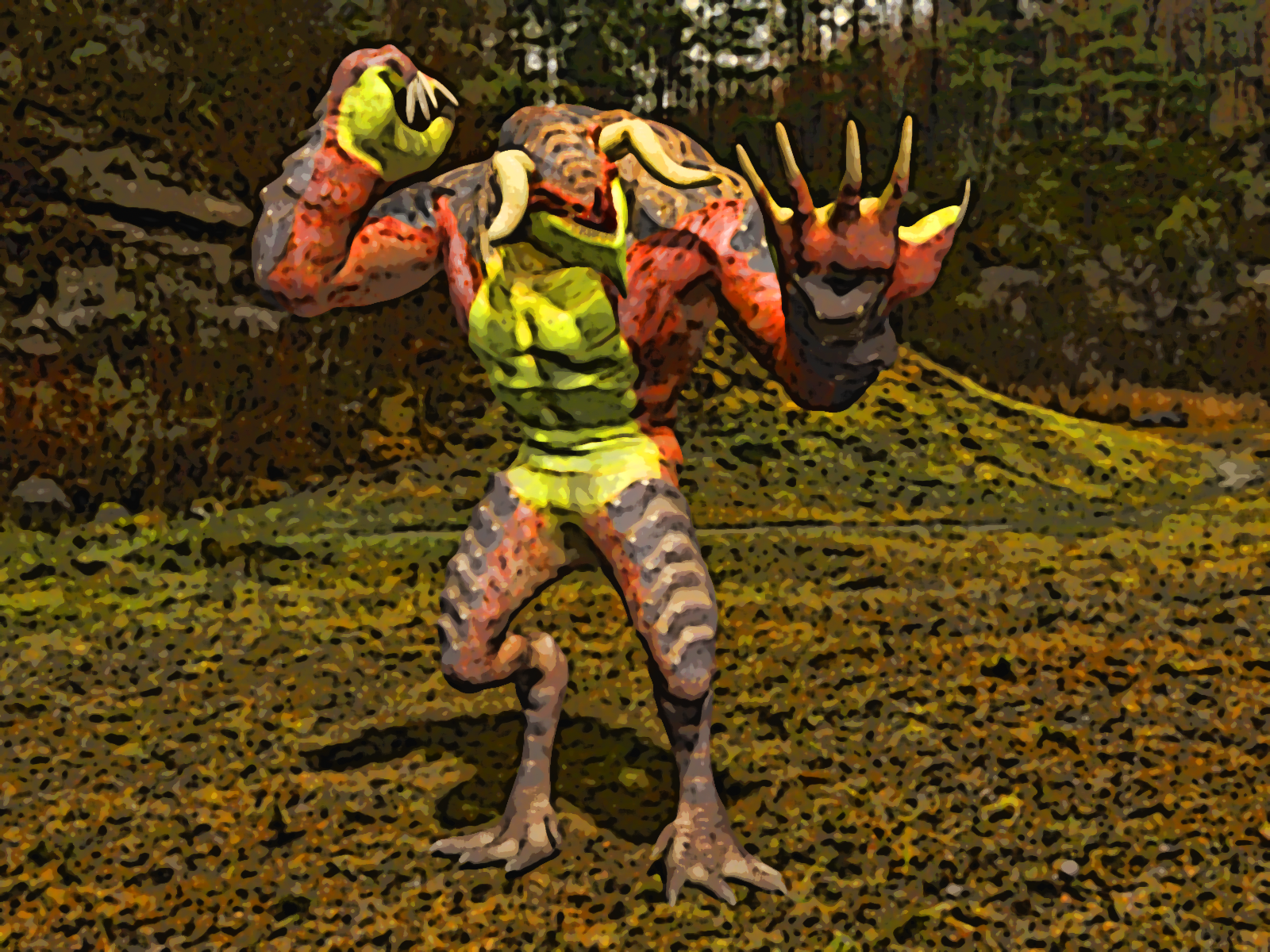
Carrara Non Photo Realistic Works 2https://www.daz3d.com/dragovinian-for-ravager-parasite-for-genesis-81-male
Trial render - still more work to be done on this beastie !!!
Note - if you buy it you will need to alter the data file as it is set at 1 instead of 0 for the morph Edit - Joe has issued an update
Issues - https://www.daz3d.com/forums/discussion/comment/8023256/#Comment_8023256
crazy hairThe ideal would be to create a custom morph to match the figue shapes used, but you could use the Geometry Editor in vertex mode (right-click menu or Tool settings pane) to select the lower portion of the tails, right-click>Geometry Assignment>Create rigidity Group From Selected, then select a few vertices where the hair touches the breast and from the same right-click menu make them a reference group for the rigidity map - then the rigidity mapped section should move as a unit, without deforming, to follow the area that is against the breast. If the tails are posable you could also just enable Ppreferences>Show Hidden Properties in the Parameters pane option menu (the lined button in the top corner or right-click the tab) and then zero out the hidden morphs that match the figure shape, then adjust the tails to hang correctly.
crazy hairWith breast augmentation, the hairstyle adjusts to the boobs. There is a defect on the tails. Which is not adjustable when changing postures or when shortening the length. How to make the hairstyle stay in position until the chest is entrained. How to make the breast morph not affect the hair?
Hello can someone please help me with somethingI believe you can alpha out a tooth or morph it small. You could model a tooth with root to take the place of that tooth and then use that for the extraction.
Looking for this modelLeana said:
Onyx is most likely this one: https://www.renderosity.com/marketplace/products/122992/onyx-for-genesis-3
yeah I found that one just looking for the character morph
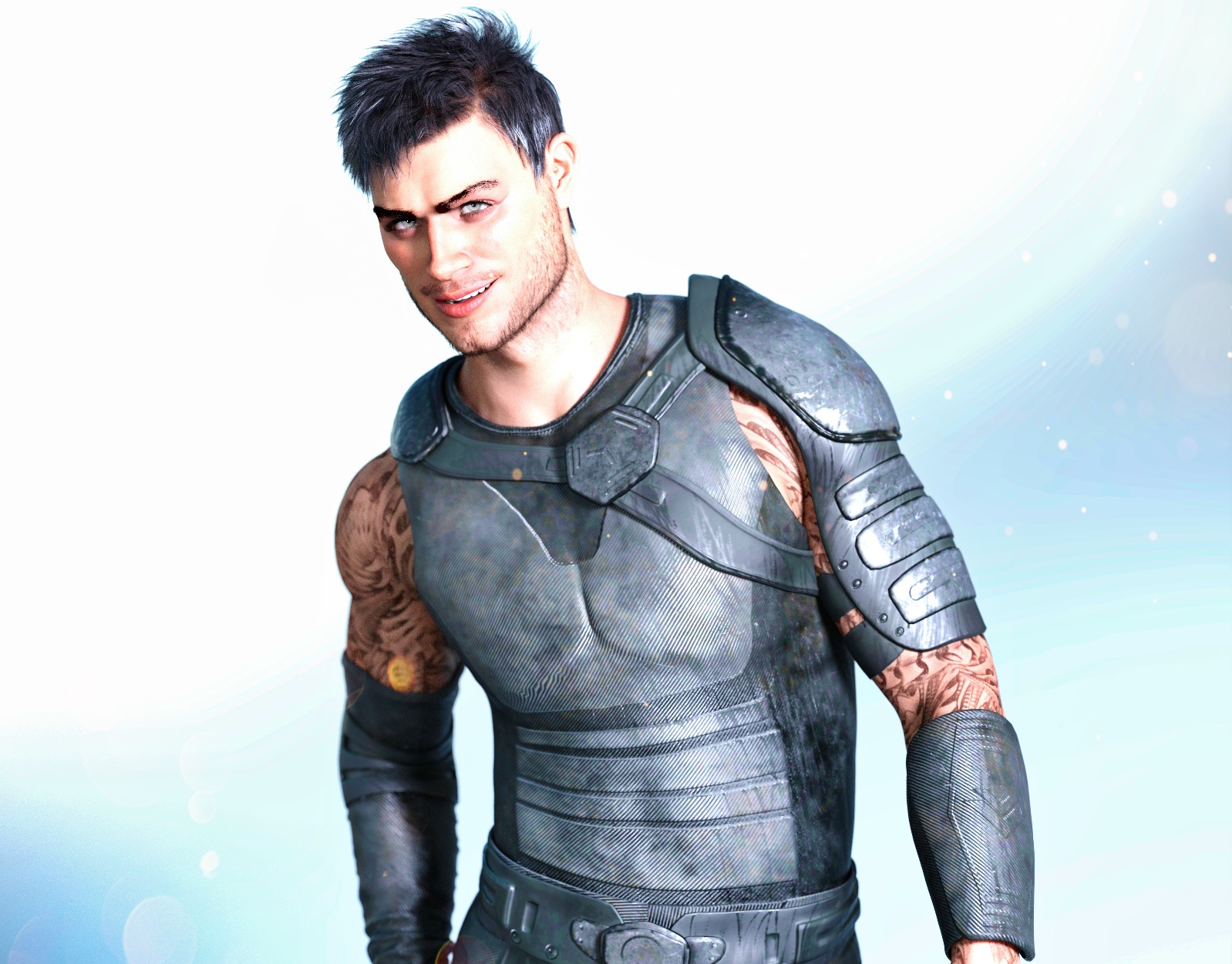
Redz Kaz for Genesis 9I actually like the Kaz morph; it is very much a Redz style. I did a quick render:
 Looking for this model
Leana said:
Onyx is most likely this one: https://www.renderosity.com/marketplace/products/122992/onyx-for-genesis-3
yeah I found that one just looking for the character morph
[SOLVED] Subtle Distortion of Genesis 8 and 8.1 Female FiguresSofaCitizen said:
Also, have you don the whole "show hidden and zero figure" on BOTH machines? It sounds like you did this on the 2nd with no difference to account for the figure being a little smaller but perhaps that is because the first machine that you assumed was the "correct" version actually has a default morph making things a little bigger and it is infact the second machine that is correct?
Brilliant!
I had NOT performed those checks on the old PC, because, as you said, I had assumed it was giving me the "correct" version of the characters. I sent one of my test files to a friend and had him render it for me. The result matched the image from my NEW PC, not the old one.
I ran the "show hiden and zero figure" checks on G8.1 F on the old PC, and found a suspicious morph called "Nipple Fix". I turned out to be in a freebie by someone named Felldude, which I picked up at Renderosity in 2019. The freebie was supposed to be for adding freckles to characters, so I have no idea why the artist included morphs for nipples, let alone whatever else that morph was affecting - but he must have screwed up and made his morph affect all figures. I found another thread related to this freebie here:
https://www.daz3d.com/forums/discussion/381301/freckles-duf-the-daz-snipe-hunt
Once I removed all the files for that morph from the Das library on my old PC, the model rendered exactly like it did on my new PC.
Many thanks for your help - and everyone else who offered assistance! :)
Genesis 9 EyesAngells said:
If you have a custom face morph , how do you get the eyes to match if you are using vendors morphs mix and match, and exporting the obj and using morph loader to import the morph back into ds. How do you work to make they eyes match, will rigging to shape work or do you have to use a deformer to match the custom face morph?
Genesis 9 eyes are a separate figure from the main body, in the same way that clothes are separate from the main body, so you have to make a separate morph for the eyes too. Give it the same name as your morph on the head (notice i said same 'Name' and not same 'Label')
When eye morph has same name as the head morph, it will be automatically dialled in on the eyes whenever the head morph is dialled in on the body.
When saving out morph asset, remember to save both the body morph and then separately the eye morph.
There is a youtube video im too lazy to link to
Genesis 9 EyesIf you have a custom face morph , how do you get the eyes to match if you are using vendors morphs mix and match, and exporting the obj and using morph loader to import the morph back into ds. How do you work to make they eyes match, will rigging to shape work or do you have to use a deformer to match the custom face morph?
Shape Splitter - Divide, Combine and Save (The new version is already available. 1.2.1)[Commercial]Hi, I realize things have changed drastically with Genesis 9's introduction, but for those of us still using the previous generations, is there a chance you'll release your script to transfer morphs between genders? It would really make the creature library far more versatile. Also, thank you for this script; it's been helpful plenty of times.
Why do user-made morphs erode the teeth? It is preventable?Look for a morph called "Mouth Realism HD". For some reason it used to be set at 100% by default on the base figure, and I used to get your problem all the time before I found that out.
Shape Splitter - Divide, Combine and Save (The new version is already available. 1.2.1)[Commercial]Thanks so much for the solution to my problem, CGI3DM. It worked. And it works for G8 as well as G8.1. I never use G8.1, so I was having the problem with G8, and your instructions worked.
I will have another question for you later, after I figure out how to describe the other issue I am now facing.
CGI3DM said:
The problem with the teeth is due, in most cases, to a morph(s) that is loaded by default, Mouth Realism HD (8.1). It must be changed to 0% before performing the spawn/Combine.
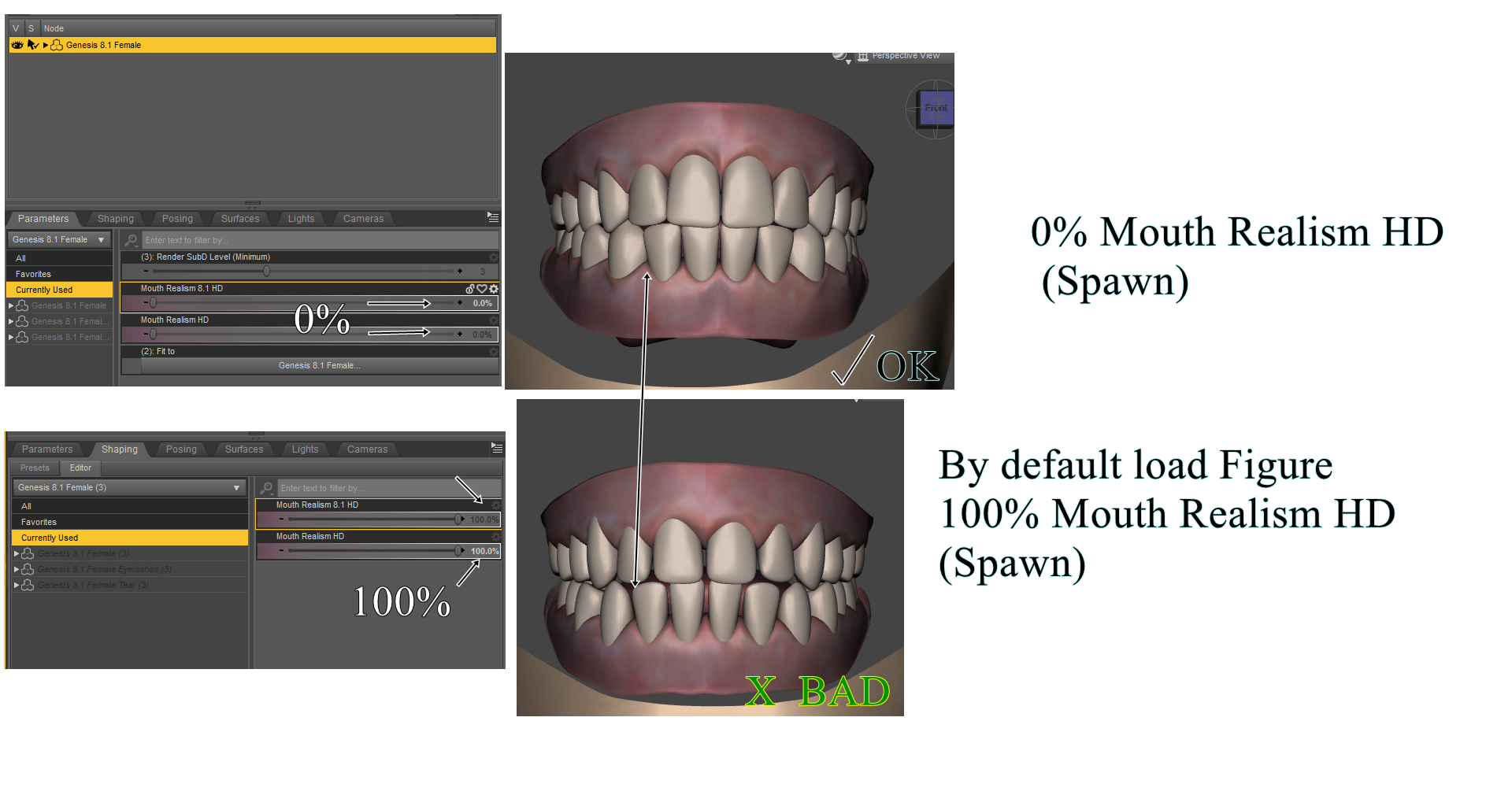
And for morphs(created) with teeth problems, you can use the "Bones" option, and select "lowerTeeth" and "UpperTeeth". With "Remaining"
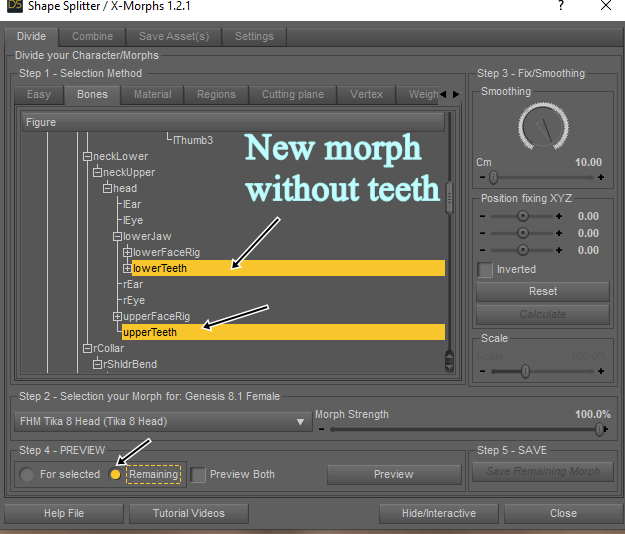 Adjusting bones on a new DIY morph
You should also do ERC freeze, to get it to follow your morph.
Try to see this
 There's Always Another Sale Thread -- Discussions Only
DAV Sidra HD for Genesis 9 Feminine
https://www.daz3d.com/dav-sidra-hd-for-genesis-9-feminine
From the Details description "Sidra is sculpted at 4 Levels SubD and texturized with 4K detailed skin.", Level 4 SubD?! holly cow would bring my rig to it's knees. No 8K normal map, all textures seem to be 4Kx4K, so now we are deviating from the Gensis 9 listings? oh this is a PA asset bought by Daz3d so it's up to the PA, well that kinda doesn't cut it when Gensis 9 details ......ugh.. okay.
there are 14 Promo on the product page. this is a Level 4 SubD scupt morph pack, Geoshell, and 2 textures blue and black. There is not 1 of the 14 promo shows that show the skin detail of the body, only head shots. all promos are clothed except the last 2 promos which only show head and some neck. No teeth morphs, promos with teeth showing look like defualt Gensis 9 teeth, reminds of 80's si-fi with an actor sipping a soda through a straw. really alien with human teeth, no texture nada, just normal. The last 2 promo shots show the head and some neck and they look streached. there is a weird line acorss the chest, extra smothing, upper lip looks smooth but rest of face has detials, shoulders have a weird white atrifact and the other shoulder shows it more prodementally, think this is caused by the lighting, but again - without seeing what the skin looks like it just looks odd, is the skin scales? smoothish? or a combiation of both. No bending promos, all generally standing pinup posed, all promo shtos are cut at hips, no detials of legs or rest of body. Hand shot in 1 promo looks like default Gensis 9 hand painted blue with detail around fingernails - skin looks very generic.
Is it too hard to have 1 promo that shows what it looks like on Genesis 9 Male, since Gensis 9 is all about the muti female/male thing. What does this product loook like on default Gensis 9 , no SubD level , on a male without the Geoshell?
There are 14 promos shots with 3 outfits shown. 2 of the outfits are listed on the product page clearly. what's the 3rd clothing item? Why does 1 of the promoshots have a green detailed texture clothing (if that IS actual clothing) - is this the same 3 outfits or something entirely different?
yes it seem like I am being overly picky, I use Daz3d products in other applications other than Daz Studio. HD doesn't eally do anything for me at all, so I need to know what details will look like IN Daz Studio , but also what will it look like outside of Daz Studio exported, what will I lose, how can the prodcut be used in kitbashing with other products etc.
This is simlar to Josie 9 by another PA and a Daz3d orignal, face makeup, no nails or toes nail colors, no 8K normal, no HD.
Man it's getting hard to figure out what a prodcut is, isn't, how usful it is in other programs etc. no material zones shown on clothing items UGH.
Daz 3D is part of

Connect
DAZ Productions, Inc.
7533 S Center View Ct #4664
West Jordan, UT 84084Licensing Agreement | Terms of Service | Privacy Policy | EULA
© 2026 Daz Productions Inc. All Rights Reserved.