-
(Released!) Vellus Horizon Shader System USER GUIDE IN COMMENTS
lilweep said:
So... are you going to make this for Genesis 9?
I use it all the time but too lazy to do texture transfer for the displacement maps to G9 UV.Also, can you save the geoshell as just 1 whole Wearable preset - nobody has time for setting everything up manually.
Just finished the Genesis 9 version today. Added a bump map to drive additional visibility options. I like the way it turned out, and I'll start packing it up tomorrow!
ETA: scratch that, I see some ways I can make this much better, so more work to do!
Arrak for Genesis 9 [commercial]Richard Haseltine said:
Are the mandibles on the chin grafts or morph?
I must admit, with my innate bloody-mindedness, I am tempted to overcome my arachnophobia (Arrak? No, phobia!) and have the webbing be used by Dr Arrak for binding up injured body parts.
The mandibles are morphs...so not posable
Dr Arrak....good evil villian name
Arrak for Genesis 9 [commercial]Are the mandibles on the chin grafts or morph?
I must admit, with my innate bloody-mindedness, I am tempted to overcome my arachnophobia (Arrak? No, phobia!) and have the webbing be used by Dr Arrak for binding up injured body parts.
Rudimentary DSF parser in C#Nice work on this. I've also been playing around with Daz files. I got the DSF object by using "paste special" in Visual Studio. I took Genesis <version>.Dsf and selected all then copied into the source code.
This gave me a rotoobject which I renamed and modified to suit the task. I also did morph files, a sample I posted here (your code didn't inlcude the modifier_library).
I hope this helps! :)
public class Rootobject
{
public string file_version { get; set; }
public Units units { get; set; }
public Asset_Info asset_info { get; set; }
public object[] pedigree { get; set; }
public Modifier_Library[] modifier_library { get; set; }
public Scene scene { get; set; }
}public class Units
{
public int length { get; set; }
public string angle { get; set; }
public int time { get; set; }
}public class Asset_Info
{
public string id { get; set; }
public Contributor contributor { get; set; }
public string revision { get; set; }
public string modified { get; set; }
}public class Contributor
{
public string author { get; set; }
public string email { get; set; }
public string website { get; set; }
}public class Scene
{
public Modifier[] modifiers { get; set; }
}public class Modifier
{
public string id { get; set; }
public string url { get; set; }
}public class Modifier_Library
{
public string id { get; set; }
public string parent { get; set; }
public Presentation presentation { get; set; }
public Channel channel { get; set; }
public string region { get; set; }
public string group { get; set; }
public Formula[] formulas { get; set; }
public Morph morph { get; set; }
}public class Presentation
{
public string type { get; set; }
public string label { get; set; }
public string description { get; set; }
public string icon_large { get; set; }
public float[][] colors { get; set; }
}public class Channel
{
public string id { get; set; }
public string label { get; set; }
public bool visible { get; set; }
public bool locked { get; set; }
public int min { get; set; }
public int max { get; set; }
public bool clamped { get; set; }
public bool display_as_percent { get; set; }
public float step_size { get; set; }
public int value { get; set; }
public bool auto_follow { get; set; }
}public class Morph
{
public int vertex_count { get; set; }
public Deltas deltas { get; set; }
}public class Deltas
{
public int count { get; set; }
public float[][] values { get; set; }
}public class Formula
{
public string output { get; set; }
public Operation[] operations { get; set; }
}public class Operation
{
public string op { get; set; }
public string url { get; set; }
public float val { get; set; }
}Regards,
Dorian
AOBB's freebie head morph Jimmy v2 for G8.1M based on James Stewart. No materials nor textures.Thank you, nonesuch00! I think the screenshot of the Pureref photo reference sheet that I was using will help you and others see why the model looks the way it does.
Perlk - I love that render. You've really captured Jimmy's essence in it.
 I am looking forward to seeing the image re-rendered with the new morph. It will be interesting to compare both renders.Exporting Unreal environments to Daz or Blender
You can try this: Daz To Unreal – Environment Transfer – David Vodhanel
It's a bit iffy though due to the variety of ways that environments are setup.
AOBB's freebie head morph Jimmy v2 for G8.1M based on James Stewart. No materials nor textures.A genuinely kind and humble man with a strong, moral backbone and a will of iron. A great movie star and war hero. A devoted husband and father. A man with a rascally sense of humor. What a guy!!!
I give you the freebie head morph of a young James "Jimmy" Stewart (from the 1930s):

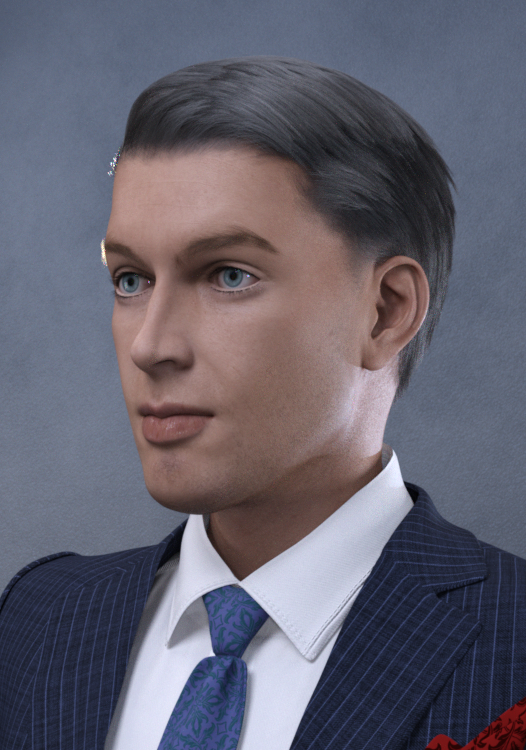

Assets used in promo images:
Thadeus hair for G8M
Bold Brows II for G8M (Brow 10)
MI Two Piece Business Suit w texture expansion for G8M
Lashes utilities for G2,3,8
BOSS Pro Lights
Natural Eyes II for G8.1M
The skin materials/textures are the generic G8.1M model's materials/textures. They just look different, because of the BOSS Pro lighting.
Noncommercial use only.
Please enjoy, let me know what you think and if you make a render with Jimmy, please post it in this thread for me (us) to enjoy. I am thrilled when you post the renders with "my" head morphs.

AOBB
Edit: I have attached my photo reference sheet for comparison.
Where Can I Get Victoria 4.2 Morph++ PackShapes ++ should be the right product. Did you install to the same Content Directory as the base, and if you don't use the PowerLoader tool did you run /Runtime/Libraries/!DAZ/DzCreateExPFiles-v4.bat (for Windows - command script of the same name for Mac) and then inject the morphs from the Pose library, under poser formats, Daz' Victoria 4>Morph Injections (as I recall)?
Where Can I Get Victoria 4.2 Morph++ PackI own the Victoria 4.2 figure. I would like to add the Victoria 4.2 Morph++ package.
I found an item in the Marketpace called "Victoria 4.2 Shapes++," for which the description seemed to be what I was looking for. So I bought it and downloaded it for manual installation. But all I got was a package to create clothing for Victiora 4.2. There are undoubtedly some developeres out there who want this package, but I am not one of them. I want the morphs that were described under the Victoria 4.2 Shapes++ item.
Daz has very nicely offered to refund my puchase amount. However, I still do not have the Mroph++ package that I would like to buy.
Does anyone have a suggestion of how I should go about finding and buy the morph package?
G8F Eyes Closed eyelid distortion. Please help!Astroz said:
yes, I did recently.
This issue is new and now all G9 figures including the Gen9 Base figures share this issue.
I did what you said and it is still there.
Maybe I missed something, so I try it again.
But it is insane. Why is such thing inside a product?
btw: its probably this "Vo Vivian HD for Genesis 9" causing the issues
I deleted it, but still all Gen9 are bugged.
The Gen 8 are ok.
It's a G9 character that brings no impact to G8.
So you did not use other head morph except for this Vo Vivian, right?
help with Coral 8.11. You should've used A-pose to export Coral 8.1's tail graft only (unfit it first) from Daz to Blender to 'remove' the gills and import it back to Ds as a 'delta morph' on the tail. Now you only have a 'single mesh' of Coral 8.1... how could you pose her, and texturize her... build a brand new UV?
2. As to exporting texture maps to blender, it's doable. You just need to check 'Write Material Libray' when exporting to obj file (but roughness / bump / normal maps could not be exported). Better use Diffeomorphic Daz Importer and install a blender plugin named 'Super Solid Mode', then you may have at least all Diffuse texture maps visible in Blender - solid mode...Space Road Stop and Add-Ons [Commercial]the robotic legs are one of my first try/work/test of daz3d, it's very bugged and not friendly use (they are not a morph for genesis 3 but a new mecanisme, all the axes are differents from the base bone of genesis character so pose of genesis don't work) so i don't put it on sale. but I still use them in promo given the huge time I spent on them at the time.
yes the common part where public can access are a "clean/poor" style but the futur part where only the staff of the sattion can access like reactor will be more wire,cable and pipe stuff.
G8F Eyes Closed eyelid distortion. Please help!Astroz said:
I have a similar problem, but with my Gen9 figures.
The Left eylid is not closing partially. Any idea why?
How to fix it?
Seems you used some head morphs from VOOTW, correct? Anyway, check 'who is the culprit' first:
1. Add all the head morphs you use to Favorites;
2. Zero G9's shape;
3. With Eyes Blink 100%, go to Favorites, slide each head morph from 0% to 100%, one by one, check which one bring you this issue.Then we may see how to fix...
Freebie Challenge May 2023 - "Sweet Music" - Entries Thread OnlyThe Sweet Sixteens
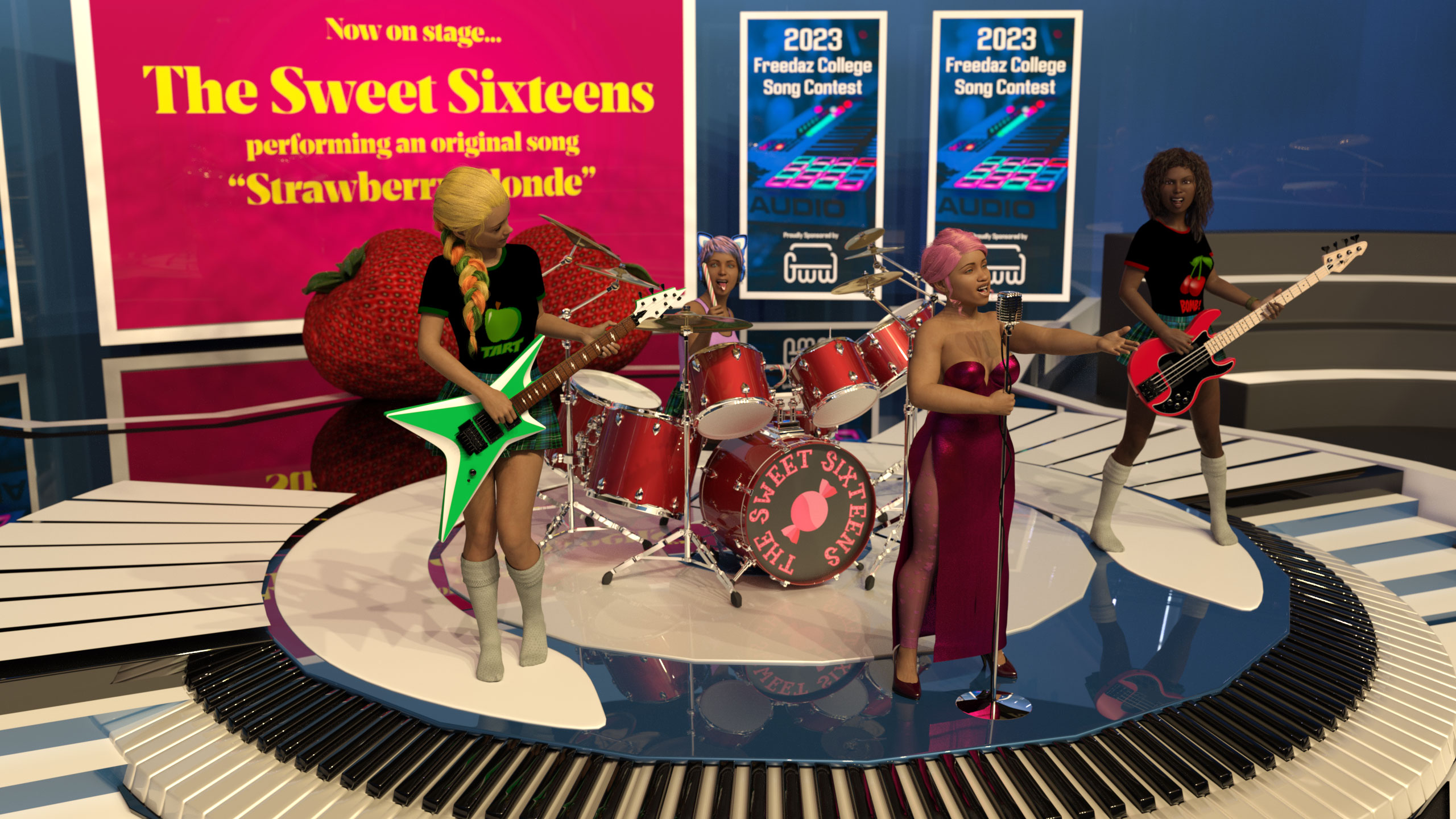
Gallery link for a little more detail
Freebies
- Stage Set: https://www.cgtrader.com/free-3d-models/interior/other/studio-5a146187-e206-46be-bbfb-d9cff7bfacb0
- Singer's Hair: https://www.renderosity.com/freestuff/items/81937/dforce-french-twist-hair-for-genesis-8-females
- Singer's Morph: https://www.sharecg.com/v/98945/gallery/21/DAZ-Studio/Generations-G8F-shape-presets
- Singer's Dress: https://www.renderosity.com/freestuff/items/83866/rabbit-dress-for-g8f
- Singer's Tights: https://www.renderhub.com/humanxystudio/variable-leotardnylon-for-g8-and-8-1-female
- Singer's Shoes: https://www.renderosity.com/freestuff/items/87897/classic-fashionable-modest-pumps
- Singer's Microphone: https://www.deviantart.com/elborja/art/Oldmic-obj-839317942
- Applied to Environment, Drum Kit & Microphone: https://www.deviantart.com/tom2099/art/Iray-car-related-shader-presets-megapack-539622361
- Bassist's skin & morph: https://www.renderosity.com/freestuff/items/83613/alysha-for-genesis-8-female
- Bassist & guitarist's skirts: https://www.renderhub.com/tikiman-3d/dforce-schoolgirl-skirt (possiby NSFW)
- Bassist & guitarist's tops: https://www.renderosity.com/freestuff/items/85301/basic-t-shirt-for-g8f
- Bassist's hair: https://www.renderosity.com/freestuff/items/86422/dingos-wild-curls-for-genesis-8-female
- Guitarist's morph: https://www.renderosity.com/freestuff/items/85871/inga-britt-for-g8f
- Bassist & guitarist's socks: https://www.renderosity.com/freestuff/items/80428/military-uniform-for-genesis-8-females
- Guitarist's hair: https://www.renderosity.com/freestuff/items/88062/candy-braids-hair-for-genesis-8-females
- Drum set: https://free3d.com/3d-model/drum-set-41081.html
- Drumsticks: https://www.renderosity.com/freestuff/items/87242/low-poly-candy-canes-with-procedural-materials
- Drummer's headset: https://www.deviantart.com/amyaimei/art/Sci-fi-Cat-Headphone-for-Genesis-8-Female-757851949
- Bass guitar: https://www.renderosity.com/freestuff/items/85428/peavy-t-40-bass
- Lead guitar: https://www.renderosity.com/freestuff/items/85445/fb-carving-guitar
- Strawberry props: https://www.renderosity.com/freestuff/items/79690/daz-studio-strawberry-prop
- Contest banner background image: https://unsplash.com/photos/c-NBiJrhwdM
No count items
- Genesis 8 Starter Essentials
Paid Items
- Growing Up for Genesis 8 Female(s) (De-age the band members)
- The Bass Guitar and Poses for Genesis 3 and 8 (Pose only)
- Electric Guitar Collection Poses for Genesis 3 and 8 (Pose only)
Freebie Challenge May 2023 - "Sweet Music" - Main ThreadSofaCitizen said:
The Sweet Sixteens
Gallery link for a little more detail
Freebies
- Stage Set: https://www.cgtrader.com/free-3d-models/interior/other/studio-5a146187-e206-46be-bbfb-d9cff7bfacb0
- Singer's Hair: https://www.renderosity.com/freestuff/items/81937/dforce-french-twist-hair-for-genesis-8-females
- Singer's Morph: https://www.sharecg.com/v/98945/gallery/21/DAZ-Studio/Generations-G8F-shape-presets
- Singer's Dress: https://www.renderosity.com/freestuff/items/83866/rabbit-dress-for-g8f
- Singer's Tights: https://www.renderhub.com/humanxystudio/variable-leotardnylon-for-g8-and-8-1-female
- Singer's Shoes: https://www.renderosity.com/freestuff/items/87897/classic-fashionable-modest-pumps
- Singer's Microphone: https://www.deviantart.com/elborja/art/Oldmic-obj-839317942
- Applied to Environment, Drum Kit & Microphone: https://www.deviantart.com/tom2099/art/Iray-car-related-shader-presets-megapack-539622361
- Bassist's skin & morph: https://www.renderosity.com/freestuff/items/83613/alysha-for-genesis-8-female
- Bassist & guitarist's skirts: https://www.renderhub.com/tikiman-3d/dforce-schoolgirl-skirt (possiby NSFW)
- Bassist & guitarist's tops: https://www.renderosity.com/freestuff/items/85301/basic-t-shirt-for-g8f
- Bassist's hair: https://www.renderosity.com/freestuff/items/86422/dingos-wild-curls-for-genesis-8-female
- Guitarist's morph: https://www.renderosity.com/freestuff/items/85871/inga-britt-for-g8f
- Bassist & guitarist's socks: https://www.renderosity.com/freestuff/items/80428/military-uniform-for-genesis-8-females
- Guitarist's hair: https://www.renderosity.com/freestuff/items/88062/candy-braids-hair-for-genesis-8-females
- Drum set: https://free3d.com/3d-model/drum-set-41081.html
- Drumsticks: https://www.renderosity.com/freestuff/items/87242/low-poly-candy-canes-with-procedural-materials
- Drummer's headset: https://www.deviantart.com/amyaimei/art/Sci-fi-Cat-Headphone-for-Genesis-8-Female-757851949
- Bass guitar: https://www.renderosity.com/freestuff/items/85428/peavy-t-40-bass
- Lead guitar: https://www.renderosity.com/freestuff/items/85445/fb-carving-guitar
- Strawberry props: https://www.renderosity.com/freestuff/items/79690/daz-studio-strawberry-prop
- Contest banner background image: https://unsplash.com/photos/c-NBiJrhwdM
No count items
- Genesis 8 Starter Essentials
Paid Items
- Growing Up for Genesis 8 Female(s) (De-age the band members)
- The Bass Guitar and Poses for Genesis 3 and 8 (Pose only)
- Electric Guitar Collection Poses for Genesis 3 and 8 (Pose only)
All Freebies check out, please move to Entries
The Amazing PD Howler Dogwaffle Tips, Tricks, and Discussion ThreadOmega Man said:
Dartanbeck said:
One more week of the incredible PD Howler Deep Dive course - the extra VIP classes.
Today was fantastic, as was the main four weeks that preceded it. Tiffanie and Philip both... teaching Howler... I'm in Heaven!!!
Dart, your character animations are looking better and better to the extent that you seem able to tell whatever story you want. How are you achieving the character animation ? Are you editing motion capture or keyframing by hand or using those aniBlocks which I see in the store ?
First, Thanks! I really appreciate that!
I use aniBlocks and animated Pose files, key framing by hand, and using these really cool animation dials I made for my character. I'm working on an educational course on that topic as we speak.
There's more to it than saying it like that, however, since I use aniBlocks to send key frames to the timeline, edit, and make new aniBlocks. In this way, I can combine many aniBlocks using tracks and sub tracks. But that's just to get the real motion capture to the timeline - so I bake it. That's when my dials come into play and I either tweak what's there or change it entirely - using the motion capture data as the base. The dials basically afford me the power of a graph editor by using dials on the figure, and without deleting any keys from the original data.
It's fun. I have to make it work in a fun way because I do it every day.
Daz Studio is different from traditional 3d animation software in a lot of odd ways. That's why I never used it. I am a Carrara Pro artistic animator.
What I used Studio for, before version 4.0, was simply an aniMate 2 launcher. I made and edited aniBlocks for use with the aniBlock Importer for Carrara, which dumped the key frames wherever I want them on Carrara's sequencer. Grab a few, reverse them, slow them, speed them up... whatever... Carrara just plain Rocks Animation!!! It Wants to Animate!
Then Daz Studio 4.0 was released - and they made the almighty Pro version Free?!!! Even better, they bought and included all of the CCTs (Content Creation Tools)!!! So now I was using Daz Studio for a whole lot more. The bridge to and from Hexagon auto-launches Morph Loader Pro on the return trip, which is Uber Awesome!!! I was making custom morphs for all sorts of things. Then I discovered... okay this part just keeps building - but none of it leads to me animating or rendering in Studio. I mean, it was common knowledge that DS simply is not an animation tool.
Well Linday came out with that hair. That was it.
I had Teen Judy 7 in my library at the time, so I loaded her up to see what she looked like in Iray. That was the second thing. Okay, now I want to run character animations in Daz Studio. I bought the hair and started working on new characters, and I didn't do very well. I was really mostly just looking at the hair and trying to figure out better ways to animate - doing a lot of lengthy graph editor edits along the way.
I woke up in the middle of the night with an epiphany that I couldn't shake, so... to Daz Studio I went - and I've been here ever since.
I use the CCTs to create these custom tools and... voila! Instant graph editor without having to go to the graph editor! Either fo them!!! (aniMate 2, at least the paid version also has one)
The course is moving along nicely. Working very hard to get it done, but also to get it done right. It sounds really good and I'm not babbling! ;)
Need help saving a character expression using Addy custom smile morphsWell I'm not sure if the Lyla smile moves the mesh or not. I would assume that the Lyla morph does in fact move the mesh since it is found when you try to save a shape preset. I guess my best course of action will be to try and make a smile that is entirely based off of a shape morph or an expression morph. To do otherwise sounds like it will be rather complicated. But I do appreciate your help Gordig.
Need help saving a character expression using Addy custom smile morphsThat's going to depend on how they work. If the Lyla smile works by moving the mesh around (morph) while the Macey smile works by manipulating joints (pose), then there may not be a way to combine them short of doing an ERC freeze to combine the morph and the pose into a single slider (if that's even possible).
Need help saving a character expression using Addy custom smile morphsHello,
I have created a custom character and created a rather nice smile for her by blending a smile morph from BlueJaunte's Macey and Addy's Lyla smile morphs. However, when I try to save the smile as a pose preset I cannot find Addy's Lyla smile in the Pose Preset pick list. The Macy smile is there just not the one for Lyla. I have looked in the Expressions folders for both G8 and G8.1 as well as every sub folder that I can think of with no luck. And while looking for the Lyla smile, I realized that none of the custom smile morphs that come with Addy's characters are showing up either. Can anyone tell me where I can find these morphs in the list, or provide some tips on how to find them, so that I can save an expression?
Thanks in advance for any replies.
nabob21
help with Coral 8.1
thank you! I'll try it with blender (I'm still learning but I think I get what you mean) :)ShelLuser said:I think the biggest issue to cope with here is that the gills are a separate surface of their own, with normal map and everything. I'd start there, this is part of her tail. Because of that I don't think that just copying her human texutre is going to do you much good here.
But second... intruiging problem IMO so I did what I always do when I want to study a figure in more detail: I GoZ'd her over into ZBrush and sure enough: the "hiatus" which those gills are showing (the edges and such?) are part of the mesh itself, so I think you're going to need more to smoothen that out: you probably need to smoothen the mesh itself as well.
I'll show you what I mean... there... if you look closely you'll notice a bright(er) red surface: this is the human part of Coral, and you'll notice a darker reddish surface: that's her tail. Notice how the sharper edges of the gill all form around the darker reddish parts?
So I think (this is just my theory!) that next to changing the textures you're also going to need to smoothen out the tail mesh. Maybe a morph?
Hope this can help a bit.
(edit) So I tried to create a morph to try and smoothen this out... it looked somewhat good in ZBrush but when trying to actually save the morph in Studio it crashed the program. Still, I believe that a morph + retexture is your best way out of this.
(edit2) Houston, we have a problem. I didn't notice at first because I was too focussed on ZBrush but.. try to actually hide the "Coral 8.1 Tail" asset in Studio? There's not much of her left after that :( On first impression I blamed Normal maps (ey, I never claimed to be a professional! ;)) but this runs way deeper: her bottom half is part of her tail and not some overlap as I first assumed. See my second attachment "gill_gaps"?
We need to edit the mesh, retexture parts of said mesh and then it should work. Can't do much more for now but for whatever it's worth I'll look further into this upcoming week.
Daz 3D is part of

Connect
DAZ Productions, Inc.
7533 S Center View Ct #4664
West Jordan, UT 84084Licensing Agreement | Terms of Service | Privacy Policy | EULA
© 2026 Daz Productions Inc. All Rights Reserved.