-
Save numerous morphs as a single morph?
Hey guys,
I have a character that is changed by a lot of various morphs. Can I somehow save the character's shape as a single morph instead?
Also, do many morphs affect dForce calculations? Or dForce only works with actual meshes?
Transfer mesh to Shapekey@TheMysteryIsThePoint
I did what you said. After that action, the clothes moved to the side. Or did I do it at the wrong time? Anyway, I did some experimenting. My temporary solution is to copy the garment and remove the armature modifier and all shapekeys from it.
I use the clothes with the armature only for previewing and disable them for rendering. I apply the necessary morphs to the clothes without the armature and enable them for rendering. It seems like a bit of a mess compared to Daz Studios, but... there you go.Applying shapekeys on top of each other is unintuitive. If there are multiple shapekeys on a cloth and I create a new one from the morph, it works relative to the base shape, not the current resulting shape.
To fix this, I have to create a new shape from mix, leave its value =0, and then create a new shape from the morph. And you need to change its relativity from the basic shape to the mix shape. In general, I have to press a lot of buttons to get it to work.Help identifying hair?sunnyjei said:
Looks similar to this one to me: https://www.daz3d.com/aron-short-hair-for-genesis-8-and-81-males
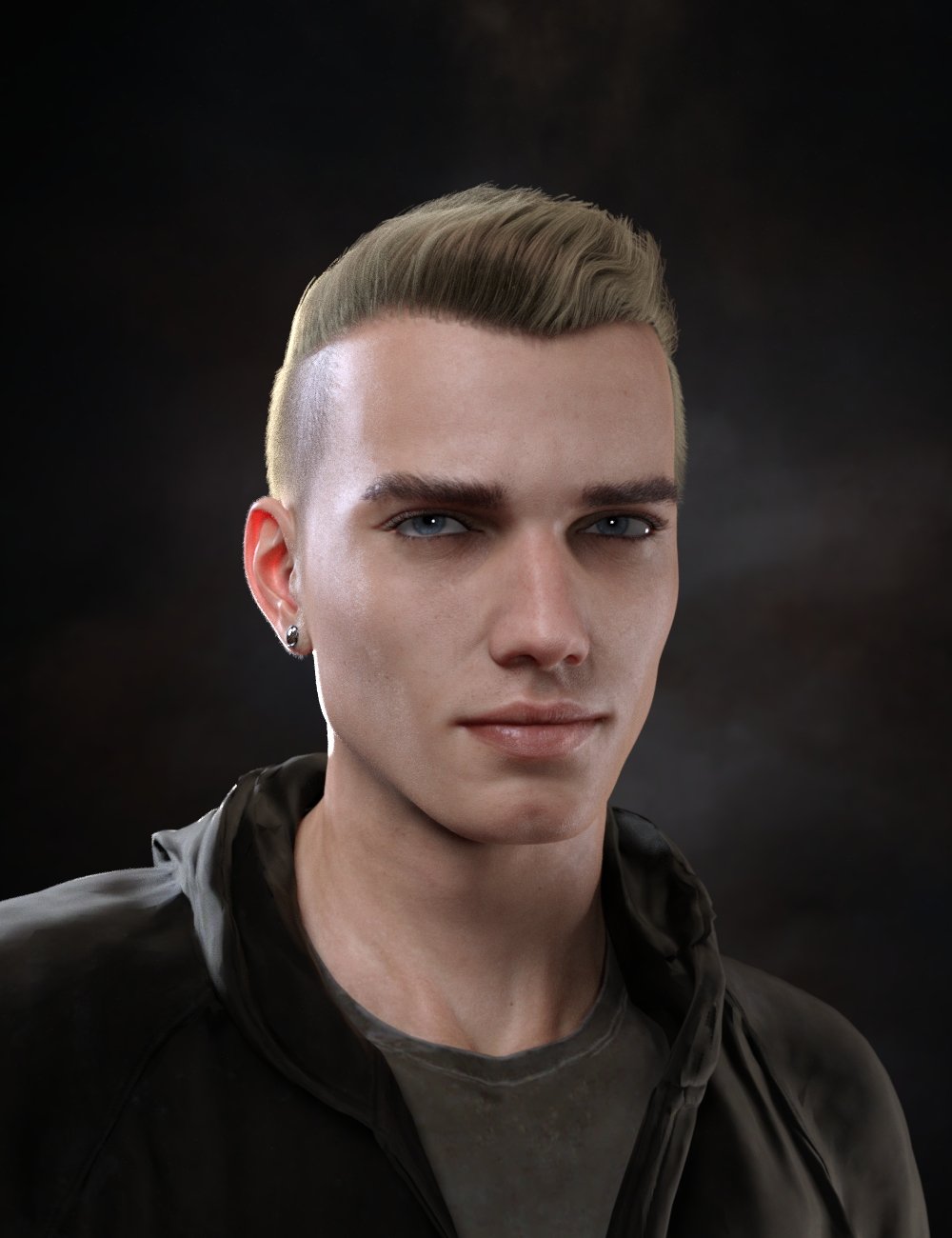
I don't have this hair but there is probably a morph/dial to make this shorter on the top and maybe decrease the widows peak. If this isn't it a whole bunch of male hairs can be found here: https://www.daz3d.com/catalogsearch/result/?pp=40&q=male+hair&mature=true&s=score&p=1&guid=
Good luck!
Thanks for the info! However it's not Aron Hair, as I already have that one. But I'll have a look through the link you gave :)
Soft Expressions for Genesis 9The problem with a complete morph based approach is that it can conflict with the underlying character morph/s - causing pinching and other deformations, especially around the corners of the mouth and eyes. This can be compounded by a poorly constructed morph - if a vertex is moved too far out of it's base position in relation to its weights. The ideal solution, in my opinion, is a mix of joint and morph based expressions; somewhere along the lines of 66/33 to 75/25 joints to morphs. The joints do the raw, bulk lifting and the morphs tweak the end result to blend in surrounding features. The morphs, however, should really be character dependent for best results - moreso for more extreme character shapes.
That said, the best out of the box expression pack I've seen so far is Valery3D's V 100 Eye Catchy Expressions for Genesis 8.1 Females - it seems to just use 8.1's facs morphs and in my experience is the one expression pack that has only required minor adjustments depending on the character.
Regarding teeth positioning - I think that's less the expression's 'fault' and more the character. It can take a while for me to determine the best vertical position for a character's teeth after experimenting with several expressions.
Help identifying hair?Looks similar to this one to me: https://www.daz3d.com/aron-short-hair-for-genesis-8-and-81-males
I don't have this hair but there is probably a morph/dial to make this shorter on the top and maybe decrease the widows peak. If this isn't it a whole bunch of male hairs can be found here: https://www.daz3d.com/catalogsearch/result/?pp=40&q=male+hair&mature=true&s=score&p=1&guid=
Good luck!
applying morphs to foot of g8f before rigging the shoeIf the shoes are rigged, legs are baked and I apply morph to g8 to make big tie thinner im pretty sure the shoe will become deformed in that toe area as the shie would also follow the morph. That is why I thought I would have to apply morph before using the utility transfer to rig the shoes. Would that morph/pose preset take cats of that so it would work correctly if yes do you have a link I could learn about it from? Thanks
Hitchens: A DAZ Studio to Blender Live LinkHi.
To be clear: It works. Perfectly. The way you would think something that is just pure math would. All the DSBS is figured out.
The only thing that I haven't worked out is when you want to retarget mocap, and the source armature's bones are oriented differently than the target armature's bones, because it screws up the necessary conversion because in Blender bones are always oriented along local +Y. If you keyframe with ARP and Animation Layers, this does not matter to you at all.
This is the reason I wanted a live link specifically made to transfer between DS and Blender, that knows all about either one, instead of a generic file format that doesn't know about the foibles of either.
Case in point: it turns out that you have to ignore the rotations of the twist bones altogether because the bend bone's twist drives the twist bone's twist, and the twist bone's bend and side-to-side are both constrained to 0. Setting the rotation of the bend bone configures the twist bone appropriately, automatically. I don't know of any file formats that can be told to do that. But LotP knows all of that. That's why it just works. But just for DS <-> Blender.
As for contact IK, that works fine once it is baked because the armature in Blender is precisely the same as the DS armature. Precisely. The same origins, pre-rotation orientations, and rest pose orientations. Because ARP's Quick Rig is like magic and can apply an IK rig to an existing armature. You lose some of the cooler ARP features, but hey, it's still an IK rig. Once it is baked, it is just local rotations on all the bones. After they are imported back, DAZ can't know how the Quaternions were calculated... a Quaternion is a Quaternion is a Quaternion and it works perfectly.
I can't bring myself to spend the time to make a video or something, but it worked perfectly on an animation with very extreme rotations. You'll just have to see it and be convinced when I'm done. Again, don't worry... it's coming.
Soft Expressions for Genesis 9
That's why I like AlFan's morph based expressions products, they might look exaggerated and options are limited but at least they look like expressions of those drama queens around usCybersox said:CHWT said:
I expected more. I might be able to produce slightly more natural result with certain 8.1 figures. What bugs me from generation to generation is that the mouth always doesn't look quite right LOL
The mouths have been getting worse, really, as the expressions become more orientated around bones than on morphs. The thing is that Bones DO allow for more extreme expressions, but the fact is that the human face isn't filled with a lot of little pivot points, so unless one is extremely careful, the end results can creep into the uncanny valley quite quickly. After all, what produces expressions in a real human face is not just external points on the skin being moved, but rather a long complicated interaction as muscles expand and contract while interacting with both the underinhg skull and tendons and also the overlaying layers of fat and skin, all of which are also interacting, and something that's truly accurate simply can't be produced with the existing DAZ system, even if the number of facial bones was expanded into the multiple hundreds or even thousands.
applying morphs to foot of g8f before rigging the shoeI don't think so.
I keep rigging and morphing separate although there is a morph/pose preset that could be made to apply when wearing a particular pair of shoes.
The inevitable- G8-8.1 to G9 character/morph transfer script!mehdi.biz96 said:
hi everyone im actually fairly new to daz studio and i wanted to transfer a morph from a g8f figure to a g9f since i didnt find any script or plugin that automates this process i tried asking chatGPT since it can write code however i have no experience with daz scripts ( or python in general ) so im gonna share what i got from chatGPT if someone can tell if its usable or can be modified to work well
import os
import sys
import dson.dzdsonimporter as dzimp
import dson.dzdsonexporter as dzexp
import dson.dzdsonio as dzio
import dson.dzdsoncommon as dzcom
import dson.dzdsonutils as dzut
import dson.dzdsondata as dzdata
import dson.dzdsonconstants as dzconst
import dson.dzdsonmaterial as dzmat# Get references to the selected Genesis 8 and Genesis 9 figures
g8 = None
g9 = None
selection = dzcom.get_selection()
for node in selection:
if node.is_figure() and node.label() == "Genesis 8 Female":
g8 = node
elif node.is_figure() and node.label() == "Genesis 9 Female":
g9 = node# Check if both figures were selected
if g8 is None or g9 is None:
print("Please select both a Genesis 8 Female and a Genesis 9 Female figure before running the script.")
else:
# Get the file path for the morph to load
morph_path = dzio.get_file("Please select a morph to load onto " + g8.label() + ".", dzio.FileType.DSON, dzio.FileLoadType.OPEN)# Load the morph onto the Genesis 8 figure
if morph_path is not None:
g8.load_morph(morph_path)# Get the name of the loaded morph
morph_name = os.path.splitext(os.path.basename(morph_path))[0]# Transfer the morph to the Genesis 9 figure
g9.paste_morph(g8.morphs[morph_name], morph_name)print("Morph " + morph_name + " transferred from " + g8.label() + " to " + g9.label() + " successfully.")
else:
print("No morph selected. Script aborted.")This version of the script uses the
get_file()method to prompt the user to select a morph file to load onto the Genesis 8 figure. It then loads the selected morph onto the figure, gets the name of the loaded morph, and transfers it to the selected Genesis 9 figure using thepaste_morph()method.Again, please note that this is just an example script, and it may need to be modified or customized to work properly with your specific Daz Studio setup and workflow. Additionally, as with any script or plugin, it's always a good idea to test it on a backup copy of your scene data first.
ChatGPT continues to show the worth of AI - it's given you a Python script, apparently wildly guessing at function availability, but Daz Studio doesn't use Python.
The inevitable- G8-8.1 to G9 character/morph transfer script!hi everyone im actually fairly new to daz studio and i wanted to transfer a morph from a g8f figure to a g9f since i didnt find any script or plugin that automates this process i tried asking chatGPT since it can write code however i have no experience with daz scripts ( or python in general ) so im gonna share what i got from chatGPT if someone can tell if its usable or can be modified to work well
import os
import sys
import dson.dzdsonimporter as dzimp
import dson.dzdsonexporter as dzexp
import dson.dzdsonio as dzio
import dson.dzdsoncommon as dzcom
import dson.dzdsonutils as dzut
import dson.dzdsondata as dzdata
import dson.dzdsonconstants as dzconst
import dson.dzdsonmaterial as dzmat# Get references to the selected Genesis 8 and Genesis 9 figures
g8 = None
g9 = None
selection = dzcom.get_selection()
for node in selection:
if node.is_figure() and node.label() == "Genesis 8 Female":
g8 = node
elif node.is_figure() and node.label() == "Genesis 9 Female":
g9 = node# Check if both figures were selected
if g8 is None or g9 is None:
print("Please select both a Genesis 8 Female and a Genesis 9 Female figure before running the script.")
else:
# Get the file path for the morph to load
morph_path = dzio.get_file("Please select a morph to load onto " + g8.label() + ".", dzio.FileType.DSON, dzio.FileLoadType.OPEN)# Load the morph onto the Genesis 8 figure
if morph_path is not None:
g8.load_morph(morph_path)# Get the name of the loaded morph
morph_name = os.path.splitext(os.path.basename(morph_path))[0]# Transfer the morph to the Genesis 9 figure
g9.paste_morph(g8.morphs[morph_name], morph_name)print("Morph " + morph_name + " transferred from " + g8.label() + " to " + g9.label() + " successfully.")
else:
print("No morph selected. Script aborted.")This version of the script uses the
get_file()method to prompt the user to select a morph file to load onto the Genesis 8 figure. It then loads the selected morph onto the figure, gets the name of the loaded morph, and transfers it to the selected Genesis 9 figure using thepaste_morph()method.Again, please note that this is just an example script, and it may need to be modified or customized to work properly with your specific Daz Studio setup and workflow. Additionally, as with any script or plugin, it's always a good idea to test it on a backup copy of your scene data first.
It takes too long to go through Genesis 9 people, looking for male or female characters.xyer0 said:
Sevrin said:
PerttiA said:
nonesuch00 said:
murgatroyd314 said:
nonesuch00 said:
All you need do is log into the store and there are check boxes for Genesis 9 near the left margin about a quarter down from the top.
That gives you EVERYTHING that is compatible with G9. Can you find a filter that will give G9 characters, but not G9 clothing?
No, it includes wearables. I agree they need a 'character' filter only, exclusive of clothing, props, add-ons, morph packs, hairs, and textures.
But they do already, it's called 'People'
If you could post a screenshot of search results from a store search for "People", or even something that just says "People", I'd be much obliged. I'm not seeing it.
Thanks in advance.
Here ya go. 99 or so People, including Creatures.

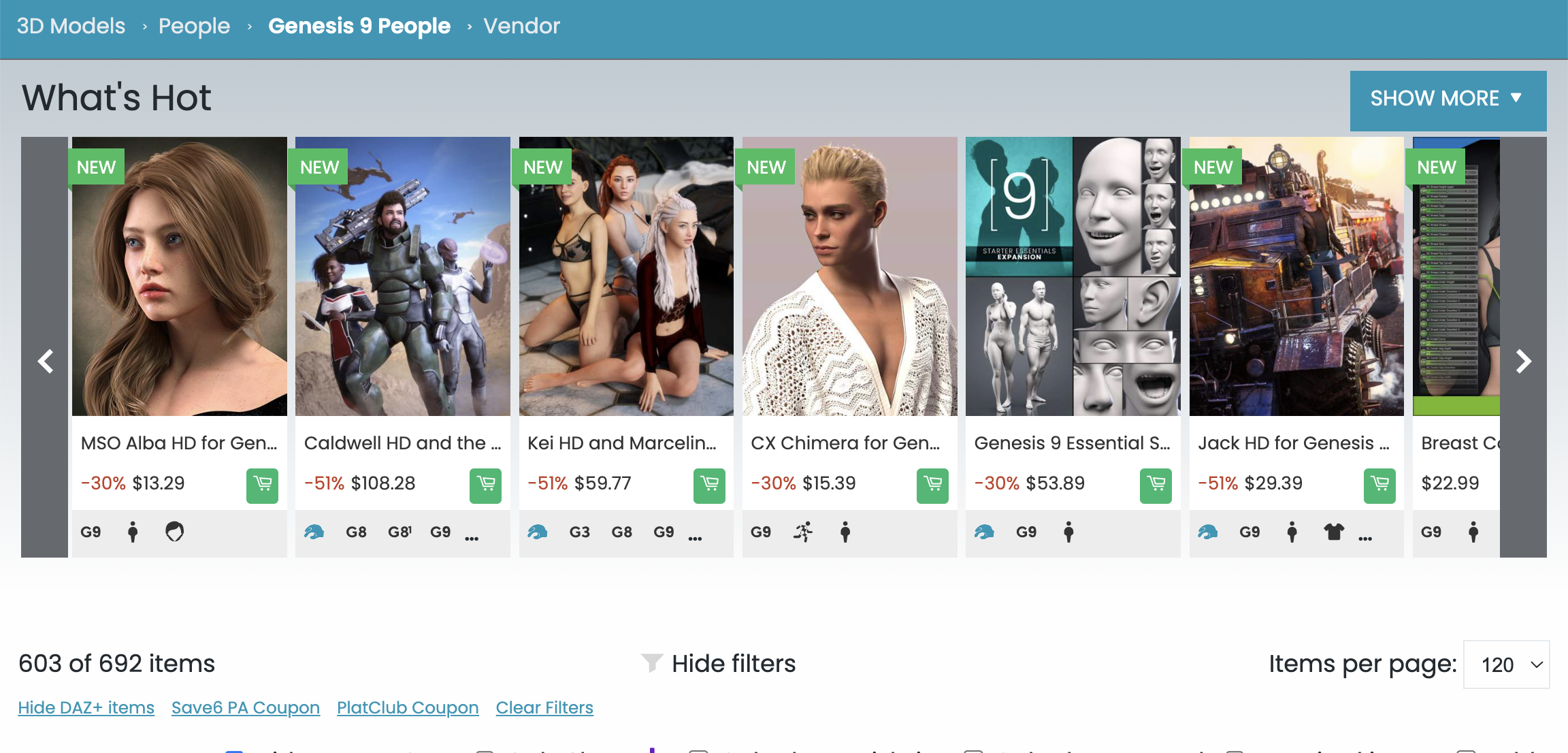
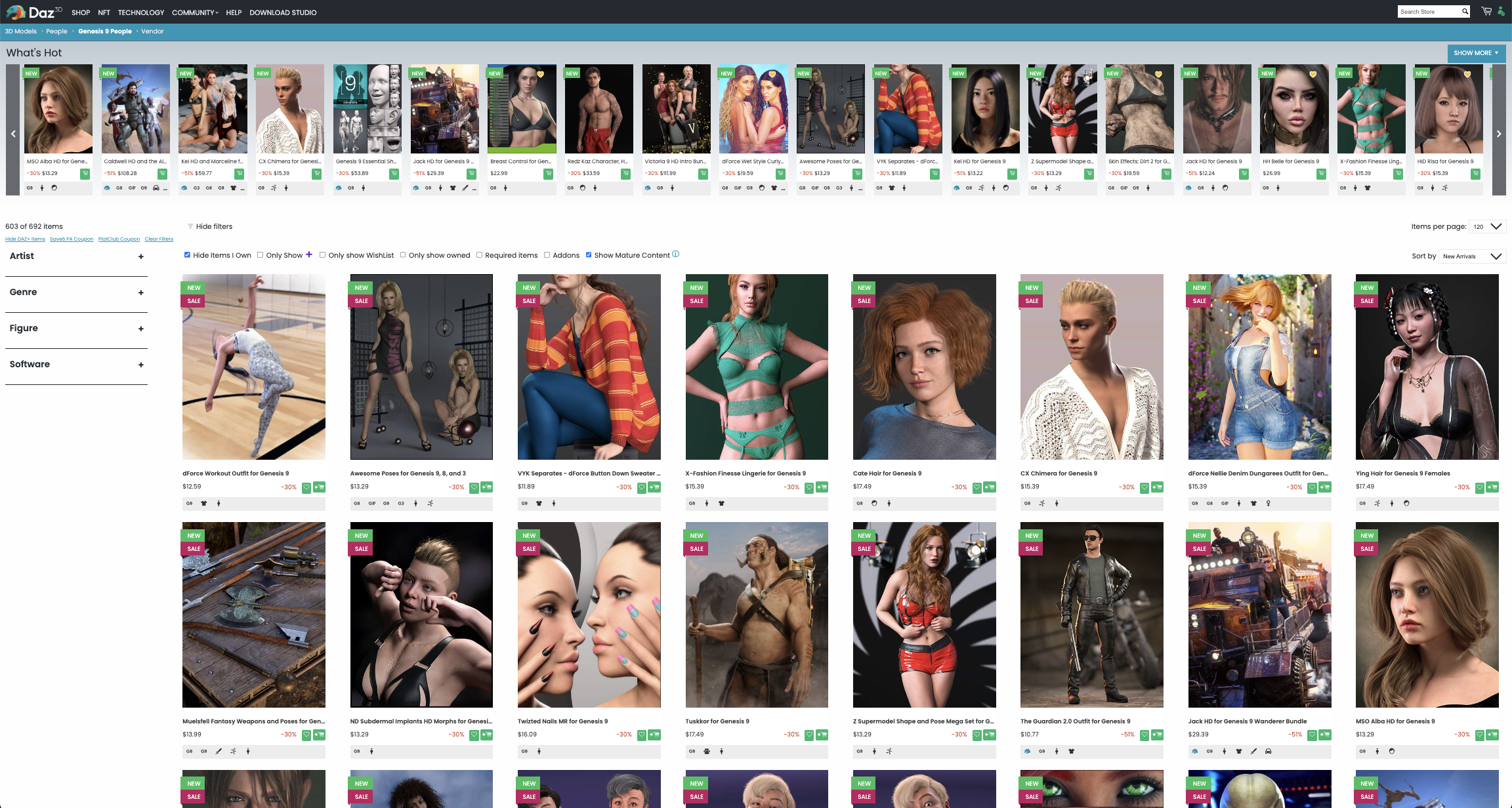
I'm not sure you looked at these results before you posted them.
Of the 16 items visible in your screen shot, only 4(I giving credit for the bundle here but it's not a character, it's a bundle) are characters.
The other 12 items are hair, poses, clothes, a morphs and props.
This is exactly the problem OP is talking about.
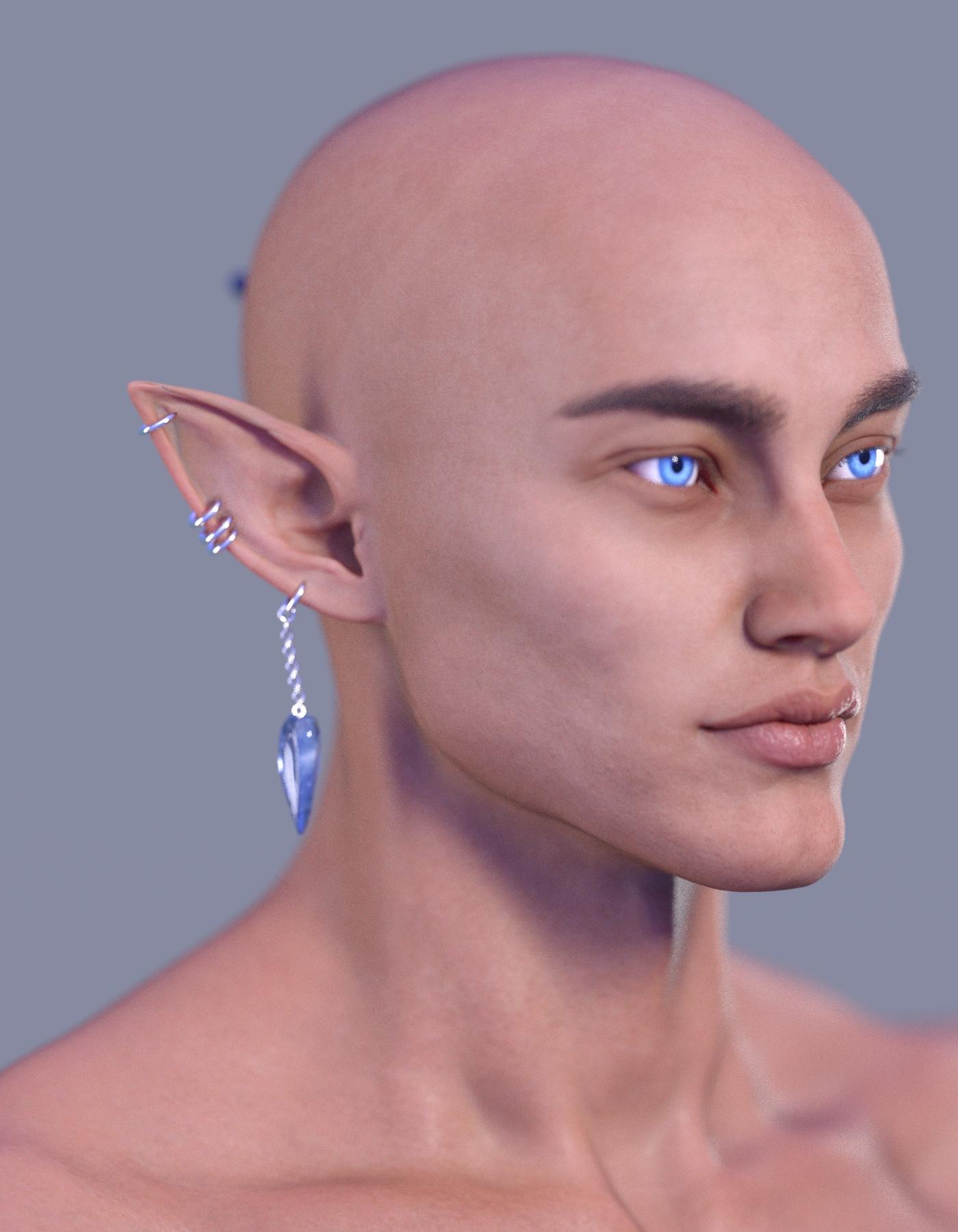
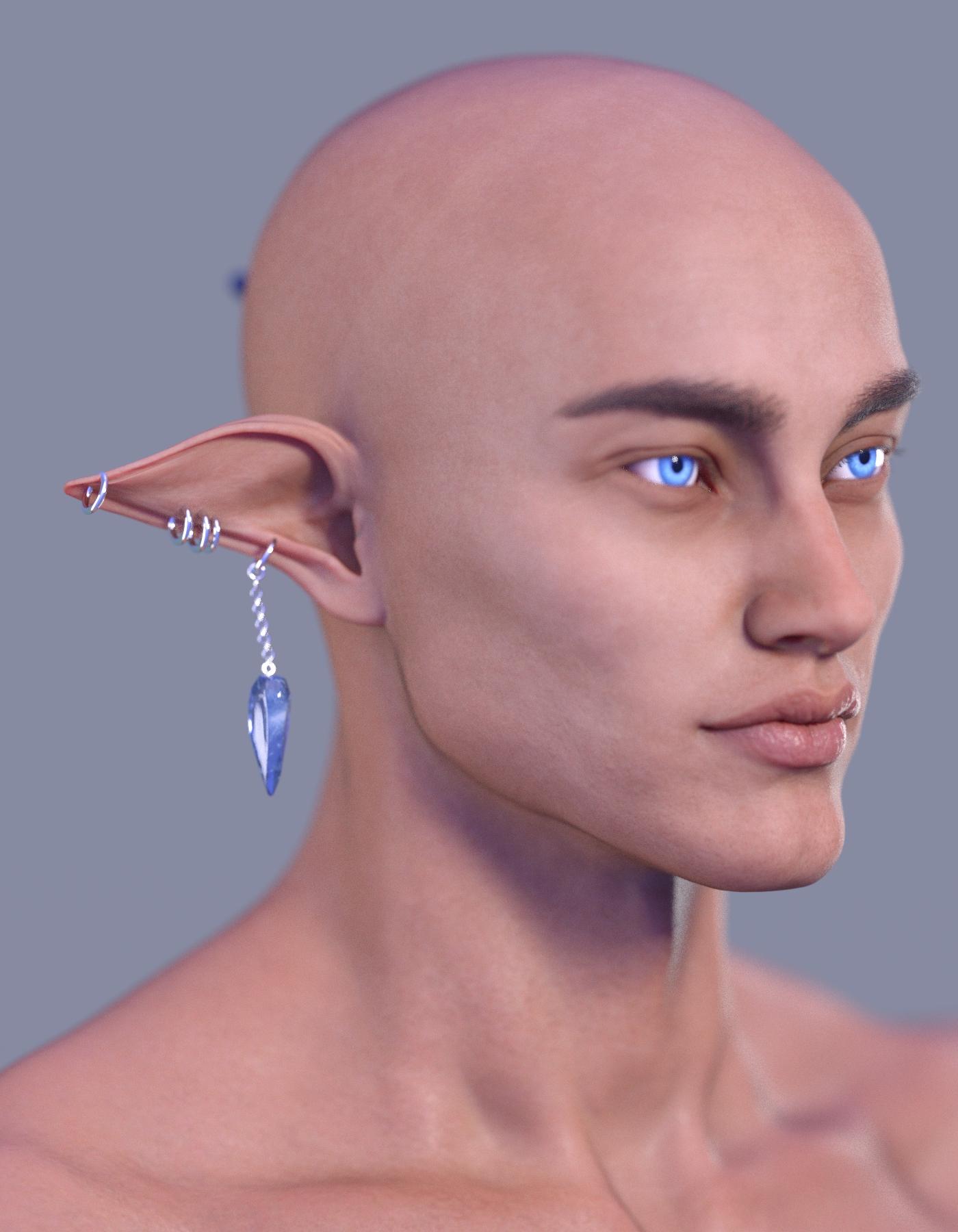
SereneNight’s Sci-Fi Fun Thread 3Twizted Fantasy Ears & Accessories for Genesis 8 Female is quite cool. It includes an elf ear up and down morph (Fantasy Ear 9 and 10), and corresponding jewelry. It is for Genesis 8 Female, but I transferred the morphs using a script, and was able to get it to work on a Genesis 8 male (with the exception of the last earring which is double piercing his ear). I can likely move it though.
 Pax's Pretty Boys Thread
I did a cover mockup for someone who was told by two different cover artists that what she wanted was impossible. I mean, it didn't look impossible to me, so... have a pretty girl in the pretty boys thread. (She liked it enough that she said she'd send it to the next cover artist. No job for me, haha.) I stole the ruffles from the Almira outfit for G9, with... varying degrees of success with meshgrabber it has to be said.
Impossible, my arse.
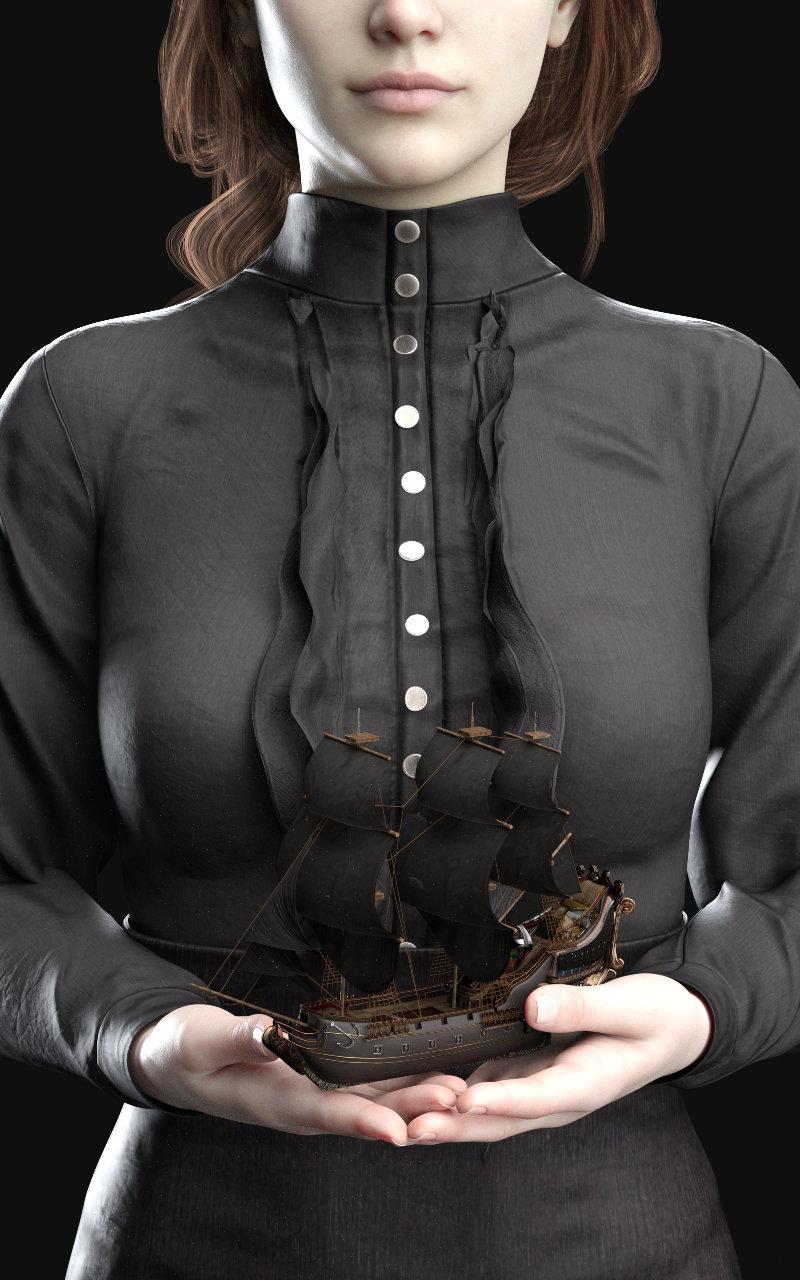
She also described the second cover... sort of. If all you have to go on is 'copper skin, turquoise bob and lipstick, flamboyant, likes embroidery, holding Victorian house" it's a bit... awkward. Apparently there's a PDF. I didn't get the PDF. Should've been aiming more for the Scarlet Pimpernel, apparently (which is a look I considered, then discarded, oops). I had a lot of fun, although I did realise there's a remarkable shortage of turquoise lipstick (I stole this one from a female skin, and not via LIE), which was... surprisingly awkward actually. Lots of purple, lots of dark blues. No blue-greens. I feel this could be awkward if I rendered more sci-fi women...
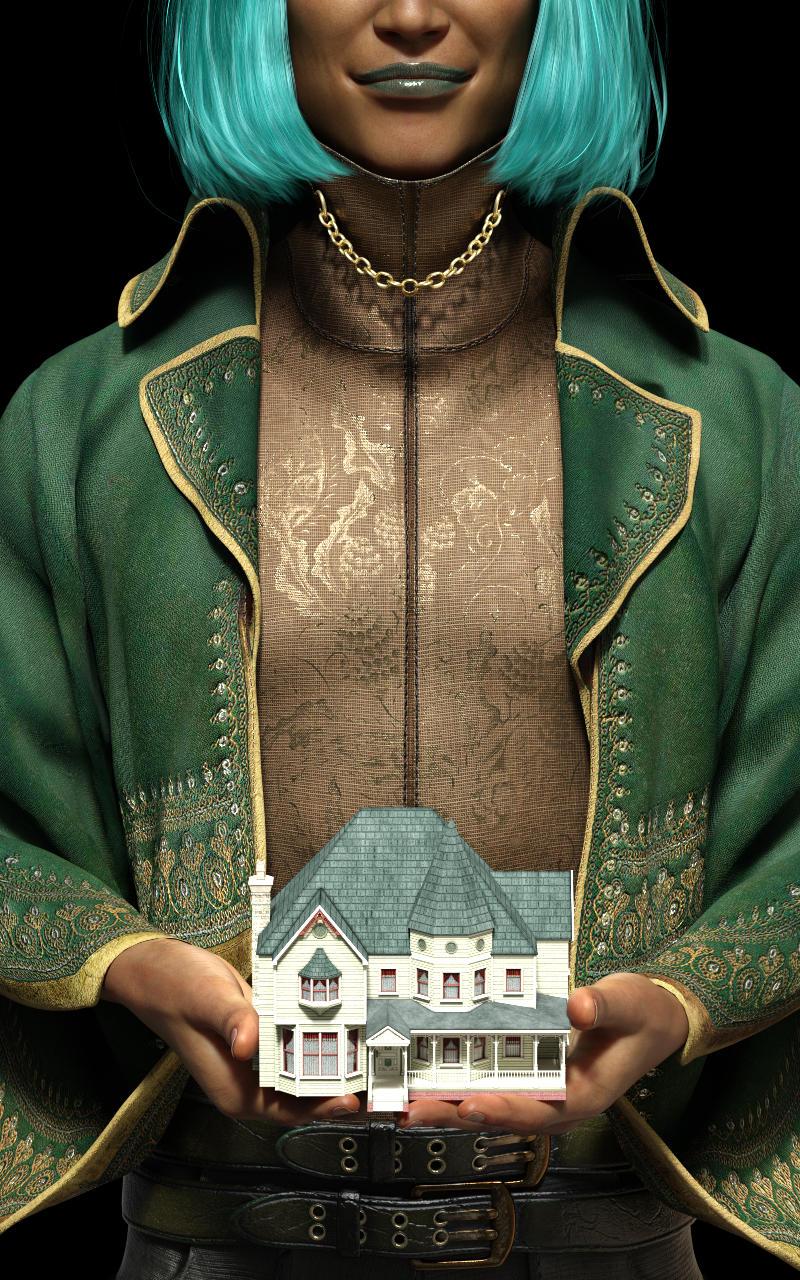
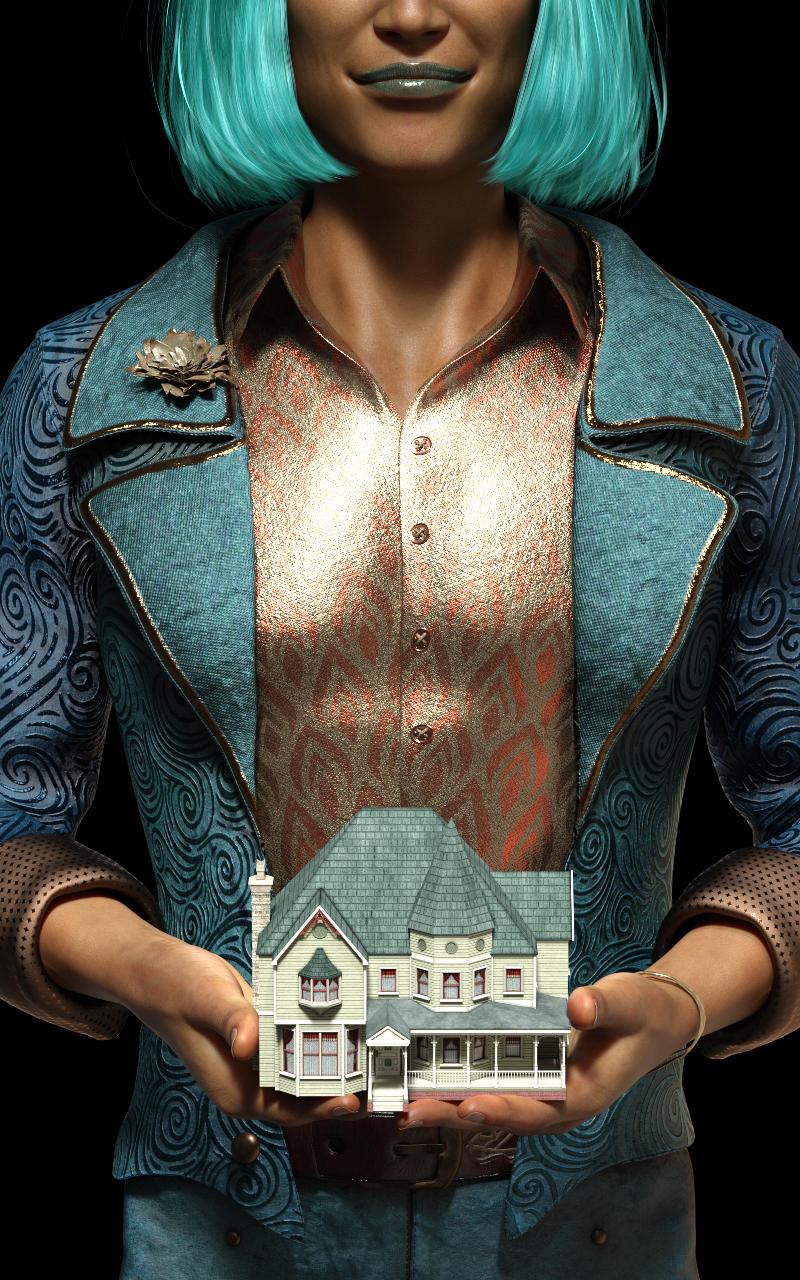
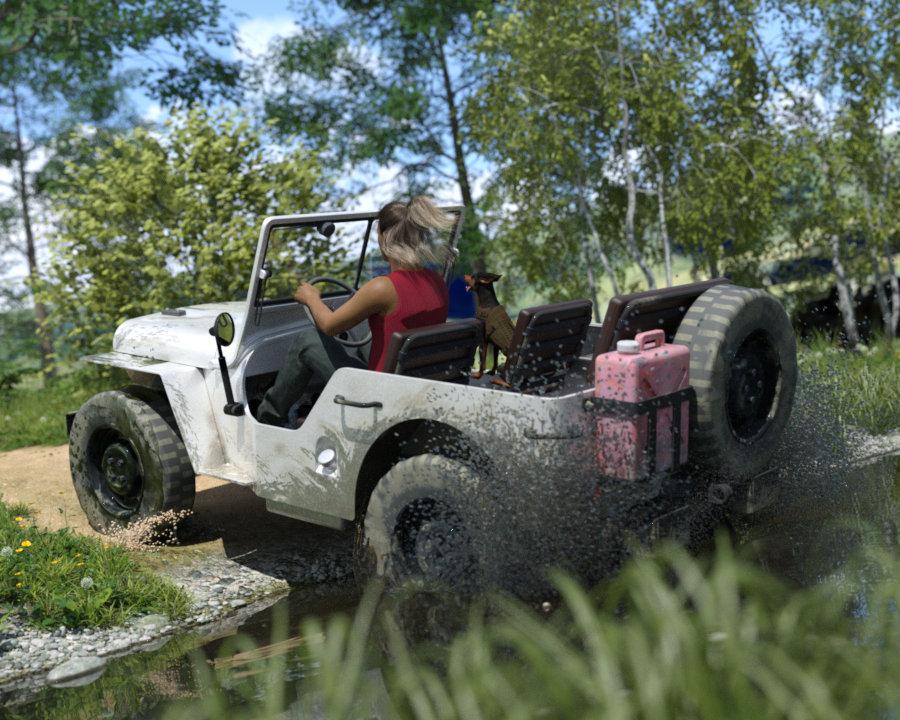
Annnnd I can't get the new UltraScenery addon to work. I am the only person who can't get it to work. There is no reason it shouldn't work, it's all installed in the right places and literally every. other. addon. works, but this one won't. I am unhappy. (Not the creator's fault.) But while I was swearing and grousing I created a couple of different scenes, and this one I got a bit carried away with. I had to get a bit creative with getting the UltraScenery water shader onto the droplets (ahh save shader preset, my old friend, I last abused you to move Yve's hair colour around) and even more creative with some water splashes to turn them into grit. I've been wanting to do this scene for ages and couldn't ever quite get it to work, so I'm happy with this.
That's my little doggo in the passenger seat.
 I've not really played with Dog 8 because the base Dobermann morph really irritated me — it's illegal to dock ears and tails in the UK, but I know it isn't in the US and the fact that someone would create a docked ear for a 3D dog is just gross to me, especially because pinschers have absolutely delightful ears and tails — but the jeep looked empty without a passenger. So I decided to put my MinPin in it. (Despite what you might imagine from the name, Miniature Pinschers came some 300 years before the Dobermann Pinscher, which was created when a businessman, Mr. Dobermann, liked the fearless attitude of the MinPin and wanted a bigger version to protect his property. In the words of my (female) Tesco driver: "Huh. Typical man.") It took a bit of work to get a MinPin's typical oversized bat ears, and even more work to get them to fold back properly (why are there two sets of morphs??? maybe I should have paid more attention sooner...), and my little girl would never be so ungraceful as to flap her tongue out her mouth like that... but my little girl also sheds her clothes in the bed in winter and farts under the covers and vacates the area, so she's not exactly a paragon of virtue.
Currently she has her back legs on the back of the sofa and her front legs on my shoulders, watching me type. I should probably be nicer about her.
ANYWAY. This render was fun.
 Genesis 3 (Dev Load) ?
Gator said:
OK, I am confused now, mentioned that you have the Genesis 8 Dev load. You could just delete the eyelashes on Genesis 3 and then and you're in the same boat as with Genesis 8. I mentioned bending the arms because I assumed you were making morphs for Genesis 9.
What are you trying to accomplish? Perhaps with that info can be of more help.
So, let's start from the beginning: I need to edit the body shape of a female figure in Blender. The one who made this model used DAZ Studio to have a base to work on and in this case, the base is Genesis 3 Female.
Since this is a heroine of a famous video game, I assume he used a software to extract the skin texture, eyes, hair etc. from the video game itself (unfortunately I'm not well informed about this sort of thing because for me are too complex).
He later ported it to Blender but didn't use Diffeomorphic for the import otherwise, if that were the case I wouldn't be here asking for help as I would have used Diffeomorphic to import a body morph from DAZ directly on the figure in Blender.
So I started looking elsewhere and someone told me that I could create an OBJ file with the body shape, import it into Blender and use it as a body morph.
Unfortunately, I haven't been able to do any of this because..
1) On Genesis 3 I have never been able to eliminate all the protrusions (eyelashes, eyebrows etc..) therefore, even if I could create an OBJ file I would never be able to use it for my purpose.
2) What would be imported into the OBJ would basically be a Genesis 3 Female and therefore, together with the body there would also be the head. In my case, however, the head of the figure on Blender must remain unchanged since what I have to change is only the shape of the body ..and that's it.
Since I couldn't do any of this, I decided to let it go and learn how to model and sculpt the figure directly on Blender, but the process requires time and above all.. knowledge! That's why I would have come in handy to use a ready-made morph..!
I could also show you a couple of reference images for you to understand what I intend to achieve but unfortunately I can not post them here because they are adult content.
And this is all :)daz hd morphs blender add on wont installhttps://bitbucket.org/Diffeomorphic/import_daz/issues/1414/attributeerror-module
You can take a look at my recent discussion here with Xin, and the workaround I found to install the latest daz-hd-morph addon.
How to apply Genesis 8.1 skin on Genesis 8?Update:
....well finally got the transfer to work, albeit with a bit more effort needed. Apparently figures that have a separate head and body texture are the problematic ones. The character skin I have been trying to use has not only separate materials for the head and body, but five different ones for the head alone. (no freckles, three densities of freckles, and no makeup.
To deal with that required creating a separate head surface for the G8 character using the Geometry Editor. There is a bit of overlap between G8 and 8.1 which made for odd colouration between along the collarbone so I avoid ed using those polys as part of the surface zone (also setting to target character to the 8.1 UV adds the neck texture)
Doing that allowed and applying the head texture from the 8.1 character to the new surface on the G8 one.
While the swap looked fine in OpenGL view, shifting to Iray view mode caused all the skin to turn green . Apparently there were several of SSS values involved that didn't translate well which changed the SSS value on the target character from "Mono" to "Specular". Changing it back fixed that teh green issue, however she now looked as if she had a terrible case of sunburn and the texture on the new Head surface had a bit of sheen This required adjusting several surface channels including Transmitted Colour (which transferred as a shade of orange instead of white) SSS Reflective Tint (to a light blue), Translucency Colour to match that of other surface areas, and SSS Amount to 1,00. Setting the Glossy Layered Weight channel to 0,00 got rid of the sheen on the head and neck surface.
So a few extra adjustments were required (again likely due to the SSS setup of the 8.1 character) and she finally looked a lot better.
File crashes on loadIt looks, on the face of it, as if there might be an issue with a morph (perhaps one that is used in that scene but not others).
EXPORTING HIGH POLY MORPHS TO CINEMA 4Dmikael-aronsson said:
FBX always export at base resolution, no HD or even high resolution meshes will be exported, you just get the crappy base resolution, you can subdivide after you import it into C4D though even if you will not get the same result as in DS
.
if you lock high resolution and export fbx it will export high rez with the morph .... it works with genesis 3 and it 's perfect when imported in c4d ...........;i didn't try genesis 8 or 9 but i will
Save expressions as presets?As a Pose preset, or by creating a master slider and linking it to the individual parts. You can, but don't want to, export as an OBJ and load as a new morph - that would be a bad idea in general as it would break any links to corrective adjustments to make character shapes play nicely with expressions and for expressions in particular as manya re bones, which rotate, while a morph moves in a straight line (which means 0% and 100% would match, but intermediate values would be different).
To make a controller, right-click in the Parameters pane and put it into Edit Mode, if it isn't. Right-click in the group you want to hold the controller and select the Create New property option. Name the property, set limits, adjust any presentation properties to taste, and set the Type to Modifier/Pose. Set the new property to 100%, with the expression applied and the figure otherwise zeroed. Right-click on the new property and select ERC Freeze, then in the dialogue make sure only the intended things (your expressions) are selected as sub components, click Accept. Test, and if the results are good zero the slifder and use File>Save As>Support Assets>Save Morph Asset if you want it to be available on all characters based on that figure.
Daz 3D is part of

Connect
DAZ Productions, Inc.
7533 S Center View Ct #4664
West Jordan, UT 84084Licensing Agreement | Terms of Service | Privacy Policy | EULA
© 2026 Daz Productions Inc. All Rights Reserved.