-
G8F/M Pose Transfer to G9
@richardandtracy - Hello Richard. As I do daily, I was browsing through my list of YouTube subscriptions for new or not before seen videos a short while ago and came across one that Rauko posted six months ago - How To Use Genesis 8 Poses On Genesis 9 – wherein he discusses and demonstrates your G8F/M Pose Transfer to G9 script. Thanks you! I haven’t yet installed Genesis 9 but when I do, I will certainly install your script as well.
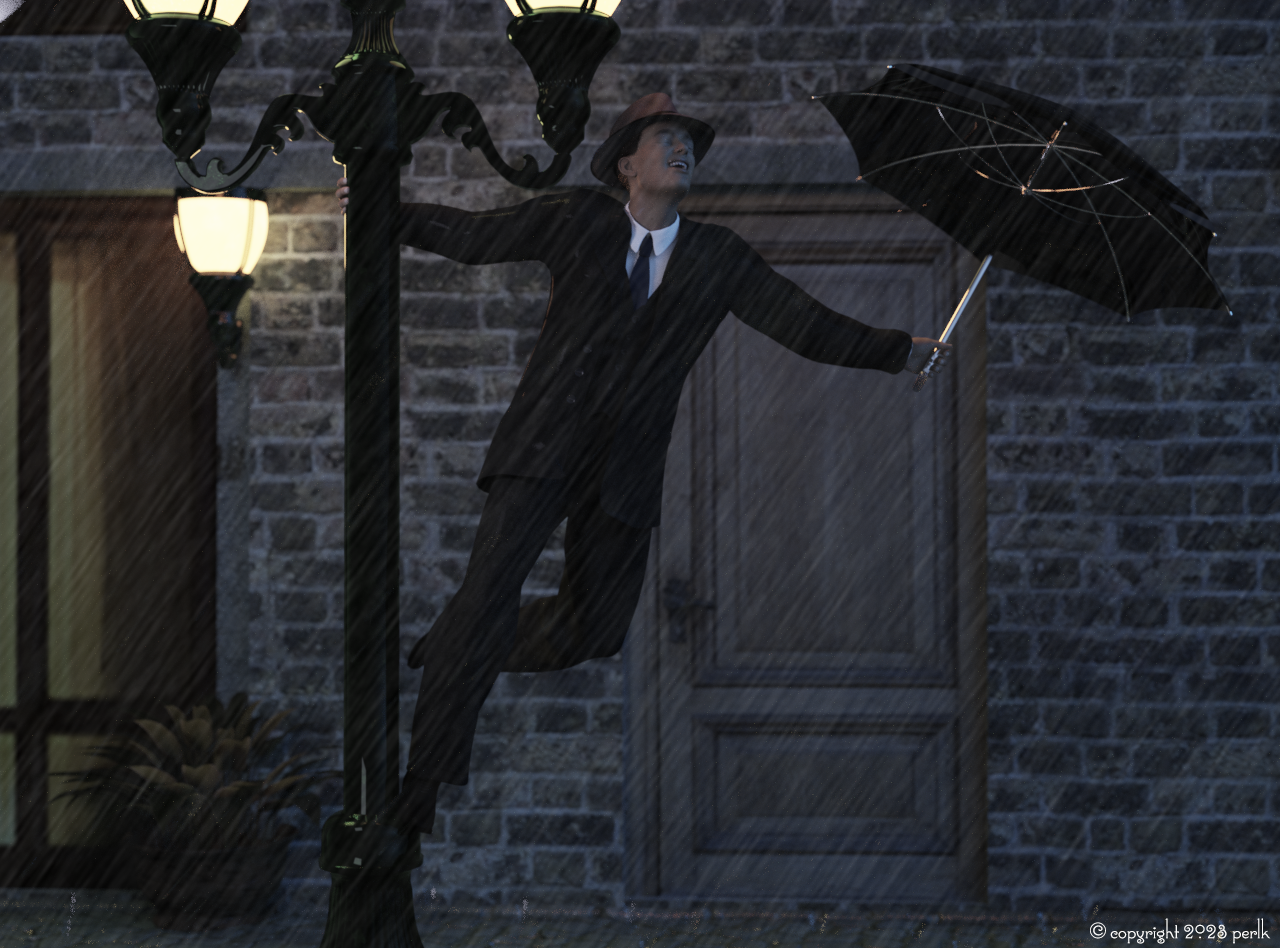
Freebie Challenge May 2023 - "Sweet Music" - Entries Thread Only"Singing in the Rain"
(Inspiration - the 1952 movie)
I did a lot of hiding polygons using the Geometry Editor including modifying the building and hiding his hair so it didn't poke through the hat. Let me know if you want more details on how I did this.
No count: Daz Iray shaders, Genesis 8.1 Male
Free:
- Debonair for G8.1M (morph)
- Sokka for G8M (texture)
- dforce 40s Mens Suit for G8M (this is the high res version which I will be releasing shortly, but you could achieve the same with the version I have linked here - and will update when the high res version is released)
- Everyday hairstyle for Genesis 8 Males
- Shaders for various objects
- Streetscene 01
- Textures for windows and door, laid overtop of the building on a plane
- Electrical Substation
- Umbrella
- Antique street lamp
- Soft hat
- Plant from Tuscan Dinner
- Bring the rain
Pre-postwork version attached below.
 Any textures that work well with the hooves morph in the G8 HFS Ultimate Shapes?
Are there any G8F andG8M textures or products that work well with hoof morphs in the G8 HFS Ultimate Shapes bundle? they morph the whole foot so 2 of the toes form the hoofs, the toenail is only part of the hoof. Alternatively any simple tutorials on alering the UV maps so I could create a hoof zone to use the toenail materials or similar myself?
Or would creating a material zone for the hoofs be better handled by something like a Geoshell & transparency map??
There is Joequick's Fantasy Deer which looks really good, but that seems to take a different approach to the legs from looking at the store page. I also prefer the look of mixing HFS Legs 01 Hoofed & Legs 02 Hoofed for what I have in mind. But if that can be used with them or the legs can be made sturdier it would be basically prefect.
Incidentally is there any project like the HFS Ultimate Shapes in the work for G9? Because they are incredibly versatile.
ED spelling, more thoughts
ED 2: Looks like a Geoshell is a good place to start, I think it will need a transparency map too, though
Does anyone have visual rep of the what the Daz File system is supposed to look like? See AttachmentPerttiA said:
The Manifest.dsx and Supplement.dsx are only used by the installers. if installing manually, one doesn't need them.
I have attached instructions for manual installation, maybe that helps in understanding how it works.In general, the Data folder is for geometry, runtime/textures is for textures and runtime/support is for metadata. Files in these folders need to go where the creator has put them, but I have seen for example freebees where creators have not followed even these rules.
There is one rule that must be followed if one wants to have a product working. If the product is a character or a morph for Daz base figure, the morph files need to be put in the morph folder for that character, which for Genesis 8 Female is "...\Data\DAZ 3D\Genesis 8\Female\Morphs\", that is the folder that G8F is looking for morphs when loaded into a scene.
Otherwise "It's up to you"

If the assets are bought from DAZ store, one uses the installers to install them and 'Smart' Content to load them into the scene, it is better not to move stuff from where the installer put them - They may not follow the general 'rules' in where they are placed and quite often it makes finding them in Content Library a pain in the behind, but one gets the benefit of using the installer to uninstall them easily.
If one is leaning towards old school ways, using manual installation and using Content Library to load stuff into the scene, apart from what is under Data and Runtime folders, everything else can be moved* around and arranged according to ones own logic.
*The exception being products using scripts that load other parts of products, for example Ultra Scenery.
You're a good friend, and I'd like to shake your virtual hand. And thank you, everyone!
The example you used about the morphs was a goodn seeing as how I've been placing one Id purchased just about every place known to my network to no avail. Bought it about a month ago!
Also love the bill gates quote hahaha.
Kala 9 HDThe combination of normals with HD is way too strong. I'd either turn down the HD morph by 50%...or leave it at 100% and turn the normals down. Joan 9 had the same problem. The best look for her (Joan 9) was to keep the normals and lower the HD morph to 50%.
That being said...I like Kala 8...but Kala 8 is not without her own issues. Her hand texture out of the box is oofta (the normals are the problem).
I've spent too much today as it is with 70% off build-your-own flash sale so I won't be picking up Kala 9...at least not for a while. Don't really have a use for anything in the bundle, so really only the core character is what I'd get.
Does anyone have visual rep of the what the Daz File system is supposed to look like? See AttachmentThe Manifest.dsx and Supplement.dsx are only used by the installers. if installing manually, one doesn't need them.
I have attached instructions for manual installation, maybe that helps in understanding how it works.In general, the Data folder is for geometry, runtime/textures is for textures and runtime/support is for metadata. Files in these folders need to go where the creator has put them, but I have seen for example freebees where creators have not followed even these rules.
There is one rule that must be followed if one wants to have a product working. If the product is a character or a morph for Daz base figure, the morph files need to be put in the morph folder for that character, which for Genesis 8 Female is "...\Data\DAZ 3D\Genesis 8\Female\Morphs\", that is the folder that G8F is looking for morphs when loaded into a scene.
Otherwise "It's up to you"
If the assets are bought from DAZ store, one uses the installers to install them and 'Smart' Content to load them into the scene, it is better not to move stuff from where the installer put them - They may not follow the general 'rules' in where they are placed and quite often it makes finding them in Content Library a pain in the behind, but one gets the benefit of using the installer to uninstall them easily.
If one is leaning towards old school ways, using manual installation and using Content Library to load stuff into the scene, apart from what is under Data and Runtime folders, everything else can be moved* around and arranged according to ones own logic.
*The exception being products using scripts that load other parts of products, for example Ultra Scenery.
Kala 9 HDAs far as the jump in price of base figures, the HD morphs were sold separately in previous generations. This caused quite a large price if you wanted to purchase both. Now the HD morphs are included with the base figure, so I would expect them to be more than the non-HD morph alone.
[Released] RSSY Character And Material Conversion Bundle Genesis 8 to Genesis 9 [Commercial]RiverSoftArt said:
Eboshijaana said:
RiverSoftArt said:
Eboshijaana said:
Yess, I'm eager to use this ^^
Thank you! I hope you will like it. It was the most difficult script we have done for Daz Studio.
I assume eyes and teeth are a no-go for transfer.
No, you can transfer. It is finicky with extreme eyes but with the material suit, you are able to do it
Excuse me, I meant the morphs for eyes and teeth, not the materials.
[Released] dForce Assistant [Commercial]RiverSoftArt said:
Eboshijaana said:
Something I've been struggling with; If you have two (or more) figures in the scene that need simulation, how does one do that? I've tried using the script separately on both, but one always ends up with a messed up timeline.
How do you mean messed up timeline? I would hide the first character, simulate and freeze the results on the second character, hide the second character, and show, simulate and freeze the results on the first character.
It is hard to explain, but basically, instead of the script making the character's morphs default to 0 in the timeline spot 0, it adds the second character's zero morphs in the middle of the simulation.
As you can see, the second figure starts with all the morphs active, then turns to default and THEN the morph change happens.
The second character's dforce helper script is activated at the end of the timeline,too.[Released] RSSY Character And Material Conversion Bundle Genesis 8 to Genesis 9 [Commercial]Eboshijaana said:
RiverSoftArt said:
Eboshijaana said:
Yess, I'm eager to use this ^^
Thank you! I hope you will like it. It was the most difficult script we have done for Daz Studio.
I assume eyes and teeth are a no-go for transfer.
No, you can transfer. It is finicky with extreme eyes but with the material suit, you are able to do it
Freebie Challenge May 2023 - "Sweet Music" - Main ThreadJackyBrown said:
3D Art Freebie Challenge May 2023 "Sweet Music"
"Music, sweet music
I wish I could caress, and kiss, kiss"
(Lyrics from Manic Depression by The Jimi Hendrix Experience © 1968, Source: https://genius.com)Music is magic! ;)
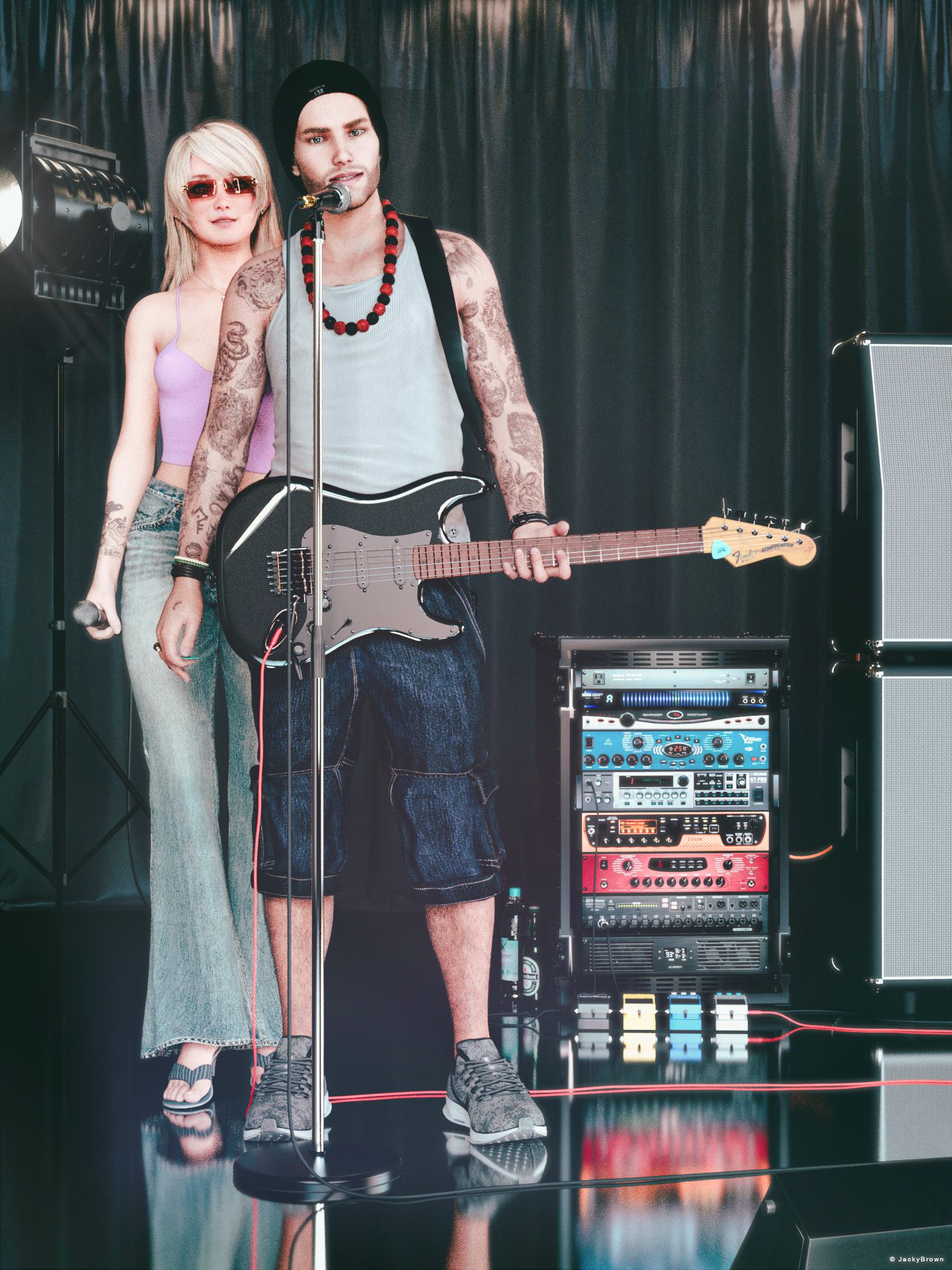
So it is completely inconceivable that I would not submit a render this month, not with this theme. :)[Best watched at full size for details.]
"Music connects"
Starring: Linda and Walther (2.0)The tale: (Entirely fictional)
Walther "The Ridge" Byruslanomar, lead guitarist of the world famous punkrock band The Dead Grants softly played the first tones of the next song and said: "She has been one of my best friends for a long time and of course needs no further introduction due to her own world fame. Ladies and gentlemen, please give a warm round of applause to miss Whitney Spiers!"
By the way, the neck of Walther's guitar is the original neck of a 1967 Fender Stratocaster that rock legend Jimi Hendrix burned on stage!
Non-motion Picture Soundtrack:Marty Friedman featuring +a/Alfakyun - The Perfect World (© 2018)
https://www.youtube.com/watch?v=pq3MqusXS-I&t=215s (at 3:35)
COUNTABLE FREEBIES: (Alphabetic order)#01! Bear Ring by kalhh
https://www.deviantart.com/kalhh/art/Bear-Ring-853733610 **#02! Beer Bottle for Daz Studio by forged3DX
https://www.deviantart.com/forged3dx/art/Beer-Bottle-for-Daz-Studio-608260601 **#03! BNJ TankTop G8M - FREE by SdeB
https://www.sdebstore.com/collections/free-stuff/products/bnj-tanktop-g8m-free **#04! Cargo Short G8M - FREE by SdeB
https://www.sdebstore.com/collections/free-stuff/products/cargo-short-g8m_free **#05! Chameleon ROse2 for Genesis 8 Female by zoro_d
https://www.renderosity.com/freestuff/items/85859/chameleon-rose2-for-genesis-8-female **
[Lashes morph used]#06! DaisyTop for Daz Genesis 8 Female by Digi-Dotz
https://www.digi-dotz.com/index.php/clothing/daisytop-for-daz-genesis-8-female#07! Dante DMC5 Free Stubble for Genesis 8 Male by InTheFlesh
https://sharecg.com/v/94752/gallery/21/DAZ-Studio/Dante-DMC5-Free-Stubble-for-Genesis-8-Male **#08! Delsin Beanie and Hair for G8M by InTheFlesh
https://sharecg.com/v/92677/browse/21/DAZ-Studio/FINAL-Delsin-Beanie-and-Hair-for-G8M **#09! Drinks by klausdbg
https://www.sharecg.com/v/74240/gallery/5/3D-Model/Summer-IV-Drinks **#10! ED's Brick Shader (Iray) by Edheldil3D
https://www.deviantart.com/edheldil3d/art/Freebie-ED-s-Brick-Shader-Iray-788871766 **#11! Effector by Laboratory108 (Zippo)
http://www.lab108.x0.com/lab108/inst.html (item 1)#12! G8M Walther 2.0 by Ruslanomar
https://sharecg.com/v/97276/gallery/21/DAZ-Studio/G8M-Walther-2.0 **#13! Guitar Pick by Laboratory108 (Zippo)
http://www.lab108.x0.com/lab108/inst.html (item 20)#14! Iray car related shader presets 'megapack' by Tom2099
https://www.deviantart.com/tom2099/art/Iray-car-related-shader-presets-megapack-539622361 **#15! Iray Jewelry Shaders by AllenArt
https://sharecg.com/v/95893/gallery/21/DAZ-Studio/Iray-Jewelry-Shaders **#16! Kiara Interior HDRI by Poly Haven
https://polyhaven.com/a/kiara_interior#17! Koelle Alaaf! by klausdbg
https://www.sharecg.com/v/79631/gallery/5/3D-Model/Koelle-Alaaf%21 **
[Crowncork used, customized texture]#18! Linda - Character for G3F with texture maps by Edelzwicker
https://www.sharecg.com/v/89731/related/21/DAZ-Studio/Linda-Character-for-G3F-with-texture-maps **#19! Little Flower Studs for Genesis 8 and/or 8.1 Female by AllenArt
https://sharecg.com/v/98499/gallery/21/DAZ-Studio/Little-Flower-Studs **#20! Lights for Daz Studio w/ Iray by DrBoots
https://www.deviantart.com/drboots/art/Freebie-Lights-for-Daz-Studio-w-Iray-579993105 **#21! Lunafreya for G8F by Shinteo
https://www.patreon.com/posts/lunafreya-for-40600356#22! Lunafreya Summoner Outfit For Daz by Shinteo
https://www.patreon.com/posts/lunafreya-outfit-67676433
[Hair, Add-on to the previous pack]#23! Maddy for GF8 Charakter Shape by MysticArtDesign
https://sharecg.com/v/98461/browse/21/DAZ-Studio/Maddy-for-GF8-Charakter-Shape **
[LIE Blush Make up & freckles, customized, also used on G8M]#24! mcjNewStrat by mCasual Jacques
https://sites.google.com/site/mcasualsdazscripts2/mcj-1#25! mcjStack by mCasual Jacques
https://sites.google.com/site/mcasualsdazscripts2/mcjstack#26! My Heart Necklace for Genesis 8 Female by Amy Aimei
https://www.deviantart.com/amyaimei/art/My-Heart-Necklace-for-Genesis-8-Female-729010047 **#27! Mystics Floor & Backplanes by MysticArtDesign
https://sharecg.com/v/94620/browse/21/DAZ-Studio/Mystics-Floor-Backplanes **#28! New Walther 2.0 tanned skin + hair system by Ruslanomar
https://sharecg.com/v/98463/browse/21/DAZ-Studio/New-Walther-2.0-tanned-skin-%2B-hair-system **#29! Nike Air Zoom for G1 by Tranquil
https://sharecg.com/v/97066/browse/21/DAZ-Studio/Nike-Air-Zoom-for-G1 **#30! Pd-Soft Leather Daz Studio Shaders for Iray by Parrotdolphin (Janet)
https://sharecg.com/v/80223/gallery/7/Material-and-Shader/Pd-Soft-Leather-Daz-Studio-Shaders-for-Iray **#31! Piercing Gaze for Genesis 8 Females by SWTrium
https://www.renderosity.com/freestuff/items/83703/piercing-gaze-for-genesis-8-females **#32! RAV Hayajuku Real Tattoos FOUR for Genesis 8.1 Females by Ravenstone
https://www.renderosity.com/freestuff/items/89767/rav-hayajuku-real-tattoos-four-for-genesis-81-females **#33! REAL Hairy for Genesis 2 Male ***FREE*** by MikeyFTL
https://www.deviantart.com/mikeyftl/art/REAL-Hairy-for-Genesis-2-Male-FREE-859328094 **#34! Realistic Curtains by Cherubit
https://www.renderosity.com/freestuff/items/83637/realistic-curtains **#35! Rimless Sunglasses G8F-FREE by SdeB
https://www.sdebstore.com/collections/free-stuff/products/rimless-sunglasses-g8f-free **#36! Shimmery Sheer Fabrics II by AllenArt
https://sharecg.com/v/95898/gallery/21/DAZ-Studio/Shimmery-Sheer-Fabrics-II **#37! SoulTrain Pants G8F_FREE by SdeB
https://www.sdebstore.com/collections/free-stuff/products/soultrain-pants-g8f_free **#38! Speaker and Amplifers by woodkz71
https://www.renderosity.com/freestuff/items/78126/speaker-and-amplifers **#39! Spotlight Prop by DrBoots
https://www.deviantart.com/drboots/art/Freebie-Daz-3D-Studio-Iray-Spotlight-Prop-582958157 **#40! Stage Speaker by woodkz71
https://www.renderosity.com/freestuff/items/78116/stage-speaker **#41! Storage Box with Foam contents by woodkz71
https://www.renderosity.com/freestuff/items/78164/storage-box-with-foam-contents **#42! "STRONG" for G8M Character Morph & Pose by Mar3D
https://www.renderosity.com/mod/freestuff/strong-for-g8m-character-morph-amp-pose/82833 **#43! SuitWell Watch G8M - FREE by SdeB
https://www.sdebstore.com/collections/free-stuff/products/suitwell-watch-g8m-free **#44! SY 200 Morphs for Genesis 8 Head and Body by SickleYield
https://sharecg.com/v/91888/view/21/DAZ-Studio/SY-200-Morphs-for-Genesis-8-Head-and-Body **#45! Wooden Beads Necklace G8M-FREE by SdeB
https://www.sdebstore.com/collections/free-stuff/products/wooden-beads-necklace-g8m-free **
NO-COUNT ITEMS:--- 33 Eyes Materials for the Genesis 8 + 8.1 people by LevKornowska
++ Bardot Oufit G8F Sandals by Mada
--- Casual Outfit 2 for G3M by Tab [Bracelet]
--- Genesis 2 Male Beard 03 by Laticis Imagery
--- MIC Set, MicCable Set and MicStand Set by MDP_MI
--- Nose Ring 01 for G2F, G3F and/or G8F by AllenArt
--- Scene Lights for Iray by Lali Kamala (Holiday Loyalty Sale 2021 Free Item)PURCHASED/PAID FOR ITEMS: None 100% Freebies
*1 E-mail address required
** Registration required
#x! Countable Items (Bold ones are used by me for the first time I think.)
--- No longer available freebies
++ Free with DAZ Studio (or the Essentials)
$x. Purchased/Paid For Item
Rendered with DAZ Studio 4.10.0.123 (nVidia Iray®)Other free software used: GIMP v2.10.32 and Irfanview 4.60
Postwork: Used some filters that come with GIMP. Also used mcjLut by mcasual https://sites.google.com/site/mcasualsdazscripts9/mcjlut with the free FilterGrade Cinematic LUTs Pack https://filtergrade.com/free-cinematic-luts-video-editing/ and the Vintage-Look Photoshop Effects Pack/Light Leaks Effect Pack by Michael Jarrott https://creativecloud.adobe.com/discover/article/vintage-look-photoshop-effects-pack.
"Music connects"
All Freebies checked, please move to Entries
I'm once again flashed with the amount of freebies you've collected
 G9 Eyebrows
Yep, I ve got those. They are really good (a few issues) but for the number of characters I have and matching real world people means they are still limited.
www.daz3d.com/super-natural-brows-merchant-resource-for-genesis-8-and-3-female was my go to becuase you can morph them and customise to match almost any character. Thats what i'm hoping for again.
Adding a hair tie to Strand-Based Hair in Daz3D Studiolilweep said:
lilweep said:
This doesnt answer your questions, but from experience, one problem which you may encounter that you may not have thought of is that, with a mid to high ponytail, when the neck bends down/side-to-side, the hairs which are spawned at the lower neck (the ones that travel upwards from the neck towards the ponytail) may dislodge from the tight ponytail.
I'm not sure what the best solution to this problem will be. I guess you could style the hair to account for this or tweak the rigging of your haircap in the neck area (assuming you are even using a haircap). You could also make these hairs on a different haircap than the one which is rigged by the neck bones.
See attached for example. This is a SBH i had made showing what happens when head is rotated.
That's it I also noticed... It's not a JCM... so one way to fix it is: Turn on Preview PR Hairs, then use Geometry Editor + Mesh Grabber to 'push it in' ... I tried dFormer but failed. Then I used blender to fix it and imported the morph back, the morph dial didn't work...
HH Lexi for G9 (Commercial)FSMCDesigns said:
I saw the Lexi was released when I first got up this morning and wanted to purchase and play with her, but had to go to work. Picked her up when I got home though! WOOHOO!
Thanks for another great character!
Here she is with the body at 68% and a few other morphs added. I also made her a little more tan and added some more sheen to the skin and used my own makeup. Really like her face morph!!
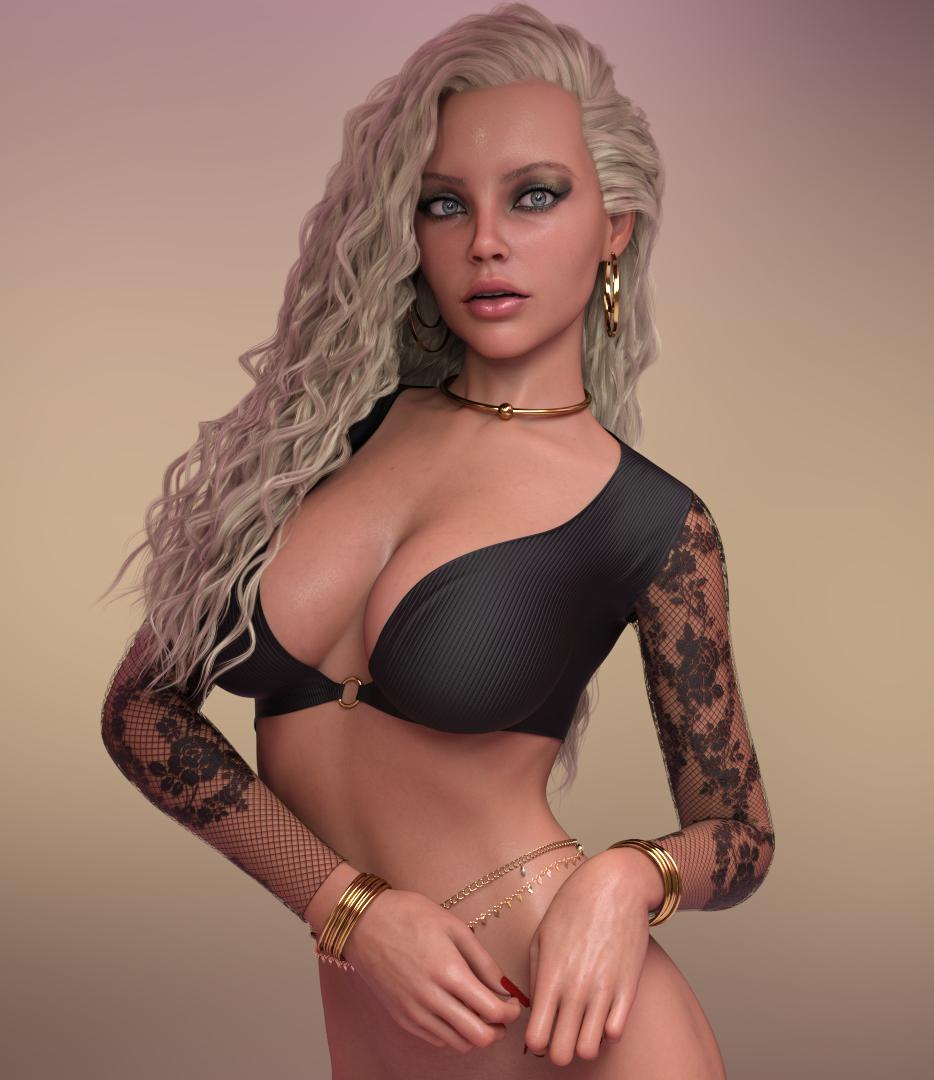
Wow, she looks incredible! Nice work!
Loading morphs from DeviantArtNormally there's only one 'data' folder in the downloaded file of such 'morph only characters'. You dump this 'data' folder to the root path of your Daz Library, then reload a G8M or a G8F base figure to the scene, go to Parameters pane, type the character's name or a keyword in the filter field, you may locate the corresponding morph dial(s). If there's a Readme.txt or documentation folder or sth. like that in the downloaded file, also check them in which the author might give some guideline of How-to-use as well。。。
HH Lexi for G9 (Commercial)I saw the Lexi was released when I first got up this morning and wanted to purchase and play with her, but had to go to work. Picked her up when I got home though! WOOHOO!
Thanks for another great character!
Here she is with the body at 68% and a few other morphs added. I also made her a little more tan and added some more sheen to the skin and used my own makeup. Really like her face morph!!
Making Clones of G9 - TutorialBubbleCloud said:
Catherine3678ab said:
BubbleCloud said:
I'm so lost, I wish someone could help me out.
i have made G9 clone for G8, OK.
I also have the G8 clone for G9, OK.
What I want is to have a mesh with the G9 body and the head of G8F.
This is how I can tranfer the heads (only the heads) of my G8 girls to G9.
(Is that right or I'm getting crazy?????????)
I can't figure out how to make a G9 body with G8 head, my brain has stopped working.
Can anyone help me?
1. The purpose of making auto-fit clones is not for making morphs, they are for getting clothing to fit.
2. Along a similar track, you would need to make the 'clothing' of the G9 body [base resolution etc] for G8. Then with G8 dialed to the default G9 pose, plus the desired head shape [G9 clothing is still "fit to" G8]; HIDE all except the "clothing" of G9. Export that out as .obj [remember still at base resolution and no groups]. Then have G9 showing and selected, using Morph Loader Pro import in the G9 "clothing" as a morph, name the head morph sensibly and uniquely, "reverse deformations" and etc. Hopefully this works. If it does, dial the morph to 0 and save it as a morph asset. I don't recall the exact wording but when making this morph, be sure to select the option for a morph shape type.
Elsewhere in the forums I do have a tutorial that covers in more detail how to transfer morphs between the figures. My .pdf tutorials tend to cover all the steps as I work through the projects while making the tutorials.
Thank you. I still don't understand (you talk about G9 body, but the clone also changes the head, so if i apply my g8 head morph to this mesh, the morph is not the same because it has the g9 head in it) but i will it a try tomorrow following these steps. Also, I know how to tranfer full body morphs, I have transferred many of my girls to Gen9. My problem is that these transferred morphs also affect the body of G9 (and they give the shape of G8F body) but I just want to be able to mix the heads only. Thank you for yout reply. Will come back tomorrow with my results.If you have the shape of G9 dialed into G8, apply the desired G8 head shape to G8; hide all except the G9 "clothing" - then import that back via Morph Loader to make the morph in G9. In "reversing deformations" it will not double nor change the G9 effects in the G8 head morph. It will only display the G8 morph.
Like many a project, not everything looks perfectly okay until the end result is achieved ;-)
Making Clones of G9 - Tutorial
Thank you. I still don't understand (you talk about G9 body, but the clone also changes the head, so if i apply my g8 head morph to this mesh, the morph is not the same because it has the g9 head in it) but i will it a try tomorrow following these steps. Also, I know how to tranfer full body morphs, I have transferred many of my girls to Gen9. My problem is that these transferred morphs also affect the body of G9 (and they give the shape of G8F body) but I just want to be able to mix the heads only. Thank you for yout reply. Will come back tomorrow with my results.Catherine3678ab said:BubbleCloud said:
I'm so lost, I wish someone could help me out.
i have made G9 clone for G8, OK.
I also have the G8 clone for G9, OK.
What I want is to have a mesh with the G9 body and the head of G8F.
This is how I can tranfer the heads (only the heads) of my G8 girls to G9.
(Is that right or I'm getting crazy?????????)
I can't figure out how to make a G9 body with G8 head, my brain has stopped working.
Can anyone help me?1. The purpose of making auto-fit clones is not for making morphs, they are for getting clothing to fit.
2. Along a similar track, you would need to make the 'clothing' of the G9 body [base resolution etc] for G8. Then with G8 dialed to the default G9 pose, plus the desired head shape [G9 clothing is still "fit to" G8]; HIDE all except the "clothing" of G9. Export that out as .obj [remember still at base resolution and no groups]. Then have G9 showing and selected, using Morph Loader Pro import in the G9 "clothing" as a morph, name the head morph sensibly and uniquely, "reverse deformations" and etc. Hopefully this works. If it does, dial the morph to 0 and save it as a morph asset. I don't recall the exact wording but when making this morph, be sure to select the option for a morph shape type.
Elsewhere in the forums I do have a tutorial that covers in more detail how to transfer morphs between the figures. My .pdf tutorials tend to cover all the steps as I work through the projects while making the tutorials.
Making Clones of G9 - TutorialBubbleCloud said:
I'm so lost, I wish someone could help me out.
i have made G9 clone for G8, OK.
I also have the G8 clone for G9, OK.
What I want is to have a mesh with the G9 body and the head of G8F.
This is how I can tranfer the heads (only the heads) of my G8 girls to G9.
(Is that right or I'm getting crazy?????????)
I can't figure out how to make a G9 body with G8 head, my brain has stopped working.
Can anyone help me?1. The purpose of making auto-fit clones is not for making morphs, they are for getting clothing to fit.
2. Along a similar track, you would need to make the 'clothing' of the G9 body [base resolution etc] for G8. Then with G8 dialed to the default G9 pose, plus the desired head shape [G9 clothing is still "fit to" G8]; HIDE all except the "clothing" of G9. Export that out as .obj [remember still at base resolution and no groups]. Then have G9 showing and selected, using Morph Loader Pro import in the G9 "clothing" as a morph, name the head morph sensibly and uniquely, "reverse deformations" and etc. Hopefully this works. If it does, dial the morph to 0 and save it as a morph asset. I don't recall the exact wording but when making this morph, be sure to select the option for a morph shape type.
Elsewhere in the forums I do have a tutorial that covers in more detail how to transfer morphs between the figures. My .pdf tutorials tend to cover all the steps as I work through the projects while making the tutorials.
Freebie Challenge May 2023 - "Sweet Music" - Main Thread3D Art Freebie Challenge May 2023 "Sweet Music"
"Music, sweet music
I wish I could caress, and kiss, kiss"
(Lyrics from Manic Depression by The Jimi Hendrix Experience © 1968, Source: https://genius.com)Music is magic! ;)
So it is completely inconceivable that I would not submit a render this month, not with this theme. :)[Best watched at full size for details.]
"Music connects"
Starring: Linda and Walther (2.0)The tale: (Entirely fictional)
Walther "The Ridge" Byruslanomar, lead guitarist of the world famous punkrock band Dead Grants softly played the first tones of the next song and said: "She has been one of my best friends for a long time and of course needs no further introduction due to her own world fame. Ladies and gentlemen, please give a warm round of applause to miss Whitney Spiers!"
By the way, the neck of Walther's guitar is the original neck of a 1967 Fender Stratocaster that rock legend Jimi Hendrix burned on stage!
Non-motion Picture Soundtrack:Marty Friedman featuring +a/Alfakyun - The Perfect World (© 2018)
https://www.youtube.com/watch?v=pq3MqusXS-I&t=215s (at 3:35)
COUNTABLE FREEBIES: (Alphabetic order)#01! Bear Ring by kalhh
https://www.deviantart.com/kalhh/art/Bear-Ring-853733610 **#02! Beer Bottle for Daz Studio by forged3DX
https://www.deviantart.com/forged3dx/art/Beer-Bottle-for-Daz-Studio-608260601 **#03! BNJ TankTop G8M - FREE by SdeB
https://www.sdebstore.com/collections/free-stuff/products/bnj-tanktop-g8m-free **#04! Cargo Short G8M - FREE by SdeB
https://www.sdebstore.com/collections/free-stuff/products/cargo-short-g8m_free **#05! Chameleon ROse2 for Genesis 8 Female by zoro_d
https://www.renderosity.com/freestuff/items/85859/chameleon-rose2-for-genesis-8-female **
[Lashes morph used]#06! DaisyTop for Daz Genesis 8 Female by Digi-Dotz
https://www.digi-dotz.com/index.php/clothing/daisytop-for-daz-genesis-8-female#07! Dante DMC5 Free Stubble for Genesis 8 Male by InTheFlesh
https://sharecg.com/v/94752/gallery/21/DAZ-Studio/Dante-DMC5-Free-Stubble-for-Genesis-8-Male **#08! Delsin Beanie and Hair for G8M by InTheFlesh
https://sharecg.com/v/92677/browse/21/DAZ-Studio/FINAL-Delsin-Beanie-and-Hair-for-G8M **#09! Drinks by klausdbg
https://www.sharecg.com/v/74240/gallery/5/3D-Model/Summer-IV-Drinks **#10! ED's Brick Shader (Iray) by Edheldil3D
https://www.deviantart.com/edheldil3d/art/Freebie-ED-s-Brick-Shader-Iray-788871766 **#11! Effector by Laboratory108 (Zippo)
http://www.lab108.x0.com/lab108/inst.html (item 1)#12! G8M Walther 2.0 by Ruslanomar
https://sharecg.com/v/97276/gallery/21/DAZ-Studio/G8M-Walther-2.0 **#13! Guitar Pick by Laboratory108 (Zippo)
http://www.lab108.x0.com/lab108/inst.html (item 20)#14! Iray car related shader presets 'megapack' by Tom2099
https://www.deviantart.com/tom2099/art/Iray-car-related-shader-presets-megapack-539622361 **#15! Iray Jewelry Shaders by AllenArt
https://sharecg.com/v/95893/gallery/21/DAZ-Studio/Iray-Jewelry-Shaders **#16! Kiara Interior HDRI by Poly Haven
https://polyhaven.com/a/kiara_interior#17! Koelle Alaaf! by klausdbg
https://www.sharecg.com/v/79631/gallery/5/3D-Model/Koelle-Alaaf%21 **
[Crowncork used, customized texture]#18! Linda - Character for G3F with texture maps by Edelzwicker
https://www.sharecg.com/v/89731/related/21/DAZ-Studio/Linda-Character-for-G3F-with-texture-maps **#19! Little Flower Studs for Genesis 8 and/or 8.1 Female by AllenArt
https://sharecg.com/v/98499/gallery/21/DAZ-Studio/Little-Flower-Studs **#20! Lights for Daz Studio w/ Iray by DrBoots
https://www.deviantart.com/drboots/art/Freebie-Lights-for-Daz-Studio-w-Iray-579993105 **#21! Lunafreya for G8F by Shinteo
https://www.patreon.com/posts/lunafreya-for-40600356#22! Lunafreya Summoner Outfit For Daz by Shinteo
https://www.patreon.com/posts/lunafreya-outfit-67676433
[Hair, Add-on to the previous pack]#23! Maddy for GF8 Charakter Shape by MysticArtDesign
https://sharecg.com/v/98461/browse/21/DAZ-Studio/Maddy-for-GF8-Charakter-Shape **
[LIE Blush Make up & freckles, customized, also used on G8M]#24! mcjNewStrat by mCasual Jacques
https://sites.google.com/site/mcasualsdazscripts2/mcj-1#25! mcjStack by mCasual Jacques
https://sites.google.com/site/mcasualsdazscripts2/mcjstack#26! My Heart Necklace for Genesis 8 Female by Amy Aimei
https://www.deviantart.com/amyaimei/art/My-Heart-Necklace-for-Genesis-8-Female-729010047 **#27! Mystics Floor & Backplanes by MysticArtDesign
https://sharecg.com/v/94620/browse/21/DAZ-Studio/Mystics-Floor-Backplanes **#28! New Walther 2.0 tanned skin + hair system by Ruslanomar
https://sharecg.com/v/98463/browse/21/DAZ-Studio/New-Walther-2.0-tanned-skin-%2B-hair-system **#29! Nike Air Zoom for G1 by Tranquil
https://sharecg.com/v/97066/browse/21/DAZ-Studio/Nike-Air-Zoom-for-G1 **#30! Pd-Soft Leather Daz Studio Shaders for Iray by Parrotdolphin (Janet)
https://sharecg.com/v/80223/gallery/7/Material-and-Shader/Pd-Soft-Leather-Daz-Studio-Shaders-for-Iray **#31! Piercing Gaze for Genesis 8 Females by SWTrium
https://www.renderosity.com/freestuff/items/83703/piercing-gaze-for-genesis-8-females **#32! RAV Hayajuku Real Tattoos FOUR for Genesis 8.1 Females by Ravenstone
https://www.renderosity.com/freestuff/items/89767/rav-hayajuku-real-tattoos-four-for-genesis-81-females **#33! REAL Hairy for Genesis 2 Male ***FREE*** by MikeyFTL
https://www.deviantart.com/mikeyftl/art/REAL-Hairy-for-Genesis-2-Male-FREE-859328094 **#34! Realistic Curtains by Cherubit
https://www.renderosity.com/freestuff/items/83637/realistic-curtains **#35! Rimless Sunglasses G8F-FREE by SdeB
https://www.sdebstore.com/collections/free-stuff/products/rimless-sunglasses-g8f-free **#36! Shimmery Sheer Fabrics II by AllenArt
https://sharecg.com/v/95898/gallery/21/DAZ-Studio/Shimmery-Sheer-Fabrics-II **#37! SoulTrain Pants G8F_FREE by SdeB
https://www.sdebstore.com/collections/free-stuff/products/soultrain-pants-g8f_free **#38! Speaker and Amplifers by woodkz71
https://www.renderosity.com/freestuff/items/78126/speaker-and-amplifers **#39! Spotlight Prop by DrBoots
https://www.deviantart.com/drboots/art/Freebie-Daz-3D-Studio-Iray-Spotlight-Prop-582958157 **#40! Stage Speaker by woodkz71
https://www.renderosity.com/freestuff/items/78116/stage-speaker **#41! Storage Box with Foam contents by woodkz71
https://www.renderosity.com/freestuff/items/78164/storage-box-with-foam-contents **#42! "STRONG" for G8M Character Morph & Pose by Mar3D
https://www.renderosity.com/mod/freestuff/strong-for-g8m-character-morph-amp-pose/82833 **#43! SuitWell Watch G8M - FREE by SdeB
https://www.sdebstore.com/collections/free-stuff/products/suitwell-watch-g8m-free **#44! SY 200 Morphs for Genesis 8 Head and Body by SickleYield
https://sharecg.com/v/91888/view/21/DAZ-Studio/SY-200-Morphs-for-Genesis-8-Head-and-Body **#45! Wooden Beads Necklace G8M-FREE by SdeB
https://www.sdebstore.com/collections/free-stuff/products/wooden-beads-necklace-g8m-free **
NO-COUNT ITEMS:--- 33 Eyes Materials for the Genesis 8 + 8.1 people by LevKornowska
++ Bardot Oufit G8F Sandals by Mada
--- Casual Outfit 2 for G3M by Tab [Bracelet]
--- Genesis 2 Male Beard 03 by Laticis Imagery
--- MIC Set, MicCable Set and MicStand Set by MDP_MI
--- Nose Ring 01 for G2F, G3F and/or G8F by AllenArt
--- Scene Lights for Iray by Lali Kamala (Holiday Loyalty Sale 2021 Free Item)PURCHASED/PAID FOR ITEMS: None 100% Freebies
*1 E-mail address required
** Registration required
#x! Countable Items (Bold ones are used by me for the first time I think.)
--- No longer available freebies
++ Free with DAZ Studio (or the Essentials)
$x. Purchased/Paid For Item
Rendered with DAZ Studio 4.10.0.123 (nVidia Iray®)Other free software used: GIMP v2.10.32 and Irfanview 4.60
Postwork: Used some filters that come with GIMP. Also used mcjLut by mcasual https://sites.google.com/site/mcasualsdazscripts9/mcjlut with the free FilterGrade Cinematic LUTs Pack https://filtergrade.com/free-cinematic-luts-video-editing/ and the Vintage-Look Photoshop Effects Pack/Light Leaks Effect Pack by Michael Jarrott https://creativecloud.adobe.com/discover/article/vintage-look-photoshop-effects-pack.
"Music connects"
Daz 3D is part of

Connect
DAZ Productions, Inc.
7533 S Center View Ct #4664
West Jordan, UT 84084Licensing Agreement | Terms of Service | Privacy Policy | EULA
© 2026 Daz Productions Inc. All Rights Reserved.