-
Does anyone know if pwtoon works with DS 4.9?
If so, how do I access? Is this the best option for toon renders?
Sketchy - Toon and Art Style Shaders for Iray [Commercial]I have a request/question: is it possible to do a faux rim light effect using Sketchy?
Here's an example: https://www.pinterest.com/pin/456341374727734545/
Here's another: https://www.pinterest.com/pin/456341374727597472/
It's a comic effect I used to notice where certain textures would appear as a faux rim light. It was used as a design choice in most cases, but it would also be used to denote that a character was wearing a darker color than the printing palettes of the time could demonstrate.
It's an effect I can do with pwToon and would definitely be something I'd look for in an Iray toon shader.
Thanks!
Visual Style ShadersVisual Style Shaders, Manga Style Shaders, PWToon and so on were made to make it easier to get manga / comic book style renders.. They all have shaders for every part of a scene in the case of VSS you have Skin, Hair, shaders and colour preset shaders for everything else..
They were designed mainly to be used in 3Delight since that was the only renderer in Studio at the time when this product came out and well since Iray is intended more for realistic looking type renders..
Other than that do not know, but personally I would use the renderer they were designed for since it is part of Studio but that is just me..
Non-photorealistic Renders (NPR)Here's a rerender of something I worked on before.
You know, this might just ... steal me away from PWToon and similar, because it works at least as well, and just as fast. This render was at 2160x2160, took 7 minutes. And I could probably have stopped it at 3 or 4 minutes, I just got distracted by something.
I want to color this....Very cool
Non-photorealistic Renders (NPR)Here's a rerender of something I worked on before.
You know, this might just ... steal me away from PWToon and similar, because it works at least as well, and just as fast. This render was at 2160x2160, took 7 minutes. And I could probably have stopped it at 3 or 4 minutes, I just got distracted by something.
it's amazing 0_0
I like just as it is now, did you use the outliner shader or your new black flat geoshell method?
Non-photorealistic Renders (NPR)Here's a rerender of something I worked on before.
You know, this might just ... steal me away from PWToon and similar, because it works at least as well, and just as fast. This render was at 2160x2160, took 7 minutes. And I could probably have stopped it at 3 or 4 minutes, I just got distracted by something.
Post-Work Tips & Tricks (PS, Illustration & Lightroom)@Dreamfarm, don't worry! Spam away! The purpose here is to share :D. And I like the girl. It's a great result! Maybe you can paint some highlights for the hair? That way you can set apart hair from skin. I'll can do a tutorial mini-tutorial on how I paint hair sometime this week if you're interested.
As to the pwToon renders. Have you tried rendering those guys normally (iray) and then overlaying the pwToon render with the original render? If you blend the PwToon layer (that has to be on top) with overlay, hardlight or maybe even legacy, you should get those lines into the artwork.
Post-Work Tips & Tricks (PS, Illustration & Lightroom)Sorry to spam your thread. I'm still poking at alternatives for getting outlines but meanwhile I applied the Photoshop filter/blending stuff to a prior render and I really like how it looks. I'm having to reconsider how I want my visual novel art style to look!
Original render: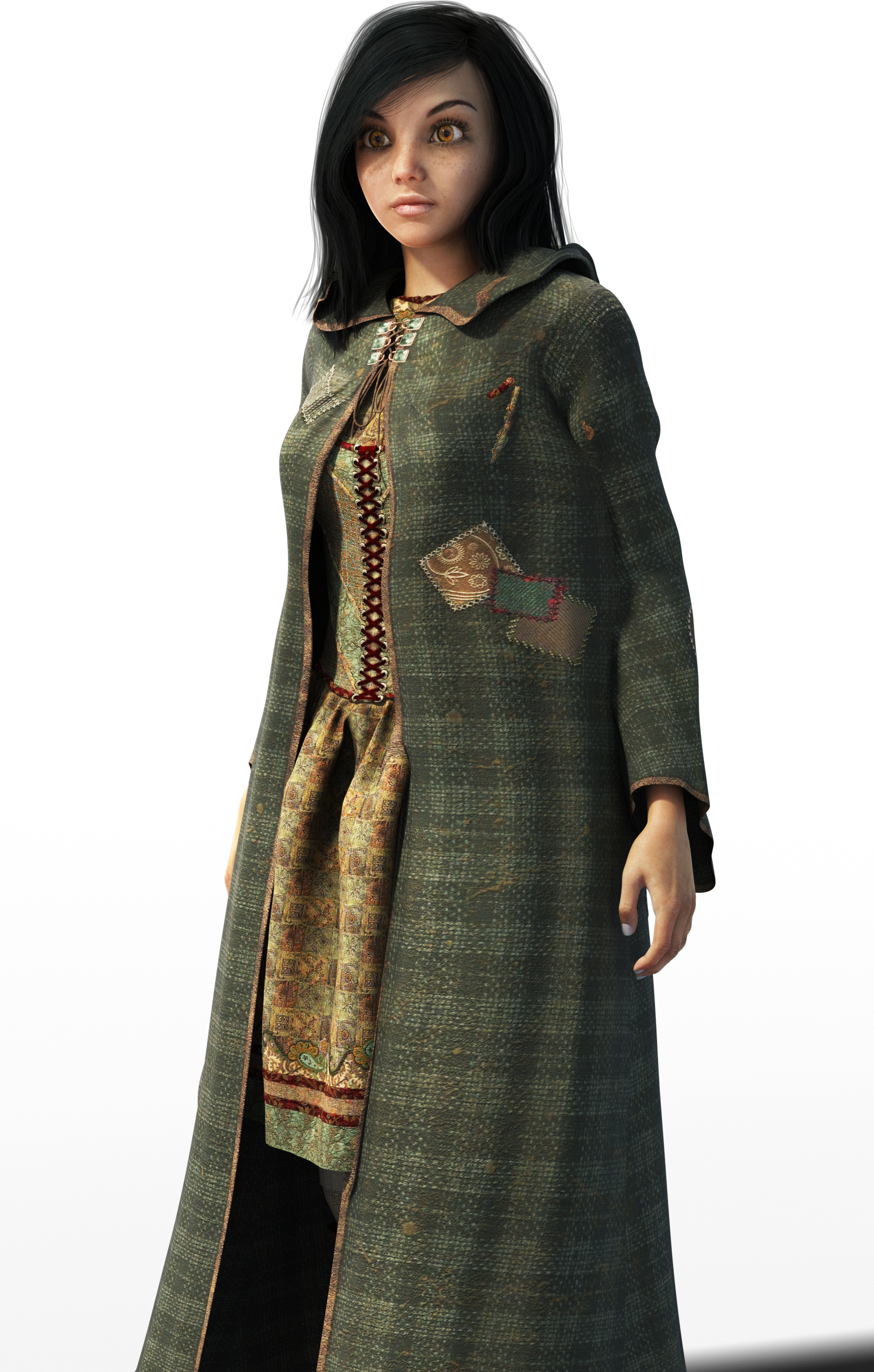
Filtered, before any kind of painting.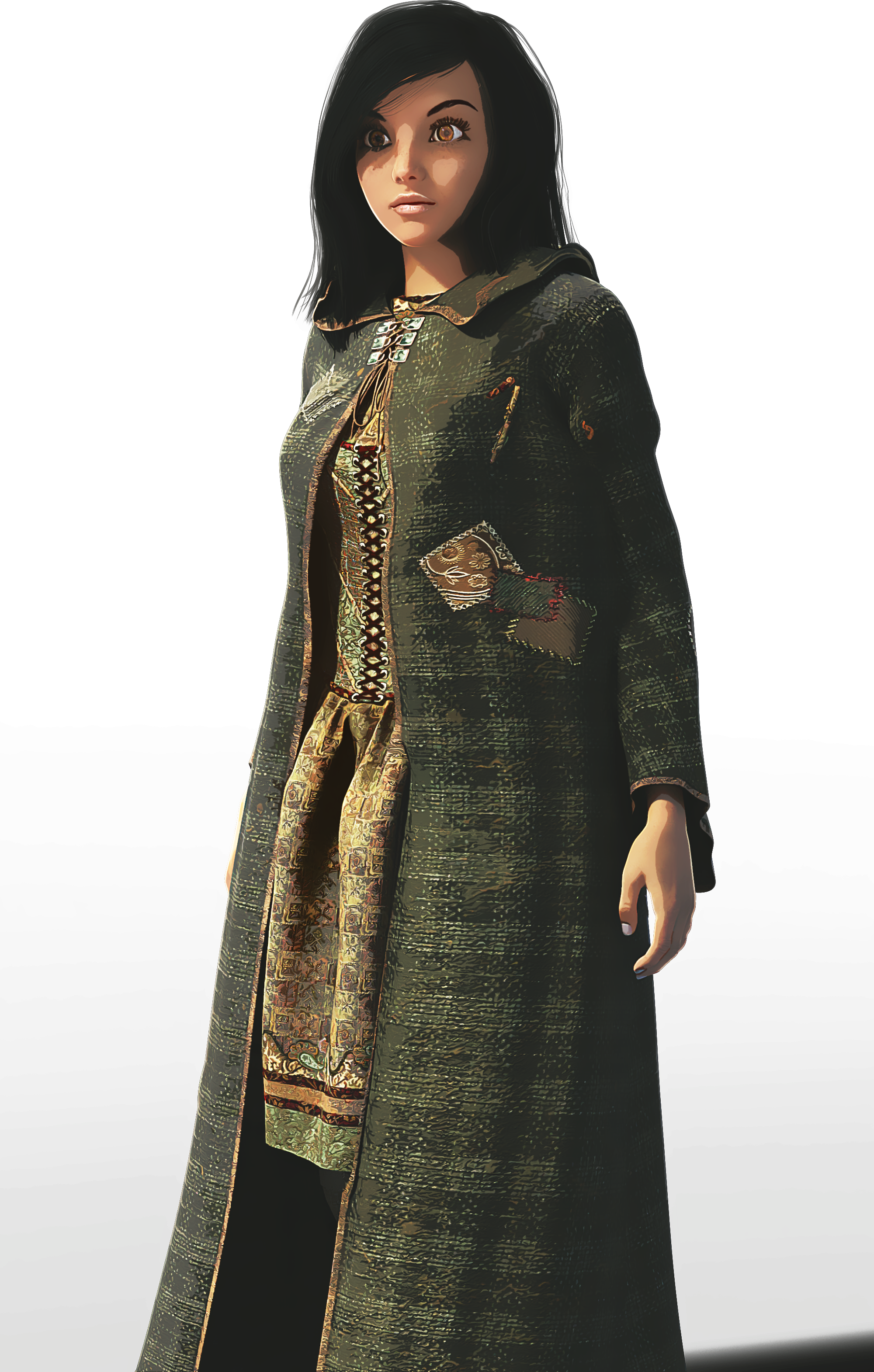
Meanwhile, this is my attempt at rendering something with lines. It's a pwToon preset and it has GREAT lines, but it isn't transparent.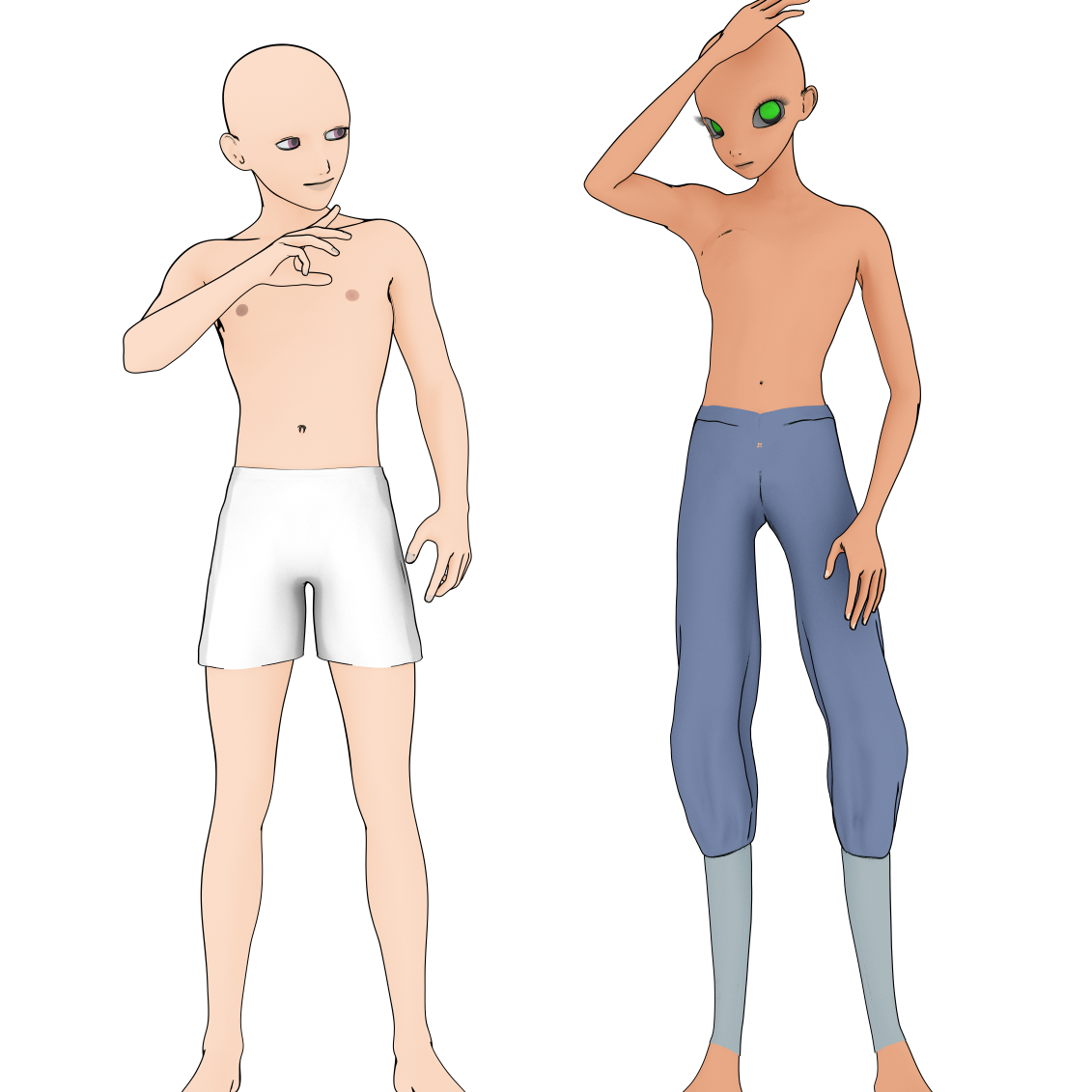
New motherboard or new video card? I can't decide....AMD 8 core with 32 gig of RAM and Windows 7 should be working fine for you. I think Poser Firefly is multithreaded, but I don't know about the program as it has many older parts that may be singlethreaded. I don't know how much they rewrote. That may explain the slow speed. I rarely use it anymore and haven't upgraded in over a year. It's always been slow for me. DAZ has more multithreading, but I don't know if dynamics is multithreaded. The render engines are, but that's all I know for sure.
Reducing texture size is the best thing you can do right now for increasing speed some. I like 3Delight, but I've been using it less and less and Iray more and more.
Is PWToon single threaded? If that's the case, you will have to look for a faster processor, not really more cores. If you are looking at 3Delight, more CPU cores will help. Iray can use a faster GPU with more memory.3Delight: Black and White rendersI think one of the AoA cameras let you render b&w.
And if you use PWToon, pretty sure there are easy presets for that
New motherboard or new video card? I can't decide....LOL. I thought that too but the RAM is maxed out and has been. The computer tends to be well maintenanced. It just doesn't have the power, though. For example. I load Poser Pro 2014. I'm good sort of... and then I try the fitting room. Aaaaand... then it's so slow I hit "go" and hope things work because I can't tweak things.
DAZ runs okay, being more friendly to lower systems, but lately I've been playing with dynamic props and making my own.
Rendering 1 second of pwtoon video will take hours.
You know. Little things like that. At the time when I first went to this machien that was a vast improvement. It's not anymore. Time to step up another rung on the ladder.
I'm looking at the following:
i-7 6850 6-core, 40 lanes
I'll keep the video cards for now but will buy one when i get the savings up again
ASUS X99-E motherboard. Wow that got big. How do I make the text not big like that.... (yay! fixed)
I dont know if I need a biggetr power supply. Have to open up the computer to see. But just those things are barely within my budget so far.
New motherboard or new video card? I can't decide....I can't decide which I should get. A new motherboard. or a new video card. Because I don't know which will help my case best.
I'm running two GTX950s on an AMD eight core processor with win7 64 bit. If you want anything more technical than that I'll have to wake the other half... LOL
I want to get the Nividia Titan.
But. I also use PWtoon for rendering animations, and 3Delight is a CPU render engine.
So. I dunno which way I should go.
Advice?
Anime/Manga CharatcersThanks for that list - there are some older A3-related products here at DAZ like:
chibibel - http://www.daz3d.com/chibibel-school-set (both the character and clothes set)
BelBel - http://www.daz3d.com/belbel (an anime head for A3)
XinXin - http://www.daz3d.com/xinxin-for-aiko-3 (anime morph for aiko3)
And offsite, there's the maya-doll character - a standalone classic with some male morphs, and the free kururu character with some outfits. (google them?)
A local forum participant 'ghastly' has built and distributed the lolo hai character and a bunch of add-ons/clothes/morphs, etc. over at sharecg and some freebies at rendo.
There are some good cel shaders for DS at sharecg as well if you search for AcartoonDZ (Narucoman) and some pwToon shader presets by Crescent.
others?
--ms
Anime/Manga CharatcersI don't know if this is allowed, given that it's Renderosity, but...
https://www.renderosity.com/mod/bcs/anime-doll-for-genesis-2-female/112582/
Why hsan't this lovely lady been mentioned yet? She seems PERFECT for the anime fan wanting to use Genesis!!She's perfect! So adorable yet fierce at the same time. I NEED her!
I'm also an anime otaku/nerd/fan/etc. I like to make Anime style renders, complete with outlines and unrealistic colors and shading for a 2D anime look. Sometimes older products give a stronger anime appearance than newer ones. Realism doesn't always mix well with anime renders, although it can!
Some great products by Daz PAs that I use include:
- Star 2.0 for Genesis 3 Female (She uses Genesis 3 body, so you can just dial her in a more normal looking anime/human body. The face is pretty good tho)
- LineRender9000 (Gives great outlines in any color if you're looking to give a 2D look to your renders)
- Camera Magic: Toonycam Pro (Cheaper than LineRender, but not nearly as many features)
- pwToon (A shader resource for creating a 2D appearance)
- Visual Style Shaders (Another shader resource, for 2D-ish anime skin and hair)
- Subsurface Toon Shaders (For Genesis 1, sometimes useful for 3D anime skin and hair)
Worthy of mentioning, the AnimeDoll at Renderosity also has Genesis 3 compatible add-ons.
Another non-Daz product worth mentioning is the Universal Anime Head by ken1171, who I really wish would become a Daz PA.
 Daz Studio 4.9.3 Pro, General Release!
Well here's hoping it's a better version. Iray is nice and all but I use DAZ for Optitex and pwtoon renders. :-)
Can anyone give me some starter settings for iray animation?Oh, I was referring to getting frames good enough for animation but not as high quality as for print work...sorry if i was unclear! Thank you though!
Wow, for animating in iRay? 1st suggestion is what I already told you but instead just use 1280x720p and expect to spend months rendering short clips.
Depending on your scene you may need to do composite renderings (render dome off in iRay settings).
To make it even faster choose smaller resolutions like: 320x200 or 640x480.
And even faster limit light bounces to 1 and buy the pwToon or other toon rendering products from the DAZ Store.
Sometime in 2017 Unity 3D is supposed to have Octane Rendering available as part of Unity Free so when that happens you'll probably want to teach yourself to animate in Unity 3D.
Finally you could animate and render in Blender but that requires much more learning then rendering in DAZ Studio although you'll ultimately be able to render and animate better scenes in Blender than you can with the current version of DAZ Studio and it's animation add-on plugin products.
3D Render to 2D RenderI highly recommend both PWToon and LineRender9000 for creating 2d 'look' of renders.
My results with LineRender9000:
http://willbear.deviantart.com/art/Abandoned-City-illo-647768912
http://willbear.deviantart.com/art/WC-Drawn-647308933
http://willbear.deviantart.com/art/Robo-and-Worker-640493342
And PWToon, one of my favorite renders:
http://willbear.deviantart.com/art/Hollowfaust-Necromancer-583279378
Also:
http://willbear.deviantart.com/art/KappaToon-635854571
Generally I've used LineRender9000 or PWToon and basic Photoshop filters (particularly smudge stick or graphic pen) to create interesting (IMO) 2d-like stuff.
3D Render to 2D RenderThere are different shader and camera sets that can do it as well as post-render methods.
Inside DAZ Studio (apologies if I left out any products):
- http://www.daz3d.com/linerender9000
- http://www.daz3d.com/camera-magic-toonycam-pro
- http://www.daz3d.com/visual-style-shaders
- http://www.daz3d.com/manga-style-shaders
- http://www.daz3d.com/skunkville-noir
- http://www.daz3d.com/pwtoon
- http://www.sharecg.com/v/69733/favorite/21/DAZ-Studio/Crescents-pwToon-Cel-Shaders ;(for use with pwtoon)
- http://www.daz3d.com/forums/discussion/67547/merry-toonmas-freebie
Post Render Software:
- http://akvis.com/en/sketch/index.php (They have several plugins, but Sketch is my favorite.)
- http://www.topazlabs.com/ (Adjust and Clean are my favorites for 2D looks.)
- http://www.alienskin.com/snapart/
- http://www.mediachance.com/dap/
- https://filterforge.com/ (There are a lot of filters you can download once you buy the basic program.)
- http://fotosketcher.com/ (Free.)
- http://www.autofx.com/photo-effects-software/automagic-photo-effects-gen2.html
- http://www.painterartist.com/en/product/painter/ (You can have it automatically paint over the image using different media.)
- http://www.painterartist.com/en/product/painter-essentials/ ^^
There are also a lot of Photoshop and Gimp actions and tutorials on how to make your photos/renders look sketched/painted; some are free and some are for sale on different sites.
Hope this helps,
Cres
Non-photorealistic Renders (NPR)Will: that sounds interesting! I've been working through the same tools (toonycam, pwtoon, VisualStyle, Manga-Style, EustaceScrub's stuff, etc.) to various effect (some good some not-so-good) in my quest for the so-called cel-shaded silver-bullet...
Any quick samples of the different looks from your experiments? (are your above attachments using that effect?) I'm looking for crisp outlines and less shadow/fill effects.
cheers,
--ms
A special tattoo...You could also buy one of the Tiger / Lion / Jaguar cats from the DAZ Store and render it using the pwToon or LineRender9000 shaders.
There is another advantage to doing that...you can place the cat, scale, position and pose it in place where you want the tatoo to be. Then set the figure you want it to be for, invisible before rendering.
Daz 3D is part of

Connect
DAZ Productions, Inc.
7533 S Center View Ct #4664
West Jordan, UT 84084Licensing Agreement | Terms of Service | Privacy Policy | EULA
© 2026 Daz Productions Inc. All Rights Reserved.