-
Michael 4 Base
Assuming you are using the default paths:
Go to C:/Users/Public/Docuemnts/My Daz 3D Library/Runtime/Libraries/!DAZ and double click the DzCreateExPFiles-m4.bat file (Mac users use the equvalent of the Public Documents folder, and double-click the DzCraeteExPFiles-m4.command file).
In Daz Studio use the Content Library pane and go to Poser Formats>My Daz 3D Library>Figures>Daz People to find the figure file.
In Poser, make sure that you have the C:/Users/Public/Documents/My Daz 3d Library folder selected as an external Runtime and you should then be able to find the Michael 4 figure.
------
Once you hae the figure loaded, go to the Pose library instead of the Figure library and in the Daz' Michael 4 folder you will find subfolders for adding the morphs (Morph Inj), materials (the All natural NG will replace the painted on trunks with smooth skin) and actual poses.
Michael 4 BaseI'm really very confused and angry. Yesterday I bought the Michael 4 basic package for $ 29.95. I use Poser 11 pro and Daz3D 4.10.
For Daz I installed correctly with the manager of daz but in the software I can not find Michael 4 people figures. Why this thing?
For Poser, a method to install is missing in the 4 zip file.
All of this is really bad and represents a bad service from Daz!3D Art Freebie Challenge-February 2019-"Strange Love" -Main Thread OnlyAre following products no-counts?
https://www.daz3d.com/200-plus-head-and-face-morphs-for-genesis-8-female-s
https://www.daz3d.com/fit-control-for-genesis-8-female-s
https://www.daz3d.com/sy-victoria-4-and-michael-4-clones-for-genesis-8Adding specific character body morphs to clothingOkay guys I'm not exactly a newbie to all of this however I have always had difficulty in getting clothing to fit exactly with characters that either I create or combined several different morphs to create or purchase from an existing vendor. is there an existing utility that will allow me to take a full body morph from a character that either I have created or a vendor has created and allow me to inject that into an existing article of clothing? Primarily I work with Victoria 4 and Michael 4. I have all of the base morphs plus the plus plus package and other bars that either I have created or have purchased from vendors to help change figure shapes looking for an easy way to add these combinations to clothing that won't leave me spinning dials for hours on end only to end up frustrated because they just don't workReport sales errors here. Missed it? No worries. "There's Always Another Sale™"What bothers me most about Tasha is the same marketing strategy I keep complaining about which started sometime between the G3 & G8 debuts. For the longest time, Daz would offer the base model/s that you could buy solo or in starter and pro bundle offers, plus a handful of other characters that also had starter and pro bundle options. All the other named morph/texture characters of that generation were sold alone, but for less than a base model. There would be a few that were also available bundled with a hair and an outfit. Now the vast majority are put out like new models with prices to match -- $30+ for base, $60+ starter, $90+ - $100+ pro. Whether it's something really different like Centaurs, Floyd and Edie, or just-another-supermodel.
Plus I just don't do glamour vampires.
Victoria 4 and Michael 4 were free, with add-on name characters as we have now., and the Genesis series has followed the same pattern. Before that the Name characters were new figures rather than add-ons anyway. I'm not, therefore, sure what you are thinking of here.
military clothesI can not find new clothing as a soldier, army general ... maybe it's me who can not find anything except for Michael 4
Is there a fix for Michael 4 base figure?Again, I need the M4 base figure and again I can't remember where it is.
I own it.
Found it a while back with someones help.
Can not find it again.
He refuses to show up in smart content or content library
He needs to be updated so that he shows up in smart content.
Until then, anyone know where to pull him up?
Setting up Basic Materials for Genesis FiguresUV Coordinates for Genesis in Carrara
When we bring in the Base Genesis model from the library, it comes in without textures. If we instead load in one of the versions found in the Characters section, they come in with their basic color maps in place, and they load with the UV Mapped Coordinates for that specific shape. This can be important to know if we wish to use a specific set of maps - no matter the shape we want to end up using.
Basic Female comes in with UVs that match Victoria 4 texture maps. Basic Male is the same for Michael 4 maps and Basic Child for Kids 4 maps.
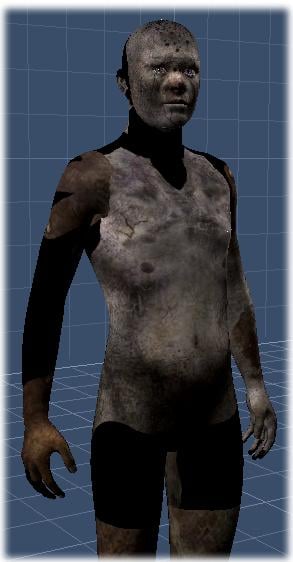 Other characters we collect will often have custom UVs which make for more uniform texture mapping of the figure after its shape has changed to that, particular shape - a really nice design feature Daz3d has built into their Genesis system.
Knowing this, let’s consider that we want to use (for example) the Troll maps on a shape of a small girl child.
To do this easily, we’d start by loading in the Troll character preset so that the maps line up. Remember, we want to use Troll’s maps. Those maps were made to fit the custom UVs of the Troll shape.
So we begin with the Troll character preset and then change the shape to anything we want. In this case, remove the Troll morph, and add some Female and Child morphs to our liking.
In this same idea, we can use Michael 5 maps on a Troll or Gorilla or on Victoria or whatever shape we want. We just want to begin with the base character that corresponds to the maps we want to use - and then change the shape to whatever we want.
It’s important to do this or we’ll end up seeing map irregularities on the figure, like the outside of the map, etc.,
The figure here shows the Troll maps loaded onto the basic Genesis. Notice how the maps don’t line up with the figure. This is what I’m talking about here. If we want top use the Troll maps, begin by loading the Troll character preset. This will give us the proper UV Mapping for those textures. Now we can change the shape to anything we want, and the mapping will follow.
Daz Studio has a built-in function which allows users to swap UV Mapping directly while working but Carrara does not. So the simple work-around is to just load in the preset character according to which maps we will use.
sale errors5 old items (from the Victoria 4/Michael 4 category) plus two older new releases works for me. I don't, however, get two of the five free if I remove one of the new items - I think the free items have to be exactly the right number to match the number of freebies allowed.
sale errorsI don't see any items in there from yesterday or today.
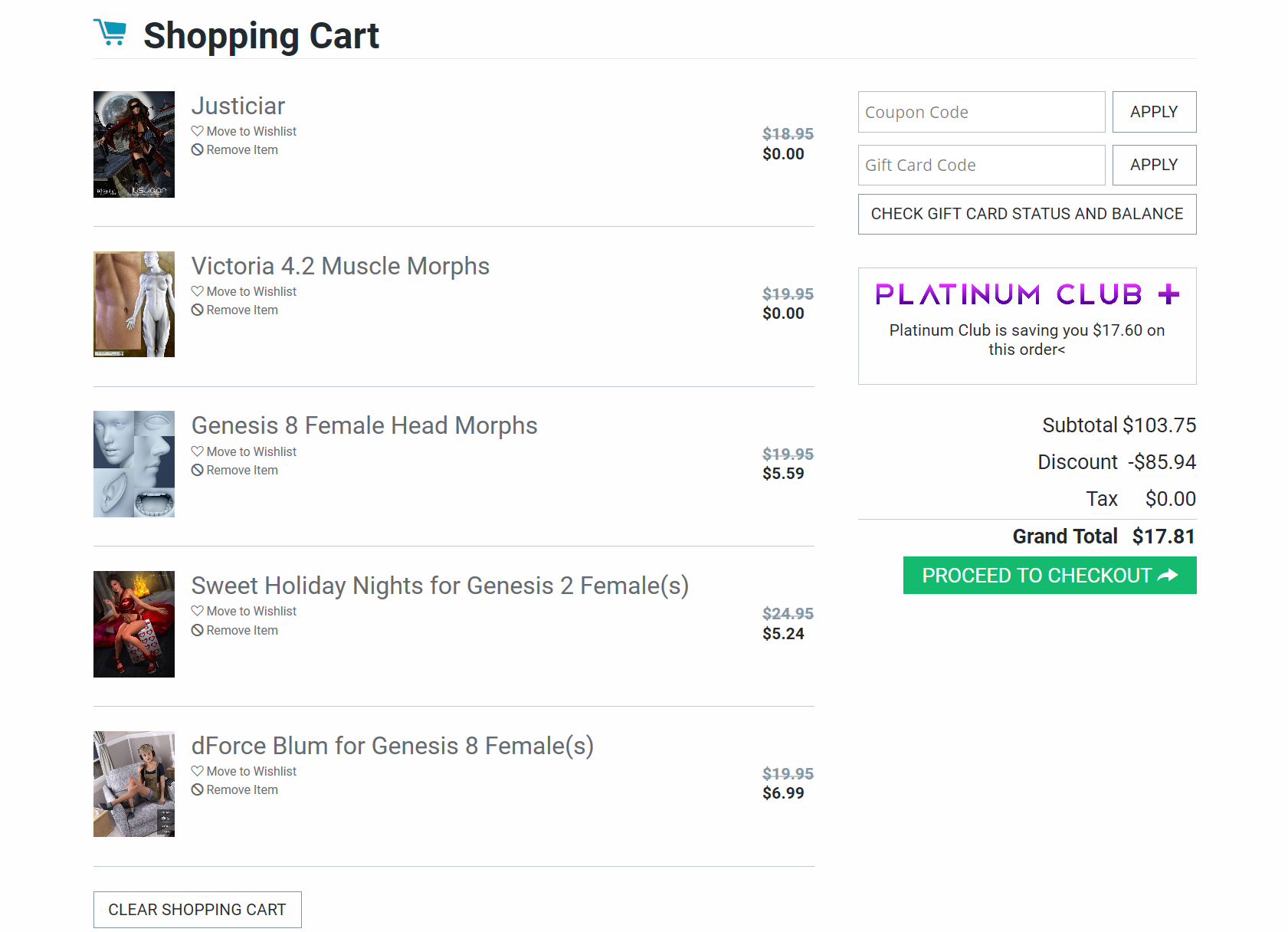
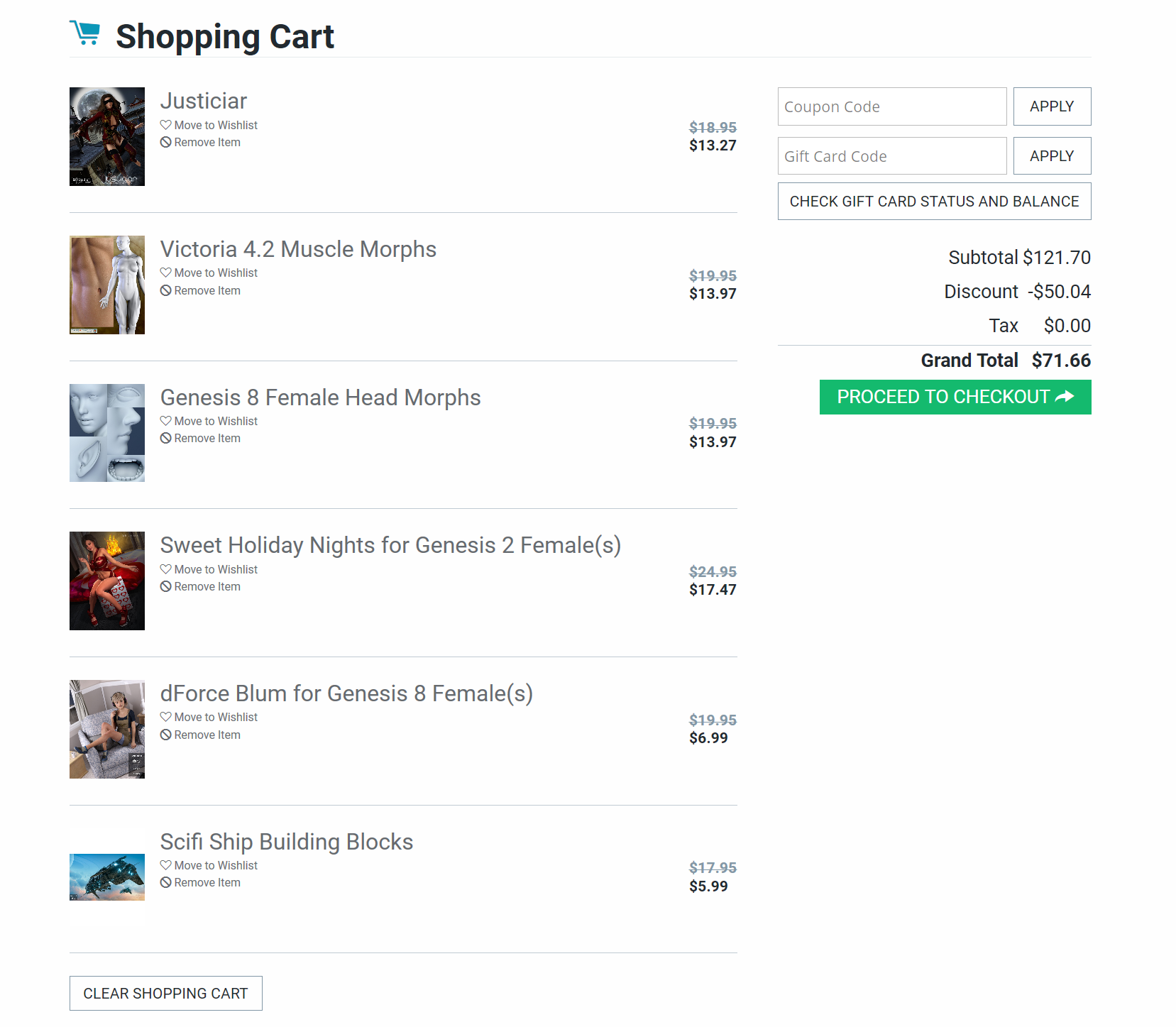
"Buy a New Release to unlock extra savings on Michael 4 & Victoria 4, Genesis, Genesis 3 and Genesis 8 Items below" it has to be New Release not today's release. (*Items must be in cart simultaneously for discount to apply, qualifying purchase must be over $5.)
All of the bonuses work good with just one new release but if someone puts two new release there the bonuses disappear.
The difference between these two Shopping Cart is that in the first one there is only one new release in the second one there are two new release and no bonuses. Why it's a problem because buying two new releases should get you a slightly higher bonus according to the sale. (and +3 Select Michael 4 or Victoria 4 Items for FREE)
 Sorry, you have been blocked
When trying to download the templates for Legacy UVs for Genesis 8: Michael 4, I get a "Sorry, you have been blocked" message.
the freakHi, guys - I have the michael 4 base and also the freak 4. Can't seem to figure out how to get the freak the work, however. I've tried loading him by himself. Tried loading Michael 4 and seeing if he comes up as a morph or material - nothing there. Just interested in any suggestions/help you can give.
Characters and MorphsYou can further adjust a characters look after applying a morph.
(Note that you are quite limited in how much you can change any character unless you've purchased additional products. For M4 that would be M4 Morph ++)
Hair can always be changed and is unrelated to morphs. In fact if you purchase a character, it will come without hair, unless it specifically says that the hair is included.
Characters and MorphsMichael 4 is quite a few generations ago, not familiar with it. But with genesis 3 and 8 you can apply morphs on any character. Say you have the body morph pack, you can go for an athletic look, thin or more chubby by applying those morphs. Or in the face you can change the eyes or nose or mouth. The morph packs can be invaluable for this.
Hair can always be changed. Its basically an object parented (glued) to the head. So you can delete the hair and apply another. The easiest is if you products from the same generation, as it was specifically made for it, but some conversion is possible and not particularly difficult if you worked a while with Studio. The bigger generation gap the harder it gets, and from older to newer is usually easier.
Characters and MorphsIf I apply a morph to a character (Michael 4, for instance), can I change the way the character looks, or is the character set permanently? Can I change the hair?
For DzAsset.addCompatibilities: How do I get a complete list of bases?For DzAsset.addCompatibilities ( Array bases, Boolean create=false ):
How do I get a complete list of bases that I can add to an asset?
I'm looking for something that will return these in a list.
.......
Generation4
Generation4/Michael 4
Generation4/Michael 4#David
Generation4/Michael 4#Hiro
Generation4/Michael 4#The Freak
Generation4/The Kids 4
Generation4/Victoria 4
Generation4/Victoria 4#Aiko
Generation4/Victoria 4#Stephanie
Generation4/Victoria 4#The Girl
......Thanks
What features would you like to see appear in dazstudio 5?How about the ability to move morphs and textures from any generation beginning at Michael 4 to whatever the current version of Genesis when version 5 comes out.Victoria 4 Internal Organs product questionif you are just using the organs by themselves you don't need to fit them to anything
I don't think they untangle though
I haven't tried Dforce on them
that said I made a video once where Michael 4 spilt his guts, youtube didn't censor that, they only do nudity
*closed* RRRR - What can go wrong when moving - Render ContestErrrr... what's a chain item ?
In the meantime, here's my pull #4:
#1 - 31 - Ace of Spades Jack ...an M4 outfit, good start!
#2 - 1526 - This n That Extravaganza 1 ...DAZ Store can't find it -a bundle from the PC anniversary sale - way back in the old days (Dark Designs - Volume 2, GIS Nova, GIS Terminal, Lisa's Botanicals - Climbing Vines, Resplendent Tresses, Stellar)
#3 - 990 - Millennium Girls ...DAZ Store can't find it - probably too old. PreTeen/PreSchool characters (V1/2 texture-compatible).Got it!
#4 - 1241 - Ruffle Bikini Textures ...don't have the bikini
#4b - 337 - Dark Ops Ready-to-Render Bundle ...DAZ Store can't find it. One of the DS 4 freebie bundles - contains: Dark Ops Ready to Render Scene(.DUF); Victoria 4.2 Base; Victoria 4 gw 5 female texture; De Roca Hair; Tango Down V4; Michael 4 Base; Michael 4 Skin Maps (High Res); Michael 4 Creature Creator Morphs; AFC for Men; Loading Dock)
455 - DSON Importer for Poser BETA (Inactive) ...don't use DSON
LB1 - 943 - Mermaid ...DAZ Store can't find it - probably too old. It's the old V1/2 era stand-alone mermaid.Got it!Edit: and of course a couple of 'chain items'...
Oh lordy, this one's sooo obvious now !
What is "dynamic clothing" ?Hey there!
I tried to use a few items from this website: http://www.optitex-dynamiccloth.com/FreebieDownload01.php
I can't seem to auto-fit any of them to my G8 characters. I own SY's clones and have auto-fitted generation 4 clothes successfully before.
I get the impression that "dynamic clothing" is perhaps something different. Can those items be used with G8, and if so how?
Thanks!
Daz 3D is part of

Connect
DAZ Productions, Inc.
7533 S Center View Ct #4664
West Jordan, UT 84084Licensing Agreement | Terms of Service | Privacy Policy | EULA
© 2026 Daz Productions Inc. All Rights Reserved.