-
How to disable deformation when using "Fit to"?
I made custom eyes for G8F. They work ok with basic female figure, but when I fit them to Victoria 8 or Hyuna they are deformed: they are not round anymore. How to avoid this?
I didn't find anything in parameters. I only want the eyes move and scale but keep the same shape.
Meet Mom and Dad - we've come a long way, babyI started with Poser 3.I don't remember how I got it. I never even rendered anything, I just played with creating a ton of fashion poses on stylized Poser characters that I made super skinny in extreme poses. It was really sort of like playing with dolls. Then eventually I got Poser 7, found Daz somehow which was just a content store at the time and was hooked!
yes ..the entire thrust of DAZ changed once DAZ Studio came into being. It was "the" place to go for quality content, for Poser, especially with the success of Victoria.
Hair that is not mentioned in the Promotional section helpCan someone tell me where I can get the Ciri hair from? She's from the Witcher, and I noticed someone using her hair in the promo of this image here. But I can't find it nowhere on DAZ.
https://www.daz3d.com/gwennili-hd-for-victoria-7
They apparently listed everything else in the promo except that white hair style.
Stephanie 4 S4 in Poser 9 installation/usageYes. If I open Poser, click on the figures (person-shaped) button, then go to My Library>DAZ People, I have Stephanie 4, V4.2 to V3, and Victoria 4 all in that folder.
Wanderer's OasisGlad you got Ultraman fixed. And hey, I like your posing Ultramen image. I had something similar happen to a figure from the Daz store. It turns out there were two versions, one for Daz Studio and one or Poser. The Daz version worked fine, but some body parts of the version rigged for Poser were not appearing at all. Very strange because the Poser rigged should have worked - it was fom an early enough version.. Victoria 4 an Michael 4 have the same type of rigging. In any case, looking forward to seeing Ultraman defeat some monsters.
Regarding Elvenesque.I'm comparing Bow and Arrow poses & props for Gen 8. I see Elvenesque,but I don't see whether the props are included or they're from some other set.
Appreciate any info regading the above item. Thanks in advance.
V4/M4 bodysuits for Genesis 8If they are just V4/M4 second skin textures, then use one of the Cayman Studios products like this one
https://www.daz3d.com/legacy-uvs-for-genesis-8-victoria-4
It works if I used V4 with G8F and M4 with G8M.
In fact, just I need V4 UV map for G8 Male. In that case, maybe I should convert from V4 to G3F as if it was a skin and use UV Swap.
Problems with Victoria 4 for Genesis 2 FemaleTried with GIS Biosuit and Genesis 2 Female figure, I have no issue, the Victoria 4 UV is set.
Problems with Victoria 4 for Genesis 2 FemaleI don't know if this is a new thing or not, couldn't find any help in a search, not even a google search.
I can not get any V4 textures on Genesis 2 no matter what I do. Either nothing happens or G2 turns grey and then nothing will work on her. I recently upgraded to 4.10, was using 4.8 previously, and have no idea what is going on. It worked in 4.8.
Does anyone know if this item is working in 4.10 or not or could it be something else. Oh and I also redownloaded it on the off chance I had a corrupted file.
No No - my character are too uglyDid you start from a character morph or did you start with Genesis 8 base female? I started with G8F and added the heads and the texture that I wanted (in this case, Charlotte's). I suppose if you started with, say, a character morph (like loading on of the characters right from the library folders) then you might get some weird stuff if there are scaling issues.
Laurie
I think he's probably dialing them in too high. You have quite a few morphs dialed in but none above 50%. He said "they all have dials 0-100%" - I think that it might be the high percentages (the ones at or near 100%) that could be causing the issue.
Thing is I went and dialed a few above 50% and they still aren't distorted. I think maybe there's some scaling weirdness going on. Load the base G8 Female and add the heads from the shaping tab. Don't start with a character from the library and see if that makes a difference.
I don't know, it looks pretty easy to get distortions when dialing in multiple characters at 100%. Here's Charlotte, Olympia, and Victoria dialed at 100%.

Here's Alexandra, Charlotte, Monique, and Olympia:
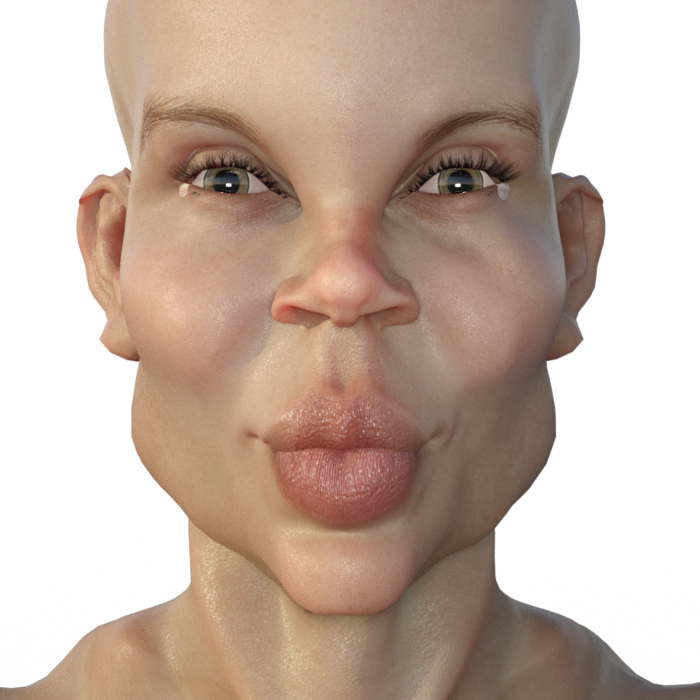
lol Pretty scary. These freaked me out a bit while rendering them. haha
I see a successful Halloween line starting to take shape - The Kissing Troll Family! The first in our family to be revealed... VicTROLLia 8... answer her riddles 3 or kissing you she will be!

ROFL!!! That had me literally laughing out loud!
V4 Elite Body Shapes, where to installIt should be installed to the same content directory as Victoria 4 Base. If you are installing manually, and not using the PowerLoader script in DS, you will then need to go to the Runtime/Libraries/!DAZ folder in the content directory used and run the DzCreateExPFiles-v4 script for your operating system.
No No - my character are too uglyDid you start from a character morph or did you start with Genesis 8 base female? I started with G8F and added the heads and the texture that I wanted (in this case, Charlotte's). I suppose if you started with, say, a character morph (like loading on of the characters right from the library folders) then you might get some weird stuff if there are scaling issues.
Laurie
I think he's probably dialing them in too high. You have quite a few morphs dialed in but none above 50%. He said "they all have dials 0-100%" - I think that it might be the high percentages (the ones at or near 100%) that could be causing the issue.
Thing is I went and dialed a few above 50% and they still aren't distorted. I think maybe there's some scaling weirdness going on. Load the base G8 Female and add the heads from the shaping tab. Don't start with a character from the library and see if that makes a difference.
I don't know, it looks pretty easy to get distortions when dialing in multiple characters at 100%. Here's Charlotte, Olympia, and Victoria dialed at 100%.
Here's Alexandra, Charlotte, Monique, and Olympia:
lol Pretty scary. These freaked me out a bit while rendering them. haha
I see a successful Halloween line starting to take shape - The Kissing Troll Family! The first in our family to be revealed... VicTROLLia 8... answer her riddles 3 or kissing you she will be!
V4/M4 bodysuits for Genesis 8I want to keep my Genesis 8 textures. V4/M4 must stay a "wearable".
For example this bodysuit, my G8 figure is wearing Victoria 4 (Cutout Opacity= 0% for hands, forearms, head, face, ears, mouth, lips, eyes, fingernails, toenails, feet)
 How Many Pages in Your Product Library?
The oldest thing in my account history under my current screen name is Victoria clothing pack 1 for Victoria 1 which I bought on July 6, 2000. I'm going to assume that's since the place has been called Daz3d, but I don't remember really. I would have bought Victoria 1 herself which is not in my account history and was for sure sold while this place was still called Zygote. There are many things that aren't in my account list at all because I had a different screen name then ;).
Laurie
V4/M4 bodysuits for Genesis 8If they are just V4/M4 second skin textures, then use one of the Cayman Studios products like this one
https://www.daz3d.com/legacy-uvs-for-genesis-8-victoria-4
How Many Pages in Your Product Library?Entered the Poser/DAZ community somewhere around 2002.
52 pages here, including the stuff from RDNA that merged into DAZ3D.
Some DAZ items that I aquired through 3D magazine cover disks, like Mike & Vicky 5.
101 items at Rosity, so I just opened my third page there.
Pretty much everything Poser World did that was included on their DVD-collections, when they were still a subscription site.
Various stuff in small amounts from other stores like 3DCommune, PoserPros, Art Collaborations, Baumgarten, 3DMost, RDNA, PhilC, 9MBI, Content Paradise, Mankahoo, HiveWire, PoserDirect, Studio Maya, Xurge, CGBytes, Pret-a-3D.
Some non-DAZ stuff I got from cover disks, like the Dina V.-charakter.
I'm at a tight budget, so I usually restrict myself on sales, and never invested much in the Genesis generations, or in iRay, as a predominant Poser-user without a fancy graphics card. (I'm currently mostly catching up on old Mike and Vicky 4 stuff)
First thing I ever got here at DAZ3D was Victoria 1.0 Reduced Resolution, that was the freebie of the week, May 17th, 2002. (Still use her for background charakters.) Joined the Platinum Club at the beginning of 2004, which is when I started being a paying customer here.
And there's of course all the freebies I downloaded since 2002, including from websites that have long time disappeared .
No No - my character are too uglyLoad your G8 basic figure and without changing anything, look in either the shaping tab or parameters. Everything should be 0. If not, there's your problem.
Back in the G2M days, everytime I loaded a base G2 male figure, the Gianni dial was always at 100%, however Gianni's shape didn't load. Gianni had managed to infiltrate the base figure. I ended up uninstalling both. When I reinstalled everything worked properly again.
That's what I do. I start with base Genesis character and dial in from the shaping or parameters tab. Rarely do I start with the named character like say Monique or Victoria
No No - my character are too uglyWhile you don't want the totals to exceed 100%, there is some leeway on that. Many non-Iconic characters (those that don't come with a generation name after them) automatically dial in Iconic characters to a certain degree (how much varies depending on the character) - but you can dial those out and dial in a different one when looking at the separate head and body morphs. This does result in a different looking character, though how much will vary of course. I've dialed out Mei Lin, for example, and replaced her with Aiko (or vice versa). So you can, for example, have Camile at 35%, Frankie at 25%, and Karen 7 at 65% (having dialed out both Bethany 7 and Victoria 7) Just between the iconic characters, I try to not exceed 100%
Also depending on how subtly you've used the other characters, you can go a little over 100% with those, but I don't reccomend going over about 115%
I would have to verify at home but i think i just made some morphs to the ayana character but exceeding well over 100% That being said i used both body morphs and face morphs with the face a total of around 125% i think. I did went subtle with the non ayana morphs (i think 3) and kept ayyana around 75% (This is from memory as im not home at the moment)
I do however understand what you are saying and when i did crank up som dials just to see whats hapening Beauty quickly turned into freak of nature :) .
No No - my character are too uglyDid you start from a character morph or did you start with Genesis 8 base female? I started with G8F and added the heads and the texture that I wanted (in this case, Charlotte's). I suppose if you started with, say, a character morph (like loading on of the characters right from the library folders) then you might get some weird stuff if there are scaling issues.
Laurie
I think he's probably dialing them in too high. You have quite a few morphs dialed in but none above 50%. He said "they all have dials 0-100%" - I think that it might be the high percentages (the ones at or near 100%) that could be causing the issue.
Thing is I went and dialed a few above 50% and they still aren't distorted. I think maybe there's some scaling weirdness going on. Load the base G8 Female and add the heads from the shaping tab. Don't start with a character from the library and see if that makes a difference.
I don't know, it looks pretty easy to get distortions when dialing in multiple characters at 100%. Here's Charlotte, Olympia, and Victoria dialed at 100%.
Here's Alexandra, Charlotte, Monique, and Olympia:
lol Pretty scary. These freaked me out a bit while rendering them. haha
No No - my character are too uglyWhile you don't want the totals to exceed 100%, there is some leeway on that. Many non-Iconic characters (those that don't come with a generation name after them) automatically dial in Iconic characters to a certain degree (how much varies depending on the character) - but you can dial those out and dial in a different one when looking at the separate head and body morphs. This does result in a different looking character, though how much will vary of course. I've dialed out Mei Lin, for example, and replaced her with Aiko (or vice versa). So you can, for example, have Camile at 35%, Frankie at 25%, and Karen 7 at 65% (having dialed out both Bethany 7 and Victoria 7) Just between the iconic characters, I try to not exceed 100%
Also depending on how subtly you've used the other characters, you can go a little over 100% with those, but I don't reccomend going over about 115%
Daz 3D is part of

Connect
DAZ Productions, Inc.
7533 S Center View Ct #4664
West Jordan, UT 84084Licensing Agreement | Terms of Service | Privacy Policy | EULA
© 2026 Daz Productions Inc. All Rights Reserved.