-
[Released] RSSY Character And Material Conversion Bundle Genesis 8 to Genesis 9 [Commercial]
Gabriel-C said:
I'm having the problem of having too many morphs that make up my character. Twice I've tried to do the custom character converter and I've made bonzai trees...
From the manual:
The Converted Character’s Body is wrinkled. Because of the way that morphs must be converted, a morph that on Genesis 8 appears to only touch a small part of the head can affect the whole body on Genesis 9. You need to show Currently Used parameters to show all morphs on the converted character. Then, one by one, dial in the morphs to find the offending morph(s). Once you find them, delete the morphs from your HD (click the Gear icon, Parameter Settings, and look at File Path for the asset to figure out where the morph is and what it is called). You should also resave the character with the offending morph(s) dialed out (set to 0).
Alternatively, you could export the G8 morphs as one OBJ morph, get rid of all of the others, and pull that back in. Then only one morph, touching everything would be converted. That might work.
[Released] RSSY Character And Material Conversion Bundle Genesis 8 to Genesis 9 [Commercial]00qisq00 said:
So, luckily my own custom morphs have converted fine, it's just the eyes and mouth, as expected, are not aligned. I can align the eyes with the script and the mouth through parameters, I'm just not sure how to save those settings into the morph itself. I tried the ERC Freeze, save as morph asset, but I might be missing something, I haven't saved anything that way for awhile. Other than that, this is great!
The eyes are aligned as a morph on the eyes, not the figure.
[Released] RSSY Character And Material Conversion Bundle Genesis 8 to Genesis 9 [Commercial]00qisq00 said:
So, luckily my own custom morphs have converted fine, it's just the eyes and mouth, as expected, are not aligned. I can align the eyes with the script and the mouth through parameters, I'm just not sure how to save those settings into the morph itself. I tried the ERC Freeze, save as morph asset, but I might be missing something, I haven't saved anything that way for awhile. Other than that, this is great!
The eyes are aligned as a morph on the eyes, not the figure.
[Released] RSSY Character And Material Conversion Bundle Genesis 8 to Genesis 9 [Commercial]3DRT said:
I'm using the G8M converter on a custom character and it seems like it's applying the G8M clone to every converted morph which stacks on the G9 figure when I mix and match producing rather horrendous results. Dialing in just one is fine. Is there a way to prevent the G8M clone from being applied multiple times?
Applying the clone is part of the process to get the figures to match before transferring morphs, so every converted morph will have the G8M clone in it for males.
[Released] RSSY Character And Material Conversion Bundle Genesis 8 to Genesis 9 [Commercial]HoMart said:
Renamed the "modifiers" to FBM_... and FHM_.... in the character file and renamed the morph accordingly
This is what I get. There must be something else.
Giving up on that character
You are showing hidden properties to make sure you see all morphs? I would have to see log to see what morphs were converted.
Genesis 8 to Genesis 2Aaah okay, thanks for explaining. I guess it will be manual labor to transfer textures and morphs...
Also there is a preview picture on the product page of Millawa, showing how she would look with 60% Millawa and 70% Kayo.
Could you explain how to achieve that look?
Is it just sliding all the morphs that way or is there any more stuff involved?[Released] RSSY Character And Material Conversion Bundle Genesis 8 to Genesis 9 [Commercial]The conversion scripts works great, great job and thanks a lot for this wonderful product :) It also corrects the Height difference between G8 and G9.
However the script to fix the eyes doesn't work as intended, the Translate X/Y/Z sliders are only setting the same values for the eyes and it also rotates the eyes. To really translate the different eyes, you have to change the X/Y/Z translate of Eyes from the G9 character (scale works for both the eyes and the character):)
When I manually converted my characters from G8F to G9, I scaled/translated the eyes, exported them to OBJ, reset all translations/scalings of the eyes, created a morph from the Eyes OBJ with my Character (or Head) morph name. So the morph was applied directly when enabling the character :)
AIUTO...CHI CONOSCE L’ITALIANO? PARTE TREDICIKainjy said:
Il geograpth è tuo.. è fatto con la tua geometria, devi solo riuscire ad attaccare la testa al corpo del tuo genesis. Stessa cosa per la coda.
Inoltre puoi anche riggare a piacere la testa (mettento i rig per occhi e bocca).Se invece rendi la testa un prop (tipo un cappello) hai il problema dei morph: ogni volta che applichi un morph alla faccia del tuo Genesis, esso si proietta sulla testa se ha il Fit To... se lo imparenti semplicemente non hai questa cosa ma hai il problema dell'attacco del collo.
No, la DAZ persino i vertici uguali li ritiene suoi, in ogni caso si deve chiedere il permesso alla DAZ per redistribuire i GeoGraft .
@muscleman mi confermi questa cosa?
[Released] RSSY Character And Material Conversion Bundle Genesis 8 to Genesis 9 [Commercial]nomadraccoon said:
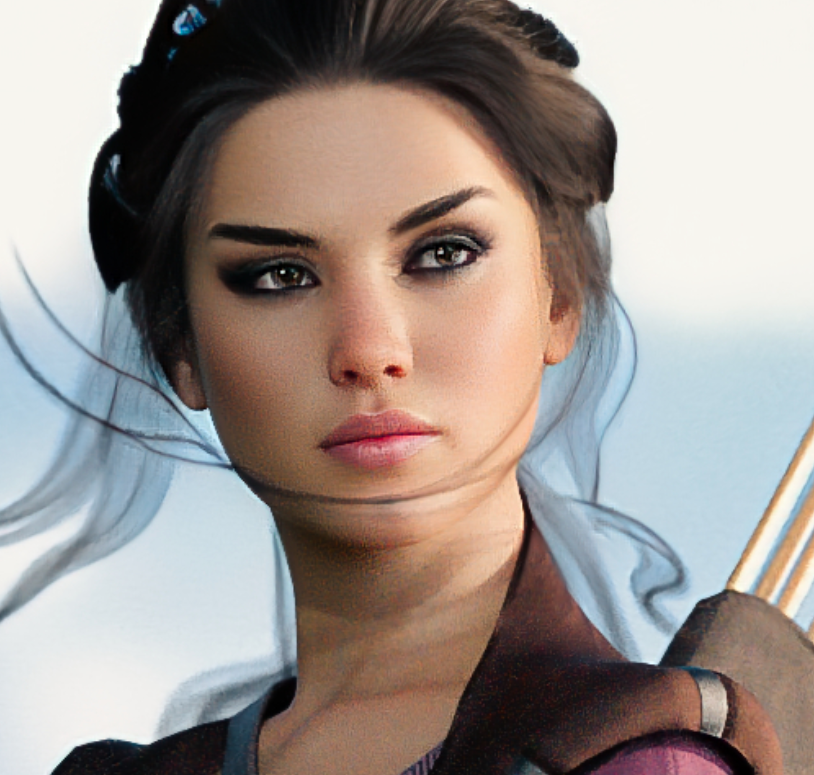
Aurore looks great in theory, but do all characters have these horrible SEAMS between head and chest?
And I imagine they have the same seams between middle of the head and back of the head? + shoulders etc.
Is this supposed to be a "good" conversion with this product?
All custom examples I've seen had either anatomic materials on their faces as the BODY surface is slapped on their face, either horrible seams in the places I've mentioned, or both of these problems. Some pictures here look good, but only on old daz originals with the lightweight looking texture design from G8, nothing from G8.1. Someone already mentioned they can't convert Bluejaunte stuff, this confirms what I have heard as well.
Please, do not mistake my bad lighting (shadows of light props fighting with each other on a quick setup) with a problem with the product that simply is not there. Cheers.
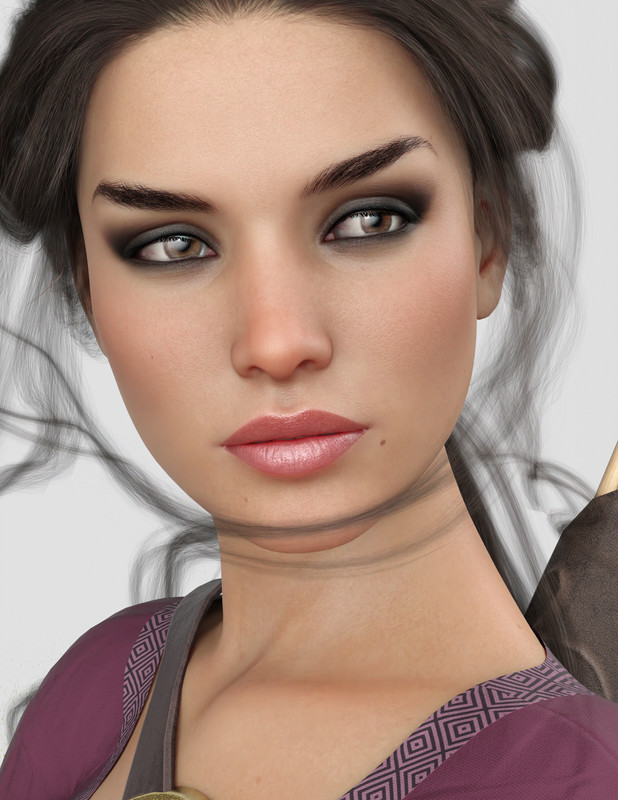
As for the back of the head and shoulders - even if not shown - (after removing G9 Tear getting on the way)
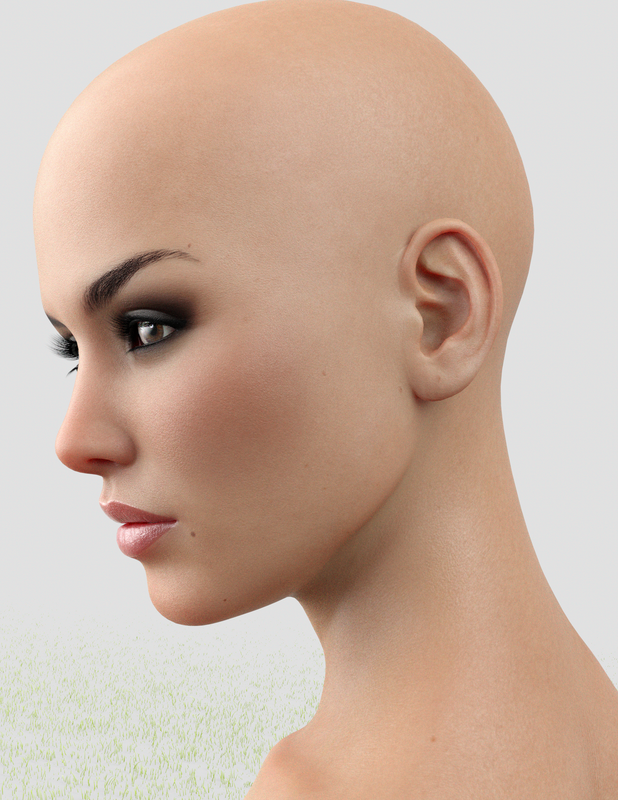
Also works on Bluejaunte's characters: My very first attempt with this tool was BJ Noemi, and I got that wrinkled output so I made that comment I'm editing right now. But once stablished that turning down the main character dial and dialing up just head and body morph the conversion works fine, no troubles. Here is a recent conversion of BJ Imoen 8.1 using G9 BJ Giana's materials.And yes, I have some poke through going on

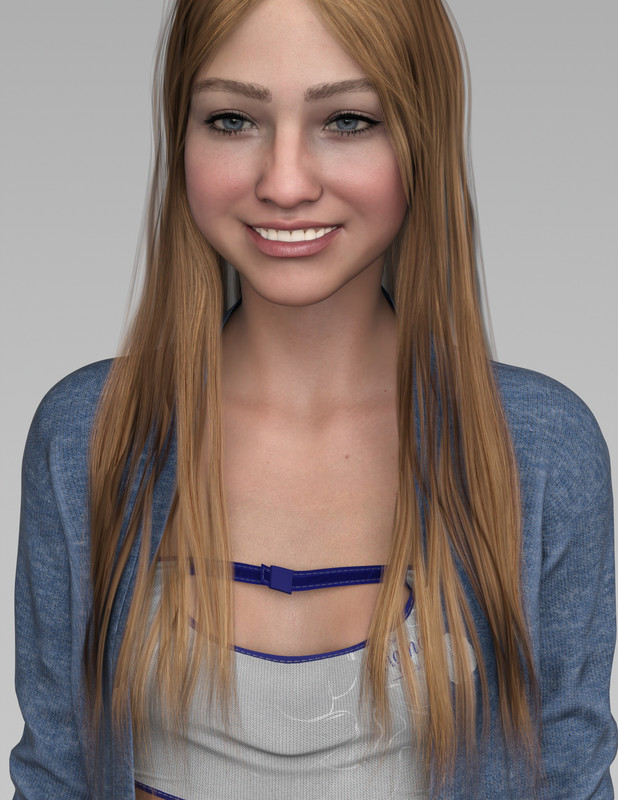
I agree the useful thing about this product is to make use of the new G9 HD textures on older characters, but it is also cool to have the opportunity to use old /original textures trough the Material Suit if needed.
Celebrity Look-a-Likes for 3D figures part 3oliacym said:
Hi everyone, hopefully this is the place to ask about this. I've been trying to put together a Thirteenth Doctor for a project I'm working on, but I can't get Jodie Whittaker's likeness. Does anyone have any advice, or even better, does anyone know where I could commission a morph/texture to really nail the likeness? I'm willing to pay what it's worth as long as I can afford it, as I really want this to look like her. I'm aware of Celebrity Series 112, but it doesn't quite get it right for me. Here's my current attempts attached. I'd be grateful if anyone has any ideas, or knows anyone capable of doing this!
I swear I saw a Jodie clone on renderhub in the last couple of days but can no longer find her.
Celebrity Look-a-Likes for 3D figures part 3Hi everyone, hopefully this is the place to ask about this. I've been trying to put together a Thirteenth Doctor for a project I'm working on, but I can't get Jodie Whittaker's likeness. Does anyone have any advice, or even better, does anyone know where I could commission a morph/texture to really nail the likeness? I'm willing to pay what it's worth as long as I can afford it, as I really want this to look like her. I'm aware of Celebrity Series 112, but it doesn't quite get it right for me. Here's my current attempts attached. I'd be grateful if anyone has any ideas, or knows anyone capable of doing this!
[Released] RSSY Character And Material Conversion Bundle Genesis 8 to Genesis 9 [Commercial]So, luckily my own custom morphs have converted fine, it's just the eyes and mouth, as expected, are not aligned. I can align the eyes with the script and the mouth through parameters, I'm just not sure how to save those settings into the morph itself. I tried the ERC Freeze, save as morph asset, but I might be missing something, I haven't saved anything that way for awhile. Other than that, this is great!
Freebie Challenge May 2023 - "Sweet Music" - Main Threadperlk said:
Sorry, posted in the wrong thread! If you want to delete it from there, please feel free.
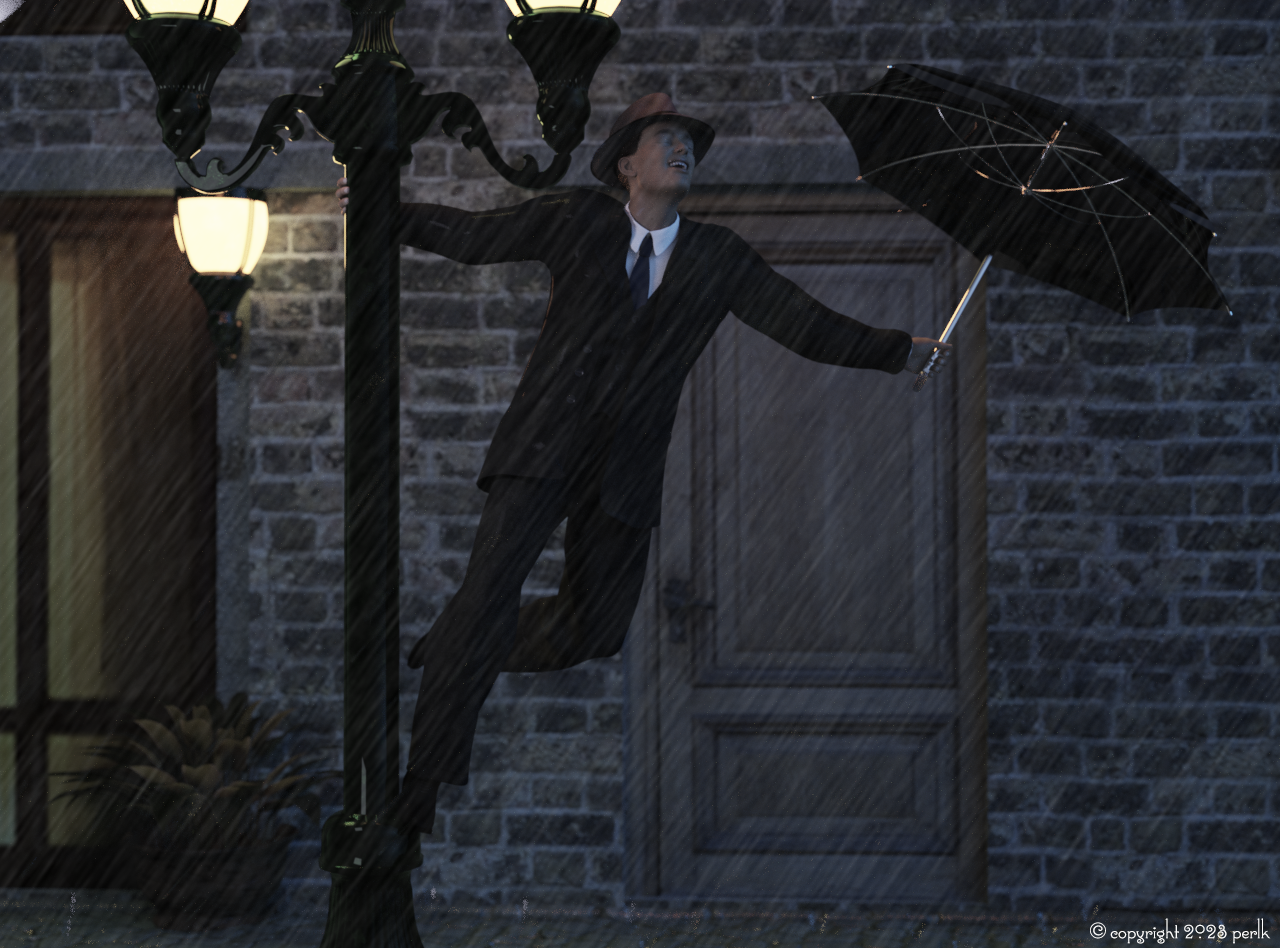
"Singing in the Rain"
(Inspiration - the 1952 movie)
I did a lot of hiding polygons using the Geometry Editor including modifying the building and hiding his hair so it didn't poke through the hat. Let me know if you want more details on how I did this.
No count: Daz Iray shaders, Genesis 8.1 Male
Free:
- Debonair for G8.1M (morph)
- Sokka for G8M (texture)
- dforce 40s Mens Suit for G8M (this is the high res version which I will be releasing shortly, but you could achieve the same with the version I have linked here - and will update when the high res version is released)
- Everyday hairstyle for Genesis 8 Males
- Shaders for various objects
- Streetscene 01
- Textures for windows and door, laid overtop of the building on a plane
- Electrical Substation
- Umbrella
- Antique street lamp
- Soft hat
- Plant from Tuscan Dinner
- Bring the rain
Pre-postwork version attached below.
now we're good, all freebies checked, please move to Entries
Horse 3 stuff - pose presets, pose control presets ...As I was rendering out the icons for a set of simple poses, realized that the updates for Horse 3 apparently really made a mess of some. Making changes to 3D stuff is akin to fixing the plumbing; fixing one thing can break another. So I've removed the zips as some of that content was affected. Indeed one of them looked pretty bad -- and nobody said anything?!
If anybody is interested, the way some of those bend dials work now, it would appear that one could possibly make a camel morph from Horse 3.
1940's inspired suit for G8M - new higher res version out now!AOBB said:
@perlk - I don't even know if I can leave comments about renders that are in the Contest Entries Thread ("Sweet Music" namely), so I am posting praise here, but I love your "Singing In The Rain" render - wonderful take on an iconic scene!
The suit looks great (with shoulder pads!!!) and I am tickled pink that you used the Debonair morph! 

Your morphs add authenticity to these sorts of renders... such good stuff. <3
Anyone know of a figure that approximates Ron PerlmanAgitatedRiot said:
It's a face transfer.
Ahhh, Yes, almost forgot about that. I have Face Transfer, but rarely use it. I just feel it is a form of "cheating" rather than using or conforming a face using the morph controls. I usually only use that if I absolutely have to.
AIUTO...CHI CONOSCE L’ITALIANO? PARTE TREDICI@Imago
rimane il problema che esistono migliaglia di morph... inoltre non è detto che qualcuno (come me o te) crei un nuovo morph e poi lo applichi al personaggio e non lo venda su DAZ... pertanto bisogna trovare una soluzione che tolga tutti i morph (prop imparentato o Rigidity)AIUTO...CHI CONOSCE L’ITALIANO? PARTE TREDICIKainjy said:
Si ma di morph ce ne sono di infiniti... da quelli per espressioni a quelli per sagomare il volto.
Voglia a crearne di contro-morph.. forse si potrebbe provare con una rigidity mp:
http://docs.daz3d.com/doku.php/public/software/dazstudio/4/userguide/creating_content/rigging/tutorials/rigidity/startIn questo caso, controbilanci annullando i morph proiettati.
Nel menu Parameters, attiva "show hidden" e poi seleziona la mutanda che vuoi correggere. Vai su "Currently used", tra quelli "oscurati" trova quello che deforma l'abito e abbassa (o alza, dipende) lo slider fino ad ottenere la forma voluta. Hanno lo stesso nome dei morph che hai applicato al personaggio.
Non funziona sempre, specie in quei morph che alterano le dimensioni del personaggio, ma per la maggior parte dei casi con espressioni o piccoli cambi di orecchie, occhi o naso funziona egregiamente.AIUTO...CHI CONOSCE L’ITALIANO? PARTE TREDICISi ma di morph ce ne sono di infiniti... da quelli per espressioni a quelli per sagomare il volto.
Voglia a crearne di contro-morph.. forse si potrebbe provare con una rigidity mp:
http://docs.daz3d.com/doku.php/public/software/dazstudio/4/userguide/creating_content/rigging/tutorials/rigidity/start[Released] RSSY Character And Material Conversion Bundle Genesis 8 to Genesis 9 [Commercial]I'm using the G8M converter on a custom character and it seems like it's applying the G8M clone to every converted morph which stacks on the G9 figure when I mix and match producing rather horrendous results. Dialing in just one is fine. Is there a way to prevent the G8M clone from being applied multiple times?
Daz 3D is part of

Connect
DAZ Productions, Inc.
7533 S Center View Ct #4664
West Jordan, UT 84084Licensing Agreement | Terms of Service | Privacy Policy | EULA
© 2026 Daz Productions Inc. All Rights Reserved.