-
unable to active plugins
Hello, i'm having a problem, i'm unable to active some publisher plugins (Autosave, Shaping Transfer and pose converter) i tried it in daz24 and 26 doesnt works, it says that must to be registredm to active, can some one help me?
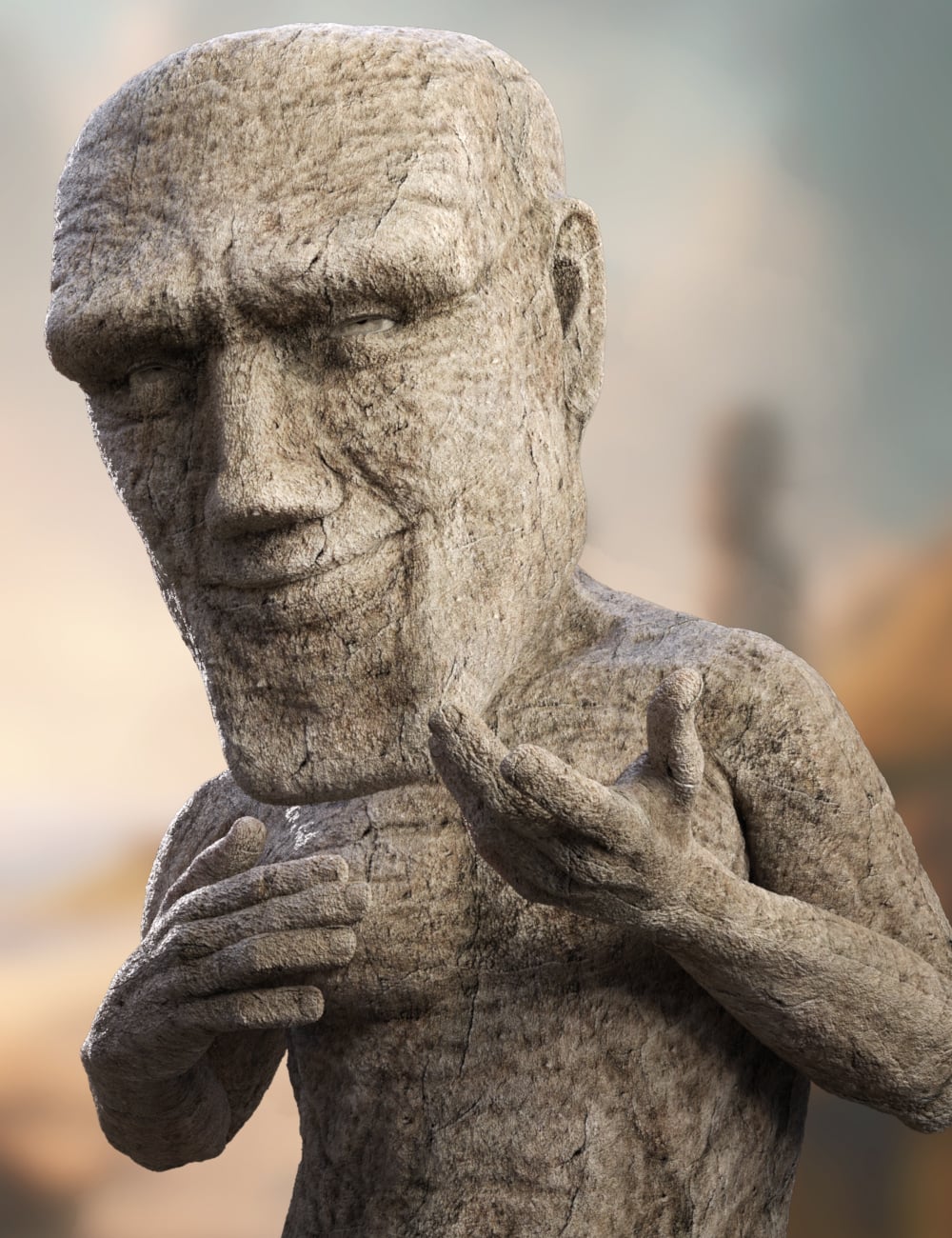
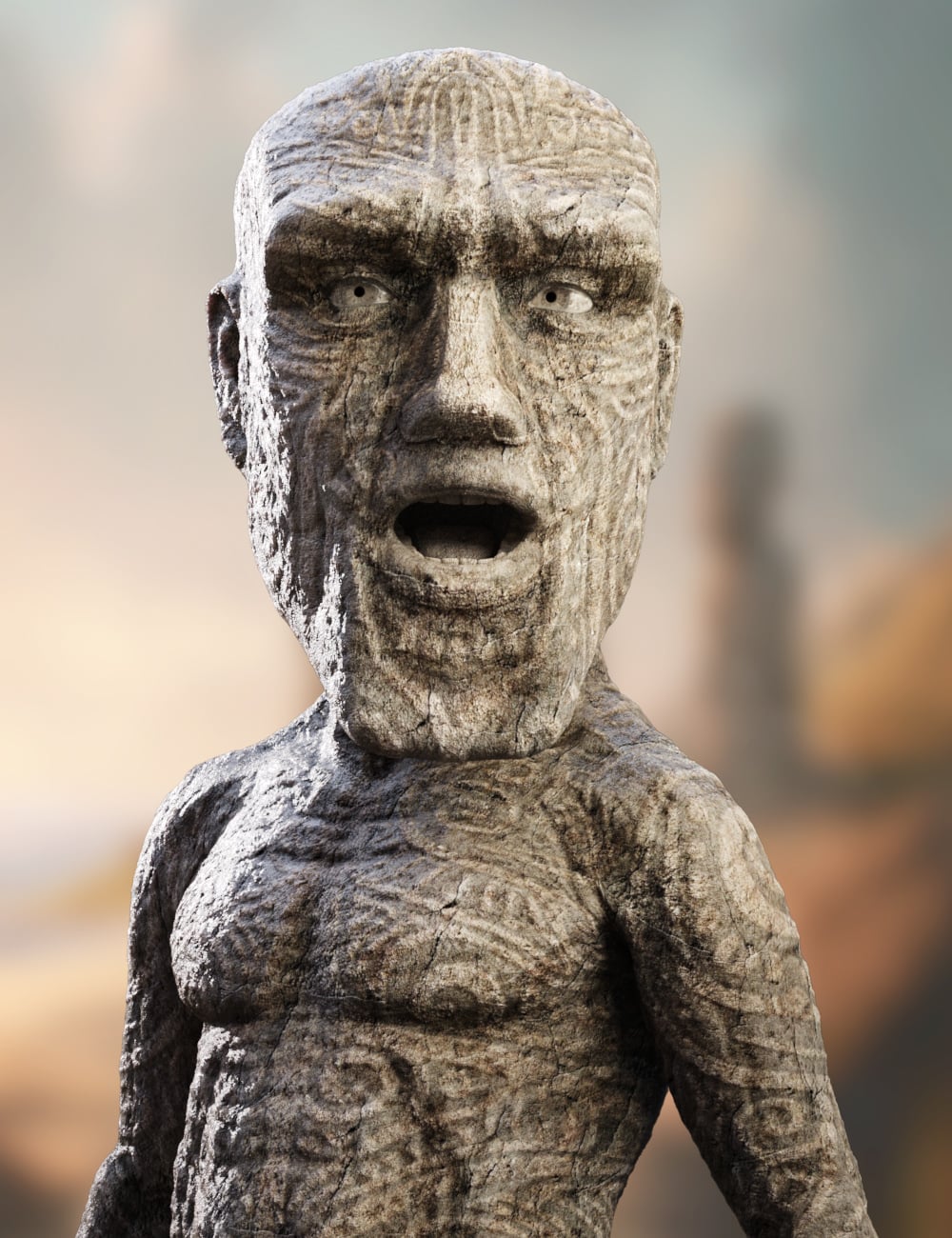
Raw Deals - Moaimir for Genesis 9 [commercial]RAW DEALS
In the face of these tough financial times around the world, I am proud to introduce a "Raw Deals" line of products that are the same high quality products you have come to expect from me, but with a smaller scope of whats included, and much cheaper prices. I will keep my current product schedule continuing as always, this will be a separate line added on top.
I hope this will help people continue to be creative in these tough times
Raw Deals - Moaimir for Genesis 9
https://www.daz3d.com/raw-deals--moaimir-for-genesis-9
Moaimir rises from the ages as part of the Raw Deals line, a value-driven series designed to deliver hero-quality characters without the overwhelming clutter of endless options. These sets are streamlined for creators who want striking results fast while still enjoying premium craftsmanship where it matters most.
This package features a high-definition sculpted morph that brings Moaimir’s monumental Moai-inspired form to life, paired with highly realistic stone textures that convey the weight, age, and presence of living rock.
Included are two powerful surface looks:
Plain Stone, a raw, weathered finish perfect for ancient guardians, forgotten titans, or primal constructs.
Carved Stone, etched with bold ritual-inspired patterns that suggest lost civilizations, sacred markings, and timeless purpose.
Whether you’re building a mythic fantasy scene, a sci-fi relic world, or a supernatural powerhouse, Moaimir delivers a strong visual identity, fast setup, and exceptional value, proving that sometimes less noise means more impact.
What's Included and Features
- Raw Deals - Moaimir for Genesis 9: (.DUF)
- One Moaimir Character Preset
- One Moaimir Shaping Preset
- Material Options:
- One Stone Full Body Base Skin Material Preset (with No Genital Maps)
- One Carved Stone Full Body Base Skin Material Preset (with No Genital Maps)
 Rogue shaping/corrective morphs affecting cbs settings
Yes.
Usually rogue JCMs/CBSs are the result of a missing mutliply link to connect them to their parent morph, and you can address this using the Property Hierarchy pane and the Parameter pane (in edit mode) to drag the offending rogue controls to be a multiply sub-component of the required control property.
You then use Save As -> Support Asset -> Save Modified Assets. It *should* primarily list the JCMs/CBSs - if it lists the control morph, you need to go into the control links in the Hierarchy pane and set them to instead save under the CBS (usually DS is smart about setting up where the link should save, but it occasionally gets it wrong).
You should also report it to customer support though, as this will help fix it for everyone and will mean that the product package itself gets updated so you don't need to worry about potentially having to redo the links if you ever need to restore your library.
(Alternatively, the least technical option is to uninstall the product and report the error, and wait for the update to come through. I tend to find most CBS links I report as broken get an update within a relatively few days).
Rogue shaping/corrective morphs affecting cbs settingsI just ran across a morph set that I bought recently that appears to be active when you haven't selected it. It would seem that more extreme poses can result in cbs settings that cause freakish, ugly deformations. I get that I could just uninstall it and solve the problem but let's say I want to keep it (and don't want to constantly have to manually fix the settings). What, if anything, can be done to manually prevent it from being active when you haven't applied the morphs? Can the problem be fixed by manually updating files?
Hello how much will it cast for a bull's Head Morph for genesis 8.1 male?I need just the bull's head morph for genesis 8.1 male
The knife selection could use some switching upI was trying to do a 1950's rumble-style piece and couldn't find a single switchblade. I decided to go looking for a standard pocketknife, but all I could find was a single Swiss Army knife multitool. With so many styles of pocketknives available, from switchblades and double-ratcheted claw blades, old-fashioned stag handled triblades, coin style claw blades, butterfly knives, to spring-loaded double-edge blades, there are multiple products here—a forgotten niche in a very popular category. With a single morph and/or joint, I don't see this adding much difficulty for you, knife modellers out there.
Hello how much will it cast for a bull's Head Morph for genesis 8.1 male?I just need the Bull's Head Morph for Genesis 8.1 Male
How do I Apply the New Content I Got From Renderotica (or from anywhere for that matter)?turmanidzeoto said:
WendyLuvsCatz said:
depends if you are a Mac or Windows user
I cannot help with Mac
in Windows you unzip it
copy or
if you do not want delete the original afterwards
(studio may find it as an unneeded confusing extra directory in a content search)
cut
the folder called runtime and paste it in your Daz studio content folder under library in documents usually, there will already be a folder named runtime in there.
Windows will ask if you want to merge it
click yes, same with any folders
when it comes to files you may have to chose whether to replace, save as duplicate or ignore do not copy, if it is a readme,a duplicte is handy if it is a different size as it may have other information, otherwise ignore do not copy the safest, it should not happen with anything but readmes.
if it does, you will still have that uncopied file in your original unzipped folder to see what it was and why.seems so simple reply but i had early issues from renderhub to apply,for footjob poses it worked kinda was easier for expectancy as for posses but when comes to models of characters to apply that..
Poses are probably self-contained files, they just list settings to be applied to the figure, so they will work from anywhere. Models, materials, scenes etc. will ususally include a liist of external files (the figure and morph files, the textures that wrap around the model) and for those to work they must be in the correct position relative to the base content directory (My Library or whatever you use).
Convert dialed expressions to bone expressions.So I want to use Genesis 8 characters in a game engine. I am able to export them with different tools, including Daz's own Unity Export tool with no issues.
However, the problem is that right now, if I want my character to have some facial expressions, I have to export a lot of morphs and that is bad for memory.
I want to have a set of animations instead. I can manually create expressions via Blender and save them as animations, but that's a very long process.
Is there a way to just go through some dialed expressions, set the bones to match that expression and then export an animation file? Something fitting the rig after you morph it?
"Adjust rigging to shape" doesn't work.
Or... If someone already has a collection for Genesis 8 and 9 and I can buy it (with the license, of course) please point me to it.
Many thanks in advance, folks. Have a great day.
Is Moltbook, an AI only Social Platform Pandora's box?kyoto kid said:
...one of the arguments we've heard about the 3D work we do is we are using assets designed by others. However we can morph and kitbash those assets (something I often do with sets props nd characters) into our own original ideas.
Granted it is somewhat like building, customising, and kitbashing physical display models of cars or aeroplanes that are assembled and detailed by hand (something I did in my "youth")
AI however draws on original artworks done by others that is puts in its "learning pool" for generating an image hence the many "stylised" AI pieces that resemble a specific artist's style and technique.
Sort of...ish. The problem is that all art and all art styles are shaped by other's works. If you like Art Nouveau, for example, it is important to realize that it was a reaction to a previous style, and it drove the reaction that produced Art Deco for example. There is a phenomenon of art where several artists produce work on the same subject using David as an example from Donatello's David, Andrea del Verrocchio’s David, Gian Lorenzo Bernini’s David, or Michelangelo’s David. Art has never existed in a vacuum driven only by an artist's creativity. I suspect the issue with much AI is the difference between a rumba and a professional yielding a Hoover; they both will clean the rug but differently. The question is when do you want precision (AI) and when do you want accuracy (the human artist). Be prepared that a human artist guiding AI may give you accuracy and precision though.
Is Moltbook, an AI only Social Platform Pandora's box?...one of the arguments we've heard about the 3D work we do is we are using assets designed by others. However we can morph and kitbash those assets (something I often do with sets props nd characters) into our own original ideas.
Granted it is somewhat like building, customising, and kitbashing physical display models of cars or aeroplanes that are assembled and detailed by hand (something I did in my "youth")
AI however draws on original artworks done by others that is puts in its "learning pool" for generating an image hence the many "stylised" AI pieces that resemble a specific artist's style and technique.
A bug on OOT hair or my mistake? Please, help.If the hair collides with the base figure then the cranium resizing should be accomodated.
As for the ponytail, you probably need to create a morph to match the figure/head morph (which you could probably do with a dForm) to bring it back into position, and then most likely adjust the rigging to match the new position (Edit>Figure>Rigging>Adjust rigging to Shape with the tail selected should get you close).
The 'Eat Your Food and Like It' Complaint ThreadComplaint: While idly scanning my room from my recliner chair I spied with my little eye, one of my ancient WinXP computers sitting there covered in dust, and having not been turned on in a couple of years. So, says I: "Let's just see if you're still alive." To that end I pushed all the right buttons on my KVM switch to give it access to my keyboard, mouse & display, pressed the power switch and I get a BIOS warning that it can't see a keyboard. (*Sigh*) A few more tries and yep, tain't working.
 Then I realized that it might work with a PS2 connector keyboard instead of a USB keyboard. I disassembled my pile of boxes in the kitchen to get down to the big box with all my old keyboards and found a PS2 keyboard. Yay! Plugged it into the computer, pressed the power switch, and it found the keyboard but didn't find either hard drive in the unit. (*Sigh*).
 Well, I have time on my hands, why not see if I can wake this guy up. I disconnected all the cables, moved the heavy metal Dell "Dimension 3000" tower to my lab workbench, found my mouse, LAN & display workbench cables, pressed the correct KVM switch button, plugged in the PS2 keyboard, opened the case, laid the tower on its side, removed the side cover, peered inside, pressed the power button, and BINGO it all worked, came up into WinXP and wanted me to log in.
 But I'd forgotten my password for that machine. Luckily I had hidden the Admin password on the back of the machine, so I was able to get in, and check things out. Works OK, except that it's still running InternetExplorer8, or 9 and despite reaching the Web, can't view much of it.
 I think the problem with the hard drives is that they had sat for so long, that they got stuck and needed to be jostled (as when I moved it to my lab bench) to free them up.
Non-complaint: I think instead of finding a web browser for it, I'll just try to configure a local LAN connection to one of my other computers, and get any new things (i.e. old games) into it that way. Wheee... playtime.
 I've moved the XP machine back to it's place at the back of my lab bench, hooked up all the proper cables, and gave it a small PS2 keyboard to get it past BIOS checks, just like it used to have before I cleaned up and packed that PS2 keyboard into my box-o-keyboards. Yeah, it works with a USB keyboard but needs a PS2 keyboard to get past BIOS checks.
 Grrr..., ancient technology, y'gotta love it.
A FEW MOMENTS LATER:
Complaint: Nope, no cigar!
File sharing within Windows was always messy, and I haven't got the patience to delve into the details to make that work between WinXP and Win11. Any file transfer will have to be via USB or CD. Just like in the old, old days, physical media. At least it's not punch cards or paper tape. But, ah, those were the days.I remember the time (late '60s, early '70s) that my college got a new computer and had to transfer student files from an IBM-1130 to a Xerox Sigma-5. No network, no mag tape on the IBM, no removable disk drives on the Xerox, different buildings on opposite ends of the campus. Punched cards was the answer. So much data that it had to be compressed from IBM's character format (EBCDIC) into binary to even make the process feasable. So many boxes of binary punched cards as fragile as lace, and heaven help you if the punch machine or the card reader ate a card!
 Thereby lies a tale.
 G3 Base figures weird texturing
WendyLuvsCatz said:
Karen7 should be in the UV dropdown under surfaces
there is one for each surface so if you only changed the skin, you need to set her for all the skin surfaces
if using other characters eyes etc use their base
where this becomes a huge issue is things like universal displacement maps and LIE settings
Texture transfer being the only real solution for the former and using geoshells instead for the latter
there is a Karen 7 in the drop down but switching to it makes no difference. I did not change the textures on the Base Female so I don't know why it's not mapping the default textures correctly for that character. I'm good with Karen 7, works great. Just the base Gen 3 characters are not working correctly, and it's straight out of the box after downloading the essentials.
I did make a ticket with Daz for this but I have no idea how long it takes them to respond. I know this is old characters but the performance is great when using them and they still look great.
G3 Base figures weird texturingKaren7 should be in the UV dropdown under surfaces
there is one for each surface so if you only changed the skin, you need to set her for all the skin surfaces
if using other characters eyes etc use their base
where this becomes a huge issue is things like universal displacement maps and LIE settings
Texture transfer being the only real solution for the former and using geoshells instead for the latter
I would pay an absurd amount of money for a D-former that is "last in chain"I dont understand what a dformer and a chain is in this context. D-Former in daz refers to those specifc deformation tool that deforms based on transforming selected geometry. I guess this is what you are talking about? Mesh Grabber is built from D-formers but I thought Mesh Grabber was more about morph creation instead of preserving a useable D-former that you can still move around.
If you are talking about morph creation, i.e., deformations produced by "morphs", if so then you can control when they are applied with ERC. If you are talking about a need for correctives for Frog people's FACS expressions or arkit blendshapes etc, you can add custom "morphs" with corrective blendshapes and ERC
Maybe i dont understand what you are referring to
making morphs is free. I mean, yes you can do it in Mesh Grabber, but going into the sculpting window in Blender is free, so... paying 150 [currency] is unnecessary.
Adjusting G9 EyesThanks for the inputs Crosswind. I was almost sure someone would suggest this workaround :). I guess we just need to accept this thing as it is. However, it seems easier to just change the body morph that messed up the eyes and use a different one that fits.
Error Opening FileThat looks like a list of vertices (number, then three numbers that are either postions in space or, given their size, more likely morph deltas). If that is the end of the file I would guess it was truncated and is probably not recoverable.
Adjusting G9 EyesEyeballs don't really fit well with some character morphs... that's why content creators have to fix the auto-generated head morphs on the eyeballs ~~
If you know some external software like Blender, you can easily fix the issue by exporting figure + eyeballs to Blender, make the eyeballs fit well then import them to update the head morph of eyeballs in DS....
or you can refer to this free way : https://www.renderhub.com/rendorgal/et-morphs That freebie and tutorial are not for G9, but the process works for G9. After clearing the delta morph, you need to manually tweak / rig eyeballs instead.
Adjusting G9 Eyesda_kovacs said:
Hello!
Can someone help me please with intstuctions on how to make adjustments on G9 eyes? The attached image shows the default G9 Actor with some minimal adjustments, but the eyes and sockets are the defaults one and there is a visible gap between the eyes and socket. How can this be adjusted to fit by using the default dials? Do I need to buy morph sliders for eye adjustment?
Thanks in advance!
In the meantime I ran some tests and realized what caused the gap...I used a full body morph on the G9 Actor and the eye got messed up (faulty morph or incomplete). Anyways, the initial question still remains - how can I fix this?
Daz 3D is part of

Connect
DAZ Productions, Inc.
7533 S Center View Ct #4664
West Jordan, UT 84084Licensing Agreement | Terms of Service | Privacy Policy | EULA
© 2026 Daz Productions Inc. All Rights Reserved.