-
Daz Studio | M1 Mac System Running Windows Through Parallels Desktop | AppStartup Consistent Crashes
Thanks for your response, StratDragon.
COMPUTER INFORMATIONComputer:
Apple M1 Ultra with 20-core CPU, 64-core GPU, 32-core Neural Engine
Model Name:
M1 Mac Studio
Chip:
Apple M1 Ultra
Total Number of Cores:
20 | 16 performance | 4 efficiency
Memory:
128 GB
Hard Drive:
8 TB SSD Storage
Overall, I've been running Windows (10 & 11) in various versions of Parallels Desktop on different Mac systems for well over a decade.
When configured in accordance with the type of applications installed (in my case, a large variety of memory-intensive, system resource-consuming
software applications), I have found Parallels Desktop to perform consistently well under the most resource-consuming conditions.
Parallels Desktop operation is quite resilient. I have not found another software application that comes even close to matching its
consistent reliability, performance, and unwavering ability to co-exist within another operating system while performing its tasks.
In my current situation, I've successfully used this setup (running Windows 11 Pro through Parallels Desktop) on my M1 Mac Studio since 2022.
I run (not at the same time, of course) dozens of memory-intensive, resource-consuming, graphics-based, and advanced 3D software applications without
experiencing any difficulties with installations and/or total VM crashes, all while running my Mac (MacOS Tahoe) additionally.
Yes, I do occasionally experience system slowdowns (depending on the project), but nothing that causes one software application (at launch) to crash
and certainly nothing that crashes the VM.
FYI: Windows Defender is not running on the Windows operating system (within Parallels Desktop) installed on my M1 Mac Studio.
I completely agree with you on attempting to run 2 competing AVs on one computer system. That's a disaster in the making that will never end well.
Thank you for providing directions to the location of error logs. I'm assuming that Daz doesn't file error logs within its own file directory system.
If so, I will have to figure out which error log file is Daz-specific, since most error log names are alphanumeric, making my search more challenging.
To conclude, my search for answers continues. It's certainly encouraging to have this Daz-specific resource available with knowledgeable individuals who can
choose to share their valuable time & information. Thank you for your input on this post. Greatly appreciated.Please dion't quote me.Personally, i like stacked quotes because I hate going through pages in a thread to understand the nuance of a thread in one place and partly, as time goes on, context gets lost in a long thread so it is nice to see the exact wording. Granted, my computer scrolls easily and I often use the search function on a web page. I can see how it could annoying for someone on a phone but there are trade offs as always. I will confess that the urge to nest all the quotes above was enormous.
6 forum references but only 1 is usefulJust leave DAZ and Google the subject with the words "DAZ forum" added. I've yet to try the AI version, but the DAZ store, forum, and DAZ Studio searches have always been inferior to the stand-alone search engines, going back to the days of AskJeeves, especially when products that were are DAZ have either moved to another store or are no longer available.
New Store and Features Discussion ThreadCybersox said:
One more minor suggestion: if a vendor has left DAZ, they no longer appear in the vendor filter in the Product Library. I know the old library didn't have vendor filtering at all, so this isn't really a complaint. But now that the feature exists, it would be great if we could still filter by retired vendors as well. It would make finding older purchases much easier.
I've mentioned this a number of times in the threads, and certainly wouldn't call that a minor suggestion. Frankly, it would make managing large inventories a lot more practical, especially as many of the names of DAZ products are rather undescriptive and even nonsensical. Unfortunately, it does seems to run contrary to the way that DAZ has traditionally treated vendors and products that are no longer in the store, something which has always felt, to me, as uncomfortably similar to how how some people will have "break-up bonfires" where they destroy all of their photos and other mementos of an ex. As emotionally satisfying as that process may be to some people, it does leave those of us who've bought products that are now effectively "children of the divorce" losing some of the basic support that we expected at time of purchase. So, while I applaud the addition of the artist selection to the Product Library sort as an idea, it's value is badly crippled when I have several thousand products, many purchased in the last six months, that won't come up unless I can remember part of the name and/or do an extensive apge by page search of my PL... even when in many case the vendor that made those products is still selling in the store.
 I understand that products cannot be shown as available when vendors are gone. But, I remember as a newbie, buying add-ons for products that did not exist. When I complained I was called out, and rightfully so. People who own products from vendors and PAs who made add-ons for those unavailable/inactive products should have the opportunity to buy those add-ons. If DAZ populated those inactive products as owned, and populated any add-ons that are lingering, they might get extra sales. I have multiple versions of DAZ Studio on various machines. And I prefer older software versions for certain projects. And I am not alone in this mindset. We all have plug-ins we like to continue to use. Hiding things and making things difficult for customers won't stabilize or grow customer retention. I am no longer a customer here but I feel after spending $60K plus here, DAZ should listen and take accountability as to why some of us leave. Searching the library via the library filters is a painful experience . . . but it is sad when shopping here becomes a tedious task.
Edit: Where is next page? In library page limit is 40 how do I see the rest of what I own?
How do I use the Product Library?It's pretty straighforward. By default, instead of listing your latest purchases by name on the left side, it now list them as icons or as a list on the right side. Click a product icon to get info and download links for the product.
Combine search and filters to find the products and categories you are looking for.
It looks though as the pagination bar at the bottom is missing or hidden in FireFox, so the video here is recorded in Edge:
https://app.screencast.com/SMJ6zzJaEp0hH
(sorry, some sound from a sound generator was accidently added when recording the video, you can turn it off by clicking the loudpeaker icon)
New Store and Features Discussion ThreadI stopped shopping here in May. The tests for A B were annoying DAZ should have a link to opt out. The Library windows and products windows are awful. Daz had a great interface once upon a time but it has gone downhill. On an LG 38 inch curve with a desktop it is just annoying. Feels like I am on an inflated (scaled up) mobile app site. And that search is sad. s=score refreshes pages dynamically and I hate the 80 limit because when I click next page the order seems to change and items by last page I have seen on earlier pages. This may have changed since I last shopped but looked around today and it felt worse. Guess I'll not bother again.
Edit: This is half the screen 1920. Not a full 3840.
How do I use the Product Library?Hello Richard.
It was a long time ago I used it, so I can't give a screen shot. But I would simply enter the name of the item, press search (I think) and it I bought it, it would appear to the left with download links. But when I choose to go there now, there are more items to answer and I still do not know how to use it.
VERSLUIS SUBTITLESI am pretty sure this question had been posted several times, but, in absence of a word oriented searc option in hte forum, i have to ask:; is there any way for to get the subtitles in the Versluis tutorial videos?...it is a real shame it there is not that option....anybody can help??
EZFinder - Advanced Content Manager for Daz Studio [Commercial]Mosk the Scribe said:
Not sure the etiquette for bumping earlier post on DAZ forums - but from Google search, I think (hope) this is acceptable.
Mosk the Scribe said:
As @Doctorjellybean had noted about a dozen posts back, it seemed like v1.05 of EZFinder has been sitting in the queue with DAZ for 8 weeeks. I'm curious how the update queue works at DAZ, and as a vendor, maybe you can shed some light.
Rex, just a couple of posts back, you requested we 'get all new feature requests in before this update is placed ...'
Is that for your next update, meaning v1.06 or higher?
Or are you still adding things to v1.05? And if you are still adding to v1.05, does that send you to the back of the DAZ queue each time you update your v1.05 submission? Or does DAZ let you, as a vendor, know, 'ok, on Aug 18th we're ready to review your update' - and you still have till that time to get in your 'final' v1.05 for submission?
Thanks for any clarification you can provide.
Version 6 has not been started yet and does not even exist except in projected talks.
Version 5 I will try and get Daz to move on it Monday. This process could take a week or a little over for Version 5 to get released.
As for why It has not been released or has fallen through the cracks, it is not Daz's fault. I have just not been ready when I needed to put on steam and release it.
And for Daz, EZFinder is huge and is not typical for Daz, so it requires the most skilled people/person to test and release it.
And version 5 has actually been slated for release for 4 months. 4 months ago, I uploaded the update and since then it has had 100's of features and bugs fixed and a dozen replacement version uploads. If it had been released 4 months ago it could have been problematic. Once the dust settles on these latest features (Monday) I will begin a serious attempt to release it.
For instance, when version 3 came out there was an oversight, somehow the HDRI scan button got disconnected. You currently cannot scan for HDRIs, the button does nothing even though the scan itself works perfectly. With 125,000 lines of code and only one person (me) developing it, there is pressure to make sure it is right. But the update is really ready now and my top priority... I have 25 Daz programs in various stages of completion and only 3 of them have been released. These are not scripts; they are full programs. You will be amazed when you see what is becoming available for Daz Studio. Just look at VDB Wizard, that took over 9 months to make, there is nothing like it at all in the Daz Store and again it is HUGE. So there is not only updates but radically new products coming very soon for Daz Studio!
Tips on making scene file smaller?Viper141 said:
Hey Thanks again for the response
crosswind said:
Ah no, it shows just the geometry data with hundreds or thousands of code lines... to let you know what objects have these geometry data and can be saved as Figure / Prop assets or Modifier assets so as to shrink the DUF file size ~~
I tried it out but I can't well find the objects that need to be put in figure/prop asset. I looked under Geometry Library and well I saw this
Well the DUF file you checked might be more complex e.g. there're morph properties with linked geometry data not saved as assets, or dforced data on timeline, etc. You can search by using a keyword "vertex_count", like the screenshot 1 I attached.
crosswind said:
I ever wrote two scripts for a folk to change Base to High Resolution and vice versa for the items in the scene by content types. You can try and use them or modify them at will. https://www.daz3d.com/forums/discussion/comment/8541796/#Comment_8541796 ;Oh wow, so terms of content types I can make idk, all genesis figures and hair assets to base, then later in render queuer I can have the script running before render is cooked? Or is the script during work?
Well... I removed the content type check and rewrote the scripts, the scripts loop check all figures / props and set their lodlevel to Base or High. Check the screenshot 2 and try the modified scripts in the attached ZIP .
Edit: Pls be noted: if a figure or prop in your scene has not been Converted to SubD, its lodlevel cannot be set to High Resolution. Do Convert to SubD beforehand if needed ~~ (some figures / props may have artifacts after conversion... check 'n do it case by case)
crosswind said:
Because the vendor left this Daz3D store and moved to Rendo ~~
Man such a shame I really think this would've been super useful to me.
Diffeomorphic Add-ons Version 5.2.0 ReleasedThank you Thomas for ALL the hard work and dedication to this project - its importance to the Blender movement is immeasurable!!
And while I'd like to thank everyone who helps out with Diffeo support and insight, I'd like to spotlight/thank Padone for their many forum contributions; you are also much appreciated... - RayEZFinder - Advanced Content Manager for Daz Studio [Commercial]Not sure the etiquette for bumping earlier post on DAZ forums - but from Google search, I think (hope) this is acceptable.
Mosk the Scribe said:
As @Doctorjellybean had noted about a dozen posts back, it seemed like v1.05 of EZFinder has been sitting in the queue with DAZ for 8 weeeks. I'm curious how the update queue works at DAZ, and as a vendor, maybe you can shed some light.
Rex, just a couple of posts back, you requested we 'get all new feature requests in before this update is placed ...'
Is that for your next update, meaning v1.06 or higher?
Or are you still adding things to v1.05? And if you are still adding to v1.05, does that send you to the back of the DAZ queue each time you update your v1.05 submission? Or does DAZ let you, as a vendor, know, 'ok, on Aug 18th we're ready to review your update' - and you still have till that time to get in your 'final' v1.05 for submission?
Thanks for any clarification you can provide.
Let's talk about Holden3DIO said:
Still not a fan of OmniShader, although I suppose it could be my lagging old system taking the joy out of using it.
There are many different unrelated shaders beginning with the prefix Omni, so I would advise to avoid saying "OmniShader" because it is not clear enough which one you are referring to, especially when we are already discussing two different kinds in this conversation now (OmniSkin and OmniHair, which are essentially unrelated to eachother).
I will remark that I only deployed the OCN OmniSkin because I believe the end result is better, but a longer render time is a known drawback, especially notable for those with non Nvidia cards or slower machines, in which case the benefits may not outweight the costs. There are other issues with the shader, which we have been discussing at length in the OmniSurfaceBase thread on this forum.
When I was preparing the materials for PBRSkin, I tried to ensure that the PBRSkin was very close to the OCN Omniskin material preset, so I would suggest just using the PBRSkin material to avoid any pitfalls with OCN Omniskin presets. It's not like I made one good material preset (OmniSkin) and then phoned in the other (PBRSkin). I made them both look acceptable.
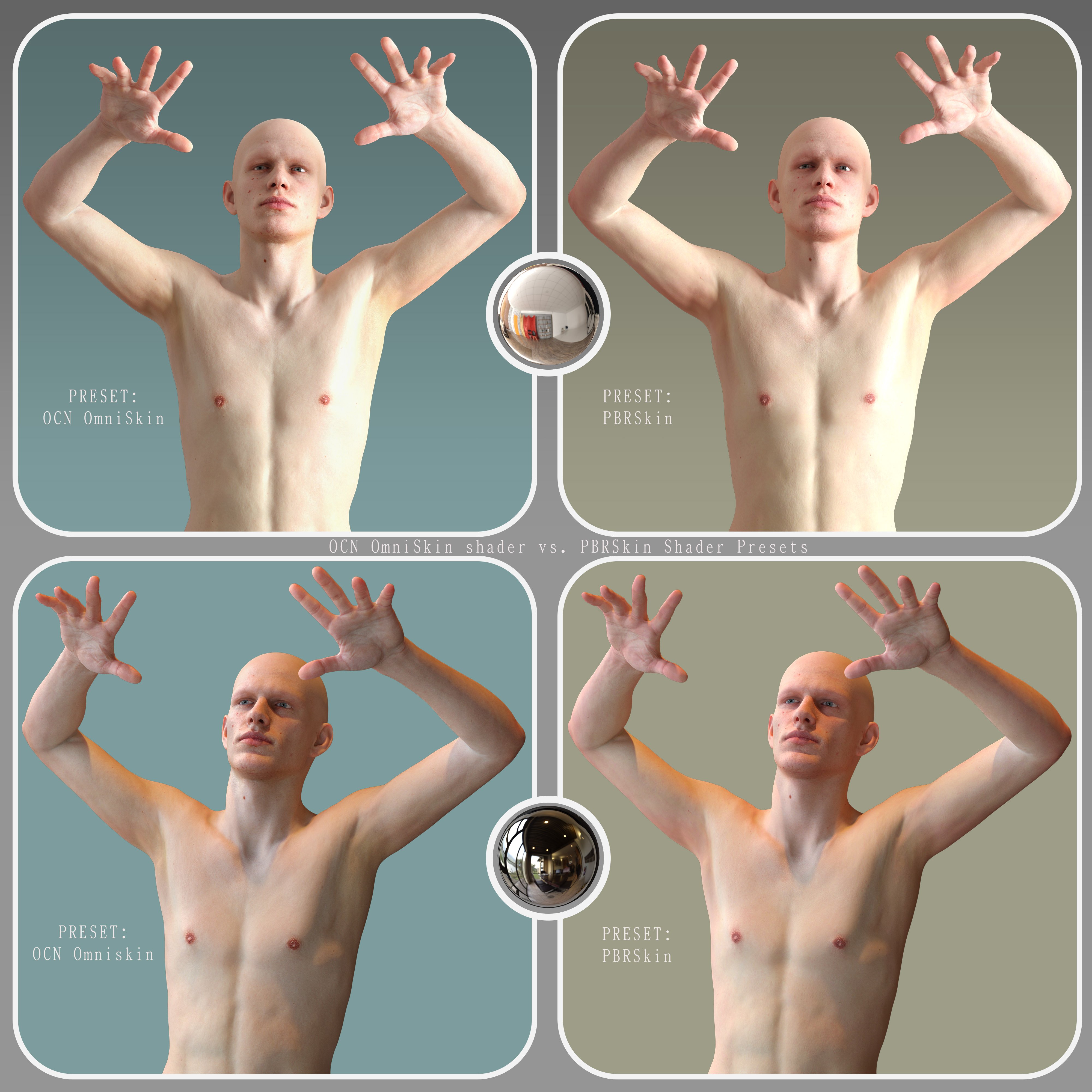
It is possible to get PBRSkin looking close to OmniSkin with much effort (see attached). The problem when setting up materials with PBRSkin (and Iray Uber had the same exact problem) is that PBRSkin is highly dependent on the Translucency Color map, where even minor changes in color values will lead to drastic changes in the skin appearance. This makes fine tuning the skin on PBRSkin and Iray Uber infuriating. The Translucency Color map used for those two shaders is also necessarily lacking in detail because it has to be washed out/blown out vs the main color map, and this means that the final skin lacks a certain level of detail. For OmniSkin you can keep all the important detail in the color map because it doesnt use a "Translucency Color" map at all let alone a washed out one, and the maintained detail is borne out in the final result.
6 forum references but only 1 is usefulWhen I encounter similar results, I ask DAZ AI. It's a huge help for finding products and even better for searching the forum than the forum search.
6 forum references but only 1 is usefulhttps://www.daz3d.com/forums/discussion/comment/9343261/#Comment_9343261
Interested in Dynamic Wind Rigs for dForce Cloth Dynamic Wind Rigs for dForce Cloth | Daz 3D so I go and check forum references. Looks great! there are six, a whole discussion. The first post just mentions that 2 products are on doorbusters. ALL of the following posts are about the other product. No one even mentions the product I am thinking of buying. Somedoys the internet conspires against me.
Daz Studio | M1 Mac System Running Windows Through Parallels Desktop | AppStartup Consistent CrashesM1 mac is going to require a lot of overhead to get windows 11 running, it's emulating and converting code. Intel Macs had the advantage of running windows variants natively with x64 cpus. ARM processers are different. Even if you're not using your mac, it's using resources to keep the vm software running and maintaining a lot of heavy lifting to do minor things. It's possible the anti-virus API built into mac; Xprotect is picking up something it doesn't like, or Xprotect is fighting against Windows Defender; two AV's running at the same time, sandboxed or not can cause incompatibility. you can disable xprotect (and defender) but I do not recommend it and you will need to do your own research, I won't assist anyone to try and work around that compromise security. You can also look at apple gatekeeper as a culprit. I wrote an user article on the mac user support site on that thing, damned if I can find it. Having an Intel Mac, and M1 mac and a Windows build I will always default to the windows before I vm or bootcamp on a mac, and I only bootcamp for lab tests. This is probably not what you want to hear but this is my $0.02 on working with Macs and Windows and virtualizing. ARM is really good for virtualizing Linux distros built for ARM, but Apples switch to ARM really handicapped windows flexibility.
windows error logs are in the event viewer (Start search box, start typing "event viewer"), the Mac its in Applications/Utilities/Crash Reporter or something like that. I'm on my PC, procrastinating mowing my lawn in a heatwave.
EZFinder - Advanced Content Manager for Daz Studio [Commercial]mindsong said:
great news, all - thanks for the responses and your consideration of my/our inputs.
coming late to this party, i have some suggestions and feedback based on the current version, but I'd like to base any forward thoughts off of your latest version, so I'll happily wait. You've likely fixed or updated many of the suggestions I've got.
(and Mosk, your suggestion about duplicates is great. Given the possible side-effects for the variety of our use-cases, it was worth the mention to Rex.)
looking forward to the new version!
best,
--ms
I added a global Dedupe Folders button, and you can also right-click on a folder and remove duplicates that way.
The leak was plugged that caused duplicates and you now also have a global Dead Content button for those who have content with broken links.
You can also right-click on a folder and search for dead content and remove it that way.
These features must be used with caution. Make sure you save all tabs first before ever using these buttons just incase the result is not as expected.
 Get all new feature requests in before this update is placed. It may be a while before the next update comes around.New Year, New Sales Thread: Report Issues Here 4 "Reporting Only"
I see the sale now, but STORE WIDE should mean as it means at the other store that shall remain nameless, STOREWIDE.
Does not say excludes new releases. I'm dying to buy the high leg cut leotard from a few ds ago , was hoping for a wishlist sale for new releases.
Wrong thread but how do I set my signature picture? googled and search the forums - nothing. I see it in the settings window for signature, it's not too big or anything, just refuses to be seen at the forums.
Edit, for some reason this artw worked better as a signature, the other was not too big either but refused to load. Sorry to take up space for this in the report thread. Delete this post if it's not allowed.
Would love a tutorial on how to set the image though.
[SOLVED] Thumbnail Mysteryjecswp said:
I have a couple hundres files that don't have thumbnails. I'll fix them as they pop up in a search and catch my attention. I use the following instructions and it always works perfectly -
1. Select the product, right click and select "Browse to folder location"
2. Drill down to Runtime/Support and select, copy and paste into the folder the icon .jpg file
3. Rename the copied file to 1_.jpg The SKU is already in the name so just add the 1_ in front of the SKU and delete everything else.
4. Move the file to ...My Daz Connect Library\data\cloud\meta I have a shortcut to the meta folder setup and just move the file to the shortcut'ed folder.Until today . . .
I performed the procedure on this product dForce FE Straight Bangs Long Strand-Based Hair for Genesis 9, 8 and 8.1 and the thumbnail refuses to show. It shouldn't bother me so much, but it really does. Any guidance in regards to what files/settings to look at to fix this would be greatly appreciated.
I use a similar process to add thumbnails to 3rd party products that I install manually – mostly from Renderosity or RenderHub. Once I copy the files to my Daz Studio the files stall the files, I then Create a Product from the Content Library files. I make sure that a copy of the desired jpg file has exactly the same name as the dsx file that is created and I place that jpg file in Runtime/Support. My thumbnails are significantly bigger than the too tiny thumbnails that are created from DAZ3D zip files.
On occasion, I have had the issue of a thumbnail not appearing in Smart Content once I’ve created it and placed it in Runtime/Support. I have found in almost every case that the jpg file had an opacity setting. If I reopen the problematic jpg file in Microsoft Paint and then use Save As (not Save) to save it again as a jpg file, I usually get a popup window warning me that if I continue, the opacity setting will be lost. Once I complete the Save As and place the newly saved jpg file in Runtime/Support, the thumbnail appears in Smart Content.
Content Library v4.24 and v2026Ah, I didn't pay attention to what forum section it was in. Since the user had so few posts, I assumed it was a new user kind of question.Daz 3D is part of

Connect
DAZ Productions, Inc.
7533 S Center View Ct #4664
West Jordan, UT 84084Licensing Agreement | Terms of Service | Privacy Policy | EULA
© 2026 Daz Productions Inc. All Rights Reserved.