-
Insane long delay when saving a new scene
Hi Richard,
Should I be reporting this as a bug to tech support?
Having to shut down CMS in order to work with just a subset of the full content library, seems kind of a bug to me.
Not sure why others haven't reported this issue. Maybe they don't have as many assets and can just work with their full library and don't mind the waiting?
I mean, there a utilities that are trying to improve G8 loading times when a lot of morph assets are installed. Not sure how anyone can stand waiting for > 8 minutes to load a G8 into the scene and not use content subsets.
What do you think?Identify a Genesis 9 modelMetalSunde94 said:
Cris Palomino said:
Moved to Product Suggestions as it was not a Daz Studio discussion.
Ok, it wasn't really a suggestion but I just wanted to what character that is or what the morph mix was!?
Also, arguing with moderators about their decisions is not a recipe for success.
[Released] RSSY Character And Material Conversion Bundle Genesis 8 to Genesis 9 [Commercial]RiverSoftArt said:
aaráribel caađo said:
I'm having a very frustrating time converting my character via the Fit Clone method that I think underlies this product. Does it create morphs that can be combined, or just single characters? I want the flexibility of converting G8 morphs and character presets that I can combine together. I've seen somebody combined G9 and G8 characters, but don't know if that works with multiple G8 characters. If this can solve my problem, it's an insta purchase :)
The product converts each used morph individually. It does not combine the used G8 morphs into one combined morph before converting. (I thought about it after seeing all the issues people had. I still may add that feature if I end up doing the G3-G9 conversion but right now I need a break from Character Conversion).
On this note, just a question: I noticed when I converted PedroFurtadoArts Alistair that a secondary morph, something like Alistair Chin Correction, and it didn't "break" the head/body morphs (it doesn't appear to also contain the G8M head shape baked in). I believe I noticed that it had PHM in the name, is the script not baking the body/head morphs for these PHM/PBM morphs? I'm not complaining, just noticing, especially since this character didn't use the FHM/FBM naming conventions for the head/body morphs.
Identify a Genesis 9 modelCris Palomino said:
Moved to Product Suggestions as it was not a Daz Studio discussion.
Ok, it wasn't really a suggestion but I just wanted to what character that is or what the morph mix was!?
Combining Multiple Converted G8 Morphs in a G9 Figure: Help!aaráribel caađo said:
Okay, after a failed attempt where the same problems reoccurred even with the reverse + delta, got it sorted.
@crosswinds, how did you save the preset on Morphloader Pro? I don't see any way to do that and that would make my life easier.
@Lilweep, I didn't know that about transfer utility. Good to know
Thanks, both of you.
Yea, pls refer to the attached screenshot...
Combining Multiple Converted G8 Morphs in a G9 Figure: Help!Okay, after a failed attempt where the same problems reoccurred even with the reverse + delta, got it sorted.
@crosswinds, how did you save the preset on Morphloader Pro? I don't see any way to do that and that would make my life easier.
@Lilweep, I didn't know that about transfer utility. Good to know
Thanks, both of you.
Repackaging morph assets used in presetsI have a bad feeling I know the answer but here it goes:
Over the last year I've been compiling a series of pose morphs, but initially didn't have the foresight that they would all be in the same "theme" for lack of a better word. As a result, I initially saved them as two separate "products" when using Save Support Asset>Morph Asset. Over the course of that same year, many pose presets utilizing the various morphs have been developed.
Now I realize they should have been packaged in the same product all along. I can move them to the same "Property Group" in the Parameters pane simple enough but...there's no way I'd be able to change which Product they belong to without breaking all the pose presets, is there? I'm afraid to even try lol
Shape Shift for Genesis 9 (Commercial)Fairyteller said:
jhemonts_6fd79136bd said:
Today (2023/06/10) I applied the update for Shape Shift for Genesis 9 offered in Install Manager.
Now every time I load a new Genesis 9 character, or an existing scene containing a Genesis 9 character, I get the error message: "Duplicate formulas found in files. Make sure that the content is properly installed. See the log file for more details". After acknowledging the message the scene seems to load allright, but the error message is distracting. Could you please fix this?I have the same issue. For me it's the Vinme Abdomen Length morph from https://www.daz3d.com/vinme-morphs-for-genesis-9 that conflicts with SS_body_bs_Abdomen Length from Shape Shift, but only with the latest update.
That sounds like a reversion - there was a conflict, though i thought both products were updated so it may be worth checking you haven't missed an update for the Vinme set.
Mechasar's Characters Catalog: Who's next? (commercial)Rod Wise Driggo said:
Really looking forward to this Pack. Since it is a "MEGA" Pack I hope you don't take any inspiration from DAZ with regards to the pricing. DAZ MEGA mostly means > $100 ;-)
Really looking for the smoothed abdomen morph for Zuna. Some smoothed back morphs for Berverly and Gladys would also be quite nice. Don't know it it's the right muscle but the "Erector spinae" next to the spine is quite strongly articulated as well IMO:
If you need any further inspiration for Pack 2:
- Gladys needs some VR goggles
- Mr. Gammon a board game to make him Mr. Backgammon
- The Mad Scientist could be the basis for an alien-morph like Crypto from "Destroy all humans"Hope for some nice deals on your back catalog as well once this gets released. Still need to get Slime Attack ;-)
You can rest easy, it’s way far from that price :) The pack will include (among other things) morphs, textures and attachments that will allow you to achieve a completely new character, or add improvement and new features in other cases. So, Gladys will become a seductive monster, Mr. Gammon (without a backgammon board XD) switched to the punk style and the mad scientist will be… halfway through his final transformation ;)
[Released] RSSY Character And Material Conversion Bundle Genesis 8 to Genesis 9 [Commercial]aaráribel caađo said:
I'm having a very frustrating time converting my character via the Fit Clone method that I think underlies this product. Does it create morphs that can be combined, or just single characters? I want the flexibility of converting G8 morphs and character presets that I can combine together. I've seen somebody combined G9 and G8 characters, but don't know if that works with multiple G8 characters. If this can solve my problem, it's an insta purchase :)
The product converts each used morph individually. It does not combine the used G8 morphs into one combined morph before converting. (I thought about it after seeing all the issues people had. I still may add that feature if I end up doing the G3-G9 conversion but right now I need a break from Character Conversion).
Shape Shift for Genesis 9 (Commercial)jhemonts_6fd79136bd said:
Today (2023/06/10) I applied the update for Shape Shift for Genesis 9 offered in Install Manager.
Now every time I load a new Genesis 9 character, or an existing scene containing a Genesis 9 character, I get the error message: "Duplicate formulas found in files. Make sure that the content is properly installed. See the log file for more details". After acknowledging the message the scene seems to load allright, but the error message is distracting. Could you please fix this?I have the same issue. For me it's the Vinme Abdomen Length morph from https://www.daz3d.com/vinme-morphs-for-genesis-9 that conflicts with SS_body_bs_Abdomen Length from Shape Shift, but only with the latest update.
Genesis 9 eyes do not morph with figure?If you dial a head morph of a G9 character, the eyeballs will follow. So what 'head morph' did you 'add' ? a converted one ?
Duplicate formula found Genesis 9Reason: The morph 'Torso Width' in Shape Shift G9 and Vinme Morphs for G9 have the same 'ID'...
If you don't wanna wait for the fix from the PA, simply fix Vinme's Torso Width morph with a text editor.. (Notepad, Notepad++, EmEditor... etc.). Locate the 'Vinme Torso Width.dsf', open and edit the file as below...
In general, if we fix these files (with duplicate formulas) by ourselves, just add a suffix to the 'id' of the morph... e.g. with vendor's name or abbr. Then if you get the updated product package some day, just install it...
Combining Multiple Converted G8 Morphs in a G9 Figure: Help!you know you can use transfer utility with the clone to transfer favourited morphs from G8 to G9 all at once, rather than doing them in Morph Loader Pro?
Anyway, as previously pointed out, since you are not importing your morphs on to the base Gen 9 but rather a clone G8 shape, you should use Reverse Deformations so the clone shape gets subtracted from the morph deltas you are loading. Generally good practice to select 'deltas only' too to update any existing morphs.
(Remember to adjust rigging and ERC freeze the rigging change to the morph before saving as morph asset.)
Genesis 9 eyes do not morph with figure?Genesis 9 eyes do not morph with figure?
When I add any head morph to the stock Genesis 9 figure, the eyes do not resize with the head.
Is this the new norm for Genesis 9, that you have to resize the eyes after a head morph?
Am I doing something wrong?
I like that the eyes are separate objects and I do not mind resizing and fitting the eyes after a morph but I am just wondering if there is some sort of auto follow thing that is turned off or something.
Why am I getting duplicate morphs error for Vinme Morphs for Gen 9?I had to remove the morph "Vinme Abdomen Length" to get the duplicate morph message to go away.
Why?
Combining Multiple Converted G8 Morphs in a G9 Figure: Help!I figured this out: the G8.1F shape is getting duplicated everytime, so you need to:
- Export an unmorphed G9 with the G8.1 (or 8) clone applied (e.g., create a G9 morph that's just the G8 base figure)
- Load the G9 morphs you made earlier plus the G8 clone
- One at a time, set the G9 morph to 100% and the G8 clone to -100%
- Export the figure.
- Bring in the morph - base figure morphs
- Use new morphs with the base figure morph set at 100%
I'm almost certain this was not a step required when converting G3 to G8. Does RSSY Character Converter do this or does it have a way of making proper morphs that don't need the older gen base figure work-around?
Combining Multiple Converted G8 Morphs in a G9 Figure: Help!It took me a while to get back to this, but it's not working for me.
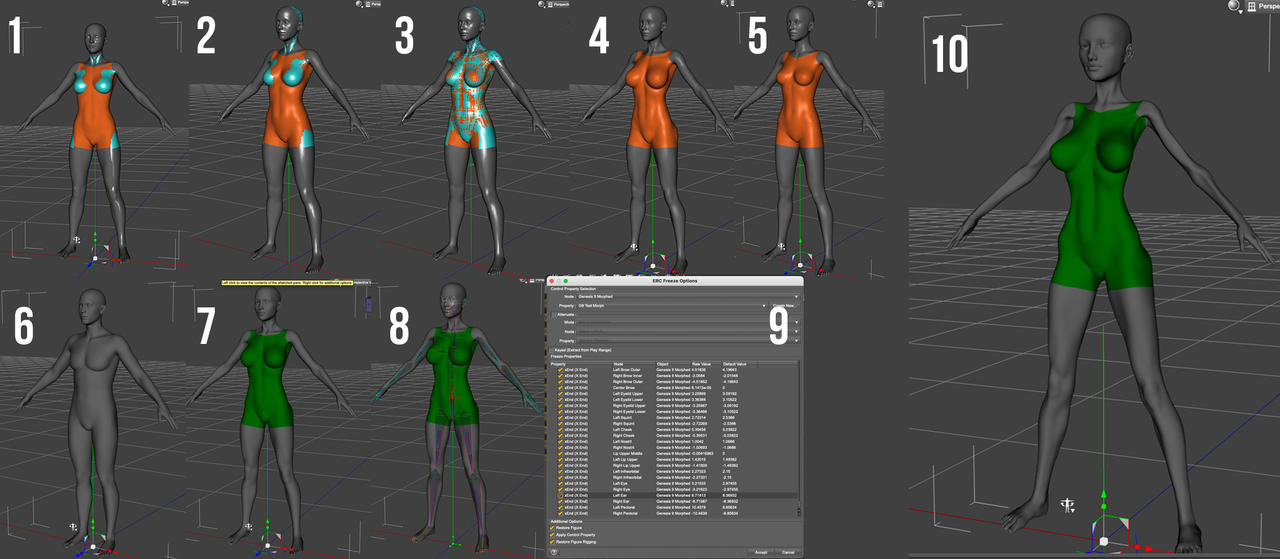
My steps:
- Load G8.1 Dev load and G9 Dev Load and apply the hidden G8F Clone to the G9 figure (G8 in cyan, G9 in orange)
- Export the G9 (with fit clone applied at base geometry level) as an obj file and import it back in
- Transfer G8 rigging to G9
- Dial in morph to G8, then export the G9 again
- Remove prior morph and dial in new one, export as new obj
- Load new G9 Dev figure
- Use Morph Loader Pro to add 1st morph
- Adjust the rigging to the figure
- Freeze the ERCs (and then repeat septs 7-9 for morph 2, not shown)
- Apply both morphs at 100%
The original morphs applied together on G8F work fine:
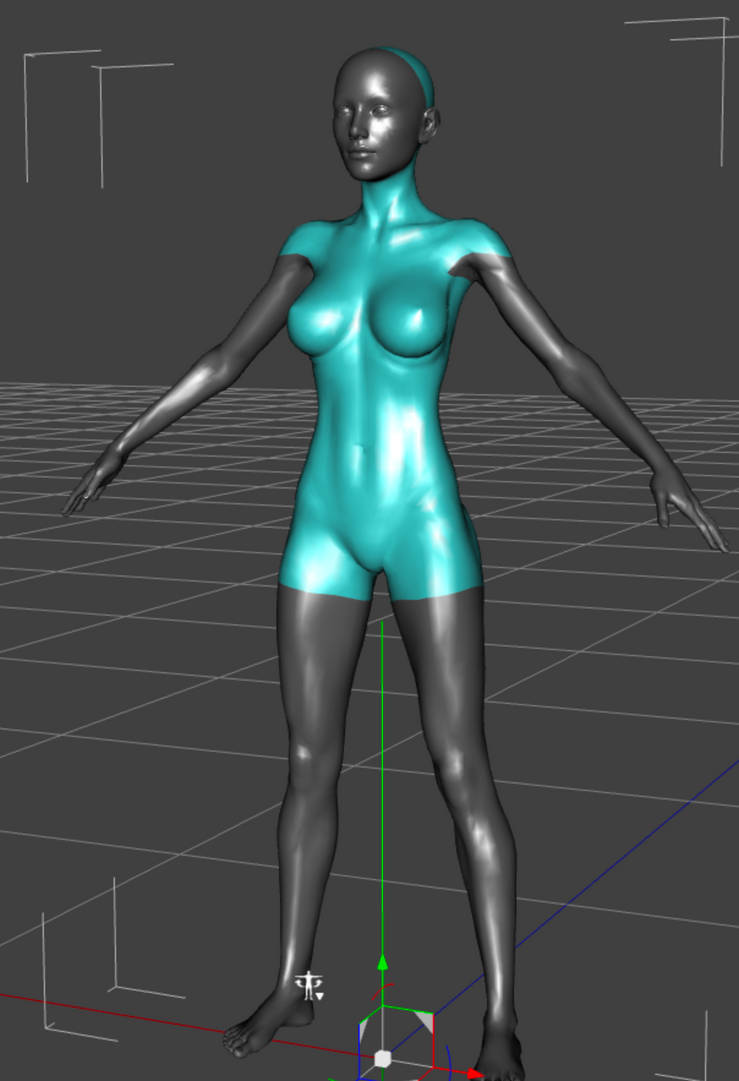
Both of the G9 morphs work perfectly by themselves, but the combination is unusable. I have no idea how to make this work. I tried importing the moprhs with Reverse Deformations set to (Yes), but I didn't see a way to set it to Reverse Deformations + Delta Only.
Genesis 9 clothing questions & answersI still haven't figured out the magic to confidently export OBJs that guarantee that the addon vertices match the garment vertices. I keep trying.
But I did come to one breakthrough in my process. Rather than use the exported OBJs to create a new garment on G9 with the transfer utility. I use the OBJs to update the base geometry of the G8 garment and then fit that to G9 with the Transfer Utility. The retains the existing morphs in the garment so I don't lose those. I redid the Embers Top as a way to verify that that works for the top and addon. Lets hope this is reliable and not another case of one time it works and another time it doesn't. This still relies on having good OBJs for the addon, which is the part I have only been able to do twice in all my attempts.
Remixing your art with AIwsterdan said:
WendyLuvsCatz said:
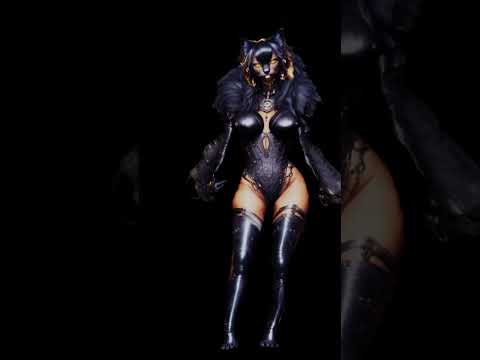
rigging AI images as blimps using Transfer Utility
Interesting (and cute); where do the blimps come in? I'm obviously missing something regarding using the AI images with Transfer Utility.
-- Walt Sterdan
I should have explained but there ae a few ways to create them, you need the background removed
this one is a cutout with volume created using a Carrara plugin by Philemo
I have also used Alpha to Mesh in Zbrush and masking and extract under subtools to make them
basically any modelling program that can cut out a silhouette/billboard and give it some volume like a cushion
the Carrara one the UV matches the image
initially so does the Zbrush ones but I end up Zremeshing them and then creating a planar UV and projecting the image on using Polypaint and Spotlight
or you can do that in a UV mapping program as the shape of the island still the same if planar it just needs scaling if image not square
Daz 3D is part of

Connect
DAZ Productions, Inc.
7533 S Center View Ct #4664
West Jordan, UT 84084Licensing Agreement | Terms of Service | Privacy Policy | EULA
© 2026 Daz Productions Inc. All Rights Reserved.